Storytelling
using Javascript, HTML5, CSS3


              with

        Storify
       @xdamman - March 2011
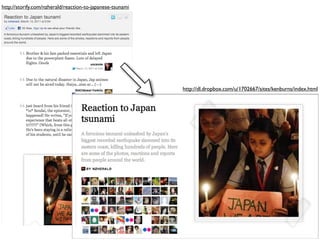
http://storify.com/nzherald/reaction-to-japanese-tsunami


                                                           http://dl.dropbox.com/u/1702667/sites/kenburns/index.html
JSON/CSS3/JavaScript
   is the new Model/View/Controller
Model: JSON
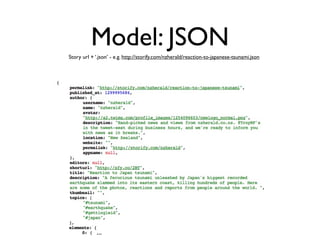
Story url + ‘.json’ - e.g. http://storify.com/nzherald/reaction-to-japanese-tsunami.json


            ...
http://storify.com/nzherald/reaction-to-japanese-tsunami.json

                   position index
           of the story element (string)


 Details of the
   editor who
    added this
element to the
         story


image attached
to the element
        (if any)


  Normalized
 details of the
story element
          (title,
    thumbnail,
   description,
       author)


  Timestamps                                                      Number of seconds since January 1st 1970
(epoch time in                                                    To convert to Javascript date:
     seconds)                                                     new Date(parseInt(story.elements[“3”].created_at,10)*1000);
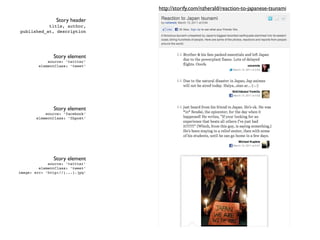
http://storify.com/nzherald/reaction-to-japanese-tsunami

                Story header
           title, author,
published_at, description


               Story element
             source: ‘twitter’
         elementClass: ‘tweet’


               Story element
            source: ‘facebook’
        elementClass: ‘fbpost’


               Story element
             source: ‘twitter’
         elementClass: ‘tweet’
image: src: ‘http://(...).jpg’
http://storify.com/nzherald/reaction-to-japanese-tsunami

               Story element
             source: ‘twitter’
         elementClass: ‘tweet’
image: src: ‘http://(...).jpg’


               Story element
            source: ‘storify’
         elementClass: ‘text’


               Story element
            source: ‘twitter’
        elementClass: ‘tweet’
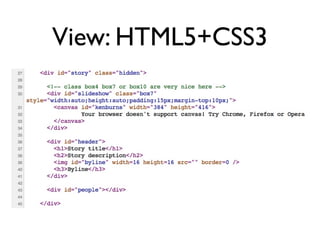
View: HTML5+CSS3
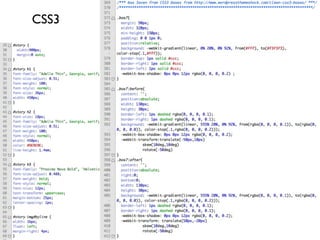
CSS3
Controller: JavaScript

1. Fetch the model
  jQuery> $.getJSON(storyurl+’.json?
  callback=?’,function(storyurl) { });

2. Fill the HTML template with the story
  jQuery> $(‘#story h1’).html(story.title);

3. Add extra behaviors, animations, ...
We fetch the model
                       $.getJSON


            We render the story
            $(domElement).html();


    We walkthrough each story
    element to gather all images
          story.elements[i].image
    and all twitter users ‘ avatars
  story.elements[i].author.avatar


      We render the images in a
     slideshow with a Ken Burns
                          effect
              jQuery library from
http://willmcgugan.com/2011/2/26/
ken-burns-effect-with-javascript-
                       and-canvas
Sources available on
http://github.com/storify/templates


             Storify
             Social media stories


            @xdamman - March 2011

Storytelling using Javascript HTML5 CSS3

  • 1.
    Storytelling using Javascript, HTML5,CSS3 with Storify @xdamman - March 2011
  • 2.
    http://storify.com/nzherald/reaction-to-japanese-tsunami http://dl.dropbox.com/u/1702667/sites/kenburns/index.html
  • 3.
    JSON/CSS3/JavaScript is the new Model/View/Controller
  • 4.
    Model: JSON Story url+ ‘.json’ - e.g. http://storify.com/nzherald/reaction-to-japanese-tsunami.json ...
  • 5.
    http://storify.com/nzherald/reaction-to-japanese-tsunami.json position index of the story element (string) Details of the editor who added this element to the story image attached to the element (if any) Normalized details of the story element (title, thumbnail, description, author) Timestamps Number of seconds since January 1st 1970 (epoch time in To convert to Javascript date: seconds) new Date(parseInt(story.elements[“3”].created_at,10)*1000);
  • 6.
    http://storify.com/nzherald/reaction-to-japanese-tsunami Story header title, author, published_at, description Story element source: ‘twitter’ elementClass: ‘tweet’ Story element source: ‘facebook’ elementClass: ‘fbpost’ Story element source: ‘twitter’ elementClass: ‘tweet’ image: src: ‘http://(...).jpg’
  • 7.
    http://storify.com/nzherald/reaction-to-japanese-tsunami Story element source: ‘twitter’ elementClass: ‘tweet’ image: src: ‘http://(...).jpg’ Story element source: ‘storify’ elementClass: ‘text’ Story element source: ‘twitter’ elementClass: ‘tweet’
  • 8.
  • 9.
  • 10.
    Controller: JavaScript 1. Fetchthe model jQuery> $.getJSON(storyurl+’.json? callback=?’,function(storyurl) { }); 2. Fill the HTML template with the story jQuery> $(‘#story h1’).html(story.title); 3. Add extra behaviors, animations, ...
  • 11.
    We fetch themodel $.getJSON We render the story $(domElement).html(); We walkthrough each story element to gather all images story.elements[i].image and all twitter users ‘ avatars story.elements[i].author.avatar We render the images in a slideshow with a Ken Burns effect jQuery library from http://willmcgugan.com/2011/2/26/ ken-burns-effect-with-javascript- and-canvas
  • 12.
    Sources available on http://github.com/storify/templates Storify Social media stories @xdamman - March 2011