1 
1 
1 
eresource nfra ERP 
Stores Module
2 
2 
2 
Features
3 
3 
3 
Store Details 
This form will give you complete details of Store material avability
4 
4 
4 
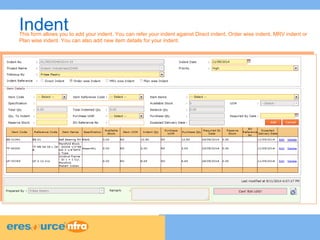
Indent This form allows you to add your indent. You can refer your indent against Direct indent, Order wise indent, MRV indent or 
Plan wise indent. You can also add new item details for your indent.
5 
5 
5 
GRN(Good Receipt Note) 
The user can generate good receipt note for received item list. GRN can also be generated against the item list that you 
have received.
6 
6 
6 
Material Return Number 
You can keep a track of the material which are returned back to the supplier or warehouse. You can generate Material 
Return Number for this returned material.
You can generate the Stock Transfer Receipt using this form. Select the option of transfer i.e. from where to where 
(Project site to warehouse or Warehouse to Project Site). You wil get the system generated item list and you have to just 
select the item which you want to transfer. 
7 
7 
7 
Stock Transfer Receipt 
Will show from where to where stock 
need to be transfer
8 
8 
8 
Material Issue Voucher 
You can generate the Stock Transfer Receipt using this form. Select the option of transfer i.e. from where to where 
(Project site to warehouse or Warehouse to Project Site). You wil get the system generated item list and you have to just 
select the item which you want to transfer.
9 
9 
9 
Stock Transfer 
You can generate the Stock Transfer Receipt using this form. Select the option of transfer i.e. from where to where 
(Project site to warehouse or Warehouse to Project Site). You wil get the system generated item list and you have to just 
select the item which you want to transfer.
10 
10 
10 
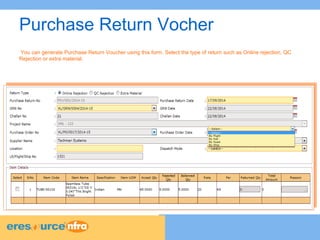
Purchase Return Vocher 
You can generate Purchase Return Voucher using this form. Select the type of return such as Online rejection, QC 
Rejection or extra material.
11 
11 
11 
Pending 
Where you will get pendings for Indent,GRN,MIV and Stock Transfer
12 
12 
12 
Report 
Where you will get report for Store Status, Supply Demand,Item Ledger,Material Consumption
13 
13 
13 
Contact Us 
Address 
TMA House, 1st Floor, Road No:16 
Plot No. 6, Wagle Industrial Estate 
Thane (West) 400 604, Maharashtra 
+91 22 41118000/8049(50 lines) 
www.eresourceerp.com

Stores

  • 1.
    1 1 1 eresource nfra ERP Stores Module
  • 2.
    2 2 2 Features
  • 3.
    3 3 3 Store Details This form will give you complete details of Store material avability
  • 4.
    4 4 4 Indent This form allows you to add your indent. You can refer your indent against Direct indent, Order wise indent, MRV indent or Plan wise indent. You can also add new item details for your indent.
  • 5.
    5 5 5 GRN(Good Receipt Note) The user can generate good receipt note for received item list. GRN can also be generated against the item list that you have received.
  • 6.
    6 6 6 Material Return Number You can keep a track of the material which are returned back to the supplier or warehouse. You can generate Material Return Number for this returned material.
  • 7.
    You can generatethe Stock Transfer Receipt using this form. Select the option of transfer i.e. from where to where (Project site to warehouse or Warehouse to Project Site). You wil get the system generated item list and you have to just select the item which you want to transfer. 7 7 7 Stock Transfer Receipt Will show from where to where stock need to be transfer
  • 8.
    8 8 8 Material Issue Voucher You can generate the Stock Transfer Receipt using this form. Select the option of transfer i.e. from where to where (Project site to warehouse or Warehouse to Project Site). You wil get the system generated item list and you have to just select the item which you want to transfer.
  • 9.
    9 9 9 Stock Transfer You can generate the Stock Transfer Receipt using this form. Select the option of transfer i.e. from where to where (Project site to warehouse or Warehouse to Project Site). You wil get the system generated item list and you have to just select the item which you want to transfer.
  • 10.
    10 10 10 Purchase Return Vocher You can generate Purchase Return Voucher using this form. Select the type of return such as Online rejection, QC Rejection or extra material.
  • 11.
    11 11 11 Pending Where you will get pendings for Indent,GRN,MIV and Stock Transfer
  • 12.
    12 12 12 Report Where you will get report for Store Status, Supply Demand,Item Ledger,Material Consumption
  • 13.
    13 13 13 Contact Us Address TMA House, 1st Floor, Road No:16 Plot No. 6, Wagle Industrial Estate Thane (West) 400 604, Maharashtra +91 22 41118000/8049(50 lines) www.eresourceerp.com