1
eresource NFRA Stores
Modulet
2
Stores or warehouses are very important for project based industries as these are the
places where all the materials and required tools are stored.
Material transfer, inward and outward flow of material takes place everyday and thus
there is a requirement to track all this flow of material in order to avoid any material
loss.
Nfra allows you to manage the Inventories of the Central Warehouse and also all
inventories at the site.
NFRA allows user to easily handle and manage all this, ensuring that minimal or no loss
is incurred.
Stores
3
Stores Module WOrkFlow
4
Stock details
This portal of NFRA allows user to update the opening stock information.
The Stock update for Central Warehouse and Project Site can be updated from here.
The user can check the stocks in multiple warehouses as well as multiple project sites.
For the ease of having knowledge of all stocks, the stocks can be checked against different
categories and type.
5
Pending for indent
Pending Indents are Indents which are approved to which no Purchase Order is being
associated.
Indents are created against the Material requested from the site Engineers.
The stores department can issue the material against the Requesition. But, if the
material is not in the stock, then, the Store Department can create an Indent to
Purchase department for Purchase of Material.
6
INDENT
User is able to add or view previously added items for indent.
The items can be added directly, Maerial Take Over wise, MRV wise or Plan wise.
The items are displayed with their name, reference, available, intend stock and the
date by which they are required.
Expected delivery date is also displayed with a provision to edit or delete the items at
any point of time.
7
Material inward (pending grn)
This window provides with the details of items that are expected to be delivered
at site or warehouse.
In addition to PO number, it provides detail with supplier name, address and the
project name foe which the item is being procured.
The item pending for GRN is displayed below with order, balance, received,
rejected, pending and accepted quantities.
8
GRN
GRN in eresource can be done ONLY
against the Purchase ORdre issued to the
supplier.
Acceptance of extra Material or Extra
Quantity which is not in the Purchase
Order, can be received only after the
approval of the GRN.
The invoice number and date are updates
along with gate pass number and date.
Optional information that can be added for
more and to prevent any future problems,
one can add the transport number and
transport name.
All the quantities that were not updated
while the GRN was pending are updated
here.
9
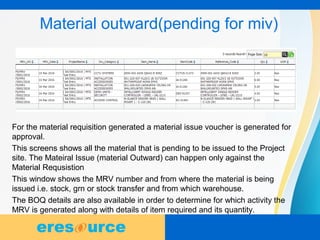
Material outward(pending for miv)
For the material requisition generated a material issue voucher is generated for
approval.
This screens shows all the material that is pending to be issued to the Project
site. The Mateiral Issue (material Outward) can happen only against the
Material Requsistion
This window shows the MRV number and from where the material is being
issued i.e. stock, grn or stock transfer and from which warehouse.
The BOQ details are also available in order to determine for which activity the
MRV is generated along with details of item required and its quantity.
10
Delivery / material issue to site
11
Delivery / material issue to site
Material Issue/ Delivery Order can be generated only against the Material
Requisition from the site.
This window displays the approved material issue voucher.
From the name of person to whom the material is handed over, transporter
number and road permit number every detail is visible.
Firstly the detail of BOQ is displayed for which the items are required and
then the item details are displayed which is being issued.
12
Stock transfer
Similar to the stock transfer from material inwards, this portal is for
stock transfer between the sites.
Material can be transfered from 1 site to another site
Material can be transfered from the site to the central warehouse.
Material can be transfered from Central Warehouse to the Site
Location.
13
stock transfer
14
Purchase return voucher
Purchase Return Note or Purchase Return Voucher is crated in 2 cases
a ) Material Rejection due to the reason best known to the stores and purchase
department.
b) Extra Material received.
This voucher is generated against the purchase order number and date on which the
material was procured.
The item details contain the name of item and the quantity being returned with per
unit cost and then the total amount.
Purchase Return note will update the Inventory. However, for accounting effect, Debit
note against the Purchase return should be passed.
15
Purchase return voucher
16
Store report
Store Status
Supply Demand
Item Ledger
Material Consumption
Tools tracking
Inward Outward Register
GRN Replace
Stock Valuation
17
conclusion
eresource provides a comprehensive configuration of
Inventory Management for different location. This location in
eresource is referred to ONSITE Location, Warehouse and
Stores. The warehouse management processes built in
eresource ERP system allows the inventory in the
organization to always be up to date and correctly valued.
http://www.eresourceerp.com
http://nfra.eresourceerp.com

Eresource nfra stores modulet

  • 1.
  • 2.
    2 Stores or warehousesare very important for project based industries as these are the places where all the materials and required tools are stored. Material transfer, inward and outward flow of material takes place everyday and thus there is a requirement to track all this flow of material in order to avoid any material loss. Nfra allows you to manage the Inventories of the Central Warehouse and also all inventories at the site. NFRA allows user to easily handle and manage all this, ensuring that minimal or no loss is incurred. Stores
  • 3.
  • 4.
    4 Stock details This portalof NFRA allows user to update the opening stock information. The Stock update for Central Warehouse and Project Site can be updated from here. The user can check the stocks in multiple warehouses as well as multiple project sites. For the ease of having knowledge of all stocks, the stocks can be checked against different categories and type.
  • 5.
    5 Pending for indent PendingIndents are Indents which are approved to which no Purchase Order is being associated. Indents are created against the Material requested from the site Engineers. The stores department can issue the material against the Requesition. But, if the material is not in the stock, then, the Store Department can create an Indent to Purchase department for Purchase of Material.
  • 6.
    6 INDENT User is ableto add or view previously added items for indent. The items can be added directly, Maerial Take Over wise, MRV wise or Plan wise. The items are displayed with their name, reference, available, intend stock and the date by which they are required. Expected delivery date is also displayed with a provision to edit or delete the items at any point of time.
  • 7.
    7 Material inward (pendinggrn) This window provides with the details of items that are expected to be delivered at site or warehouse. In addition to PO number, it provides detail with supplier name, address and the project name foe which the item is being procured. The item pending for GRN is displayed below with order, balance, received, rejected, pending and accepted quantities.
  • 8.
    8 GRN GRN in eresourcecan be done ONLY against the Purchase ORdre issued to the supplier. Acceptance of extra Material or Extra Quantity which is not in the Purchase Order, can be received only after the approval of the GRN. The invoice number and date are updates along with gate pass number and date. Optional information that can be added for more and to prevent any future problems, one can add the transport number and transport name. All the quantities that were not updated while the GRN was pending are updated here.
  • 9.
    9 Material outward(pending formiv) For the material requisition generated a material issue voucher is generated for approval. This screens shows all the material that is pending to be issued to the Project site. The Mateiral Issue (material Outward) can happen only against the Material Requsistion This window shows the MRV number and from where the material is being issued i.e. stock, grn or stock transfer and from which warehouse. The BOQ details are also available in order to determine for which activity the MRV is generated along with details of item required and its quantity.
  • 10.
  • 11.
    11 Delivery / materialissue to site Material Issue/ Delivery Order can be generated only against the Material Requisition from the site. This window displays the approved material issue voucher. From the name of person to whom the material is handed over, transporter number and road permit number every detail is visible. Firstly the detail of BOQ is displayed for which the items are required and then the item details are displayed which is being issued.
  • 12.
    12 Stock transfer Similar tothe stock transfer from material inwards, this portal is for stock transfer between the sites. Material can be transfered from 1 site to another site Material can be transfered from the site to the central warehouse. Material can be transfered from Central Warehouse to the Site Location.
  • 13.
  • 14.
    14 Purchase return voucher PurchaseReturn Note or Purchase Return Voucher is crated in 2 cases a ) Material Rejection due to the reason best known to the stores and purchase department. b) Extra Material received. This voucher is generated against the purchase order number and date on which the material was procured. The item details contain the name of item and the quantity being returned with per unit cost and then the total amount. Purchase Return note will update the Inventory. However, for accounting effect, Debit note against the Purchase return should be passed.
  • 15.
  • 16.
    16 Store report Store Status SupplyDemand Item Ledger Material Consumption Tools tracking Inward Outward Register GRN Replace Stock Valuation
  • 17.
    17 conclusion eresource provides acomprehensive configuration of Inventory Management for different location. This location in eresource is referred to ONSITE Location, Warehouse and Stores. The warehouse management processes built in eresource ERP system allows the inventory in the organization to always be up to date and correctly valued. http://www.eresourceerp.com http://nfra.eresourceerp.com