VERSION UPDATED: 11/2014
Demartek
ABOUT THIS REPORT
LEGEND
INFO
Hover over this symbol to view additional
information about a specific topic
SEARCH
Allows you to search for a specific
word within the document
ACRONYM SHORTCUT
Provides definitions to technical abreviations
listed on the page upon hover
NEXT
Advances to the next page
LAST
Returns to the previous page
PRINT
Provides print options for the document
CLOSE
Closes the window containing this icon
Because of the number of storage interface types and related
technologies that are used for storage devices, we have
compiled this summary document providing some basic
information for each of the interfaces. This document will be
updated periodically. This document may become larger over
time. Contact us if you’d like to see additional information in
this document.
The interface types listed here are known as “block” interfaces,
meaning that they provide an interface for “block” reads and
writes. They simply provide a conduit for blocks of data to be
read and written, without regard to file systems, file names or
any other knowledge of the data in the blocks. The host
requesting the block access provides a starting address and
number of blocks to read or write.
We are producing deployment guides for some of the
technologies described in this document.
This version of the Demartek Storage Interface Comparison report is provided in
an active PDF format. With this format you are capable of viewing and interacting
with the information in ways not available with standard PDF readers. To get the
most out of this guide we encourage you to upgrade to the latest version of the
Adobe Acrobat Reader.
Demartek provides real-world, hands-on research and analysis by focusing on
industry analysis and lab validation testing of server, network, storage and
security technologies.
Demartek provides a few handy reference documents based on work
performed in the Demartek Lab. These documents are updated periodically.
To get more information visit:
Demartek
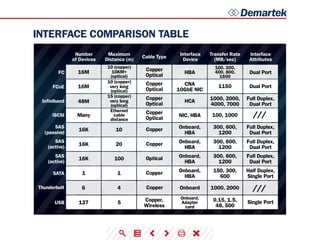
INTERFACE COMPARISON TABLE
Number
of Devices
Maximum
Distance (m)
Interface
Device
Transfer Rate
(MB/sec)
Interface
Attributes
Cable Type
FC
FCoE
Infiniband
iSCSI
SAS
(passive)
SAS
(active)
SAS
(active)
SATA
USB
16M
1150
100, 1000
Copper
Optical
HBA Dual Port
Dual PortCNA
10GbE NIC
HCA
NIC, HBA
Onboard,
HBA
Onboard,
HBA
Onboard,
HBA
Onboard,
HBA
Copper
Optical
Copper
Optical
Copper
Optical
1000, 2000,
4000, 7000
Full Duplex,
Dual Port
Full Duplex,
Dual Port
Full Duplex,
Dual Port
Full Duplex,
Dual Port
Half Duplex,
Single Port
300, 600,
1200
300, 600,
1200
300, 600,
1200
150, 300,
600
Copper
Copper
Optical
Copper
10 (copper)
10KM+
(optical)
10 (copper)
very long
(optical)
15 (copper)
very long
(optical)
Ethernet
cable
distance
100, 200,
400, 800,
1600
16M
16K 10
20
100
1
16K
16K
1
Single Port0.15, 1.5,
48, 500
Copper,
Wireless
Onboard,
Adapter
card
5127
48M
Many
Thunderbolt 6 4 Copper Onboard 1000, 2000 ///
///
Demartek
TRANSFER RATE
ENCODING SCHEME TABLE
Transfer rate, sometimes known as transfer speed, is the maximum
rate at which data can be transferred across the interface. This is not
to be confused with the transfer rate of individual devices that may
be connected to this interface. Some interfaces may not be able to
transfer data at the maximum possible transfer rate due to process-
ing overhead inherent with that interface. Some interface adapters
provide hardware offload to improve performance, manageability
and/or reliability of the data transmission across the respective
interface. The transfer rates listed are across a single port at half
duplex.
Bits vs. Bytes and Encoding Schemes
Transfer rates for storage interfaces and devices are generally listed
as MB/sec or MBps, which is generally calculated as Megabits per
second (Mbps) divided by 10. Many of these interfaces use “8b/10b”
encoding which maps 8 bit bytes into 10 bit symbols for transmis-
sion on the wire, with the extra bits used for command and control
purposes. When converting from bits to bytes on the interface,
dividing by ten (10) is
exactly correct. 8b/10b encoding results in a 20 percent overhead
(10-8)/10 on the raw bit rate.
Beginning with 10GbE and 10GbFC (for ISL’s), some of the newer
speeds emerging in 2010 and beyond, a newer “64b/66b” encoding
scheme is being used to improve data transfer efficiency. 64b/66b
is the encoding scheme for 16Gb FC and is planned for higher
data rates for IB. 64b/66b encoding is not directly compatible with
8b/10b, but the technologies that implement it will be built so that
they can work with the older encoding scheme. 16Gb Fibre Chan-
nel uses a line rate of 14.025Gbps, but with the 64b/66b encoding
scheme results in a doubling of the throughput of 8Gb Fibre Chan-
nel, which uses a line rate of 8.5Gbps with the 8b/10b encoding
scheme. 64b/66b encoding results in a 3 percent overhead (66-64)/66
on the raw bit rate.
PCIe versions 1.x and 2.x use 8b/10b encoding. PCIe version 3 uses
128b/130b encoding, resulting in a 1.5 percent overhead on the raw
bit rate. Additional PCIe information is provided in the PCI Express
section below.
8b/10b
64b/66b
128b/130b
128b/132b
Overhead Applications
20% 1GbE, FC (up to 8Gb), IB (SDR, DDR & QDR), PCIe (1.0 & 2.0) SAS, SATA, USB (up to 3.0)
10GbE, 100GbE, FC (10Gb & 16Gb), FCoE, IB (FDR & EDR)
PCIe 3.0, 24Gb SAS (likely)
USB 3.1 (10Gbps, see Roadmaps section)
1.5%
3%
3%
Demartek
TRANSFER RATE (cont.)
FIBER CHANNEL SPEED TABLE
INFINIBAND SPEED TABLE
PCI-X
PCI-X
PCIe 3.0 x8
PCI-X 2.0 or
PCIe 1.0 x4
PCI-X 1.0 x8 or
PCIe 2.0 x4
PCI-X 2.0 x8 or
PCIe 3.0 x4
8b/10b
8b/10b
8b/10b
8b/10b
64b/66b
64b/66b
1.0625
2.125
4.25
8.5
14.025
28.05
100
2Gbps
4Gbps
8Gbps
8Gbps 24Gbps 8b/10b PCIe 1.0 x8
PCIe 1.0 x16 or
PCIe 2.0 x8
PCIe 2.0 x8
PCIe 3.0 x8
PCIe 3.0 x8
PCIe 3.0 x16
8b/10b
8b/10b
64b/66b
64b/66b
64b/66b
48Gbps
96Gbps
123.75Gbps
163.64Gbps
300Gbps
16Gbps
32Gbps
41.25Gbps
54.55Gbps
100Gbps
10.31Gbps
13.64Gbps
25Gbps
200
400
800
1600
3200
1GFC
2GFC
4GFC
8GFC
16GFC
32GFC
Throughput
(MBps)
1X data rate 4X data rate 12X data rate
Line Rate
(GBaud)
Host Adapter req.
(dual-port cards)
Host Adapter req.
(dual-port cards)
Encoding
Encoding
SDR
DDR
QDR
FDR
EDR
FDR-10*
Mellanox only*
Demartek
HISTORY
Click interface above to view history
The computing and storage industry is one that is moving at a rate
that is often times is hard to keep up with. Every year, it seems,
a new technology is released that often outshines the previous
model many times over. Newer interface speeds are often available
in switches and adapters long before they are available in storage
devices and storage systems for public use.
We have created an interactive way to experience the rate of
change for many different technologies. To view a timeline history
and additional details of each type of interface, click on the inter-
face name on the top of the graphic.
The graphics below are intended to show the interface history, not revenue, units
shipped, or any other statistics.
Demartek
ROADMAPS
Click interface above to view roadmap
1 2 3 4 1 2 3 41 2 1 2 3
These roadmaps include the estimated calendar years that higher
speeds may become available and are based on our industry
research, which are subject to change. Past history indicates that
several of these interfaces are on a three or four year development
cycle for the next improvement in speed. It is reasonable to expect
that pace to continue.
It should be noted that it typically takes several months after the
specification is complete before products are generally
available in the marketplace. Widespread adoption of those new
products takes additional time, sometimes years.
Some of the standards groups are now working on “Energy Ef-
ficient” versions of these interfaces to indicate additions to their
standards to reduce power consumption. Additional information
on NVMe is located on the Demartek NVMe Commentary page. For
additional comments on Thunderbolt and USB, visit our CES2014
Commentary page or our Demartek IDF2014 Commentary page.
Demartek
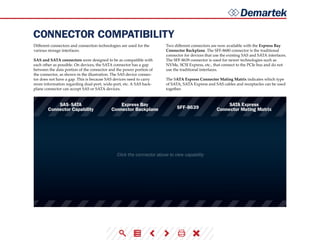
CONNECTOR COMPATIBILITY
Click the connector above to view capability
Different connectors and connection technologies are used for the
various storage interfaces.
SAS and SATA connectors were designed to be as compatible with
each other as possible. On devices, the SATA connector has a gap
between the data portion of the connector and the power portion of
the connector, as shown in the illustration. The SAS device connec-
tor does not have a gap. This is because SAS devices need to carry
more information regarding dual-port, wide-port, etc. A SAS back-
plane connector can accept SAS or SATA devices.
Two different connectors are now available with the Express Bay
Connector Backplane. The SFF-8680 connector is the traditional
connector for devices that use the existing SAS and SATA interfaces.
The SFF-8639 connector is used for newer technologies such as
NVMe, SCSI Express, etc., that connect to the PCIe bus and do not
use the traditional interfaces.
The SATA Express Connector Mating Matrix indicates which type
of SATA, SATA Express and SAS cables and receptacles can be used
together.
Demartek
Typically with an optical core of approximately 9
(microns), has lower modal dispersion than multi-mode fiber
and can support distances up to 80-100 kilometers or more,
depending on transmission speed, transceivers and the buffer
credits allocated in the switches.
SINGLE-MODE FIBER (SMF)
Has an optical core of either 50 or 62.5 and supports
distances up to 600 meters, depending on transmission
speeds and transceivers.
MULTI-MODE FIBER (MMF)
CABLES: FIBER OPTIC & COPPER
As interface speeds increase, expect increased usage of fiber optic
cables and connectors for most interfaces. At higher Gigabit speeds
(10Gb+), copper cables and interconnects generally have too much
amplitude loss except for short distances, such as within a rack or
to a nearby rack. This amplitude loss is sometimes called a poor
signal-to-noise ratio or simply “too noisy.”
Single-mode fiber vs. Multi-mode fiber
Meter-for-meter, single-mode and multi-mode cables are similarly
priced. However, some of the other components used in single-
mode links are more expensive than their multi-mode equivalents.
When planning datacenter cabling requirements, be sure to consid-
er that a service life of 15 to 20 years can be expected for fiber optic
cabling, so the choices made today need to support legacy, current
and emerging data rates. Also note that deploying large amounts of
new cable in a datacenter can be labor-intensive, especially in exist-
ing environments.
There are different designations for fiber optic cables depending on
the bandwidth supported.
Multi-mode: OM1, OM2, OM3, OM4
Single-mode: OS1 (there is a proposed OS2 standard)
OM3 and OM4 are newer multi-mode cables that are “laser opti-
mized” (LOMMF) and support 10 Gigabit Ethernet applications.
OM3 and OM4 cables are also the only multi-mode fibers included
in the IEEE 802.3ba 40G/100G Ethernet standard that was ratified
in June 2010. The 40G and 100G speeds are currently achieved by
bundling multiple channels together in parallel with special multi-
channel (or multi-lane) connector types. This standard defines an
expected operating range of up to 100m for OM3 and up to 150m
for OM4 for 40 Gigabit Ethernet and 100 Gigabit Ethernet. These are
estimates of distance only and supported distances may differ when
40GbE and 100GbE products become available in the coming years.
See the Connector Types section below for additional detail. OM4
cabling is expected to support 32GFC up to 100 meters.
Newer multi-mode OM2, OM3 and OM4 (50 µm) and single-mode
OS1 (9 µm) fiber optic cables have been introduced that can handle
tight corners and turns. These are known as “bend optimized,”
“bend insensitive,” or have “enhanced bend performance.” These
fiber optic cables can have a very small turn or bend radius with
minimal signal loss or “bending loss.” The term “bend optimized”
multi-mode fiber (BOMMF) is sometimes used.
OS1 and OS2 single-mode fiber optics are used for long distances,
up to 10,000m (6.2 miles) with the standard transceivers and have
been known to work at much longer distances with special trans-
ceivers and switching infrastructure.
Demartek
CABLES: FIBER OPTIC & COPPER(cont.)
Copper Cabling - Cat 6 is the minimum requirement, Cat
6a is recommended for Ethernet.
Fiber Optic Cabling - OM3 is the minimum requirement,
OM4 is recommended.
Fiber Optic Connectors - LC is the standard for one or
two fiber optic SFP and SFP+ connectors.
Currently the most common type of fiber optic 10GbE cable is
the 10GBASE-SR cable that supports an SFP+ connector with
an optical transceiver rated for 10Gb transmission speed.
These are also known as “short reach” fiber optic cables.
10GBASE-SR
These are the “long reach” fiber optic cables that support
single-mode fiber optic cables and connectors.
10GBASE-LR
Update: 24 April 2012:
The Telecommunications Industry Association (TIA) Engineer-
ing Committee TR-42 Telecommunications Cabling Systems has
approved the publication of TIA-942-A, the revised Telecommu-
nications Infrastructure Standard for Data Centers. A number of
changes were made to update the specification with respect to
higher transmission speeds, energy efficiency and harmonizing
with international standards. For backbone and horizontal cabling
and connectors, the following are some of the important updates:
10Gb Ethernet Fiber-Optic Cables
Indoor vs. Outdoor Cabling
Indoor fiber-optic cables are suitable for indoor building applica-
tions. Outdoor cables, also known as outside plant or OSP, are suit-
able for outdoor applications and are water (liquid and frozen) and
ultra-violet resistant. Indoor/outdoor cables provide the protections
of outdoor cables with a fire-retardant jacket that allows deploy-
ment of these cables inside the building entrance beyond the OSP
maximum distance, which can reduce the number of transition
splices and connections needed.
To view fiber optic characteristics and distance/speed graphs, continue to
the next page.
Demartek
CABLES: FIBER OPTIC & COPPER(cont.)
FIBER OPTIC CABLE BY DISTANCE & SPEED
FIBER OPTIC CABLE CHARACTERISTICS
Mode
OM1 OM2 OM3 OM4
Core Diameter Wavelength Modal Bandwidth
Cable Jacket
Color
OM1
1 Gbps
2 Gbps
4 Gbps
8 Gbps
10 Gbps
16 Gbps
OM2
OM3
OS1
OM4
multi-mode
300m
300m
500m
500m
400m
190m
125m
380m
860m
150m
150m
150m
100m
Up to 300m Up to 400m
50m
82m
35m
70m
21m
33m
15m
1 1 1 1
200 MHz Orange
Orange
Aqua
Aqua
Yellow
500 MHz
2000 MHz
4700 MHz
62.5 µm
50 µm
50 µm
50 µm
9 µm
multi-mode
850nm
1300nm
850nm
1300nm
850nm
1300nm
850nm
1300nm
1310nm
1550nm
multi-mode
multi-mode
single-mode
OM1 cable is not recommended for 16Gbps FC,
but is expected to operate up to 15m
Distances supported in actual configurations
are generally less than the distance supported
by the raw fiber optic cable. The distances
shown here are for 850 nm wavelength multi-
mode cables. The 1300 nm wavelength multi-
mode cables can support longer distances.
1
///
///
///
Demartek
CABLES: FIBER OPTIC & COPPER(cont.)
Active Copper vs. Passive Copper
Passive copper connections are common with many interfaces. The
industry is finding that as the transfer rates increase, passive copper
does not provide the distance needed and takes up too much physi-
cal space. The industry is moving towards an active copper type of
interface for higher speed connections, such as 6Gbps SAS. Ac-
tive copper connections include components that boost the signal,
reduce the noise and work with smaller-gauge cables, improving
signal distance, cable flexibility and airflow. These active copper
components are expected to be less expensive and consume less
electric power than the equivalent components used with fiber optic
cables.
Copper: 10GBASE-T and 1000BASE-T
1000BASE-T cabling is commonly used for 1Gb Ethernet traffic in
general, and 1Gb iSCSI for storage connections. This is the familiar
four pair copper cable with the RJ45 connectors. Cables used for
1000BASE-T are known as Cat5e (Category 5 enhanced) or Cat6
(Category 6) cables.
10BASE-T cabling supports 10Gb Ethernet traffic, including 10Gb
iSCSI storage traffic. The cables and connectors are similar to,
but not the same as the cables used for 1000BASE-T. 10GBASE-T
cables are Cat6a (Category 6 augmented), also known as Class EA
cables. These support the higher frequencies required for 10Gb
transmission up to 100 meters (330 feet). Cables must be certified
for 10GBASE-T compliance, and is typically deployed in Europe.
Cat6 cables may work in 10GBASE-T deployments up to 55m, but
should be tested first. 10GBASE-T cabling is not expected to be de-
ployed for FCoE applications in the near future. Some newer 10GbE
switches support 10GBASE-T (RJ45) connectors.
10GBASE-CR - Currently, the most common type of copper 10GbE
cable is the 10GBASE-CR cable that uses an attached SFP+ connec-
tor, also known as a Direct Attach Copper (DAC). This fits into the
same for factor connector and housing as the fiber optic cables with
SFP+ connectors. Many 10GbE switches accept cables with SFP+
connectors, which support both copper and fiber optic cables. These
cables are available in 1m, 3m, 5m, 7m, 8.5m, and longer distances.
The most commonly deployed distances are 3m and 5m.
10GBASE-CX4 - These cables are older and not very common. This
type of cable and connector is similar to cables used for InfiniBand
technology.
Continue reading for information on connector types.
Demartek
CONNECTOR TYPES
SFP+ QSFP+ CONNECTOR/INTERFACE
Several types of connectors are available with cables used for stor-
age interfaces. This is not an exhaustive list but is intended to show
the more common types. Each of the connector types includes the
number of lanes (or channels) and the rated speed.
As of early 2011, the fastest generally available connector speeds
supported were 10Gbps per lane. Significantly higher speeds	
are currently achieved by bundling multiple lanes in parallel, such
as 4x10 (40Gbps), 10x10 (100Gbps), 12x10 (120Gbps), etc. Most of
the current implementations of 40GbE and 100GbE use multiple
lanes of 10GbE and are considered “channel bonded” solutions.
14Gbps per lane connectors appeared in the last half of 2011. These
connectors support 16Gb Fibre Channel (single-lane) and 56Gb
(FDR) InfiniBand (multi-lane).
25Gbps per lane connectors may become available in 2012 or 2013
as prototypes. When 25Gbps per lane connectors are available,
then higher speeds, such as 100Gbps can be achieved by bundling
four of these lanes together. Other variations of bundling multiple
lanes of 25Gbps may be possible, such as 10x25 (250Gbps), 12x25
(300Gbps) or 16x25 (400Gbps). It is expected that the 25Gbps (actu-
ally 28 Gbps) connectors will support 32Gb Fibre Channel in single-
lane configurations and higher speeds for Ethernet and InfiniBand
in multi-lane configurations.
In calendar Q1 2012, several fiber-optic connector manufacturers
demonstrated working prototypes of the “25/28G” connectors.
These connectors support speeds up to 28Gbps per lane and will be
used for 100Gbps Ethernet (100GbE) in a 4x25 configuration. These
connector technologies will also be used for other high-speed ap-
plications such as the next higher speeds of Fibre Channel (32GFC)
and InfiniBand. End-user products with these higher speed tech-
nologies were originally estimated to become available in 2013 or
2014, but more work remains before 25Gb products become gener-
ally available.
Two of the popular fiber-optic cable connectors are SFP+ and QSFP+
(see diagrams below). SFP+ is used for single-lane high-speed con-
nections, and QSFP+ is used for four-lane high-speed connections.
Many in the industry use the four-lane (“quad”) interface to pro-
vide increased bandwidth. Currently, the single-lane SFP+ is used
for 10Gb Ethernet and 8Gb and 16Gb Fibre Channel. The four-lane
QSFP+ is used for 40Gb Ethernet and 40Gb (QDR) and 56Gb (FDR)
InfiniBand. The Fibre Channel technical committee is now officially
discussing a single-lane and four-lane (“quad”) solution with the
32GFC technology (4x32) for a 128Gbps connection. See the Road-
maps section for more information.
Reference the encoding schemes described previously for addi-
tional detail on speeds available for various connector and cable
combinations.
SFP SFP+ QSFP+
ETHERNET
FC
INFINIBAND
1GbE 10GbE 40GbE
QDR/FDR
1/2/4GFC 8/16GFC
Demartek
CONNECTOR TABLE
MINI SAS
CXP
CFP
MINI SAS HD
COPPER CX4
SMALL FORM-
FACTOR PLUGGABLE
SMALL FORM-FACTOR
PLUGGABLE ENHANCED
QUAD SMALL FORM-
FACTOR PLUGGABLE
QUAD SMALL FORM-
FACTOR PLUGGABLE
ENHANCED
TYPE LANES
MAX. SPEED
PER LANE
(Gbps)
MAX. SPEED
TOTAL (Gbps) CABLE TYPE USAGE
SAS 4
4
16
16
10
10
5
6 24 Copper 3Gb, 6Gb SAS
Various
6Gb, 12Gb SAS
10Gb Ethernet,
SDR & DDR
InfiniBand
10Gb Ethernet,
8 & 16Gb FC,
10Gb FCoE
40Gb Ethernet,
DDR, QDR & FDR
InfiniBand,
64Gb FC
1Gb Ethernet,
FC: 1, 2, 4Gb
100Gb Ethernet,
120Gb other
100Gb Ethernet
Copper
Copper
Copper
Copper,
Optical
Copper,
Optical
Copper,
Optical
Copper,
Optical
Optical
20
20
64
16
4
48, 96
100, 120
100
5
12
4
1
1
4
4
10, 12
10
4, 8SAS
CX4
SFP
SFP+
QSFP
QSFP+
CXP
CFP
Demartek
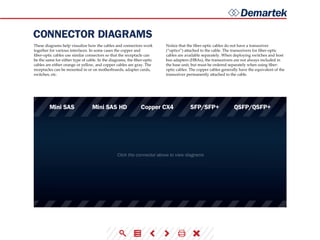
CONNECTOR DIAGRAMS
Mini SAS Copper CX4 SFP/SFP+ QSFP/QSFP+Mini SAS HD
Click the connector above to view diagrams
These diagrams help visualize how the cables and connectors work
together for various interfaces. In some cases the copper and
fiber-optic cables use similar connectors so that the receptacle can
be the same for either type of cable. In the diagrams, the fiber-optic
cables are either orange or yellow, and copper cables are gray. The
receptacles can be mounted in or on motherboards, adapter cards,
switches, etc.
Notice that the fiber-optic cables do not have a transceiver
(“optics”) attached to the cable. The transceivers for fiber-optic
cables are available separately. When deploying switches and host
bus adapters (HBAs), the transceivers are not always included in
the base unit, but must be ordered separately when using fiber-
optic cables. The copper cables generally have the equivalent of the
transceiver permanently attached to the cable.
Demartek
CONNECTOR TYPES (cont.)
Mini SFP
In the second half of 2010, a new variant of the SFP/SFP+ connector
was introduced to accommodate the Fibre Channel backbone with
64-port blades and the planned increased density Ethernet core
switches. This new connector, known as mSFP, mini-SFP or mini-
LC SFP, narrows the optical centerline of a conventional SFP/SFP+
connector from 6.25 mm to 5.25 mm. Although this connector looks
very much like a standard SFP style connector, it is narrower and is
required for the higher-density devices. The photo provided here
shows the difference between mini-SFP and the standard size.
CXP and CFP
The CXP (copper) and CFP (optical) connectors are expected to be
used initially for switch-to-switch connections. These are expected
for Ethernet and may also be used for InfiniBand. CFP connectors
currently support 10 lanes of 10 Gbps connections (10x10) that
consume approximately 35-40 watts. CFP2 is a single board, smaller
version of CFP that also supports 10x10 but uses less power than
CFP. During 2013, quite a bit of development activity is focused on
CFP2. A future CFP4 connector is in the planning stages that is
expected to use the 25/28G connectors and support 4x25. CFP4 is
expected to handle long range fiber optic distances.
Mini SAS and Mini SAS HD
The Mini SAS connector is the familiar 4-lane connector available
on most SAS cables today. The Mini SAS HD connector provides
twice the density as the Mini SAS connector, and is available in
4-lane and 8-lane configurations. The Mini SAS HD connector is the
same connector for passive copper, active copper and optical SAS
cables. The diagrams below compare these two types of SAS
connectors.
Demartek
PCI EXPRESS (PCIe)
PCIe DATA RATES
PCI Express, also known as PCIe, stands for Peripheral Component
Interconnect Express and is the computer industry standard for the
I/O bus for computers introduced in the last few years. The first ver-
sion of the PCIe specification, 1.0a, was introduced in 2003. Version
2.0 was introduced in 2007 and version 3.0 was introduced in 2010.
These versions are often identified by their generation (“gen 1,”
“gen 2,” etc.). It can take a year or two between the time the speci-
fication is introduced and general availability of computer systems
and devices using those specification versions. The PCIe specifica-
tions are developed and maintained by the PCI-SIG (PCI Special
Interest Group). PCI Express and PCIe are registered trademarks of
the PCI-SIG.
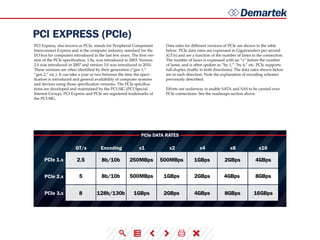
Data rates for different versions of PCIe are shown in the table
below. PCIe data rates are expressed in Gigatransfers per second
(GT/s) and are a function of the number of lanes in the connection.
The number of lanes is expressed with an “x” before the number
of lanes, and is often spoken as “by 1,” “by 4,” etc. PCIe supports
full-duplex (traffic in both directions). The data rates shown below
are in each direction. Note the explanation of encoding schemes
previously described.
Efforts are underway to enable SATA and SAS to be carried over
PCIe connections. See the roadmaps section above.
GT/s
PCIe 1.x
PCIe 2.x
PCIe 3.x
Encoding x1 x2 x4 x8 x16
2.5 250MBps
500MBps
500MBps
1GBps
1GBps
1GBps
2GBps
2GBps
2GBps
4GBps
4GBps
4GBps
8GBps
8GBps
16GBps
5
8
8b/10b
8b/10b
128b/130b
Demartek
PCI EXPRESS (PCIe) (cont.)
Mini-PCIe - PCI Express cards are also available in a mini PCIe
form factor. This is a special form factor for PCIe that is approxi-
mately 30mm x 51mm or 30mm x 26.5mm, designed for laptop
and notebook computers, and equivalent to a single-lane (x1) PCIe
slot. A variety of devices including WiFi modules, WAN modules,
video/audio decoders, SSDs and other devices are available in this
form factor.
SFF-8639 - SFF-8639 is the I/O backplane connector designed for
high-density SSD storage devices and is backward compatible with
existing storage interfaces. SFF-8639 supports PCIe/NVMe, SAS and
SATA devices and enables hot plug and hot swap of devices while
the system is running. Revision 0.7 of the SFF-8639 specification
was released in March 2014, with Revision 1.0 expected by year-end
2014. The SFF-8639 connector is expected to meet similar electrical
requirements as a standard PCIe CEM connector.
M-PCIe™ - M-PCIe is the specification that maps PCIe over the
MIPI­­® Alliance M-PHY® technology used in low-power mobile
and handheld devices. M-PCIe is optimized for RFI/EMI require-
ments and supports M-PHY gears 1, 2 and 3 and will be extended
to support gear 4.
M.2 - M.2 is the next generation PCIe
connector for ultra-thin tablets and other
mobile platforms. It’s multiple socket
definitions support WWAN, SSD and
other applications. M.2 can support PCIe
protocols or SATA protocol, but not both
at the same time on the same device. M.2
supports a variety of board width and
length options. M.2 is available in single-
sided modules that can be soldered down,
or single-single-sided and dual-sided
modules used with a connector.
PCIe 2.0 - Servers that have PCIe 2.0 x8 slots can support two ports
of 10GbE or two ports of 16GFC on one adapter.
PCIe 3.0 - On 6 March 2012, the major server vendors announced
their next generation servers that support PCIe 3.0, which, among
other things, doubles the I/O throughput rate from the previous
generation. These servers also provide up to 40 PCIe 3.0 lanes per
processor socket, which is also at least double from the previous
server generation. Workstation and desktop computer mother-
boards that support PCIe 3.0 first appeared in late 2011. PCIe 3.0
graphics cards appeared in late 2011. Other types of adapters sup-
porting PCIe 3.0 were announced in 2012 and 2013. The PCIe3.0
specification was completed in November 2010.
PCIe 3.1 - The PCIe 3.1 specification was released in October 2014.
It incorporates M-PCIe and consolidates numerous protocol exten-
sions and functionality for ease of access.
PCIe 4.0 - In November 2011, the PCI-SIG announced the approval
of 16 gigatransfers per second as the bit rate for the next generation
of PCIe architecture, known as PCIe 4.0. After technical analysis, it
was determined that 16 GT/s can be manufactured and deployed
with known technologies, while maintaining backward compat-
ibility with previous generations of PCIe architecture such as PCIe
1.x, 2.x and 3.x. Revision 0.5 of the PCIe 4.0 specification is expected
by year-end 2014, while Revision 0.9 is expected to be available in
1H 2016. It may take up to a year or more for products that support
PCIe4.0 technology to become generally available after the final
PCIe 4.0 specification is complete.
OCuLINK - OCuLINK is intended to be a low-cost, small cable
form factor for PCIe internal and external devices, offering bit rates
starting at 8Gbps, with headroom to scale, and new independent
cable lock integration. OCuLINK supports x1, x2, and x4 lanes of
PCIe 3.0 connectivity. OCuLINK supports passive cables capable of
reaching up to 3 meters and active copper and optical cables.
Demartek
PCI EXPRESS (PCIe) (cont.)
Active copper cables can reach up to 10 meters while active optical
cables can reach up to 300 meters in length. The OCuLINK specifi-
cation will be completed in the first calendar quarter of 2015 with
products expected shortly thereafter.
I/O Virtualization - In 2008, the PCI-SIG announced the completion
of its I/O Virtualization (IOV) suite of specifications including sin-
gle-root IOV (SR-IOV) and multi-root IOV (MR-IOV). These tech-
nologies can work with system virtualization technologies and can
allow multiple operating systems to natively share PCIe devices.
SR-IOV is currently supported with several 10GbE NICs and hyper-
visors. See the recent Demartek I/O Virtualization presentation for
additional detail.
The concept of sharing PCIe devices or providing access to PCIe
devices that may be physically larger than some smaller form-factor
systems can accommodate has led to the development of external
connections to some PCIe devices. Cables have been developed
for extending the PCIe bus outside of the chassis holding the PCIe
slots. These cables are specified by indicating the number of PCIe
lanes (x4, x8, etc.) supported. Cables are typically available for x4,
x8 and x16 lane configurations. Common cable lengths are 1m and
3m.
The photo below shows some PCIe cables and connectors. PCIe can
also be carried over fiber-optic cables for longer distances. In the fu-
ture we will begin to see the shift from PCIe cables and connectors
to OCuLINK cables and connectors, also shown in the image below.

Storage Networking Interfaces

  • 1.
  • 2.
    Demartek ABOUT THIS REPORT LEGEND INFO Hoverover this symbol to view additional information about a specific topic SEARCH Allows you to search for a specific word within the document ACRONYM SHORTCUT Provides definitions to technical abreviations listed on the page upon hover NEXT Advances to the next page LAST Returns to the previous page PRINT Provides print options for the document CLOSE Closes the window containing this icon Because of the number of storage interface types and related technologies that are used for storage devices, we have compiled this summary document providing some basic information for each of the interfaces. This document will be updated periodically. This document may become larger over time. Contact us if you’d like to see additional information in this document. The interface types listed here are known as “block” interfaces, meaning that they provide an interface for “block” reads and writes. They simply provide a conduit for blocks of data to be read and written, without regard to file systems, file names or any other knowledge of the data in the blocks. The host requesting the block access provides a starting address and number of blocks to read or write. We are producing deployment guides for some of the technologies described in this document. This version of the Demartek Storage Interface Comparison report is provided in an active PDF format. With this format you are capable of viewing and interacting with the information in ways not available with standard PDF readers. To get the most out of this guide we encourage you to upgrade to the latest version of the Adobe Acrobat Reader. Demartek provides real-world, hands-on research and analysis by focusing on industry analysis and lab validation testing of server, network, storage and security technologies. Demartek provides a few handy reference documents based on work performed in the Demartek Lab. These documents are updated periodically. To get more information visit:
  • 3.
    Demartek INTERFACE COMPARISON TABLE Number ofDevices Maximum Distance (m) Interface Device Transfer Rate (MB/sec) Interface Attributes Cable Type FC FCoE Infiniband iSCSI SAS (passive) SAS (active) SAS (active) SATA USB 16M 1150 100, 1000 Copper Optical HBA Dual Port Dual PortCNA 10GbE NIC HCA NIC, HBA Onboard, HBA Onboard, HBA Onboard, HBA Onboard, HBA Copper Optical Copper Optical Copper Optical 1000, 2000, 4000, 7000 Full Duplex, Dual Port Full Duplex, Dual Port Full Duplex, Dual Port Full Duplex, Dual Port Half Duplex, Single Port 300, 600, 1200 300, 600, 1200 300, 600, 1200 150, 300, 600 Copper Copper Optical Copper 10 (copper) 10KM+ (optical) 10 (copper) very long (optical) 15 (copper) very long (optical) Ethernet cable distance 100, 200, 400, 800, 1600 16M 16K 10 20 100 1 16K 16K 1 Single Port0.15, 1.5, 48, 500 Copper, Wireless Onboard, Adapter card 5127 48M Many Thunderbolt 6 4 Copper Onboard 1000, 2000 /// ///
  • 4.
    Demartek TRANSFER RATE ENCODING SCHEMETABLE Transfer rate, sometimes known as transfer speed, is the maximum rate at which data can be transferred across the interface. This is not to be confused with the transfer rate of individual devices that may be connected to this interface. Some interfaces may not be able to transfer data at the maximum possible transfer rate due to process- ing overhead inherent with that interface. Some interface adapters provide hardware offload to improve performance, manageability and/or reliability of the data transmission across the respective interface. The transfer rates listed are across a single port at half duplex. Bits vs. Bytes and Encoding Schemes Transfer rates for storage interfaces and devices are generally listed as MB/sec or MBps, which is generally calculated as Megabits per second (Mbps) divided by 10. Many of these interfaces use “8b/10b” encoding which maps 8 bit bytes into 10 bit symbols for transmis- sion on the wire, with the extra bits used for command and control purposes. When converting from bits to bytes on the interface, dividing by ten (10) is exactly correct. 8b/10b encoding results in a 20 percent overhead (10-8)/10 on the raw bit rate. Beginning with 10GbE and 10GbFC (for ISL’s), some of the newer speeds emerging in 2010 and beyond, a newer “64b/66b” encoding scheme is being used to improve data transfer efficiency. 64b/66b is the encoding scheme for 16Gb FC and is planned for higher data rates for IB. 64b/66b encoding is not directly compatible with 8b/10b, but the technologies that implement it will be built so that they can work with the older encoding scheme. 16Gb Fibre Chan- nel uses a line rate of 14.025Gbps, but with the 64b/66b encoding scheme results in a doubling of the throughput of 8Gb Fibre Chan- nel, which uses a line rate of 8.5Gbps with the 8b/10b encoding scheme. 64b/66b encoding results in a 3 percent overhead (66-64)/66 on the raw bit rate. PCIe versions 1.x and 2.x use 8b/10b encoding. PCIe version 3 uses 128b/130b encoding, resulting in a 1.5 percent overhead on the raw bit rate. Additional PCIe information is provided in the PCI Express section below. 8b/10b 64b/66b 128b/130b 128b/132b Overhead Applications 20% 1GbE, FC (up to 8Gb), IB (SDR, DDR & QDR), PCIe (1.0 & 2.0) SAS, SATA, USB (up to 3.0) 10GbE, 100GbE, FC (10Gb & 16Gb), FCoE, IB (FDR & EDR) PCIe 3.0, 24Gb SAS (likely) USB 3.1 (10Gbps, see Roadmaps section) 1.5% 3% 3%
  • 5.
    Demartek TRANSFER RATE (cont.) FIBERCHANNEL SPEED TABLE INFINIBAND SPEED TABLE PCI-X PCI-X PCIe 3.0 x8 PCI-X 2.0 or PCIe 1.0 x4 PCI-X 1.0 x8 or PCIe 2.0 x4 PCI-X 2.0 x8 or PCIe 3.0 x4 8b/10b 8b/10b 8b/10b 8b/10b 64b/66b 64b/66b 1.0625 2.125 4.25 8.5 14.025 28.05 100 2Gbps 4Gbps 8Gbps 8Gbps 24Gbps 8b/10b PCIe 1.0 x8 PCIe 1.0 x16 or PCIe 2.0 x8 PCIe 2.0 x8 PCIe 3.0 x8 PCIe 3.0 x8 PCIe 3.0 x16 8b/10b 8b/10b 64b/66b 64b/66b 64b/66b 48Gbps 96Gbps 123.75Gbps 163.64Gbps 300Gbps 16Gbps 32Gbps 41.25Gbps 54.55Gbps 100Gbps 10.31Gbps 13.64Gbps 25Gbps 200 400 800 1600 3200 1GFC 2GFC 4GFC 8GFC 16GFC 32GFC Throughput (MBps) 1X data rate 4X data rate 12X data rate Line Rate (GBaud) Host Adapter req. (dual-port cards) Host Adapter req. (dual-port cards) Encoding Encoding SDR DDR QDR FDR EDR FDR-10* Mellanox only*
  • 6.
    Demartek HISTORY Click interface aboveto view history The computing and storage industry is one that is moving at a rate that is often times is hard to keep up with. Every year, it seems, a new technology is released that often outshines the previous model many times over. Newer interface speeds are often available in switches and adapters long before they are available in storage devices and storage systems for public use. We have created an interactive way to experience the rate of change for many different technologies. To view a timeline history and additional details of each type of interface, click on the inter- face name on the top of the graphic. The graphics below are intended to show the interface history, not revenue, units shipped, or any other statistics.
  • 7.
    Demartek ROADMAPS Click interface aboveto view roadmap 1 2 3 4 1 2 3 41 2 1 2 3 These roadmaps include the estimated calendar years that higher speeds may become available and are based on our industry research, which are subject to change. Past history indicates that several of these interfaces are on a three or four year development cycle for the next improvement in speed. It is reasonable to expect that pace to continue. It should be noted that it typically takes several months after the specification is complete before products are generally available in the marketplace. Widespread adoption of those new products takes additional time, sometimes years. Some of the standards groups are now working on “Energy Ef- ficient” versions of these interfaces to indicate additions to their standards to reduce power consumption. Additional information on NVMe is located on the Demartek NVMe Commentary page. For additional comments on Thunderbolt and USB, visit our CES2014 Commentary page or our Demartek IDF2014 Commentary page.
  • 8.
    Demartek CONNECTOR COMPATIBILITY Click theconnector above to view capability Different connectors and connection technologies are used for the various storage interfaces. SAS and SATA connectors were designed to be as compatible with each other as possible. On devices, the SATA connector has a gap between the data portion of the connector and the power portion of the connector, as shown in the illustration. The SAS device connec- tor does not have a gap. This is because SAS devices need to carry more information regarding dual-port, wide-port, etc. A SAS back- plane connector can accept SAS or SATA devices. Two different connectors are now available with the Express Bay Connector Backplane. The SFF-8680 connector is the traditional connector for devices that use the existing SAS and SATA interfaces. The SFF-8639 connector is used for newer technologies such as NVMe, SCSI Express, etc., that connect to the PCIe bus and do not use the traditional interfaces. The SATA Express Connector Mating Matrix indicates which type of SATA, SATA Express and SAS cables and receptacles can be used together.
  • 9.
    Demartek Typically with anoptical core of approximately 9 (microns), has lower modal dispersion than multi-mode fiber and can support distances up to 80-100 kilometers or more, depending on transmission speed, transceivers and the buffer credits allocated in the switches. SINGLE-MODE FIBER (SMF) Has an optical core of either 50 or 62.5 and supports distances up to 600 meters, depending on transmission speeds and transceivers. MULTI-MODE FIBER (MMF) CABLES: FIBER OPTIC & COPPER As interface speeds increase, expect increased usage of fiber optic cables and connectors for most interfaces. At higher Gigabit speeds (10Gb+), copper cables and interconnects generally have too much amplitude loss except for short distances, such as within a rack or to a nearby rack. This amplitude loss is sometimes called a poor signal-to-noise ratio or simply “too noisy.” Single-mode fiber vs. Multi-mode fiber Meter-for-meter, single-mode and multi-mode cables are similarly priced. However, some of the other components used in single- mode links are more expensive than their multi-mode equivalents. When planning datacenter cabling requirements, be sure to consid- er that a service life of 15 to 20 years can be expected for fiber optic cabling, so the choices made today need to support legacy, current and emerging data rates. Also note that deploying large amounts of new cable in a datacenter can be labor-intensive, especially in exist- ing environments. There are different designations for fiber optic cables depending on the bandwidth supported. Multi-mode: OM1, OM2, OM3, OM4 Single-mode: OS1 (there is a proposed OS2 standard) OM3 and OM4 are newer multi-mode cables that are “laser opti- mized” (LOMMF) and support 10 Gigabit Ethernet applications. OM3 and OM4 cables are also the only multi-mode fibers included in the IEEE 802.3ba 40G/100G Ethernet standard that was ratified in June 2010. The 40G and 100G speeds are currently achieved by bundling multiple channels together in parallel with special multi- channel (or multi-lane) connector types. This standard defines an expected operating range of up to 100m for OM3 and up to 150m for OM4 for 40 Gigabit Ethernet and 100 Gigabit Ethernet. These are estimates of distance only and supported distances may differ when 40GbE and 100GbE products become available in the coming years. See the Connector Types section below for additional detail. OM4 cabling is expected to support 32GFC up to 100 meters. Newer multi-mode OM2, OM3 and OM4 (50 µm) and single-mode OS1 (9 µm) fiber optic cables have been introduced that can handle tight corners and turns. These are known as “bend optimized,” “bend insensitive,” or have “enhanced bend performance.” These fiber optic cables can have a very small turn or bend radius with minimal signal loss or “bending loss.” The term “bend optimized” multi-mode fiber (BOMMF) is sometimes used. OS1 and OS2 single-mode fiber optics are used for long distances, up to 10,000m (6.2 miles) with the standard transceivers and have been known to work at much longer distances with special trans- ceivers and switching infrastructure.
  • 10.
    Demartek CABLES: FIBER OPTIC& COPPER(cont.) Copper Cabling - Cat 6 is the minimum requirement, Cat 6a is recommended for Ethernet. Fiber Optic Cabling - OM3 is the minimum requirement, OM4 is recommended. Fiber Optic Connectors - LC is the standard for one or two fiber optic SFP and SFP+ connectors. Currently the most common type of fiber optic 10GbE cable is the 10GBASE-SR cable that supports an SFP+ connector with an optical transceiver rated for 10Gb transmission speed. These are also known as “short reach” fiber optic cables. 10GBASE-SR These are the “long reach” fiber optic cables that support single-mode fiber optic cables and connectors. 10GBASE-LR Update: 24 April 2012: The Telecommunications Industry Association (TIA) Engineer- ing Committee TR-42 Telecommunications Cabling Systems has approved the publication of TIA-942-A, the revised Telecommu- nications Infrastructure Standard for Data Centers. A number of changes were made to update the specification with respect to higher transmission speeds, energy efficiency and harmonizing with international standards. For backbone and horizontal cabling and connectors, the following are some of the important updates: 10Gb Ethernet Fiber-Optic Cables Indoor vs. Outdoor Cabling Indoor fiber-optic cables are suitable for indoor building applica- tions. Outdoor cables, also known as outside plant or OSP, are suit- able for outdoor applications and are water (liquid and frozen) and ultra-violet resistant. Indoor/outdoor cables provide the protections of outdoor cables with a fire-retardant jacket that allows deploy- ment of these cables inside the building entrance beyond the OSP maximum distance, which can reduce the number of transition splices and connections needed. To view fiber optic characteristics and distance/speed graphs, continue to the next page.
  • 11.
    Demartek CABLES: FIBER OPTIC& COPPER(cont.) FIBER OPTIC CABLE BY DISTANCE & SPEED FIBER OPTIC CABLE CHARACTERISTICS Mode OM1 OM2 OM3 OM4 Core Diameter Wavelength Modal Bandwidth Cable Jacket Color OM1 1 Gbps 2 Gbps 4 Gbps 8 Gbps 10 Gbps 16 Gbps OM2 OM3 OS1 OM4 multi-mode 300m 300m 500m 500m 400m 190m 125m 380m 860m 150m 150m 150m 100m Up to 300m Up to 400m 50m 82m 35m 70m 21m 33m 15m 1 1 1 1 200 MHz Orange Orange Aqua Aqua Yellow 500 MHz 2000 MHz 4700 MHz 62.5 µm 50 µm 50 µm 50 µm 9 µm multi-mode 850nm 1300nm 850nm 1300nm 850nm 1300nm 850nm 1300nm 1310nm 1550nm multi-mode multi-mode single-mode OM1 cable is not recommended for 16Gbps FC, but is expected to operate up to 15m Distances supported in actual configurations are generally less than the distance supported by the raw fiber optic cable. The distances shown here are for 850 nm wavelength multi- mode cables. The 1300 nm wavelength multi- mode cables can support longer distances. 1 /// /// ///
  • 12.
    Demartek CABLES: FIBER OPTIC& COPPER(cont.) Active Copper vs. Passive Copper Passive copper connections are common with many interfaces. The industry is finding that as the transfer rates increase, passive copper does not provide the distance needed and takes up too much physi- cal space. The industry is moving towards an active copper type of interface for higher speed connections, such as 6Gbps SAS. Ac- tive copper connections include components that boost the signal, reduce the noise and work with smaller-gauge cables, improving signal distance, cable flexibility and airflow. These active copper components are expected to be less expensive and consume less electric power than the equivalent components used with fiber optic cables. Copper: 10GBASE-T and 1000BASE-T 1000BASE-T cabling is commonly used for 1Gb Ethernet traffic in general, and 1Gb iSCSI for storage connections. This is the familiar four pair copper cable with the RJ45 connectors. Cables used for 1000BASE-T are known as Cat5e (Category 5 enhanced) or Cat6 (Category 6) cables. 10BASE-T cabling supports 10Gb Ethernet traffic, including 10Gb iSCSI storage traffic. The cables and connectors are similar to, but not the same as the cables used for 1000BASE-T. 10GBASE-T cables are Cat6a (Category 6 augmented), also known as Class EA cables. These support the higher frequencies required for 10Gb transmission up to 100 meters (330 feet). Cables must be certified for 10GBASE-T compliance, and is typically deployed in Europe. Cat6 cables may work in 10GBASE-T deployments up to 55m, but should be tested first. 10GBASE-T cabling is not expected to be de- ployed for FCoE applications in the near future. Some newer 10GbE switches support 10GBASE-T (RJ45) connectors. 10GBASE-CR - Currently, the most common type of copper 10GbE cable is the 10GBASE-CR cable that uses an attached SFP+ connec- tor, also known as a Direct Attach Copper (DAC). This fits into the same for factor connector and housing as the fiber optic cables with SFP+ connectors. Many 10GbE switches accept cables with SFP+ connectors, which support both copper and fiber optic cables. These cables are available in 1m, 3m, 5m, 7m, 8.5m, and longer distances. The most commonly deployed distances are 3m and 5m. 10GBASE-CX4 - These cables are older and not very common. This type of cable and connector is similar to cables used for InfiniBand technology. Continue reading for information on connector types.
  • 13.
    Demartek CONNECTOR TYPES SFP+ QSFP+CONNECTOR/INTERFACE Several types of connectors are available with cables used for stor- age interfaces. This is not an exhaustive list but is intended to show the more common types. Each of the connector types includes the number of lanes (or channels) and the rated speed. As of early 2011, the fastest generally available connector speeds supported were 10Gbps per lane. Significantly higher speeds are currently achieved by bundling multiple lanes in parallel, such as 4x10 (40Gbps), 10x10 (100Gbps), 12x10 (120Gbps), etc. Most of the current implementations of 40GbE and 100GbE use multiple lanes of 10GbE and are considered “channel bonded” solutions. 14Gbps per lane connectors appeared in the last half of 2011. These connectors support 16Gb Fibre Channel (single-lane) and 56Gb (FDR) InfiniBand (multi-lane). 25Gbps per lane connectors may become available in 2012 or 2013 as prototypes. When 25Gbps per lane connectors are available, then higher speeds, such as 100Gbps can be achieved by bundling four of these lanes together. Other variations of bundling multiple lanes of 25Gbps may be possible, such as 10x25 (250Gbps), 12x25 (300Gbps) or 16x25 (400Gbps). It is expected that the 25Gbps (actu- ally 28 Gbps) connectors will support 32Gb Fibre Channel in single- lane configurations and higher speeds for Ethernet and InfiniBand in multi-lane configurations. In calendar Q1 2012, several fiber-optic connector manufacturers demonstrated working prototypes of the “25/28G” connectors. These connectors support speeds up to 28Gbps per lane and will be used for 100Gbps Ethernet (100GbE) in a 4x25 configuration. These connector technologies will also be used for other high-speed ap- plications such as the next higher speeds of Fibre Channel (32GFC) and InfiniBand. End-user products with these higher speed tech- nologies were originally estimated to become available in 2013 or 2014, but more work remains before 25Gb products become gener- ally available. Two of the popular fiber-optic cable connectors are SFP+ and QSFP+ (see diagrams below). SFP+ is used for single-lane high-speed con- nections, and QSFP+ is used for four-lane high-speed connections. Many in the industry use the four-lane (“quad”) interface to pro- vide increased bandwidth. Currently, the single-lane SFP+ is used for 10Gb Ethernet and 8Gb and 16Gb Fibre Channel. The four-lane QSFP+ is used for 40Gb Ethernet and 40Gb (QDR) and 56Gb (FDR) InfiniBand. The Fibre Channel technical committee is now officially discussing a single-lane and four-lane (“quad”) solution with the 32GFC technology (4x32) for a 128Gbps connection. See the Road- maps section for more information. Reference the encoding schemes described previously for addi- tional detail on speeds available for various connector and cable combinations. SFP SFP+ QSFP+ ETHERNET FC INFINIBAND 1GbE 10GbE 40GbE QDR/FDR 1/2/4GFC 8/16GFC
  • 14.
    Demartek CONNECTOR TABLE MINI SAS CXP CFP MINISAS HD COPPER CX4 SMALL FORM- FACTOR PLUGGABLE SMALL FORM-FACTOR PLUGGABLE ENHANCED QUAD SMALL FORM- FACTOR PLUGGABLE QUAD SMALL FORM- FACTOR PLUGGABLE ENHANCED TYPE LANES MAX. SPEED PER LANE (Gbps) MAX. SPEED TOTAL (Gbps) CABLE TYPE USAGE SAS 4 4 16 16 10 10 5 6 24 Copper 3Gb, 6Gb SAS Various 6Gb, 12Gb SAS 10Gb Ethernet, SDR & DDR InfiniBand 10Gb Ethernet, 8 & 16Gb FC, 10Gb FCoE 40Gb Ethernet, DDR, QDR & FDR InfiniBand, 64Gb FC 1Gb Ethernet, FC: 1, 2, 4Gb 100Gb Ethernet, 120Gb other 100Gb Ethernet Copper Copper Copper Copper, Optical Copper, Optical Copper, Optical Copper, Optical Optical 20 20 64 16 4 48, 96 100, 120 100 5 12 4 1 1 4 4 10, 12 10 4, 8SAS CX4 SFP SFP+ QSFP QSFP+ CXP CFP
  • 15.
    Demartek CONNECTOR DIAGRAMS Mini SASCopper CX4 SFP/SFP+ QSFP/QSFP+Mini SAS HD Click the connector above to view diagrams These diagrams help visualize how the cables and connectors work together for various interfaces. In some cases the copper and fiber-optic cables use similar connectors so that the receptacle can be the same for either type of cable. In the diagrams, the fiber-optic cables are either orange or yellow, and copper cables are gray. The receptacles can be mounted in or on motherboards, adapter cards, switches, etc. Notice that the fiber-optic cables do not have a transceiver (“optics”) attached to the cable. The transceivers for fiber-optic cables are available separately. When deploying switches and host bus adapters (HBAs), the transceivers are not always included in the base unit, but must be ordered separately when using fiber- optic cables. The copper cables generally have the equivalent of the transceiver permanently attached to the cable.
  • 16.
    Demartek CONNECTOR TYPES (cont.) MiniSFP In the second half of 2010, a new variant of the SFP/SFP+ connector was introduced to accommodate the Fibre Channel backbone with 64-port blades and the planned increased density Ethernet core switches. This new connector, known as mSFP, mini-SFP or mini- LC SFP, narrows the optical centerline of a conventional SFP/SFP+ connector from 6.25 mm to 5.25 mm. Although this connector looks very much like a standard SFP style connector, it is narrower and is required for the higher-density devices. The photo provided here shows the difference between mini-SFP and the standard size. CXP and CFP The CXP (copper) and CFP (optical) connectors are expected to be used initially for switch-to-switch connections. These are expected for Ethernet and may also be used for InfiniBand. CFP connectors currently support 10 lanes of 10 Gbps connections (10x10) that consume approximately 35-40 watts. CFP2 is a single board, smaller version of CFP that also supports 10x10 but uses less power than CFP. During 2013, quite a bit of development activity is focused on CFP2. A future CFP4 connector is in the planning stages that is expected to use the 25/28G connectors and support 4x25. CFP4 is expected to handle long range fiber optic distances. Mini SAS and Mini SAS HD The Mini SAS connector is the familiar 4-lane connector available on most SAS cables today. The Mini SAS HD connector provides twice the density as the Mini SAS connector, and is available in 4-lane and 8-lane configurations. The Mini SAS HD connector is the same connector for passive copper, active copper and optical SAS cables. The diagrams below compare these two types of SAS connectors.
  • 17.
    Demartek PCI EXPRESS (PCIe) PCIeDATA RATES PCI Express, also known as PCIe, stands for Peripheral Component Interconnect Express and is the computer industry standard for the I/O bus for computers introduced in the last few years. The first ver- sion of the PCIe specification, 1.0a, was introduced in 2003. Version 2.0 was introduced in 2007 and version 3.0 was introduced in 2010. These versions are often identified by their generation (“gen 1,” “gen 2,” etc.). It can take a year or two between the time the speci- fication is introduced and general availability of computer systems and devices using those specification versions. The PCIe specifica- tions are developed and maintained by the PCI-SIG (PCI Special Interest Group). PCI Express and PCIe are registered trademarks of the PCI-SIG. Data rates for different versions of PCIe are shown in the table below. PCIe data rates are expressed in Gigatransfers per second (GT/s) and are a function of the number of lanes in the connection. The number of lanes is expressed with an “x” before the number of lanes, and is often spoken as “by 1,” “by 4,” etc. PCIe supports full-duplex (traffic in both directions). The data rates shown below are in each direction. Note the explanation of encoding schemes previously described. Efforts are underway to enable SATA and SAS to be carried over PCIe connections. See the roadmaps section above. GT/s PCIe 1.x PCIe 2.x PCIe 3.x Encoding x1 x2 x4 x8 x16 2.5 250MBps 500MBps 500MBps 1GBps 1GBps 1GBps 2GBps 2GBps 2GBps 4GBps 4GBps 4GBps 8GBps 8GBps 16GBps 5 8 8b/10b 8b/10b 128b/130b
  • 18.
    Demartek PCI EXPRESS (PCIe)(cont.) Mini-PCIe - PCI Express cards are also available in a mini PCIe form factor. This is a special form factor for PCIe that is approxi- mately 30mm x 51mm or 30mm x 26.5mm, designed for laptop and notebook computers, and equivalent to a single-lane (x1) PCIe slot. A variety of devices including WiFi modules, WAN modules, video/audio decoders, SSDs and other devices are available in this form factor. SFF-8639 - SFF-8639 is the I/O backplane connector designed for high-density SSD storage devices and is backward compatible with existing storage interfaces. SFF-8639 supports PCIe/NVMe, SAS and SATA devices and enables hot plug and hot swap of devices while the system is running. Revision 0.7 of the SFF-8639 specification was released in March 2014, with Revision 1.0 expected by year-end 2014. The SFF-8639 connector is expected to meet similar electrical requirements as a standard PCIe CEM connector. M-PCIe™ - M-PCIe is the specification that maps PCIe over the MIPI­­® Alliance M-PHY® technology used in low-power mobile and handheld devices. M-PCIe is optimized for RFI/EMI require- ments and supports M-PHY gears 1, 2 and 3 and will be extended to support gear 4. M.2 - M.2 is the next generation PCIe connector for ultra-thin tablets and other mobile platforms. It’s multiple socket definitions support WWAN, SSD and other applications. M.2 can support PCIe protocols or SATA protocol, but not both at the same time on the same device. M.2 supports a variety of board width and length options. M.2 is available in single- sided modules that can be soldered down, or single-single-sided and dual-sided modules used with a connector. PCIe 2.0 - Servers that have PCIe 2.0 x8 slots can support two ports of 10GbE or two ports of 16GFC on one adapter. PCIe 3.0 - On 6 March 2012, the major server vendors announced their next generation servers that support PCIe 3.0, which, among other things, doubles the I/O throughput rate from the previous generation. These servers also provide up to 40 PCIe 3.0 lanes per processor socket, which is also at least double from the previous server generation. Workstation and desktop computer mother- boards that support PCIe 3.0 first appeared in late 2011. PCIe 3.0 graphics cards appeared in late 2011. Other types of adapters sup- porting PCIe 3.0 were announced in 2012 and 2013. The PCIe3.0 specification was completed in November 2010. PCIe 3.1 - The PCIe 3.1 specification was released in October 2014. It incorporates M-PCIe and consolidates numerous protocol exten- sions and functionality for ease of access. PCIe 4.0 - In November 2011, the PCI-SIG announced the approval of 16 gigatransfers per second as the bit rate for the next generation of PCIe architecture, known as PCIe 4.0. After technical analysis, it was determined that 16 GT/s can be manufactured and deployed with known technologies, while maintaining backward compat- ibility with previous generations of PCIe architecture such as PCIe 1.x, 2.x and 3.x. Revision 0.5 of the PCIe 4.0 specification is expected by year-end 2014, while Revision 0.9 is expected to be available in 1H 2016. It may take up to a year or more for products that support PCIe4.0 technology to become generally available after the final PCIe 4.0 specification is complete. OCuLINK - OCuLINK is intended to be a low-cost, small cable form factor for PCIe internal and external devices, offering bit rates starting at 8Gbps, with headroom to scale, and new independent cable lock integration. OCuLINK supports x1, x2, and x4 lanes of PCIe 3.0 connectivity. OCuLINK supports passive cables capable of reaching up to 3 meters and active copper and optical cables.
  • 19.
    Demartek PCI EXPRESS (PCIe)(cont.) Active copper cables can reach up to 10 meters while active optical cables can reach up to 300 meters in length. The OCuLINK specifi- cation will be completed in the first calendar quarter of 2015 with products expected shortly thereafter. I/O Virtualization - In 2008, the PCI-SIG announced the completion of its I/O Virtualization (IOV) suite of specifications including sin- gle-root IOV (SR-IOV) and multi-root IOV (MR-IOV). These tech- nologies can work with system virtualization technologies and can allow multiple operating systems to natively share PCIe devices. SR-IOV is currently supported with several 10GbE NICs and hyper- visors. See the recent Demartek I/O Virtualization presentation for additional detail. The concept of sharing PCIe devices or providing access to PCIe devices that may be physically larger than some smaller form-factor systems can accommodate has led to the development of external connections to some PCIe devices. Cables have been developed for extending the PCIe bus outside of the chassis holding the PCIe slots. These cables are specified by indicating the number of PCIe lanes (x4, x8, etc.) supported. Cables are typically available for x4, x8 and x16 lane configurations. Common cable lengths are 1m and 3m. The photo below shows some PCIe cables and connectors. PCIe can also be carried over fiber-optic cables for longer distances. In the fu- ture we will begin to see the shift from PCIe cables and connectors to OCuLINK cables and connectors, also shown in the image below.