Five Steps to Get Facebook
Engagement Indicators
• Created by The Curiosity Bits Blog (curiositybits.com)
• With the support from Dr. Gregory D. Saxton
What are Facebook Engagement Indicators?
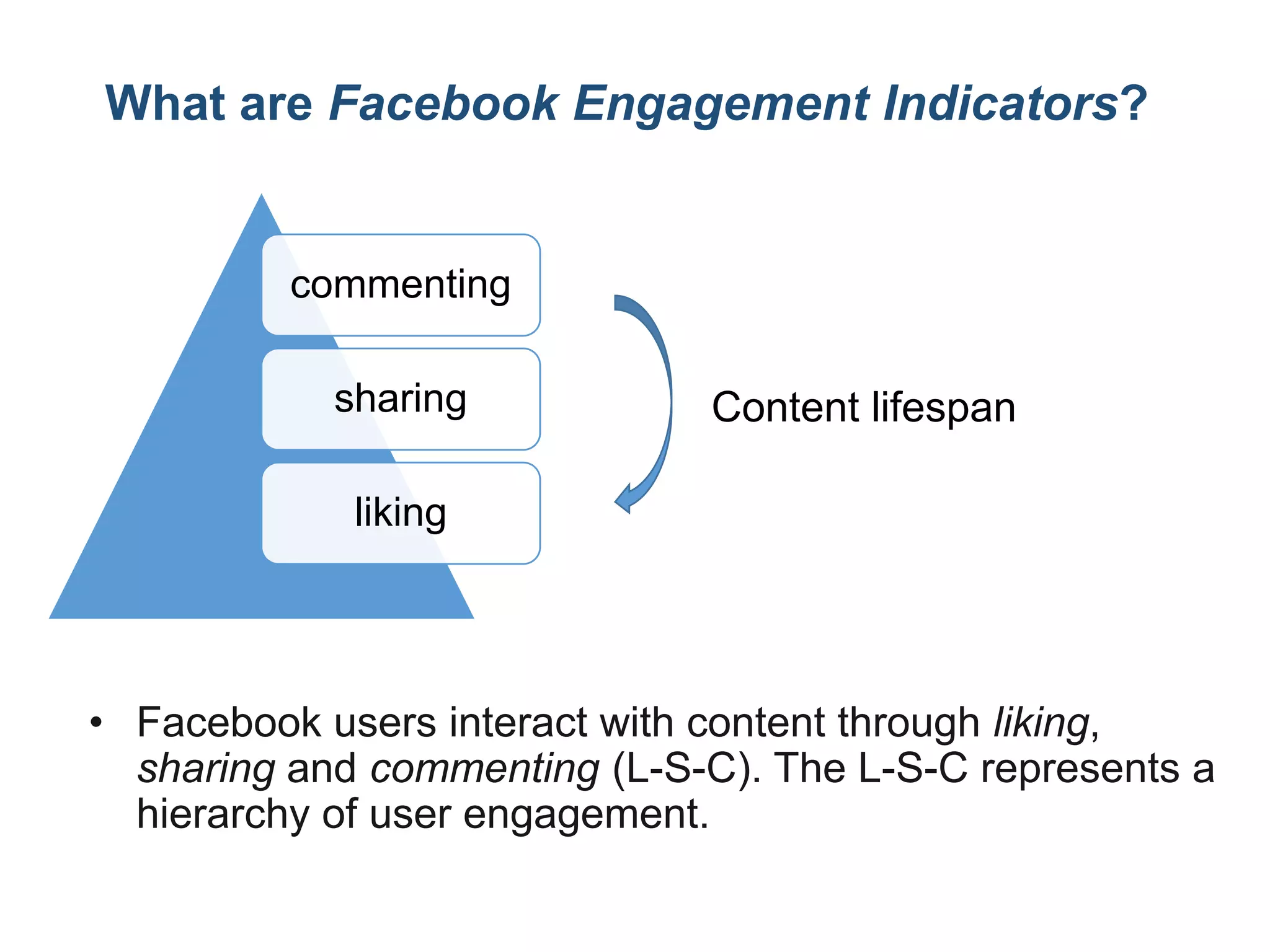
• Facebook users interact with content through liking,
sharing and commenting (L-S-C). The L-S-C represents a
hierarchy of user engagement.
commenting
sharing
liking
Content lifespan
Getting ready!
• In this tutorial, you will learn how to get:
• # of likes, shares and comments for all
posts on a Facebook page.
• Content lifecycle: the amount of time for
how long the content can drive user
attention and engagement.
Download the code
https://drive.google.com/file/d/0Bwwg6GLCW
_IPZlpVOHZ2amZJR2c/edit?usp=sharing
Getting ready!
• Please complete all steps in our previous
tutorial: Mining Facebook Fan Page – getting
posts and comments (http://curiositybits.com/python-
for-mining-the-social-web/python-tutorial-mining-
facebook-fan-page-getting-posts-and-comments/)
• From the previous tutorial, you have
generated a SQLite database that includes:
• Posts: all posts on a Facebook page
• Content, posted time, included URLs, mentioned
Facebook friends/pages, etc.
• Comments: comments to the posts
• Sender, content, posted time, etc.
Step 1: Checklist
• Do you know how to install necessary
Python packages? If not, please review pg.8
in http://curiositybits.com/python-for-mining-the-social-
web/python-tutorial-mining-twitter-user-profile/
• Do you know how to browse and edit SQLite
database through SQLite Database
Browser? If not, please review pg.10-14 in
http://curiositybits.com/python-for-mining-the-social-
web/python-tutorial-mining-twitter-user-profile/
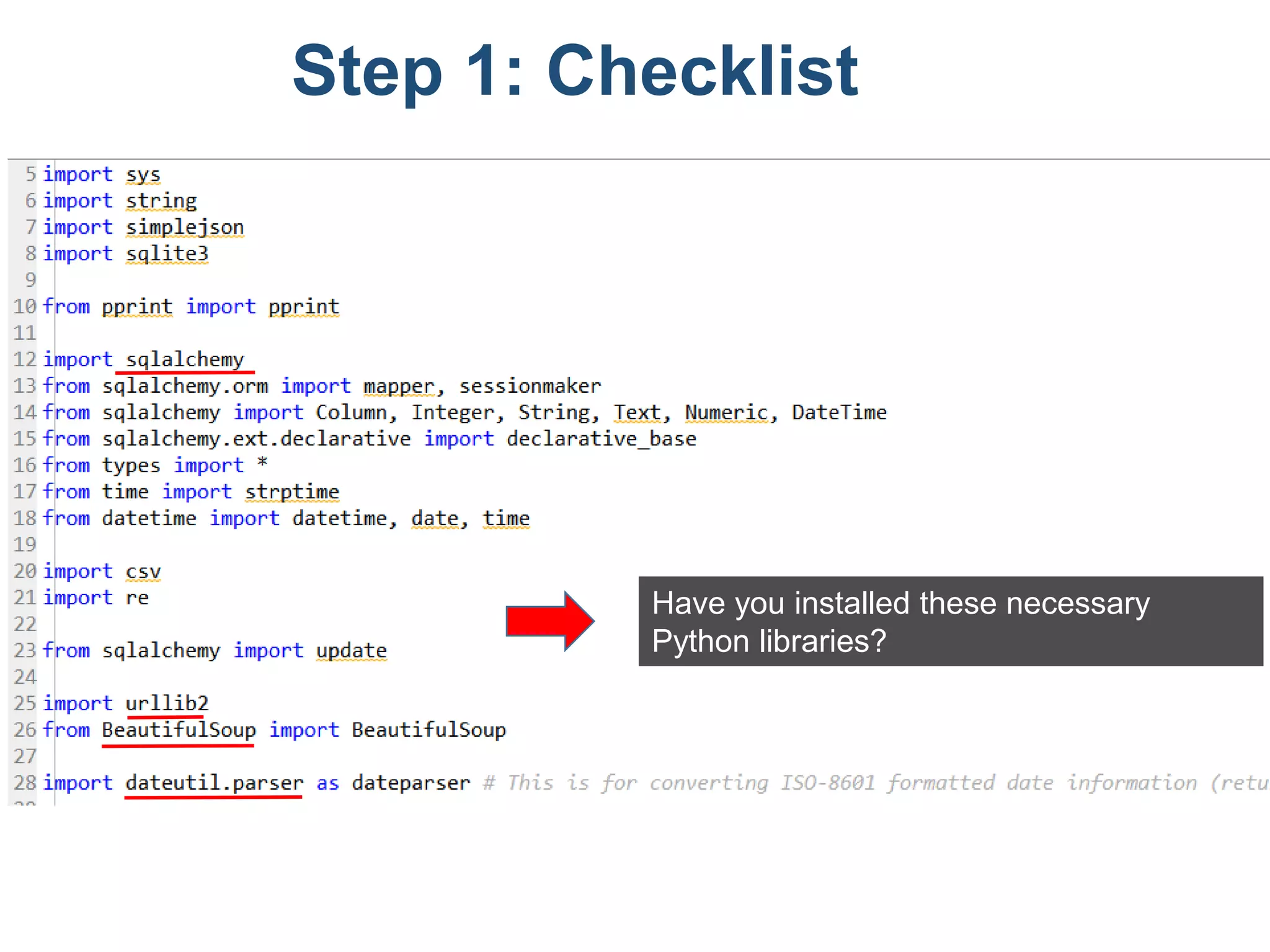
Have you installed these necessary
Python libraries?
Step 1: Checklist
Step 2: creating new columns
• In previous tutorial, we have created
various columns in the database. But in this
run, there are THREE columns defined in
the script, but are NOT existent in the
current database. We need to create them
manually through SQLite Database
Browser.
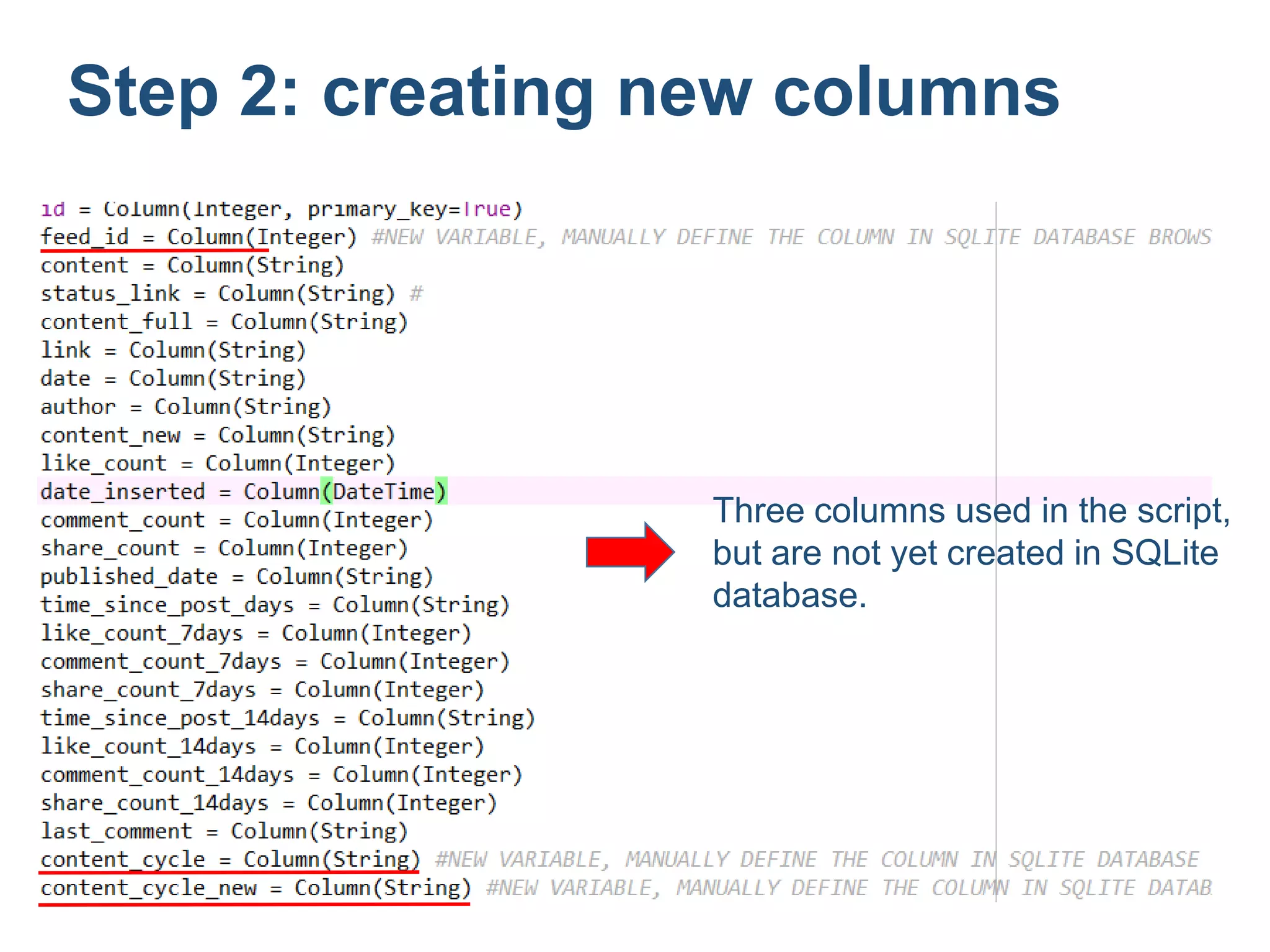
Three columns used in the script,
but are not yet created in SQLite
database.
Step 2: creating new columns
Now let’s create the three columns:
• In SQLite Database Browser, choose [Edit] – [Modify
Table] – [Edit] – [Add Field]
name type
Feed_id Integer
content_cycle String
content_cycle_new String
Step 2: creating new columns
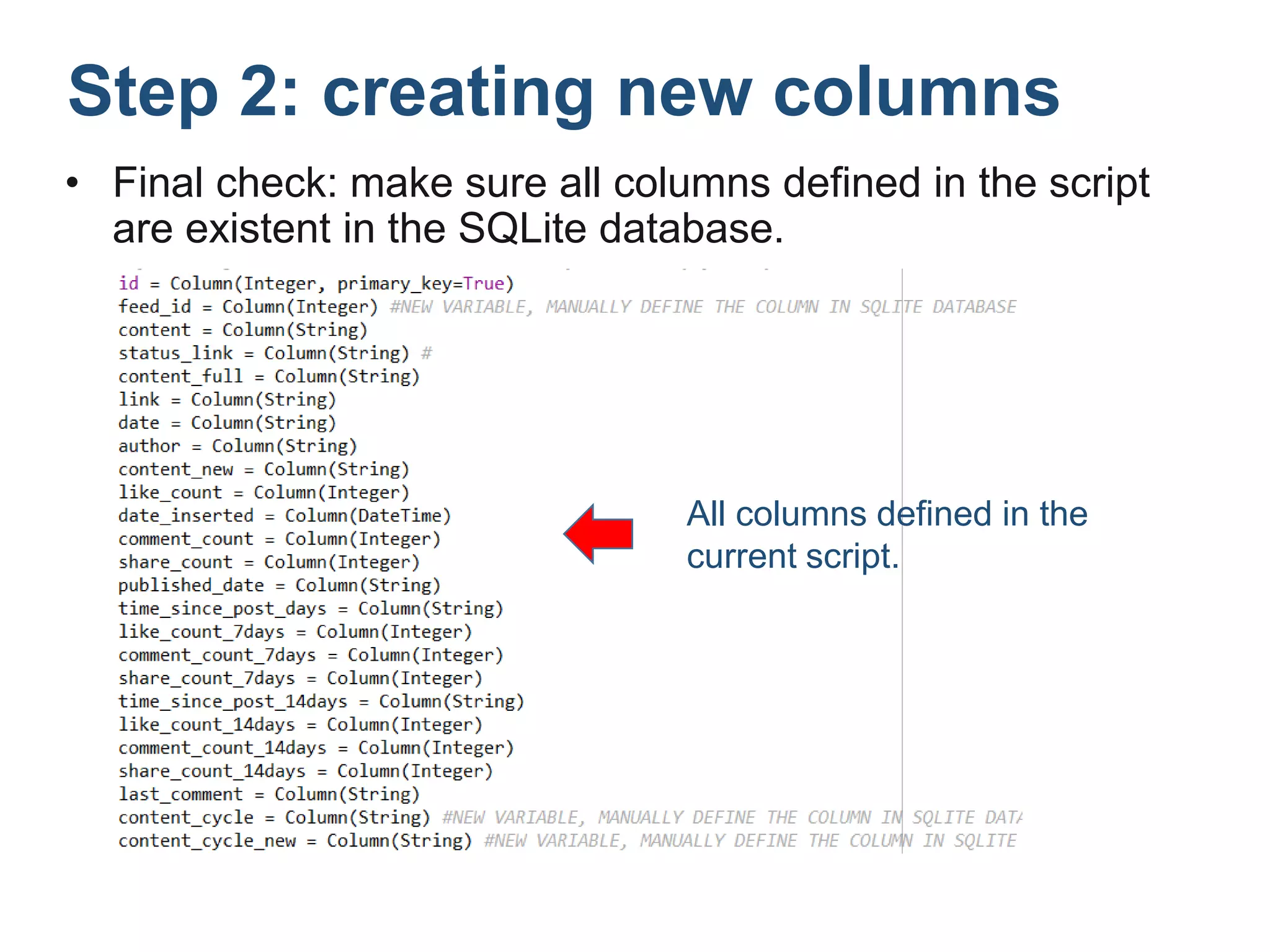
• Final check: make sure all columns defined in the script
are existent in the SQLite database.
All columns defined in the
current script.
Step 2: creating new columns
Step 3: Connecting to the existing DB
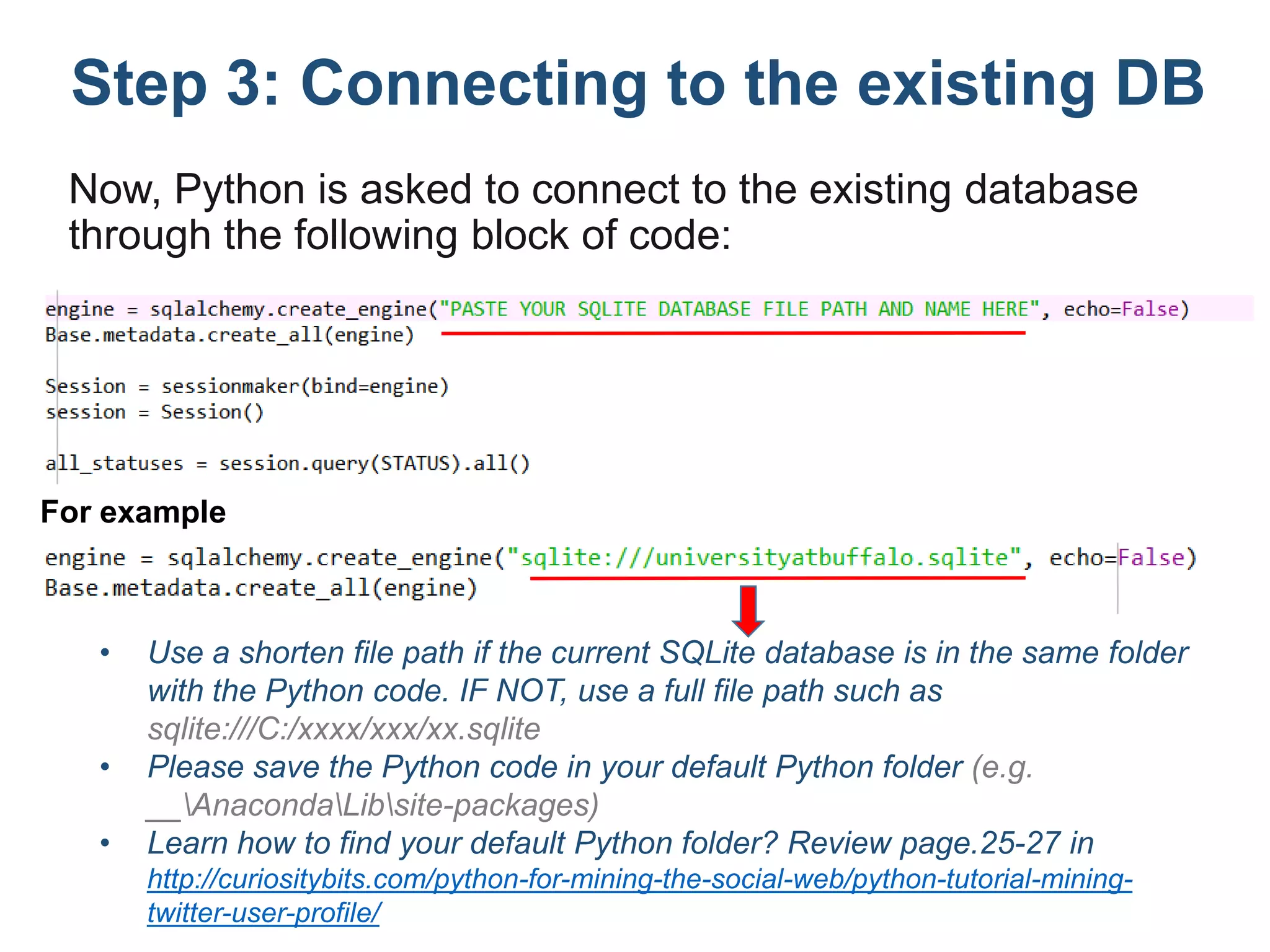
Now, Python is asked to connect to the existing database
through the following block of code:
• Use a shorten file path if the current SQLite database is in the same folder
with the Python code. IF NOT, use a full file path such as
sqlite:///C:/xxxx/xxx/xx.sqlite
• Please save the Python code in your default Python folder (e.g.
__AnacondaLibsite-packages)
• Learn how to find your default Python folder? Review page.25-27 in
http://curiositybits.com/python-for-mining-the-social-web/python-tutorial-mining-
twitter-user-profile/
For example
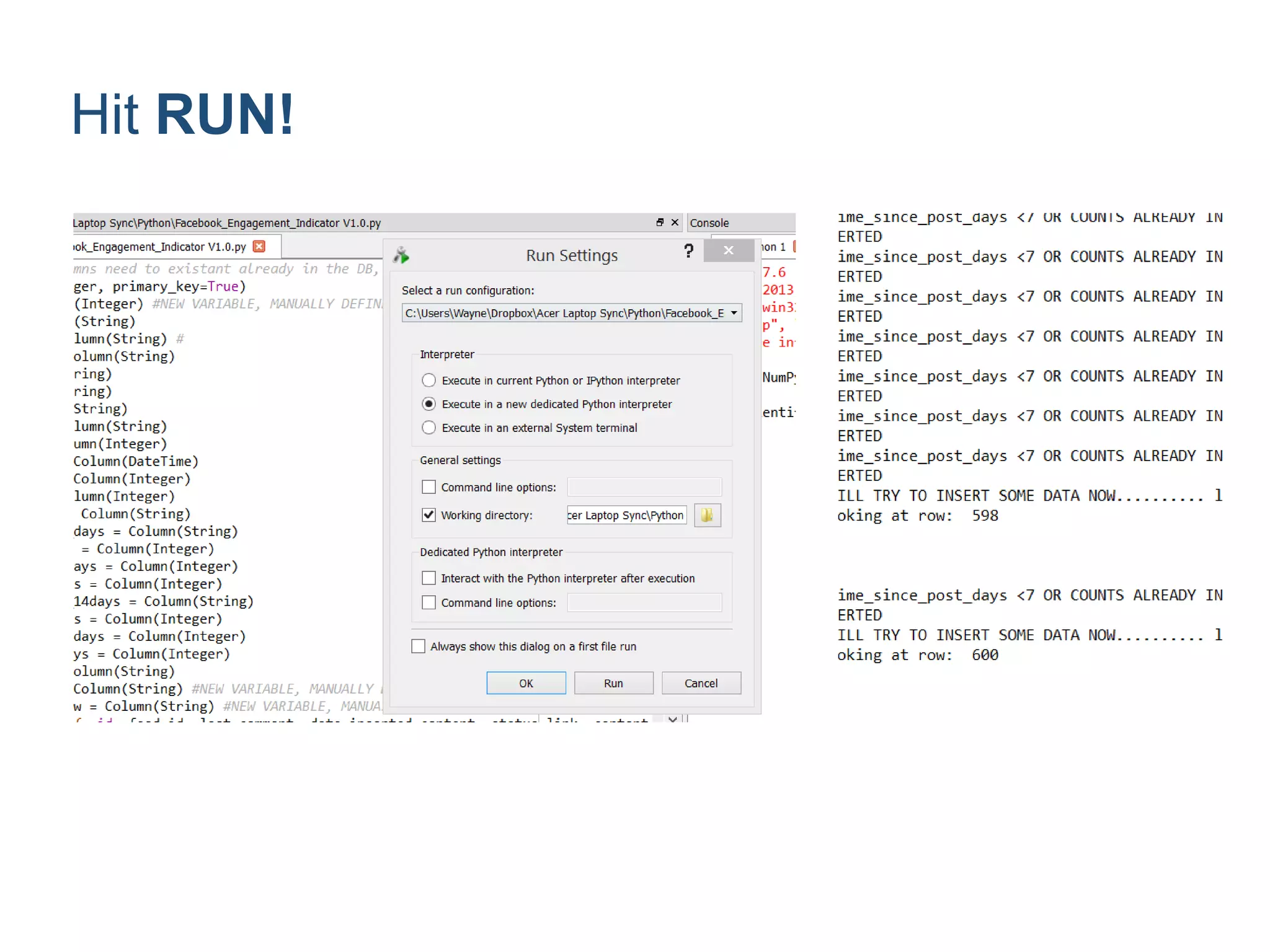
Hit RUN!
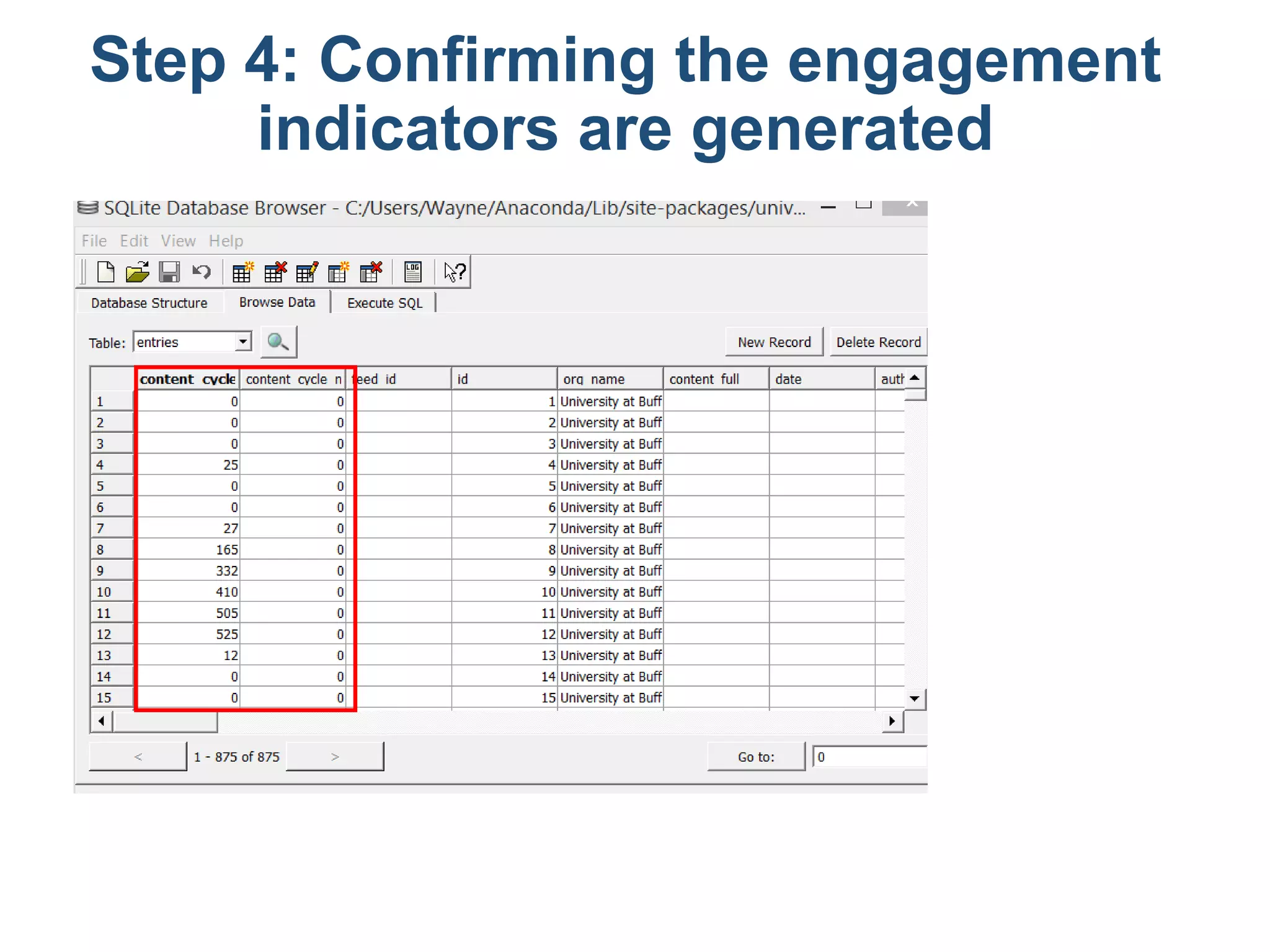
Step 4: Confirming the engagement
indicators are generated
Step 5: Learn how the engagement
indicators are calculated
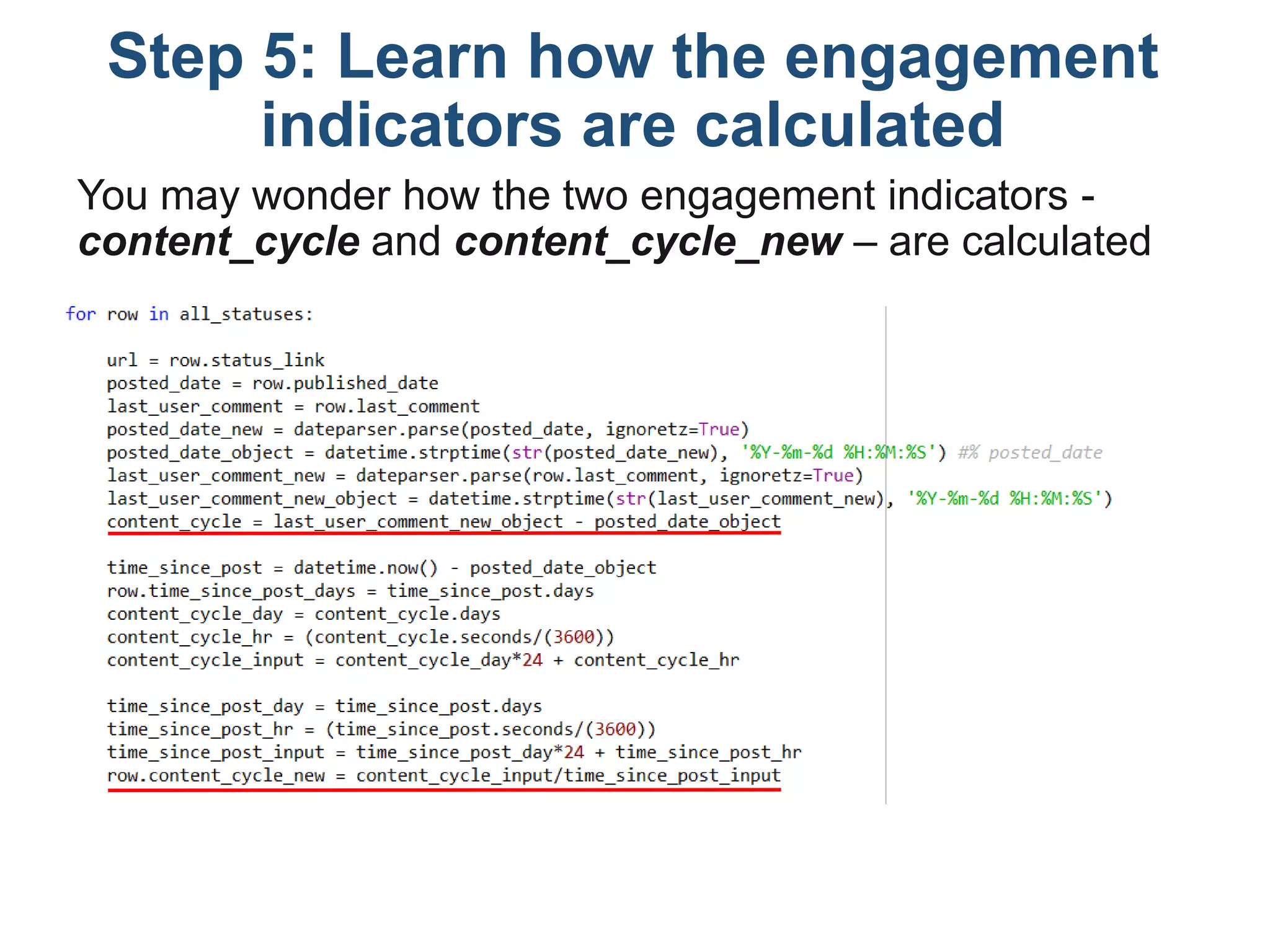
You may wonder how the two engagement indicators -
content_cycle and content_cycle_new – are calculated
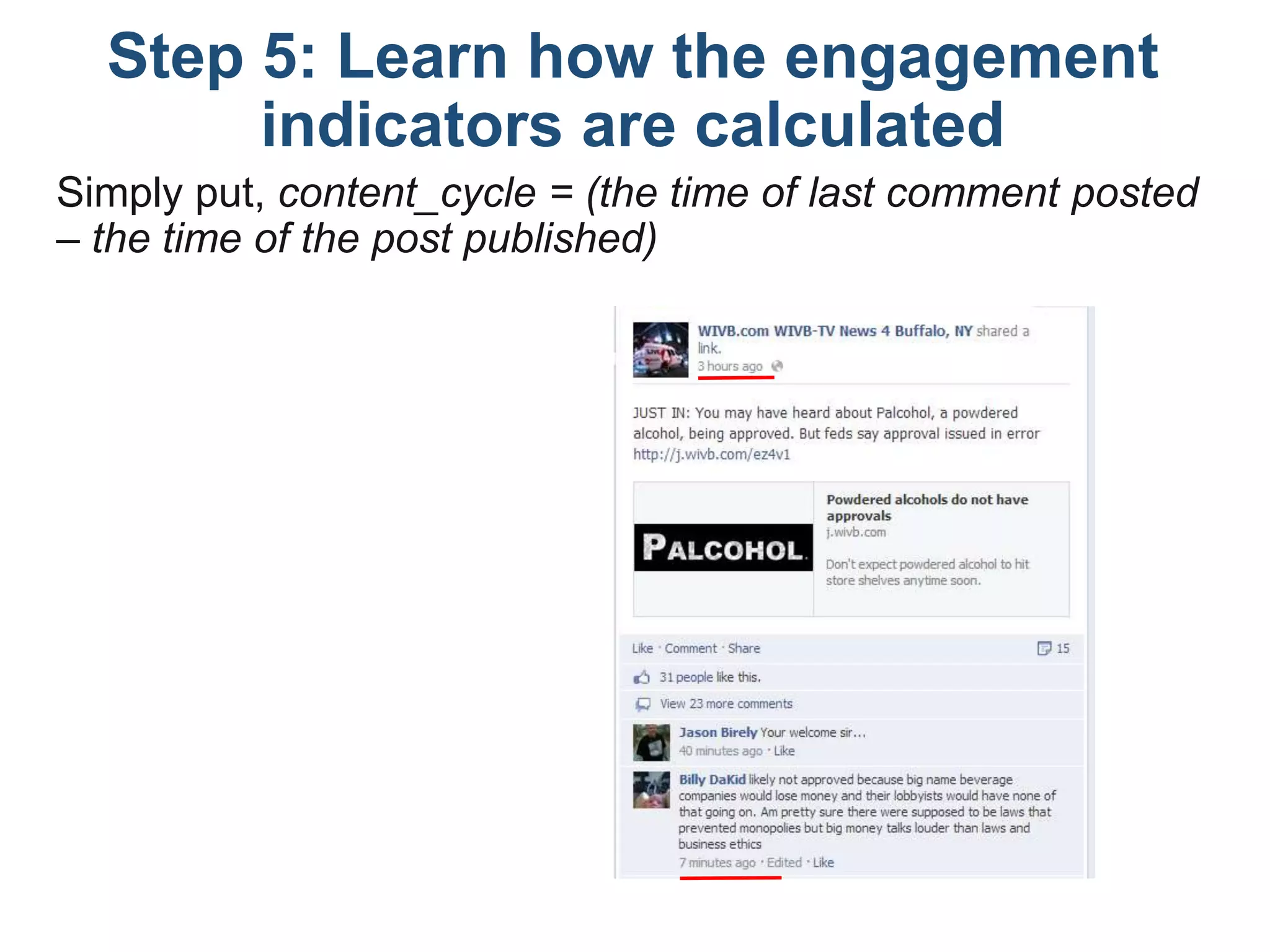
Simply put, content_cycle = (the time of last comment posted
– the time of the post published)
Step 5: Learn how the engagement
indicators are calculated
Content_cycle_new is the content lifecycle, after controlling
for the amount of time of the content being live.
Specifically,
content_cycle_new = (the time of last comment posted –
the time of the post published)/time_since_post
where, time_since_post = the time of the data mining – the
time of the post published
Step 5: Learn how the engagement
indicators are calculated

Five Steps to Get Facebook Engagement Indicators

  • 1.
    Five Steps toGet Facebook Engagement Indicators • Created by The Curiosity Bits Blog (curiositybits.com) • With the support from Dr. Gregory D. Saxton
  • 2.
    What are FacebookEngagement Indicators? • Facebook users interact with content through liking, sharing and commenting (L-S-C). The L-S-C represents a hierarchy of user engagement. commenting sharing liking Content lifespan
  • 3.
    Getting ready! • Inthis tutorial, you will learn how to get: • # of likes, shares and comments for all posts on a Facebook page. • Content lifecycle: the amount of time for how long the content can drive user attention and engagement. Download the code https://drive.google.com/file/d/0Bwwg6GLCW _IPZlpVOHZ2amZJR2c/edit?usp=sharing
  • 4.
    Getting ready! • Pleasecomplete all steps in our previous tutorial: Mining Facebook Fan Page – getting posts and comments (http://curiositybits.com/python- for-mining-the-social-web/python-tutorial-mining- facebook-fan-page-getting-posts-and-comments/) • From the previous tutorial, you have generated a SQLite database that includes: • Posts: all posts on a Facebook page • Content, posted time, included URLs, mentioned Facebook friends/pages, etc. • Comments: comments to the posts • Sender, content, posted time, etc.
  • 5.
    Step 1: Checklist •Do you know how to install necessary Python packages? If not, please review pg.8 in http://curiositybits.com/python-for-mining-the-social- web/python-tutorial-mining-twitter-user-profile/ • Do you know how to browse and edit SQLite database through SQLite Database Browser? If not, please review pg.10-14 in http://curiositybits.com/python-for-mining-the-social- web/python-tutorial-mining-twitter-user-profile/
  • 6.
    Have you installedthese necessary Python libraries? Step 1: Checklist
  • 7.
    Step 2: creatingnew columns • In previous tutorial, we have created various columns in the database. But in this run, there are THREE columns defined in the script, but are NOT existent in the current database. We need to create them manually through SQLite Database Browser.
  • 8.
    Three columns usedin the script, but are not yet created in SQLite database. Step 2: creating new columns
  • 9.
    Now let’s createthe three columns: • In SQLite Database Browser, choose [Edit] – [Modify Table] – [Edit] – [Add Field] name type Feed_id Integer content_cycle String content_cycle_new String Step 2: creating new columns
  • 10.
    • Final check:make sure all columns defined in the script are existent in the SQLite database. All columns defined in the current script. Step 2: creating new columns
  • 11.
    Step 3: Connectingto the existing DB Now, Python is asked to connect to the existing database through the following block of code: • Use a shorten file path if the current SQLite database is in the same folder with the Python code. IF NOT, use a full file path such as sqlite:///C:/xxxx/xxx/xx.sqlite • Please save the Python code in your default Python folder (e.g. __AnacondaLibsite-packages) • Learn how to find your default Python folder? Review page.25-27 in http://curiositybits.com/python-for-mining-the-social-web/python-tutorial-mining- twitter-user-profile/ For example
  • 12.
  • 13.
    Step 4: Confirmingthe engagement indicators are generated
  • 14.
    Step 5: Learnhow the engagement indicators are calculated You may wonder how the two engagement indicators - content_cycle and content_cycle_new – are calculated
  • 15.
    Simply put, content_cycle= (the time of last comment posted – the time of the post published) Step 5: Learn how the engagement indicators are calculated
  • 16.
    Content_cycle_new is thecontent lifecycle, after controlling for the amount of time of the content being live. Specifically, content_cycle_new = (the time of last comment posted – the time of the post published)/time_since_post where, time_since_post = the time of the data mining – the time of the post published Step 5: Learn how the engagement indicators are calculated