SMAC LAB, LSU

Sep 14, 2018
SMAC Talks
Collect Twitter Data Using Python
Instructor: Dr. Ke (Jenny) Jiang
Get Tweets Sent by a List of Users
Five Steps
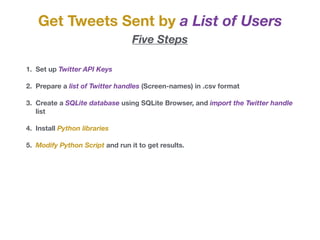
1. Set up Twitter API Keys
2. Prepare a list of Twitter handles (Screen-names) in .csv format
3. Create a SQLite database using SQLite Browser, and import the Twitter handle
list
4. Install Python libraries
5. Modify Python Script and run it to get results.
Get Tweets Sent by a List of Users
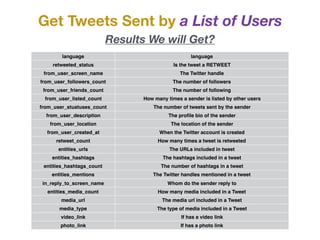
Results We will Get?
language language
retweeted_status Is the tweet a RETWEET
from_user_screen_name The Twitter handle
from_user_followers_count The number of followers
from_user_friends_count The number of following
from_user_listed_count How many times a sender is listed by other users
from_user_stuatuses_count The number of tweets sent by the sender
from_user_description The profile bio of the sender
from_user_location The location of the sender
from_user_created_at When the Twitter account is created
retweet_count How many times a tweet is retweeted
entities_urls The URLs included in tweet
entities_hashtags The hashtags included in a tweet
entities_hashtags_count The number of hashtags in a tweet
entities_mentions The Twitter handles mentioned in a tweet
in_reply_to_screen_name Whom do the sender reply to
entities_media_count How many media included in a Tweet
media_url The media url included in a Tweet
media_type The type of media included in a Tweet
video_link If has a video link
photo_link If has a photo link
Get Tweets Sent by a List of Users
Step One: Set up Twitter API Keys
Go to apps.twitter.com
Get Tweets Sent by a List of Users
Step One: Set up Twitter API Keys
Click
Get Tweets Sent by a List of Users
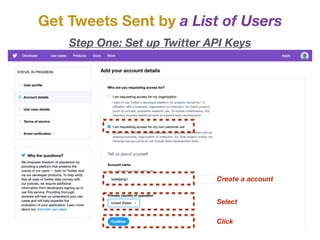
Step One: Set up Twitter API Keys
Create a account
Select
Click
Get Tweets Sent by a List of Users
Step One: Set up Twitter API Keys
Please Describe using
at least 300 character
Select No
Click Continue
Get Tweets Sent by a List of Users
Step One: Set up Twitter API Keys
Check the box
Submit
Get Tweets Sent by a List of Users
Step One: Set up Twitter API Keys
Go to your mailbox…
Get Tweets Sent by a List of Users
Step One: Set up Twitter API Keys
Click
Get Tweets Sent by a List of Users
Step One: Set up Twitter API Keys
Click
Get Tweets Sent by a List of Users
Step One: Set up Twitter API Keys
Click
Get Tweets Sent by a List of Users
Step One: Set up Twitter API Keys
Create your app name
Description
URL: ANY
Check box
URL: same as above
Describe how the app
will be used
Click create
Get Tweets Sent by a List of Users
Step One: Set up Twitter API Keys
Click create
Get Tweets Sent by a List of Users
Step One: Set up Twitter API Keys
Click
Get Tweets Sent by a List of Users
Step One: Set up Twitter API Keys
Click Create
Get Tweets Sent by a List of Users
Step One: Set up Twitter API Keys
API key
API secret key
token
token secret
Get Tweets Sent by a List of Users
Step Two: Prepare a Twitter handle List
* The first column lists sequential numbers
beginning with 1
Create a list of Twitter handles whose tweets we are
interested in collecting. You can create the list in
Excel and save it as csv format. The list should have
three columns (in accordance to the configuration in
the Python script).

* The second column lists Twitter handles
* The third column, you could enter 1 all
throughout, you also can leave it blank.
Go to http://sqlitebrowser.org and download SQLite
Database Browser. It allows you to view and edit
SQLite databases.

Get Tweets Sent by a List of Users
Step Three: Create a SQLite database
mac
Windows
Get Tweets Sent by a List of Users
Step Three: Create a SQLite database
mac: go to application, and open DB Browser for SQLite
Get Tweets Sent by a List of Users
Step Three: Create a SQLite database
Click: File - New Database
Get Tweets Sent by a List of Users
Step Three: Create a SQLite database
*Name database as “twitter database.sqlite”
*Add the extension .sqlite when typing filename
Get Tweets Sent by a List of Users
Step Three: Create a SQLite database
Import the list of Twitter handle into twitter database.sqlite
Select File - Import - Table from CSV file
Get Tweets Sent by a List of Users
Step Three: Create a SQLite database
Select “Sample twitter handles” - Click “Open”
Get Tweets Sent by a List of Users
Step Three: Create a SQLite database
Name the Table as “accounts” - Click Ok
Get Tweets Sent by a List of Users
Step Three: Create a SQLite database
Click “Modify Table”
Get Tweets Sent by a List of Users
Step Three: Create a SQLite database
Change the three field names as
1. rowid - type - integer
2. screen_name - type - text (string)
3. user_type - type - text (string)
Then, Click “Ok”
Get Tweets Sent by a List of Users
Step Three: Create a SQLite database
The “accounts” table has been created
and defined in the Database
Get Tweets Sent by a List of Users
Step Three: Create a SQLite database
Click “Browse Data”, you will find the
“sample twitter handles” has been
imported into the Database
Mac: go to Application, open Utilities, then open Terminal.
Once you are on Terminal, type in the command line pip install,
followed by the name of Python library. 

Windows: go to Start menu and type in CMD and run the CMD
file as administrator. Once you are on CMD, type in the
command line pip install, followed by the name of Python library. 

Get Tweets Sent by a List of Users
Step Four: Install Python libraries
e.g. to install Twython, you need to type pip install twython, and press
enter
Install the following libraries: 

1. pip install simplejson
2. pip install pysqlite3
3. pip install sqlalchemy
4. pip install twython
Get Tweets Sent by a List of Users
Step Four: Install Python libraries
Get Tweets Sent by a List of Users
Step Five: Modify Python Script
On Spyder, please open “collecting tweets sent by as list of users” .
Locate to line 20-23, ENTER YOUR API KEYS
Get Tweets Sent by a List of Users
Step Five: Modify Python Script
Go to line 385, Please make sure your Python script file and the created
SQLite database are in the same folder, just paste your database name
(twitter database.sqlite) here. 

Otherwise, you have to match the file path and file name to the SQLite
database you’ve created. 

* Make sure your Python script file is in the Default Python folder.
How to find default folder?
Go to Console, type:
import os

os.getcwd()
Get Tweets Sent by a List of Users
Step Five: Modify Python Script
Run the Whole File
Get Tweets Sent by a List of Users
Step Five: Modify Python Script
Go to SQL, you will find the data
has been saved in the twitter database
Get Tweets Sent by a List of Users
Step Five: Modify Python Script
Click File - Export - Tables to CSV file…
Get Tweets Sent by a List of Users
Step Five: Modify Python Script
Select Table Tweets, Press OK,
Then, tweets.csv will be stored in your default folder
Get Tweets Sent by a List of Users
Step Five: Modify Python Script
If the Python script is running successfully, it should give you these
Get Tweets Sent by a List of Users
Twitter API Rate Limit
A Twitter API allows you to get around 3,200 tweets from a specific Twitter handle
Rate Limit
Generally speaking, Twitter API allows 15 requests per user, and 15 minutes per request.

More information: https://developer.twitter.com/en/docs/basics/rate-limits.html

Two ways to get around the restriction:
1. wait for 15 minutes for another run,

2. create multiple Twitter apps and get multiple API keys.
When you start a new run:
1. go to line 395,

2. Change 0 to index of twitter handle you want to start with.
Question: In the first run, you’ve covered
user 0 to user 100, and run into rate limit.
What number you will put on line 395?
Search and Store Tweets by Keywords
If Several Libraries have not been installed, you will get error.
Then you need to “pip install”…
Step One: Install Packages
On Spyder, please open “Search and Store Tweet by keywords.py” .
Run line 1-34
Search and Store Tweets by Keywords
Go to line 36-38, change the terms to your own,
Step Two: Enter Your Search Term
You can enter multiple search terms, separated by comas.
Please notice that the last search term ends by a coma.
Search and Store Tweets by Keywords
Go to line 41-44, ENTER YOUR API KEYS
Step Three: Enter API Keys
Search and Store Tweets by Keywords
Go to line 176,
Step Four: Change the Parameter
result_type defined by the Twitter API Documents. Now we set it to recent,
we can also set it to mixed or popular.
* recent: return only the most recent results in the response

* mixed: include both popular and real time results in the response

* popular: return only the most popular results in the response
If you want to limit the search to Spanish, you can add lang = ‘es’
If you want to limit the search to Chinese, you can add lang = ‘zh’
If you want to limit the search to Korean, you can add lang = ‘ko’
Search and Store Tweets by Keywords
Go to line 376,
Step Five: Set Up SQLite Database
We have to type in a file name, and then the database will be saved in the
same folder with the Python script.
Search and Store Tweets by Keywords
Run the Scripts
Run the Whole File
Search and Store Tweets by Keywords
Getting All the Tweets?
If you run the script daily or twice a day, you should be good enough to
cover all tweets generated on that day, and tweets a few days old.
But, historical tweets are EXPENSIVE!

Collect twitter data using python

  • 1.
    SMAC LAB, LSU Sep14, 2018 SMAC Talks Collect Twitter Data Using Python Instructor: Dr. Ke (Jenny) Jiang
  • 2.
    Get Tweets Sentby a List of Users Five Steps 1. Set up Twitter API Keys 2. Prepare a list of Twitter handles (Screen-names) in .csv format 3. Create a SQLite database using SQLite Browser, and import the Twitter handle list 4. Install Python libraries 5. Modify Python Script and run it to get results.
  • 3.
    Get Tweets Sentby a List of Users Results We will Get? language language retweeted_status Is the tweet a RETWEET from_user_screen_name The Twitter handle from_user_followers_count The number of followers from_user_friends_count The number of following from_user_listed_count How many times a sender is listed by other users from_user_stuatuses_count The number of tweets sent by the sender from_user_description The profile bio of the sender from_user_location The location of the sender from_user_created_at When the Twitter account is created retweet_count How many times a tweet is retweeted entities_urls The URLs included in tweet entities_hashtags The hashtags included in a tweet entities_hashtags_count The number of hashtags in a tweet entities_mentions The Twitter handles mentioned in a tweet in_reply_to_screen_name Whom do the sender reply to entities_media_count How many media included in a Tweet media_url The media url included in a Tweet media_type The type of media included in a Tweet video_link If has a video link photo_link If has a photo link
  • 4.
    Get Tweets Sentby a List of Users Step One: Set up Twitter API Keys Go to apps.twitter.com
  • 5.
    Get Tweets Sentby a List of Users Step One: Set up Twitter API Keys Click
  • 6.
    Get Tweets Sentby a List of Users Step One: Set up Twitter API Keys Create a account Select Click
  • 7.
    Get Tweets Sentby a List of Users Step One: Set up Twitter API Keys Please Describe using at least 300 character Select No Click Continue
  • 8.
    Get Tweets Sentby a List of Users Step One: Set up Twitter API Keys Check the box Submit
  • 9.
    Get Tweets Sentby a List of Users Step One: Set up Twitter API Keys Go to your mailbox…
  • 10.
    Get Tweets Sentby a List of Users Step One: Set up Twitter API Keys Click
  • 11.
    Get Tweets Sentby a List of Users Step One: Set up Twitter API Keys Click
  • 12.
    Get Tweets Sentby a List of Users Step One: Set up Twitter API Keys Click
  • 13.
    Get Tweets Sentby a List of Users Step One: Set up Twitter API Keys Create your app name Description URL: ANY Check box URL: same as above Describe how the app will be used Click create
  • 14.
    Get Tweets Sentby a List of Users Step One: Set up Twitter API Keys Click create
  • 15.
    Get Tweets Sentby a List of Users Step One: Set up Twitter API Keys Click
  • 16.
    Get Tweets Sentby a List of Users Step One: Set up Twitter API Keys Click Create
  • 17.
    Get Tweets Sentby a List of Users Step One: Set up Twitter API Keys API key API secret key token token secret
  • 18.
    Get Tweets Sentby a List of Users Step Two: Prepare a Twitter handle List * The first column lists sequential numbers beginning with 1 Create a list of Twitter handles whose tweets we are interested in collecting. You can create the list in Excel and save it as csv format. The list should have three columns (in accordance to the configuration in the Python script). * The second column lists Twitter handles * The third column, you could enter 1 all throughout, you also can leave it blank.
  • 19.
    Go to http://sqlitebrowser.organd download SQLite Database Browser. It allows you to view and edit SQLite databases. Get Tweets Sent by a List of Users Step Three: Create a SQLite database mac Windows
  • 20.
    Get Tweets Sentby a List of Users Step Three: Create a SQLite database mac: go to application, and open DB Browser for SQLite
  • 21.
    Get Tweets Sentby a List of Users Step Three: Create a SQLite database Click: File - New Database
  • 22.
    Get Tweets Sentby a List of Users Step Three: Create a SQLite database *Name database as “twitter database.sqlite” *Add the extension .sqlite when typing filename
  • 23.
    Get Tweets Sentby a List of Users Step Three: Create a SQLite database Import the list of Twitter handle into twitter database.sqlite Select File - Import - Table from CSV file
  • 24.
    Get Tweets Sentby a List of Users Step Three: Create a SQLite database Select “Sample twitter handles” - Click “Open”
  • 25.
    Get Tweets Sentby a List of Users Step Three: Create a SQLite database Name the Table as “accounts” - Click Ok
  • 26.
    Get Tweets Sentby a List of Users Step Three: Create a SQLite database Click “Modify Table”
  • 27.
    Get Tweets Sentby a List of Users Step Three: Create a SQLite database Change the three field names as 1. rowid - type - integer 2. screen_name - type - text (string) 3. user_type - type - text (string) Then, Click “Ok”
  • 28.
    Get Tweets Sentby a List of Users Step Three: Create a SQLite database The “accounts” table has been created and defined in the Database
  • 29.
    Get Tweets Sentby a List of Users Step Three: Create a SQLite database Click “Browse Data”, you will find the “sample twitter handles” has been imported into the Database
  • 30.
    Mac: go toApplication, open Utilities, then open Terminal. Once you are on Terminal, type in the command line pip install, followed by the name of Python library. Windows: go to Start menu and type in CMD and run the CMD file as administrator. Once you are on CMD, type in the command line pip install, followed by the name of Python library. Get Tweets Sent by a List of Users Step Four: Install Python libraries e.g. to install Twython, you need to type pip install twython, and press enter
  • 31.
    Install the followinglibraries: 1. pip install simplejson 2. pip install pysqlite3 3. pip install sqlalchemy 4. pip install twython Get Tweets Sent by a List of Users Step Four: Install Python libraries
  • 32.
    Get Tweets Sentby a List of Users Step Five: Modify Python Script On Spyder, please open “collecting tweets sent by as list of users” . Locate to line 20-23, ENTER YOUR API KEYS
  • 33.
    Get Tweets Sentby a List of Users Step Five: Modify Python Script Go to line 385, Please make sure your Python script file and the created SQLite database are in the same folder, just paste your database name (twitter database.sqlite) here. Otherwise, you have to match the file path and file name to the SQLite database you’ve created. * Make sure your Python script file is in the Default Python folder. How to find default folder? Go to Console, type: import os os.getcwd()
  • 34.
    Get Tweets Sentby a List of Users Step Five: Modify Python Script Run the Whole File
  • 35.
    Get Tweets Sentby a List of Users Step Five: Modify Python Script Go to SQL, you will find the data has been saved in the twitter database
  • 36.
    Get Tweets Sentby a List of Users Step Five: Modify Python Script Click File - Export - Tables to CSV file…
  • 37.
    Get Tweets Sentby a List of Users Step Five: Modify Python Script Select Table Tweets, Press OK, Then, tweets.csv will be stored in your default folder
  • 38.
    Get Tweets Sentby a List of Users Step Five: Modify Python Script If the Python script is running successfully, it should give you these
  • 39.
    Get Tweets Sentby a List of Users Twitter API Rate Limit A Twitter API allows you to get around 3,200 tweets from a specific Twitter handle Rate Limit Generally speaking, Twitter API allows 15 requests per user, and 15 minutes per request. More information: https://developer.twitter.com/en/docs/basics/rate-limits.html Two ways to get around the restriction: 1. wait for 15 minutes for another run, 2. create multiple Twitter apps and get multiple API keys. When you start a new run: 1. go to line 395, 2. Change 0 to index of twitter handle you want to start with. Question: In the first run, you’ve covered user 0 to user 100, and run into rate limit. What number you will put on line 395?
  • 40.
    Search and StoreTweets by Keywords If Several Libraries have not been installed, you will get error. Then you need to “pip install”… Step One: Install Packages On Spyder, please open “Search and Store Tweet by keywords.py” . Run line 1-34
  • 41.
    Search and StoreTweets by Keywords Go to line 36-38, change the terms to your own, Step Two: Enter Your Search Term You can enter multiple search terms, separated by comas. Please notice that the last search term ends by a coma.
  • 42.
    Search and StoreTweets by Keywords Go to line 41-44, ENTER YOUR API KEYS Step Three: Enter API Keys
  • 43.
    Search and StoreTweets by Keywords Go to line 176, Step Four: Change the Parameter result_type defined by the Twitter API Documents. Now we set it to recent, we can also set it to mixed or popular. * recent: return only the most recent results in the response * mixed: include both popular and real time results in the response * popular: return only the most popular results in the response If you want to limit the search to Spanish, you can add lang = ‘es’ If you want to limit the search to Chinese, you can add lang = ‘zh’ If you want to limit the search to Korean, you can add lang = ‘ko’
  • 44.
    Search and StoreTweets by Keywords Go to line 376, Step Five: Set Up SQLite Database We have to type in a file name, and then the database will be saved in the same folder with the Python script.
  • 45.
    Search and StoreTweets by Keywords Run the Scripts Run the Whole File
  • 46.
    Search and StoreTweets by Keywords Getting All the Tweets? If you run the script daily or twice a day, you should be good enough to cover all tweets generated on that day, and tweets a few days old. But, historical tweets are EXPENSIVE!