26th of February 2015
Cheatsheet for
by Alexis von Glasow
1
26th of February 2015
Table of contents
● Why this presentations could be useful
● Differents vim modes
● Commands lists and usage
● Plugins (or how to customize your vim)
● Book (to know more about vim)
● NeoVim (new vim ?)
2
26th of February 2015
Why
3
26th of February 2015
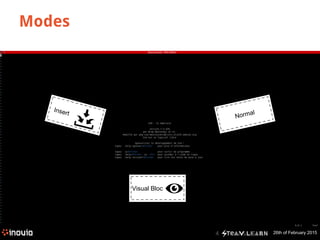
Modes
4
NormalInsert
Visual Bloc
26th of February 2015
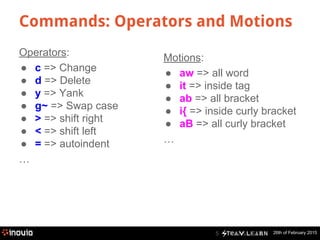
Commands: Operators and Motions
5
Operators:
● c => Change
● d => Delete
● y => Yank
● g~ => Swap case
● > => shift right
● < => shift left
● = => autoindent
…
Motions:
● aw => all word
● it => inside tag
● ab => all bracket
● i{ => inside curly bracket
● aB => all curly bracket
…
26th of February 2015
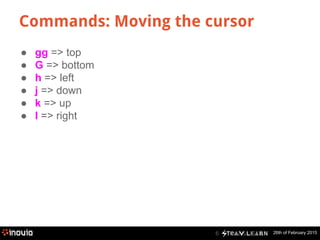
Commands: Moving the cursor
6
● gg => top
● G => bottom
● h => left
● j => down
● k => up
● l => right
26th of February 20157
● w => forward by word
● W => forward by word (only space)
● b => backward by word
● B => backward by word (only space)
● f => found a char in line
Commands: Moving the cursor
26th of February 20158
● dd => delete a line
● daw => delete all word (take space after word)
● dw => delete word from cursor
● dW => delete word from cursor (including ‘,’, ‘/’ => url)
● diw => delete in word (only letters)
Commands: Deletion
26th of February 20159
● yy => yank a line
● p => paste
● . => repeat
● u => undo change
● <C-r> => redo change
Commands: Modifications
26th of February 2015
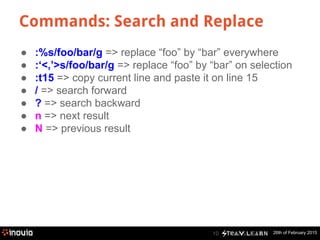
Commands: Search and Replace
10
● :%s/foo/bar/g => replace “foo” by “bar” everywhere
● :‘<,’>s/foo/bar/g => replace “foo” by “bar” on selection
● :t15 => copy current line and paste it on line 15
● / => search forward
● ? => search backward
● n => next result
● N => previous result
26th of February 2015
Commands: Macros
11
● qq => start to save macro in register q
● q => stop saving macro
● @q => execute macro saved in register q
● @@ => execute latest macro run
26th of February 2015
Commands: Mode Visual Bloc
12
● I => insert before
● A => insert after
● u => lowercase
● U => uppercase
26th of February 201513
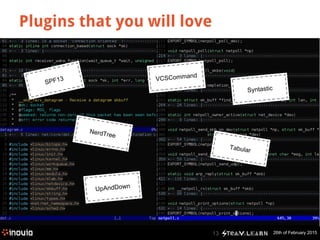
Plugins that you will love
SPF13 VCSCommand
Tabular
Syntastic
UpAndDown
NerdTree
26th of February 201514
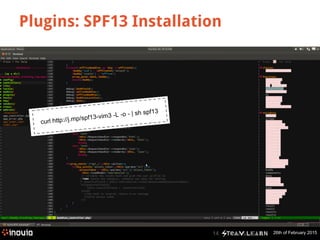
Plugins: SPF13 Installation
curl http://j.mp/spf13-vim3 -L -o - | sh spf13
26th of February 201515
Plugins: Installation
https://github.com/tpope/vim-pathogen
cd ~/.vim/bundle && 
git clone https://github.com/scrooloose/syntastic.git
26th of February 201516
Plugins
http://vimawesome.com/
http://www.vim.org/
26th of February 201517
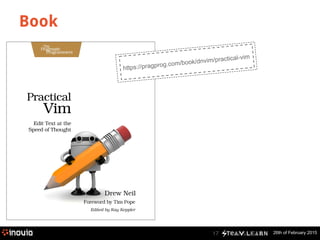
Book
https://pragprog.com/book/dnvim/practical-vim
26th of February 201518
NeoVim
http://neovim.org/
26th of February 201519
To remember
● Differents mode for different use
● Operators and motions are complementary
● Combine Operators and Motions to create commands
26th of February 2015
Questions ?
For online questions, please leave a comment on the article.
20
How to open more than one file
at the same time?
How can I remember all of that?
Is tab exists with Vim?
26th of February 201521
26th of February 2015
Sources
● <F1>
● Practical Vim
● https://github.com/vonglasow/Dotfiles/tree/master/vim
● http://getpostdelete.com/LinuxKeyboardShortcuts.html#vim
Credits photos:
● Vim
● Jao Marcelo Ribeiro
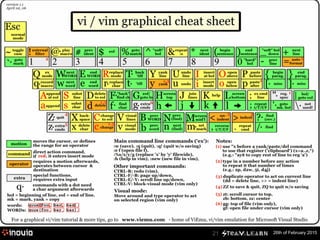
● http://www.viemu.com/a_vi_vim_graphical_cheat_sheet_tutorial.html
22
26th of February 2015
Join the community !
(in Paris)
Social networks :
● Follow us on Twitter : https://twitter.com/steamlearn
● Like us on Facebook : https://www.facebook.com/steamlearn
SteamLearn is an Inovia initiative : inovia.fr
You wish to be in the audience ? Join the meetup group!
http://www.meetup.com/Steam-Learn/
23

Steam Learn: Cheat sheet for Vim

  • 1.
    26th of February2015 Cheatsheet for by Alexis von Glasow 1
  • 2.
    26th of February2015 Table of contents ● Why this presentations could be useful ● Differents vim modes ● Commands lists and usage ● Plugins (or how to customize your vim) ● Book (to know more about vim) ● NeoVim (new vim ?) 2
  • 3.
    26th of February2015 Why 3
  • 4.
    26th of February2015 Modes 4 NormalInsert Visual Bloc
  • 5.
    26th of February2015 Commands: Operators and Motions 5 Operators: ● c => Change ● d => Delete ● y => Yank ● g~ => Swap case ● > => shift right ● < => shift left ● = => autoindent … Motions: ● aw => all word ● it => inside tag ● ab => all bracket ● i{ => inside curly bracket ● aB => all curly bracket …
  • 6.
    26th of February2015 Commands: Moving the cursor 6 ● gg => top ● G => bottom ● h => left ● j => down ● k => up ● l => right
  • 7.
    26th of February20157 ● w => forward by word ● W => forward by word (only space) ● b => backward by word ● B => backward by word (only space) ● f => found a char in line Commands: Moving the cursor
  • 8.
    26th of February20158 ● dd => delete a line ● daw => delete all word (take space after word) ● dw => delete word from cursor ● dW => delete word from cursor (including ‘,’, ‘/’ => url) ● diw => delete in word (only letters) Commands: Deletion
  • 9.
    26th of February20159 ● yy => yank a line ● p => paste ● . => repeat ● u => undo change ● <C-r> => redo change Commands: Modifications
  • 10.
    26th of February2015 Commands: Search and Replace 10 ● :%s/foo/bar/g => replace “foo” by “bar” everywhere ● :‘<,’>s/foo/bar/g => replace “foo” by “bar” on selection ● :t15 => copy current line and paste it on line 15 ● / => search forward ● ? => search backward ● n => next result ● N => previous result
  • 11.
    26th of February2015 Commands: Macros 11 ● qq => start to save macro in register q ● q => stop saving macro ● @q => execute macro saved in register q ● @@ => execute latest macro run
  • 12.
    26th of February2015 Commands: Mode Visual Bloc 12 ● I => insert before ● A => insert after ● u => lowercase ● U => uppercase
  • 13.
    26th of February201513 Plugins that you will love SPF13 VCSCommand Tabular Syntastic UpAndDown NerdTree
  • 14.
    26th of February201514 Plugins: SPF13 Installation curl http://j.mp/spf13-vim3 -L -o - | sh spf13
  • 15.
    26th of February201515 Plugins: Installation https://github.com/tpope/vim-pathogen cd ~/.vim/bundle && git clone https://github.com/scrooloose/syntastic.git
  • 16.
    26th of February201516 Plugins http://vimawesome.com/ http://www.vim.org/
  • 17.
    26th of February201517 Book https://pragprog.com/book/dnvim/practical-vim
  • 18.
    26th of February201518 NeoVim http://neovim.org/
  • 19.
    26th of February201519 To remember ● Differents mode for different use ● Operators and motions are complementary ● Combine Operators and Motions to create commands
  • 20.
    26th of February2015 Questions ? For online questions, please leave a comment on the article. 20 How to open more than one file at the same time? How can I remember all of that? Is tab exists with Vim?
  • 21.
  • 22.
    26th of February2015 Sources ● <F1> ● Practical Vim ● https://github.com/vonglasow/Dotfiles/tree/master/vim ● http://getpostdelete.com/LinuxKeyboardShortcuts.html#vim Credits photos: ● Vim ● Jao Marcelo Ribeiro ● http://www.viemu.com/a_vi_vim_graphical_cheat_sheet_tutorial.html 22
  • 23.
    26th of February2015 Join the community ! (in Paris) Social networks : ● Follow us on Twitter : https://twitter.com/steamlearn ● Like us on Facebook : https://www.facebook.com/steamlearn SteamLearn is an Inovia initiative : inovia.fr You wish to be in the audience ? Join the meetup group! http://www.meetup.com/Steam-Learn/ 23