REACT.JS WORKSHOP
SPONSORED BY:
TECH47.IN
HTML, CSS & JAVASCRIPT
PREREQUISITES
PREREQUISITES
REACT.JS WORKSHOP
EXPECTATIONS
▸ Doing stuff is learning
▸ You should code it along
▸ Trust the process
JAIKANT
KUMARAN
@JAIKANTKUMARAN
JAI@TECH47.IN
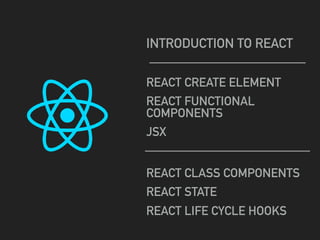
REACT CREATE ELEMENT
REACT FUNCTIONAL
COMPONENTS
JSX
REACT CLASS COMPONENTS
REACT STATE
REACT LIFE CYCLE HOOKS
INTRODUCTION TO REACT
QUESTIONS?
WHAT IS REACT?
A JavaScript library for building user
interfaces
REACT.JS WORKSHOP
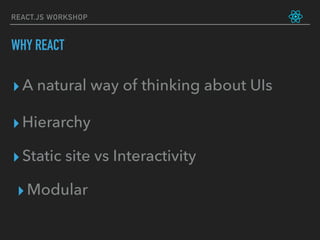
WHY REACT
▸A natural way of thinking about UIs
▸Static site vs Interactivity
▸Modular
▸Hierarchy
REACT.JS WORKSHOP
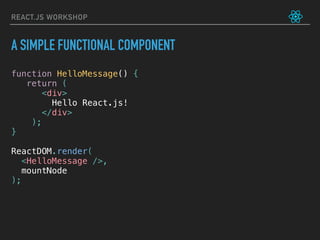
A SIMPLE FUNCTIONAL COMPONENT
function HelloMessage() {
return (
<div>
Hello React.js!
</div>
);
}
ReactDOM.render(
<HelloMessage />,
mountNode
);
REACT ELEMENTS
FUNCTIONAL COMPONENTS
JSX & PROPS
REACT ELEMENTS
BASIC HTML TEMPLATE
REACT.JS WORKSHOP
REACT.JS WORKSHOP
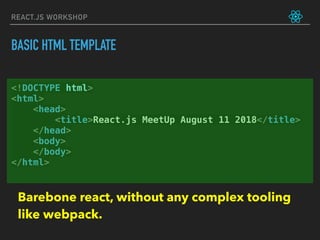
<!DOCTYPE html>
<html>
<head>
<title>React.js MeetUp August 11 2018</title>
</head>
<body>
</body>
</html>
BASIC HTML TEMPLATE
Barebone react, without any complex tooling
like webpack.
REACT.JS WORKSHOP
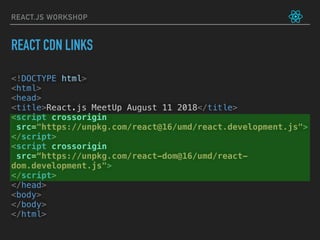
<!DOCTYPE html>
<html>
<head>
<title>React.js MeetUp August 11 2018</title>
<script crossorigin
src="https://unpkg.com/react@16/umd/react.development.js">
</script>
<script crossorigin
src=“https://unpkg.com/react-dom@16/umd/react-
dom.development.js">
</script>
</head>
<body>
</body>
</html>
REACT CDN LINKS
REACT.JS WORKSHOP
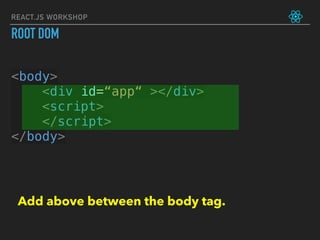
<body>
<div id=“app“ ></div>
<script>
</script>
</body>
ROOT DOM
Add above between the body tag.
REACT.JS WORKSHOP
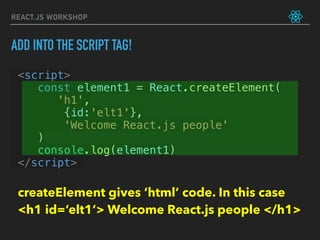
<script>
const element1 = React.createElement(
       'h1',
        {id:'elt1'},
        'Welcome React.js people'
    )
console.log(element1)
</script>
ADD INTO THE SCRIPT TAG!
createElement gives ‘html’ code. In this case 

<h1 id=‘elt1’> Welcome React.js people </h1>
REACT.JS WORKSHOP
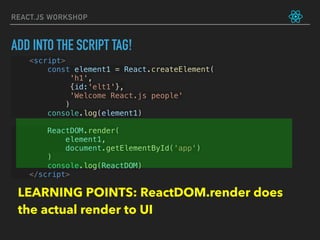
<script>
const element1 = React.createElement(
             'h1',
             {id:'elt1'},
             'Welcome React.js people'
            )
console.log(element1)
ReactDOM.render(
     element1,
     document.getElementById('app')
)
console.log(ReactDOM)
</script>
ADD INTO THE SCRIPT TAG!
LEARNING POINTS: ReactDOM.render does
the actual render to UI
REACT.JS WORKSHOP
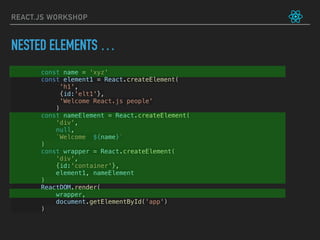
const name = 'xyz'
const element1 = React.createElement(
             'h1',
             {id:'elt1'},
             'Welcome React.js people'
            )
const nameElement = React.createElement(
'div',
null,
`Welcome ${name}`
)
const wrapper = React.createElement(
'div',
{id:'container'},
element1, nameElement
)
ReactDOM.render(
     wrapper,
     document.getElementById('app')
)
NESTED ELEMENTS …
FUNCTIONAL
COMPONENTS
REACT.JS WORKSHOP
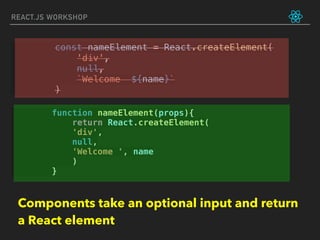
function nameElement(props){
return React.createElement(
'div',
null,
'Welcome ', name
)
}
const nameElement = React.createElement(
'div',
null,
`Welcome ${name}`
)
Components take an optional input and return
a React element
JSX
REACT.JS WORKSHOP
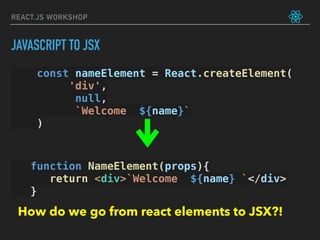
const nameElement = React.createElement(
'div',
null,
`Welcome ${name}`
)
function NameElement(props){
return <div>`Welcome ${name} `</div>
}
How do we go from react elements to JSX?!
JAVASCRIPT TO JSX
REACT.JS WORKSHOP
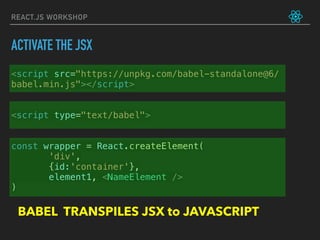
<script src="https://unpkg.com/babel-standalone@6/
babel.min.js"></script>
<script type="text/babel">
const wrapper = React.createElement(
'div',
{id:'container'},
element1, <NameElement />
)
BABEL TRANSPILES JSX to JAVASCRIPT
ACTIVATE THE JSX
THANK YOU!
MAXIMILIEN
TEXT
REACT CLASS
COMPONENTS
REACT.JS WORKSHOP
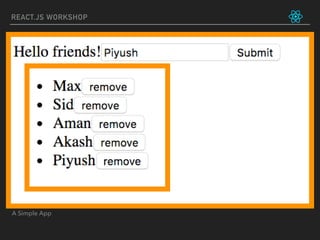
A Simple App
REACT.JS WORKSHOP
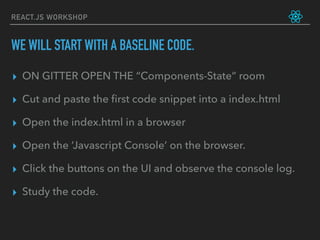
▸ ON GITTER OPEN THE “Components-State” room
▸ Cut and paste the first code snippet into a index.html
▸ Open the index.html in a browser
▸ Open the ‘Javascript Console’ on the browser.
▸ Click the buttons on the UI and observe the console log.
▸ Study the code.
WE WILL START WITH A BASELINE CODE.
let friends = ['Max', 'Sid', 'Aman']
function FriendList(props) {
return (
<ul>
{props.list.map((friend) => (
<li key={friend}>
{friend}
<button onClick={() => props.onRemoveFriend(friend)}> remove </button>
</li>
))}
</ul>
)
}
function handleRemoveFriend(name) {
console.log("Removing friend: ", name)
friends = friends.filter((friend) => friend != name)
console.log("The friends are: ", friends)
}
function App() {
return (
<div>
Hello friends!
<FriendList list={friends}
onRemoveFriend={handleRemoveFriend} />
</div>
)
}
ReactDOM.render(
<App/>,
document.getElementById('app')
)
REACT.JS WORKSHOP
REACT.JS WORKSHOP
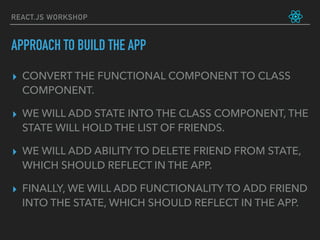
▸ CONVERT THE FUNCTIONAL COMPONENT TO CLASS
COMPONENT.
▸ WE WILL ADD STATE INTO THE CLASS COMPONENT, THE
STATE WILL HOLD THE LIST OF FRIENDS.
▸ WE WILL ADD ABILITY TO DELETE FRIEND FROM STATE,
WHICH SHOULD REFLECT IN THE APP.
▸ FINALLY, WE WILL ADD FUNCTIONALITY TO ADD FRIEND
INTO THE STATE, WHICH SHOULD REFLECT IN THE APP.
APPROACH TO BUILD THE APP
STEP 1: CONVERT <APP/> COMPONENT TO A
CLASS COMPONENT
REACT.JS WORKSHOP
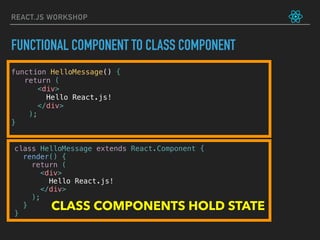
FUNCTIONAL COMPONENT TO CLASS COMPONENT
function HelloMessage() {
return (
<div>
Hello React.js!
</div>
);
}
class HelloMessage extends React.Component {
render() {
return (
<div>
Hello React.js!
</div>
);
}
}
CLASS COMPONENTS HOLD STATE
REACT.JS WORKSHOP
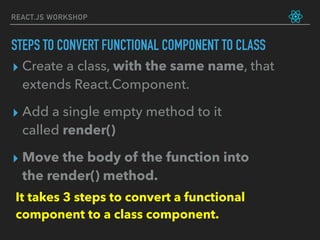
▸ Create a class, with the same name, that
extends React.Component.
▸ Add a single empty method to it
called render()
▸ Move the body of the function into
the render() method.
It takes 3 steps to convert a functional
component to a class component.
STEPS TO CONVERT FUNCTIONAL COMPONENT TO CLASS
REACT.JS WORKSHOP
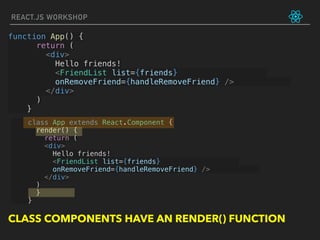
class App extends React.Component {
render() {
return (
<div>
Hello friends!
<FriendList list={friends}
onRemoveFriend={handleRemoveFriend} />
</div>
)
}
}
function App() {
return (
<div>
Hello friends!
<FriendList list={friends}
onRemoveFriend={handleRemoveFriend} />
</div>
)
}
CLASS COMPONENTS HAVE AN RENDER() FUNCTION
STEP 2: ADD STATE INTO CLASS COMPONENT
WHICH WILL HOLD THE FRIEND LIST
let friends = ['Max', 'Sid', 'Aman']
class App extends React.Component {
constructor(props) {
super(props)
this.state = {
friends : ['Max', ‘Aman', 'Sid']
}
}
render() {
return (
<div>
Hello friends!
<FriendList
list={this.state.friends} />
onRemoveFriend={handleRemoveFriend} />
</div>
)
}
}
REACT.JS WORKSHOP
Step 1 of 3:
LEARNING POINTS: CONSTRUCTOR, STATE
INITIALIZATION
STEP 3: WE WILL ADD ABILITY TO DELETE FRIEND
FROM STATE, WHICH SHOULD REFLECT IN THE APP.
REACT.JS WORKSHOP
function handleRemoveFriend(name) {
friends = friends.filter((friend) => friend != name)
this.setState((currentState)=> {
return {
friends: currentState.friends.filter((friend) =>
friend!= name)
}
})
}
Step 2 of 3:
setState(updater[, callback])
updater function signature:
(prevState, props) => stateChange
REACT.JS WORKSHOP
constructor(props) {
super(props)
this.state = {
friends : ['Max', 'Sid', 'Aman']
}
handleRemoveFriend = handleRemoveFriend.bind(this)
}
Step 3 of 3:
LEARNING POINTS: bind this to functions!
STEP 3: FINALLY, WE WILL ADD FUNCTIONALITY TO ADD
FRIEND INTO THE STATE, WHICH SHOULD REFLECT IN THE APP.
REACT.JS WORKSHOP
updateInput(e) {
const value = e.target.value
this.setState({
input : value
})
}
handleAddFriend(){
this.setState((currentState) => {
return {
friends : currentState.friends.concat([this.state.input])
}
})
}
Step 1 of 3:
REACT.JS WORKSHOP
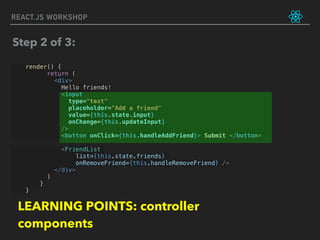
render() {
return (
<div>
Hello friends!
<input
type="text"
placeholder="Add a friend"
value={this.state.input}
onChange={this.updateInput}
/>
<button onClick={this.handleAddFriend}> Submit </button>
<FriendList
list={this.state.friends}
onRemoveFriend={this.handleRemoveFriend} />
</div>
)
}
}
Step 2 of 3:
LEARNING POINTS: controller
components
REACT.JS WORKSHOP
constructor(props) {
super(props)
this.state = {
friends : ['Max', 'Sid', 'Aman'],
input : ""
}
this.handleRemoveFriend = this.handleRemoveFriend.bind(this)
this.handleAddFriend = this.handleAddFriend.bind(this)
this.updateInput = this.updateInput.bind(this)
}
Step 3 of 3:
LEARNING POINTS: bind this to functions!
REACT.JS WORKSHOP
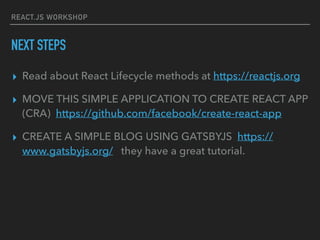
NEXT STEPS
▸ Read about React Lifecycle methods at https://reactjs.org
▸ MOVE THIS SIMPLE APPLICATION TO CREATE REACT APP
(CRA) https://github.com/facebook/create-react-app
▸ CREATE A SIMPLE BLOG USING GATSBYJS https://
www.gatsbyjs.org/ they have a great tutorial.
REACT.JS WORKSHOP
On the Gitter Chat
`
JAIKANT
KUMARAN
@JAIKANTKUMARAN
JAI@TECH47.IN

React.js workshop by tech47.in

  • 1.
  • 2.
    HTML, CSS &JAVASCRIPT PREREQUISITES PREREQUISITES
  • 3.
    REACT.JS WORKSHOP EXPECTATIONS ▸ Doingstuff is learning ▸ You should code it along ▸ Trust the process
  • 4.
  • 5.
    REACT CREATE ELEMENT REACTFUNCTIONAL COMPONENTS JSX REACT CLASS COMPONENTS REACT STATE REACT LIFE CYCLE HOOKS INTRODUCTION TO REACT
  • 6.
  • 7.
    WHAT IS REACT? AJavaScript library for building user interfaces
  • 8.
    REACT.JS WORKSHOP WHY REACT ▸Anatural way of thinking about UIs ▸Static site vs Interactivity ▸Modular ▸Hierarchy
  • 9.
    REACT.JS WORKSHOP A SIMPLEFUNCTIONAL COMPONENT function HelloMessage() { return ( <div> Hello React.js! </div> ); } ReactDOM.render( <HelloMessage />, mountNode );
  • 10.
  • 11.
  • 12.
  • 13.
    REACT.JS WORKSHOP <!DOCTYPE html> <html> <head> <title>React.jsMeetUp August 11 2018</title> </head> <body> </body> </html> BASIC HTML TEMPLATE Barebone react, without any complex tooling like webpack.
  • 14.
    REACT.JS WORKSHOP <!DOCTYPE html> <html> <head> <title>React.jsMeetUp August 11 2018</title> <script crossorigin src="https://unpkg.com/react@16/umd/react.development.js"> </script> <script crossorigin src=“https://unpkg.com/react-dom@16/umd/react- dom.development.js"> </script> </head> <body> </body> </html> REACT CDN LINKS
  • 15.
    REACT.JS WORKSHOP <body> <div id=“app“></div> <script> </script> </body> ROOT DOM Add above between the body tag.
  • 16.
    REACT.JS WORKSHOP <script> const element1= React.createElement(        'h1',         {id:'elt1'},         'Welcome React.js people'     ) console.log(element1) </script> ADD INTO THE SCRIPT TAG! createElement gives ‘html’ code. In this case 
 <h1 id=‘elt1’> Welcome React.js people </h1>
  • 17.
    REACT.JS WORKSHOP <script> const element1= React.createElement(              'h1',              {id:'elt1'},              'Welcome React.js people'             ) console.log(element1) ReactDOM.render(      element1,      document.getElementById('app') ) console.log(ReactDOM) </script> ADD INTO THE SCRIPT TAG! LEARNING POINTS: ReactDOM.render does the actual render to UI
  • 18.
    REACT.JS WORKSHOP const name= 'xyz' const element1 = React.createElement(              'h1',              {id:'elt1'},              'Welcome React.js people'             ) const nameElement = React.createElement( 'div', null, `Welcome ${name}` ) const wrapper = React.createElement( 'div', {id:'container'}, element1, nameElement ) ReactDOM.render(      wrapper,      document.getElementById('app') ) NESTED ELEMENTS …
  • 19.
  • 20.
    REACT.JS WORKSHOP function nameElement(props){ returnReact.createElement( 'div', null, 'Welcome ', name ) } const nameElement = React.createElement( 'div', null, `Welcome ${name}` ) Components take an optional input and return a React element
  • 21.
  • 22.
    REACT.JS WORKSHOP const nameElement= React.createElement( 'div', null, `Welcome ${name}` ) function NameElement(props){ return <div>`Welcome ${name} `</div> } How do we go from react elements to JSX?! JAVASCRIPT TO JSX
  • 23.
    REACT.JS WORKSHOP <script src="https://unpkg.com/babel-standalone@6/ babel.min.js"></script> <scripttype="text/babel"> const wrapper = React.createElement( 'div', {id:'container'}, element1, <NameElement /> ) BABEL TRANSPILES JSX to JAVASCRIPT ACTIVATE THE JSX
  • 24.
  • 25.
  • 26.
  • 27.
    REACT.JS WORKSHOP ▸ ONGITTER OPEN THE “Components-State” room ▸ Cut and paste the first code snippet into a index.html ▸ Open the index.html in a browser ▸ Open the ‘Javascript Console’ on the browser. ▸ Click the buttons on the UI and observe the console log. ▸ Study the code. WE WILL START WITH A BASELINE CODE.
  • 28.
    let friends =['Max', 'Sid', 'Aman'] function FriendList(props) { return ( <ul> {props.list.map((friend) => ( <li key={friend}> {friend} <button onClick={() => props.onRemoveFriend(friend)}> remove </button> </li> ))} </ul> ) } function handleRemoveFriend(name) { console.log("Removing friend: ", name) friends = friends.filter((friend) => friend != name) console.log("The friends are: ", friends) } function App() { return ( <div> Hello friends! <FriendList list={friends} onRemoveFriend={handleRemoveFriend} /> </div> ) } ReactDOM.render( <App/>, document.getElementById('app') ) REACT.JS WORKSHOP
  • 29.
    REACT.JS WORKSHOP ▸ CONVERTTHE FUNCTIONAL COMPONENT TO CLASS COMPONENT. ▸ WE WILL ADD STATE INTO THE CLASS COMPONENT, THE STATE WILL HOLD THE LIST OF FRIENDS. ▸ WE WILL ADD ABILITY TO DELETE FRIEND FROM STATE, WHICH SHOULD REFLECT IN THE APP. ▸ FINALLY, WE WILL ADD FUNCTIONALITY TO ADD FRIEND INTO THE STATE, WHICH SHOULD REFLECT IN THE APP. APPROACH TO BUILD THE APP
  • 30.
    STEP 1: CONVERT<APP/> COMPONENT TO A CLASS COMPONENT
  • 31.
    REACT.JS WORKSHOP FUNCTIONAL COMPONENTTO CLASS COMPONENT function HelloMessage() { return ( <div> Hello React.js! </div> ); } class HelloMessage extends React.Component { render() { return ( <div> Hello React.js! </div> ); } } CLASS COMPONENTS HOLD STATE
  • 32.
    REACT.JS WORKSHOP ▸ Createa class, with the same name, that extends React.Component. ▸ Add a single empty method to it called render() ▸ Move the body of the function into the render() method. It takes 3 steps to convert a functional component to a class component. STEPS TO CONVERT FUNCTIONAL COMPONENT TO CLASS
  • 33.
    REACT.JS WORKSHOP class Appextends React.Component { render() { return ( <div> Hello friends! <FriendList list={friends} onRemoveFriend={handleRemoveFriend} /> </div> ) } } function App() { return ( <div> Hello friends! <FriendList list={friends} onRemoveFriend={handleRemoveFriend} /> </div> ) } CLASS COMPONENTS HAVE AN RENDER() FUNCTION
  • 34.
    STEP 2: ADDSTATE INTO CLASS COMPONENT WHICH WILL HOLD THE FRIEND LIST
  • 35.
    let friends =['Max', 'Sid', 'Aman'] class App extends React.Component { constructor(props) { super(props) this.state = { friends : ['Max', ‘Aman', 'Sid'] } } render() { return ( <div> Hello friends! <FriendList list={this.state.friends} /> onRemoveFriend={handleRemoveFriend} /> </div> ) } } REACT.JS WORKSHOP Step 1 of 3: LEARNING POINTS: CONSTRUCTOR, STATE INITIALIZATION
  • 36.
    STEP 3: WEWILL ADD ABILITY TO DELETE FRIEND FROM STATE, WHICH SHOULD REFLECT IN THE APP.
  • 37.
    REACT.JS WORKSHOP function handleRemoveFriend(name){ friends = friends.filter((friend) => friend != name) this.setState((currentState)=> { return { friends: currentState.friends.filter((friend) => friend!= name) } }) } Step 2 of 3: setState(updater[, callback]) updater function signature: (prevState, props) => stateChange
  • 38.
    REACT.JS WORKSHOP constructor(props) { super(props) this.state= { friends : ['Max', 'Sid', 'Aman'] } handleRemoveFriend = handleRemoveFriend.bind(this) } Step 3 of 3: LEARNING POINTS: bind this to functions!
  • 39.
    STEP 3: FINALLY,WE WILL ADD FUNCTIONALITY TO ADD FRIEND INTO THE STATE, WHICH SHOULD REFLECT IN THE APP.
  • 40.
    REACT.JS WORKSHOP updateInput(e) { constvalue = e.target.value this.setState({ input : value }) } handleAddFriend(){ this.setState((currentState) => { return { friends : currentState.friends.concat([this.state.input]) } }) } Step 1 of 3:
  • 41.
    REACT.JS WORKSHOP render() { return( <div> Hello friends! <input type="text" placeholder="Add a friend" value={this.state.input} onChange={this.updateInput} /> <button onClick={this.handleAddFriend}> Submit </button> <FriendList list={this.state.friends} onRemoveFriend={this.handleRemoveFriend} /> </div> ) } } Step 2 of 3: LEARNING POINTS: controller components
  • 42.
    REACT.JS WORKSHOP constructor(props) { super(props) this.state= { friends : ['Max', 'Sid', 'Aman'], input : "" } this.handleRemoveFriend = this.handleRemoveFriend.bind(this) this.handleAddFriend = this.handleAddFriend.bind(this) this.updateInput = this.updateInput.bind(this) } Step 3 of 3: LEARNING POINTS: bind this to functions!
  • 43.
    REACT.JS WORKSHOP NEXT STEPS ▸Read about React Lifecycle methods at https://reactjs.org ▸ MOVE THIS SIMPLE APPLICATION TO CREATE REACT APP (CRA) https://github.com/facebook/create-react-app ▸ CREATE A SIMPLE BLOG USING GATSBYJS https:// www.gatsbyjs.org/ they have a great tutorial.
  • 44.
  • 45.