All Aboard the Naviance Express:
Encouraging Your Entire School
Community to Use Naviance
Betsy Stangel, College Coordinator
Mount Carmel Academy, New Orleans, Louisiana
Why Should You Get Everyone
Involved?
Use and support of your own school
community enables you to use Naviance to its
potential.
Purpose today is to briefly explain
(1) our school’s usage,
(2) the tactics we use to get our community to
use the program,
(3) our plan for the next steps,
(4) and sharing some lessons learned along
the way.
Mount Carmel Academy’s
History of Naviance Usage
Why Mount Carmel Academy first
implemented Naviance
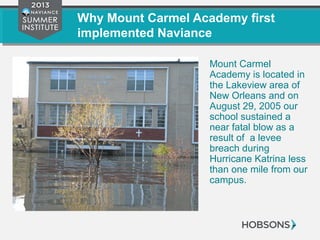
Mount Carmel
Academy is located in
the Lakeview area of
New Orleans and on
August 29, 2005 our
school sustained a
near fatal blow as a
result of a levee
breach during
Hurricane Katrina less
than one mile from our
campus.
Why Mount Carmel Academy first
implemented Naviance
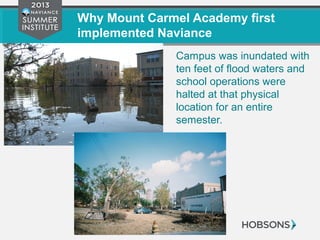
Campus was inundated with
ten feet of flood waters and
school operations were
halted at that physical
location for an entire
semester.
Why Mount Carmel Academy first
implemented Naviance
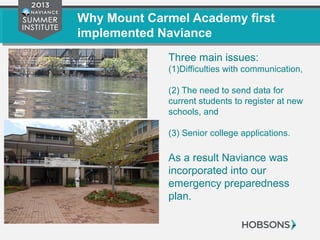
Three main issues:
(1)Difficulties with communication,
(2) The need to send data for
current students to register at new
schools, and
(3) Senior college applications.
As a result Naviance was
incorporated into our
emergency preparedness
plan.
Working in High School College Advising
in New Orleans Post-Katrina
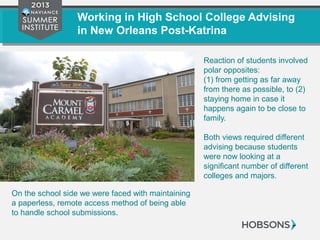
Reaction of students involved
polar opposites:
(1) from getting as far away
from there as possible, to (2)
staying home in case it
happens again to be close to
family.
Both views required different
advising because students
were now looking at a
significant number of different
colleges and majors.
On the school side we were faced with maintaining
a paperless, remote access method of being able
to handle school submissions.
Working in High School College Advising
in New Orleans Post-Katrina
Research at similar schools who used Naviance
helped us determine that it was the program we
were going to use.
Naviance Family Connection and Naviance
Succeed allowed us to address the two pressing
issues that we faced in college advising at our
school.
The Rest of the World Post-K
Whatever your reason for discovering Naviance:
•The program is amazing in its capacity to fulfill the needs
of all schools.
• You need to commit to learn about its features that will
work for you.
I attended NSI in 2010 and feel that it changed my
proficiency and confidence. I am not sure if I could have
accomplished what we have done without commitment to
stay updated on the material available.
Learning How to Encourage
Your Community to Want to
Get On Board
It is Not Just a College Program
We know that Naviance is more than just a
college program, but figuring out how to explain
this to everyone involved is the biggest problem
we faced.
Define the members of your school community
and find the way that Naviance can help them.
Students Teachers as Club Moderators
Parents Coaches
Guidance Counselors Alumni Coordinators
Faculty Planned Giving/Development
Staff Administration
Look at Change as Positive
“After the Saints Won the Superbowl” vs. “After the Storm”
Anytime you present something new to your community
it is a challenge:
• change is often resisted,
• faculty already has so many things they are supposed to
do,
• but if you give them a tool to make life easier you’ve won!
Suggestions to help make it work
Try not to make it sound like a new
religion and acknowledge that it will not
be everything to all people.
Administrative support is key!
Non-Intended Uses Will Surprise You
I am a believer in the philosophy of “there has to be an easier
way” instead of “this is the way we’ve always done it.”
Use this philosophy in working to establish your plan for each
defined member of your community.
Resources:
•Naviance Support via phone and email
•Naviance Network online
•Naviance users in your community
We are Making Progress
Now my school community asks me:
“Is there a way we can use Naviance
to do this?”
Tickets to the Train For Our
Community Members
Administration and Using a Plan of
Implementation
Administration supported implementation….so the
challenge we faced:
(1) Who should have rights to the data in Succeed, and
(2) What features of family connection would be used by
which grade levels each year as we progressed into using
the program.
Develop Your Plan of Implementation
To deal with these issues you must:
• Commit to learn the program, and
• Set up a realistic plan of implementation
one step at a time.
The key is making sure it is based in reality as far
as time and commitment of all involved.
Balance Community Member
Involvement
We recommend that you have one site administrator and
tight controls on “rights” to access certain activities you
may find yourself faced with leaders and followers that
you will have to figure out how to use to help your cause.
Use your community members:
• make the best use of their talents and strengths
• it helps compensate for those who feel left out
Guidance Department
Guidance Counselors were de facto required users and
depending on your school setup the features you
experience may be different.
Guidance Department, continued
Things that Guidance Counselors Found Useful:
•Photos
•Same database that the teachers use
•Documents
•Document Library for our online publications
•Email feature
•All Test Scores – feedback says it needs more information
•Surveys
•Journal entries for documenting when needed – all grades levels
•College planning
Guidance Department, Continued
Counselor Feedback
The counselors are the best critics and give me ideas at
least once a month to pass on to the Naviance Network.
Remember:
• Naviance is not all things to all people, and
• You need to be open to change and development for
overall department success.
Getting Students On Board
Initial set up was difficult because the students
looked at it as a task that they had to do with a
finite term.
(1) Login,
(2) Complete a task,
(3) logout, and
(4) forget.
Getting Students On Board,
Continued
Suggestions:
•Do not force it.
•Get the “approval” of the seniors using it to deal with
college planning.
•Use the club moderators for the things that the students
want to know about and things will change for the positive.
•The more carrots instead of sticks we use, the more the
usage increases!
Getting Parents on Board
The thought of another login and password to the
parents was daunting.
As student usage has increased their interest has as
well and we now offer the parents the choice of
having a separate login than their child.
Parents reply that they like:
• Career Resources
•College Planning
•Resources that we post online
Parent Usage, continued
The ability to have a parent login is offered at : 8th
grade
interviews and 10th
grade interviews and after junior year in
preparation for college planning.
For those without a login: For those with a login:
We keep their data in the student section get benefit of being able to reply
Emails are still sent to surveys for parents**
They can login with their child see multiple children on one
account
Things that Interested Teachers
Teachers were the first community members to get on board
because of letters of recommendation for college
submissions.
We have always required all teachers to use it for letters of
recommendation. No paper letters are to leave our school
unless a paper school and we still route through our office.
Teacher Usage
The letter of recommendation audience of teachers was limited to a few.
There was little incentive to login and look at data to learn more about
students because they felt like it was not helpful to them.
Things that got their attention Future Involvement Plans
Student photos Career Planning
Journal entries Document Library
Brag Survey Results Biography Pages of teachers
Test Scores
Learning Style Inventories
Resume
Club Moderators & Coaches Use Has
Skyrocketed
Use the Group Feature to set up your clubs and athletics
and let the moderators/coaches help you figure out what
they need.
Things that work for these community members:
• Emails to students and parents
• Attachments to those emails such as maps, permission slips
• Ability to track outstanding members via journal entries –
collaborative for moderators, teachers, counselors, students and
parents
• Surveys
Next Steps in Our Plan
We plan to increase our community of users to use
Success Planning as well as the Alumni Tracker.
We anticipate that the success planning and the student
app will increase the student usage.
Lessons Learned & Tips to
Keep Everyone Happy
Learn the Program and Take One
Feature at a Time
The fastest way to lose credibility with anyone is to
implement a program and not know enough about it.
We heeded that warning and established our community
of users and set out clear steps of which users would use
the program each year.
Learn the Program and Take One
Feature at a Time
Establish what authority you can on specific
areas of the program and use them.
Then learn more and expand.
Data Management
Data input is something that we had issues with and in our
experience it should be limited to one or two people
maximum to make sure things are consistent.
Invest the time and find the right help to make sure that
this is done correctly.
Feedback and Professional
Development
•Meet to assess usage by each community group
- Example of a major modification using eDocs for our
school this year and it WORKS
•Empower members of your community with feedback
options
•Plan with your administration for updated professional
development on the program and it needs to include an on-
boarding session for new people each year. Be sure to invite
experienced users to that session for the new ones for (1)
refresher and (2) to share good experiences of how they use
it.
Parting Words of Advice
• Learn as much as you can about the program
• Use the Naviance Network online and with other
users whenever you get the chance
• Brainstorm with your school community
• Create your plan
• Update your plan every year as you accomplish
that year’s goal and to add new one in its place
Betsy Stangel
College Coordinator
Mount Carmel Academy
New Orleans, Louisiana
bstangel@mcacubs.org
504-288-7626, ext. 213
Your Feedback Matters!
Thank you for attending the
Naviance Summer Institute 2013!
We greatly appreciate your feedback, please
complete a brief evaluation for this session at:
http://go.naviance.com/evaluations

All Aboard the Naviance Express

  • 1.
    All Aboard theNaviance Express: Encouraging Your Entire School Community to Use Naviance Betsy Stangel, College Coordinator Mount Carmel Academy, New Orleans, Louisiana
  • 2.
    Why Should YouGet Everyone Involved? Use and support of your own school community enables you to use Naviance to its potential. Purpose today is to briefly explain (1) our school’s usage, (2) the tactics we use to get our community to use the program, (3) our plan for the next steps, (4) and sharing some lessons learned along the way.
  • 3.
  • 4.
    Why Mount CarmelAcademy first implemented Naviance Mount Carmel Academy is located in the Lakeview area of New Orleans and on August 29, 2005 our school sustained a near fatal blow as a result of a levee breach during Hurricane Katrina less than one mile from our campus.
  • 5.
    Why Mount CarmelAcademy first implemented Naviance Campus was inundated with ten feet of flood waters and school operations were halted at that physical location for an entire semester.
  • 6.
    Why Mount CarmelAcademy first implemented Naviance Three main issues: (1)Difficulties with communication, (2) The need to send data for current students to register at new schools, and (3) Senior college applications. As a result Naviance was incorporated into our emergency preparedness plan.
  • 7.
    Working in HighSchool College Advising in New Orleans Post-Katrina Reaction of students involved polar opposites: (1) from getting as far away from there as possible, to (2) staying home in case it happens again to be close to family. Both views required different advising because students were now looking at a significant number of different colleges and majors. On the school side we were faced with maintaining a paperless, remote access method of being able to handle school submissions.
  • 8.
    Working in HighSchool College Advising in New Orleans Post-Katrina Research at similar schools who used Naviance helped us determine that it was the program we were going to use. Naviance Family Connection and Naviance Succeed allowed us to address the two pressing issues that we faced in college advising at our school.
  • 9.
    The Rest ofthe World Post-K Whatever your reason for discovering Naviance: •The program is amazing in its capacity to fulfill the needs of all schools. • You need to commit to learn about its features that will work for you. I attended NSI in 2010 and feel that it changed my proficiency and confidence. I am not sure if I could have accomplished what we have done without commitment to stay updated on the material available.
  • 10.
    Learning How toEncourage Your Community to Want to Get On Board
  • 11.
    It is NotJust a College Program We know that Naviance is more than just a college program, but figuring out how to explain this to everyone involved is the biggest problem we faced. Define the members of your school community and find the way that Naviance can help them. Students Teachers as Club Moderators Parents Coaches Guidance Counselors Alumni Coordinators Faculty Planned Giving/Development Staff Administration
  • 12.
    Look at Changeas Positive “After the Saints Won the Superbowl” vs. “After the Storm” Anytime you present something new to your community it is a challenge: • change is often resisted, • faculty already has so many things they are supposed to do, • but if you give them a tool to make life easier you’ve won!
  • 13.
    Suggestions to helpmake it work Try not to make it sound like a new religion and acknowledge that it will not be everything to all people. Administrative support is key!
  • 14.
    Non-Intended Uses WillSurprise You I am a believer in the philosophy of “there has to be an easier way” instead of “this is the way we’ve always done it.” Use this philosophy in working to establish your plan for each defined member of your community. Resources: •Naviance Support via phone and email •Naviance Network online •Naviance users in your community
  • 15.
    We are MakingProgress Now my school community asks me: “Is there a way we can use Naviance to do this?”
  • 16.
    Tickets to theTrain For Our Community Members
  • 17.
    Administration and Usinga Plan of Implementation Administration supported implementation….so the challenge we faced: (1) Who should have rights to the data in Succeed, and (2) What features of family connection would be used by which grade levels each year as we progressed into using the program.
  • 18.
    Develop Your Planof Implementation To deal with these issues you must: • Commit to learn the program, and • Set up a realistic plan of implementation one step at a time. The key is making sure it is based in reality as far as time and commitment of all involved.
  • 19.
    Balance Community Member Involvement Werecommend that you have one site administrator and tight controls on “rights” to access certain activities you may find yourself faced with leaders and followers that you will have to figure out how to use to help your cause. Use your community members: • make the best use of their talents and strengths • it helps compensate for those who feel left out
  • 20.
    Guidance Department Guidance Counselorswere de facto required users and depending on your school setup the features you experience may be different.
  • 21.
    Guidance Department, continued Thingsthat Guidance Counselors Found Useful: •Photos •Same database that the teachers use •Documents •Document Library for our online publications •Email feature •All Test Scores – feedback says it needs more information •Surveys •Journal entries for documenting when needed – all grades levels •College planning
  • 22.
    Guidance Department, Continued CounselorFeedback The counselors are the best critics and give me ideas at least once a month to pass on to the Naviance Network. Remember: • Naviance is not all things to all people, and • You need to be open to change and development for overall department success.
  • 23.
    Getting Students OnBoard Initial set up was difficult because the students looked at it as a task that they had to do with a finite term. (1) Login, (2) Complete a task, (3) logout, and (4) forget.
  • 24.
    Getting Students OnBoard, Continued Suggestions: •Do not force it. •Get the “approval” of the seniors using it to deal with college planning. •Use the club moderators for the things that the students want to know about and things will change for the positive. •The more carrots instead of sticks we use, the more the usage increases!
  • 25.
    Getting Parents onBoard The thought of another login and password to the parents was daunting. As student usage has increased their interest has as well and we now offer the parents the choice of having a separate login than their child. Parents reply that they like: • Career Resources •College Planning •Resources that we post online
  • 26.
    Parent Usage, continued Theability to have a parent login is offered at : 8th grade interviews and 10th grade interviews and after junior year in preparation for college planning. For those without a login: For those with a login: We keep their data in the student section get benefit of being able to reply Emails are still sent to surveys for parents** They can login with their child see multiple children on one account
  • 27.
    Things that InterestedTeachers Teachers were the first community members to get on board because of letters of recommendation for college submissions. We have always required all teachers to use it for letters of recommendation. No paper letters are to leave our school unless a paper school and we still route through our office.
  • 28.
    Teacher Usage The letterof recommendation audience of teachers was limited to a few. There was little incentive to login and look at data to learn more about students because they felt like it was not helpful to them. Things that got their attention Future Involvement Plans Student photos Career Planning Journal entries Document Library Brag Survey Results Biography Pages of teachers Test Scores Learning Style Inventories Resume
  • 29.
    Club Moderators &Coaches Use Has Skyrocketed Use the Group Feature to set up your clubs and athletics and let the moderators/coaches help you figure out what they need. Things that work for these community members: • Emails to students and parents • Attachments to those emails such as maps, permission slips • Ability to track outstanding members via journal entries – collaborative for moderators, teachers, counselors, students and parents • Surveys
  • 30.
    Next Steps inOur Plan
  • 31.
    Next Steps inOur Plan We plan to increase our community of users to use Success Planning as well as the Alumni Tracker. We anticipate that the success planning and the student app will increase the student usage.
  • 32.
    Lessons Learned &Tips to Keep Everyone Happy
  • 33.
    Learn the Programand Take One Feature at a Time The fastest way to lose credibility with anyone is to implement a program and not know enough about it. We heeded that warning and established our community of users and set out clear steps of which users would use the program each year.
  • 34.
    Learn the Programand Take One Feature at a Time Establish what authority you can on specific areas of the program and use them. Then learn more and expand.
  • 35.
    Data Management Data inputis something that we had issues with and in our experience it should be limited to one or two people maximum to make sure things are consistent. Invest the time and find the right help to make sure that this is done correctly.
  • 36.
    Feedback and Professional Development •Meetto assess usage by each community group - Example of a major modification using eDocs for our school this year and it WORKS •Empower members of your community with feedback options •Plan with your administration for updated professional development on the program and it needs to include an on- boarding session for new people each year. Be sure to invite experienced users to that session for the new ones for (1) refresher and (2) to share good experiences of how they use it.
  • 37.
    Parting Words ofAdvice • Learn as much as you can about the program • Use the Naviance Network online and with other users whenever you get the chance • Brainstorm with your school community • Create your plan • Update your plan every year as you accomplish that year’s goal and to add new one in its place
  • 38.
    Betsy Stangel College Coordinator MountCarmel Academy New Orleans, Louisiana bstangel@mcacubs.org 504-288-7626, ext. 213
  • 39.
    Your Feedback Matters! Thankyou for attending the Naviance Summer Institute 2013! We greatly appreciate your feedback, please complete a brief evaluation for this session at: http://go.naviance.com/evaluations

Editor's Notes

  • #3 Smart phone analogy -
  • #15 Lady Mac Guyver and “Mommy fixed it!”
  • #23 Our future plans include : Success Planning More with Career Planning Resume
  • #24 Initial set up was difficult not because it was hard, but because the students looked at it as a task that they had to do with a finite term. Login, complete a survey, logout, forget. We employed tactics from others about fun ways to introduce the program, but it was still boring to the students. However, once we started to use it more and got the “approval” of the seniors using it to deal with college planning as well as the club moderators for the things that they wanted to know about things started to change. I do not require students to attend make up sessions if they are absent when we have introduction on how to work on college research, setting up lists of schools and managing applications; however, they come to me to find out how to learn more. The more carrots instead of sticks we use, the more the usage increases!
  • #25 We employed tactics from others about fun ways to introduce the program, but it was still boring to the students. However, once we started to use it more and got the “approval” of the seniors using it to deal with college planning as well as the club moderators for the things that they wanted to know about things started to change. I do not require students to attend make up sessions if they are absent when we have introduction on how to work on college research, setting up lists of schools and managing applications; however, they come to me to find out how to learn more. The more carrots instead of sticks we use, the more the usage increases!
  • #26 When we started using Naviance the parents were told to use the student login because we did not have them as part of the plan as far as independent users. The thought of another login and password to the parents was also daunting. As student usage has increased their interest has as well and we now offer the parents the choice of having a separate login than their child. Many do not want a separate login; however, with multiple students and a greater understanding of the various features they are opting more and more for their own individual login and password. Parents reply that they like: Career Resources College Planning Resources that we post online
  • #30 This group was the one that has jumped on the bandwagon the fasted and was the incentive to come up with this presentation. I introduced this concept at a professional development session in August and I could tell from the questions in the session and the number of requests for copies of the instructions that it was going to work.
  • #35 While there will be some in your community who have the reputation for jumping in and asking questions later, we really do not recommend that process.