

Well come,,,,,,,,,Chandan Pawar
SQL Server
MS SQL Server is a database
server
Product of Microsoft
Enables user to write queries and
other SQL statements and
execute them
Overview,,,,,
Introduction
DDL Commands
DML Commands
SQL Statements, Operators, Clauses
The ANSI standard language for the definition
and manipulation of relational database.
Includes data definition language (DDL),
statements that specify and modify database
schemas.
Includes a data manipulation language (DML),
statements that manipulate database content.
Structured Query Language (SQL)
SQL: DDL Commands
CREATE TABLE: used to create a table.
ALTER TABLE: modifies a table after it was created.
DROP TABLE: removes a table from a database.
SQL: CREATE TABLE Statement
Things to consider before you create your table are:
The type of data
the table name
what column(s) will make up the primary key
the names of the columns
CREATE TABLE statement syntax:
CREATE TABLE <table name>
( field1 datatype ( NOT NULL ),
field2 datatype ( NOT NULL )
);
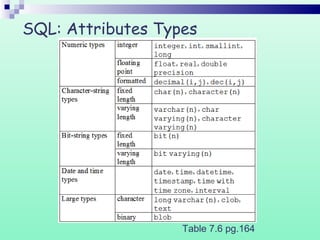
SQL: Attributes Types
Table 7.6 pg.164
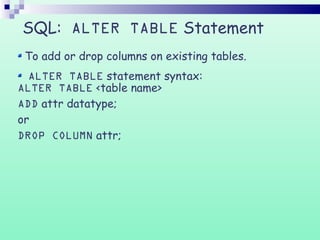
SQL: ALTER TABLE Statement
To add or drop columns on existing tables.
ALTER TABLE statement syntax:
ALTER TABLE <table name>
ADD attr datatype;
or
DROP COLUMN attr;
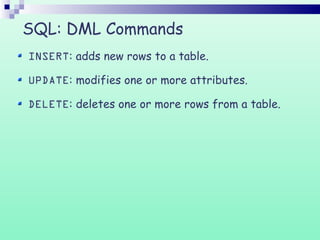
SQL: DML Commands
INSERT: adds new rows to a table.
UPDATE: modifies one or more attributes.
DELETE: deletes one or more rows from a table.
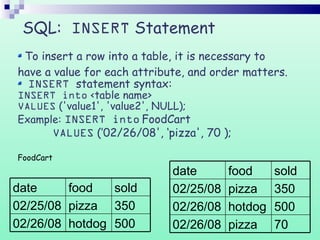
SQL: INSERT Statement
To insert a row into a table, it is necessary to
have a value for each attribute, and order matters.
INSERT statement syntax:
INSERT into <table name>
VALUES ('value1', 'value2', NULL);
Example: INSERT into FoodCart
VALUES (’02/26/08', ‘pizza', 70 );
FoodCart
70pizza02/26/08
500hotdog02/26/08
350pizza02/25/08
soldfooddate
500hotdog02/26/08
350pizza02/25/08
soldfooddate
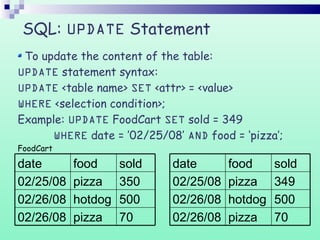
SQL: UPDATE Statement
To update the content of the table:
UPDATE statement syntax:
UPDATE <table name> SET <attr> = <value>
WHERE <selection condition>;
Example: UPDATE FoodCart SET sold = 349
WHERE date = ’02/25/08’ AND food = ‘pizza’;
FoodCart
70pizza02/26/08
500hotdog02/26/08
350pizza02/25/08
soldfooddate
70pizza02/26/08
500hotdog02/26/08
349pizza02/25/08
soldfooddate
SQL: DELETE Statement
To delete rows from the table:
DELETE statement syntax:
DELETE FROM <table name>
WHERE <condition>;
Example: DELETE FROM FoodCart
WHERE food = ‘hotdog’;
FoodCart
Note: If the WHERE clause is omitted all rows of data are deleted from the table.
70pizza02/26/08
500hotdog02/26/08
349pizza02/25/08
soldfooddate
70pizza02/26/08
349pizza02/25/08
soldfooddate
SQL Statements, Operations, Clauses
SQL Statements:
Select
SQL Operations:
Join
Left Join
Right Join
Like
SQL Clauses:
Order By
Group By
Having
SQL: SELECT
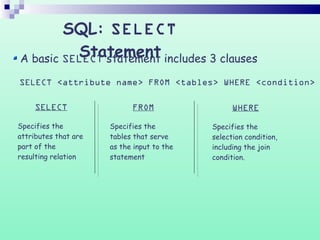
StatementA basic SELECT statement includes 3 clauses
SELECT <attribute name> FROM <tables> WHERE <condition>
SELECT
Specifies the
attributes that are
part of the
resulting relation
FROM
Specifies the
tables that serve
as the input to the
statement
WHERE
Specifies the
selection condition,
including the join
condition.
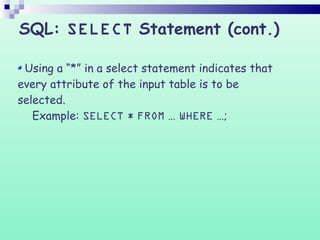
Using a “*” in a select statement indicates that
every attribute of the input table is to be
selected.
Example: SELECT * FROM … WHERE …;
SQL: SELECT Statement (cont.)
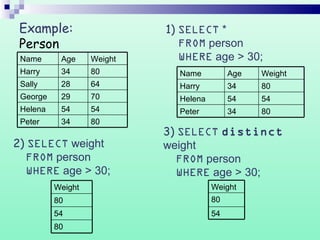
Example:
Person
8034Peter
5454Helena
7029George
6428Sally
8034Harry
WeightAgeName
8034Peter
5454Helena
8034Harry
WeightAgeName
80
54
80
Weight
1) SELECT *
FROM person
WHERE age > 30;
2) SELECT weight
FROM person
WHERE age > 30;
3) SELECT distinct
weight
FROM person
WHERE age > 30;
54
80
Weight
SQL: Join operation
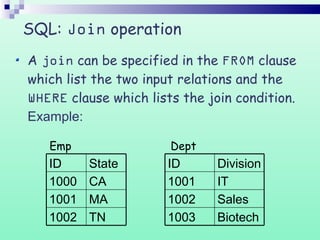
A join can be specified in the FROM clause
which list the two input relations and the
WHERE clause which lists the join condition.
Example:
Biotech1003
Sales1002
IT1001
DivisionID
TN1002
MA1001
CA1000
StateID
Emp Dept
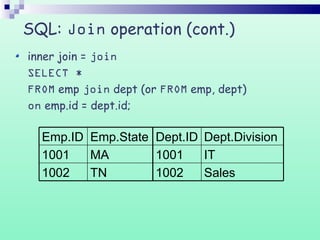
SQL: Join operation (cont.)
Sales1002
IT1001
Dept.DivisionDept.ID
TN1002
MA1001
Emp.StateEmp.ID
inner join = join
SELECT *
FROM emp join dept (or FROM emp, dept)
on emp.id = dept.id;
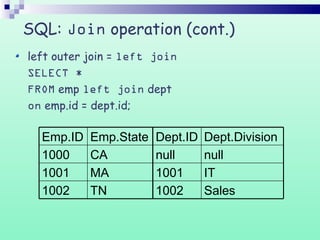
SQL: Join operation (cont.)
IT1001
Sales1002
nullnull
Dept.DivisionDept.ID
CA1000
TN1002
MA1001
Emp.StateEmp.ID
left outer join = left join
SELECT *
FROM emp left join dept
on emp.id = dept.id;
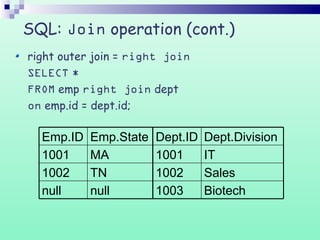
SQL: Join operation (cont.)
Sales1002
Biotech1003
IT1001
Dept.DivisionDept.ID
MA1001
nullnull
TN1002
Emp.StateEmp.ID
right outer join = right join
SELECT *
FROM emp right join dept
on emp.id = dept.id;
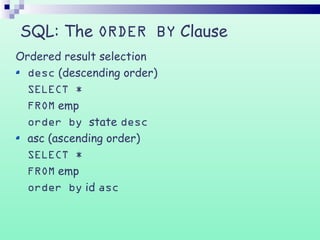
SQL: The ORDER BY Clause
Ordered result selection
desc (descending order)
SELECT *
FROM emp
order by state desc
asc (ascending order)
SELECT *
FROM emp
order by id asc
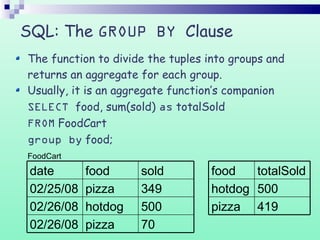
SQL: The GROUP BY Clause
The function to divide the tuples into groups and
returns an aggregate for each group.
Usually, it is an aggregate function’s companion
SELECT food, sum(sold) as totalSold
FROM FoodCart
group by food;
FoodCart
419pizza
500hotdog
totalSoldfood
70pizza02/26/08
500hotdog02/26/08
349pizza02/25/08
soldfooddate
Thank You
Created By :
Chandan
Pawar

Sql presentation 1 by chandan

  • 1.
    Well come,,,,,,,,,Chandan Pawar SQLServer MS SQL Server is a database server Product of Microsoft Enables user to write queries and other SQL statements and execute them
  • 2.
  • 3.
    The ANSI standardlanguage for the definition and manipulation of relational database. Includes data definition language (DDL), statements that specify and modify database schemas. Includes a data manipulation language (DML), statements that manipulate database content. Structured Query Language (SQL)
  • 4.
    SQL: DDL Commands CREATETABLE: used to create a table. ALTER TABLE: modifies a table after it was created. DROP TABLE: removes a table from a database.
  • 5.
    SQL: CREATE TABLEStatement Things to consider before you create your table are: The type of data the table name what column(s) will make up the primary key the names of the columns CREATE TABLE statement syntax: CREATE TABLE <table name> ( field1 datatype ( NOT NULL ), field2 datatype ( NOT NULL ) );
  • 6.
  • 7.
    SQL: ALTER TABLEStatement To add or drop columns on existing tables. ALTER TABLE statement syntax: ALTER TABLE <table name> ADD attr datatype; or DROP COLUMN attr;
  • 8.
    SQL: DML Commands INSERT:adds new rows to a table. UPDATE: modifies one or more attributes. DELETE: deletes one or more rows from a table.
  • 9.
    SQL: INSERT Statement Toinsert a row into a table, it is necessary to have a value for each attribute, and order matters. INSERT statement syntax: INSERT into <table name> VALUES ('value1', 'value2', NULL); Example: INSERT into FoodCart VALUES (’02/26/08', ‘pizza', 70 ); FoodCart 70pizza02/26/08 500hotdog02/26/08 350pizza02/25/08 soldfooddate 500hotdog02/26/08 350pizza02/25/08 soldfooddate
  • 10.
    SQL: UPDATE Statement Toupdate the content of the table: UPDATE statement syntax: UPDATE <table name> SET <attr> = <value> WHERE <selection condition>; Example: UPDATE FoodCart SET sold = 349 WHERE date = ’02/25/08’ AND food = ‘pizza’; FoodCart 70pizza02/26/08 500hotdog02/26/08 350pizza02/25/08 soldfooddate 70pizza02/26/08 500hotdog02/26/08 349pizza02/25/08 soldfooddate
  • 11.
    SQL: DELETE Statement Todelete rows from the table: DELETE statement syntax: DELETE FROM <table name> WHERE <condition>; Example: DELETE FROM FoodCart WHERE food = ‘hotdog’; FoodCart Note: If the WHERE clause is omitted all rows of data are deleted from the table. 70pizza02/26/08 500hotdog02/26/08 349pizza02/25/08 soldfooddate 70pizza02/26/08 349pizza02/25/08 soldfooddate
  • 12.
    SQL Statements, Operations,Clauses SQL Statements: Select SQL Operations: Join Left Join Right Join Like SQL Clauses: Order By Group By Having
  • 13.
    SQL: SELECT StatementA basicSELECT statement includes 3 clauses SELECT <attribute name> FROM <tables> WHERE <condition> SELECT Specifies the attributes that are part of the resulting relation FROM Specifies the tables that serve as the input to the statement WHERE Specifies the selection condition, including the join condition.
  • 14.
    Using a “*”in a select statement indicates that every attribute of the input table is to be selected. Example: SELECT * FROM … WHERE …; SQL: SELECT Statement (cont.)
  • 15.
    Example: Person 8034Peter 5454Helena 7029George 6428Sally 8034Harry WeightAgeName 8034Peter 5454Helena 8034Harry WeightAgeName 80 54 80 Weight 1) SELECT * FROMperson WHERE age > 30; 2) SELECT weight FROM person WHERE age > 30; 3) SELECT distinct weight FROM person WHERE age > 30; 54 80 Weight
  • 16.
    SQL: Join operation Ajoin can be specified in the FROM clause which list the two input relations and the WHERE clause which lists the join condition. Example: Biotech1003 Sales1002 IT1001 DivisionID TN1002 MA1001 CA1000 StateID Emp Dept
  • 17.
    SQL: Join operation(cont.) Sales1002 IT1001 Dept.DivisionDept.ID TN1002 MA1001 Emp.StateEmp.ID inner join = join SELECT * FROM emp join dept (or FROM emp, dept) on emp.id = dept.id;
  • 18.
    SQL: Join operation(cont.) IT1001 Sales1002 nullnull Dept.DivisionDept.ID CA1000 TN1002 MA1001 Emp.StateEmp.ID left outer join = left join SELECT * FROM emp left join dept on emp.id = dept.id;
  • 19.
    SQL: Join operation(cont.) Sales1002 Biotech1003 IT1001 Dept.DivisionDept.ID MA1001 nullnull TN1002 Emp.StateEmp.ID right outer join = right join SELECT * FROM emp right join dept on emp.id = dept.id;
  • 20.
    SQL: The ORDERBY Clause Ordered result selection desc (descending order) SELECT * FROM emp order by state desc asc (ascending order) SELECT * FROM emp order by id asc
  • 21.
    SQL: The GROUPBY Clause The function to divide the tuples into groups and returns an aggregate for each group. Usually, it is an aggregate function’s companion SELECT food, sum(sold) as totalSold FROM FoodCart group by food; FoodCart 419pizza 500hotdog totalSoldfood 70pizza02/26/08 500hotdog02/26/08 349pizza02/25/08 soldfooddate
  • 22.
    Thank You Created By: Chandan Pawar

Editor's Notes

  • #4 DDL includes statements like: CREATE TABLE ALTER TABLE DROP TABLE CREATE INDEX DML includes statements like: INSERT UPDATE DELETE
  • #7 Blob- binary long object clob – character long object
  • #21 The default ordering of the ORDER BY clause is by ascending order A-Z.