SQL Pass-Through and the ODBC Interface: Extract and Transform Your Data FASTER – For PC SAS Users
Overview Definitions ODBC  RDBMS SQL Pass-Through Query Syntax ODBC libname statement Explicit SQL pass-through query using ODBC interface Why Use Explicit Pass-Through? Increased processing speed Differences between Oracle, DB2, and SAS Work around SAS limitations Implicit pass-through doesn’t always work (ex: unconvertable SAS functions, complex joins, outer joins)
Definitions
Definitions ODBC : Open Database Connectivity RDBMS : Relational Database Management System DB2 Access Oracle SQL Server SQL : Structured Query Language Each RDBMS has its own dialect of SQL Use SQL within SAS by invoking Proc SQL Pass-Through Query : Instead of having SAS do the work, process the data in its native environment using native SQL functions (implicit vs. explicit)
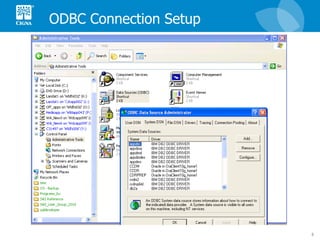
ODBC Connection Setup
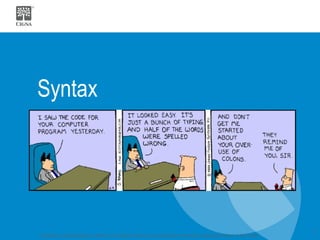
Syntax
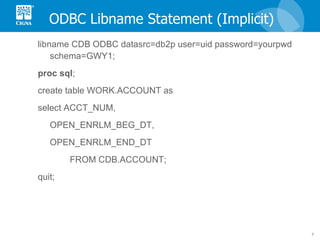
ODBC Libname Statement (Implicit) libname CDB ODBC datasrc=db2p user=uid password=yourpwd schema=GWY1; proc   sql ; create table WORK.ACCOUNT as select ACCT_NUM, OPEN_ENRLM_BEG_DT, OPEN_ENRLM_END_DT  FROM CDB.ACCOUNT; quit;
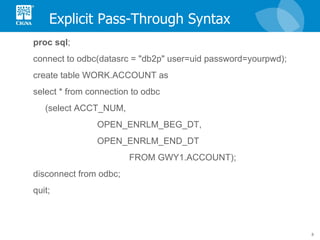
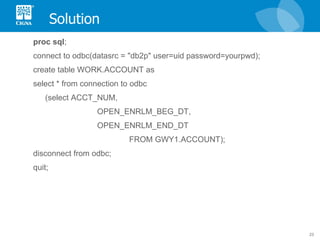
Explicit Pass-Through Syntax proc   sql ; connect to odbc(datasrc = "db2p" user=uid password=yourpwd);  create table WORK.ACCOUNT as select * from connection to odbc (select ACCT_NUM, OPEN_ENRLM_BEG_DT, OPEN_ENRLM_END_DT  FROM GWY1.ACCOUNT); disconnect from odbc; quit;
Why Use Explicit Pass-Through?
Processing Location Affects Processing Speed "No one will believe you solved this problem in one day! We've been working on it for months. Now, go act busy for a few weeks and I'll let you know when it's time to tell them."   --submission from a real-life “Dilbert Quotes” contest
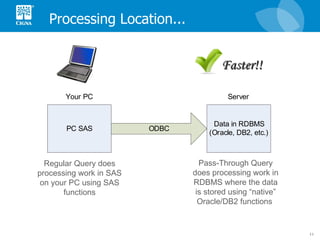
Processing Location... Regular Query does processing work in SAS on your PC using SAS functions Pass-Through Query does processing work in RDBMS where the data is stored using “native” Oracle/DB2 functions  Faster!!
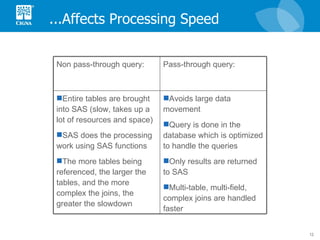
...Affects Processing Speed Avoids large data movement Query is done in the database which is optimized to handle the queries Only results are returned to SAS Multi-table, multi-field, complex joins are handled faster Entire tables are brought into SAS (slow, takes up a lot of resources and space) SAS does the processing work using SAS functions The more tables being referenced, the larger the tables, and the more complex the joins, the greater the slowdown Pass-through query: Non pass-through query:
Differences in Numeric Precision – Oracle example
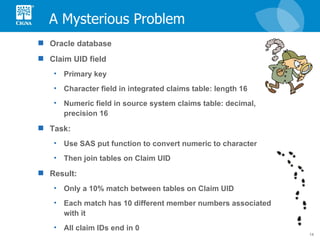
A Mysterious Problem Oracle database Claim UID field Primary key Character field in integrated claims table: length 16 Numeric field in source system claims table: decimal, precision 16 Task: Use SAS put function to convert numeric to character Then join tables on Claim UID Result: Only a 10% match between tables on Claim UID Each match has 10 different member numbers associated with it All claim IDs end in 0
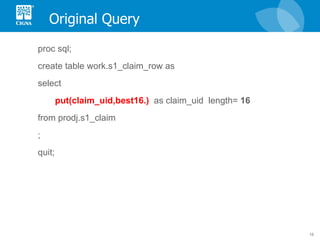
Original Query proc sql; create table work.s1_claim_row as select put(claim_uid,best16.)   as claim_uid  length=  16   from prodj.s1_claim  ;  quit;
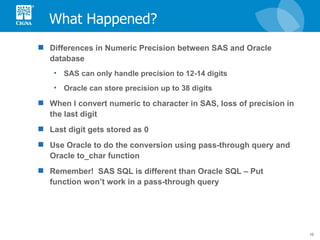
What Happened? Differences in Numeric Precision between SAS and Oracle database SAS can only handle precision to 12-14 digits Oracle can store precision up to 38 digits When I convert numeric to character in SAS, loss of precision in the last digit Last digit gets stored as 0 Use Oracle to do the conversion using pass-through query and Oracle to_char function Remember!  SAS SQL is different than Oracle SQL – Put function won’t work in a pass-through query
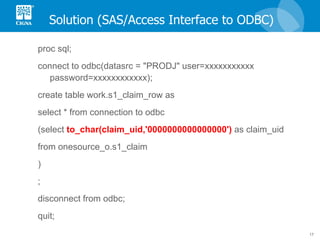
Solution (SAS/Access Interface to ODBC) proc sql; connect to odbc(datasrc = "PRODJ" user=xxxxxxxxxxx password=xxxxxxxxxxxx); create table work.s1_claim_row as select * from connection to odbc (select  to_char(claim_uid,'0000000000000000')  as claim_uid from onesource_o.s1_claim  ) ; disconnect from odbc; quit;
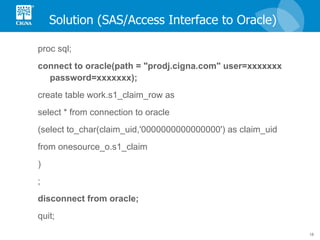
Solution (SAS/Access Interface to Oracle) proc sql; connect to oracle(path = "prodj.cigna.com" user=xxxxxxx password=xxxxxxx); create table work.s1_claim_row as select * from connection to oracle (select to_char(claim_uid,'0000000000000000') as claim_uid from onesource_o.s1_claim  ) ; disconnect from oracle; quit;
Differences in Naming Conventions – DB2 example
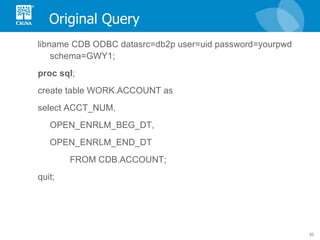
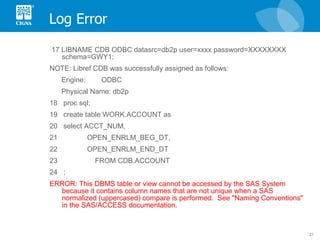
Original Query libname CDB ODBC datasrc=db2p user=uid password=yourpwd schema=GWY1; proc   sql ; create table WORK.ACCOUNT as select ACCT_NUM, OPEN_ENRLM_BEG_DT, OPEN_ENRLM_END_DT  FROM CDB.ACCOUNT; quit;
Log Error 17 LIBNAME CDB ODBC datasrc=db2p user=xxxx password=XXXXXXXX schema=GWY1; NOTE: Libref CDB was successfully assigned as follows: Engine:  ODBC Physical Name: db2p 18  proc sql; 19  create table WORK.ACCOUNT as 20  select ACCT_NUM, 21  OPEN_ENRLM_BEG_DT, 22  OPEN_ENRLM_END_DT 23  FROM CDB.ACCOUNT 24  ; ERROR: This DBMS table or view cannot be accessed by the SAS System because it contains column names that are not unique when a SAS normalized (uppercased) compare is performed.  See "Naming Conventions" in the SAS/ACCESS documentation.
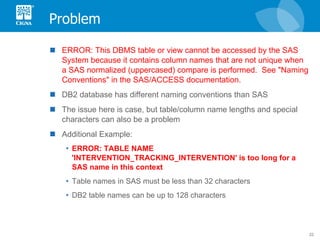
Problem ERROR: This DBMS table or view cannot be accessed by the SAS System because it contains column names that are not unique when a SAS normalized (uppercased) compare is performed.  See "Naming Conventions" in the SAS/ACCESS documentation. DB2 database has different naming conventions than SAS The issue here is case, but table/column name lengths and special characters can also be a problem Additional Example:  ERROR: TABLE NAME 'INTERVENTION_TRACKING_INTERVENTION' is too long for a SAS name in this context Table names in SAS must be less than 32 characters DB2 table names can be up to 128 characters
Solution proc   sql ; connect to odbc(datasrc = "db2p" user=uid password=yourpwd);  create table WORK.ACCOUNT as select * from connection to odbc (select ACCT_NUM, OPEN_ENRLM_BEG_DT, OPEN_ENRLM_END_DT  FROM GWY1.ACCOUNT); disconnect from odbc; quit;
Conclusion
Why Use Pass-Through Queries? Decrease Processing Time The closer you move the processing operations to where the data is located, the more efficient your query is Pass-through queries process the data in its native environment Differences Between Oracle, DB2, and SAS Numerical precision Table/field naming conventions Work Around SAS Limitations Use Oracle or DB2 functions to do the work if SAS can’t Particularly useful for initial data extractions Good when you are familiar with Oracle or DB2 SQL dialects
Contact Information Presentation author: Jessica Hampton  For more information about SQL pass-through queries, email  [email_address] Useful links: SAS ODBC Driver: User’s Guide and Programmer’s Reference:  http://support.sas.com/documentation/onlinedoc/91pdf/sasdoc_91/odbc_ugref_6971.pdf SAS/Access for Relational Databases Reference:  http://support.sas.com/documentation/onlinedoc/91pdf/sasdoc_913/access_rdbref_9297.pdf Numeric Precision in SAS  http://support.sas.com/techsup/technote/ts230.html   http://support.sas.com/techsup/technote/ts654.pdf DB2 Naming Conventions  http://support.sas.com/documentation/cdl/en/acreldb/63647/HTML/default/viewer.htm#a001383772.htm

SQL Pass Through and the ODBC Interface

  • 1.
    SQL Pass-Through andthe ODBC Interface: Extract and Transform Your Data FASTER – For PC SAS Users
  • 2.
    Overview Definitions ODBC RDBMS SQL Pass-Through Query Syntax ODBC libname statement Explicit SQL pass-through query using ODBC interface Why Use Explicit Pass-Through? Increased processing speed Differences between Oracle, DB2, and SAS Work around SAS limitations Implicit pass-through doesn’t always work (ex: unconvertable SAS functions, complex joins, outer joins)
  • 3.
  • 4.
    Definitions ODBC :Open Database Connectivity RDBMS : Relational Database Management System DB2 Access Oracle SQL Server SQL : Structured Query Language Each RDBMS has its own dialect of SQL Use SQL within SAS by invoking Proc SQL Pass-Through Query : Instead of having SAS do the work, process the data in its native environment using native SQL functions (implicit vs. explicit)
  • 5.
  • 6.
  • 7.
    ODBC Libname Statement(Implicit) libname CDB ODBC datasrc=db2p user=uid password=yourpwd schema=GWY1; proc sql ; create table WORK.ACCOUNT as select ACCT_NUM, OPEN_ENRLM_BEG_DT, OPEN_ENRLM_END_DT FROM CDB.ACCOUNT; quit;
  • 8.
    Explicit Pass-Through Syntaxproc sql ; connect to odbc(datasrc = "db2p" user=uid password=yourpwd); create table WORK.ACCOUNT as select * from connection to odbc (select ACCT_NUM, OPEN_ENRLM_BEG_DT, OPEN_ENRLM_END_DT FROM GWY1.ACCOUNT); disconnect from odbc; quit;
  • 9.
    Why Use ExplicitPass-Through?
  • 10.
    Processing Location AffectsProcessing Speed "No one will believe you solved this problem in one day! We've been working on it for months. Now, go act busy for a few weeks and I'll let you know when it's time to tell them." --submission from a real-life “Dilbert Quotes” contest
  • 11.
    Processing Location... RegularQuery does processing work in SAS on your PC using SAS functions Pass-Through Query does processing work in RDBMS where the data is stored using “native” Oracle/DB2 functions Faster!!
  • 12.
    ...Affects Processing SpeedAvoids large data movement Query is done in the database which is optimized to handle the queries Only results are returned to SAS Multi-table, multi-field, complex joins are handled faster Entire tables are brought into SAS (slow, takes up a lot of resources and space) SAS does the processing work using SAS functions The more tables being referenced, the larger the tables, and the more complex the joins, the greater the slowdown Pass-through query: Non pass-through query:
  • 13.
    Differences in NumericPrecision – Oracle example
  • 14.
    A Mysterious ProblemOracle database Claim UID field Primary key Character field in integrated claims table: length 16 Numeric field in source system claims table: decimal, precision 16 Task: Use SAS put function to convert numeric to character Then join tables on Claim UID Result: Only a 10% match between tables on Claim UID Each match has 10 different member numbers associated with it All claim IDs end in 0
  • 15.
    Original Query procsql; create table work.s1_claim_row as select put(claim_uid,best16.) as claim_uid length= 16 from prodj.s1_claim ; quit;
  • 16.
    What Happened? Differencesin Numeric Precision between SAS and Oracle database SAS can only handle precision to 12-14 digits Oracle can store precision up to 38 digits When I convert numeric to character in SAS, loss of precision in the last digit Last digit gets stored as 0 Use Oracle to do the conversion using pass-through query and Oracle to_char function Remember! SAS SQL is different than Oracle SQL – Put function won’t work in a pass-through query
  • 17.
    Solution (SAS/Access Interfaceto ODBC) proc sql; connect to odbc(datasrc = "PRODJ" user=xxxxxxxxxxx password=xxxxxxxxxxxx); create table work.s1_claim_row as select * from connection to odbc (select to_char(claim_uid,'0000000000000000') as claim_uid from onesource_o.s1_claim ) ; disconnect from odbc; quit;
  • 18.
    Solution (SAS/Access Interfaceto Oracle) proc sql; connect to oracle(path = "prodj.cigna.com" user=xxxxxxx password=xxxxxxx); create table work.s1_claim_row as select * from connection to oracle (select to_char(claim_uid,'0000000000000000') as claim_uid from onesource_o.s1_claim ) ; disconnect from oracle; quit;
  • 19.
    Differences in NamingConventions – DB2 example
  • 20.
    Original Query libnameCDB ODBC datasrc=db2p user=uid password=yourpwd schema=GWY1; proc sql ; create table WORK.ACCOUNT as select ACCT_NUM, OPEN_ENRLM_BEG_DT, OPEN_ENRLM_END_DT FROM CDB.ACCOUNT; quit;
  • 21.
    Log Error 17LIBNAME CDB ODBC datasrc=db2p user=xxxx password=XXXXXXXX schema=GWY1; NOTE: Libref CDB was successfully assigned as follows: Engine: ODBC Physical Name: db2p 18 proc sql; 19 create table WORK.ACCOUNT as 20 select ACCT_NUM, 21 OPEN_ENRLM_BEG_DT, 22 OPEN_ENRLM_END_DT 23 FROM CDB.ACCOUNT 24 ; ERROR: This DBMS table or view cannot be accessed by the SAS System because it contains column names that are not unique when a SAS normalized (uppercased) compare is performed. See "Naming Conventions" in the SAS/ACCESS documentation.
  • 22.
    Problem ERROR: ThisDBMS table or view cannot be accessed by the SAS System because it contains column names that are not unique when a SAS normalized (uppercased) compare is performed. See "Naming Conventions" in the SAS/ACCESS documentation. DB2 database has different naming conventions than SAS The issue here is case, but table/column name lengths and special characters can also be a problem Additional Example: ERROR: TABLE NAME 'INTERVENTION_TRACKING_INTERVENTION' is too long for a SAS name in this context Table names in SAS must be less than 32 characters DB2 table names can be up to 128 characters
  • 23.
    Solution proc sql ; connect to odbc(datasrc = "db2p" user=uid password=yourpwd); create table WORK.ACCOUNT as select * from connection to odbc (select ACCT_NUM, OPEN_ENRLM_BEG_DT, OPEN_ENRLM_END_DT FROM GWY1.ACCOUNT); disconnect from odbc; quit;
  • 24.
  • 25.
    Why Use Pass-ThroughQueries? Decrease Processing Time The closer you move the processing operations to where the data is located, the more efficient your query is Pass-through queries process the data in its native environment Differences Between Oracle, DB2, and SAS Numerical precision Table/field naming conventions Work Around SAS Limitations Use Oracle or DB2 functions to do the work if SAS can’t Particularly useful for initial data extractions Good when you are familiar with Oracle or DB2 SQL dialects
  • 26.
    Contact Information Presentationauthor: Jessica Hampton For more information about SQL pass-through queries, email [email_address] Useful links: SAS ODBC Driver: User’s Guide and Programmer’s Reference: http://support.sas.com/documentation/onlinedoc/91pdf/sasdoc_91/odbc_ugref_6971.pdf SAS/Access for Relational Databases Reference: http://support.sas.com/documentation/onlinedoc/91pdf/sasdoc_913/access_rdbref_9297.pdf Numeric Precision in SAS http://support.sas.com/techsup/technote/ts230.html http://support.sas.com/techsup/technote/ts654.pdf DB2 Naming Conventions http://support.sas.com/documentation/cdl/en/acreldb/63647/HTML/default/viewer.htm#a001383772.htm

Editor's Notes

  • #7 "I saw the code for your computer program yesterday. It looked easy. Its just a bunch of typing. And half of the words were spelt wrong. And don’t get me started on your over-use of colons."         - The Pointy-Haired Boss
  • #12 Add example logs with times contrasting pass-through query time w non-pass-through? Especially faster for complex joins (i.e. mutiple fields) on large tables b/c rdbms is typically optimized to handle such queries. Non pass through: entire tables brought into SAS, SAS does query, produces results Pass through: avoids large data movement, query is done in the database which is optimized to handle the queries, and only results are returned to SAS The more tables being referenced and the larger the tables, the greater the difference in speed.
  • #13 Add example logs with times contrasting pass-through query time w non-pass-through? Especially faster for complex joins (i.e. mutiple fields) on large tables b/c rdbms is typically optimized to handle such queries. Non pass through: entire tables brought into SAS, SAS does query, produces results Pass through: avoids large data movement, query is done in the database which is optimized to handle the queries, and only results are returned to SAS The more tables being referenced and the larger the tables, the greater the difference in speed.
  • #19 Or Using Libname clause: proc sql; create table work.s1_claim_row as select * from prodj.s1_claim using libname prodj oracle user=xxxxxxxx password=xxxxxxx path=‘prodj.cigna.com'; quit; Another example of explicit pass-through. Also try using proc sql options _method and _tree to show order of joins and which parts of the query were processed through/passed to the rdbms. Good when trying to join several tables in a database with a sas dataset.
  • #24 Add non-odbc pass-through syntax for db2?
  • #26 Or maybe you’re more fluent in another dialect of SQL