DM-57-2017
Data movement issues: Explicit
SQL Pass-Through can do the trick
Kiran Venna
Dataspace Inc.
Agenda
• Motivation
• Introduction
• Different categories to access Teradata
tables
• Case study 1: ETL Design with write
access to Teradata permanent tables
• Case study 2: ETL Design with no write
access to Teradata permanent tables
• Case Study 3: ETL design involving many
Teradata tables and SAS tables
Agenda contd..
• Case study 4: Advantage of using explicit
SQL pass-through in SAS macro.
• General Issue with macro variables in
explicit SQL pass-through and solution to it.
• Issue of remerging summary statistics with
data in explicit SQL pass-through and
solution to it
• Conclusion
Motivation
• Very Long running queries
• Failed queries
Introduction
• SAS and Teradata play an important role
in decision support systems (DSS).
• Teradata is used for the purpose of data
warehousing, where in large amounts of
data can be stored and retrieved quickly.
• SAS is powerful in doing reporting and
analytics owing to lot of custom
procedures
Introduction contd..
• ETL with SAS involves moving data in
both directions.
• Data movement between SAS and
Teradata will increase I/O time .
• Teradata executes query in parallel and
can complete ETL Job in less time.
• Explicit SQL pass-through is essential for
decreasing run time of SAS Job
Different categories to access
Teradata tables and
advantages/disadvantages with
each approach
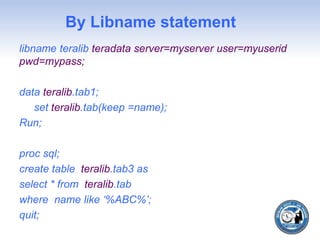
By Libname statement
libname teralib teradata server=myserver user=myuserid
pwd=mypass;
data teralib.tab1;
set teralib.tab(keep =name);
Run;
proc sql;
create table teralib.tab3 as
select * from teralib.tab
where name like ‘%ABC%’;
quit;
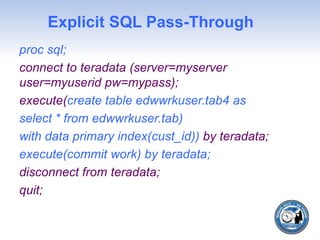
Explicit SQL Pass-Through
proc sql;
connect to teradata (server=myserver
user=myuserid pw=mypass);
execute(create table edwwrkuser.tab4 as
select * from edwwrkuser.tab)
with data primary index(cust_id)) by teradata;
execute(commit work) by teradata;
disconnect from teradata;
quit;
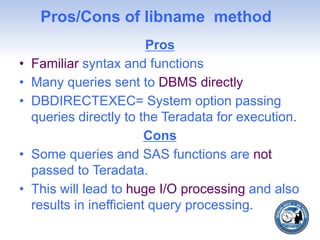
Pros/Cons of libname method
Pros
• Familiar syntax and functions
• Many queries sent to DBMS directly
• DBDIRECTEXEC= System option passing
queries directly to the Teradata for execution.
Cons
• Some queries and SAS functions are not
passed to Teradata.
• This will lead to huge I/O processing and also
results in inefficient query processing.
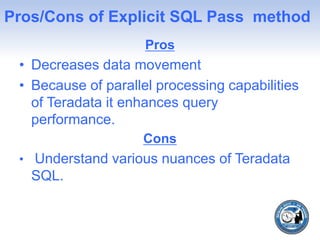
Pros/Cons of Explicit SQL Pass method
Pros
• Decreases data movement
• Because of parallel processing capabilities
of Teradata it enhances query
performance.
Cons
• Understand various nuances of Teradata
SQL.
Case study 1: ETL design
involving lot of Teradata tables
with write access to Teradata
permanent tables and final
output as SAS table.
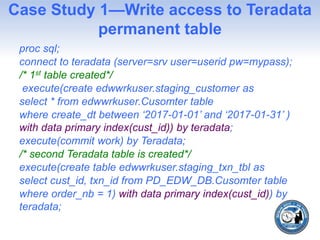
Case Study 1—Write access to Teradata
permanent table
proc sql;
connect to teradata (server=srv user=userid pw=mypass);
/* 1st table created*/
execute(create edwwrkuser.staging_customer as
select * from edwwrkuser.Cusomter table
where create_dt between ‘2017-01-01’ and ‘2017-01-31’ )
with data primary index(cust_id)) by teradata;
execute(commit work) by Teradata;
/* second Teradata table is created*/
execute(create table edwwrkuser.staging_txn_tbl as
select cust_id, txn_id from PD_EDW_DB.Cusomter table
where order_nb = 1) with data primary index(cust_id)) by
teradata;
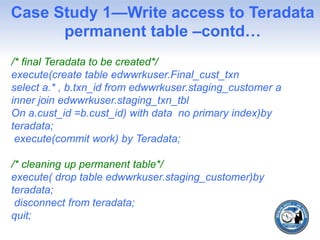
Case Study 1—Write access to Teradata
permanent table –contd…
/* final Teradata to be created*/
execute(create table edwwrkuser.Final_cust_txn
select a.* , b.txn_id from edwwrkuser.staging_customer a
inner join edwwrkuser.staging_txn_tbl
On a.cust_id =b.cust_id) with data no primary index)by
teradata;
execute(commit work) by Teradata;
/* cleaning up permanent table*/
execute( drop table edwwrkuser.staging_customer)by
teradata;
disconnect from teradata;
quit;
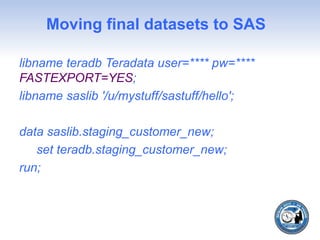
Moving final datasets to SAS
libname teradb Teradata user=**** pw=****
FASTEXPORT=YES;
libname saslib '/u/mystuff/sastuff/hello';
data saslib.staging_customer_new;
set teradb.staging_customer_new;
run;
Case study 2: ETL design
involving lot of Teradata tables
with no write access to Teradata
permanent tables and final
output as SAS table.
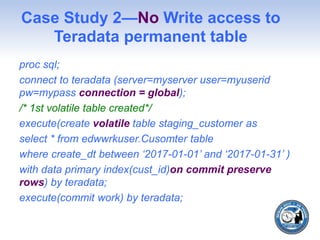
Case Study 2—No Write access to
Teradata permanent table
proc sql;
connect to teradata (server=myserver user=myuserid
pw=mypass connection = global);
/* 1st volatile table created*/
execute(create volatile table staging_customer as
select * from edwwrkuser.Cusomter table
where create_dt between ‘2017-01-01’ and ‘2017-01-31’ )
with data primary index(cust_id)on commit preserve
rows) by teradata;
execute(commit work) by teradata;
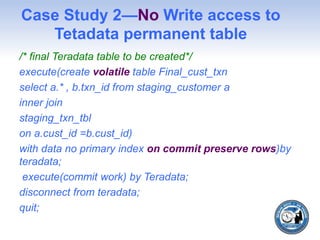
Case Study 2—No Write access to
Tetadata permanent table
/* final Teradata table to be created*/
execute(create volatile table Final_cust_txn
select a.* , b.txn_id from staging_customer a
inner join
staging_txn_tbl
on a.cust_id =b.cust_id)
with data no primary index on commit preserve rows)by
teradata;
execute(commit work) by Teradata;
disconnect from teradata;
quit;
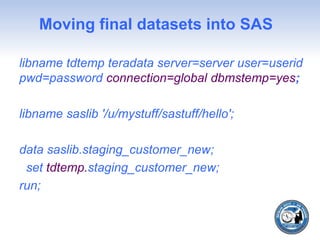
Moving final datasets into SAS
libname tdtemp teradata server=server user=userid
pwd=password connection=global dbmstemp=yes;
libname saslib '/u/mystuff/sastuff/hello';
data saslib.staging_customer_new;
set tdtemp.staging_customer_new;
run;
Case Study 3: ETL design
involving many Teradata tables
with few reference tables in SAS.
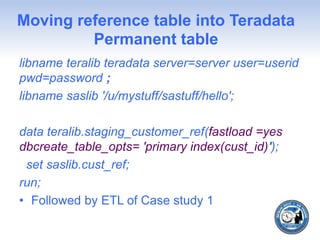
Moving reference table into Teradata
Permanent table
libname teralib teradata server=server user=userid
pwd=password ;
libname saslib '/u/mystuff/sastuff/hello';
data teralib.staging_customer_ref(fastload =yes
dbcreate_table_opts= 'primary index(cust_id)');
set saslib.cust_ref;
run;
• Followed by ETL of Case study 1
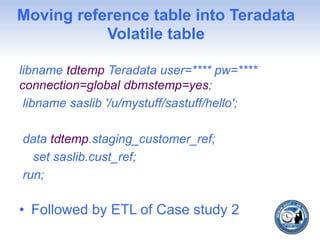
Moving reference table into Teradata
Volatile table
libname tdtemp Teradata user=**** pw=****
connection=global dbmstemp=yes;
libname saslib '/u/mystuff/sastuff/hello';
data tdtemp.staging_customer_ref;
set saslib.cust_ref;
run;
• Followed by ETL of Case study 2
Case study 4: Advantage of
using explicit SQL pass-through
in SAS macro.
SAS MACRO - Explicit SQL Pass-
Through --Introduction
• Inspiration data scrubbing global macros
in one of the projects.
• data scrubbing on Teradata table and
follows business rules and a final dataset
is created in SAS.
• Macro with Implicit pass through and DATA
Step --2 hours.
• Explicit SQL Pass-Through less than 10
minutes
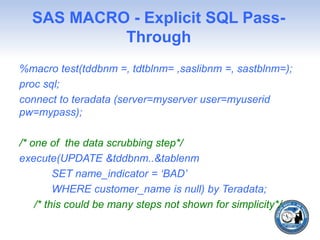
SAS MACRO - Explicit SQL Pass-
Through
%macro test(tddbnm =, tdtblnm= ,saslibnm =, sastblnm=);
proc sql;
connect to teradata (server=myserver user=myuserid
pw=mypass);
/* one of the data scrubbing step*/
execute(UPDATE &tddbnm..&tablenm
SET name_indicator = ‘BAD’
WHERE customer_name is null) by Teradata;
/* this could be many steps not shown for simplicity*/
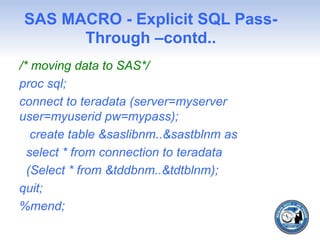
SAS MACRO - Explicit SQL Pass-
Through –contd..
/* moving data to SAS*/
proc sql;
connect to teradata (server=myserver
user=myuserid pw=mypass);
create table &saslibnm..&sastblnm as
select * from connection to teradata
(Select * from &tddbnm..&tdtblnm);
quit;
%mend;
General Issue with macro
variables in explicit SQL pass-
through and solution to it
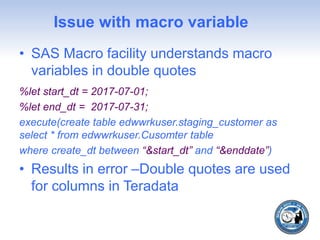
Issue with macro variable
• SAS Macro facility understands macro
variables in double quotes
%let start_dt = 2017-07-01;
%let end_dt = 2017-07-31;
execute(create table edwwrkuser.staging_customer as
select * from edwwrkuser.Cusomter table
where create_dt between “&start_dt” and “&enddate”)
• Results in error –Double quotes are used
for columns in Teradata
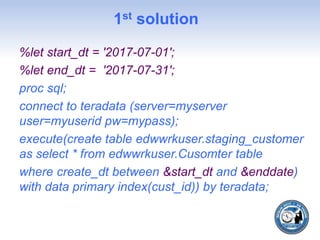
1st solution
%let start_dt = '2017-07-01';
%let end_dt = '2017-07-31';
proc sql;
connect to teradata (server=myserver
user=myuserid pw=mypass);
execute(create table edwwrkuser.staging_customer
as select * from edwwrkuser.Cusomter table
where create_dt between &start_dt and &enddate)
with data primary index(cust_id)) by teradata;
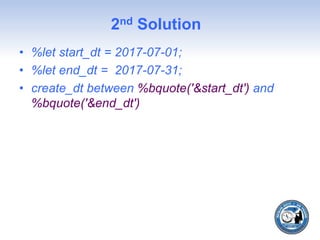
2nd Solution
• %let start_dt = 2017-07-01;
• %let end_dt = 2017-07-31;
• create_dt between %bquote('&start_dt') and
%bquote('&end_dt')
Issue of remerging summary
statistics with data in Explicit
SQL pass-through and solution
to it
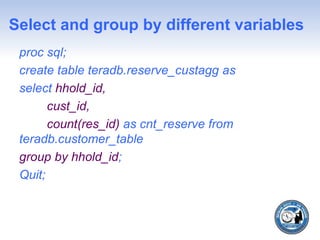
Select and group by different variables
proc sql;
create table teradb.reserve_custagg as
select hhold_id,
cust_id,
count(res_id) as cnt_reserve from
teradb.customer_table
group by hhold_id;
Quit;
Note in SAS and Error in Pass through
• "NOTE: The query requires remerging
summary statistics back with the original
data.”
• SELECT Failed. [3504] Selected non-
aggregate values must be part of the
associated group.
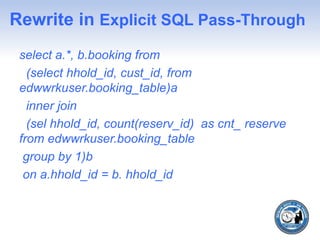
Rewrite in Explicit SQL Pass-Through
select a.*, b.booking from
(select hhold_id, cust_id, from
edwwrkuser.booking_table)a
inner join
(sel hhold_id, count(reserv_id) as cnt_ reserve
from edwwrkuser.booking_table
group by 1)b
on a.hhold_id = b. hhold_id
Important authors
• Jeff Bailey --bulk load utilities
• Harry Droogendyk explain SAS equivalent
code in Teradata
Conclusion
• Saves tremendous response time for SAS
ETL Job’s and SAS Macro’s.
• No need access to permanent table
• Faster with Teradata Permanent table as
fastload and fastexport can be used.
• Issues with macro variables in can be
fixed with %bquote.
• Remerge feature of PROC SQL can be
emulated by query rewrite
Thanks
• Thanks for listening
• I would like to specially thank, Paul Kirk
Lafler for encouraging me to write papers.
• I would like to thank, Lakshmi Nadiya
Chintalapudi, Charannag Devarapalli ,
Anvesh Reddy Perati, Srirama Reddy for
helping me with proof reading and giving
their valuable suggestions.

Data Movement issues: Explicit SQL Pass-Through can do the trick

  • 1.
    DM-57-2017 Data movement issues:Explicit SQL Pass-Through can do the trick Kiran Venna Dataspace Inc.
  • 2.
    Agenda • Motivation • Introduction •Different categories to access Teradata tables • Case study 1: ETL Design with write access to Teradata permanent tables • Case study 2: ETL Design with no write access to Teradata permanent tables • Case Study 3: ETL design involving many Teradata tables and SAS tables
  • 3.
    Agenda contd.. • Casestudy 4: Advantage of using explicit SQL pass-through in SAS macro. • General Issue with macro variables in explicit SQL pass-through and solution to it. • Issue of remerging summary statistics with data in explicit SQL pass-through and solution to it • Conclusion
  • 4.
    Motivation • Very Longrunning queries • Failed queries
  • 5.
    Introduction • SAS andTeradata play an important role in decision support systems (DSS). • Teradata is used for the purpose of data warehousing, where in large amounts of data can be stored and retrieved quickly. • SAS is powerful in doing reporting and analytics owing to lot of custom procedures
  • 6.
    Introduction contd.. • ETLwith SAS involves moving data in both directions. • Data movement between SAS and Teradata will increase I/O time . • Teradata executes query in parallel and can complete ETL Job in less time. • Explicit SQL pass-through is essential for decreasing run time of SAS Job
  • 7.
    Different categories toaccess Teradata tables and advantages/disadvantages with each approach
  • 8.
    By Libname statement libnameteralib teradata server=myserver user=myuserid pwd=mypass; data teralib.tab1; set teralib.tab(keep =name); Run; proc sql; create table teralib.tab3 as select * from teralib.tab where name like ‘%ABC%’; quit;
  • 9.
    Explicit SQL Pass-Through procsql; connect to teradata (server=myserver user=myuserid pw=mypass); execute(create table edwwrkuser.tab4 as select * from edwwrkuser.tab) with data primary index(cust_id)) by teradata; execute(commit work) by teradata; disconnect from teradata; quit;
  • 10.
    Pros/Cons of libnamemethod Pros • Familiar syntax and functions • Many queries sent to DBMS directly • DBDIRECTEXEC= System option passing queries directly to the Teradata for execution. Cons • Some queries and SAS functions are not passed to Teradata. • This will lead to huge I/O processing and also results in inefficient query processing.
  • 11.
    Pros/Cons of ExplicitSQL Pass method Pros • Decreases data movement • Because of parallel processing capabilities of Teradata it enhances query performance. Cons • Understand various nuances of Teradata SQL.
  • 12.
    Case study 1:ETL design involving lot of Teradata tables with write access to Teradata permanent tables and final output as SAS table.
  • 13.
    Case Study 1—Writeaccess to Teradata permanent table proc sql; connect to teradata (server=srv user=userid pw=mypass); /* 1st table created*/ execute(create edwwrkuser.staging_customer as select * from edwwrkuser.Cusomter table where create_dt between ‘2017-01-01’ and ‘2017-01-31’ ) with data primary index(cust_id)) by teradata; execute(commit work) by Teradata; /* second Teradata table is created*/ execute(create table edwwrkuser.staging_txn_tbl as select cust_id, txn_id from PD_EDW_DB.Cusomter table where order_nb = 1) with data primary index(cust_id)) by teradata;
  • 14.
    Case Study 1—Writeaccess to Teradata permanent table –contd… /* final Teradata to be created*/ execute(create table edwwrkuser.Final_cust_txn select a.* , b.txn_id from edwwrkuser.staging_customer a inner join edwwrkuser.staging_txn_tbl On a.cust_id =b.cust_id) with data no primary index)by teradata; execute(commit work) by Teradata; /* cleaning up permanent table*/ execute( drop table edwwrkuser.staging_customer)by teradata; disconnect from teradata; quit;
  • 15.
    Moving final datasetsto SAS libname teradb Teradata user=**** pw=**** FASTEXPORT=YES; libname saslib '/u/mystuff/sastuff/hello'; data saslib.staging_customer_new; set teradb.staging_customer_new; run;
  • 16.
    Case study 2:ETL design involving lot of Teradata tables with no write access to Teradata permanent tables and final output as SAS table.
  • 17.
    Case Study 2—NoWrite access to Teradata permanent table proc sql; connect to teradata (server=myserver user=myuserid pw=mypass connection = global); /* 1st volatile table created*/ execute(create volatile table staging_customer as select * from edwwrkuser.Cusomter table where create_dt between ‘2017-01-01’ and ‘2017-01-31’ ) with data primary index(cust_id)on commit preserve rows) by teradata; execute(commit work) by teradata;
  • 18.
    Case Study 2—NoWrite access to Tetadata permanent table /* final Teradata table to be created*/ execute(create volatile table Final_cust_txn select a.* , b.txn_id from staging_customer a inner join staging_txn_tbl on a.cust_id =b.cust_id) with data no primary index on commit preserve rows)by teradata; execute(commit work) by Teradata; disconnect from teradata; quit;
  • 19.
    Moving final datasetsinto SAS libname tdtemp teradata server=server user=userid pwd=password connection=global dbmstemp=yes; libname saslib '/u/mystuff/sastuff/hello'; data saslib.staging_customer_new; set tdtemp.staging_customer_new; run;
  • 20.
    Case Study 3:ETL design involving many Teradata tables with few reference tables in SAS.
  • 21.
    Moving reference tableinto Teradata Permanent table libname teralib teradata server=server user=userid pwd=password ; libname saslib '/u/mystuff/sastuff/hello'; data teralib.staging_customer_ref(fastload =yes dbcreate_table_opts= 'primary index(cust_id)'); set saslib.cust_ref; run; • Followed by ETL of Case study 1
  • 22.
    Moving reference tableinto Teradata Volatile table libname tdtemp Teradata user=**** pw=**** connection=global dbmstemp=yes; libname saslib '/u/mystuff/sastuff/hello'; data tdtemp.staging_customer_ref; set saslib.cust_ref; run; • Followed by ETL of Case study 2
  • 23.
    Case study 4:Advantage of using explicit SQL pass-through in SAS macro.
  • 24.
    SAS MACRO -Explicit SQL Pass- Through --Introduction • Inspiration data scrubbing global macros in one of the projects. • data scrubbing on Teradata table and follows business rules and a final dataset is created in SAS. • Macro with Implicit pass through and DATA Step --2 hours. • Explicit SQL Pass-Through less than 10 minutes
  • 25.
    SAS MACRO -Explicit SQL Pass- Through %macro test(tddbnm =, tdtblnm= ,saslibnm =, sastblnm=); proc sql; connect to teradata (server=myserver user=myuserid pw=mypass); /* one of the data scrubbing step*/ execute(UPDATE &tddbnm..&tablenm SET name_indicator = ‘BAD’ WHERE customer_name is null) by Teradata; /* this could be many steps not shown for simplicity*/
  • 26.
    SAS MACRO -Explicit SQL Pass- Through –contd.. /* moving data to SAS*/ proc sql; connect to teradata (server=myserver user=myuserid pw=mypass); create table &saslibnm..&sastblnm as select * from connection to teradata (Select * from &tddbnm..&tdtblnm); quit; %mend;
  • 27.
    General Issue withmacro variables in explicit SQL pass- through and solution to it
  • 28.
    Issue with macrovariable • SAS Macro facility understands macro variables in double quotes %let start_dt = 2017-07-01; %let end_dt = 2017-07-31; execute(create table edwwrkuser.staging_customer as select * from edwwrkuser.Cusomter table where create_dt between “&start_dt” and “&enddate”) • Results in error –Double quotes are used for columns in Teradata
  • 29.
    1st solution %let start_dt= '2017-07-01'; %let end_dt = '2017-07-31'; proc sql; connect to teradata (server=myserver user=myuserid pw=mypass); execute(create table edwwrkuser.staging_customer as select * from edwwrkuser.Cusomter table where create_dt between &start_dt and &enddate) with data primary index(cust_id)) by teradata;
  • 30.
    2nd Solution • %letstart_dt = 2017-07-01; • %let end_dt = 2017-07-31; • create_dt between %bquote('&start_dt') and %bquote('&end_dt')
  • 31.
    Issue of remergingsummary statistics with data in Explicit SQL pass-through and solution to it
  • 32.
    Select and groupby different variables proc sql; create table teradb.reserve_custagg as select hhold_id, cust_id, count(res_id) as cnt_reserve from teradb.customer_table group by hhold_id; Quit;
  • 33.
    Note in SASand Error in Pass through • "NOTE: The query requires remerging summary statistics back with the original data.” • SELECT Failed. [3504] Selected non- aggregate values must be part of the associated group.
  • 34.
    Rewrite in ExplicitSQL Pass-Through select a.*, b.booking from (select hhold_id, cust_id, from edwwrkuser.booking_table)a inner join (sel hhold_id, count(reserv_id) as cnt_ reserve from edwwrkuser.booking_table group by 1)b on a.hhold_id = b. hhold_id
  • 35.
    Important authors • JeffBailey --bulk load utilities • Harry Droogendyk explain SAS equivalent code in Teradata
  • 36.
    Conclusion • Saves tremendousresponse time for SAS ETL Job’s and SAS Macro’s. • No need access to permanent table • Faster with Teradata Permanent table as fastload and fastexport can be used. • Issues with macro variables in can be fixed with %bquote. • Remerge feature of PROC SQL can be emulated by query rewrite
  • 37.
    Thanks • Thanks forlistening • I would like to specially thank, Paul Kirk Lafler for encouraging me to write papers. • I would like to thank, Lakshmi Nadiya Chintalapudi, Charannag Devarapalli , Anvesh Reddy Perati, Srirama Reddy for helping me with proof reading and giving their valuable suggestions.