Dr. Eduardo Castro Martínez
Microsoft MVP
ecastro@grupoasesor.net

http://comunidadwindows.org
http://ecastrom.blogspot.com
Project Server
Client Tier   Clients    Project
                                                        Professio
                                                                                    3rd Party
                                                                                    Applicatio
                                                                                                        LOB
                                                                                                      Applicatio
                                                                                                                             Internet
                                                                                                                             Explorer
                                                 Active    nal                         ns                ns
                                             Cache


              PWA Server                                                                            Microsoft SharePoint Server
                                                                 PSI
Web Tier
                                                                                   ASPX                        2010
                                                              Forwarde                                 Microsoft SharePoint
                                                                                   Pages
                                                                  r                                      Foundation 2010


              Project Server 2010                                                          PWA                            ASPX Pages
                                                                                           Server

                                                                         Project Server Interface
                                                     Scheduling Engine
                                Queuing System


                                                                                                        Workflow System
              Eventing System


                                                                                  (PSI)                                    Microsoft


                                                                                                         Project Server
Application                                                                                                               SharePoint
                                                                                                                          Server 2010
   Tier                                                                     Business Objects                               Microsoft
                                                                                                                          SharePoint
                                                                                                                          Foundation
                                                                         Data Access Layer (DAL)                             2010


              SQL Server
 Database
                                                    Draft                  Published Archive Reporting Content Config
   Tier
High Availability
Virtualization
Storage
Entity            Small    Medium      Large
                Projects                    100      5,000       20,000
                Tasks                       17,125   856,250     342,5000
                Avg. Tasks Per Project      171.25   171.25      171.25
                Task Transaction History    10       100         1000
                Assignments                 22,263   1,113,125   4,500,000
                Avg. Assignments Per Task   1.3      1.3         1.3
                Approvals                   50       600         3000
                Users                       1,000    10,000      50,000
                Project (Formula)           3        20          25
Custom Fields


                Project (Manual)            2        40          50
                Task (Formula)              6        12          15
                Task (Manual)               4        8           10
                Assignment Rolldown         50%      50%         50%
                Resource                    10       20          25
                Look up Table Custom
                Fields                      2        15          100
                Timesheets (per year)       52,000   780,000     8,320,000
                Timesheet Lines             5        10          10
Component   Minimum requirement

Processor   64-bit, four-core, 2.5 GHz minimum per
            core
RAM         8 GB for single server and multiple server
            farm installation for production use
Hard disk   80 GB for installation
Component Minimum requirement

Processor   64-bit, four-core, 2.5 GHz minimum per
            core
RAM         8 GB for single server and multiple
            server farm installation for production
            use
Hard disk   80 GB for installation


Component Minimum requirement

Processor   64-bit, four-core
            2.5 GHz minimum per core
RAM         16 GB
Hard disk   Refer to TechNet for Recommendations
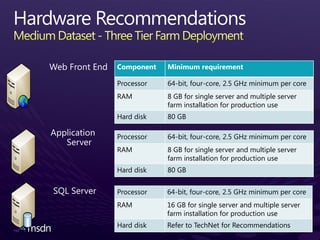
Component   Minimum requirement

Processor   64-bit, four-core, 2.5 GHz minimum per core
RAM         8 GB for single server and multiple server
            farm installation for production use
Hard disk   80 GB

Processor   64-bit, four-core, 2.5 GHz minimum per core
RAM         8 GB for single server and multiple server
            farm installation for production use
Hard disk   80 GB


Processor   64-bit, four-core, 2.5 GHz minimum per core
RAM         16 GB for single server and multiple server
            farm installation for production use
Hard disk   Refer to TechNet for Recommendations
−   Ensure optimized disk subsystem


                                      −   Monitor system performance
                                          against workloads
                                      −   Monitor SQL Indexes

−   Keep Web Front End, Application
    Server and SQL Server separate
−   Limit custom field usage and      −   Limit tasks to 8hr – 80hr
    formula driven fields                 duration
−   Limit number of fields in views   −   Limit publish operations
Capacity Planning in Project Server 2010 White Paper
http://technet.microsoft.com/en-us/library/ff686784.aspx
or higher
                              or higher


                  or higher          or higher
or higher


Exchange 2007 SP2 or later
Base          SQL Server        SharePoint    Project Server        Post
  Installation                        Server 2010        2010         Configuration
Install Windows   Install SQL        Run Pre-       Install Project   Central Admin
Server            Server and         Requisite      Server            Configuration
                  Components         Installer
Run Windows                                         Run SharePoint    Project Web
Update            Install Software   Install        Configuration     Access Admin
                  Updates            SharePoint     Wizard            Configuration
                                     Server 2010
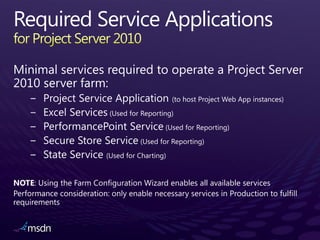
NOTE: Using the Farm Configuration Wizard enables all available services
−   Project Server 2007

                                                           NOT
−   Project Server 2003


       http://go.microsoft.com/?linkid=9729345
−   Project Portfolio Server


Upgrade and Migration for Project Server 2010:
    http://technet.microsoft.com/en-us/projectserver/ee691958.aspx
NOT


  − Database Attach (recommended)


  − In-place upgrade


− Backwards Compatibility Mode
Existing Office Project Server 2007


   Install SharePoint Server 2010


       Install Project Server 2010


           Run the “Configuration Wizard”
           (PSConfig)
Project Desktop and Project Server
                           Project Server       Project Server            Project Server 2010
                               2003                 2007
 Project Professional
                           Full connectivity    Not Supported                 Not Supported
         2003

 Project Professional                                               Connectivity to Server in BCM*
                           Not Supported        Full connectivity       (Project Professional 2007 SP2
         2007                                                                      required)

 Project Professional
                           Not Supported        Not Supported                Full connectivity
         2010


                 Project Server and SharePoint Server
                           Installation          Will coexist on the          Will NOT work with
                          Requirement             same farm with
Project Server 2010      SharePoint Server     SharePoint Server 2010       Office SharePoint Server
                          2010 Enterprise            Enterprise                       2007
Project Server 2007     Windows SharePoint     Office SharePoint Server
                                                                            SharePoint Server 2010
                           Services 3.0                  2007
EPM Solution demo includes:         Recommended Hardware/Software
• PPM Governance                    • 8GB RAM
• Portfolio Selection & Analytics   • Solid State Drive (SSD)
• Detailed Planning                 • Windows Server 2008 R2 64 bit
• Project & Portfolio Execution       (Hyper-V)


Download - http://go.microsoft.com/?linkid=9713956
Hosted - http://go.microsoft.com/?linkid=9713654
•   Product information
     –   http://www.microsoft.com/project/2010
     –   Project Team Blog http://blogs.msdn.com/project
•   End-User Product Help
     –   Project 2010 Help http://office2010.microsoft.com/project-help
     –   Project Server 2010 Help http://office2010.microsoft.com/project-server-help
•   Interactive content - Videos & Sessions & Webcasts
     –   http://www.microsoft.com/showcase/en/US/channels/microsoftproject
     –   http://www.microsoft.com/events/series/epm.aspx

•   IT Professional related
     –   TechCenter @ TechNet http://technet.microsoft.com/ProjectServer
     –   Admin Blog http://blogs.technet.com/projectadministration
•   Developer related
     –   Developer center @ MSDN http://msdn.microsoft.com/Project
     –   Programmability blog http://blogs.msdn.com/project_programmability
•   Additional questions? Project 2010 Forums!
     –   http://social.msdn.microsoft.com/Forums/en-
         US/category/projectserver2010,projectprofessional2010
•   SharePoint 2010 resources
     –   http://sharepoint.microsoft.com
Client                                                                                                                                             Application/PSI Server                                                                                                                   Database Server
                                                                                                                                                                                                                                                                                                  Farm Configuration
                                                                                                                                                                             Microsoft SharePoint Server 2010                                                                                         Database
 3rd Party Client     http://Svr:32843/ProjectServerApplication/*.asmx
                      http://Svr/InstanceName/_vti_bin/psi/*.asmx                                                                                         Microsoft SharePoint Foundation 2010                                                                                                      Central Admin
Custom Logic
                                                                                                                                                                                                                                                                                                   Content Database
Impersonation
                                                                                                                                                                              Windows Workflow Foundation
                                                                                                                                                                                                                                                                                                     Project Server
                                                                                                                                                                                                                                                                                                  Archive Database(n)
                                                                                                                     Web Service Tier                                                                               Business Logic Tier
                                                              Web Server                                                                                                                                                                                                                            Project Server


                                                                                                                      WCF Interface ASMX Interface
                                                                                                                                                                                                               Server Side                                                                       Reporting Database(n)
   Project Web                                  Microsoft SharePoint Server 2010                                                                                                                               Scheduling


                                                                                                                                                     External Web Services

                                                                                                                                                                                 Internal Web Services
      Access                                                                                                                                                                                                                                                                                         Project Server


                                                                                                                                                                                                                                                 Filter Data Access Layer
                                                                                                                                                                                                                Queuing                                                                          Published Database(n)


                                                                                                                                                                                                                                                                            Data Access Layer
                                                                                                                                                                                                                Service


                                                                                                                                                                                                                              Business Objects
IE Browser Level                             Microsoft SharePoint Foundation 2010
                       ASMX over http/soap


Security Zone                                                                                                                                                                                                                                                                                       Project Server
AJAX                                                                                                                                                                                                            Eventing                                                                           Draft Database(n)
                          WCF Services


                                                                                                                                                                                                                 Service
                                                                   Web Parts                                                                                                                                                                                                                        Shared Services
     Project                                                                                                                                                                                                                                                                                       Content Database
                                                                                                                                                                                                                Serializer
   Professional
                                                                 Master Pages                                                                                                                                                                                                                       Shared Services
                                                                                    Project User Context


Scheduling Engine
                                             Authentication


                                                                                                                                                                                                                                                                                                   Service Database
Desktop Reporting                                                                                                    Project User Context                                                                       Workflow
                                                                                                                                                                                                                Platform
Client Active_Cache                                                 ASPX                                                                                                                                                                                                                            Web Application
Soap Client                                                                                                                                                                                                                                                                                       Content Database(n)
Serializer
                                                                  PSI Proxies                                                                                                                                                                                                                        State Service
                                                                                                           WCF Services                                                                                                                                                                                Database

                                                                 PSI Forwarder                                                                                                                                                                                                                      Web Analytics
                                                              Server Active_Cache                                                                                                                        PWA and WSS content pages                                                                   Database
Application Server                                                    SQL Server                                                   Web Server
                                        1.     Determine workloads                                    6. Determine workloads                                        10. Determine workloads
Sizing:
                                        2.     Determine data profile                                 7. Determine resource ratios                                  11. Determine user concurrency
 1.   NOT about how many users
 2.   NOT about how many servers        3.     Determine throughput                                      against application server                                 12. Determine resource ratios
 3.   IS how many workloads/profile     4.     Determine queue model                                  8. Determine resource ratios                                  FINAL STEPS:
 4.   IS how many system resources      5.     Size application resources                                against SQL server                                         13. Size to physical server count
                                                                                                      9. Determine file allocation                                  14. Size to virtual guest count
General considerations:
 1.   # Instances                                           Bus Hardware                                                 Bus Hardware                                                  Bus Hardware
 2.   # web applications                      Processor                          Memory                    Processor                            Memory                   Processor                          Memory
 3.   Throughput tolerance
 4.   Co-existence                        2.8Ghz 2.8Ghz   2.8Ghz 2.8Ghz                                2.8Ghz 2.8Ghz   2.8Ghz 2.8Ghz                                 2.8Ghz 2.8Ghz   2.8Ghz 2.8Ghz

 5.   64 bit (scale up)                   2.8Ghz 2.8Ghz
                                                                                   16Gb                                                          32Gb                2.8Ghz 2.8Ghz
                                                                                                                                                                                                             16Gb
                                                          2.8Ghz 2.8Ghz                                2.8Ghz 2.8Ghz   2.8Ghz 2.8Ghz                                                 2.8Ghz 2.8Ghz

                                                                                 Network                                                        Network                                                     Network
Virtualization:                                                                                        2.8Ghz 2.8Ghz   2.8Ghz 2.8Ghz


 1.   Size for physical first                                                     Primary              2.8Ghz 2.8Ghz   2.8Ghz 2.8Ghz
                                                                                                                                                 Primary                                                     Primary
                                                                                   Team                                                           Team                                                        Team
 2.   Extrapolate to virtual             Internal Storage                                             Internal Storage                                              Internal Storage
                                                                            Backup      Heartbeat                                         Backup      Heartbeat                                        Backup      Heartbeat
 3.   Dedicate high demand to            RAID 1   RAID 1                                              RAID 1   RAID 1                                                RAID 1   RAID 1
                                             72GB     72GB                                                72GB     72GB                                                  72GB     72GB
      physical
                                               72GB             72GB       Restricted Un-Restricted         72GB             72GB        Restricted Un-Restricted         72GB             72GB       Restricted Un-Restricted
 4.   Allow host machine overhead                                         ManagementManagement                                          ManagementManagement                                         ManagementManagement

                                                                                                      External Storage                   SAN Connections
Storage:                                Application 64Bit                 Project Server PSI           RAID 1+0                                Host Bus Adaptor     Application 64Bit                Project Server WFE
 1.   SAN configuration                 Quantity                          ?                                               1TB
                                                                                                                                                                    Quantity                         ?
                                                                                                                                               Host Bus Adaptor
 2.   RAID level & optimization         OS (64Bit)                        Win2008 Enterprise                                                                        OS (64Bit)                       Win2008 Enterprise
 3.   # spindles                        High Availability                 Round Robin                                                                               High Availability                Loadbalancing
 4.   Storage size                      Q -Thread Count                   12 (#CPU * 1.5 for HT)                                                                    Partitions
                                                                                                      Application 64Bit                SQL Server
 5.   File group allocation             Q - Polling Interval              10000                                                                                     C:(OS)                          72Gb
                                                                                                      Quantity                         ?
                                        Q - Fast Polling                  Disabled                                                                                  D:(Data)                        72Gb
                                                                                                      OS (64Bit)                       Win2008 Enterprise
                                        Partitions
Balance:                                                                                              High Availability                Clustering Services
                                        C:(OS)                           72Gb
 1.   Physical footprint                                                                              Partitions
                                        D:(Data)                         72Gb                                                                                       Physical                                 Virtual
 2.   Scalar depth vs. concurrency                                                                    C:(OS)                          72Gb
 3.   System ratios vs. server role                                                                   D:(Data)                        72Gb
                                                                                                      S:(SQL Data)                    400Gb
 4.   Physical vs. virtual allocation
                                                                                                      L:(Logs)                        40Gb
                                                                                                      T:(TempDB)                      1Gb
                                                                                                      R:(Recovery)                    400Gb
Input                       Value   Calculation
1. TCC (Total CPU Count): The TCC represents       Profile                     Three   N/A
   the number of CPUs required for the SQL         # Users                     5000    N/A
   Server. Apply a ratio of 1:2 against the        # Projects                  1500    N/A
   Application Server TTC.                         Application Server TCC      4       Refer to Application Server table
2. TRC (Total RAM Count): The TRC                  SQL Server TCC              8       1:2
   represents the amount of memory for the         TRC                         16Gb    1:4
   SQL Server. Apply a 1:4 ratio of CPU to         Total TempDB count          8       1:1 with SQL Server TCC
   RAM. This is imperative on a SQL Server         Total TempDB size           2.6Gb   86Gb * 0.25 / 8
   using 64bit.                                    TempDB Spindle Count        16      8*2
3. Total TempDB Count: The total number of         SQL File Allocation - C:   80Gb    Operating System file. RAID 0 + 1.
   TempDB files to allocate from the TCC.          SQL File Allocation - D:   120Gb   Local storage, log files. RAID 0 + 1.
   Apply a 1:1 ratio with the TCC.                                                     Data files RAID 10 or RAID 5: Database Size + 25%
                                                   SQL File Allocation - E:   110Gb
4. Total TempDB Size: The total size of the                                            (Disk Defrag space).
   TempDB to allocate from the Profile             SQL File Allocation - F:   30Gb    Log Files RAID 10: Total Database Size * 25%.
   Database Size. The size is calculated as 25%    SQL File Allocation - G:   2.6Gb   TempDB Data files RAID 10.
                                                                                       TempDB Log files RAID 10. Total TempDB Size *
   of the Draft database size. As the Database     SQL File Allocation - H:   1Gb
                                                                                       25%.
   Size column includes all 4 databases for
   that instance. TempDB Size = [Profile          † = Minimum startup value 8Gb RAM
   Database Size] X [.25] / [TCC]
5. TempDB Spindle Count: This represents
   the number of spindles to allocate across
   TempDB. The rule is one spindle per file
   group. RAID 10 is recommended, therefore
   doubling the count.
Input            Value                         Calculation
1. Profile: Use the Profile column the Estimated           Profile          Three                         N/A
    Database Size table to determine the number of
                                                           # Users          5000                          N/A
    projects in the system for processing.
2. # Users: Resource column from the chosen Profile        # Projects       1500                          N/A
    row.                                                   JTM              0.146                         N/A
3. # Jobs: Project column from the chosen Profile row.     HT               1.5                           N/A
4. JTM = 0.146 minutes. (Refer to whitepaper for           TPT              219 minutes                   JTM * #Projects
    details)                                               TTC              7.3 threads (Round up to 8)   TPT / PW. TTC not to exceed 12.
5. HT (High Throughput): To reduce a race condition
                                                           TCC              4.66 (Round down to 4 CPU)    TTC / HT
    on the Queue Group, set the Queue thread count to
    1.5 per CPU on the server (do not exceed more than     TRC              8Gb                           1:2
    12 threads for the entire farm – the Queue thread     † = Minimum startup value 8Gb RAM
    count is per Application Server). For each
    Application Server role added to the farm, the
    Queue thread count must be reduced
    proportionately to ensure Maximum Thread Count
    (MTC) of 12 is not exceeded.
6. PW (Processing Window): The PW represents a
    processing window through the Queue during peak
    load of 30 minutes.
7. TPT (Total Processing Time): The TPT represents
    the total estimated time to process all jobs on a
    single Queue thread - JTM x # Jobs.
8. TTC (Total Thread Count): The TTC represents the
    number of Queue threads to process the # Jobs
    within the desired processing window. TPT / PW.
9. TCC (Total CPU Count): The TCC represents the
    number of CPUs required for the Application Server.
    HT / TTC.
10. TRC (Total RAM Count): The TRC represents the
    amount of memory for the Application Server.
    Apply a 1:2 ratio of CPU to RAM.
Input                      Value   Calculation
1.   TCC (Total CPU Count): The TCC       Profile                    Three   N/A
     represents the number of CPUs        # Users                    5000    N/A
                                          TCC                        4       N/A
     required for the Web Front End
                                          TRC                        8Gb     1:2
     server.
                                         † = Minimum startup value 8Gb RAM
       •   1 – 1000 users = 2 CPU
       •   1001 – 5000 users = 4 CPU
       •   5001 – 15,000 users = 8 CPU
2.   TRC (Total RAM Count): The TRC
                                           Additional Resources
     represents the amount of memory             Capacity planning in Project Server 2010 (white paper)
     for the Web Front End Server.
     Apply a 1:2 ratio of CPU to RAM.            http://go.microsoft.com/fwlink/?LinkId=128376
                                                 Running a Project Server 2010 performance test lab
                                                 Performance and capacity planning best practices white
                                                 paper (2007)

                                                                       http://technet.microsoft.com/en-
                                                 us/library/cc816955.aspx
−
    −
−
    −
−                                                  NOT supported
    −
    −


                        Dedicated Project       Dedicated SharePoint
                          Server Farm               Server Farm
        Coexistence Add SharePoint Server      Add Project Server
                                 Merge into a single Farm
        Standalone           Split Existing Farm into two Farms
EPM and Office SharePoint Server 2007 Coexistence — Intranet Scenario
(TechNet whitepaper applicable to 2010)
Together Pros and Cons
Apart Pros and Cons
• Project Workspaces cannot be created in another Farm, but
Content       can belong to multiple Site Collections


            • Integrating Project Server Web parts in other SharePoint sites
Web Part      • Supported scenarios documented in TechNet
              • Page Viewer Web part


            • Surfacing Project Server data
Reporting     • KPI, Excel Services, PerformancePoint Services, Business
                Connectivity Services, SQL Reporting Services, Dashboards


            • Querying Project Server data
 Search       • Enterprise Search and Business Connectivity Services
Dr. Eduardo Castro Martínez
Microsoft MVP
ecastro@grupoasesor.net

http://comunidadwindows.org
http://ecastrom.blogspot.com
Sql 2008 and project server 2010

Sql 2008 and project server 2010

  • 1.
    Dr. Eduardo CastroMartínez Microsoft MVP ecastro@grupoasesor.net http://comunidadwindows.org http://ecastrom.blogspot.com
  • 5.
    Project Server Client Tier Clients Project Professio 3rd Party Applicatio LOB Applicatio Internet Explorer Active nal ns ns Cache PWA Server Microsoft SharePoint Server PSI Web Tier ASPX 2010 Forwarde Microsoft SharePoint Pages r Foundation 2010 Project Server 2010 PWA ASPX Pages Server Project Server Interface Scheduling Engine Queuing System Workflow System Eventing System (PSI) Microsoft Project Server Application SharePoint Server 2010 Tier Business Objects Microsoft SharePoint Foundation Data Access Layer (DAL) 2010 SQL Server Database Draft Published Archive Reporting Content Config Tier
  • 6.
  • 7.
    Entity Small Medium Large Projects 100 5,000 20,000 Tasks 17,125 856,250 342,5000 Avg. Tasks Per Project 171.25 171.25 171.25 Task Transaction History 10 100 1000 Assignments 22,263 1,113,125 4,500,000 Avg. Assignments Per Task 1.3 1.3 1.3 Approvals 50 600 3000 Users 1,000 10,000 50,000 Project (Formula) 3 20 25 Custom Fields Project (Manual) 2 40 50 Task (Formula) 6 12 15 Task (Manual) 4 8 10 Assignment Rolldown 50% 50% 50% Resource 10 20 25 Look up Table Custom Fields 2 15 100 Timesheets (per year) 52,000 780,000 8,320,000 Timesheet Lines 5 10 10
  • 8.
    Component Minimum requirement Processor 64-bit, four-core, 2.5 GHz minimum per core RAM 8 GB for single server and multiple server farm installation for production use Hard disk 80 GB for installation
  • 9.
    Component Minimum requirement Processor 64-bit, four-core, 2.5 GHz minimum per core RAM 8 GB for single server and multiple server farm installation for production use Hard disk 80 GB for installation Component Minimum requirement Processor 64-bit, four-core 2.5 GHz minimum per core RAM 16 GB Hard disk Refer to TechNet for Recommendations
  • 10.
    Component Minimum requirement Processor 64-bit, four-core, 2.5 GHz minimum per core RAM 8 GB for single server and multiple server farm installation for production use Hard disk 80 GB Processor 64-bit, four-core, 2.5 GHz minimum per core RAM 8 GB for single server and multiple server farm installation for production use Hard disk 80 GB Processor 64-bit, four-core, 2.5 GHz minimum per core RAM 16 GB for single server and multiple server farm installation for production use Hard disk Refer to TechNet for Recommendations
  • 11.
    Ensure optimized disk subsystem − Monitor system performance against workloads − Monitor SQL Indexes − Keep Web Front End, Application Server and SQL Server separate − Limit custom field usage and − Limit tasks to 8hr – 80hr formula driven fields duration − Limit number of fields in views − Limit publish operations
  • 12.
    Capacity Planning inProject Server 2010 White Paper http://technet.microsoft.com/en-us/library/ff686784.aspx
  • 13.
    or higher or higher or higher or higher or higher Exchange 2007 SP2 or later
  • 14.
    Base SQL Server SharePoint Project Server Post Installation Server 2010 2010 Configuration Install Windows Install SQL Run Pre- Install Project Central Admin Server Server and Requisite Server Configuration Components Installer Run Windows Run SharePoint Project Web Update Install Software Install Configuration Access Admin Updates SharePoint Wizard Configuration Server 2010
  • 15.
    NOTE: Using theFarm Configuration Wizard enables all available services
  • 17.
    Project Server 2007 NOT − Project Server 2003 http://go.microsoft.com/?linkid=9729345 − Project Portfolio Server Upgrade and Migration for Project Server 2010: http://technet.microsoft.com/en-us/projectserver/ee691958.aspx
  • 18.
    NOT −Database Attach (recommended) − In-place upgrade − Backwards Compatibility Mode
  • 19.
    Existing Office ProjectServer 2007 Install SharePoint Server 2010 Install Project Server 2010 Run the “Configuration Wizard” (PSConfig)
  • 20.
    Project Desktop andProject Server Project Server Project Server Project Server 2010 2003 2007 Project Professional Full connectivity Not Supported Not Supported 2003 Project Professional Connectivity to Server in BCM* Not Supported Full connectivity (Project Professional 2007 SP2 2007 required) Project Professional Not Supported Not Supported Full connectivity 2010 Project Server and SharePoint Server Installation Will coexist on the Will NOT work with Requirement same farm with Project Server 2010 SharePoint Server SharePoint Server 2010 Office SharePoint Server 2010 Enterprise Enterprise 2007 Project Server 2007 Windows SharePoint Office SharePoint Server SharePoint Server 2010 Services 3.0 2007
  • 21.
    EPM Solution demoincludes: Recommended Hardware/Software • PPM Governance • 8GB RAM • Portfolio Selection & Analytics • Solid State Drive (SSD) • Detailed Planning • Windows Server 2008 R2 64 bit • Project & Portfolio Execution (Hyper-V) Download - http://go.microsoft.com/?linkid=9713956 Hosted - http://go.microsoft.com/?linkid=9713654
  • 22.
    Product information – http://www.microsoft.com/project/2010 – Project Team Blog http://blogs.msdn.com/project • End-User Product Help – Project 2010 Help http://office2010.microsoft.com/project-help – Project Server 2010 Help http://office2010.microsoft.com/project-server-help • Interactive content - Videos & Sessions & Webcasts – http://www.microsoft.com/showcase/en/US/channels/microsoftproject – http://www.microsoft.com/events/series/epm.aspx • IT Professional related – TechCenter @ TechNet http://technet.microsoft.com/ProjectServer – Admin Blog http://blogs.technet.com/projectadministration • Developer related – Developer center @ MSDN http://msdn.microsoft.com/Project – Programmability blog http://blogs.msdn.com/project_programmability • Additional questions? Project 2010 Forums! – http://social.msdn.microsoft.com/Forums/en- US/category/projectserver2010,projectprofessional2010 • SharePoint 2010 resources – http://sharepoint.microsoft.com
  • 23.
    Client Application/PSI Server Database Server Farm Configuration Microsoft SharePoint Server 2010 Database 3rd Party Client http://Svr:32843/ProjectServerApplication/*.asmx http://Svr/InstanceName/_vti_bin/psi/*.asmx Microsoft SharePoint Foundation 2010 Central Admin Custom Logic Content Database Impersonation Windows Workflow Foundation Project Server Archive Database(n) Web Service Tier Business Logic Tier Web Server Project Server WCF Interface ASMX Interface Server Side Reporting Database(n) Project Web Microsoft SharePoint Server 2010 Scheduling External Web Services Internal Web Services Access Project Server Filter Data Access Layer Queuing Published Database(n) Data Access Layer Service Business Objects IE Browser Level Microsoft SharePoint Foundation 2010 ASMX over http/soap Security Zone Project Server AJAX Eventing Draft Database(n) WCF Services Service Web Parts Shared Services Project Content Database Serializer Professional Master Pages Shared Services Project User Context Scheduling Engine Authentication Service Database Desktop Reporting Project User Context Workflow Platform Client Active_Cache ASPX Web Application Soap Client Content Database(n) Serializer PSI Proxies State Service WCF Services Database PSI Forwarder Web Analytics Server Active_Cache PWA and WSS content pages Database
  • 24.
    Application Server SQL Server Web Server 1. Determine workloads 6. Determine workloads 10. Determine workloads Sizing: 2. Determine data profile 7. Determine resource ratios 11. Determine user concurrency 1. NOT about how many users 2. NOT about how many servers 3. Determine throughput against application server 12. Determine resource ratios 3. IS how many workloads/profile 4. Determine queue model 8. Determine resource ratios FINAL STEPS: 4. IS how many system resources 5. Size application resources against SQL server 13. Size to physical server count 9. Determine file allocation 14. Size to virtual guest count General considerations: 1. # Instances Bus Hardware Bus Hardware Bus Hardware 2. # web applications Processor Memory Processor Memory Processor Memory 3. Throughput tolerance 4. Co-existence 2.8Ghz 2.8Ghz 2.8Ghz 2.8Ghz 2.8Ghz 2.8Ghz 2.8Ghz 2.8Ghz 2.8Ghz 2.8Ghz 2.8Ghz 2.8Ghz 5. 64 bit (scale up) 2.8Ghz 2.8Ghz 16Gb 32Gb 2.8Ghz 2.8Ghz 16Gb 2.8Ghz 2.8Ghz 2.8Ghz 2.8Ghz 2.8Ghz 2.8Ghz 2.8Ghz 2.8Ghz Network Network Network Virtualization: 2.8Ghz 2.8Ghz 2.8Ghz 2.8Ghz 1. Size for physical first Primary 2.8Ghz 2.8Ghz 2.8Ghz 2.8Ghz Primary Primary Team Team Team 2. Extrapolate to virtual Internal Storage Internal Storage Internal Storage Backup Heartbeat Backup Heartbeat Backup Heartbeat 3. Dedicate high demand to RAID 1 RAID 1 RAID 1 RAID 1 RAID 1 RAID 1 72GB 72GB 72GB 72GB 72GB 72GB physical 72GB 72GB Restricted Un-Restricted 72GB 72GB Restricted Un-Restricted 72GB 72GB Restricted Un-Restricted 4. Allow host machine overhead ManagementManagement ManagementManagement ManagementManagement External Storage SAN Connections Storage: Application 64Bit Project Server PSI RAID 1+0 Host Bus Adaptor Application 64Bit Project Server WFE 1. SAN configuration Quantity ? 1TB Quantity ? Host Bus Adaptor 2. RAID level & optimization OS (64Bit) Win2008 Enterprise OS (64Bit) Win2008 Enterprise 3. # spindles High Availability Round Robin High Availability Loadbalancing 4. Storage size Q -Thread Count 12 (#CPU * 1.5 for HT) Partitions Application 64Bit SQL Server 5. File group allocation Q - Polling Interval 10000 C:(OS) 72Gb Quantity ? Q - Fast Polling Disabled D:(Data) 72Gb OS (64Bit) Win2008 Enterprise Partitions Balance: High Availability Clustering Services C:(OS) 72Gb 1. Physical footprint Partitions D:(Data) 72Gb Physical Virtual 2. Scalar depth vs. concurrency C:(OS) 72Gb 3. System ratios vs. server role D:(Data) 72Gb S:(SQL Data) 400Gb 4. Physical vs. virtual allocation L:(Logs) 40Gb T:(TempDB) 1Gb R:(Recovery) 400Gb
  • 25.
    Input Value Calculation 1. TCC (Total CPU Count): The TCC represents Profile Three N/A the number of CPUs required for the SQL # Users 5000 N/A Server. Apply a ratio of 1:2 against the # Projects 1500 N/A Application Server TTC. Application Server TCC 4 Refer to Application Server table 2. TRC (Total RAM Count): The TRC SQL Server TCC 8 1:2 represents the amount of memory for the TRC 16Gb 1:4 SQL Server. Apply a 1:4 ratio of CPU to Total TempDB count 8 1:1 with SQL Server TCC RAM. This is imperative on a SQL Server Total TempDB size 2.6Gb 86Gb * 0.25 / 8 using 64bit. TempDB Spindle Count 16 8*2 3. Total TempDB Count: The total number of SQL File Allocation - C: 80Gb Operating System file. RAID 0 + 1. TempDB files to allocate from the TCC. SQL File Allocation - D: 120Gb Local storage, log files. RAID 0 + 1. Apply a 1:1 ratio with the TCC. Data files RAID 10 or RAID 5: Database Size + 25% SQL File Allocation - E: 110Gb 4. Total TempDB Size: The total size of the (Disk Defrag space). TempDB to allocate from the Profile SQL File Allocation - F: 30Gb Log Files RAID 10: Total Database Size * 25%. Database Size. The size is calculated as 25% SQL File Allocation - G: 2.6Gb TempDB Data files RAID 10. TempDB Log files RAID 10. Total TempDB Size * of the Draft database size. As the Database SQL File Allocation - H: 1Gb 25%. Size column includes all 4 databases for that instance. TempDB Size = [Profile † = Minimum startup value 8Gb RAM Database Size] X [.25] / [TCC] 5. TempDB Spindle Count: This represents the number of spindles to allocate across TempDB. The rule is one spindle per file group. RAID 10 is recommended, therefore doubling the count.
  • 26.
    Input Value Calculation 1. Profile: Use the Profile column the Estimated Profile Three N/A Database Size table to determine the number of # Users 5000 N/A projects in the system for processing. 2. # Users: Resource column from the chosen Profile # Projects 1500 N/A row. JTM 0.146 N/A 3. # Jobs: Project column from the chosen Profile row. HT 1.5 N/A 4. JTM = 0.146 minutes. (Refer to whitepaper for TPT 219 minutes JTM * #Projects details) TTC 7.3 threads (Round up to 8) TPT / PW. TTC not to exceed 12. 5. HT (High Throughput): To reduce a race condition TCC 4.66 (Round down to 4 CPU) TTC / HT on the Queue Group, set the Queue thread count to 1.5 per CPU on the server (do not exceed more than TRC 8Gb 1:2 12 threads for the entire farm – the Queue thread † = Minimum startup value 8Gb RAM count is per Application Server). For each Application Server role added to the farm, the Queue thread count must be reduced proportionately to ensure Maximum Thread Count (MTC) of 12 is not exceeded. 6. PW (Processing Window): The PW represents a processing window through the Queue during peak load of 30 minutes. 7. TPT (Total Processing Time): The TPT represents the total estimated time to process all jobs on a single Queue thread - JTM x # Jobs. 8. TTC (Total Thread Count): The TTC represents the number of Queue threads to process the # Jobs within the desired processing window. TPT / PW. 9. TCC (Total CPU Count): The TCC represents the number of CPUs required for the Application Server. HT / TTC. 10. TRC (Total RAM Count): The TRC represents the amount of memory for the Application Server. Apply a 1:2 ratio of CPU to RAM.
  • 27.
    Input Value Calculation 1. TCC (Total CPU Count): The TCC Profile Three N/A represents the number of CPUs # Users 5000 N/A TCC 4 N/A required for the Web Front End TRC 8Gb 1:2 server. † = Minimum startup value 8Gb RAM • 1 – 1000 users = 2 CPU • 1001 – 5000 users = 4 CPU • 5001 – 15,000 users = 8 CPU 2. TRC (Total RAM Count): The TRC Additional Resources represents the amount of memory Capacity planning in Project Server 2010 (white paper) for the Web Front End Server. Apply a 1:2 ratio of CPU to RAM. http://go.microsoft.com/fwlink/?LinkId=128376 Running a Project Server 2010 performance test lab Performance and capacity planning best practices white paper (2007) http://technet.microsoft.com/en- us/library/cc816955.aspx
  • 29.
    − − − − NOT supported − − Dedicated Project Dedicated SharePoint Server Farm Server Farm Coexistence Add SharePoint Server Add Project Server Merge into a single Farm Standalone Split Existing Farm into two Farms EPM and Office SharePoint Server 2007 Coexistence — Intranet Scenario (TechNet whitepaper applicable to 2010)
  • 31.
  • 32.
  • 33.
    • Project Workspacescannot be created in another Farm, but Content can belong to multiple Site Collections • Integrating Project Server Web parts in other SharePoint sites Web Part • Supported scenarios documented in TechNet • Page Viewer Web part • Surfacing Project Server data Reporting • KPI, Excel Services, PerformancePoint Services, Business Connectivity Services, SQL Reporting Services, Dashboards • Querying Project Server data Search • Enterprise Search and Business Connectivity Services
  • 35.
    Dr. Eduardo CastroMartínez Microsoft MVP ecastro@grupoasesor.net http://comunidadwindows.org http://ecastrom.blogspot.com