Downloaded 11 times
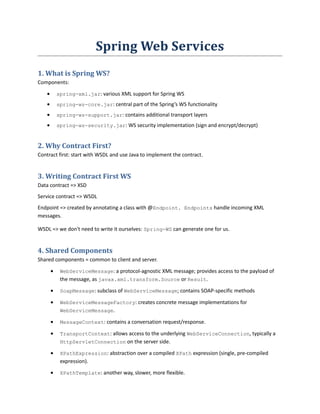
![· Logging: org.springframework.ws.server.MessageTracing=DEBUG.
5. Creating a Web Service with Spring WS
Spring WS server-side support is designed around a MessageDispatcher that dispatches incoming
messages to endpoints, with configurable endpoint mappings, response generation, and endpoint
interception.
The MessageDispatcherServlet is a standard servlet which conveniently extends from the standard
Spring Web DispatcherServlet, and wraps a MessageDispatcher. It will look for a file named
[servlet-name]-servlet.xml in the WEB-INF directory.
Static WSDL:
<sws:static-wsdl id="orders" location="/WEB-INF/wsdl/orders.wsdl"/>:
The WSDL will be available on http://localhost:8080/spring-ws/orders.wsdl.
Dynamic WSDL:
<sws:dynamic-wsdl id="orders"><sws:xsd location=”file.xsd”/>...
This builds a WSDL from a XSD schema by using conventions.
JMS Transport
Spring WS supports server-side JMS handling through the JMS functionality provided in the Spring
framework. Spring WS provides the WebServiceMessageListener to plug in to a
MessageListenerContainer.
Email Transport](https://image.slidesharecdn.com/spring-ws-141111054403-conversion-gate01/85/Spring-ws-2-320.jpg)
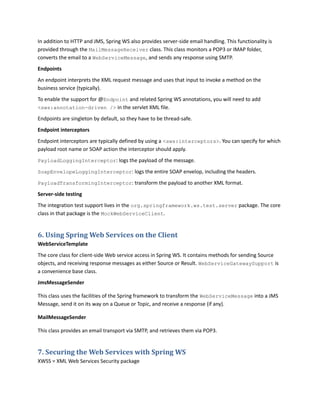


![A. Annex: WSDL
WSDL
· <types>: defines the data types used by the WS
· <message>: defines the data element of the operation
· <portType>: describes a WS, the operations it can perform, and the messages involved; cor-responds
to a class; operations have input/output nodes.
· <binding>: defines the message format and protocol details for each port
Example:
<portType name="glossaryTerms">
<operation name="getTerm">
<input message="getTermRequest"/>
<output message="getTermResponse"/>
</operation>
</portType>
<binding type="glossaryTerms" name="b1">
<soap:binding style="document" transport="http://..." />
<operation>
<soap:operation soapAction="http://example.com/getTerm"/>
<input><soap:body use="literal"/></input>
<output><soap:body use="literal"/></output>
</operation>
</binding>
<service name=”...”>
<port binding=”...” name=”...”>
<soap:address location=”...” />
</port>
</service>
B. Annex: SOAP
Skeleton SOAP Message:
<?xml version="1.0"?>
<soap:Envelope
xmlns:soap="http://www.w3.org/2001/12/soap-envelope"
soap:encodingStyle="http://www.w3.org/2001/12/soap-encoding">
<soap:Header>
[metadata; must be namespace-qualified]
...
</soap:Header>](https://image.slidesharecdn.com/spring-ws-141111054403-conversion-gate01/85/Spring-ws-6-320.jpg)
![<soap:Body>
[actual soap message intended for the ultimate endpoint]
...
<soap:Fault>
[optional element used to indicate error]
...
</soap:Fault>
</soap:Body>
</soap:Envelope>](https://image.slidesharecdn.com/spring-ws-141111054403-conversion-gate01/85/Spring-ws-7-320.jpg)

Spring Web Services allows creating web services using a contract-first approach. It provides components for defining data contracts with XSD, service contracts with WSDL, and implementing endpoints with annotated classes. Shared abstractions like WebServiceMessage and MessageContext provide common client and server functionality, while the MessageDispatcher handles dispatching requests to endpoints. The framework supports various transports including HTTP, JMS, and email.


