Spring MVC
By Deepak Bhagat
Topics
 Mapping request to Spring controllers
 Transparently binding form parameters.
 Validating form submissions.
 Uploading files.
Request in MVC
1. DispatcherServlet is the first stop
for request,
2. DS act as Front controller which
delegates responsibility for a
request to other component to
perform actual processing.
3. DS job is to send request to
Controller which DS does by the
help of Handler mapping
4. At the controller the request drop off the payload(content send by user) and
patiently wait while the controller process the information*
5. The controller pack the processed data in Model* and identifies the view to render.
It then send the request along with model and view to DispatcherServlet.
6. The DS will consult the view resolver to map the logical view name to specified
view implementation.
Setting up Spring MVC
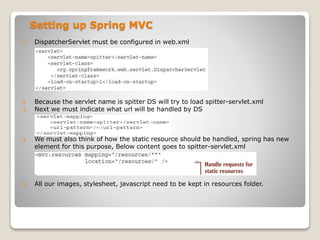
1. DispatcherServlet must be configured in web.xml
2. Because the servlet name is spitter DS will try to load spitter-servlet.xml
3. Next we must indicate what url will be handled by DS
4. We must also think of how the static resource should be handled, spring has new
element for this purpose, Below content goes to spitter-servlet.xml
5. All our images, stylesheet, javascript need to be kept in resources folder.
Writing a basic controller
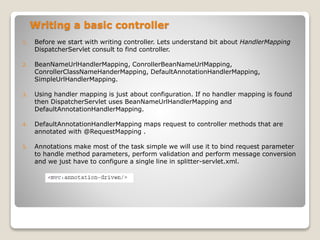
1. Before we start with writing controller. Lets understand bit about HandlerMapping
DispatcherServlet consult to find controller.
2. BeanNameUrlHandlerMapping, ConrollerBeanNameUrlMapping,
ConrollerClassNameHanderMapping, DefaultAnnotationHandlerMapping,
SimpleUrlHandlerMapping.
3. Using handler mapping is just about configuration. If no handler mapping is found
then DispatcherServlet uses BeanNameUrlHandlerMapping and
DefaultAnnotationHandlerMapping.
4. DefaultAnnotationHandlerMapping maps request to controller methods that are
annotated with @RequestMapping .
5. Annotations make most of the task simple we will use it to bind request parameter
to handle method parameters, perform validation and perform message conversion
and we just have to configure a single line in splitter-servlet.xml.
1. ````````
Writing a basic controller
1. @controller indicate this is a controller class. @controller is specialization of
@component which means that <context:component-scan> will pick up and register it
as bean. Which mean <context:componsent-scan> need to be configured in spitter-
servlet.xml.
2. @Inject : Automatically inject bean when controller is instantiated
Writing a basic controller
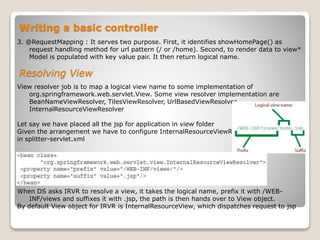
3. @RequestMapping : It serves two purpose. First, it identifies showHomePage() as
request handling method for url pattern (/ or /home). Second, to render data to view*
Model is populated with key value pair. It then return logical name.
View resolver job is to map a logical view name to some implementation of
org.springframework.web.servlet.View. Some view resolver implementation are
BeanNameViewResolver, TilesViewResolver, UrlBasedViewResolver,
InternalResourceViewResolver
Let say we have placed all the jsp for application in view folder
Given the arrangement we have to configure InternalResourceViewResolver
in splitter-servlet.xml
When DS asks IRVR to resolve a view, it takes the logical name, prefix it with /WEB-
INF/views and suffixes it with .jsp, the path is then hands over to View object.
By default View object for IRVR is InternalResourceView, which dispatches request to jsp
Resolving View
ContextLoderListener
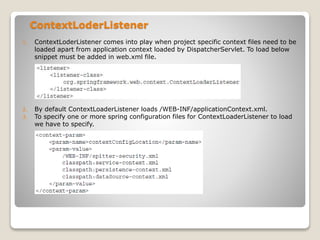
1. ContextLoderListener comes into play when project specific context files need to be
loaded apart from application context loaded by DispatcherServlet. To load below
snippet must be added in web.xml file.
2. By default ContextLoaderListener loads /WEB-INF/applicationContext.xml.
3. To specify one or more spring configuration files for ContextLoaderListener to load
we have to specify.
Handling Controller input
Controller which has to respond to URL which has user name as a request query
parameter.
Following shows an implementation that can respond to this kind of request.
Handling Controller input
1. Class level @RequestMapping defines the root level path that the class will handle.
2. Method level @RequestMapping narrows down the mapping defined in class level.
3. Attribute [method=GET] defined in @RequestMapping indicate method will handle
only get request.
4. @RequestParam is useful to bind query parameters where the name does not
match, If @RequestParam is not given then binding name will be same as request
paramter.
5. Under the cover the Model passed is Map<String, Object>, but model provide few
convenient method to populate the model.
Processing Form
Working with form in web application involve two step.
1. Processing from submission
2. Displaying the form
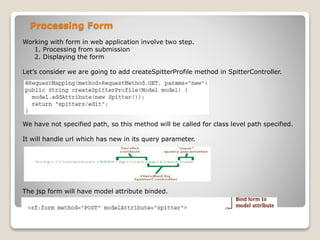
Let’s consider we are going to add createSpitterProfile method in SpitterController.
We have not specified path, so this method will be called for class level path specified.
It will handle url which has new in its query parameter.
The jsp form will have model attribute binded.
Processing Form input
After the form is submitted we will need a handler method that takes a spitter object
and saves it. Then the page should be redirected to user profile page.
Note addSpitterFromForm is adorns with @RequestMapping and does not have url path
means this method will handle class level url, this method is going to handle POST
method. And when the form is submitted the fields in the request will be bound to
the Spitter object that is passed in as an argument.
@Valid : This indicates the spitter should be passed before being processed.
Note : redirect :/ [helps to stop resubmission of form]
Processing Form input
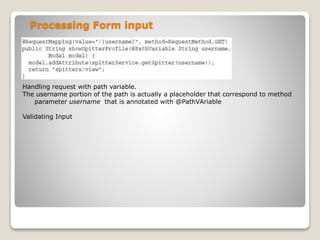
Handling request with path variable.
The username portion of the path is actually a placeholder that correspond to method
parameter username that is annotated with @PathVAriable
Validating Input

Spring mvc

  • 1.
  • 2.
    Topics  Mapping requestto Spring controllers  Transparently binding form parameters.  Validating form submissions.  Uploading files.
  • 3.
    Request in MVC 1.DispatcherServlet is the first stop for request, 2. DS act as Front controller which delegates responsibility for a request to other component to perform actual processing. 3. DS job is to send request to Controller which DS does by the help of Handler mapping 4. At the controller the request drop off the payload(content send by user) and patiently wait while the controller process the information* 5. The controller pack the processed data in Model* and identifies the view to render. It then send the request along with model and view to DispatcherServlet. 6. The DS will consult the view resolver to map the logical view name to specified view implementation.
  • 4.
    Setting up SpringMVC 1. DispatcherServlet must be configured in web.xml 2. Because the servlet name is spitter DS will try to load spitter-servlet.xml 3. Next we must indicate what url will be handled by DS 4. We must also think of how the static resource should be handled, spring has new element for this purpose, Below content goes to spitter-servlet.xml 5. All our images, stylesheet, javascript need to be kept in resources folder.
  • 5.
    Writing a basiccontroller 1. Before we start with writing controller. Lets understand bit about HandlerMapping DispatcherServlet consult to find controller. 2. BeanNameUrlHandlerMapping, ConrollerBeanNameUrlMapping, ConrollerClassNameHanderMapping, DefaultAnnotationHandlerMapping, SimpleUrlHandlerMapping. 3. Using handler mapping is just about configuration. If no handler mapping is found then DispatcherServlet uses BeanNameUrlHandlerMapping and DefaultAnnotationHandlerMapping. 4. DefaultAnnotationHandlerMapping maps request to controller methods that are annotated with @RequestMapping . 5. Annotations make most of the task simple we will use it to bind request parameter to handle method parameters, perform validation and perform message conversion and we just have to configure a single line in splitter-servlet.xml. 1. ````````
  • 6.
    Writing a basiccontroller 1. @controller indicate this is a controller class. @controller is specialization of @component which means that <context:component-scan> will pick up and register it as bean. Which mean <context:componsent-scan> need to be configured in spitter- servlet.xml. 2. @Inject : Automatically inject bean when controller is instantiated
  • 7.
    Writing a basiccontroller 3. @RequestMapping : It serves two purpose. First, it identifies showHomePage() as request handling method for url pattern (/ or /home). Second, to render data to view* Model is populated with key value pair. It then return logical name. View resolver job is to map a logical view name to some implementation of org.springframework.web.servlet.View. Some view resolver implementation are BeanNameViewResolver, TilesViewResolver, UrlBasedViewResolver, InternalResourceViewResolver Let say we have placed all the jsp for application in view folder Given the arrangement we have to configure InternalResourceViewResolver in splitter-servlet.xml When DS asks IRVR to resolve a view, it takes the logical name, prefix it with /WEB- INF/views and suffixes it with .jsp, the path is then hands over to View object. By default View object for IRVR is InternalResourceView, which dispatches request to jsp Resolving View
  • 8.
    ContextLoderListener 1. ContextLoderListener comesinto play when project specific context files need to be loaded apart from application context loaded by DispatcherServlet. To load below snippet must be added in web.xml file. 2. By default ContextLoaderListener loads /WEB-INF/applicationContext.xml. 3. To specify one or more spring configuration files for ContextLoaderListener to load we have to specify.
  • 9.
    Handling Controller input Controllerwhich has to respond to URL which has user name as a request query parameter. Following shows an implementation that can respond to this kind of request.
  • 10.
    Handling Controller input 1.Class level @RequestMapping defines the root level path that the class will handle. 2. Method level @RequestMapping narrows down the mapping defined in class level. 3. Attribute [method=GET] defined in @RequestMapping indicate method will handle only get request. 4. @RequestParam is useful to bind query parameters where the name does not match, If @RequestParam is not given then binding name will be same as request paramter. 5. Under the cover the Model passed is Map<String, Object>, but model provide few convenient method to populate the model.
  • 11.
    Processing Form Working withform in web application involve two step. 1. Processing from submission 2. Displaying the form Let’s consider we are going to add createSpitterProfile method in SpitterController. We have not specified path, so this method will be called for class level path specified. It will handle url which has new in its query parameter. The jsp form will have model attribute binded.
  • 12.
    Processing Form input Afterthe form is submitted we will need a handler method that takes a spitter object and saves it. Then the page should be redirected to user profile page. Note addSpitterFromForm is adorns with @RequestMapping and does not have url path means this method will handle class level url, this method is going to handle POST method. And when the form is submitted the fields in the request will be bound to the Spitter object that is passed in as an argument. @Valid : This indicates the spitter should be passed before being processed. Note : redirect :/ [helps to stop resubmission of form]
  • 13.
    Processing Form input Handlingrequest with path variable. The username portion of the path is actually a placeholder that correspond to method parameter username that is annotated with @PathVAriable Validating Input