Solar working station series for solar water heating control system
1
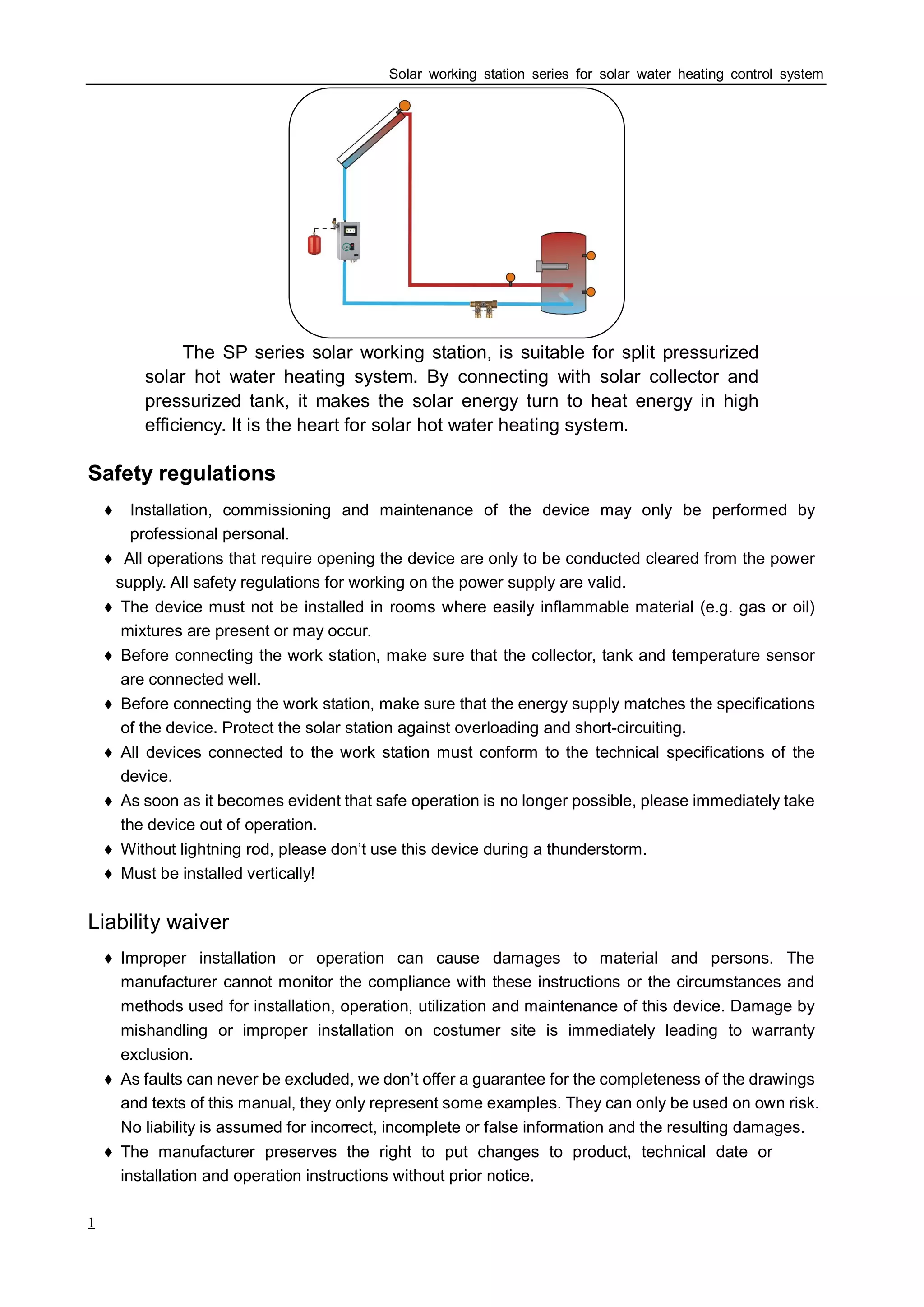
The SP series solar working station, is suitable for split pressurized
solar hot water heating system. By connecting with solar collector and
pressurized tank, it makes the solar energy turn to heat energy in high
efficiency. It is the heart for solar hot water heating system.
Safety regulations
♦ Installation, commissioning and maintenance of the device may only be performed by
professional personal.
♦ All operations that require opening the device are only to be conducted cleared from the power
supply. All safety regulations for working on the power supply are valid.
♦ The device must not be installed in rooms where easily inflammable material (e.g. gas or oil)
mixtures are present or may occur.
♦ Before connecting the work station, make sure that the collector, tank and temperature sensor
are connected well.
♦ Before connecting the work station, make sure that the energy supply matches the specifications
of the device. Protect the solar station against overloading and short-circuiting.
♦ All devices connected to the work station must conform to the technical specifications of the
device.
♦ As soon as it becomes evident that safe operation is no longer possible, please immediately take
the device out of operation.
♦ Without lightning rod, please don’t use this device during a thunderstorm.
♦ Must be installed vertically!
Liability waiver
♦ Improper installation or operation can cause damages to material and persons. The
manufacturer cannot monitor the compliance with these instructions or the circumstances and
methods used for installation, operation, utilization and maintenance of this device. Damage by
mishandling or improper installation on costumer site is immediately leading to warranty
exclusion.
♦ As faults can never be excluded, we don’t offer a guarantee for the completeness of the drawings
and texts of this manual, they only represent some examples. They can only be used on own risk.
No liability is assumed for incorrect, incomplete or false information and the resulting damages.
♦ The manufacturer preserves the right to put changes to product, technical date or
installation and operation instructions without prior notice.
Solar working station series for solar water heating control system
2
. New SPⅠ 118 solar working station
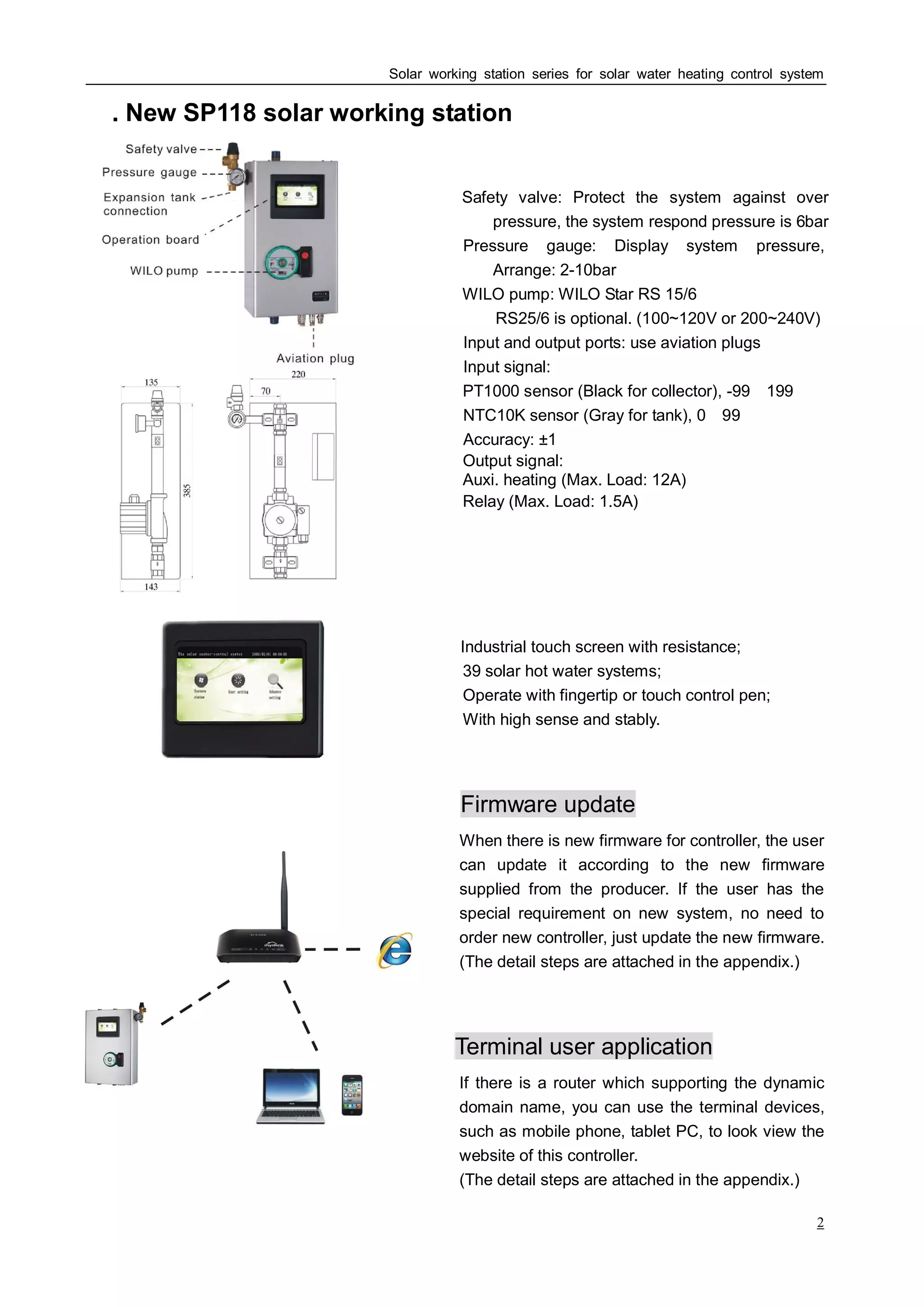
Safety valve: Protect the system against over
pressure, the system respond pressure is 6bar
Pressure gauge: Display system pressure,
Arrange: 2-10bar
WILO pump: WILO Star RS 15/6
RS25/6 is optional. (100~120V or 200~240V)
Input and output ports: use aviation plugs
Input signal:
PT1000 sensor (Black for collector), -99~199℃
NTC10K sensor (Gray for tank), 0~99℃
Accuracy: ±1℃
Output signal:
Auxi. heating (Max. Load: 12A)
Relay (Max. Load: 1.5A)
Industrial touch screen with resistance;
39 solar hot water systems;
Operate with fingertip or touch control pen;
With high sense and stably.
Firmware update
When there is new firmware for controller, the user
can update it according to the new firmware
supplied from the producer. If the user has the
special requirement on new system, no need to
order new controller, just update the new firmware.
(The detail steps are attached in the appendix.)
Terminal user application
If there is a router which supporting the dynamic
domain name, you can use the terminal devices,
such as mobile phone, tablet PC, to look view the
website of this controller.
(The detail steps are attached in the appendix.)
Solar working station series for solar water heating control system
3
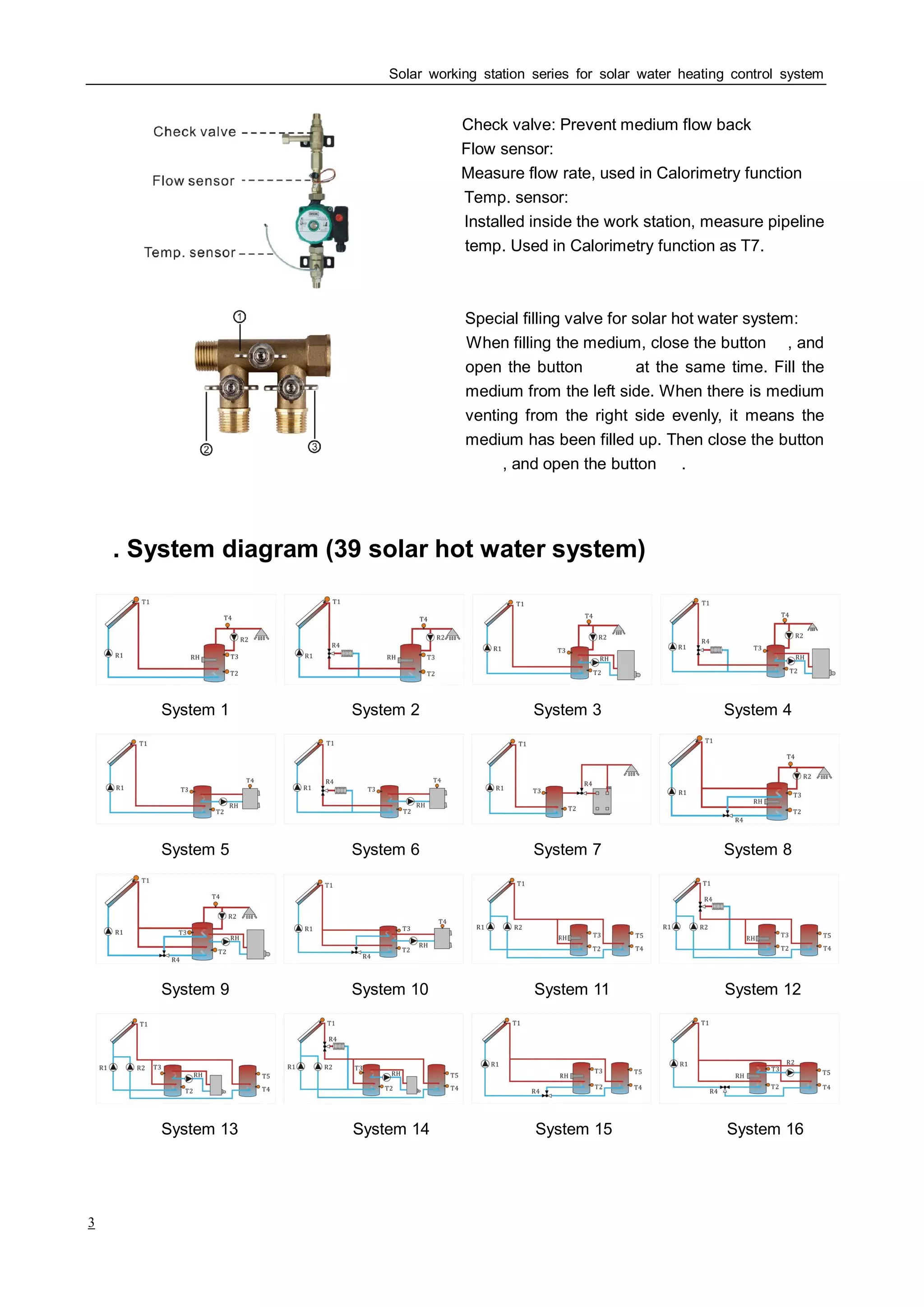
Check valve: Prevent medium flow back
Flow sensor:
Measure flow rate, used in Calorimetry function
Temp. sensor:
Installed inside the work station, measure pipeline
temp. Used in Calorimetry function as T7.
Special filling valve for solar hot water system:
When filling the medium, close the button ①, and
open the button ② ③ at the same time. Fill the
medium from the left side. When there is medium
venting from the right side evenly, it means the
medium has been filled up. Then close the button
② ③, and open the button ① .
Ⅱ. System diagram (39 solar hot water system)
System 1 System 2 System 3 System 4
System 5 System 6 System 7 System 8
System 9 System 10 System 11 System 12
System 13 System 14 System 15 System 16
Solar working station series for solar water heating control system
4
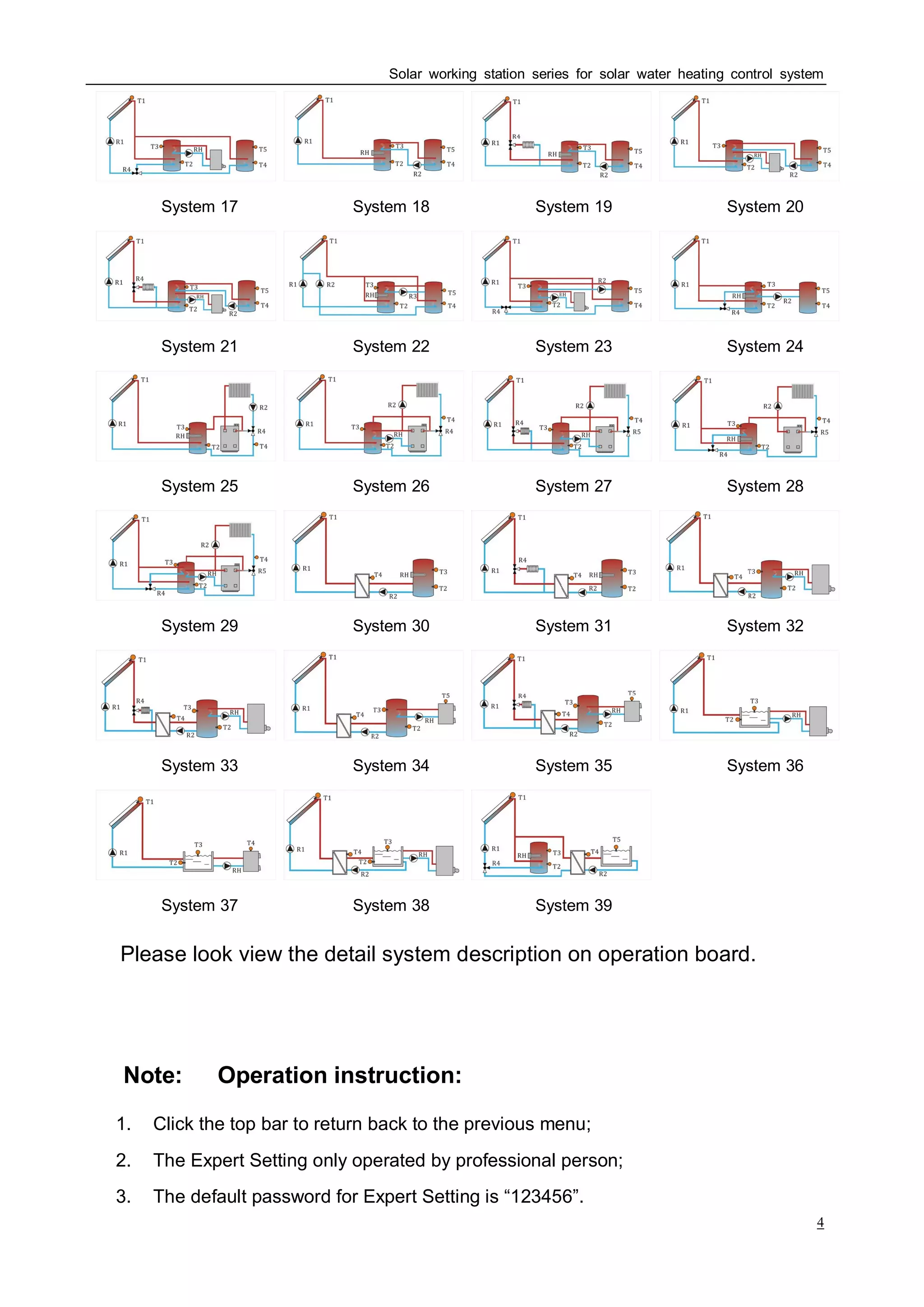
System 17 System 18 System 19 System 20
System 21 System 22 System 23 System 24
System 25 System 26 System 27 System 28
System 29 System 30 System 31 System 32
System 33 System 34 System 35 System 36
System 37 System 38 System 39
(Please look view the detail system description on operation board.)
◆Note: Operation instruction:
1. Click the top bar to return back to the previous menu;
2. The Expert Setting only operated by professional person;
3. The default password for Expert Setting is “123456”.
Solar working station series for solar water heating control system
5
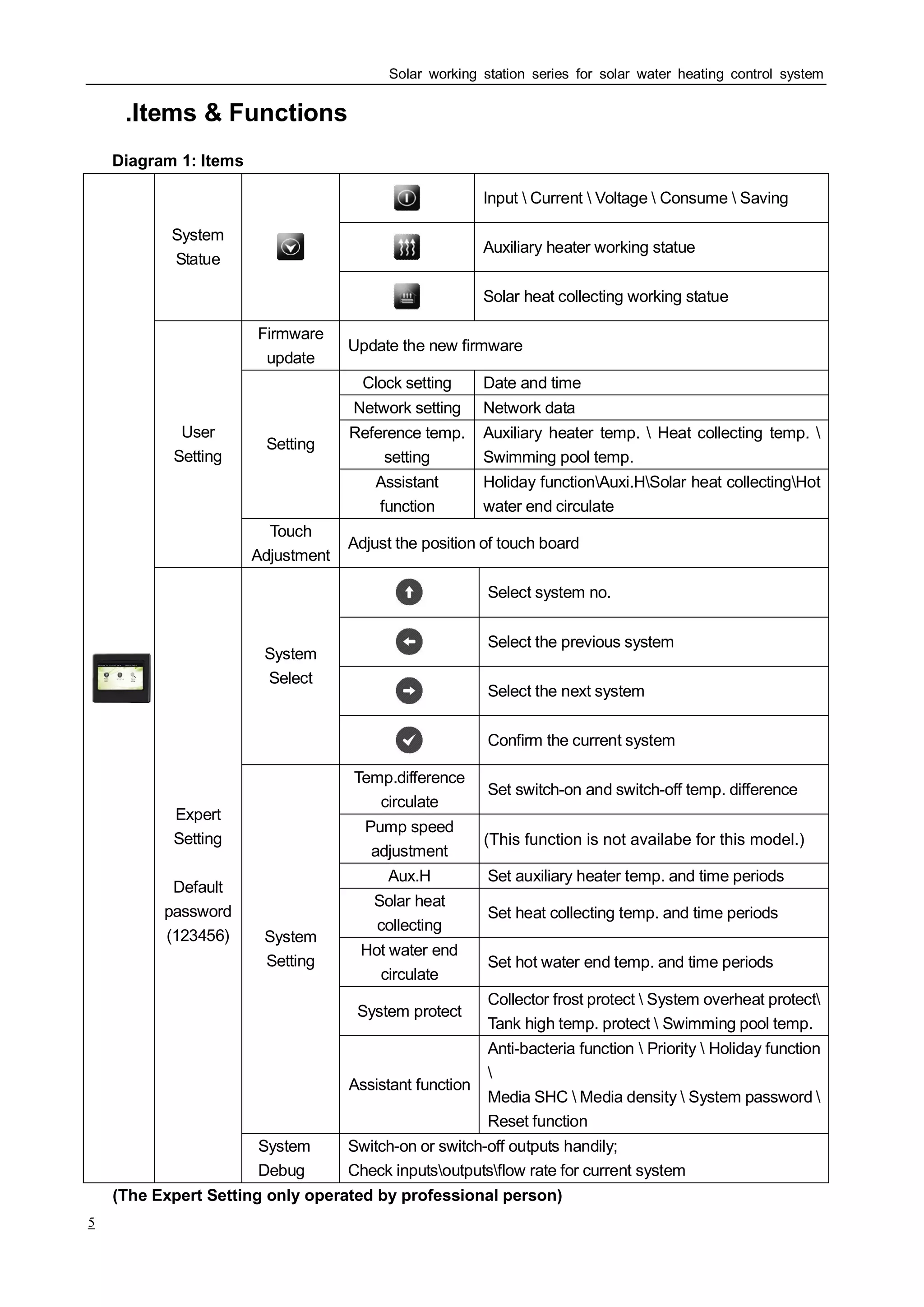
Ⅲ.Items & Functions
Diagram 1: Items
Input  Current  Voltage  Consume  Saving
Auxiliary heater working statue
System
Statue
Solar heat collecting working statue
Firmware
update
Update the new firmware
Clock setting Date and time
Network setting Network data
Reference temp.
setting
Auxiliary heater temp.  Heat collecting temp. 
Swimming pool temp.
Setting
Assistant
function
Holiday functionAuxi.HSolar heat collectingHot
water end circulate
User
Setting
Touch
Adjustment
Adjust the position of touch board
Select system no.
Select the previous system
Select the next system
System
Select
Confirm the current system
Temp.difference
circulate
Set switch-on and switch-off temp. difference
Pump speed
adjustment
Aux.H Set auxiliary heater temp. and time periods
Solar heat
collecting
Set heat collecting temp. and time periods
Hot water end
circulate
Set hot water end temp. and time periods
System protect
Collector frost protect  System overheat protect
Tank high temp. protect  Swimming pool temp.
System
Setting
Assistant function
Anti-bacteria function  Priority  Holiday function

Media SHC  Media density  System password 
Reset function
Expert
Setting
Default
password
(123456)
System
Debug
Switch-on or switch-off outputs handily;
Check inputsoutputsflow rate for current system
(The Expert Setting only operated by professional person)
(This function is not availabe for this model.)
Solar working station series for solar water heating control system
6
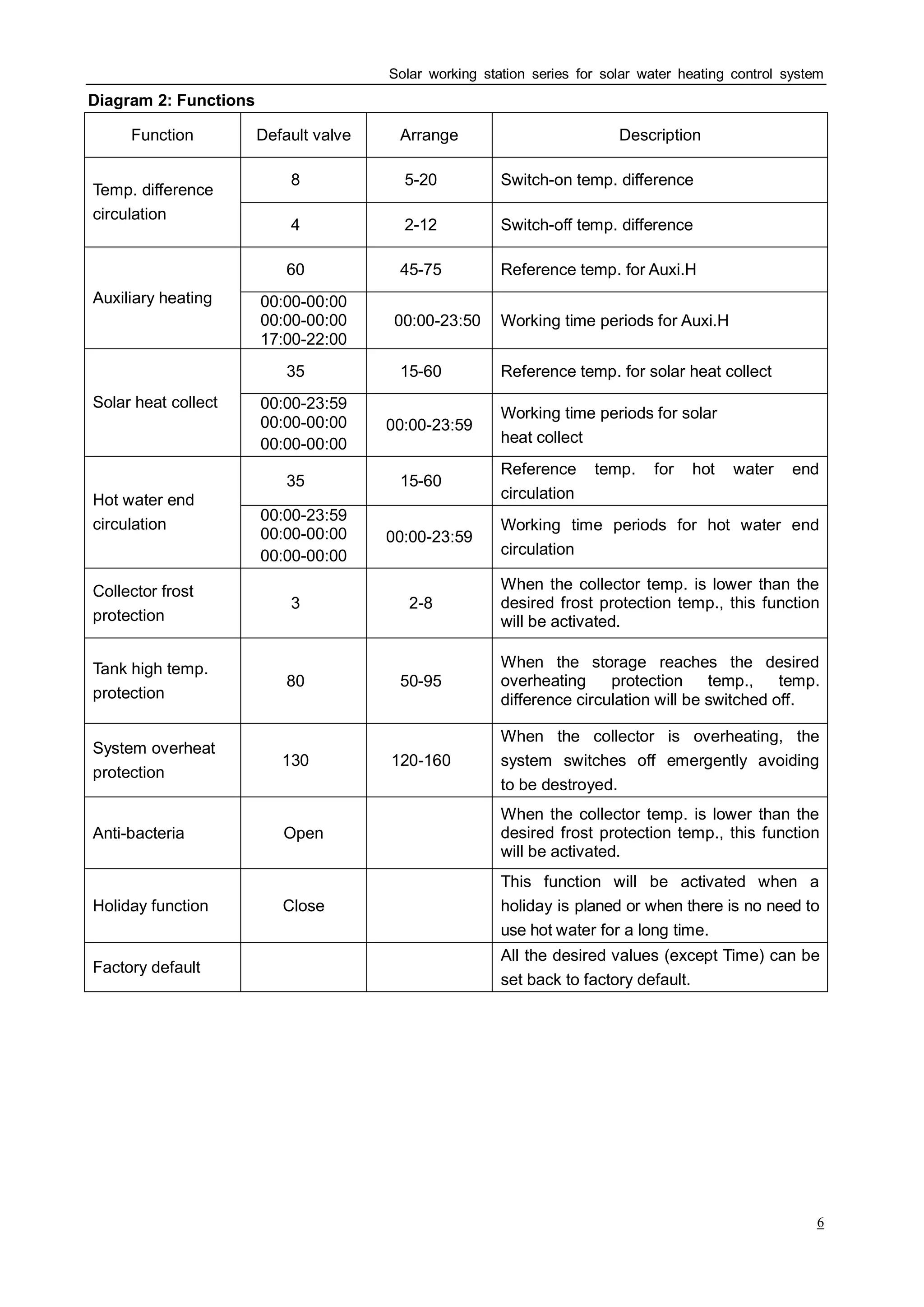
Diagram 2: Functions
Function Default valve Arrange Description
8℃ 5-20℃ Switch-on temp. difference
Temp. difference
circulation
4℃ 2-12℃ Switch-off temp. difference
60℃ 45-75℃ Reference temp. for Auxi.H
Auxiliary heating 00:00-00:00
00:00-00:00
17:00-22:00
00:00-23:50 Working time periods for Auxi.H
35℃ 15-60℃ Reference temp. for solar heat collect
Solar heat collect 00:00-23:59
00:00-00:00
00:00-00:00
00:00-23:59
Working time periods for solar
heat collect
35℃ 15-60℃
Reference temp. for hot water end
circulationHot water end
circulation
00:00-23:59
00:00-00:00
00:00-00:00
00:00-23:59
Working time periods for hot water end
circulation
Collector frost
protection
3℃ 2-8℃
When the collector temp. is lower than the
desired frost protection temp., this function
will be activated.
Tank high temp.
protection
80℃ 50-95℃
When the storage reaches the desired
overheating protection temp., temp.
difference circulation will be switched off.
System overheat
protection
130℃ 120-160℃
When the collector is overheating, the
system switches off emergently avoiding
to be destroyed.
Anti-bacteria Open
When the collector temp. is lower than the
desired frost protection temp., this function
will be activated.
Holiday function Close
This function will be activated when a
holiday is planed or when there is no need to
use hot water for a long time.
Factory default
All the desired values (except Time) can be
set back to factory default.
Solar working station series for solar water heating control system
7
Auxiliary Heating
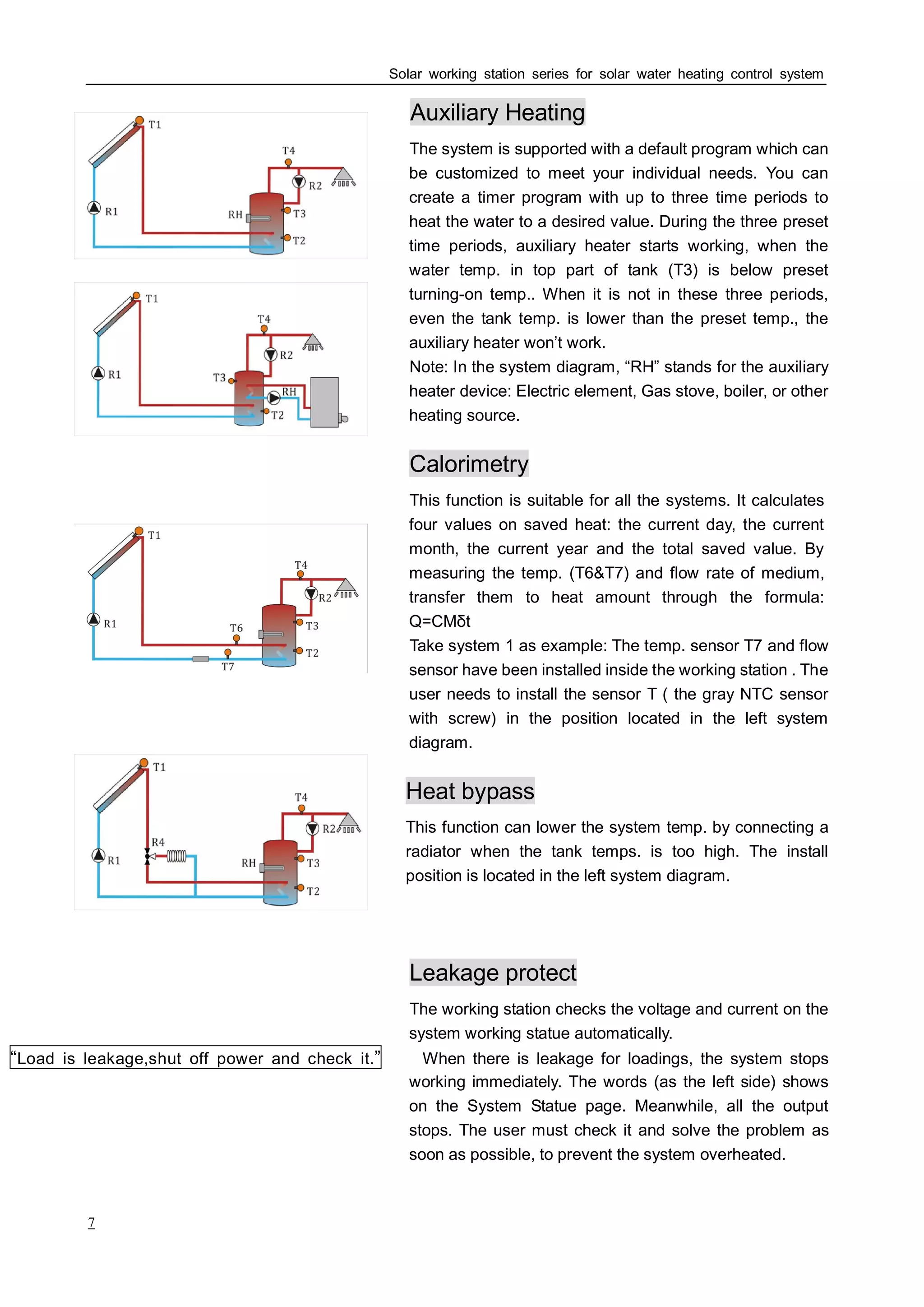
The system is supported with a default program which can
be customized to meet your individual needs. You can
create a timer program with up to three time periods to
heat the water to a desired value. During the three preset
time periods, auxiliary heater starts working, when the
water temp. in top part of tank (T3) is below preset
turning-on temp.. When it is not in these three periods,
even the tank temp. is lower than the preset temp., the
auxiliary heater won’t work.
Note: In the system diagram, “RH” stands for the auxiliary
heater device: Electric element, Gas stove, boiler, or other
heating source.
Calorimetry
This function is suitable for all the systems. It calculates
four values on saved heat: the current day, the current
month, the current year and the total saved value. By
measuring the temp. (T6&T7) and flow rate of medium,
transfer them to heat amount through the formula:
Q=CMδt
Take system 1 as example: The temp. sensor T7 and flow
sensor have been installed inside the working station . The
user needs to install the sensor T ( the gray NTC sensor
with screw) in the position located in the left system
diagram.
Heat bypass
This function can lower the system temp. by connecting a
radiator when the tank temps. is too high. The install
position is located in the left system diagram.
Leakage protect
The working station checks the voltage and current on the
system working statue automatically.
“Load is leakage,shut off power and check it.” When there is leakage for loadings, the system stops
working immediately. The words (as the left side) shows
on the System Statue page. Meanwhile, all the output
stops. The user must check it and solve the problem as
soon as possible, to prevent the system overheated.
Solar working station series for solar water heating control system
8
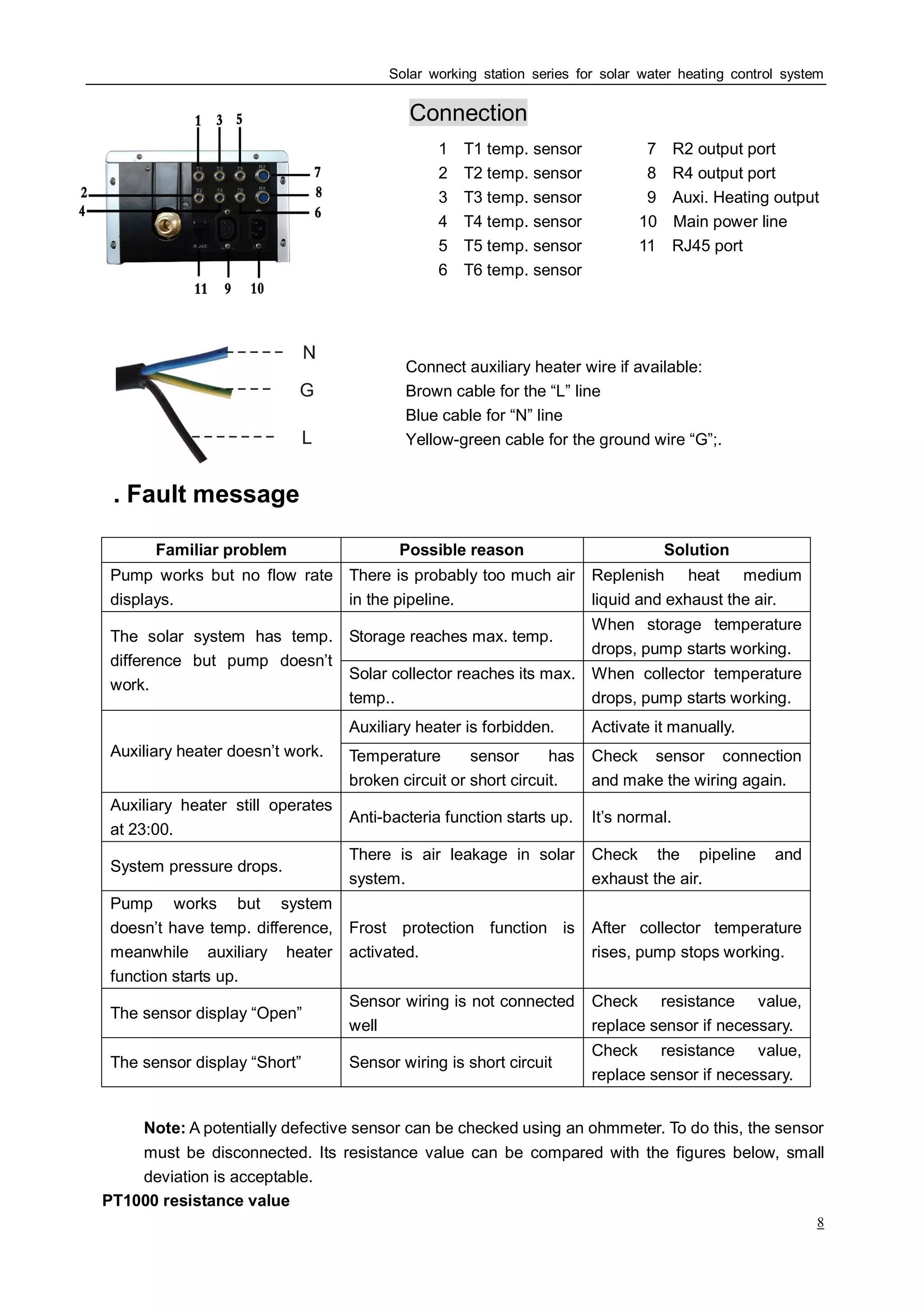
Connection
1:T1 temp. sensor 7:R2 output port
2:T2 temp. sensor 8:R4 output port
3:T3 temp. sensor 9:Auxi. Heating output
4:T4 temp. sensor 10:Main power line
5:T5 temp. sensor 11:RJ45 port
6:T6 temp. sensor
Connect auxiliary heater wire if available:
Brown cable for the “L” line
Blue cable for “N” line
Yellow-green cable for the ground wire “G”;.
. Fault messageⅣ
Familiar problem Possible reason Solution
Pump works but no flow rate
displays.
There is probably too much air
in the pipeline.
Replenish heat medium
liquid and exhaust the air.
Storage reaches max. temp.
When storage temperature
drops, pump starts working.
The solar system has temp.
difference but pump doesn’t
work.
Solar collector reaches its max.
temp..
When collector temperature
drops, pump starts working.
Auxiliary heater is forbidden. Activate it manually.
Auxiliary heater doesn’t work. Temperature sensor has
broken circuit or short circuit.
Check sensor connection
and make the wiring again.
Auxiliary heater still operates
at 23:00.
Anti-bacteria function starts up. It’s normal.
System pressure drops.
There is air leakage in solar
system.
Check the pipeline and
exhaust the air.
Pump works but system
doesn’t have temp. difference,
meanwhile auxiliary heater
function starts up.
Frost protection function is
activated.
After collector temperature
rises, pump stops working.
The sensor display “Open”
Sensor wiring is not connected
well
Check resistance value,
replace sensor if necessary.
The sensor display “Short” Sensor wiring is short circuit
Check resistance value,
replace sensor if necessary.
Note: A potentially defective sensor can be checked using an ohmmeter. To do this, the sensor
must be disconnected. Its resistance value can be compared with the figures below, small
deviation is acceptable.
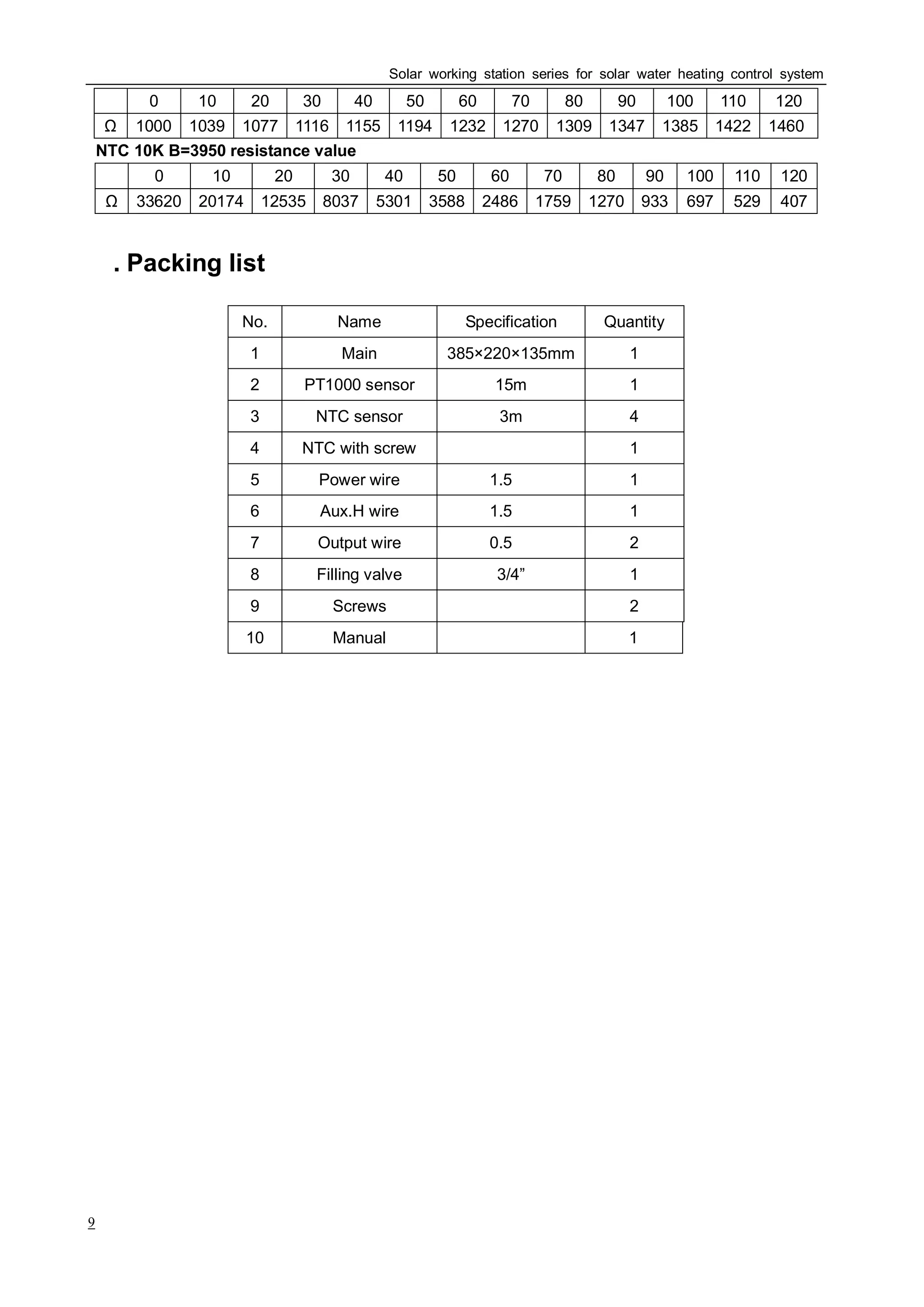
PT1000 resistance value
Solar working station series for solar water heating control system
9
℃ 0 10 20 30 40 50 60 70 80 90 100 110 120
1000 1039 1077 1116 1155 1194 1232 1270 1309 1347 1385 1422 1460
NTC 10K B=3950 resistance value
℃ 0 10 20 30 40 50 60 70 80 90 100 110 120
33620 20174 12535 8037 5301 3588 2486 1759 1270 933 697 529 407
Ⅴ. Packing list
No. Name Specification Quantity
1 Main 385×220×135mm 1
2 PT1000 sensor 15m 1
3 NTC sensor 3m 4
4 NTC with screw 1
5 Power wire 1.5 ㎡ 1
6 Aux.H wire 1.5 ㎡ 1
7 Output wire 0.5 ㎡ 2
8 Filling valve 3/4” 1
9 Screws 2
10 Manual 1
Solar working station series for solar water heating control system
10
Appendix
The product can be connected to any kind of web browser currently, such as Internet Explorer, Google
Chrome, Fire fox, and so on.
Ⅰ Connect to the computer directly
1. Through the internet cable(CAT5,UTP),connect the computer with network to the internet
port in the right side of the product.
2. The default IP address for this controller is “192.168.0.10”.
3. If the IP address of the customer is not in the same net segment as the above IP address,
please setup as the following steps:
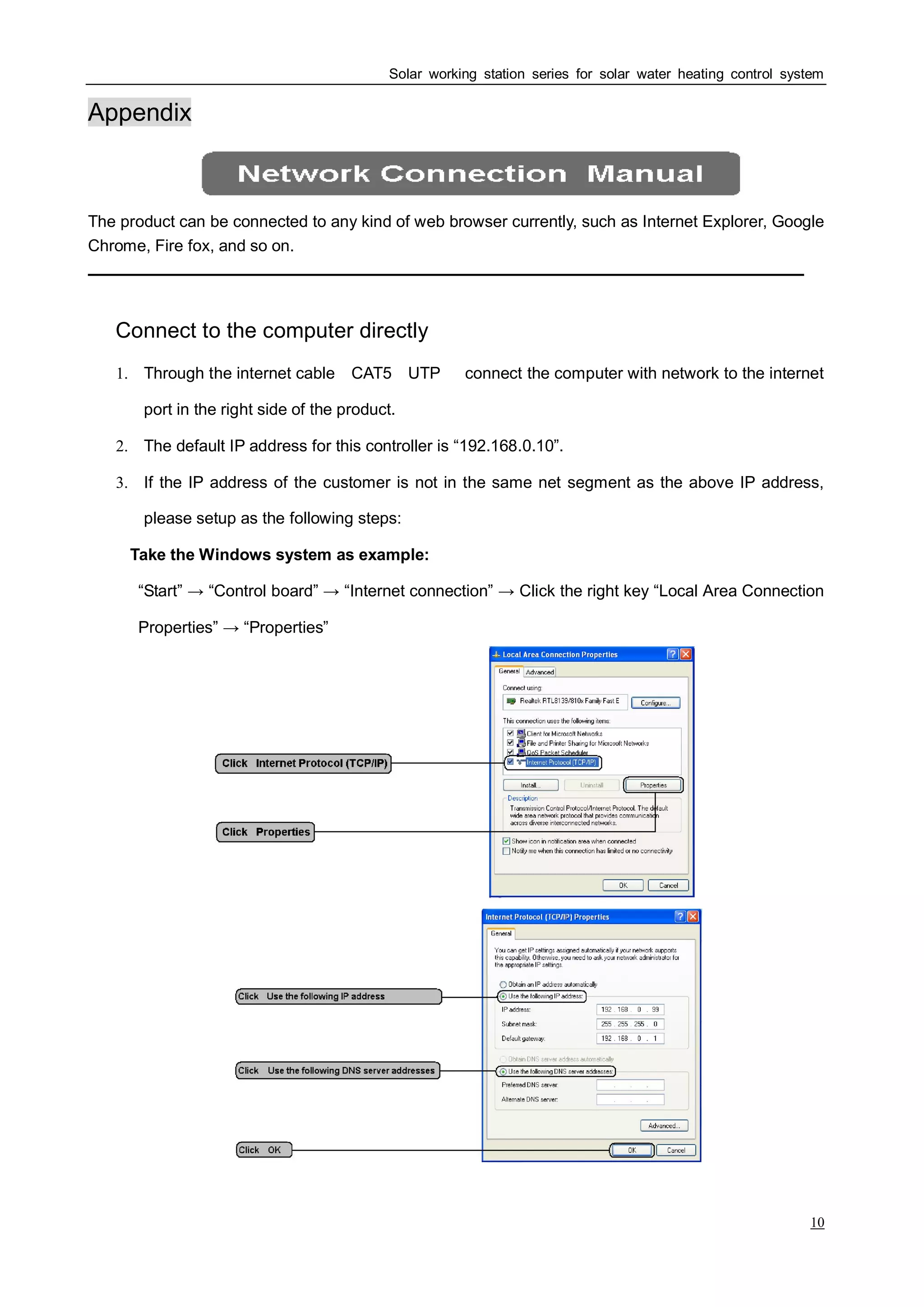
Take the Windows system as example:
“Start” → “Control board” → “Internet connection” → Click the right key “Local Area Connection
Properties” → “Properties”
4. Browser the web page, the customer can review the information about the product,
Solar working station series for solar water heating control system
11
Ⅱ Connect to the computer through Router or Switch
If the customer connects the product to the computer through Router or Switch, he should
make sure that the computer can access the IP address of this product. And the customer
should have the basic knowledge about TCP/TP, to take setup processes.
Ⅲ Login into the website
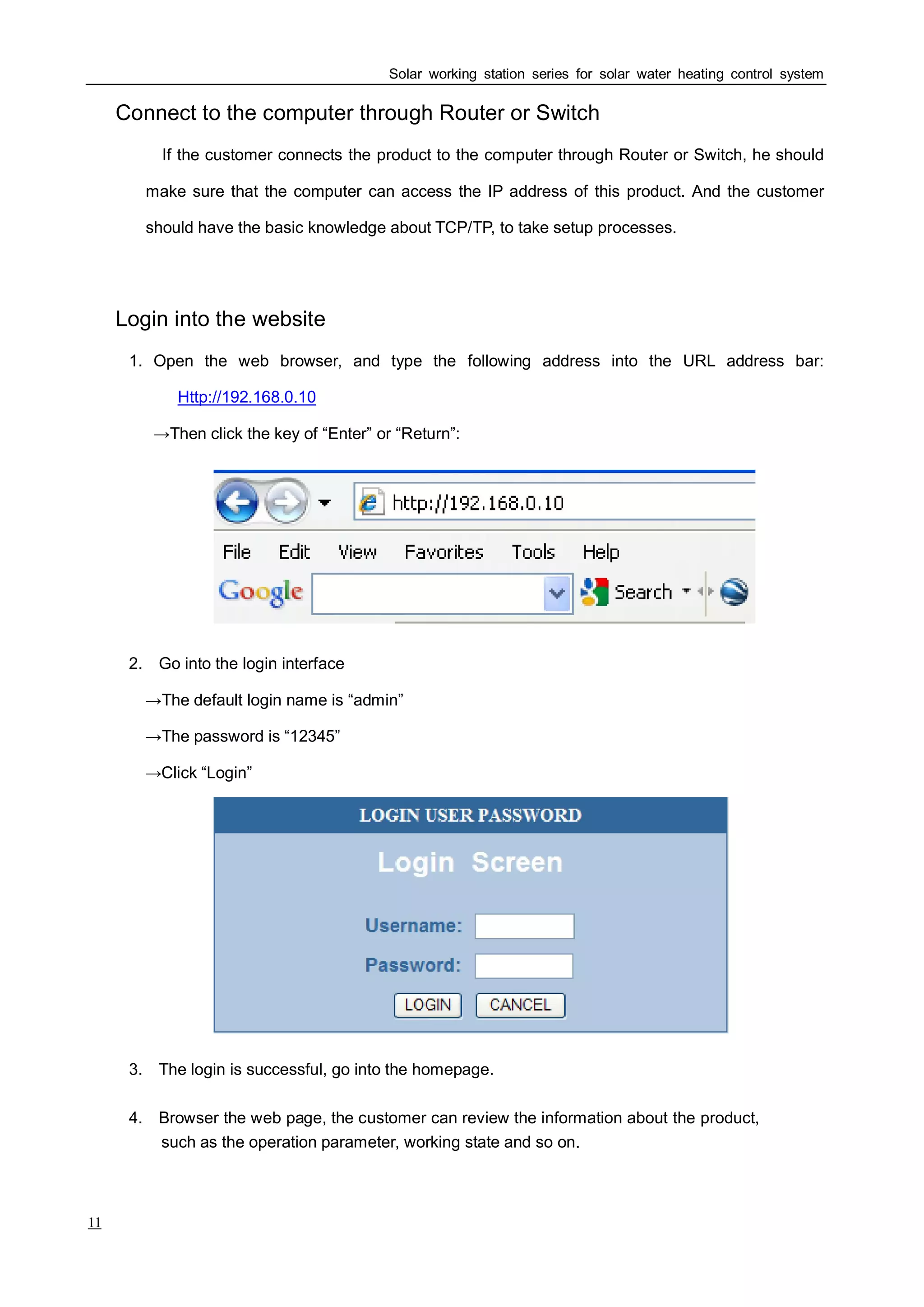
1. Open the web browser, and type the following address into the URL address bar:
Http://192.168.0.10
→Then click the key of “Enter” or “Return”:
2. Go into the login interface
→The default login name is “admin”
→The password is “12345”
→Click “Login”
3. The login is successful, go into the homepage.
such as the operation parameter, working state and so on.
Solar working station series for solar water heating control system
12
Ⅳ Steps for firmware update
1. Make sure that the product can connect the computer well;
2. When there is a new firmware updated, get the zip file on new update firmware from the
supplier, and unzip it on computer;
3. Find out the file with the suffix “.exe”, and open it; Record the IP address in the Server
Interface item;
4. Go into the “Firmware update” page on the product. Press the IP address board, and input
the address recorded in the computer, confirm it;
5. Press “Update” to start the upgrade process;
6. The product will finish the process by itself, please don’t interrupt it during the process
7. Wait for some time, until the product restarts by itself. Then the new firmware updates
successfully.
Ⅴ Steps for terminal user application
1. It needs a router which supporting the dynamic domain name;
2. Apply for a dynamic domain name, and setup it auto-login in the router;
3. Set up the router’s port forwarding or virtual server; The port 80 is redirected to the IP
address on the product;
4. After the setting, the user can look view the product’s website on any terminal device: mobile
phone, tablet pc, and so on.
Thanks for using SP series products!

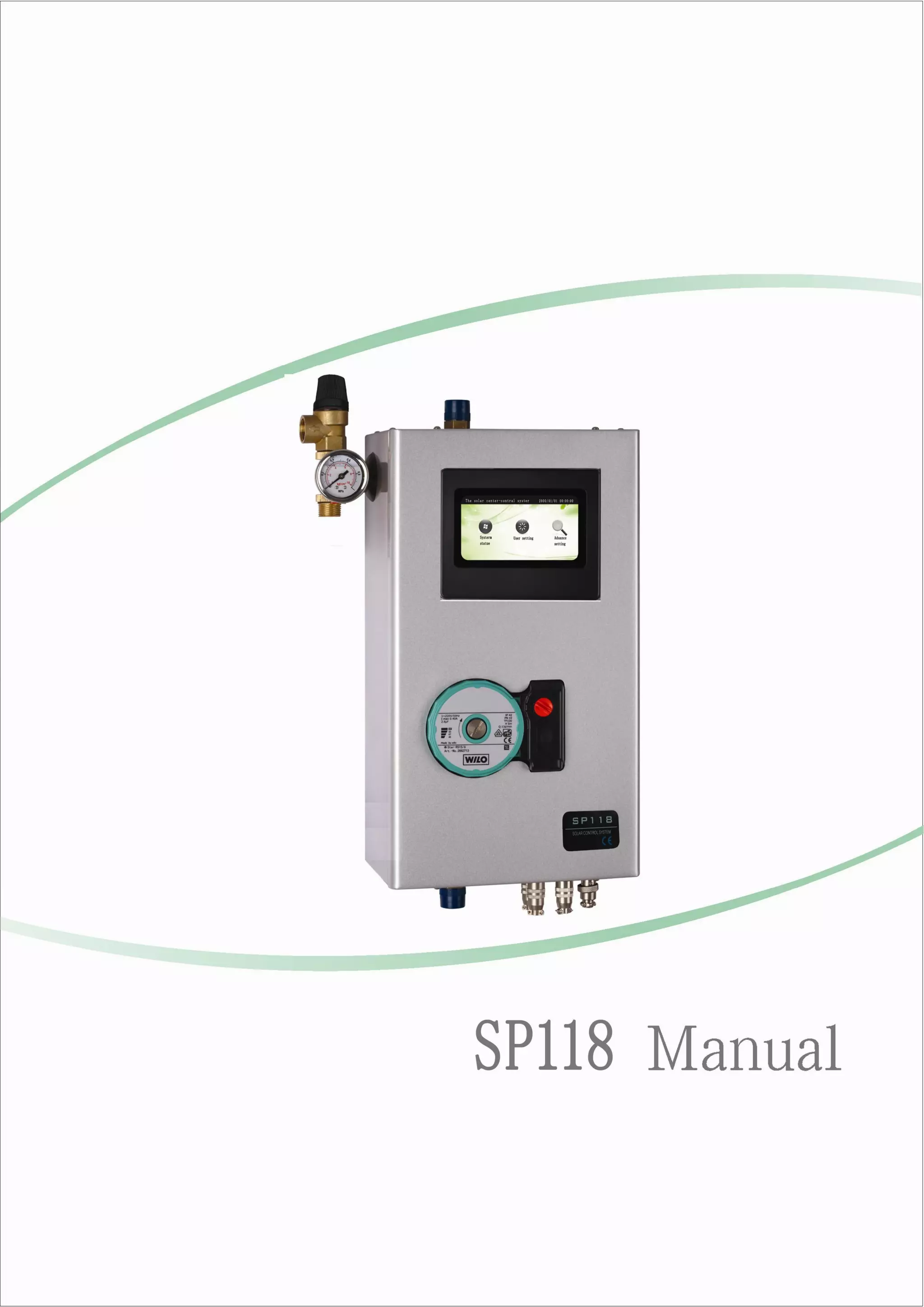
SP118 Solar Working Station 2014 New Manual

  • 2.
    Solar working stationseries for solar water heating control system 1 The SP series solar working station, is suitable for split pressurized solar hot water heating system. By connecting with solar collector and pressurized tank, it makes the solar energy turn to heat energy in high efficiency. It is the heart for solar hot water heating system. Safety regulations ♦ Installation, commissioning and maintenance of the device may only be performed by professional personal. ♦ All operations that require opening the device are only to be conducted cleared from the power supply. All safety regulations for working on the power supply are valid. ♦ The device must not be installed in rooms where easily inflammable material (e.g. gas or oil) mixtures are present or may occur. ♦ Before connecting the work station, make sure that the collector, tank and temperature sensor are connected well. ♦ Before connecting the work station, make sure that the energy supply matches the specifications of the device. Protect the solar station against overloading and short-circuiting. ♦ All devices connected to the work station must conform to the technical specifications of the device. ♦ As soon as it becomes evident that safe operation is no longer possible, please immediately take the device out of operation. ♦ Without lightning rod, please don’t use this device during a thunderstorm. ♦ Must be installed vertically! Liability waiver ♦ Improper installation or operation can cause damages to material and persons. The manufacturer cannot monitor the compliance with these instructions or the circumstances and methods used for installation, operation, utilization and maintenance of this device. Damage by mishandling or improper installation on costumer site is immediately leading to warranty exclusion. ♦ As faults can never be excluded, we don’t offer a guarantee for the completeness of the drawings and texts of this manual, they only represent some examples. They can only be used on own risk. No liability is assumed for incorrect, incomplete or false information and the resulting damages. ♦ The manufacturer preserves the right to put changes to product, technical date or installation and operation instructions without prior notice.
  • 3.
    Solar working stationseries for solar water heating control system 2 . New SPⅠ 118 solar working station Safety valve: Protect the system against over pressure, the system respond pressure is 6bar Pressure gauge: Display system pressure, Arrange: 2-10bar WILO pump: WILO Star RS 15/6 RS25/6 is optional. (100~120V or 200~240V) Input and output ports: use aviation plugs Input signal: PT1000 sensor (Black for collector), -99~199℃ NTC10K sensor (Gray for tank), 0~99℃ Accuracy: ±1℃ Output signal: Auxi. heating (Max. Load: 12A) Relay (Max. Load: 1.5A) Industrial touch screen with resistance; 39 solar hot water systems; Operate with fingertip or touch control pen; With high sense and stably. Firmware update When there is new firmware for controller, the user can update it according to the new firmware supplied from the producer. If the user has the special requirement on new system, no need to order new controller, just update the new firmware. (The detail steps are attached in the appendix.) Terminal user application If there is a router which supporting the dynamic domain name, you can use the terminal devices, such as mobile phone, tablet PC, to look view the website of this controller. (The detail steps are attached in the appendix.)
  • 4.
    Solar working stationseries for solar water heating control system 3 Check valve: Prevent medium flow back Flow sensor: Measure flow rate, used in Calorimetry function Temp. sensor: Installed inside the work station, measure pipeline temp. Used in Calorimetry function as T7. Special filling valve for solar hot water system: When filling the medium, close the button ①, and open the button ② ③ at the same time. Fill the medium from the left side. When there is medium venting from the right side evenly, it means the medium has been filled up. Then close the button ② ③, and open the button ① . Ⅱ. System diagram (39 solar hot water system) System 1 System 2 System 3 System 4 System 5 System 6 System 7 System 8 System 9 System 10 System 11 System 12 System 13 System 14 System 15 System 16
  • 5.
    Solar working stationseries for solar water heating control system 4 System 17 System 18 System 19 System 20 System 21 System 22 System 23 System 24 System 25 System 26 System 27 System 28 System 29 System 30 System 31 System 32 System 33 System 34 System 35 System 36 System 37 System 38 System 39 (Please look view the detail system description on operation board.) ◆Note: Operation instruction: 1. Click the top bar to return back to the previous menu; 2. The Expert Setting only operated by professional person; 3. The default password for Expert Setting is “123456”.
  • 6.
    Solar working stationseries for solar water heating control system 5 Ⅲ.Items & Functions Diagram 1: Items Input Current Voltage Consume Saving Auxiliary heater working statue System Statue Solar heat collecting working statue Firmware update Update the new firmware Clock setting Date and time Network setting Network data Reference temp. setting Auxiliary heater temp. Heat collecting temp. Swimming pool temp. Setting Assistant function Holiday functionAuxi.HSolar heat collectingHot water end circulate User Setting Touch Adjustment Adjust the position of touch board Select system no. Select the previous system Select the next system System Select Confirm the current system Temp.difference circulate Set switch-on and switch-off temp. difference Pump speed adjustment Aux.H Set auxiliary heater temp. and time periods Solar heat collecting Set heat collecting temp. and time periods Hot water end circulate Set hot water end temp. and time periods System protect Collector frost protect System overheat protect Tank high temp. protect Swimming pool temp. System Setting Assistant function Anti-bacteria function Priority Holiday function Media SHC Media density System password Reset function Expert Setting Default password (123456) System Debug Switch-on or switch-off outputs handily; Check inputsoutputsflow rate for current system (The Expert Setting only operated by professional person) (This function is not availabe for this model.)
  • 7.
    Solar working stationseries for solar water heating control system 6 Diagram 2: Functions Function Default valve Arrange Description 8℃ 5-20℃ Switch-on temp. difference Temp. difference circulation 4℃ 2-12℃ Switch-off temp. difference 60℃ 45-75℃ Reference temp. for Auxi.H Auxiliary heating 00:00-00:00 00:00-00:00 17:00-22:00 00:00-23:50 Working time periods for Auxi.H 35℃ 15-60℃ Reference temp. for solar heat collect Solar heat collect 00:00-23:59 00:00-00:00 00:00-00:00 00:00-23:59 Working time periods for solar heat collect 35℃ 15-60℃ Reference temp. for hot water end circulationHot water end circulation 00:00-23:59 00:00-00:00 00:00-00:00 00:00-23:59 Working time periods for hot water end circulation Collector frost protection 3℃ 2-8℃ When the collector temp. is lower than the desired frost protection temp., this function will be activated. Tank high temp. protection 80℃ 50-95℃ When the storage reaches the desired overheating protection temp., temp. difference circulation will be switched off. System overheat protection 130℃ 120-160℃ When the collector is overheating, the system switches off emergently avoiding to be destroyed. Anti-bacteria Open When the collector temp. is lower than the desired frost protection temp., this function will be activated. Holiday function Close This function will be activated when a holiday is planed or when there is no need to use hot water for a long time. Factory default All the desired values (except Time) can be set back to factory default.
  • 8.
    Solar working stationseries for solar water heating control system 7 Auxiliary Heating The system is supported with a default program which can be customized to meet your individual needs. You can create a timer program with up to three time periods to heat the water to a desired value. During the three preset time periods, auxiliary heater starts working, when the water temp. in top part of tank (T3) is below preset turning-on temp.. When it is not in these three periods, even the tank temp. is lower than the preset temp., the auxiliary heater won’t work. Note: In the system diagram, “RH” stands for the auxiliary heater device: Electric element, Gas stove, boiler, or other heating source. Calorimetry This function is suitable for all the systems. It calculates four values on saved heat: the current day, the current month, the current year and the total saved value. By measuring the temp. (T6&T7) and flow rate of medium, transfer them to heat amount through the formula: Q=CMδt Take system 1 as example: The temp. sensor T7 and flow sensor have been installed inside the working station . The user needs to install the sensor T ( the gray NTC sensor with screw) in the position located in the left system diagram. Heat bypass This function can lower the system temp. by connecting a radiator when the tank temps. is too high. The install position is located in the left system diagram. Leakage protect The working station checks the voltage and current on the system working statue automatically. “Load is leakage,shut off power and check it.” When there is leakage for loadings, the system stops working immediately. The words (as the left side) shows on the System Statue page. Meanwhile, all the output stops. The user must check it and solve the problem as soon as possible, to prevent the system overheated.
  • 9.
    Solar working stationseries for solar water heating control system 8 Connection 1:T1 temp. sensor 7:R2 output port 2:T2 temp. sensor 8:R4 output port 3:T3 temp. sensor 9:Auxi. Heating output 4:T4 temp. sensor 10:Main power line 5:T5 temp. sensor 11:RJ45 port 6:T6 temp. sensor Connect auxiliary heater wire if available: Brown cable for the “L” line Blue cable for “N” line Yellow-green cable for the ground wire “G”;. . Fault messageⅣ Familiar problem Possible reason Solution Pump works but no flow rate displays. There is probably too much air in the pipeline. Replenish heat medium liquid and exhaust the air. Storage reaches max. temp. When storage temperature drops, pump starts working. The solar system has temp. difference but pump doesn’t work. Solar collector reaches its max. temp.. When collector temperature drops, pump starts working. Auxiliary heater is forbidden. Activate it manually. Auxiliary heater doesn’t work. Temperature sensor has broken circuit or short circuit. Check sensor connection and make the wiring again. Auxiliary heater still operates at 23:00. Anti-bacteria function starts up. It’s normal. System pressure drops. There is air leakage in solar system. Check the pipeline and exhaust the air. Pump works but system doesn’t have temp. difference, meanwhile auxiliary heater function starts up. Frost protection function is activated. After collector temperature rises, pump stops working. The sensor display “Open” Sensor wiring is not connected well Check resistance value, replace sensor if necessary. The sensor display “Short” Sensor wiring is short circuit Check resistance value, replace sensor if necessary. Note: A potentially defective sensor can be checked using an ohmmeter. To do this, the sensor must be disconnected. Its resistance value can be compared with the figures below, small deviation is acceptable. PT1000 resistance value
  • 10.
    Solar working stationseries for solar water heating control system 9 ℃ 0 10 20 30 40 50 60 70 80 90 100 110 120 1000 1039 1077 1116 1155 1194 1232 1270 1309 1347 1385 1422 1460 NTC 10K B=3950 resistance value ℃ 0 10 20 30 40 50 60 70 80 90 100 110 120 33620 20174 12535 8037 5301 3588 2486 1759 1270 933 697 529 407 Ⅴ. Packing list No. Name Specification Quantity 1 Main 385×220×135mm 1 2 PT1000 sensor 15m 1 3 NTC sensor 3m 4 4 NTC with screw 1 5 Power wire 1.5 ㎡ 1 6 Aux.H wire 1.5 ㎡ 1 7 Output wire 0.5 ㎡ 2 8 Filling valve 3/4” 1 9 Screws 2 10 Manual 1
  • 11.
    Solar working stationseries for solar water heating control system 10 Appendix The product can be connected to any kind of web browser currently, such as Internet Explorer, Google Chrome, Fire fox, and so on. Ⅰ Connect to the computer directly 1. Through the internet cable(CAT5,UTP),connect the computer with network to the internet port in the right side of the product. 2. The default IP address for this controller is “192.168.0.10”. 3. If the IP address of the customer is not in the same net segment as the above IP address, please setup as the following steps: Take the Windows system as example: “Start” → “Control board” → “Internet connection” → Click the right key “Local Area Connection Properties” → “Properties”
  • 12.
    4. Browser theweb page, the customer can review the information about the product, Solar working station series for solar water heating control system 11 Ⅱ Connect to the computer through Router or Switch If the customer connects the product to the computer through Router or Switch, he should make sure that the computer can access the IP address of this product. And the customer should have the basic knowledge about TCP/TP, to take setup processes. Ⅲ Login into the website 1. Open the web browser, and type the following address into the URL address bar: Http://192.168.0.10 →Then click the key of “Enter” or “Return”: 2. Go into the login interface →The default login name is “admin” →The password is “12345” →Click “Login” 3. The login is successful, go into the homepage. such as the operation parameter, working state and so on.
  • 13.
    Solar working stationseries for solar water heating control system 12 Ⅳ Steps for firmware update 1. Make sure that the product can connect the computer well; 2. When there is a new firmware updated, get the zip file on new update firmware from the supplier, and unzip it on computer; 3. Find out the file with the suffix “.exe”, and open it; Record the IP address in the Server Interface item; 4. Go into the “Firmware update” page on the product. Press the IP address board, and input the address recorded in the computer, confirm it; 5. Press “Update” to start the upgrade process; 6. The product will finish the process by itself, please don’t interrupt it during the process 7. Wait for some time, until the product restarts by itself. Then the new firmware updates successfully. Ⅴ Steps for terminal user application 1. It needs a router which supporting the dynamic domain name; 2. Apply for a dynamic domain name, and setup it auto-login in the router; 3. Set up the router’s port forwarding or virtual server; The port 80 is redirected to the IP address on the product; 4. After the setting, the user can look view the product’s website on any terminal device: mobile phone, tablet pc, and so on. Thanks for using SP series products!