SonicWALL Configuration הדרכה מס '  4  פלא - רום  2000  בע " מ   הקניית ידע בהגדרת  Site-to-Site VPN  מעביר הדרכה גיא לוינגר Configuring SonicWalls Site-to-Site VPN Between TZ170 Standard and TZ170 Enhanced
TZ170 Enhanced Configuration  First add Address Object to define remote network. Make sure that the zone type is VPN, and that you add a network type object
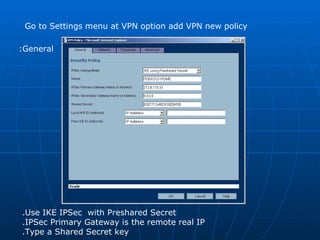
Go to Settings menu at VPN option add VPN new policy  Use IKE IPSec  with Preshared Secret. IPSec Primary Gateway is the remote real IP. Type a Shared Secret key. General:
Network:  For Local Network choose Lan Primary Subnet For Remote Network choose the Address Object you just created
Proposals:  Leave Default Settings accept Exchange – Change it to Main Mode
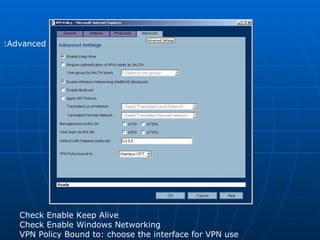
Advanced:  Check Enable Keep Alive Check Enable Windows Networking   VPN Policy Bound to: choose the interface for VPN use
TZ170 Standard Configuration  Go to Settings menu at VPN option add VPN new policy  Use IKE IPSec  with Preshared Secret. IPSec Primary Gateway is the remote real IP. Type the same Shared Secret that you typed in the TZ170 Enhanced At Destination Networks choose Specify Destination and add the remote network ID and mask  General:
Proposals:  Leave Default Settings accept Exchange – Change it to Main Mode
Advanced:  Check Enable Keep Alive Check Enable Windows Networking Choose VPN terminate at: LAN/OPT
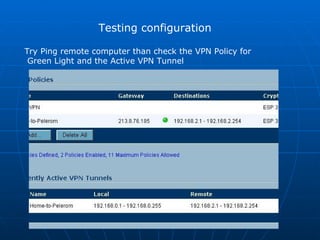
Testing configuration Try Ping remote computer than check the VPN Policy for Green Light and the Active VPN Tunnel
Done!

SonicWall VPN Configuration

  • 1.
    SonicWALL Configuration הדרכהמס ' 4 פלא - רום 2000 בע " מ הקניית ידע בהגדרת Site-to-Site VPN מעביר הדרכה גיא לוינגר Configuring SonicWalls Site-to-Site VPN Between TZ170 Standard and TZ170 Enhanced
  • 2.
    TZ170 Enhanced Configuration First add Address Object to define remote network. Make sure that the zone type is VPN, and that you add a network type object
  • 3.
    Go to Settingsmenu at VPN option add VPN new policy Use IKE IPSec with Preshared Secret. IPSec Primary Gateway is the remote real IP. Type a Shared Secret key. General:
  • 4.
    Network: ForLocal Network choose Lan Primary Subnet For Remote Network choose the Address Object you just created
  • 5.
    Proposals: LeaveDefault Settings accept Exchange – Change it to Main Mode
  • 6.
    Advanced: CheckEnable Keep Alive Check Enable Windows Networking VPN Policy Bound to: choose the interface for VPN use
  • 7.
    TZ170 Standard Configuration Go to Settings menu at VPN option add VPN new policy Use IKE IPSec with Preshared Secret. IPSec Primary Gateway is the remote real IP. Type the same Shared Secret that you typed in the TZ170 Enhanced At Destination Networks choose Specify Destination and add the remote network ID and mask General:
  • 8.
    Proposals: LeaveDefault Settings accept Exchange – Change it to Main Mode
  • 9.
    Advanced: CheckEnable Keep Alive Check Enable Windows Networking Choose VPN terminate at: LAN/OPT
  • 10.
    Testing configuration TryPing remote computer than check the VPN Policy for Green Light and the Active VPN Tunnel
  • 11.