Some things about LAN device detection
(關於內網設備識別的二三事)
Canaan Kao, Terence Liu, Hsien-Wei Hung and Ryan Lung
canaan_kao@trend.com.tw
Network Threat Defense Technology Group
Trend Micro
2015/8/29 1HitCon2015: LAN device detection
Who we are
• Network Threat Defense Technology
Group (NTDTG) of Trend Micro
– We have offices in Hsinchu and Taipei.
• We focus on
– (Virtualized) High-speed IPS/IDS
– Network-stream-based AV
– Smart-home Protection
– IoT Security
2015/8/29 2HitCon2015: LAN device detection
Before we start
• HitCon2014 slogan:
– Adapt to the new era of security threats
– 威脅是一定會有的,我們要學會適應。
• HitCon2015 slogan:
– Security of Things
– 物連網安全。
• The combination:
– Adapt to the new era of IoT security threats.
– 物連網威脅是一定會有的,我們要學會適應。
2015/8/29 HitCon2015: LAN device detection 3
Agenda
• Why LAN device identification (LDI)
• How to detect LAN devices
• The threat intelligence with LDI
• Summary
2015/8/29 HitCon2015: LAN device detection 4
• Why LAN device identification
2015/8/29 HitCon2015: LAN device detection 5
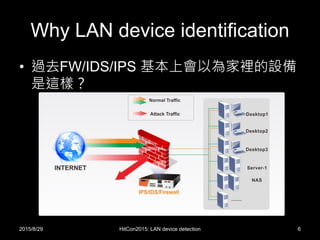
Why LAN device identification
• 過去FW/IDS/IPS 基本上會以為家裡的設備
是這樣?
2015/8/29 HitCon2015: LAN device detection 6
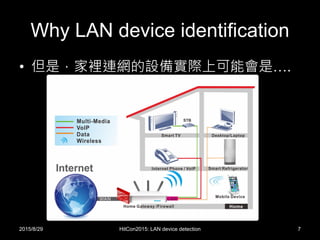
Why LAN device identification
• 但是,家裡連網的設備實際上可能會是….
2015/8/29 HitCon2015: LAN device detection 7
Why LAN device identification
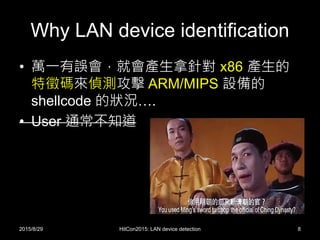
• 萬一有誤會,就會產生拿針對 x86 產生的
特徵碼來偵測攻擊 ARM/MIPS 設備的
shellcode 的狀況….
• User 通常不知道
2015/8/29 HitCon2015: LAN device detection 8
Why LAN device identification
• Monitoring
– 計量
• Access Control
– 連網控制
• Learning
– 知己, LAN device behavior modeling
– 知彼, Threat intelligence
2015/8/29 HitCon2015: LAN device detection 9
Why LAN device identification
• Device identification is not important for
traditional IDS/IPS?
– Age is changed.
– IDS/IPS need to change too.
2015/8/29 HitCon2015: LAN device detection 10
Why LAN device identification
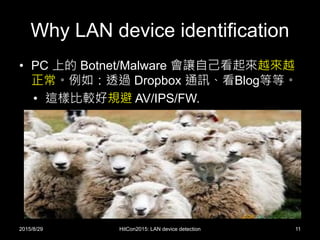
• PC 上的 Botnet/Malware 會讓自己看起來越來越
正常。例如:透過 Dropbox 通訊、看Blog等等。
• 這樣比較好規避 AV/IPS/FW.
2015/8/29 HitCon2015: LAN device detection 11
Why LAN device identification
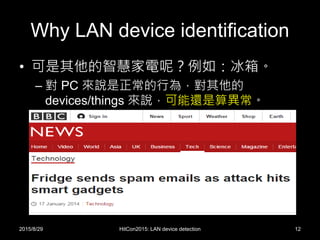
• 可是其他的智慧家電呢?例如:冰箱。
– 對 PC 來說是正常的行為,對其他的
devices/things 來說,可能還是算異常。
2015/8/29 HitCon2015: LAN device detection 12
Why LAN device identification
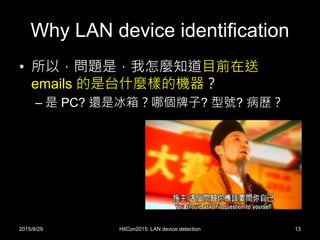
• 所以,問題是,我怎麼知道目前在送
emails 的是台什麼樣的機器?
– 是 PC? 還是冰箱?哪個牌子? 型號? 病歷?
2015/8/29 HitCon2015: LAN device detection 13
• How to detect LAN devices
2015/8/29 HitCon2015: LAN device detection 14
How to detect LAN devices
• 基本上,方法有兩種
– 1. 主動進行 device fingerprinting scan
• 就像是 Nmap 的 OS fingerprinting
• 缺點是容易被發現,且增加不必要的 traffic
– 2. 被動觀察 devices 送出來的 packets
• 優點是隱密性高
• 缺點是相關的 packets 一定要流經過
• (我們用這種)
2015/8/29 HitCon2015: LAN device detection 15
How to detect LAN devices
• 被動式的 LAN Device Identification 可以怎麼
做?
– 0. Are you router/NAT or devices?
– 1. Check the OUI of MAC address
– 2. Check the DHCP options
– 3. Check the user-agent of HTTP request
– 4. Check the used applications
• 例如:發現它常用 Skype ,那就猜它應該是 PC/phone?
– 5. Check 其他…
• 習慣用的 DNS 與 互連的 IP 等等
– 綜合這些 features, 我們就可以來 算分數/learn 
2015/8/29 HitCon2015: LAN device detection 16
How to detect LAN devices
NAT/Router detection
• 如果某個IP是台 router/NAT,而我們在它的
WAN 端
– 所轄設備的 MAC addresses,我們應該看不到
– 所轄設備的 DHCP packets,我們應該看不到
– 該 IP 所呈現的 user-agents 與 application
traffic 可能會太多樣
2015/8/29 HitCon2015: LAN device detection 17
How to detect LAN devices
NAT/Router detection
• Two keys
– The ID field in IP Header
• In general, NAT does not modify IP ID.
• If an host presents multiple IP ID sequences, it
may be a NAT.
– The TTL field in IP Header
• If you are in LAN and you find the packet’s TTL is
not the initial value (128 for Windows), the packet
may be NATed or routed.
2015/8/29 HitCon2015: LAN device detection 18
How to detect LAN devices
NAT/Router detection
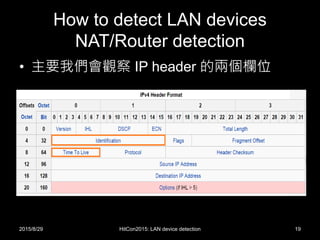
• 主要我們會觀察 IP header 的兩個欄位
2015/8/29 HitCon2015: LAN device detection 19
How to detect LAN devices
NAT/Router detection
The ID field in IP Header
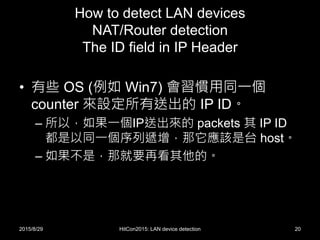
• 有些 OS (例如 Win7) 會習慣用同一個
counter 來設定所有送出的 IP ID。
– 所以,如果一個IP送出來的 packets 其 IP ID
都是以同一個序列遞增,那它應該是台 host。
– 如果不是,那就要再看其他的。
2015/8/29 HitCon2015: LAN device detection 20
How to detect LAN devices
NAT/Router detection
The ID field in IP Header
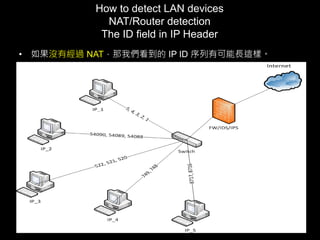
• 如果沒有經過 NAT,那我們看到的 IP ID 序列有可能長這樣。
2015/8/29 HitCon2015: LAN device detection 21
How to detect LAN devices
NAT/Router detection
The ID field in IP Header
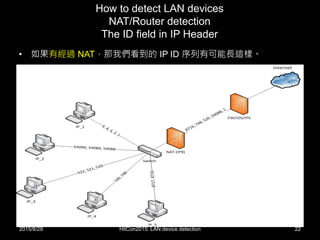
• 如果有經過 NAT,那我們看到的 IP ID 序列有可能長這樣。
2015/8/29 HitCon2015: LAN device detection 22
How to detect LAN devices
NAT/Router detection
The ID field in IP Header
• 所以,如果要偵測家裡的設備,最好的方
式就是和 home router 廠商合作。
– 除非家裡有另外的 NAT,要不然我們就可以免
除家裡的困擾。
2015/8/29 HitCon2015: LAN device detection 23
How to detect LAN devices
NAT/Router detection
The TTL field in IP Header
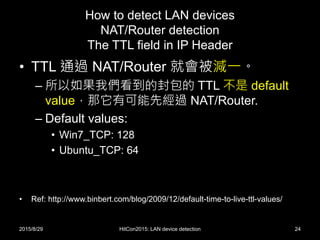
• TTL 通過 NAT/Router 就會被減一。
– 所以如果我們看到的封包的 TTL 不是 default
value,那它有可能先經過 NAT/Router.
– Default values:
• Win7_TCP: 128
• Ubuntu_TCP: 64
• Ref: http://www.binbert.com/blog/2009/12/default-time-to-live-ttl-values/
2015/8/29 HitCon2015: LAN device detection 24
How to detect LAN devices
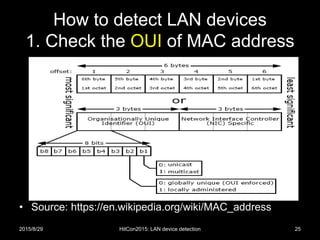
1. Check the OUI of MAC address
• Source: https://en.wikipedia.org/wiki/MAC_address
2015/8/29 HitCon2015: LAN device detection 25
How to detect LAN devices
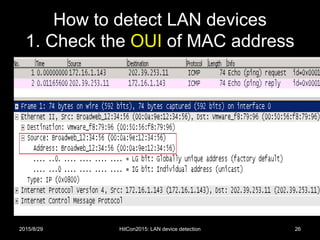
1. Check the OUI of MAC address
2015/8/29 HitCon2015: LAN device detection 26
How to detect LAN devices
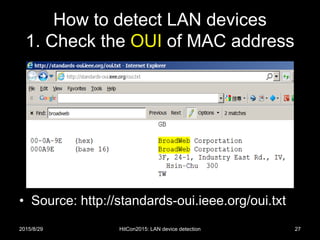
1. Check the OUI of MAC address
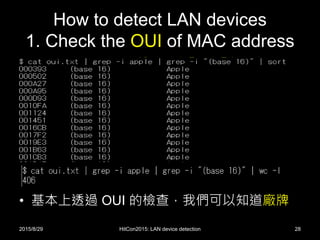
• Source: http://standards-oui.ieee.org/oui.txt
2015/8/29 HitCon2015: LAN device detection 27
How to detect LAN devices
1. Check the OUI of MAC address
• 基本上透過 OUI 的檢查,我們可以知道廠牌
2015/8/29 HitCon2015: LAN device detection 28
How to detect LAN devices
1. Check the OUI of MAC address
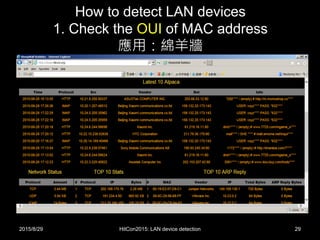
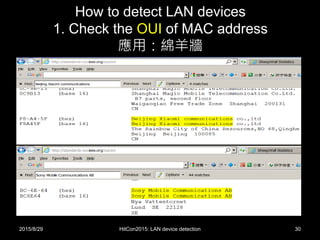
應用:綿羊牆
2015/8/29 HitCon2015: LAN device detection 29
How to detect LAN devices
1. Check the OUI of MAC address
應用:綿羊牆
2015/8/29 HitCon2015: LAN device detection 30
How to detect LAN devices
2. Check the DHCP options
• Why?
– 有人買 home router/gateway 回家啟用後,沒
開 DHCP 的嗎?
• 有普遍性
– DHCP Client 有可能洩漏些可識別的資訊給
DHCP Server
– 以及中間偷聽的設備 
2015/8/29 HitCon2015: LAN device detection 31
How to detect LAN devices
2. Check the DHCP options
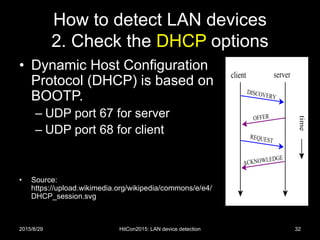
• Dynamic Host Configuration
Protocol (DHCP) is based on
BOOTP.
– UDP port 67 for server
– UDP port 68 for client
• Source:
https://upload.wikimedia.org/wikipedia/commons/e/e4/
DHCP_session.svg
2015/8/29 HitCon2015: LAN device detection 32
How to detect LAN devices
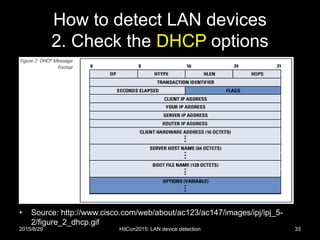
2. Check the DHCP options
• Source: http://www.cisco.com/web/about/ac123/ac147/images/ipj/ipj_5-
2/figure_2_dhcp.gif
2015/8/29 HitCon2015: LAN device detection 33
How to detect LAN devices
2. Check the DHCP options
2015/8/29 HitCon2015: LAN device detection 34
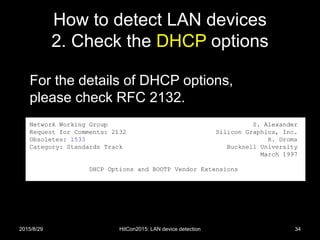
For the details of DHCP options,
please check RFC 2132.
How to detect LAN devices
2. Check the DHCP options
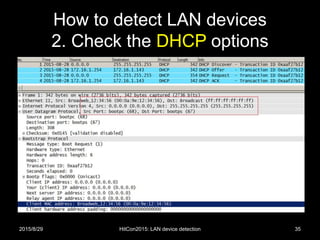
2015/8/29 HitCon2015: LAN device detection 35
How to detect LAN devices
2. Check the DHCP options
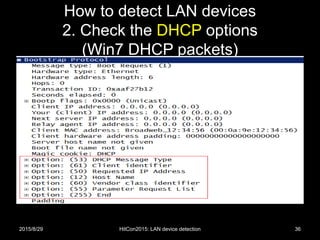
(Win7 DHCP packets)
2015/8/29 HitCon2015: LAN device detection 36
How to detect LAN devices
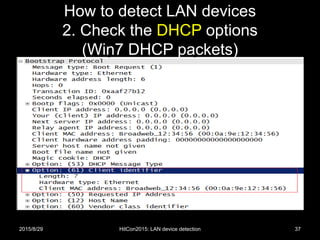
2. Check the DHCP options
(Win7 DHCP packets)
2015/8/29 HitCon2015: LAN device detection 37
How to detect LAN devices
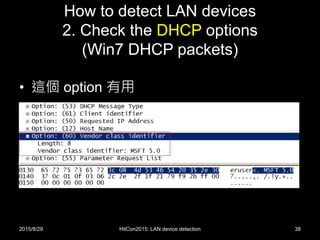
2. Check the DHCP options
(Win7 DHCP packets)
• 這個 option 有用
2015/8/29 HitCon2015: LAN device detection 38
How to detect LAN devices
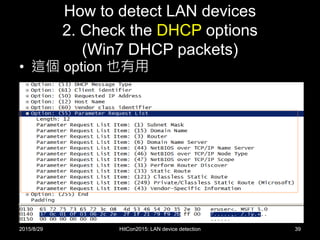
2. Check the DHCP options
(Win7 DHCP packets)
• 這個 option 也有用
2015/8/29 HitCon2015: LAN device detection 39
How to detect LAN devices
2. Check the DHCP options
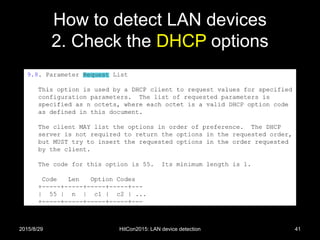
• Option 55/0x37 要怎麼用?
– 把 request 序列直接當特徵碼
• 因為 request list 會因為各家 DHCP client 的實作不
同而有所不同
– 以剛剛那個 Win7 packet 為例,
• 先找到 Option 55/0x37,跳過一個 byte (長度), 再比
• 0x01, 0x0f, 0x03, 0x06, 0x2c, 0x2e, 0x2f, 0x1f,
0x21, 0x79, 0xf9, 0x2b
• 1,15,3,6,44,46,47,31,33,121,249,43
2015/8/29 HitCon2015: LAN device detection 40
How to detect LAN devices
2. Check the DHCP options
2015/8/29 HitCon2015: LAN device detection 41
How to detect LAN devices
2. Check the DHCP options
• 一些 DHCP option 55 特徵碼 [2][4]
– For Win7/Server2008
• 1,15,3,6,44,46,47,31,33,121,249,43
– For Win 8
• 1,15,3,6,44,46,47,31,33,121,249,252,43
• 1,3,6,15,33,44,46,47,121,249,43,60,212
– For Apple iPod, iPhone or iPad
• 1,3,6,15,119,78,79,95,252
• 1,3,6,15,119,252
• 1,3,6,15,119,252,46,208,92
• 1,3,6,15,119,252,67,52,13
2015/8/29 HitCon2015: LAN device detection 42
How to detect LAN devices
3. Check the user-agent of HTTP
• 有時候,檢查 Browser 的 user-agent 裡面
的 keywords 也是一個選項。
– 的確,user-agent 比 MAC address 或是
DHCP option 55 更容易被假造。
– 沒有辦法時的辦法,加減用一下 
2015/8/29 HitCon2015: LAN device detection 43
How to detect LAN devices
3. Check the user-agent of HTTP
• IE11 on Win7
– User-Agent: Mozilla/5.0 (Windows NT 6.1;
WOW64; Trident/7.0; rv:11.0; GTB7.5) like
Gecko
• iPhone
– Mozilla/5.0 (iPhone; U; CPU iPhone OS 4_3
like Mac OS X; en-gb) AppleWebKit/533.17.9
(KHTML, like Gecko) Version/5.0.2
Mobile/8F190 Safari/6533.18.5
2015/8/29 HitCon2015: LAN device detection 44
How to detect LAN devices
4. Check the used applications
• 有些 things/devices 沒有 Ethernet/Wifi,必
須透過 (IoT) Gateway 轉換通雲端 (to log
servers)。
– 看不到 MAC address, DHCP options 55, 不一
定有 user-agent
– 傳統招式:
• IP、domain name、traffic or string-based patterns.
• 還是要想法子識別
2015/8/29 HitCon2015: LAN device detection 45
How to detect LAN devices
4. Check the used applications
• AppID
–1. 關於一般 pattern-based AppID
–2. AppID for SSL-based applications
–3. AppID for encrypted applications
2015/8/29 HitCon2015: LAN device detection 46
How to detect LAN devices
4. Check the used applications
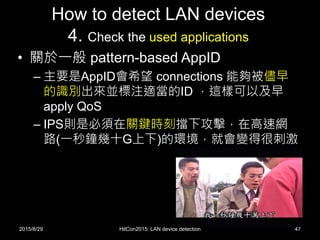
• 關於一般 pattern-based AppID
– 主要是AppID會希望 connections 能夠被儘早
的識別出來並標注適當的ID ,這樣可以及早
apply QoS
– IPS則是必須在關鍵時刻擋下攻擊,在高速網
路(一秒鐘幾十G上下)的環境,就會變得很刺激
2015/8/29 HitCon2015: LAN device detection 47
How to detect LAN devices
4. Check the used applications
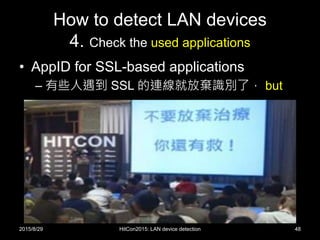
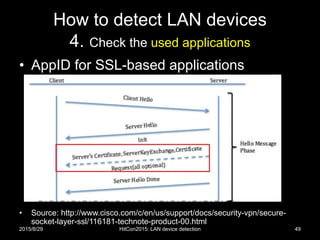
• AppID for SSL-based applications
– 有些人遇到 SSL 的連線就放棄識別了, but
2015/8/29 HitCon2015: LAN device detection 48
How to detect LAN devices
4. Check the used applications
• AppID for SSL-based applications
• Source: http://www.cisco.com/c/en/us/support/docs/security-vpn/secure-
socket-layer-ssl/116181-technote-product-00.html
2015/8/29 HitCon2015: LAN device detection 49
How to detect LAN devices
4. Check the used applications
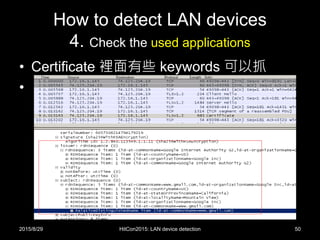
• Certificate 裡面有些 keywords 可以抓
•
2015/8/29 HitCon2015: LAN device detection 50
How to detect LAN devices
4. Check the used applications
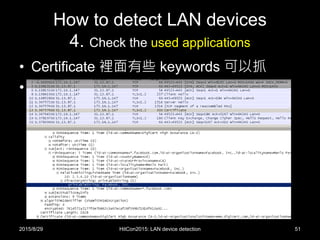
• Certificate 裡面有些 keywords 可以抓
•
2015/8/29 HitCon2015: LAN device detection 51
How to detect LAN devices
4. Check the used applications
(AppID for encrypted applications)
• 如果,你遇到的是私有的加密方式或編碼,
無法知道封包的解析規則
– 那還有招嗎?
2015/8/29 HitCon2015: LAN device detection 52
How to detect LAN devices
4. Check the used applications
(AppID for encrypted applications)
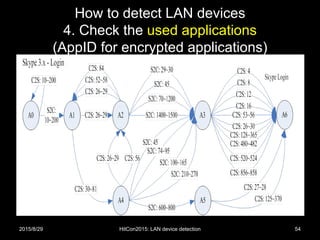
• 那我們提供一個沒有辦法的辦法
– 放棄識別 payload
– 單靠 方向、封包長度,產生出對應的 finite
state machine (FSM)
– 如果,這個 FSM 可以 match 某個 connection,
我們就假定它應該跟我們用來畫出這個 FSM
的 connections 是同一種。
2015/8/29 HitCon2015: LAN device detection 53
How to detect LAN devices
4. Check the used applications
(AppID for encrypted applications)
2015/8/29 HitCon2015: LAN device detection 54
How to detect LAN devices
• 誰適合做 LAN Device Identification?
• IoT Home Router/Gateway?
– 兵家必爭之地?
– LAN 與 WAN 資料交換必經之路
– 一般來說,真正的 source MAC address 與
DHCP option 55 只有在 LAN 看得到。
2015/8/29 HitCon2015: LAN device detection 55
How to detect LAN devices
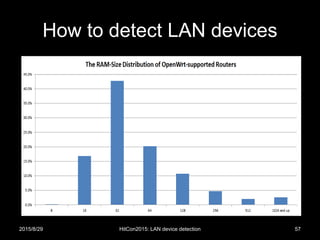
• Do you know the RAM-size in your home
router?
– 你知道家裡的 router 的 RAM 是多大嗎?
– In embedded system, in general, the RAM-
size imply the functionality which can be
equipped.
2015/8/29 HitCon2015: LAN device detection 56
How to detect LAN devices
2015/8/29 HitCon2015: LAN device detection 57
How to detect LAN devices
• 當大部分的家用 router 的 RAM 少於 128M,
(32M 是主流),大家覺得它會拿多少出來給
security functions?
– 無米之炊….
– 這是大環境的問題,需要大家一起解決。
– Security has its price.
2015/8/29 HitCon2015: LAN device detection 58
• The threat intelligence with LDI
2015/8/29 HitCon2015: LAN device detection 59
The threat intelligence with LDI
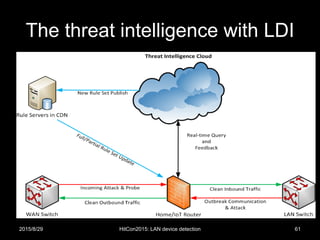
• 我們和 home router 廠商合作,取得 user
同意的 logs,彙整到我們的 cloud。
– Timely
– Accurate
– Relevant
2015/8/29 HitCon2015: LAN device detection 60
The threat intelligence with LDI
2015/8/29 HitCon2015: LAN device detection 61
The threat intelligence with LDI
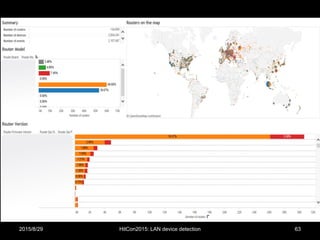
• 底下是一些去可識別化的統計資訊
2015/8/29 HitCon2015: LAN device detection 62
The threat intelligence with LDI
2015/8/29 HitCon2015: LAN device detection 63
The threat intelligence with LDI
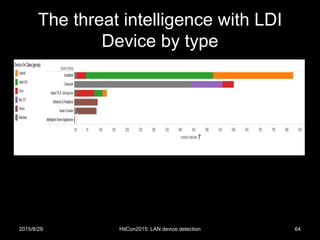
Device by type
2015/8/29 HitCon2015: LAN device detection 64
The threat intelligence with LDI
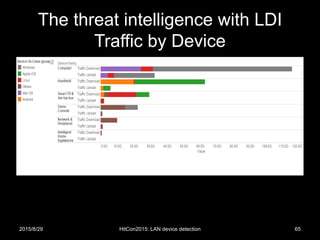
Traffic by Device
2015/8/29 HitCon2015: LAN device detection 65
The threat intelligence with LDI
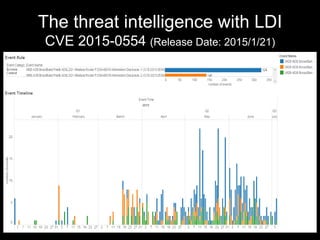
CVE 2015-0554 (Release Date: 2015/1/21)
2015/8/29 HitCon2015: LAN device detection 66
The threat intelligence with LDI
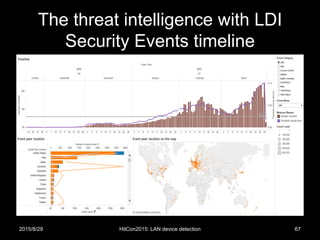
Security Events timeline
2015/8/29 HitCon2015: LAN device detection 67
The threat intelligence with LDI
• 第二屆台灣資料科學愛好者年會
– 阿里巴巴數據委員會會長-車品覺:
– 數據科學現在有兩大派別:
• 數據很平但用深厚的演算法解決問題,
• 另一種是數據廣泛而大但是用簡單的演算法。
• 我(車品覺)個人的喜好是第二個 
2015/8/29 HitCon2015: LAN device detection 68
The threat intelligence with LDI
• 我們也是喜歡簡單的演算法 
• 再回到那個冰箱送 SPAM 的問題
– 萬一,我們發現你家的冰箱開始送 emails
– 我們會比對別人家的同款的冰箱們是不是也會
送 emails
– 如果,你家的冰箱是特別的
– 理論上,將來我們會想法子通知你….
• 自己的冰箱自己救
2015/8/29 HitCon2015: LAN device detection 69
• Summary
2015/8/29 HitCon2015: LAN device detection 70
Summary
(Some things about LAN device identification)
• 1. 在 IoT 時代,網路設備識別自動化是需
要的。
• 2. 在 LAN 端,我們可以透過 MAC OUI,
DHCP packets 取得品牌與作業系統的相關
資訊。
• 3. 精準的設備識別 結合 Big Data 的運算能
力,才有辦法真正做到 threat intelligence。
2015/8/29 HitCon2015: LAN device detection 71
Acknowledgements
• The Authors would like to thank
– Eric Lien
– MiG Chien
– Hubert Lin
– Ping-Jhih Chen
– Miles Xie
– Mit Liao
– Justin Jan
– and other helpers.
2015/8/29 HitCon2015: LAN device detection 72
Reference
• 1. MAC address
– https://en.wikipedia.org/wiki/MAC_address
• 2. Fingerbank
– https://fingerbank.inverse.ca/
• 3. Using DHCP for Passive OS Identification
– http://chatteronthewire.org/download/bh-japan-
laporte-kollmann-v8.ppt
• 4. Packetfence
– http://www.packetfence.org/
2015/8/29 HitCon2015: LAN device detection 73
One more thing
(在 HITCON2015 ENT, 兩個 hackers 的問答)
• 安東尼問:
– 我們一直揭露偵測與防禦的技術,會不會造成
壞人一直改進,使得我們偵測與防禦的能力變
弱?
• 博德曼答:
– 不用擔心這個問題,因為我從來沒有在公開的
演講,揭露我真正的實作方法與技術 
• Comments:
– 也不是說我們這些 speakers 都留一手,而是
說我們做的比說的好 
2015/8/29 HitCon2015: LAN device detection 74
Q&A
• Thank you 
• E-mails:
– For media and business
• Terence Liu <terence_liu@trend.com.tw>
– For job opportunity
• Hsien-Wei Hung <hsienwei_hung@trend.com.tw>
– For technique
• Canaan Kao <canaan_kao@trend.com.tw>
2015/8/29 HitCon2015: LAN device detection 75
About BoT2015
• 現狀:
– 我現在還不能跟大家確認今年不會有 BoT2015
– 大概九月底會有 update
• Facebook for BoT conference:
– https://www.facebook.com/BotnetCon
2015/8/29 HitCon2015: LAN device detection 76

Some things about LAN device detection

  • 1.
    Some things aboutLAN device detection (關於內網設備識別的二三事) Canaan Kao, Terence Liu, Hsien-Wei Hung and Ryan Lung canaan_kao@trend.com.tw Network Threat Defense Technology Group Trend Micro 2015/8/29 1HitCon2015: LAN device detection
  • 2.
    Who we are •Network Threat Defense Technology Group (NTDTG) of Trend Micro – We have offices in Hsinchu and Taipei. • We focus on – (Virtualized) High-speed IPS/IDS – Network-stream-based AV – Smart-home Protection – IoT Security 2015/8/29 2HitCon2015: LAN device detection
  • 3.
    Before we start •HitCon2014 slogan: – Adapt to the new era of security threats – 威脅是一定會有的,我們要學會適應。 • HitCon2015 slogan: – Security of Things – 物連網安全。 • The combination: – Adapt to the new era of IoT security threats. – 物連網威脅是一定會有的,我們要學會適應。 2015/8/29 HitCon2015: LAN device detection 3
  • 4.
    Agenda • Why LANdevice identification (LDI) • How to detect LAN devices • The threat intelligence with LDI • Summary 2015/8/29 HitCon2015: LAN device detection 4
  • 5.
    • Why LANdevice identification 2015/8/29 HitCon2015: LAN device detection 5
  • 6.
    Why LAN deviceidentification • 過去FW/IDS/IPS 基本上會以為家裡的設備 是這樣? 2015/8/29 HitCon2015: LAN device detection 6
  • 7.
    Why LAN deviceidentification • 但是,家裡連網的設備實際上可能會是…. 2015/8/29 HitCon2015: LAN device detection 7
  • 8.
    Why LAN deviceidentification • 萬一有誤會,就會產生拿針對 x86 產生的 特徵碼來偵測攻擊 ARM/MIPS 設備的 shellcode 的狀況…. • User 通常不知道 2015/8/29 HitCon2015: LAN device detection 8
  • 9.
    Why LAN deviceidentification • Monitoring – 計量 • Access Control – 連網控制 • Learning – 知己, LAN device behavior modeling – 知彼, Threat intelligence 2015/8/29 HitCon2015: LAN device detection 9
  • 10.
    Why LAN deviceidentification • Device identification is not important for traditional IDS/IPS? – Age is changed. – IDS/IPS need to change too. 2015/8/29 HitCon2015: LAN device detection 10
  • 11.
    Why LAN deviceidentification • PC 上的 Botnet/Malware 會讓自己看起來越來越 正常。例如:透過 Dropbox 通訊、看Blog等等。 • 這樣比較好規避 AV/IPS/FW. 2015/8/29 HitCon2015: LAN device detection 11
  • 12.
    Why LAN deviceidentification • 可是其他的智慧家電呢?例如:冰箱。 – 對 PC 來說是正常的行為,對其他的 devices/things 來說,可能還是算異常。 2015/8/29 HitCon2015: LAN device detection 12
  • 13.
    Why LAN deviceidentification • 所以,問題是,我怎麼知道目前在送 emails 的是台什麼樣的機器? – 是 PC? 還是冰箱?哪個牌子? 型號? 病歷? 2015/8/29 HitCon2015: LAN device detection 13
  • 14.
    • How todetect LAN devices 2015/8/29 HitCon2015: LAN device detection 14
  • 15.
    How to detectLAN devices • 基本上,方法有兩種 – 1. 主動進行 device fingerprinting scan • 就像是 Nmap 的 OS fingerprinting • 缺點是容易被發現,且增加不必要的 traffic – 2. 被動觀察 devices 送出來的 packets • 優點是隱密性高 • 缺點是相關的 packets 一定要流經過 • (我們用這種) 2015/8/29 HitCon2015: LAN device detection 15
  • 16.
    How to detectLAN devices • 被動式的 LAN Device Identification 可以怎麼 做? – 0. Are you router/NAT or devices? – 1. Check the OUI of MAC address – 2. Check the DHCP options – 3. Check the user-agent of HTTP request – 4. Check the used applications • 例如:發現它常用 Skype ,那就猜它應該是 PC/phone? – 5. Check 其他… • 習慣用的 DNS 與 互連的 IP 等等 – 綜合這些 features, 我們就可以來 算分數/learn  2015/8/29 HitCon2015: LAN device detection 16
  • 17.
    How to detectLAN devices NAT/Router detection • 如果某個IP是台 router/NAT,而我們在它的 WAN 端 – 所轄設備的 MAC addresses,我們應該看不到 – 所轄設備的 DHCP packets,我們應該看不到 – 該 IP 所呈現的 user-agents 與 application traffic 可能會太多樣 2015/8/29 HitCon2015: LAN device detection 17
  • 18.
    How to detectLAN devices NAT/Router detection • Two keys – The ID field in IP Header • In general, NAT does not modify IP ID. • If an host presents multiple IP ID sequences, it may be a NAT. – The TTL field in IP Header • If you are in LAN and you find the packet’s TTL is not the initial value (128 for Windows), the packet may be NATed or routed. 2015/8/29 HitCon2015: LAN device detection 18
  • 19.
    How to detectLAN devices NAT/Router detection • 主要我們會觀察 IP header 的兩個欄位 2015/8/29 HitCon2015: LAN device detection 19
  • 20.
    How to detectLAN devices NAT/Router detection The ID field in IP Header • 有些 OS (例如 Win7) 會習慣用同一個 counter 來設定所有送出的 IP ID。 – 所以,如果一個IP送出來的 packets 其 IP ID 都是以同一個序列遞增,那它應該是台 host。 – 如果不是,那就要再看其他的。 2015/8/29 HitCon2015: LAN device detection 20
  • 21.
    How to detectLAN devices NAT/Router detection The ID field in IP Header • 如果沒有經過 NAT,那我們看到的 IP ID 序列有可能長這樣。 2015/8/29 HitCon2015: LAN device detection 21
  • 22.
    How to detectLAN devices NAT/Router detection The ID field in IP Header • 如果有經過 NAT,那我們看到的 IP ID 序列有可能長這樣。 2015/8/29 HitCon2015: LAN device detection 22
  • 23.
    How to detectLAN devices NAT/Router detection The ID field in IP Header • 所以,如果要偵測家裡的設備,最好的方 式就是和 home router 廠商合作。 – 除非家裡有另外的 NAT,要不然我們就可以免 除家裡的困擾。 2015/8/29 HitCon2015: LAN device detection 23
  • 24.
    How to detectLAN devices NAT/Router detection The TTL field in IP Header • TTL 通過 NAT/Router 就會被減一。 – 所以如果我們看到的封包的 TTL 不是 default value,那它有可能先經過 NAT/Router. – Default values: • Win7_TCP: 128 • Ubuntu_TCP: 64 • Ref: http://www.binbert.com/blog/2009/12/default-time-to-live-ttl-values/ 2015/8/29 HitCon2015: LAN device detection 24
  • 25.
    How to detectLAN devices 1. Check the OUI of MAC address • Source: https://en.wikipedia.org/wiki/MAC_address 2015/8/29 HitCon2015: LAN device detection 25
  • 26.
    How to detectLAN devices 1. Check the OUI of MAC address 2015/8/29 HitCon2015: LAN device detection 26
  • 27.
    How to detectLAN devices 1. Check the OUI of MAC address • Source: http://standards-oui.ieee.org/oui.txt 2015/8/29 HitCon2015: LAN device detection 27
  • 28.
    How to detectLAN devices 1. Check the OUI of MAC address • 基本上透過 OUI 的檢查,我們可以知道廠牌 2015/8/29 HitCon2015: LAN device detection 28
  • 29.
    How to detectLAN devices 1. Check the OUI of MAC address 應用:綿羊牆 2015/8/29 HitCon2015: LAN device detection 29
  • 30.
    How to detectLAN devices 1. Check the OUI of MAC address 應用:綿羊牆 2015/8/29 HitCon2015: LAN device detection 30
  • 31.
    How to detectLAN devices 2. Check the DHCP options • Why? – 有人買 home router/gateway 回家啟用後,沒 開 DHCP 的嗎? • 有普遍性 – DHCP Client 有可能洩漏些可識別的資訊給 DHCP Server – 以及中間偷聽的設備  2015/8/29 HitCon2015: LAN device detection 31
  • 32.
    How to detectLAN devices 2. Check the DHCP options • Dynamic Host Configuration Protocol (DHCP) is based on BOOTP. – UDP port 67 for server – UDP port 68 for client • Source: https://upload.wikimedia.org/wikipedia/commons/e/e4/ DHCP_session.svg 2015/8/29 HitCon2015: LAN device detection 32
  • 33.
    How to detectLAN devices 2. Check the DHCP options • Source: http://www.cisco.com/web/about/ac123/ac147/images/ipj/ipj_5- 2/figure_2_dhcp.gif 2015/8/29 HitCon2015: LAN device detection 33
  • 34.
    How to detectLAN devices 2. Check the DHCP options 2015/8/29 HitCon2015: LAN device detection 34 For the details of DHCP options, please check RFC 2132.
  • 35.
    How to detectLAN devices 2. Check the DHCP options 2015/8/29 HitCon2015: LAN device detection 35
  • 36.
    How to detectLAN devices 2. Check the DHCP options (Win7 DHCP packets) 2015/8/29 HitCon2015: LAN device detection 36
  • 37.
    How to detectLAN devices 2. Check the DHCP options (Win7 DHCP packets) 2015/8/29 HitCon2015: LAN device detection 37
  • 38.
    How to detectLAN devices 2. Check the DHCP options (Win7 DHCP packets) • 這個 option 有用 2015/8/29 HitCon2015: LAN device detection 38
  • 39.
    How to detectLAN devices 2. Check the DHCP options (Win7 DHCP packets) • 這個 option 也有用 2015/8/29 HitCon2015: LAN device detection 39
  • 40.
    How to detectLAN devices 2. Check the DHCP options • Option 55/0x37 要怎麼用? – 把 request 序列直接當特徵碼 • 因為 request list 會因為各家 DHCP client 的實作不 同而有所不同 – 以剛剛那個 Win7 packet 為例, • 先找到 Option 55/0x37,跳過一個 byte (長度), 再比 • 0x01, 0x0f, 0x03, 0x06, 0x2c, 0x2e, 0x2f, 0x1f, 0x21, 0x79, 0xf9, 0x2b • 1,15,3,6,44,46,47,31,33,121,249,43 2015/8/29 HitCon2015: LAN device detection 40
  • 41.
    How to detectLAN devices 2. Check the DHCP options 2015/8/29 HitCon2015: LAN device detection 41
  • 42.
    How to detectLAN devices 2. Check the DHCP options • 一些 DHCP option 55 特徵碼 [2][4] – For Win7/Server2008 • 1,15,3,6,44,46,47,31,33,121,249,43 – For Win 8 • 1,15,3,6,44,46,47,31,33,121,249,252,43 • 1,3,6,15,33,44,46,47,121,249,43,60,212 – For Apple iPod, iPhone or iPad • 1,3,6,15,119,78,79,95,252 • 1,3,6,15,119,252 • 1,3,6,15,119,252,46,208,92 • 1,3,6,15,119,252,67,52,13 2015/8/29 HitCon2015: LAN device detection 42
  • 43.
    How to detectLAN devices 3. Check the user-agent of HTTP • 有時候,檢查 Browser 的 user-agent 裡面 的 keywords 也是一個選項。 – 的確,user-agent 比 MAC address 或是 DHCP option 55 更容易被假造。 – 沒有辦法時的辦法,加減用一下  2015/8/29 HitCon2015: LAN device detection 43
  • 44.
    How to detectLAN devices 3. Check the user-agent of HTTP • IE11 on Win7 – User-Agent: Mozilla/5.0 (Windows NT 6.1; WOW64; Trident/7.0; rv:11.0; GTB7.5) like Gecko • iPhone – Mozilla/5.0 (iPhone; U; CPU iPhone OS 4_3 like Mac OS X; en-gb) AppleWebKit/533.17.9 (KHTML, like Gecko) Version/5.0.2 Mobile/8F190 Safari/6533.18.5 2015/8/29 HitCon2015: LAN device detection 44
  • 45.
    How to detectLAN devices 4. Check the used applications • 有些 things/devices 沒有 Ethernet/Wifi,必 須透過 (IoT) Gateway 轉換通雲端 (to log servers)。 – 看不到 MAC address, DHCP options 55, 不一 定有 user-agent – 傳統招式: • IP、domain name、traffic or string-based patterns. • 還是要想法子識別 2015/8/29 HitCon2015: LAN device detection 45
  • 46.
    How to detectLAN devices 4. Check the used applications • AppID –1. 關於一般 pattern-based AppID –2. AppID for SSL-based applications –3. AppID for encrypted applications 2015/8/29 HitCon2015: LAN device detection 46
  • 47.
    How to detectLAN devices 4. Check the used applications • 關於一般 pattern-based AppID – 主要是AppID會希望 connections 能夠被儘早 的識別出來並標注適當的ID ,這樣可以及早 apply QoS – IPS則是必須在關鍵時刻擋下攻擊,在高速網 路(一秒鐘幾十G上下)的環境,就會變得很刺激 2015/8/29 HitCon2015: LAN device detection 47
  • 48.
    How to detectLAN devices 4. Check the used applications • AppID for SSL-based applications – 有些人遇到 SSL 的連線就放棄識別了, but 2015/8/29 HitCon2015: LAN device detection 48
  • 49.
    How to detectLAN devices 4. Check the used applications • AppID for SSL-based applications • Source: http://www.cisco.com/c/en/us/support/docs/security-vpn/secure- socket-layer-ssl/116181-technote-product-00.html 2015/8/29 HitCon2015: LAN device detection 49
  • 50.
    How to detectLAN devices 4. Check the used applications • Certificate 裡面有些 keywords 可以抓 • 2015/8/29 HitCon2015: LAN device detection 50
  • 51.
    How to detectLAN devices 4. Check the used applications • Certificate 裡面有些 keywords 可以抓 • 2015/8/29 HitCon2015: LAN device detection 51
  • 52.
    How to detectLAN devices 4. Check the used applications (AppID for encrypted applications) • 如果,你遇到的是私有的加密方式或編碼, 無法知道封包的解析規則 – 那還有招嗎? 2015/8/29 HitCon2015: LAN device detection 52
  • 53.
    How to detectLAN devices 4. Check the used applications (AppID for encrypted applications) • 那我們提供一個沒有辦法的辦法 – 放棄識別 payload – 單靠 方向、封包長度,產生出對應的 finite state machine (FSM) – 如果,這個 FSM 可以 match 某個 connection, 我們就假定它應該跟我們用來畫出這個 FSM 的 connections 是同一種。 2015/8/29 HitCon2015: LAN device detection 53
  • 54.
    How to detectLAN devices 4. Check the used applications (AppID for encrypted applications) 2015/8/29 HitCon2015: LAN device detection 54
  • 55.
    How to detectLAN devices • 誰適合做 LAN Device Identification? • IoT Home Router/Gateway? – 兵家必爭之地? – LAN 與 WAN 資料交換必經之路 – 一般來說,真正的 source MAC address 與 DHCP option 55 只有在 LAN 看得到。 2015/8/29 HitCon2015: LAN device detection 55
  • 56.
    How to detectLAN devices • Do you know the RAM-size in your home router? – 你知道家裡的 router 的 RAM 是多大嗎? – In embedded system, in general, the RAM- size imply the functionality which can be equipped. 2015/8/29 HitCon2015: LAN device detection 56
  • 57.
    How to detectLAN devices 2015/8/29 HitCon2015: LAN device detection 57
  • 58.
    How to detectLAN devices • 當大部分的家用 router 的 RAM 少於 128M, (32M 是主流),大家覺得它會拿多少出來給 security functions? – 無米之炊…. – 這是大環境的問題,需要大家一起解決。 – Security has its price. 2015/8/29 HitCon2015: LAN device detection 58
  • 59.
    • The threatintelligence with LDI 2015/8/29 HitCon2015: LAN device detection 59
  • 60.
    The threat intelligencewith LDI • 我們和 home router 廠商合作,取得 user 同意的 logs,彙整到我們的 cloud。 – Timely – Accurate – Relevant 2015/8/29 HitCon2015: LAN device detection 60
  • 61.
    The threat intelligencewith LDI 2015/8/29 HitCon2015: LAN device detection 61
  • 62.
    The threat intelligencewith LDI • 底下是一些去可識別化的統計資訊 2015/8/29 HitCon2015: LAN device detection 62
  • 63.
    The threat intelligencewith LDI 2015/8/29 HitCon2015: LAN device detection 63
  • 64.
    The threat intelligencewith LDI Device by type 2015/8/29 HitCon2015: LAN device detection 64
  • 65.
    The threat intelligencewith LDI Traffic by Device 2015/8/29 HitCon2015: LAN device detection 65
  • 66.
    The threat intelligencewith LDI CVE 2015-0554 (Release Date: 2015/1/21) 2015/8/29 HitCon2015: LAN device detection 66
  • 67.
    The threat intelligencewith LDI Security Events timeline 2015/8/29 HitCon2015: LAN device detection 67
  • 68.
    The threat intelligencewith LDI • 第二屆台灣資料科學愛好者年會 – 阿里巴巴數據委員會會長-車品覺: – 數據科學現在有兩大派別: • 數據很平但用深厚的演算法解決問題, • 另一種是數據廣泛而大但是用簡單的演算法。 • 我(車品覺)個人的喜好是第二個  2015/8/29 HitCon2015: LAN device detection 68
  • 69.
    The threat intelligencewith LDI • 我們也是喜歡簡單的演算法  • 再回到那個冰箱送 SPAM 的問題 – 萬一,我們發現你家的冰箱開始送 emails – 我們會比對別人家的同款的冰箱們是不是也會 送 emails – 如果,你家的冰箱是特別的 – 理論上,將來我們會想法子通知你…. • 自己的冰箱自己救 2015/8/29 HitCon2015: LAN device detection 69
  • 70.
    • Summary 2015/8/29 HitCon2015:LAN device detection 70
  • 71.
    Summary (Some things aboutLAN device identification) • 1. 在 IoT 時代,網路設備識別自動化是需 要的。 • 2. 在 LAN 端,我們可以透過 MAC OUI, DHCP packets 取得品牌與作業系統的相關 資訊。 • 3. 精準的設備識別 結合 Big Data 的運算能 力,才有辦法真正做到 threat intelligence。 2015/8/29 HitCon2015: LAN device detection 71
  • 72.
    Acknowledgements • The Authorswould like to thank – Eric Lien – MiG Chien – Hubert Lin – Ping-Jhih Chen – Miles Xie – Mit Liao – Justin Jan – and other helpers. 2015/8/29 HitCon2015: LAN device detection 72
  • 73.
    Reference • 1. MACaddress – https://en.wikipedia.org/wiki/MAC_address • 2. Fingerbank – https://fingerbank.inverse.ca/ • 3. Using DHCP for Passive OS Identification – http://chatteronthewire.org/download/bh-japan- laporte-kollmann-v8.ppt • 4. Packetfence – http://www.packetfence.org/ 2015/8/29 HitCon2015: LAN device detection 73
  • 74.
    One more thing (在HITCON2015 ENT, 兩個 hackers 的問答) • 安東尼問: – 我們一直揭露偵測與防禦的技術,會不會造成 壞人一直改進,使得我們偵測與防禦的能力變 弱? • 博德曼答: – 不用擔心這個問題,因為我從來沒有在公開的 演講,揭露我真正的實作方法與技術  • Comments: – 也不是說我們這些 speakers 都留一手,而是 說我們做的比說的好  2015/8/29 HitCon2015: LAN device detection 74
  • 75.
    Q&A • Thank you • E-mails: – For media and business • Terence Liu <terence_liu@trend.com.tw> – For job opportunity • Hsien-Wei Hung <hsienwei_hung@trend.com.tw> – For technique • Canaan Kao <canaan_kao@trend.com.tw> 2015/8/29 HitCon2015: LAN device detection 75
  • 76.
    About BoT2015 • 現狀: –我現在還不能跟大家確認今年不會有 BoT2015 – 大概九月底會有 update • Facebook for BoT conference: – https://www.facebook.com/BotnetCon 2015/8/29 HitCon2015: LAN device detection 76