CLIENT/SERVER COMPUTING
 A computing model for the development of
computerized systems.
 This model is based on the distribution of
functions between two types of independent
and autonomous processors:
servers and clients
 A client is any process that requests
specific services from server processes.
 A server is a process that provides
requested services for clients.
 Client and server processes can reside
in the same computer or in different
computers connected by a network
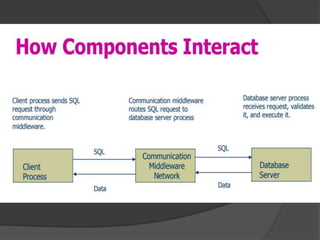
Client/Server Architecture
 The client/Server architecture is based on
hardware and software components that
interacts to form a system.
 This system includes three main
components:
 •Clients
 •Servers
 •Communication middleware
Client:
 The client is any computer process that
requests services from the server.
 The client is also known as the front-end
application,
 reflecting the fact that the end user
usually interacts with the client process
Server:
 The server is any computer process
providing services to the clients.
 The server is also known as the back-
end application,
 reflecting the fact that the server
process provides the background
services for the client process.
Communication
middleware:
 It is any computer process(es) through
which clients and servers communicate.
 The communication middleware, also
known as middleware or the
communications layers,
 is made up of several layers of software
that aid the transmission of data and
control information between clients and
servers
Characteristics of Client Server Computing
 The points for client server computing are as
follows:
 The client server computing works with a system of
request and response.
 The client sends a request to the server and the
server responds with the desired information.
 The client and server should follow a common
communication protocol so they can easily interact
with each other.
 All the communication protocols are available at
the application layer.
 A server can only accommodate a limited
number of client requests at a time. So it
uses a system based on priority to
respond to the requests
 An example of a client server computing
system is a web server. It returns the web
pages to the clients that requested them.
Advantages of Client Server Computing
 All the required data is concentrated in a
single place i.e. the server.
 It is easy to replace, upgrade or relocate the
nodes in the client server model
Disadvantages of Client Server Computing
 If all the clients simultaneously request data
from the server, it may get overloaded. This
may lead to congestion in the network.
 The cost of setting and maintaining a client
server model are quite high.
Distributed computing
 Multiple computer systems located at different
places linked together over a network,use to
solve higher level computation without having
to use an expensive supercomputer.
 Distributed system is called, When collection
of various computers seems a single coherent
system to its client, then it is called distributed
system.
 Distributed Systems have broken down into
two parts: the front end and the back end.
Types of Distributed Systems
 The nodes in the distributed systems can be
arranged in the form of
 client/server systems
 peer to peer systems.
 Peer to Peer Systems
 The peer to peer systems contains
nodes that are equal participants in data
sharing.
 All the tasks are equally divided
between all the nodes.
 Grid computing is based on distributed
architecture and is the form of "distributed
computing" or "peer-to-peer computing“
 that involving large numbers of computers
physically connected to solve a complex
problem.
Advantages of Distributed Systems
 nodes can easily share data with other nodes.
 More nodes can easily be added to the
distributed system
 Failure of one node does not lead to the
failure of the entire distributed system
Disadvantages of Distributed Systems
 It is difficult to provide adequate security in
distributed systems.
 Some messages and data can be lost
 The database connected to the distributed
systems is quite complicated and
 Overloading may occur .
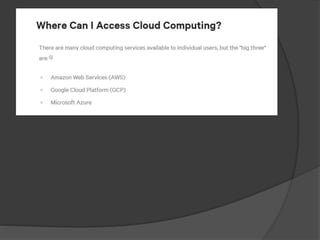
Cloud computing
 cloud computing is the delivery of computing
services— including servers, storage, databases,
networking, software, analytics, and
intelligence—over the Internet (“the cloud”) to
offer faster innovation, flexible resources, and
economies of scale.
 Cloud computing is a general term for
anything that involves delivering hosted
services over the Internet.
benefits of cloud computing
Low Cost
 Cloud computing eliminates the capital expense
of buying hardware and software and setting up
and running on-site
 Speed
 Reliability
 Security
 Performance
Types of cloud computing
 1) Public cloud
 owned and operated by a third-party cloud service providers,
which deliver their computing resources like servers and storage
over the Internet.
 Microsoft Azure is an example of a public cloud.
 2)Private cloud
 also known as an internal or enterprise cloud, resides on
company’s intranet or hosted data center where all of your data is
protected behind a firewall.
 3)Hybrid cloud
 Hybrid clouds combine public and private clouds, bound together
by technology that allows data and applications to be shared
between them.
Service models
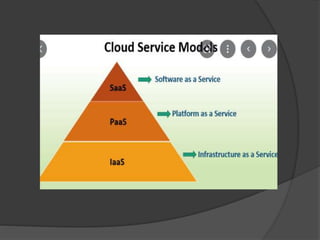
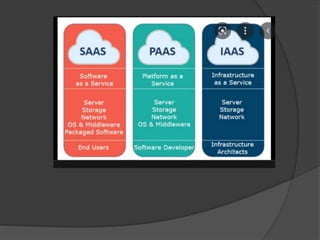
Infrastructure as a service (IaaS)
 In the most basic cloud-service model & according to
the IETF (Internet Engineering Task Force),
providers of IaaS offer computers – physical or
(more often) virtual machines – and other resources.
Platform as a service (PaaS)
 In the PaaS models, cloud providers deliver a
computing platform, typically including operating
system, programming language execution
environment, database, and web server.
Software as a service (SaaS)
 Users are provided access to application software
and databases. Cloud providers manage the
infrastructure and platforms that run the applications.
Uses of cloud computing
Create cloud-native applications
Test and build applications
Store, back up and recover data
Analyse data
Disadvantages of Cloud
Computing
 Requires a constant Internet connection
 Does not work well with low-speed
connections
 Stored data might not be secure
 Stored data can be lost
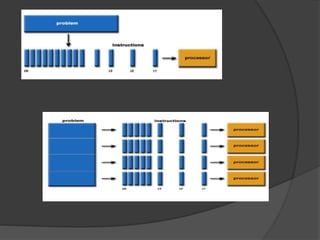
 PARALLEL COMPUTING
 Parallel computing is a form of
computation in which many calculations
are carried out simultaneously, operating
on the principle that large problems can
often be divided into smaller ones, which
are then solved at the same time.
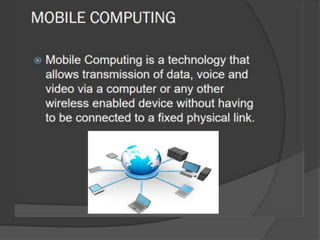
 The main concept involves:
 • Mobile communication
 • Mobile hardware
 • Mobile software
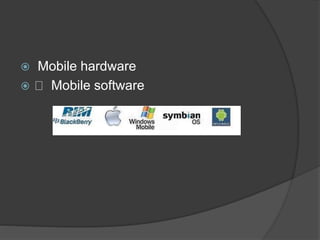
 Mobile hardware
 Mobile software
 ADVANTAGES OF MOBILE COMPUTING
 Following are the clear advantages of
Mobile Computing −
 Location flexibility
 Saves Time
 Enhanced Productivity
 Ease of research
 Entertainment
 Streamlining of Business Processes
FUTURE COMPUTING
 PREDICTIVE ANALYTICS
Predictive analytics uses statistical
methods to mine intelligence, information
and patterns in structured, unstructured
and streams of data.
 COGNITIVE COMPUTING
 The most famous technological product
in the domain of cognitive computing is
IBM’s supercomputer, Watson, an
artificial intelligence computer system
capable of answering questions posed
in natural language.
 AUTONOMIC COMPUTING
 This is another computing trend that is
set to become prevalent in the networks
of tomorrow. Autonomic computing
refers to the self-managing
characteristics of a network. Typically, it
signifies the ability of a network to self-
heal in the event of failures or faults.

SOFTWARE COMPUTING

  • 2.
    CLIENT/SERVER COMPUTING  Acomputing model for the development of computerized systems.  This model is based on the distribution of functions between two types of independent and autonomous processors:
  • 3.
    servers and clients A client is any process that requests specific services from server processes.  A server is a process that provides requested services for clients.  Client and server processes can reside in the same computer or in different computers connected by a network
  • 4.
    Client/Server Architecture  Theclient/Server architecture is based on hardware and software components that interacts to form a system.  This system includes three main components:  •Clients  •Servers  •Communication middleware
  • 5.
    Client:  The clientis any computer process that requests services from the server.  The client is also known as the front-end application,  reflecting the fact that the end user usually interacts with the client process
  • 6.
    Server:  The serveris any computer process providing services to the clients.  The server is also known as the back- end application,  reflecting the fact that the server process provides the background services for the client process.
  • 7.
    Communication middleware:  It isany computer process(es) through which clients and servers communicate.  The communication middleware, also known as middleware or the communications layers,  is made up of several layers of software that aid the transmission of data and control information between clients and servers
  • 9.
    Characteristics of ClientServer Computing  The points for client server computing are as follows:  The client server computing works with a system of request and response.  The client sends a request to the server and the server responds with the desired information.  The client and server should follow a common communication protocol so they can easily interact with each other.  All the communication protocols are available at the application layer.
  • 10.
     A servercan only accommodate a limited number of client requests at a time. So it uses a system based on priority to respond to the requests  An example of a client server computing system is a web server. It returns the web pages to the clients that requested them.
  • 11.
    Advantages of ClientServer Computing  All the required data is concentrated in a single place i.e. the server.  It is easy to replace, upgrade or relocate the nodes in the client server model
  • 12.
    Disadvantages of ClientServer Computing  If all the clients simultaneously request data from the server, it may get overloaded. This may lead to congestion in the network.  The cost of setting and maintaining a client server model are quite high.
  • 13.
    Distributed computing  Multiplecomputer systems located at different places linked together over a network,use to solve higher level computation without having to use an expensive supercomputer.  Distributed system is called, When collection of various computers seems a single coherent system to its client, then it is called distributed system.
  • 14.
     Distributed Systemshave broken down into two parts: the front end and the back end.
  • 15.
    Types of DistributedSystems  The nodes in the distributed systems can be arranged in the form of  client/server systems  peer to peer systems.
  • 16.
     Peer toPeer Systems  The peer to peer systems contains nodes that are equal participants in data sharing.  All the tasks are equally divided between all the nodes.
  • 17.
     Grid computingis based on distributed architecture and is the form of "distributed computing" or "peer-to-peer computing“  that involving large numbers of computers physically connected to solve a complex problem.
  • 18.
    Advantages of DistributedSystems  nodes can easily share data with other nodes.  More nodes can easily be added to the distributed system  Failure of one node does not lead to the failure of the entire distributed system
  • 19.
    Disadvantages of DistributedSystems  It is difficult to provide adequate security in distributed systems.  Some messages and data can be lost  The database connected to the distributed systems is quite complicated and  Overloading may occur .
  • 20.
    Cloud computing  cloudcomputing is the delivery of computing services— including servers, storage, databases, networking, software, analytics, and intelligence—over the Internet (“the cloud”) to offer faster innovation, flexible resources, and economies of scale.  Cloud computing is a general term for anything that involves delivering hosted services over the Internet.
  • 21.
    benefits of cloudcomputing Low Cost  Cloud computing eliminates the capital expense of buying hardware and software and setting up and running on-site  Speed  Reliability  Security  Performance
  • 22.
    Types of cloudcomputing  1) Public cloud  owned and operated by a third-party cloud service providers, which deliver their computing resources like servers and storage over the Internet.  Microsoft Azure is an example of a public cloud.
  • 23.
     2)Private cloud also known as an internal or enterprise cloud, resides on company’s intranet or hosted data center where all of your data is protected behind a firewall.  3)Hybrid cloud  Hybrid clouds combine public and private clouds, bound together by technology that allows data and applications to be shared between them.
  • 26.
    Service models Infrastructure asa service (IaaS)  In the most basic cloud-service model & according to the IETF (Internet Engineering Task Force), providers of IaaS offer computers – physical or (more often) virtual machines – and other resources. Platform as a service (PaaS)  In the PaaS models, cloud providers deliver a computing platform, typically including operating system, programming language execution environment, database, and web server. Software as a service (SaaS)  Users are provided access to application software and databases. Cloud providers manage the infrastructure and platforms that run the applications.
  • 27.
    Uses of cloudcomputing Create cloud-native applications Test and build applications Store, back up and recover data Analyse data
  • 28.
    Disadvantages of Cloud Computing Requires a constant Internet connection  Does not work well with low-speed connections  Stored data might not be secure  Stored data can be lost
  • 30.
     PARALLEL COMPUTING Parallel computing is a form of computation in which many calculations are carried out simultaneously, operating on the principle that large problems can often be divided into smaller ones, which are then solved at the same time.
  • 33.
     The mainconcept involves:  • Mobile communication  • Mobile hardware  • Mobile software
  • 34.
     Mobile hardware Mobile software
  • 35.
     ADVANTAGES OFMOBILE COMPUTING  Following are the clear advantages of Mobile Computing −  Location flexibility  Saves Time  Enhanced Productivity  Ease of research  Entertainment  Streamlining of Business Processes
  • 36.
    FUTURE COMPUTING  PREDICTIVEANALYTICS Predictive analytics uses statistical methods to mine intelligence, information and patterns in structured, unstructured and streams of data.
  • 37.
     COGNITIVE COMPUTING The most famous technological product in the domain of cognitive computing is IBM’s supercomputer, Watson, an artificial intelligence computer system capable of answering questions posed in natural language.
  • 38.
     AUTONOMIC COMPUTING This is another computing trend that is set to become prevalent in the networks of tomorrow. Autonomic computing refers to the self-managing characteristics of a network. Typically, it signifies the ability of a network to self- heal in the event of failures or faults.