SOC2002: Sociological Analysis and Research Methods LECTURE 13: Data Analysis (3) Analysis of Visual Data Lecturer: Bonnie Green [email_address]
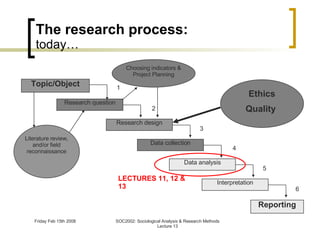
The research process: today… 1 2 3 4 5 6 LECTURES 11, 12 & 13 Reporting Research question Research design Data collection Data analysis Interpretation Literature review, and/or field reconnaissance Topic/Object Choosing indicators & Project Planning Ethics Quality
Data Analysis (3):  Overview Thematic analysis: Nvivo 7: coding and browsing codes queries Visual methods: Content analysis Semiology & semiotics
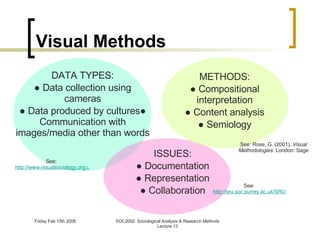
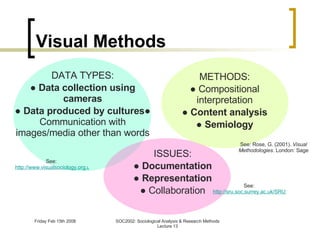
Visual Methods DATA TYPES: ●  Data collection using cameras ●  Data produced by cultures● Communication with images/media other than words See:  http://www.visualsociology.org.uk/whatis/index.php ISSUES: ●  Documentation ●  Representation ●  Collaboration See:  http://sru.soc.surrey.ac.uk/SRU11/SRU11.html See: Rose, G. (2001).  Visual Methodologies . London: Sage METHODS: ●  Compositional interpretation ●  Content analysis ●  Semiology
Visual Methods DATA TYPES: ●  Data collection using cameras ●  Data produced by cultures ● Communication with images/media other than words See:  http://www.visualsociology.org.uk/whatis/index.php ISSUES: ●  Documentation ●  Representation ●  Collaboration See:  http://sru.soc.surrey.ac.uk/SRU11/SRU11.html See: Rose, G. (2001).  Visual Methodologies . London: Sage METHODS: ●  Compositional interpretation ●  Content analysis ●  Semiology
Data Types Data collection using cameras T he camera is analogous to a tape recorder: allow you to collect data that cannot be expressed in words V isual data allows you to juxtapose events to produce meanings Studying visual data produced by cultures Their production, consumption and meaning Art, photographs, film, video, fonts, advertisements, computer icons, landscape, architecture, machines, fashion, makeup, hair style, facial expressions, tattoos, etc Visual images are constructed and may be deconstructed
Issues The use of photography/video 'visual notebook' (Banks, 1995) is  not  straightforward and unproblematic
Issues Documentation: Visual data are shaped by “the ideas that led to the production” (Banks, 1995) For visual data produced by the researcher: Do not treat your recording equipment as “capable of objectively recording social behaviour or visible 'givens'" ( Ibid. ) You are producing 'representations of reality' that are subject to the influence of your own social, cultural and historical context For visual data collected by the researcher: Attend to the technical, social, cultural and historical context of an image’s production
Issues Representation: “ Images are no more 'transparent' than written accounts...they are still representations of reality, not a direct encoding of it” ( Ibid. ) Adopt a "dual perspective": Ask about the content of any visual representation what is the 'meaning' of this particular design motif? who is the person in the photograph? Ask about the context of any visual representation who produced the image? why was this photograph taken of this particular person, and then kept by that particular person?
Analytical methods:  Content analysis Rose (2001), Chapter 3: “Counting what you (think) you see” Its use with visual data is based upon “the need to be as methodologically explicit as possible in order to make  your own way of seeing  as explicit as possible” (2001: 58)
Analytical methods:  Content analysis “ based on counting the frequency of certain visual elements in a clearly defined sample of images, and then analysing those frequencies” ( Ibid. ) Issues are basically the same as in content analysis of written texts e.g. sampling, coding frame construction, coder training, inter/intra- coder reliability monitoring
Analytical methods:  Semiology Rose (2001), Chapter 4 “semiology confronts the question of how images make meaning” (2001: 69) What is the image ‘saying’ to us? How has it been constructed in order to do this, (and by whom)? Penn (2000) ; Dyer (1988); Williamson (1978)
Doing a semiological analysis: (Penn, 2000: 232-239) Aim is “to make explicit the  cultural knowledges  required in order for the reader to understand the image” (Penn, 2000: 232) What to analyse: Some materials are more amenable to semiological analysis than others e.g. advertisements Here the author’s intentions are explicit and known Adverts are taken to be explicitly  constructed  in order to promote a product
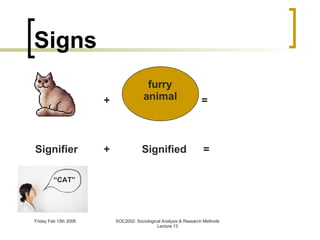
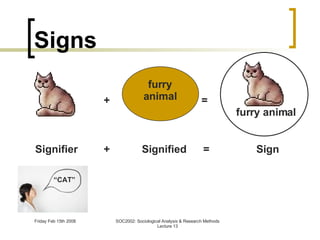
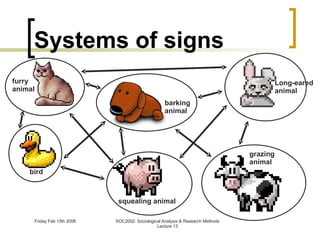
Signs, sign-systems and signification Semiology is ‘the study of signs’ The image is treated as: a set of ‘ signs’  which takes its meaning from... ...their place in wider ‘ systems of signs ’
Signs + Signifier + “ CAT”
Signs + = Signifier Signified + = furry animal “ CAT”
Signs + = Signifier Sign Signified + = furry animal “ CAT” furry animal
furry animal Systems of signs barking animal bird squealing animal grazing animal Long-eared animal
Signs, sign-systems and signification Semiology is ‘the study of signs’ The image is treated as: a set of ‘ signs’  which takes its meaning from... ...their place in wider ‘ systems of signs ’ When analysing visual images we distinguish between two levels of signification i.e. two levels at which the image has (acquires) meaning
Signs, sign-systems and signification Level 1:  Denotation The ‘literal’ message The sign describes something: e.g. “we can look at a picture of a baby and see that it is a baby and not a toddler or an adult” (Rose, 2001: 79) Level 2:  Connotation The a ‘deeper’ level of meaning What the sign “brings to mind”: e.g. “A red rose signifies love” (Penn, 2000: 230)
Doing a semiological analysis: (Penn, 2000: 232-239) Step 1: Choose material Step 2: Make a  denotational inventory Step 3: Analysis of  conotations Step 4: Stop
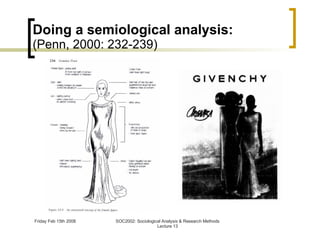
Doing a semiological analysis: (Penn, 2000: 232-239) Step 1: Choose material Step 2: Make a  denotational inventory List the components of the image systematically (i.e. the textual elements and the components of the image) Annotate a tracing of the image (Penn, 2000: 234) Step 3: Analysis of  conotations Step 4: Stop
Doing a semiological analysis: (Penn, 2000: 232-239)
Doing a semiological analysis: (Penn, 2000: 232-239) Step 1: Choose material Step 2: Make a  denotational inventory Step 3: Analysis of  connotations For each denotational component ask: What does it connote? What associations does it bring to mind? Also think about: How do elements relate to each other? What cultural knowledges are required in order to read these elements? Step 4: Stop
Further references Ball, M. S. & Smith, G. W. H. (1992). Analyzing Visual Data. London: Sage. [ http://www.amazon.com/Analyzing-Visual-Qualitative-Research-Methods/dp/0803934351/ref=si3_rdr_bb_product] Barnard, M. (2001) Approaches to understanding visual culture. Basingstoke: Palgrave. [ http://www.amazon.com/Approaches-Understanding-Culture-Malcolm-Barnard/dp/0333772881/ref=pd_bbs_sr_1?ie=UTF8&s=books&qid=1202992987&sr=8-1] Howells, R. (2003). Visual Culture. Polity Leeuwen, T.V. & Jewitt, C. (eds) (2001). Handbook of Visual Analysis. London: Sage. Pink, S. (2001). Doing Visual Ethnography Images, Media and Representation in Research. London: Sage. Rose, G. (2001). Visual Methodologies. London: Sage. [ http://books.google.com/books?id=fWA0eqXdWccC&pg=PA37&dq=rose+2001+visual+methodology&ei=7zG0R4vOLpHCzASZ9-3KBQ&sig=VLxxXQZEuZmcb3PR8_NtXjd-sa4#PPA69,M1]
Data Analysis (3):  Overview Thematic analysis: Nvivo 7: coding and browsing codes searching Visual methods: Content analysis Semiology & semiotics
N7 http://www.qsrinternational.com/products_nvivo.aspx : View tutorial Download 30-day trial software In N7, you can create a project to: store documents organise documents attach ideas (codes) to text and find patterns among your ideas
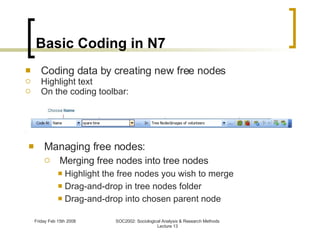
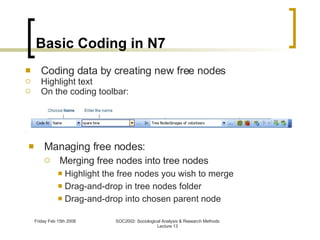
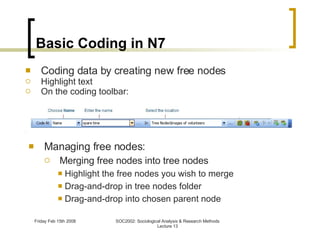
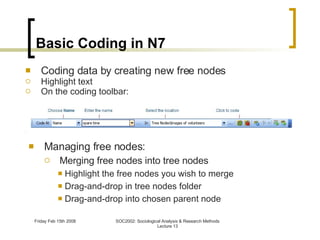
Basic Coding in N7 Managing free nodes: Merging free nodes into tree nodes Highlight the free nodes you wish to merge Drag-and-drop in tree nodes folder Drag-and-drop into chosen parent node Coding data by creating new free nodes Highlight text On the coding toolbar:
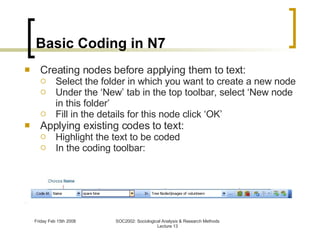
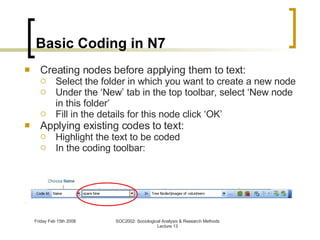
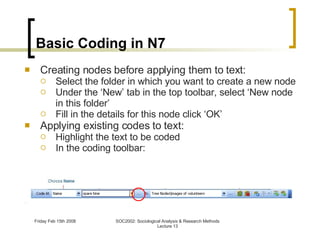
Basic Coding in N7 Creating nodes before applying them to text: Select the folder in which you want to create a new node Under the ‘New’ tab in the top toolbar, select ‘New node in this folder’ Fill in the details for this node click ‘OK’ Applying existing codes to text: Highlight the text to be coded In the coding toolbar:
Basic Coding in N7 Browsing text coded by a node: Highlight the node folder you want to browse Double-click on the node you want to browse This gives you a list of all the instances of that code
N7 http://www.qsrinternational.com/products_nvivo.aspx : View tutorial Download 30-day trial software In N7, you can create a project to: store documents organise documents attach ideas (codes) to text and find patterns among your ideas
N7 http://www.qsrinternational.com/products_nvivo.aspx : View tutorial Download 30-day trial software In N7, you can create a project to: store documents organise documents attach ideas (codes) to text and  find patterns among your ideas
Basic Queries When you have started to get a feel for your data and have a collection of codes you will want to look for  patterns  in the data Patterns may emerge as you code or be informed by theory N7 uses  queries  to do this: Text search Coding query Matrix coding query Word frequency Compound query
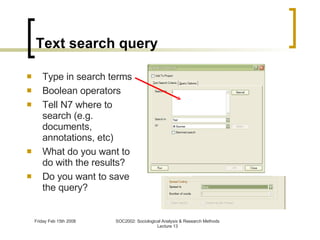
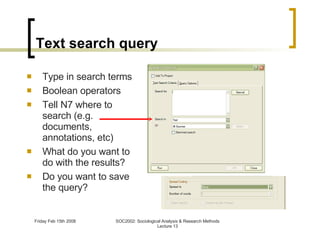
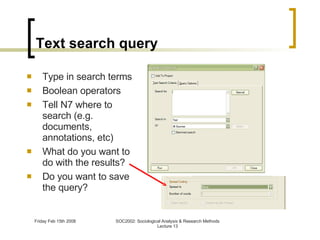
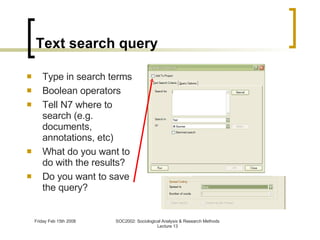
Text search query Type in search terms Boolean operators Tell N7 where to search (e.g. documents, annotations, etc) What do you want to do with the results? Do you want to save the query?
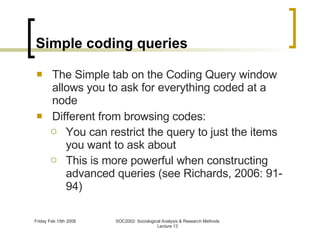
Simple coding queries The Simple tab on the Coding Query window allows you to ask for everything coded at a node Different from browsing codes: You can restrict the query to just the items you want to ask about This is more powerful when constructing advanced queries (see Richards, 2006: 91-94)
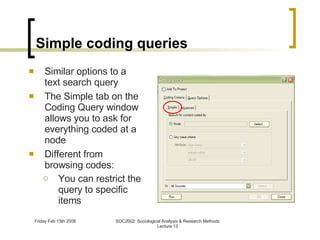
Simple coding  queries Similar options to a text search query The Simple tab on the Coding Query window allows you to ask for everything coded at a node Different from browsing codes: You can restrict the query to specific items
Further N7 resources: Richards, L. (2006). “Teach-yourself NVivo 7: the introductory tutorials”. Resources for Richards (2005).  Handling Qualitative Data . London: Sage [available at:   http://www.sagepub.co.uk/richards/  ] See also Richards, L. “Up and Running in your project: a post-workshop handbook for NVivo 7” [Available at:  http://www.lynrichards.org/up_and_running.htm  ; last accessed: 14/2/08]
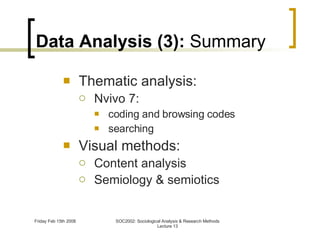
Data Analysis (3):  Summary Thematic analysis: Nvivo 7: coding and browsing codes searching Visual methods: Content analysis Semiology & semiotics
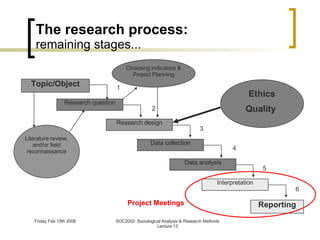
The research process: remaining stages... 1 2 3 4 5 6 Project Meetings Reporting Research question Research design Data collection Interpretation Literature review, and/or field reconnaissance Topic/Object Choosing indicators & Project Planning Ethics Quality  Data analysis
The End! Thanks!

SOC2002 Lecture 13

  • 1.
    SOC2002: Sociological Analysisand Research Methods LECTURE 13: Data Analysis (3) Analysis of Visual Data Lecturer: Bonnie Green [email_address]
  • 2.
    The research process:today… 1 2 3 4 5 6 LECTURES 11, 12 & 13 Reporting Research question Research design Data collection Data analysis Interpretation Literature review, and/or field reconnaissance Topic/Object Choosing indicators & Project Planning Ethics Quality
  • 3.
    Data Analysis (3): Overview Thematic analysis: Nvivo 7: coding and browsing codes queries Visual methods: Content analysis Semiology & semiotics
  • 4.
    Data Analysis (3): Overview Thematic analysis: Nvivo 7: coding and browsing codes queries Visual methods: Content analysis Semiology & semiotics
  • 5.
    Visual Methods DATATYPES: ● Data collection using cameras ● Data produced by cultures● Communication with images/media other than words See: http://www.visualsociology.org.uk/whatis/index.php ISSUES: ● Documentation ● Representation ● Collaboration See: http://sru.soc.surrey.ac.uk/SRU11/SRU11.html See: Rose, G. (2001). Visual Methodologies . London: Sage METHODS: ● Compositional interpretation ● Content analysis ● Semiology
  • 6.
    Visual Methods DATATYPES: ● Data collection using cameras ● Data produced by cultures ● Communication with images/media other than words See: http://www.visualsociology.org.uk/whatis/index.php ISSUES: ● Documentation ● Representation ● Collaboration See: http://sru.soc.surrey.ac.uk/SRU11/SRU11.html See: Rose, G. (2001). Visual Methodologies . London: Sage METHODS: ● Compositional interpretation ● Content analysis ● Semiology
  • 7.
    Data Types Datacollection using cameras T he camera is analogous to a tape recorder: allow you to collect data that cannot be expressed in words V isual data allows you to juxtapose events to produce meanings Studying visual data produced by cultures Their production, consumption and meaning Art, photographs, film, video, fonts, advertisements, computer icons, landscape, architecture, machines, fashion, makeup, hair style, facial expressions, tattoos, etc Visual images are constructed and may be deconstructed
  • 8.
    Issues The useof photography/video 'visual notebook' (Banks, 1995) is not straightforward and unproblematic
  • 9.
    Issues Documentation: Visualdata are shaped by “the ideas that led to the production” (Banks, 1995) For visual data produced by the researcher: Do not treat your recording equipment as “capable of objectively recording social behaviour or visible 'givens'" ( Ibid. ) You are producing 'representations of reality' that are subject to the influence of your own social, cultural and historical context For visual data collected by the researcher: Attend to the technical, social, cultural and historical context of an image’s production
  • 10.
    Issues Representation: “Images are no more 'transparent' than written accounts...they are still representations of reality, not a direct encoding of it” ( Ibid. ) Adopt a "dual perspective": Ask about the content of any visual representation what is the 'meaning' of this particular design motif? who is the person in the photograph? Ask about the context of any visual representation who produced the image? why was this photograph taken of this particular person, and then kept by that particular person?
  • 11.
    Analytical methods: Content analysis Rose (2001), Chapter 3: “Counting what you (think) you see” Its use with visual data is based upon “the need to be as methodologically explicit as possible in order to make your own way of seeing as explicit as possible” (2001: 58)
  • 12.
    Analytical methods: Content analysis “ based on counting the frequency of certain visual elements in a clearly defined sample of images, and then analysing those frequencies” ( Ibid. ) Issues are basically the same as in content analysis of written texts e.g. sampling, coding frame construction, coder training, inter/intra- coder reliability monitoring
  • 13.
    Analytical methods: Semiology Rose (2001), Chapter 4 “semiology confronts the question of how images make meaning” (2001: 69) What is the image ‘saying’ to us? How has it been constructed in order to do this, (and by whom)? Penn (2000) ; Dyer (1988); Williamson (1978)
  • 14.
    Doing a semiologicalanalysis: (Penn, 2000: 232-239) Aim is “to make explicit the cultural knowledges required in order for the reader to understand the image” (Penn, 2000: 232) What to analyse: Some materials are more amenable to semiological analysis than others e.g. advertisements Here the author’s intentions are explicit and known Adverts are taken to be explicitly constructed in order to promote a product
  • 15.
    Signs, sign-systems andsignification Semiology is ‘the study of signs’ The image is treated as: a set of ‘ signs’ which takes its meaning from... ...their place in wider ‘ systems of signs ’
  • 16.
    Signs + Signifier+ “ CAT”
  • 17.
    Signs + =Signifier Signified + = furry animal “ CAT”
  • 18.
    Signs + =Signifier Sign Signified + = furry animal “ CAT” furry animal
  • 19.
    furry animal Systemsof signs barking animal bird squealing animal grazing animal Long-eared animal
  • 20.
    Signs, sign-systems andsignification Semiology is ‘the study of signs’ The image is treated as: a set of ‘ signs’ which takes its meaning from... ...their place in wider ‘ systems of signs ’ When analysing visual images we distinguish between two levels of signification i.e. two levels at which the image has (acquires) meaning
  • 21.
    Signs, sign-systems andsignification Level 1: Denotation The ‘literal’ message The sign describes something: e.g. “we can look at a picture of a baby and see that it is a baby and not a toddler or an adult” (Rose, 2001: 79) Level 2: Connotation The a ‘deeper’ level of meaning What the sign “brings to mind”: e.g. “A red rose signifies love” (Penn, 2000: 230)
  • 22.
    Doing a semiologicalanalysis: (Penn, 2000: 232-239) Step 1: Choose material Step 2: Make a denotational inventory Step 3: Analysis of conotations Step 4: Stop
  • 23.
    Doing a semiologicalanalysis: (Penn, 2000: 232-239) Step 1: Choose material Step 2: Make a denotational inventory List the components of the image systematically (i.e. the textual elements and the components of the image) Annotate a tracing of the image (Penn, 2000: 234) Step 3: Analysis of conotations Step 4: Stop
  • 24.
    Doing a semiologicalanalysis: (Penn, 2000: 232-239)
  • 25.
    Doing a semiologicalanalysis: (Penn, 2000: 232-239) Step 1: Choose material Step 2: Make a denotational inventory Step 3: Analysis of connotations For each denotational component ask: What does it connote? What associations does it bring to mind? Also think about: How do elements relate to each other? What cultural knowledges are required in order to read these elements? Step 4: Stop
  • 26.
    Further references Ball,M. S. & Smith, G. W. H. (1992). Analyzing Visual Data. London: Sage. [ http://www.amazon.com/Analyzing-Visual-Qualitative-Research-Methods/dp/0803934351/ref=si3_rdr_bb_product] Barnard, M. (2001) Approaches to understanding visual culture. Basingstoke: Palgrave. [ http://www.amazon.com/Approaches-Understanding-Culture-Malcolm-Barnard/dp/0333772881/ref=pd_bbs_sr_1?ie=UTF8&s=books&qid=1202992987&sr=8-1] Howells, R. (2003). Visual Culture. Polity Leeuwen, T.V. & Jewitt, C. (eds) (2001). Handbook of Visual Analysis. London: Sage. Pink, S. (2001). Doing Visual Ethnography Images, Media and Representation in Research. London: Sage. Rose, G. (2001). Visual Methodologies. London: Sage. [ http://books.google.com/books?id=fWA0eqXdWccC&pg=PA37&dq=rose+2001+visual+methodology&ei=7zG0R4vOLpHCzASZ9-3KBQ&sig=VLxxXQZEuZmcb3PR8_NtXjd-sa4#PPA69,M1]
  • 27.
    Data Analysis (3): Overview Thematic analysis: Nvivo 7: coding and browsing codes searching Visual methods: Content analysis Semiology & semiotics
  • 28.
    N7 http://www.qsrinternational.com/products_nvivo.aspx :View tutorial Download 30-day trial software In N7, you can create a project to: store documents organise documents attach ideas (codes) to text and find patterns among your ideas
  • 29.
    N7 http://www.qsrinternational.com/products_nvivo.aspx :View tutorial Download 30-day trial software In N7, you can create a project to: store documents organise documents attach ideas (codes) to text and find patterns among your ideas
  • 30.
    Basic Coding inN7 Managing free nodes: Merging free nodes into tree nodes Highlight the free nodes you wish to merge Drag-and-drop in tree nodes folder Drag-and-drop into chosen parent node Coding data by creating new free nodes Highlight text On the coding toolbar:
  • 31.
    Basic Coding inN7 Managing free nodes: Merging free nodes into tree nodes Highlight the free nodes you wish to merge Drag-and-drop in tree nodes folder Drag-and-drop into chosen parent node Coding data by creating new free nodes Highlight text On the coding toolbar:
  • 32.
    Basic Coding inN7 Managing free nodes: Merging free nodes into tree nodes Highlight the free nodes you wish to merge Drag-and-drop in tree nodes folder Drag-and-drop into chosen parent node Coding data by creating new free nodes Highlight text On the coding toolbar:
  • 33.
    Basic Coding inN7 Managing free nodes: Merging free nodes into tree nodes Highlight the free nodes you wish to merge Drag-and-drop in tree nodes folder Drag-and-drop into chosen parent node Coding data by creating new free nodes Highlight text On the coding toolbar:
  • 34.
    Basic Coding inN7 Creating nodes before applying them to text: Select the folder in which you want to create a new node Under the ‘New’ tab in the top toolbar, select ‘New node in this folder’ Fill in the details for this node click ‘OK’ Applying existing codes to text: Highlight the text to be coded In the coding toolbar:
  • 35.
    Basic Coding inN7 Creating nodes before applying them to text: Select the folder in which you want to create a new node Under the ‘New’ tab in the top toolbar, select ‘New node in this folder’ Fill in the details for this node click ‘OK’ Applying existing codes to text: Highlight the text to be coded In the coding toolbar:
  • 36.
    Basic Coding inN7 Creating nodes before applying them to text: Select the folder in which you want to create a new node Under the ‘New’ tab in the top toolbar, select ‘New node in this folder’ Fill in the details for this node click ‘OK’ Applying existing codes to text: Highlight the text to be coded In the coding toolbar:
  • 37.
    Basic Coding inN7 Browsing text coded by a node: Highlight the node folder you want to browse Double-click on the node you want to browse This gives you a list of all the instances of that code
  • 38.
    N7 http://www.qsrinternational.com/products_nvivo.aspx :View tutorial Download 30-day trial software In N7, you can create a project to: store documents organise documents attach ideas (codes) to text and find patterns among your ideas
  • 39.
    N7 http://www.qsrinternational.com/products_nvivo.aspx :View tutorial Download 30-day trial software In N7, you can create a project to: store documents organise documents attach ideas (codes) to text and find patterns among your ideas
  • 40.
    Basic Queries Whenyou have started to get a feel for your data and have a collection of codes you will want to look for patterns in the data Patterns may emerge as you code or be informed by theory N7 uses queries to do this: Text search Coding query Matrix coding query Word frequency Compound query
  • 41.
    Basic Queries Whenyou have started to get a feel for your data and have a collection of codes you will want to look for patterns in the data Patterns may emerge as you code or be informed by theory N7 uses queries to do this: Text search Coding query Matrix coding query Word frequency Compound query
  • 42.
    Text search queryType in search terms Boolean operators Tell N7 where to search (e.g. documents, annotations, etc) What do you want to do with the results? Do you want to save the query?
  • 43.
    Text search queryType in search terms Boolean operators Tell N7 where to search (e.g. documents, annotations, etc) What do you want to do with the results? Do you want to save the query?
  • 44.
    Text search queryType in search terms Boolean operators Tell N7 where to search (e.g. documents, annotations, etc) What do you want to do with the results? Do you want to save the query?
  • 45.
    Text search queryType in search terms Boolean operators Tell N7 where to search (e.g. documents, annotations, etc) What do you want to do with the results? Do you want to save the query?
  • 46.
    Simple coding queriesThe Simple tab on the Coding Query window allows you to ask for everything coded at a node Different from browsing codes: You can restrict the query to just the items you want to ask about This is more powerful when constructing advanced queries (see Richards, 2006: 91-94)
  • 47.
    Simple coding queries Similar options to a text search query The Simple tab on the Coding Query window allows you to ask for everything coded at a node Different from browsing codes: You can restrict the query to specific items
  • 48.
    Further N7 resources:Richards, L. (2006). “Teach-yourself NVivo 7: the introductory tutorials”. Resources for Richards (2005). Handling Qualitative Data . London: Sage [available at: http://www.sagepub.co.uk/richards/ ] See also Richards, L. “Up and Running in your project: a post-workshop handbook for NVivo 7” [Available at: http://www.lynrichards.org/up_and_running.htm ; last accessed: 14/2/08]
  • 49.
    Data Analysis (3): Summary Thematic analysis: Nvivo 7: coding and browsing codes searching Visual methods: Content analysis Semiology & semiotics
  • 50.
    The research process:remaining stages... 1 2 3 4 5 6 Project Meetings Reporting Research question Research design Data collection Interpretation Literature review, and/or field reconnaissance Topic/Object Choosing indicators & Project Planning Ethics Quality Data analysis
  • 51.