Analysing qualitative data
 using Microsoft Word

        Jenna Condie
     University of Salford


                             1
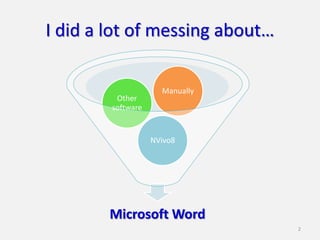
I did a lot of messing about…

                     Manually
         Other
        software


                   NVivo8


        Microsoft Word
                                2
Session outline
• Who are they? Why are they here?
• What will you do?
• Analysing some data

• Preparing the data
• Making a coding document

• Creating something – a ‘how to’ guide?

                                           3
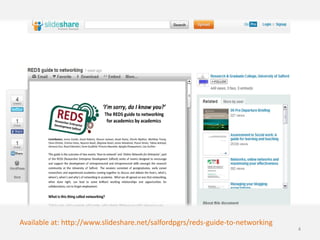
Available at: http://www.slideshare.net/salfordpgrs/reds-guide-to-networking
                                                                               4
A workshop for you…


              & why
Who are
             are they
 they?
              here?
                        5
What will you do?


           Flickr: ejhogbin


                              6
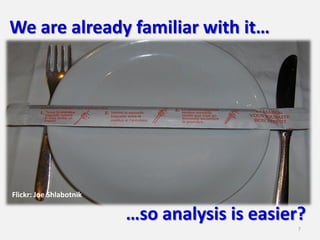
We are already familiar with it…


Flickr: Joe Shlabotnik

                         …so analysis is easier?
                                               7
It’s all in the prep!
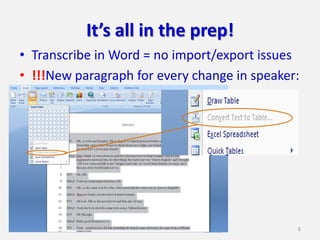
• Transcribe in Word = no import/export issues
• !!!New paragraph for every change in speaker:


                                              8
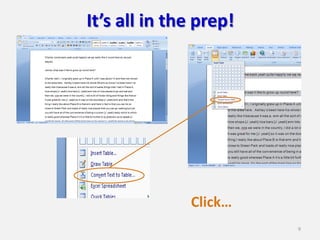
It’s all in the prep!


              Click…
                        9
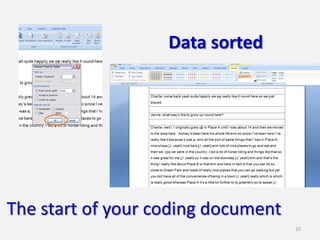
Data sorted


The start of your coding document
                                    10
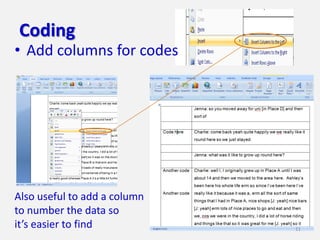
Coding
• Add columns for codes


Also useful to add a column
to number the data so
it’s easier to find           11
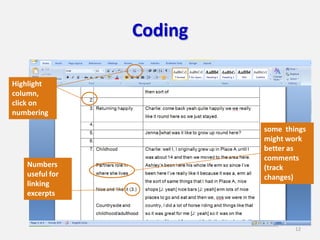
Coding

Highlight
column,
click on
numbering

                         some things
                         might work
                         better as
                         comments
   Numbers               (track
   useful for            changes)
   linking
   excerpts


                                 12
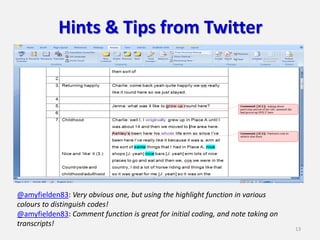
Hints & Tips from Twitter


@amyfielden83: Very obvious one, but using the highlight function in various
colours to distinguish codes!
@amyfielden83: Comment function is great for initial coding, and note taking on
transcripts!
                                                                                  13
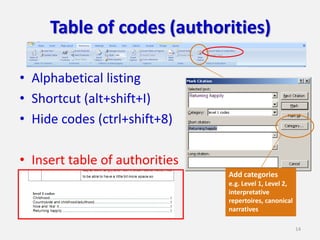
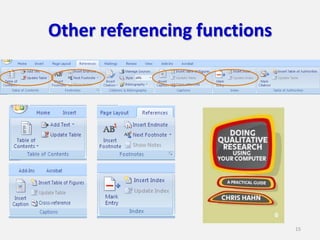
Table of codes (authorities)

• Alphabetical listing
• Shortcut (alt+shift+I)
• Hide codes (ctrl+shift+8)

• Insert table of authorities
                                Add categories
                                e.g. Level 1, Level 2,
                                interpretative
                                repertoires, canonical
                                narratives

                                                         14
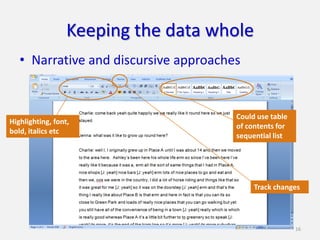
Other referencing functions


                              15
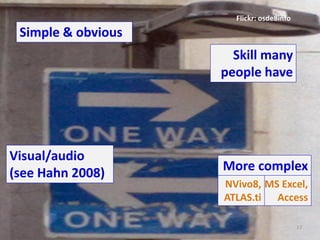
Keeping the data whole
   • Narrative and discursive approaches


                                       Could use table
Highlighting, font,
                                       of contents for
bold, italics etc
                                       sequential list


                                            Track changes


                                                         16
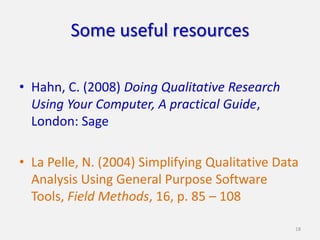
Flickr: osde8info
 Simple & obvious
                      Skill many
                    people have


Visual/audio
(see Hahn 2008)     More complex
                    NVivo8, MS Excel,
                    ATLAS.ti Access

                                          17
Some useful resources

• Hahn, C. (2008) Doing Qualitative Research
  Using Your Computer, A practical Guide,
  London: Sage

• La Pelle, N. (2004) Simplifying Qualitative Data
  Analysis Using General Purpose Software
  Tools, Field Methods, 16, p. 85 – 108

                                                 18
Analysing qualitative data
      using Microsoft Word
                       Jenna Condie
                 E: j.condie1@edu.salford.ac.uk
                            @jennacondie
Slides available at: http://www.slideshare.net/jennacondie


                   Enjoy the
               conference meal
                                                             19

QMiP workshop: Analysing qualitative data using microsoft word

  • 1.
    Analysing qualitative data using Microsoft Word Jenna Condie University of Salford 1
  • 2.
    I did alot of messing about… Manually Other software NVivo8 Microsoft Word 2
  • 3.
    Session outline • Whoare they? Why are they here? • What will you do? • Analysing some data • Preparing the data • Making a coding document • Creating something – a ‘how to’ guide? 3
  • 4.
  • 5.
    A workshop foryou… & why Who are are they they? here? 5
  • 6.
    What will youdo? Flickr: ejhogbin 6
  • 7.
    We are alreadyfamiliar with it… Flickr: Joe Shlabotnik …so analysis is easier? 7
  • 8.
    It’s all inthe prep! • Transcribe in Word = no import/export issues • !!!New paragraph for every change in speaker: 8
  • 9.
    It’s all inthe prep! Click… 9
  • 10.
    Data sorted The startof your coding document 10
  • 11.
    Coding • Add columnsfor codes Also useful to add a column to number the data so it’s easier to find 11
  • 12.
    Coding Highlight column, click on numbering some things might work better as comments Numbers (track useful for changes) linking excerpts 12
  • 13.
    Hints & Tipsfrom Twitter @amyfielden83: Very obvious one, but using the highlight function in various colours to distinguish codes! @amyfielden83: Comment function is great for initial coding, and note taking on transcripts! 13
  • 14.
    Table of codes(authorities) • Alphabetical listing • Shortcut (alt+shift+I) • Hide codes (ctrl+shift+8) • Insert table of authorities Add categories e.g. Level 1, Level 2, interpretative repertoires, canonical narratives 14
  • 15.
  • 16.
    Keeping the datawhole • Narrative and discursive approaches Could use table Highlighting, font, of contents for bold, italics etc sequential list Track changes 16
  • 17.
    Flickr: osde8info Simple& obvious Skill many people have Visual/audio (see Hahn 2008) More complex NVivo8, MS Excel, ATLAS.ti Access 17
  • 18.
    Some useful resources •Hahn, C. (2008) Doing Qualitative Research Using Your Computer, A practical Guide, London: Sage • La Pelle, N. (2004) Simplifying Qualitative Data Analysis Using General Purpose Software Tools, Field Methods, 16, p. 85 – 108 18
  • 19.
    Analysing qualitative data using Microsoft Word Jenna Condie E: j.condie1@edu.salford.ac.uk @jennacondie Slides available at: http://www.slideshare.net/jennacondie Enjoy the conference meal 19