Automated &
Performance tests
Using SoapUI open source
@gudemadhumohan
OracleBRM
Steps
• Download and Install SoapUI 5.3
• Install Web Services Manager
• Install Apache or WebLogic
• Setup TestSuite in SoapUI
• Create automated test case with Groovy scripts
• Create load test/Add load
• Execute automated test / Performance test
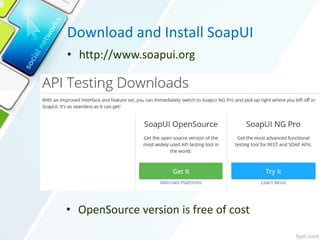
Download and Install SoapUI
• http://www.soapui.org
• OpenSource version is free of cost
Web Services Manager and WebLogic
Web Services Manager
• http://edelivery.oracle.com
• Web Services Manager is
optional component in
BRM.
• Add ojdbc6.jar to lib folder
of SoapUI.
WebLogic or Apache
• Download and install
WebLogic or Apache in your
BRM application server.
• Deploy Web Services
Manager in
WebLogic(Or)Apache.
• Access OOTB WSDL using the below link in web browser.
• http://<host>:<port>/<folder>/services/BrmBaseServices?wsdl
(replace host, port and installation folder in above URL)
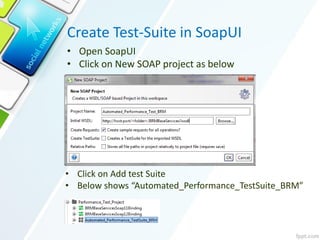
Create Test-Suite in SoapUI
• Open SoapUI
• Click on New SOAP project as below
• Click on Add test Suite
• Below shows “Automated_Performance_TestSuite_BRM”
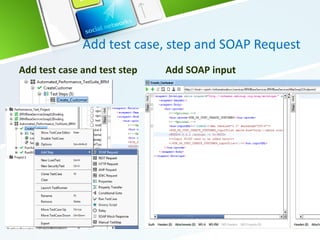
Add test case, step and SOAP Request
Add test case and test step Add SOAP input
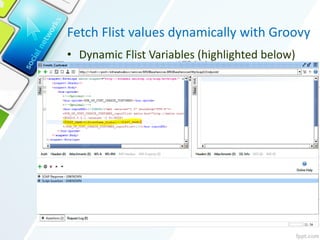
Fetch Flist values dynamically with Groovy
• Dynamic Flist Variables (highlighted below)
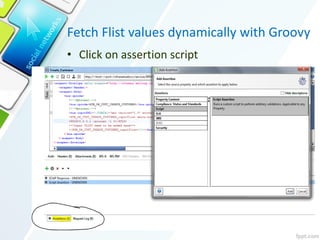
Fetch Flist values dynamically with Groovy
• Click on assertion script
Fetch Flist values dynamically with Groovy
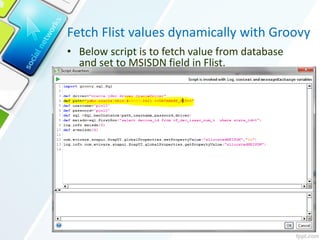
• Below script is to fetch value from database
and set to MSISDN field in Flist.
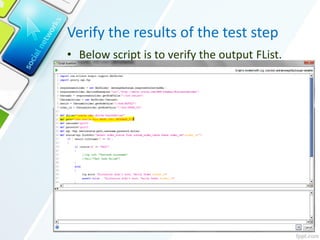
Verify the results of the test step
• Below script is to verify the output FList.
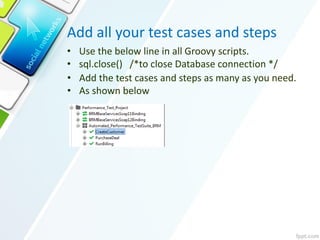
Add all your test cases and steps
• Use the below line in all Groovy scripts.
• sql.close() /*to close Database connection */
• Add the test cases and steps as many as you need.
• As shown below
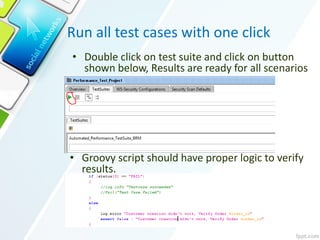
Run all test cases with one click
• Groovy script should have proper logic to verify
results.
• Double click on test suite and click on button
shown below, Results are ready for all scenarios
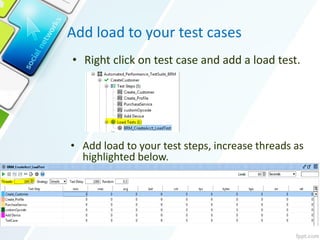
Add load to your test cases
• Add load to your test steps, increase threads as
highlighted below.
• Right click on test case and add a load test.
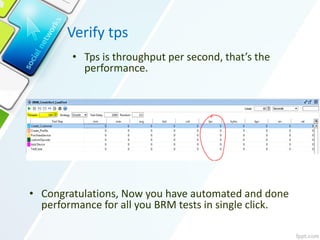
Verify tps
• Tps is throughput per second, that’s the
performance.
• Congratulations, Now you have automated and done
performance for all you BRM tests in single click.

Soap ui oracle_brm_automated_performance_tests

  • 1.
    Automated & Performance tests UsingSoapUI open source @gudemadhumohan OracleBRM
  • 2.
    Steps • Download andInstall SoapUI 5.3 • Install Web Services Manager • Install Apache or WebLogic • Setup TestSuite in SoapUI • Create automated test case with Groovy scripts • Create load test/Add load • Execute automated test / Performance test
  • 3.
    Download and InstallSoapUI • http://www.soapui.org • OpenSource version is free of cost
  • 4.
    Web Services Managerand WebLogic Web Services Manager • http://edelivery.oracle.com • Web Services Manager is optional component in BRM. • Add ojdbc6.jar to lib folder of SoapUI. WebLogic or Apache • Download and install WebLogic or Apache in your BRM application server. • Deploy Web Services Manager in WebLogic(Or)Apache. • Access OOTB WSDL using the below link in web browser. • http://<host>:<port>/<folder>/services/BrmBaseServices?wsdl (replace host, port and installation folder in above URL)
  • 5.
    Create Test-Suite inSoapUI • Open SoapUI • Click on New SOAP project as below • Click on Add test Suite • Below shows “Automated_Performance_TestSuite_BRM”
  • 6.
    Add test case,step and SOAP Request Add test case and test step Add SOAP input
  • 7.
    Fetch Flist valuesdynamically with Groovy • Dynamic Flist Variables (highlighted below)
  • 8.
    Fetch Flist valuesdynamically with Groovy • Click on assertion script
  • 9.
    Fetch Flist valuesdynamically with Groovy • Below script is to fetch value from database and set to MSISDN field in Flist.
  • 10.
    Verify the resultsof the test step • Below script is to verify the output FList.
  • 11.
    Add all yourtest cases and steps • Use the below line in all Groovy scripts. • sql.close() /*to close Database connection */ • Add the test cases and steps as many as you need. • As shown below
  • 12.
    Run all testcases with one click • Groovy script should have proper logic to verify results. • Double click on test suite and click on button shown below, Results are ready for all scenarios
  • 13.
    Add load toyour test cases • Add load to your test steps, increase threads as highlighted below. • Right click on test case and add a load test.
  • 14.
    Verify tps • Tpsis throughput per second, that’s the performance. • Congratulations, Now you have automated and done performance for all you BRM tests in single click.