How to use
MailboxValidator
Symfony Bundle to
validate email?
www.mailboxvalidator.com
Overview
• It is an easy to use Symfony package which enables Symfony users
to validate emails with just a few lines of code
• Before using the MailboxValidator API, you need to go to
https://www.mailboxvalidator.com/plans#api to sign up for a
FREE API plan
Dependencies
• This bundle requires Symfony 4.3 to work
• The MailboxValidator PHP Module is also required and will be
auto installed by Composer
• In case, your Composer did not install it, you can get it from
https://github.com/MailboxValidator/mailboxvalidator-php
Installation
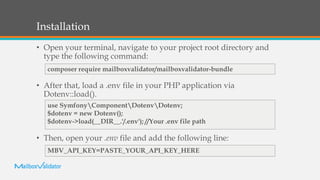
• Open your terminal, navigate to your project root directory and
type the following command:
• After that, load a .env file in your PHP application via
Dotenv::load().
• Then, open your .env file and add the following line:
composer require mailboxvalidator/mailboxvalidator-bundle
use SymfonyComponentDotenvDotenv;
$dotenv = new Dotenv();
$dotenv->load(__DIR__.'/.env'); //Your .env file path
MBV_API_KEY=PASTE_YOUR_API_KEY_HERE
Usage
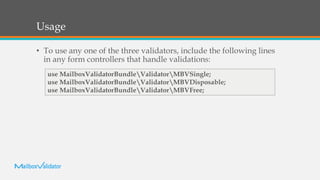
• To use any one of the three validators, include the following lines
in any form controllers that handle validations:
use MailboxValidatorBundleValidatorMBVSingle;
use MailboxValidatorBundleValidatorMBVDisposable;
use MailboxValidatorBundleValidatorMBVFree;
Usage
• After that, add a new rule to your form field and edit the error
message. For example, if you want to validate the disposable email,
your rule will be like this:
->add('email', EmailType::class, [
'constraints' => [
new MBVDisposable([
//You can also customize your own message. For example,
//'message' => 'This email is disposable. Please enter another email
again.',
]),
],
])
Usage
• Single Validation will validate the email address based on several
factors, such as whether the email address contains high risk
keywords or whether the email address is in our blacklist
• Disposable Validation will validate whether the email address
belongs to a disposable email service provider or not
• Free Validation will validate whether the email address belongs to
a free email service provider or not.
Usage
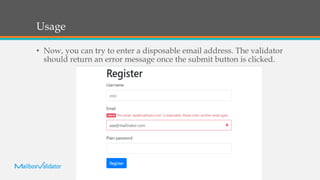
• Now, you can try to enter a disposable email address. The validator
should return an error message once the submit button is clicked.
For more articles,
please visit
https://www.mailboxvalidator.co
m/resources/

How to use mailbox validator symfony bundle to validate email

  • 1.
    How to use MailboxValidator SymfonyBundle to validate email? www.mailboxvalidator.com
  • 2.
    Overview • It isan easy to use Symfony package which enables Symfony users to validate emails with just a few lines of code • Before using the MailboxValidator API, you need to go to https://www.mailboxvalidator.com/plans#api to sign up for a FREE API plan
  • 3.
    Dependencies • This bundlerequires Symfony 4.3 to work • The MailboxValidator PHP Module is also required and will be auto installed by Composer • In case, your Composer did not install it, you can get it from https://github.com/MailboxValidator/mailboxvalidator-php
  • 4.
    Installation • Open yourterminal, navigate to your project root directory and type the following command: • After that, load a .env file in your PHP application via Dotenv::load(). • Then, open your .env file and add the following line: composer require mailboxvalidator/mailboxvalidator-bundle use SymfonyComponentDotenvDotenv; $dotenv = new Dotenv(); $dotenv->load(__DIR__.'/.env'); //Your .env file path MBV_API_KEY=PASTE_YOUR_API_KEY_HERE
  • 5.
    Usage • To useany one of the three validators, include the following lines in any form controllers that handle validations: use MailboxValidatorBundleValidatorMBVSingle; use MailboxValidatorBundleValidatorMBVDisposable; use MailboxValidatorBundleValidatorMBVFree;
  • 6.
    Usage • After that,add a new rule to your form field and edit the error message. For example, if you want to validate the disposable email, your rule will be like this: ->add('email', EmailType::class, [ 'constraints' => [ new MBVDisposable([ //You can also customize your own message. For example, //'message' => 'This email is disposable. Please enter another email again.', ]), ], ])
  • 7.
    Usage • Single Validationwill validate the email address based on several factors, such as whether the email address contains high risk keywords or whether the email address is in our blacklist • Disposable Validation will validate whether the email address belongs to a disposable email service provider or not • Free Validation will validate whether the email address belongs to a free email service provider or not.
  • 8.
    Usage • Now, youcan try to enter a disposable email address. The validator should return an error message once the submit button is clicked.
  • 9.
    For more articles, pleasevisit https://www.mailboxvalidator.co m/resources/

Editor's Notes

  • #2 To change the image on this slide, select the picture and delete it. Then click the Pictures icon in the placeholder to insert your own image.