© Geodise Project, University of Southampton, 2003.
Short Message Service
• Aims
• Architecture
• Tools
• Future Work
© Geodise Project, University of Southampton, 2003.
Aims
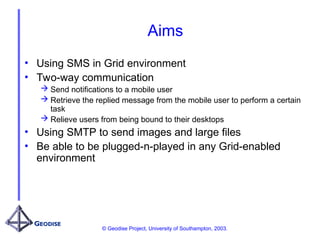
• Using SMS in Grid environment
• Two-way communication
 Send notifications to a mobile user
 Retrieve the replied message from the mobile user to perform a certain
task
 Relieve users from being bound to their desktops
• Using SMTP to send images and large files
• Be able to be plugged-n-played in any Grid-enabled
environment
© Geodise Project, University of Southampton, 2003.
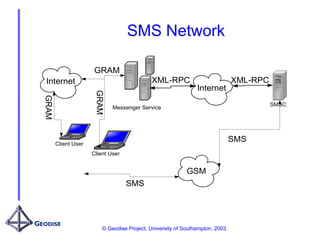
SMS Network
Client User
SMSC
GRAM
XML-RPC
Client User
GSM
Internet
SMS
SMS
Messenger Service
XML-RPC
Internet
GRAM
GRAM
© Geodise Project, University of Southampton, 2003.
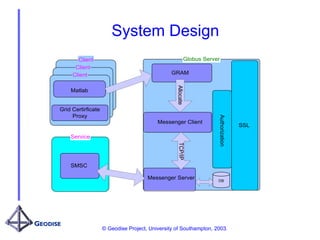
System Design
Globus Server
SSL
Messenger Server
Messenger Client
GRAM
Authorization
Allocate
TCP/IP
Client
Client
Client
Matlab
Grid Certirficate
Proxy
Service
SMSC
DB
© Geodise Project, University of Southampton, 2003.
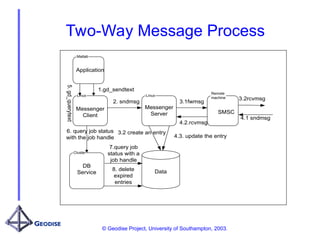
Two-Way Message Process
Data
Linux
Linux
Remote
machine
2. sndmsg
3.2 create an entry
4.3. update the entry
3.1fwmsg
3.2rcvmsg
4.1 sndmsg
4.2.rcvmsg
Messenger
Client
Messenger
Server SMSC
8. delete
expired
entries
Cluster
DB
Service
Matlab
Application
1.gd_sendtext
5.
gd_querytext
6. query job status
with the job handle
7.query job
status with a
job handle
© Geodise Project, University of Southampton, 2003.
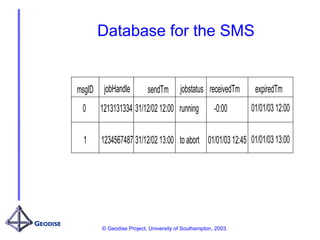
Database for the SMS
msgID jobHandle sendTm
0 1213131334 31/12/02 12:00 running
1 1234567487 31/12/02 13:00
receivedTm
-0:00
01/01/03 12:45
jobstatus expiredTm
01/01/03 12:00
01/01/03 13:00
to abort
© Geodise Project, University of Southampton, 2003.
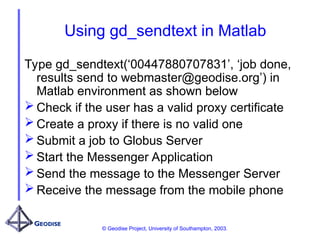
Using gd_sendtext in Matlab
Type gd_sendtext(‘00447880707831’, ‘job done,
results send to webmaster@geodise.org’) in
Matlab environment as shown below
 Check if the user has a valid proxy certificate
 Create a proxy if there is no valid one
 Submit a job to Globus Server
 Start the Messenger Application
 Send the message to the Messenger Server
 Receive the message from the mobile phone
© Geodise Project, University of Southampton, 2003.
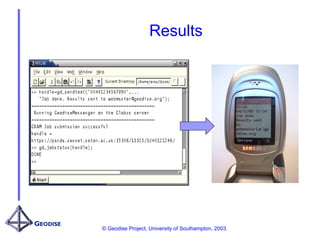
Results
© Geodise Project, University of Southampton, 2003.
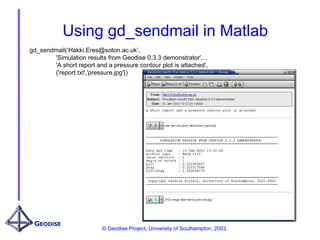
Using gd_sendmail in Matlab
gd_sendmail(‘Hakki.Eres@soton.ac.uk’,
'Simulation results from Geodise 0.3.3 demonstrator',...
'A short report and a pressure contour plot is attached',
{'report.txt','pressure.jpg'})
© Geodise Project, University of Southampton, 2003.
Future Work
• Implement the other way communication
• Send a replied message from mobile phone to
the messenger server
• Update the entry in the database
• Query the entry from the application in Matlab

SMS_presentation.ppt short message for the

  • 1.
    © Geodise Project,University of Southampton, 2003. Short Message Service • Aims • Architecture • Tools • Future Work
  • 2.
    © Geodise Project,University of Southampton, 2003. Aims • Using SMS in Grid environment • Two-way communication  Send notifications to a mobile user  Retrieve the replied message from the mobile user to perform a certain task  Relieve users from being bound to their desktops • Using SMTP to send images and large files • Be able to be plugged-n-played in any Grid-enabled environment
  • 3.
    © Geodise Project,University of Southampton, 2003. SMS Network Client User SMSC GRAM XML-RPC Client User GSM Internet SMS SMS Messenger Service XML-RPC Internet GRAM GRAM
  • 4.
    © Geodise Project,University of Southampton, 2003. System Design Globus Server SSL Messenger Server Messenger Client GRAM Authorization Allocate TCP/IP Client Client Client Matlab Grid Certirficate Proxy Service SMSC DB
  • 5.
    © Geodise Project,University of Southampton, 2003. Two-Way Message Process Data Linux Linux Remote machine 2. sndmsg 3.2 create an entry 4.3. update the entry 3.1fwmsg 3.2rcvmsg 4.1 sndmsg 4.2.rcvmsg Messenger Client Messenger Server SMSC 8. delete expired entries Cluster DB Service Matlab Application 1.gd_sendtext 5. gd_querytext 6. query job status with the job handle 7.query job status with a job handle
  • 6.
    © Geodise Project,University of Southampton, 2003. Database for the SMS msgID jobHandle sendTm 0 1213131334 31/12/02 12:00 running 1 1234567487 31/12/02 13:00 receivedTm -0:00 01/01/03 12:45 jobstatus expiredTm 01/01/03 12:00 01/01/03 13:00 to abort
  • 7.
    © Geodise Project,University of Southampton, 2003. Using gd_sendtext in Matlab Type gd_sendtext(‘00447880707831’, ‘job done, results send to webmaster@geodise.org’) in Matlab environment as shown below  Check if the user has a valid proxy certificate  Create a proxy if there is no valid one  Submit a job to Globus Server  Start the Messenger Application  Send the message to the Messenger Server  Receive the message from the mobile phone
  • 8.
    © Geodise Project,University of Southampton, 2003. Results
  • 9.
    © Geodise Project,University of Southampton, 2003. Using gd_sendmail in Matlab gd_sendmail(‘Hakki.Eres@soton.ac.uk’, 'Simulation results from Geodise 0.3.3 demonstrator',... 'A short report and a pressure contour plot is attached', {'report.txt','pressure.jpg'})
  • 10.
    © Geodise Project,University of Southampton, 2003. Future Work • Implement the other way communication • Send a replied message from mobile phone to the messenger server • Update the entry in the database • Query the entry from the application in Matlab