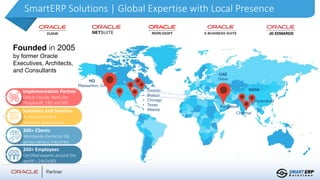
SmartERP Solutions | Global Expertise with Local Presence
UAE
Dubai
Bangalore
Hyderabad
INDIA
• Toronto
• Boston
• Chicago
• Texas
• Atlanta
HQ
Pleasanton, CA
Chennai
Founded in 2005
by former Oracle
Executives, Architects,
and Consultants
Implementation Partner
Oracle Cloude, NetSuite,
PeopleSoft, EBS and JDE
Solutions and Services
A unique blend of
Solutions and services
300+ Clients
Worldwide clients for life
across various industries
350+ Employees
Certified experts around the
world – 24x7x365
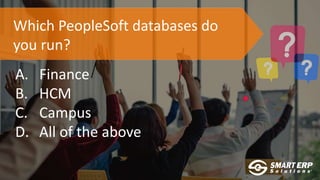
Which PeopleSoft databases do
you run?
A. Finance
B. HCM
C. Campus
D. All of the above
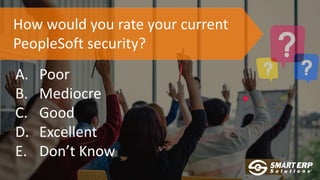
How would you rate your current
PeopleSoft security?
A. Poor
B. Mediocre
C. Good
D. Excellent
E. Don’t Know
Security and Control
Points
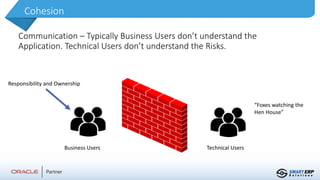
Cohesion
Communication – Typically Business Users don’t understand the
Application. Technical Users don’t understand the Risks.
Business Users Technical Users
Responsibility and Ownership
“Foxes watching the
Hen House”
‘Super User’ Access
Don’t rely on PSADMIN or VP1 generic logins without
controls
Options for management:
•Break Glass
•Individual User Logins
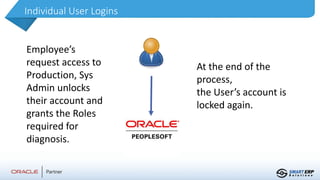
Individual User Logins
Employee’s
request access to
Production, Sys
Admin unlocks
their account and
grants the Roles
required for
diagnosis.
At the end of the
process,
the User’s account is
locked again.
One more thing…
Always worth Auditing User Profiles, Roles/Permission Lists
in PeopleSoft.
Low transaction, high impact
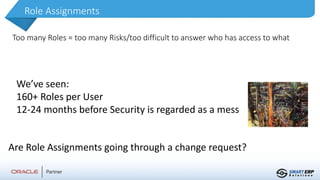
Role Assignments
Too many Roles = too many Risks/too difficult to answer who has access to what
We’ve seen:
160+ Roles per User
12-24 months before Security is regarded as a mess
Are Role Assignments going through a change request?
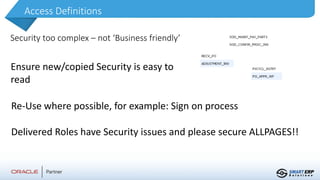
Access Definitions
Security too complex – not ‘Business friendly’
Ensure new/copied Security is easy to
read
Re-Use where possible, for example: Sign on process
Delivered Roles have Security issues and please secure ALLPAGES!!
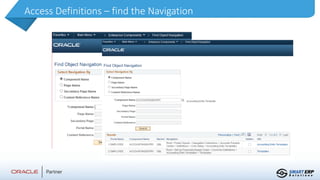
Access Definitions – find the Navigation
Data Security
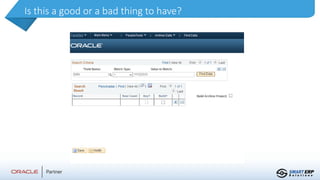
•Row Security limited in PeopleSoft
•What about GDPR or CCPA?
•Field Security, Tokenization, restrict Fields in the Pages,
Database Level Security?
Is this a good or a bad thing to have?
Opportunities for Securing Data
For Query:
Create Roles/Permission Lists for accessing this Data
Secure them against the Fields you use & the Queries for accessing this information
• Pros: Accountability – track the Roles that have access
• Cons: Can leave out other data required from a table
For Access:
Use Database level Security to Secure or Obfuscate the Data
• Pros: Total Security at the Data level
• Cons: May need each User to have a DB level User
If one DB User, what about Self Service Users?
Production Do’s and Don’ts
•Data Mover and Configuration/Development
processes– secure them!
•Submission of Jobs
•Copy of Production for testing and simulation
•Who wants to refresh every day?
•Don’t rely on Auditing
•The Horse may have bolted already!
Production Do’s and Don’ts
•Separate Configuration from Transactions
•Segregation of Duties and Access Analysis
•OMB
•NIST
•SOX
Compliance is forcing Organizations to change their
Approach to ERP Security and Controls
Production Do’s and Don’ts
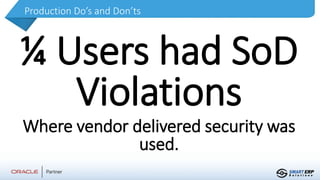
¼ Users had SoD
Violations
Where vendor delivered security was
used.
Does your organization require
compliance/readiness with Data legislation?
A. Yes
B. No
C. Don’t know what this is
D. Don’t know if we need to comply
Smart ERP Security
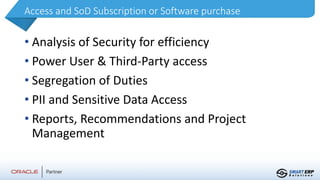
Access and SoD Subscription or Software purchase
• Analysis of Security for efficiency
• Power User & Third-Party access
• Segregation of Duties
• PII and Sensitive Data Access
• Reports, Recommendations and Project
Management
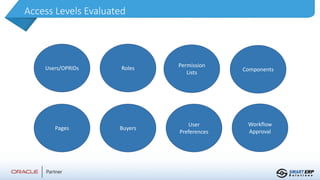
Access Levels Evaluated
Users/OPRIDs Roles Permission
Lists
Components
Pages Buyers
User
Preferences
Workflow
Approval
Rules
Rule Maintenance and Controls Assessment
through subscription
Segregation of Duties & Sensitive Access
Including Security and Configuration access – who
has keys to the kingdom?
Cross Application Support
Running multiple in-scope applications?
Our service covers any application that
may be in scope
in conjunction with Peoplesoft.
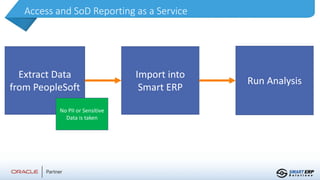
Access and SoD Reporting as a Service
Extract Data
from PeopleSoft
Import into
Smart ERP
Run Analysis
No PII or Sensitive
Data is taken
Access and SoD Reporting
• Users and their SoD Violations
• Power User Access
• Sensitive Access
• PII Access
Reports and Remediation
Benefits
• Report on who has access to what in plain
‘English’
• Identify and Remediate Users with too
much access
• Enforce strong Data Security Policies
• Comply with legislation and reduce costs
Reporting and Data Security as it should be..
Exceptions
Sometimes Users need to break the rules…
VP’s, Power Users, Limited Staff, etc
All Exceptions are stored for future reference, and
Reports available
How do you report over your security and
controls currently?
A. Manually
B. Automated
C. We don’t
D. Not sure
Report Overview
A. Just Smart Form I-9 (Free)
B. Both Smart Form I-9 and E-Verify (Free)
C. Smart Applications with Smart Onboarding ($)
D. Full Suite with HR Integration ($)
E. Full Suite with HR Integration plus other apps ($)
F. Not Sure?
Use the question feature in your Zoom application
For More Information
sales@smarterp.com
smarterp.com
smartonboarding.com
smarterpanalytics.com
smarttalentprocurement.com
smarteverify.com
404-226-6225| Lynn Duffy | Customer Success

SmartERP PeopleSoft Security

  • 4.
    SmartERP Solutions |Global Expertise with Local Presence UAE Dubai Bangalore Hyderabad INDIA • Toronto • Boston • Chicago • Texas • Atlanta HQ Pleasanton, CA Chennai Founded in 2005 by former Oracle Executives, Architects, and Consultants Implementation Partner Oracle Cloude, NetSuite, PeopleSoft, EBS and JDE Solutions and Services A unique blend of Solutions and services 300+ Clients Worldwide clients for life across various industries 350+ Employees Certified experts around the world – 24x7x365
  • 5.
    Which PeopleSoft databasesdo you run? A. Finance B. HCM C. Campus D. All of the above
  • 6.
    How would yourate your current PeopleSoft security? A. Poor B. Mediocre C. Good D. Excellent E. Don’t Know
  • 7.
  • 8.
    Cohesion Communication – TypicallyBusiness Users don’t understand the Application. Technical Users don’t understand the Risks. Business Users Technical Users Responsibility and Ownership “Foxes watching the Hen House”
  • 9.
    ‘Super User’ Access Don’trely on PSADMIN or VP1 generic logins without controls Options for management: •Break Glass •Individual User Logins
  • 10.
    Individual User Logins Employee’s requestaccess to Production, Sys Admin unlocks their account and grants the Roles required for diagnosis. At the end of the process, the User’s account is locked again.
  • 11.
    One more thing… Alwaysworth Auditing User Profiles, Roles/Permission Lists in PeopleSoft. Low transaction, high impact
  • 12.
    Role Assignments Too manyRoles = too many Risks/too difficult to answer who has access to what We’ve seen: 160+ Roles per User 12-24 months before Security is regarded as a mess Are Role Assignments going through a change request?
  • 13.
    Access Definitions Security toocomplex – not ‘Business friendly’ Ensure new/copied Security is easy to read Re-Use where possible, for example: Sign on process Delivered Roles have Security issues and please secure ALLPAGES!!
  • 14.
    Access Definitions –find the Navigation
  • 15.
    Data Security •Row Securitylimited in PeopleSoft •What about GDPR or CCPA? •Field Security, Tokenization, restrict Fields in the Pages, Database Level Security?
  • 16.
    Is this agood or a bad thing to have?
  • 17.
    Opportunities for SecuringData For Query: Create Roles/Permission Lists for accessing this Data Secure them against the Fields you use & the Queries for accessing this information • Pros: Accountability – track the Roles that have access • Cons: Can leave out other data required from a table For Access: Use Database level Security to Secure or Obfuscate the Data • Pros: Total Security at the Data level • Cons: May need each User to have a DB level User If one DB User, what about Self Service Users?
  • 18.
    Production Do’s andDon’ts •Data Mover and Configuration/Development processes– secure them! •Submission of Jobs •Copy of Production for testing and simulation •Who wants to refresh every day? •Don’t rely on Auditing •The Horse may have bolted already!
  • 19.
    Production Do’s andDon’ts •Separate Configuration from Transactions •Segregation of Duties and Access Analysis •OMB •NIST •SOX Compliance is forcing Organizations to change their Approach to ERP Security and Controls
  • 20.
    Production Do’s andDon’ts ¼ Users had SoD Violations Where vendor delivered security was used.
  • 21.
    Does your organizationrequire compliance/readiness with Data legislation? A. Yes B. No C. Don’t know what this is D. Don’t know if we need to comply
  • 22.
  • 23.
    Access and SoDSubscription or Software purchase • Analysis of Security for efficiency • Power User & Third-Party access • Segregation of Duties • PII and Sensitive Data Access • Reports, Recommendations and Project Management
  • 24.
    Access Levels Evaluated Users/OPRIDsRoles Permission Lists Components Pages Buyers User Preferences Workflow Approval
  • 25.
    Rules Rule Maintenance andControls Assessment through subscription Segregation of Duties & Sensitive Access Including Security and Configuration access – who has keys to the kingdom?
  • 26.
    Cross Application Support Runningmultiple in-scope applications? Our service covers any application that may be in scope in conjunction with Peoplesoft.
  • 27.
    Access and SoDReporting as a Service Extract Data from PeopleSoft Import into Smart ERP Run Analysis No PII or Sensitive Data is taken
  • 28.
    Access and SoDReporting • Users and their SoD Violations • Power User Access • Sensitive Access • PII Access Reports and Remediation
  • 29.
    Benefits • Report onwho has access to what in plain ‘English’ • Identify and Remediate Users with too much access • Enforce strong Data Security Policies • Comply with legislation and reduce costs Reporting and Data Security as it should be..
  • 30.
    Exceptions Sometimes Users needto break the rules… VP’s, Power Users, Limited Staff, etc All Exceptions are stored for future reference, and Reports available
  • 31.
    How do youreport over your security and controls currently? A. Manually B. Automated C. We don’t D. Not sure
  • 32.
  • 33.
    A. Just SmartForm I-9 (Free) B. Both Smart Form I-9 and E-Verify (Free) C. Smart Applications with Smart Onboarding ($) D. Full Suite with HR Integration ($) E. Full Suite with HR Integration plus other apps ($) F. Not Sure? Use the question feature in your Zoom application
  • 34.