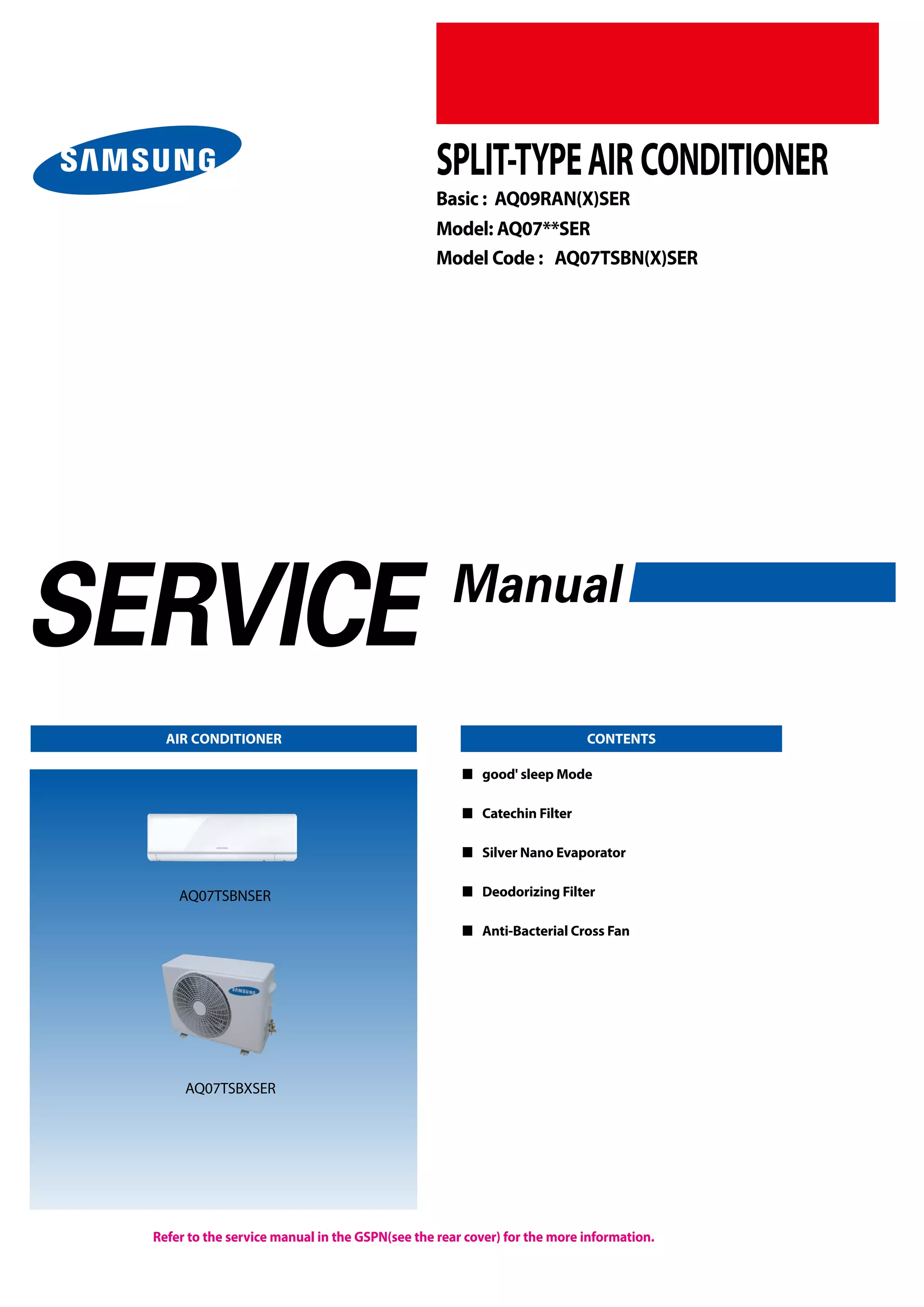
Refer to the service manual in the GSPN(see the rear cover) for the more information.
AIR CONDITIONER CONTENTS
SPLIT-TYPEAIR CONDITIONER
Basic : AQ09RAN(X)SER
Model: AQ07**SER
Model Code : AQ07TSBN(X)SER
 	good' sleep Mode
 	 Catechin Filter
 	 Silver Nano Evaporator
 	 Deodorizing Filter
 	 Anti-Bacterial Cross Fan
AQ07TSBNSER
AQ07TSBXSER
Operating Instructions and Installation
 Samsung Electronics
Contents
11.	 Precautions ......................................................................................................................................... 	 1-1
	 1-1 Precautions for the Service .............................................................................................................. 	 1-1
	 1-2 Precautions for the Static Electricity and PL ................................................................................. 	 1-1
	 1-3 Precautions for the Safety ................................................................................................................ 	 1-2
12.	 Product Specifications ................................................................................................................ 	 2-1
	 2-1 The Feature of Product ..................................................................................................................... 	 2-1
	  2-1-1 The Feature of Product ............................................................................................................ 	 2-1
	  2-1-2 Modified items compared with Basic model ...................................................................... 	 2-2
	2-2 The Comparative Specifications of Product ................................................................................. 	 2-3
	2-3 Accessory and Option Specifications ............................................................................................ 	 2-5
	  2-3-1 Accessories ................................................................................................................................ 	 2-4
	  2-3-2 Filter ............................................................................................................................................ 	 2-5
2-3-3 Accessories................................................................................................................................. 	 2-6
	2-4 Details for Operation Property ........................................................................................................ 	 2-7
	
13.	 Disassembly and Reassembly ............................................................................................... 	 3-1
	 3-1 Indoor Unit .......................................................................................................................................... 	 3-2
	 3-2 Outdoor Unit ...................................................................................................................................... 	 3-9
14.	 Troubleshooting ............................................................................................................................. 	 4-1
	 4-1 Setting Option Setup Method ........................................................................................................ 	 4-1
	 4-2 Display Error and Check Method ................................................................................................... 	 4-3
	  4-2-1 Display Error mode .................................................................................................................. 	 4-3
	 4-3 Fault Diagnosis by Symptom ......................................................................................................... 	 4-4
	  4-3-1 Indoor Temperature Sensor ErrorWhen is diplayed ........................................ 	 4-4
	  4-3-2 Indoor Heat Exchanger Temperature Sensor ErrorWhen is diplayed .......... 	 4-5
	  4-3-3 Indoor Fan Motor Speed Detecting ErrorWhen is diplayed .......................... 	 4-6
4-3-4 EEPROM Error or Option Error ............................................................................................... 	 4-7
4-3-5 MPI Feedback ErrorWhen E186 is displayed .................................................................. 	 4-7
	  4-3-6 No Power (completely dead)-Initial diagnosis (Not displayed) ....................................... 	 4-8
	  4-3-7 WhentheUp/DownLouverMotorDoesNotOperate.(InitialDiagnosis)(Notdisplayed) ....... 	 4-9
	  4-3-8 When the remote control is not receiving .......................................................................... 	 4-9
	 4-4 PCB Inspection Method ................................................................................................................... 	 4-10
	  4-4-1 Pre-inspection Notices.............................................................................................................................. 	 4-10
	  4-4-2 Inspection Procedure................................................................................................................................ 	 4-10
	  4-4-3 Indoor Detailed Inspection Procedure.............................................................................................. 	 4-10
4-5 Main Part Inspection Method ......................................................................................................... 	 4-11
Samsung Electronics 
	
Contents
15.	 Exploded Views and Parts List .............................................................................................. 	 5-1
	 5-1 Indoor Unit .......................................................................................................................................... 	 5-1
	 5-2 Outdoor Unit ...................................................................................................................................... 	 5-3
16.	 PCB Diagram and Parts List .................................................................................................... 	 6-1
	 6-1. Block Diagram ................................................................................................................................... 	 6-1
	   6-1-1. Ass'y Control In.......................................................................................................................................... 	 6-1
6-1-2. Indoor Main PCB........................................................................................................................................ 	 6-3
	  6-1-3. Indoor Display PCB.................................................................................................................................... 	 6-4
6-2. Electrical Parts List ............................................................................................................................ 	 6-5
17.	 Wiring Diagram ............................................................................................................................... 	 7-1
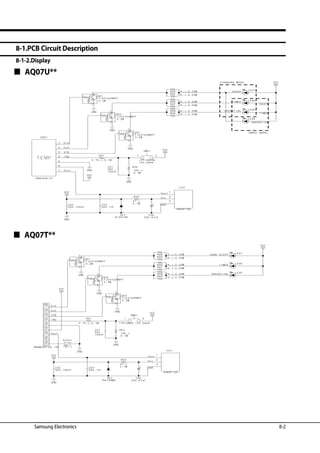
18.	 Schematic Diagram ....................................................................................................................... 	 8-1
	 8-1.PCB Circuit Description ..................................................................................................................... 	 8-1
	  8-1-1.Indoor Unit..................................................................................................................................................... 	 8-1
	  8-1-2.Display............................................................................................................................................................. 	 8-2
19.	 Reference Sheet............................................................................................................................... 	 9-1
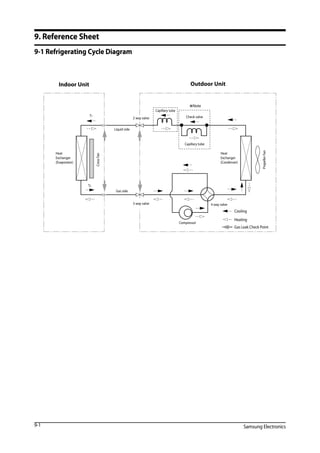
	 9-1 Refrigerating Cycle Diagram ........................................................................................................... 	 9-1
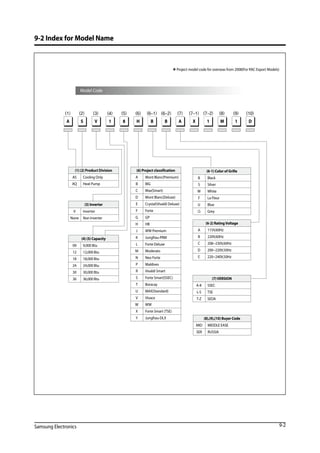
	 9-2 Index for Model Name ...................................................................................................................... 	 9-2
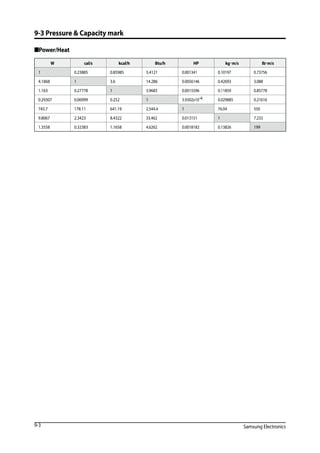
	 9-3 Pressure  Capacity mark ................................................................................................................ 	 9-3
	 9-4 Low Refrigerant Pressure Distribution .......................................................................................... 	 9-4
	 9-5 Installation Diagram of Indoor Unit and Outdoor Unit .............................................................. 	 9-5
10.Woking Range...................................................................................................................................... 	10-1
	 10-1 Power Supply ................................................................................................................................... 	 10-1
	 10-2 Working Range ................................................................................................................................ 	 10-1
	 10-2-1 MULTIZONE/MONOZONE/SUMMIT .................................................................................. 	 10-1
	 10-2-2 BIGFLOW................................................................................................................................. 	 10-2
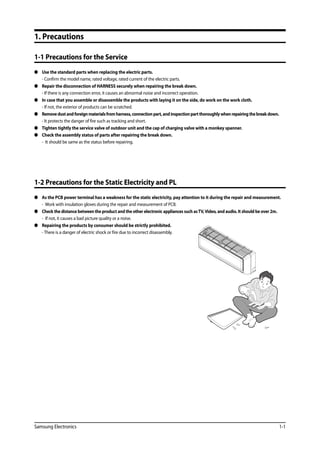
Samsung Electronics 1-1
1. Precautions
1-1 Precautions for the Service
 	 Use the standard parts when replacing the electric parts.
	 - Confirm the model name, rated voltage, rated current of the electric parts.
 	 Repair the disconnection of HARNESS securely when repairing the break down.
	 - If there is any connection error, it causes an abnormal noise and incorrect operation.
	 In case that you assemble or disassemble the products with laying it on the side, do work on the work cloth.
	 - If not, the exterior of products can be scratched.
	 Removedustandforeignmaterialsfromharness,connectionpart,andinspectionpartthoroughlywhenrepairingthebreakdown.	
- It protects the danger of fire such as tracking and short.
	 Tighten tightly the service valve of outdoor unit and the cap of charging valve with a monkey spanner.
 	 Check the assembly status of parts after repairing the break down.
	 - It should be same as the status before repairing.
1-2 Precautions for the Static Electricity and PL
	 As the PCB power terminal has a weakness for the static electricity, pay attention to it during the repair and measurement.
	 - Work with insulation gloves during the repair and measurement of PCB.
	 Check the distance between the product and the other electronic appliances such asTV,Video, and audio. It should be over 2m.
	 - If not, it causes a bad picture quality or a noise.
	 Repairing the products by consumer should be strictly prohibited.
	 - There is a danger of electric shock or fire due to incorrect disassembly.
1-2 Samsung Electronics
1-3 Precautions for the Safety
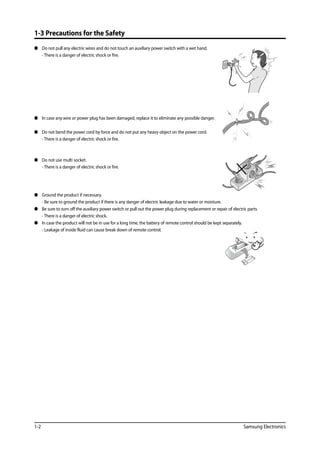
	 Do not pull any electric wires and do not touch an auxiliary power switch with a wet hand.
	 - There is a danger of electric shock or fire.
	 In case any wire or power plug has been damaged, replace it to eliminate any possible danger.
	 Do not bend the power cord by force and do not put any heavy object on the power cord.
	 - There is a danger of electric shock or fire.
	 Do not use multi socket.
	 - There is a danger of electric shock or fire.
	 Ground the product if necessary.
	 - Be sure to ground the product if there is any danger of electric leakage due to water or moisture.
	 Be sure to turn off the auxiliary power switch or pull out the power plug during replacement or repair of electric parts.
	 - There is a danger of electric shock.
	 In case the product will not be in use for a long time, the battery of remote control should be kept separately.
	 - Leakage of inside fluid can cause break down of remote control.
Samsung Electronics 2-1
2. Product Specifications
2-1 The Feature of Product
	 good' sleep Mode
good’sleep mode can help you sleep quickly and soundly and wake up refreshed.
 Catechin Filter
	 Catechin,extracted from the green tea,is contained in the filter and deactivates captured bacteria and unpleasant odors.
 Silver Nano Evaporator
 Deodorizing Filter
Activated carbon is incorporated in the filter,efficiently absorbing cigarette smoke, pet odors, and other unpleasant smells, replacing
them with clean,refreshing air.
 Anti-Bacterial Cross Fan
2-1-1 The Feature of Product
2-2 Samsung Electronics
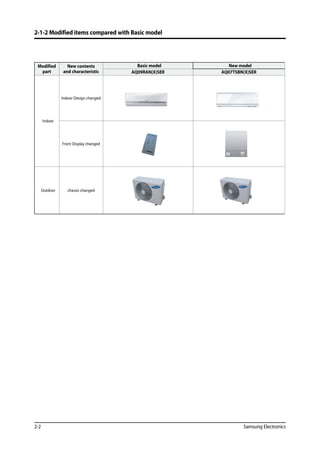
2-1-2 Modified items compared with Basic model
Modified
part
New contents
and characteristic
Basic model New model
AQ09RAN(X)SER AQ07TSBN(X)SER
Indoor
Indoor Design changed
Front Display changed
Outdoor chassis changed
Samsung Electronics 2-3
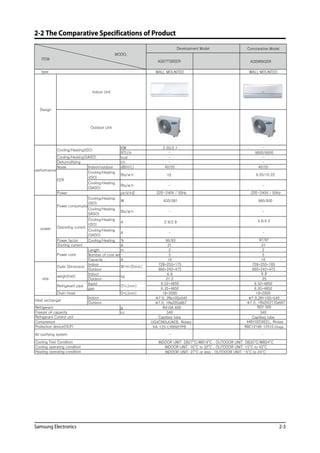
2-2 The Comparative Specifications of Product
Comparative Model
AQ07TSBSER
WALL MOUNTED WALL MOUNTED
KW
-
-
BTU/h
2.05/2.1
9000/9500
kcal - -
I/h - -
Noise Indoor/outdoor dB(H/L) 40/55 40/55
Cooling/Heating
(ISO)
Btu/w·h 10 9.05/10.22
Cooling/Heating
(SASO)
Btu/w·h -
ph/V/HZ
Cooling/Heating
(ISO)
W 635/581 995/930
Cooling/Heating
SASO)
Btu/w·h - -
Cooling/Heating
(ISO)
A 2.9/2.8
Cooling/Heating
(SASO)
A - -
Power factor Cooling/Heating % 95/93
A 21 21
Length m 2 2
Number of core wir - 5 5
Capacity A 10 10
Indoor 728*255*175 728*255*185
Outdoor 660*242*475 660*242*475
Indoor 6.6
Outdoor 21.2
liquid 9.52*4850 9.52*4850
gas 6.35*4850 6.35*4850
D*L(mm) 18*2000 18*2000
Φ7.0, 2Rx10Sx540
Φ7.0, 1Rx20Sx667
g R410A 600
cc 340 340
Capillary tube Capillary tube
UG4C065JUAEB, Rotary
KA-125-LYB0927PB
-
INDOOR UNIT: 16°C to 32°C , OUTDOOR UNIT: 15°C to 43°C
type
MODEL
ITEM
Development Model
Design
Indoor Unit
Outdoor Unit
performance
Cooling/Heating(ISO)
EER
Power
Cooling/Heating(SASO)
Dehumidifying
power
Power consumptio
Operating current
Starting current
Power cord
size
Outer Dimension W*H*D(mm)
Refrigerant pipe
weight(net) kg
Drain Hose
D*L(mm)
Heat exchanger
Indoor
Outdoor
Refrigerant
Freezer oil capacity
Refrigerant Control unit
Compressor
Cooling Test Condition
Protection device(OLP)
Air purifying system
INDOOR UNIT: DB27°C/WB19°C , OUTDOOR UNIT: DB35°C/WB24°C
Heating operating condition
Cooling operating condition
Φ7.0,2R*10S*540
-
RBC12166-12510,2stage
INDOOR UNIT: 27°C or less , OUTDOOR UNIT: -5°C to 24°C
44B102DXEEL, Rotary
-
220~240V / 50Hz
AQ09RASER
4.6/4.2
97/97
6.8
25
Φ7.0, 1Rx20(21)Sx667
R22 500
220~240V / 50Hz
2-4 Samsung Electronics
2-3 Accessory and Option Specifications
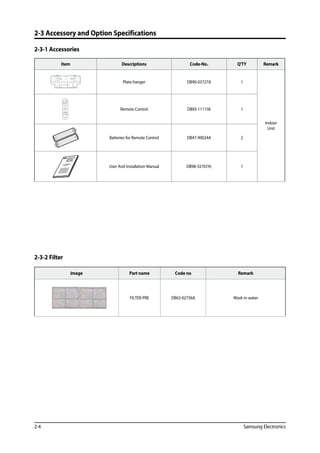
2-3-1 Accessories
Item Descriptions Code-No. Q'TY Remark
Plate-hanger DB90-03727A 1
Indoor
Unit
Remote Control DB93-11115K 1
Batteries for Remote Control DB47-90024A 2
OWNER'S INSTRUCTIONS
MANUAL DE INSTRUCCIONES
ISTRUZIONI PER L'USO
MANUAL DE INSTRU‚ÍES
MANUEL D'UTILISATION
GEBRAUCHSANWEISUNG
Splut-type Room Air Conditioner
Aire acondicionado
domŽstico sistema Split
Condizionatore
d'aria per ambienti ad unitˆ Separate
Aparelho de ar condicionado
tipo Split
Climatiseur de type sŽparŽ
Geteilte raumklimaanlag
e
User And Installation Manual DB98-32707A) 1
2-3-2 Filter
Image Part name Code no Remark
FILTER-PRE DB63-02756A Wash in water
Samsung Electronics 2-5
2-3 Accessory and Option Specifications
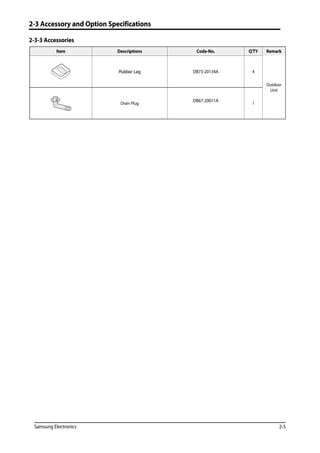
2-3-3 Accessories
Item Descriptions Code-No. Q'TY Remark
Rubber Leg DB73-20134A 4
Outdoor
Unit
Drain Plug
DB67-20011A
1
2-6 Samsung Electronics
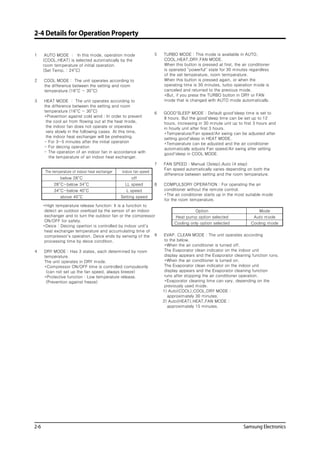
2-4 Details for Operation Property
1 AUTO MODE : In this mode, operation mode
(COOL,HEAT) is selected automatically by the
room temperature of initial operation.
(Set Temp. : 24°C)
2 COOL MODE : The unit operates according to
the difference between the setting and room
temperature.(16°C ~ 30°C)
3 HEAT MODE : The unit operates according to
the difference between the setting and room
temperature.(16°C ~ 30°C)
*Prevention against cold wind : In order to prevent
the cool air from flowing out at the heat mode,
the indoor fan does not operate or orperates
very slowly in the following cases. At this time,
the indoor heat exchanger will be preheating.
- For 3~5 minutes after the initial operation
- For deicing operation
- The operation of an indoor fan in accordance with
the temperature of an indoor heat exchanger.
*High temperature release function: It is a function to
detect an outdoor overload by the sensor of an indoor
exchanger and to turn the outdoor fan or the compressor
ON/OFF for safety.
*Deice : Deicing opertion is controlled by indoor unit's
heat exchanger temperature and accumulating time of
compressor's operation. Deice ends by sensing of the
processing time by deice condition.
4 DRY MODE : Has 3 states, each determined by room
temperature.
The unit operates in DRY mode.
*Compressor ON/OFF time is controlled compulsorily
(can not set up the fan speed, always breeze)
*Protective function : Low temperature release.
(Prevention against freeze)
9 EVAP. CLEAN MODE : The unit operates according
to the below.
*When the air conditioner is turned off.
The Evaporator clean indicator on the indoor unit
display appears and the Evaporator cleaning function runs.
*When the air conditioner is turned on.
The Evaporator clean indicator on the indoor unit
display appears and the Evaporator cleaning function
runs after stopping the air conditioner operation.
*Evaporator cleaning time can vary, depending on the
previously used mode.
1) Auto(COOL),COOL,DRY MODE :
approximately 30 minutes.
2) Auto(HEAT),HEAT,FAN MODE :
approximately 15 minutes.
6 GOOD'SLEEP MODE : Default good'sleep time is set to
8 hours. But the good'sleep time can be set up to 12
hours, increasing in 30 minute unit up to first 3 hours and
in hourly unit after first 3 hours.
*Temperature/Fan speed/Air swing can be adjusted after
setting good'sleep in HEAT MODE.
*Temperature can be adjusted and the air conditioner
automatically adjusts Fan speed/Air swing after setting
good'sleep in COOL MODE.
7 FAN SPEED : Manual (3step),Auto (4 step)
Fan speed automatically varies depending on both the
difference between setting and the room temperature.
8 COMPULSORY OPERATION : For operating the air
conditioner without the remote control.
*The air conditioner starts up in the most suitable mode
for the room temperature.
5 TURBO MODE : This mode is available in AUTO,
COOL,HEAT,DRY,FAN MODE.
When this button is pressed at first, the air conditioner
is operated powerful state for 30 minutes regardless
of the set temperature, room termperature.
When this button is pressed again, or when the
operating time is 30 minutes, turbo operation mode is
canceled and returned to the previous mode.
*But, if you press the TURBO button in DRY or FAN
mode that is changed with AUTO mode automatically.
The temperature of indoor heat exchanger indoor fan speed
below 28°C off
28°C~below 34°C LL speed
34°C~below 40°C L speed
above 40°C Setting speed
Option Mode
Heat pump option selected Auto mode
Cooling only option selected Cooling mode
Samsung Electronics 3-1
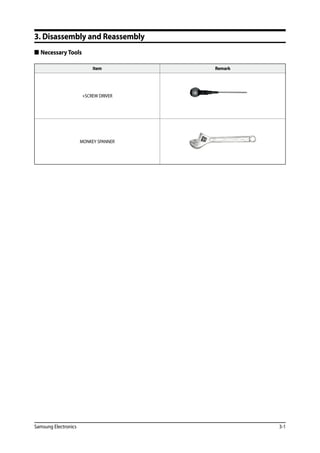
3. Disassembly and Reassembly
 Necessary Tools
Item Remark
+SCREW DRIVER
MONKEY SPANNER
Operating Instructions and Installation
3-2 Samsung Electronics
3-1 Indoor Unit
No Parts Procedure Remark
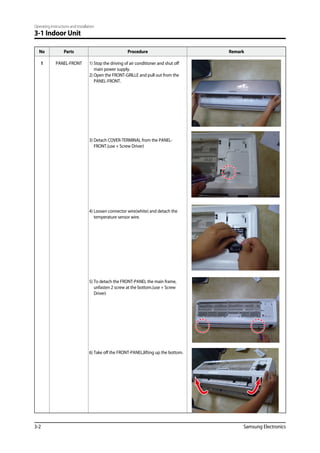
1 PANEL-FRONT 1) Stop the driving of air conditioner and shut off
main power supply.
2) Open the FRONT-GRILLE and pull out from the
PANEL-FRONT.
3) Detach COVER-TERMINAL from the PANEL-
FRONT.(use + Screw Driver)
4) Loosen connector wire(white) and detach the
temperature sensor wire.
5) To detach the FRONT-PANEL the main frame,
unfasten 2 screw at the bottom.(use + Screw
Driver)
6) Take off the FRONT-PANEL,lifting up the bottom.
Operating Instructions and Installation
Samsung Electronics 3-3
No Parts Procedure Remark
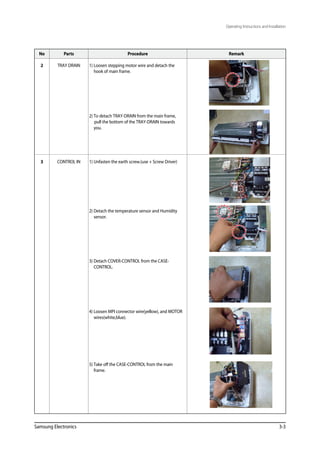
2 TRAY DRAIN 1) Loosen stepping motor wire and detach the
hook of main frame.
2) To detach TRAY-DRAIN from the main frame,
pull the bottom of the TRAY-DRAIN towards
you.
3 CONTROL IN 1) Unfasten the earth screw.(use + Screw Driver)
2) Detach the temperature sensor and Humidity
sensor.
3) Detach COVER-CONTROL from the CASE-
CONTROL.
4) Loosen MPI connector wire(yellow), and MOTOR
wires(white,blue).
5) Take off the CASE-CONTROL from the main
frame.
Operating Instructions and Installation
3-4 Samsung Electronics
No Parts Procedure Remark
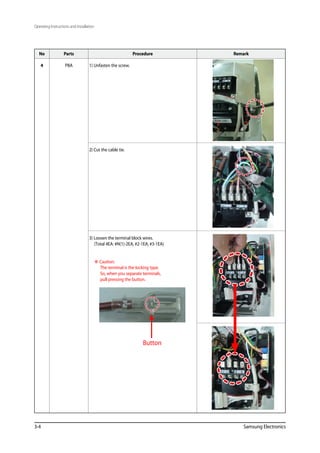
4 PBA 1) Unfasten the screw.
2) Cut the cable tie.
3) Loosen the terminal block wires.
(Total 4EA: #N(1)-2EA, #2-1EA, #3-1EA)
 Caution:
The terminal is the locking type.
So, when you separate terminals,
pull pressing the button.
Button
Operating Instructions and Installation
Samsung Electronics 3-5
No Parts Procedure Remark
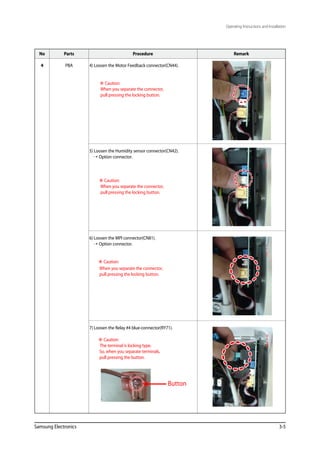
4 PBA 4) Loosen the Motor Feedback connector(CN44).
 Caution:
When you separate the connector,
pull pressing the locking button.
5) Loosen the Humidity sensor connector(CN42).
 Option connector.
 Caution:
When you separate the connector,
pull pressing the locking button.
6) Loosen the MPI connector(CN81).
 Option connector.
 Caution:
When you separate the connector,
pull pressing the locking button.
7) Loosen the Relay #4 blue-connector(RY71).
 Caution:
The terminal is locking type.
So, when you separate terminals,
pull pressing the button.
Button
Operating Instructions and Installation
3-6 Samsung Electronics
No Parts Procedure Remark
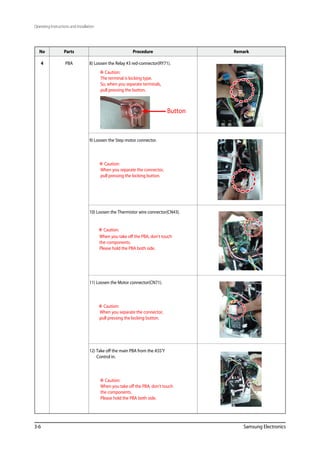
4 PBA 8) Loosen the Relay #3 red-connector(RY71).
 Caution:
The terminal is locking type.
So, when you separate terminals,
pull pressing the button.
9) Loosen the Step motor connector.
 Caution:
When you separate the connector,
pull pressing the locking button.
10) Loosen the Thermistor wire connector(CN43).
 Caution:
When you take off the PBA, don’t touch
the components.
Please hold the PBA both side.
11) Loosen the Motor connector(CN71).
 Caution:
When you separate the connector,
pull pressing the locking button.
12) Take off the main PBA from the ASS’Y
Control in.
 Caution:
When you take off the PBA, don’t touch
the components.
Please hold the PBA both side.
Button
Operating Instructions and Installation
Samsung Electronics 3-7
No Parts Procedure Remark
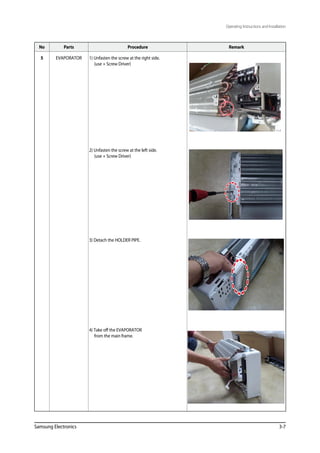
5 EVAPORATOR 1) Unfasten the screw at the right side.
(use + Screw Driver)
2) Unfasten the screw at the left side.
(use + Screw Driver)
3) Detach the HOLDER PIPE.
4) Take off the EVAPORATOR
from the main frame.
3-8 Samsung Electronics
No Parts Procedure Remark
6 FAN MOTOR

CROSS FAN
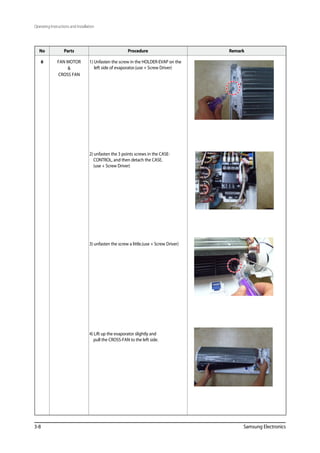
1) Unfasten the screw in the HOLDER-EVAP on the
left side of evaporator.(use + Screw Driver)
2) unfasten the 3 points screws in the CASE-
CONTROL, and then detach the CASE.
(use + Screw Driver)
3) unfasten the screw a little.(use + Screw Driver)
4) Lift up the evaporator slightly and
pull the CROSS-FAN to the left side.
Operating Instructions and Installation
Samsung Electronics 3-9
3-2 Outdoor Unit
No Parts Procedure Remark
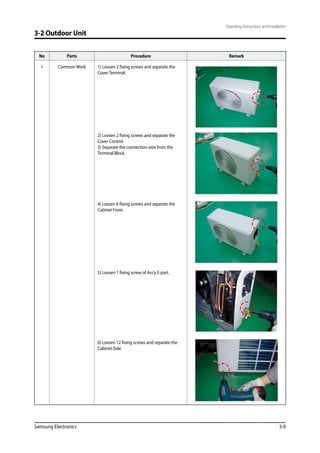
1 Common Work 1) Loosen 2 fixing screws and separate the
Cover Terminal.
2) Loosen 2 fixing screws and separate the
Cover Control.
3) Separate the connection wire from the
Terminal Block.
4) Loosen 6 fixing screws and separate the
Cabinet Front.
5) Loosen 1 fixing screw of Ass’y E-part.
6) Loosen 12 fixing screws and separate the
Cabinet-Side
3-10 Samsung Electronics
No Parts Procedure Remark
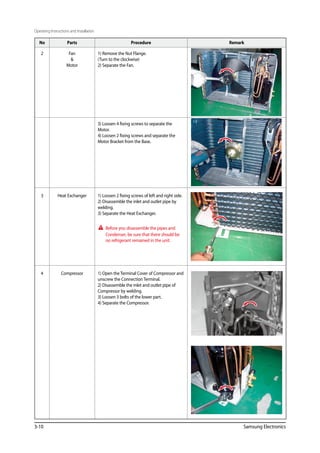
2 Fan

Motor
1) Remove the Nut Flange.
(Turn to the clockwise)
2) Separate the Fan.
3) Loosen 4 fixing screws to separate the
Motor.
4) Loosen 2 fixing screws and separate the
Motor Bracket from the Base.
3 Heat Exchanger 1) Loosen 2 fixing screws of left and right side.
2) Disassemble the inlet and outlet pipe by
welding.
3) Separate the Heat Exchanger.
Before you disassemble the pipes and
Condenser, be sure that there should be
no refrigerant remained in the unit.
4 Compressor 1) Open the Terminal Cover of Compressor and
unscrew the Connection Terminal.
2) Disassemble the inlet and outlet pipe of
Compressor by welding.
3) Loosen 3 bolts of the lower part.
4) Separate the Compressor.
Operating Instructions and Installation
Samsung Electronics 4-1
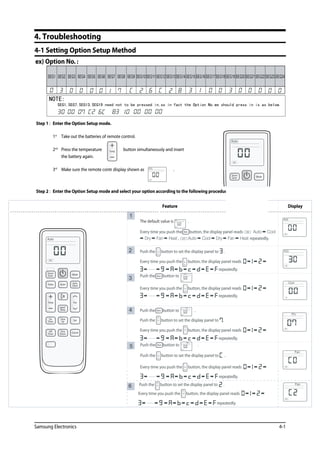
4-1 Setting Option Setup Method
4. Troubleshooting
SEG21 SEG22 SEG23 SEG24SEG16 SEG17 SEG18 SEG19 SEG20SEG11 SEG12 SEG13 SEG14 SEG15SEG6 SEG7 SEG8 SEG9 SEG10SEG1 SEG2 SEG3 SEG4 SEG5
NOTE:
SEG1,SEG7,SEG13,SEG19 need not to be pressed in,so in fact the Option No.we should press in is as below.
4-2 Samsung Electronics
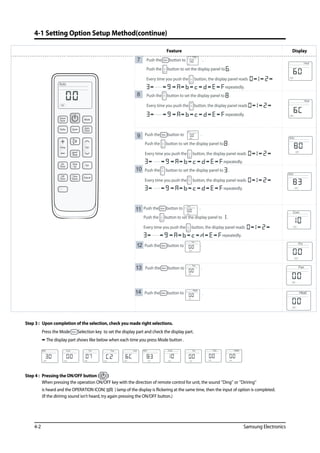
4-1 Setting Option Setup Method(continue)
Samsung Electronics 4-3
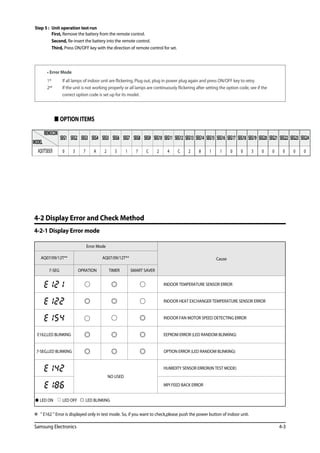
 OPTION ITEMS
Error Mode
CauseAQ07/09/12T** AQ07/09/12T**
7-SEG OPRATION TIMER SMART SAVER
INDOOR TEMPERATURE SENSOR ERROR
INDOOR HEAT EXCHANGER TEMPERATURE SENSOR ERROR
INDOOR FAN MOTOR SPEED DETECTING ERROR
E162,LED BLINKING EEPROM ERROR (LED RANDOM BLINKING)
7-SEG,LED BLINKING OPTION ERROR (LED RANDOM BLINKING)
NO USED
HUMIDITY SENSOR ERROR(IN TEST MODE)
MPI FEED BACK ERROR
 LED ON LED OFF LED BLINKING
4-2 Display Error and Check Method
4-2-1 Display Error mode
  E162  Error is displayed only in test mode. So, if you want to check,please push the power button of indoor unit.
REMOCON
MODEL
SEG1 SEG2 SEG3 SEG4 SEG5 SEG6 SEG7 SEG8 SEG9 SEG10 SEG11 SEG12 SEG13 SEG14 SEG15 SEG16 SEG17 SEG18 SEG19 SEG20 SEG21 SEG22 SEG23 SEG24
AQ07TSBSER 0 3 7 A 2 5 1 7 C 2 4 C 2 8 1 1 0 0 3 0 0 0 0 0
4-4 Samsung Electronics
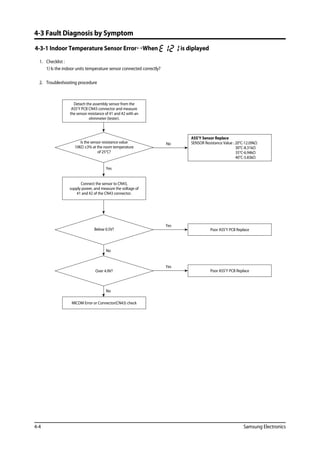
4-3-1 Indoor Temperature Sensor ErrorWhen is diplayed
	 1.	 Checklist :
		 1) Is the indoor units temperature sensor connected correctly?
	2.	 Troubleshooting procedure
Yes
No
No
Poor ASS’Y PCB Replace
Yes
Poor ASS’Y PCB Replace
Yes
ASS’Y Sensor Replace
SENSOR Resistance Value : 20°C-12.09kΩ
30°C-8.31kΩ
35°C-6.94kΩ
40°C-5.83kΩ
NoIs the sensor resistance value
10KΩ ±3% at the room temperature
of 25°C?
Detach the assembly sensor from the
ASS’Y PCB CN43 connector and measure
the sensor resistance of #1 and #2 with an
ohmmeter (tester).
Below 0.5V?
Over 4.9V?
MICOM Error or Connector(CN43) check
Connect the sensor to CN43,
supply power, and measure the voltage of
#1 and #2 of the CN43 connector.
4-3 Fault Diagnosis by Symptom
Samsung Electronics 4-5
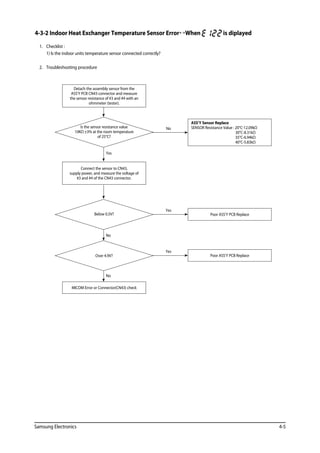
4-3-2 Indoor Heat Exchanger Temperature Sensor ErrorWhen is diplayed
	 1.	 Checklist :
		 1) Is the indoor units temperature sensor connected correctly?
	2.	 Troubleshooting procedure
Yes
No
No
Poor ASS’Y PCB Replace
Yes
Poor ASS’Y PCB Replace
Yes
ASS’Y Sensor Replace
SENSOR Resistance Value : 20°C-12.09kΩ
30°C-8.31kΩ
35°C-6.94kΩ
40°C-5.83kΩ
NoIs the sensor resistance value
10KΩ ±3% at the room temperature
of 25°C?
Detach the assembly sensor from the
ASS’Y PCB CN43 connector and measure
the sensor resistance of #3 and #4 with an
ohmmeter (tester).
Below 0.5V?
Over 4.9V?
MICOM Error or Connector(CN43) check
Connect the sensor to CN43,
supply power, and measure the voltage of
#3 and #4 of the CN43 connector.
4-6 Samsung Electronics
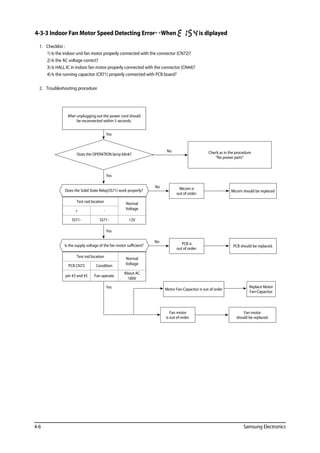
4-3-3 Indoor Fan Motor Speed Detecting ErrorWhen is diplayed
	 1.	 Checklist :
1) Is the indoor unit fan motor properly connected with the connector (CN72)?
2) Is the AC voltage correct?
3) Is HALL IC in indoor fan motor properly connected with the connector (CN44)?
4) Is the running capacitor (CR71) properly connected with PCB board?
	2.	 Troubleshooting procedure
Micom is
out of order.
Check as in the procedure
“No power parts”
No
Does the OPERATION lamp blink?
After unplugging out the power cord should
be reconnected within 5 seconds.
Does the Solid State Relay(SS71) work properly?
Test rod location Normal
Voltage+ -
SS71- SS71- 12V
Is the supply voltage of the fan motor sufficient?
Test rod location Normal
VoltagePCB CN72 Condition
pin #3 and #5 Fan operate
About AC
180V
Micom should be replaced
PCB is
out of order.
PCB should be replaced.
Yes
Yes
Yes
No
No
Yes Motor Fan-Capacitor is out of order
Replace Motor
Fan-Capacitor
Fan motor
is out of order.
Fan motor
should be replaced.
Samsung Electronics 4-7
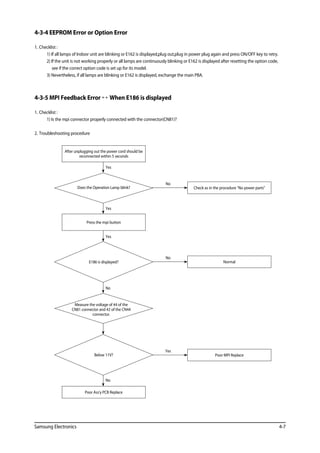
4-3-4 EEPROM Error or Option Error
1.	Checklist :
1) If all lamps of Indoor unit are blinking or E162 is displayed,plug out,plug in power plug again and press ON/OFF key to retry.
2) If the unit is not working properly or all lamps are continuously blinking or E162 is displayed after resetting the option code,
see if the correct option code is set up for its model.
3) Nevertheless, if all lamps are blinking or E162 is displayed, exchange the main PBA.
4-3-5 MPI Feedback Error  When E186 is displayed
1.	Checklist :
1) Is the mpi connector properly connected with the connector(CN81)?
2.	Troubleshooting procedure
Poor MPI Replace
Yes
Normal
No
Check as in the procedure No power parts
No
Does the Operation Lamp blink?
After unplugging out the power cord should be
reconnected within 5 seconds
Press the mpi button
Yes
E186 is displayed?
Measure the voltage of #4 of the
CN81 connector and #2 of the CN44
connector.
Below 11V?
Poor Ass'y PCB Replace
Yes
No
No
Yes
4-8 Samsung Electronics
4-3-6 No Power (completely dead)-Initial diagnosis (Not displayed)
	 1.		 Checklist :
			 1) Is input voltage normal?
			2) Is AC power linked correctly?
			 3) Is input voltage of DC regulator IC KA7805 (IC02) normal? (11VDC-12.5VDC)
			 4) Is output voltage of DC regulator IC KA7805 (IC02) normal? (4.5VDC-5.5VDC)
	2.		 Troubleshooting procedure
PCB should be replaced
No
Replace fuse
No
Reconnect wires correctly
No
 Check the display board
operate
Press the
Power Button on the
remote control unit to operate the
air conditioner
Unplug the power cord and
plug it after 30 seconds
Check the indoor unit
control board
does not operate
Check whether
2 wires of power cord are
connected correctly to the
terminal block and
control board.
Check whether
the fuse on the control board is normal.
FUSE(F701) : T3.15[A]/250[V] or
T2.5[A]/250[V]
Check the output of
SMPS on the control board.
Input power: AC230±15%[V]
IC02 Input: DC12[V]
IC02 output: DC5[V]
 Check the setting temperature
Yes
Yes
Yes
Yes
Samsung Electronics 4-9
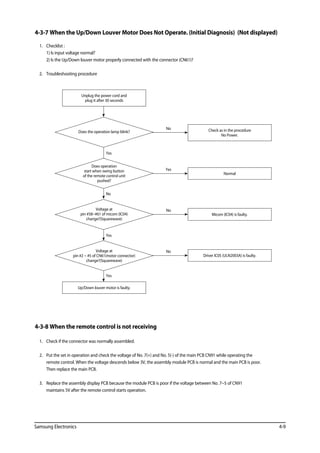
4-3-7 When the Up/Down Louver Motor Does Not Operate. (Initial Diagnosis) (Not displayed)
	 1.	 Checklist :
		 1) Is input voltage normal?
		2) Is the Up/Down louver motor properly connected with the connector (CN61)?
	2.	 Troubleshooting procedure
Yes
No
Yes
Yes
Driver IC05 (ULN2003A) is faulty.
No
Micom (IC04) is faulty.
No
Normal
Yes
Check as in the procedure
No Power.
No
Does the operation lamp blink?
Unplug the power cord and
plug it after 30 seconds
Does operation
start when swing button
of the remote control unit
pushed?
Voltage at
pin #58~#61 of micom (IC04)
change?(Squarewave)
Voltage at
pin #2 ~ #5 of CN61(motor connector)
change?(Squarewave)
Up/Down louver motor is faulty.
4-3-8 When the remote control is not receiving
	 1.	 Check if the connector was normally assembled.
	2.	Put the set in operation and check the voltage of No. 7(+) and No. 5(-) of the main PCB CN91 while operating the 		
remote control. When the voltage descends below 3V, the assembly module PCB is normal and the main PCB is poor. 		
Then replace the main PCB.
	 3.	Replace the assembly display PCB because the module PCB is poor if the voltage between No. 7~5 of CN91 			
maintains 5V after the remote control starts operation.
4-10 Samsung Electronics
4-4 PCB Inspection Method
4-4-1 Pre-inspection Notices
	 1.	Check if you pulled out the AC power plug when you eliminate the PCB or front panel.
	2.	Don’t hold the PCB side not impose excessive force on it to eliminate the PCB.
	 3.	Don’t pull the lead wire but hold the whole housing to connect or disconnect a connector to the PCB.
4-4-2 Inspection Procedure
	 1.	Check connector connection and peeling of PCB or bronze coating pattern when you think the PCB is broken.
	2.	The PCB is composed of the 2 parts.
	 1.	 Indoor Main PCB Part : MICOM and surrounding circuit, relay, room fan motor driving circuit and control circuit, sensor 	driving
circuit, power circuit of DC12V and DC5V, and buzzer driving circuit.
	 1.	 Display part : LED lamp, Switch, Remocon module
4-4-3 Indoor Detailed Inspection Procedure
No Procedure Inspection Method Cause
1 Plug out and pull the PCB
out of the electronic box.
Check the PCB fuse.
1) Is the fuse disconnected? • Over current
• Indoor Fan Motor Short
• AC Part Pattern Short of the MAIN PCB
2 Supply power.
If the operating lamp 	
twinkles at this time, 		
the above 1)~3) have 	
no relation.
Checking the power voltage.
1) Is the BD71 input voltage AC200V~AC240V? • Power Cord is fault, Fuse open. Wrong Power
Cable Wiring, AC Part is faulty.
2) Is the voltage between both terminals of the 	
C109 on the 2 side of the transformer DC12V ±0.5V?
• Switching Trans or Power Circuit is faulty
3) Is the voltage between both terminals of OUT 	
and GND of IC02(KA7805) DC5V ±0.5V?
• Power Circuit is faulty, Load Short
3 Press the ON/OFF button. Checking the power voltage.
1) Is the voltage over AC180V being imposed on 	
1) terminal #3 and #5 of the fan motor 		
connector(CN72)?
• Fan Motor of the indoor is faulty
2) Check the voltage of both terminals of 		
terminal block 1 and N(1) after 3 minute 	
operation.: AC220V
• Relay(RY71) Contact is faulty
4 Press the ON/OFF button.
1. FAN Speed [High]
2. Continuous Operation
1) Is the voltage over AC180V being imposed on 	
1) terminal #3 and #5 of the fan motor 		
connector(CN72)?
• Fan Motor of the indoor is faulty
2) The fan motor of the indoor unit doesn’t run. • Fan Motor Connector(CN72) is faulty
3) The power voltage between terminal #3 and #5 	
of the connector(CN72) is 0V.
• ASS’Y Main PCB is faulty
• Connection is faulty
Samsung Electronics 4-11
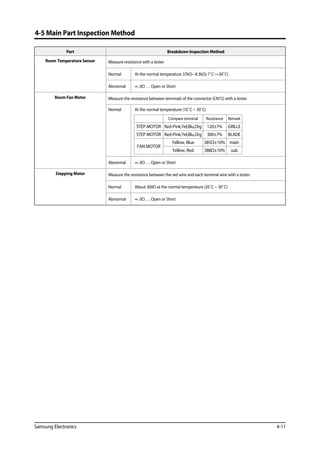
4-5 Main Part Inspection Method
Part Breakdown Inspection Method
Room Temperature Sensor Measure resistance with a tester
Normal At the normal temperature 37kΩ~ 8.3kΩ(-7˚C~+30˚C) .	
Abnormal ∞, 0Ω . . . Open or Short
Room Fan Motor Measure the resistance between terminals of the connector (CN72) with a tester.
Normal At the normal temperature (10˚C ~ 30˚C)
Abnormal ∞, 0Ω . . . Open or Short
Stepping Motor Measure the resistance between the red wire and each terminal wire with a tester.
Normal About 300Ω at the normal temperature (20˚C ~ 30˚C)
Abnormal ∞, 0Ω . . . Open or Short
Compare terminal Resistance Remark
STEP MOTOR Red-Pink,Yel,Blu,Org 120±7% GRILLE
STEP MOTOR Red-Pink,Yel,Blu,Org 300±7% BLADE
FAN MOTOR
Yellow, Blue 385Ω±10% main
Yellow, Red 388Ω±10% sub
Operating Instructions and Installation
Samsung Electronics
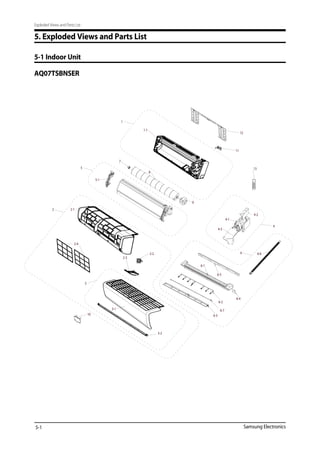
5. Exploded Views and Parts List
5-1 Indoor Unit
Exploded Views and Parts List
AQ07TSBNSER
5-1
Samsung Electronics
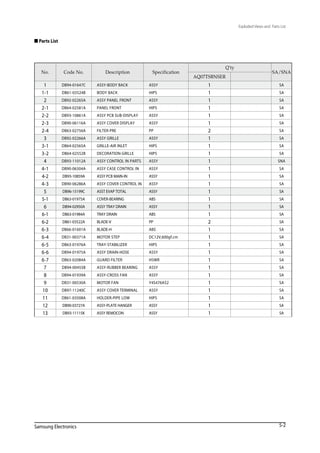
 Parts List
5-2
Exploded Views and Parts List
No. Code No. Description Specification
Q'ty
SA/SNA
AQ07TSBNSER
1 DB94-01647C ASSY-BODY BACK ASSY 1 SA
1-1 DB61-03524B BODY BACK HIPS 1 SA
2 DB92-02265A ASSY PANEL FRONT ASSY 1 SA
2-1 DB64-02581A PANEL FRONT HIPS 1 SA
2-2 DB93-10861A ASSY PCB SUB-DISPLAY ASSY 1 SA
2-3 DB90-06116A ASSY COVER DISPLAY ASSY 1 SA
2-4 DB63-02756A FILTER-PRE PP 2 SA
3 DB92-02266A ASSY GRILLE ASSY 1 SA
3-1 DB64-02565A GRILLE-AIR INLET HIPS 1 SA
3-2 DB64-02552B DECORATION-GRILLE HIPS 1 SA
4 DB93-11012A ASSY CONTROL IN PARTS ASSY 1 SNA
4-1 DB90-06304A ASSY CASE CONTROL IN ASSY 1 SA
4-2 DB93-10859A ASSY PCB MAIN-IN ASSY 1 SA
4-3 DB90-06286A ASSY COVER CONTROL IN ASSY 1 SA
5 DB96-15199C ASST EVAP TOTAL ASSY 1 SA
5-1 DB63-01975A COVER-BEARING ABS 1 SA
6 DB94-02950A ASSY TRAY DRAIN ASSY 1 SA
6-1 DB63-01984A TRAY DRAIN ABS 1 SA
6-2 DB61-03522A BLADE-V PP 2 SA
6-3 DB66-01601A BLADE-H ABS 1 SA
6-4 DB31-00371A MOTOR STEP DC12V,600gf.cm 1 SA
6-5 DB63-01976A TRAY-STABILIZER HIPS 1 SA
6-6 DB94-01975A ASSY DRAIN-HOSE ASSY 1 SA
6-7 DB63-02084A GUARD FILTER HSWR 1 SA
7 DB94-00455B ASSY-RUBBER BEARING ASSY 1 SA
8 DB94-01939A ASSY-CROSS FAN ASSY 1 SA
9 DB31-00530A MOTOR FAN Y4S476A52 1 SA
10 DB97-11240C ASSY COVER TERMINAL ASSY 1 SA
11 DB61-03508A HOLDER-PIPE LOW HIPS 1 SA
12 DB90-03727A ASSY-PLATE HANGER ASSY 1 SA
13 DB93-11115K ASSY REMOCON ASSY 1 SA
Samsung Electronics
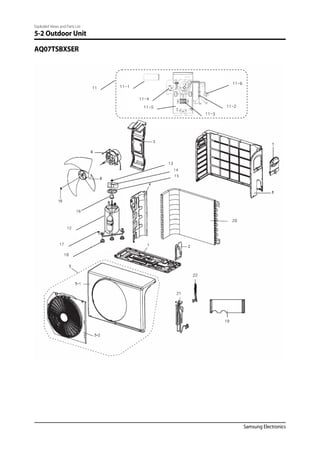
Exploded Views and Parts List
5-2 Outdoor Unit
19
20
22
21
11-1
17
18
13
14
15
11
12
11-3
11-5
11-4
11-2
11-6
16
AQ07TSBXSER
Samsung Electronics
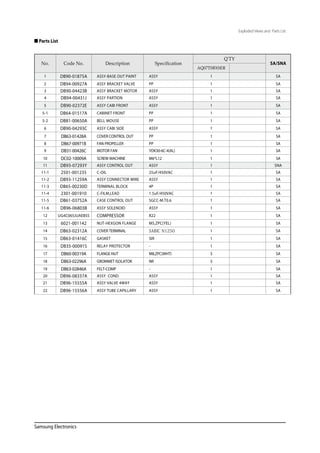
 Parts List
Exploded Views and Parts List
No. Code No. Description Specification
Q'TY
SA/SNA
AQ07TSBXSER
1 DB90-01875A ASSY-BASE OUT PAINT ASSY 1 SA
2 DB94-00927A ASSY BRACKET VALVE PP 1 SA
3 DB90-04423B ASSY BRACKET MOTOR ASSY 1 SA
4 DB94-00431J ASSY PARTION ASSY 1 SA
5 DB90-02372E ASSY CABI FRONT ASSY 1 SA
5-1 DB64-01517A CABINET FRONT PP 1 SA
5-2 DB81-00650A BELL MOUSE PP 1 SA
6 DB90-04293C ASSY CABI SIDE ASSY 1 SA
7 DB63-01428A COVER CONTROL OUT PP 1 SA
8 DB67-00971B FAN PROPELLER PP 1 SA
9 DB31-00426C MOTOR FAN YDK30-6C-4(AL) 1 SA
10 DC02-10009A SCREW MACHINE M6*L12 1 SA
11 DB93-07293Y ASSY CONTROL OUT ASSY 1 SNA
11-1 2501-001235 C-OIL 25uF/450VAC 1 SA
11-2 DB93-11259A ASSY CONNECTOR WIRE ASSY 1 SA
11-3 DB65-00230D TERMINAL BLOCK 4P 1 SA
11-4 2301-001910 C-FILM,LEAD 1.5uF/450VAC 1 SA
11-5 DB61-03752A CASE CONTROL OUT SGCC-M.T0.6 1 SA
11-6 DB96-06803B ASSY SOLENOID ASSY 1 SA
12 UG4C065JUAEBSS COMPRESSOR R22 1 SA
13 6021-001142 NUT-HEXGON FLANGE M5,ZPC(YEL) 1 SA
14 DB63-02312A COVER TERMINAL SABIC N1250 1 SA
15 DB63-01416C GASKET SIR 1 SA
16 DB35-00091S RELAY PROTECTOR - 1 SA
17 DB60-00319A FLANGE-NUT M8,ZPC(WHT) 3 SA
18 DB63-02296A GROMMET ISOLATOR NR 3 SA
19 DB63-02846A FELT-COMP - 1 SA
20 DB96-08337A ASSY COND ASSY 1 SA
21 DB96-15555A ASSY VALVE 4WAY ASSY 1 SA
22 DB96-15556A ASSY TUBE CAPILLARY ASSY 1 SA
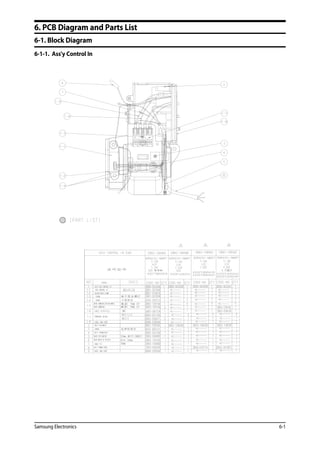
Samsung Electronics 6-1
6. PCB Diagram and Parts List
6-1. Block Diagram
6-1-1. Ass'y Control In
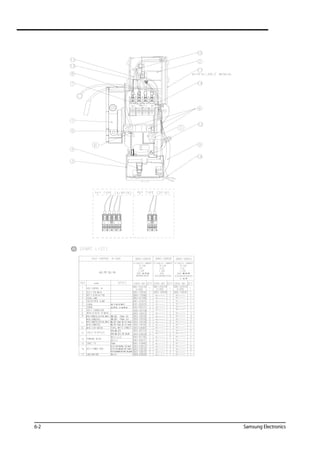
6-2 Samsung Electronics
Samsung Electronics 6-3
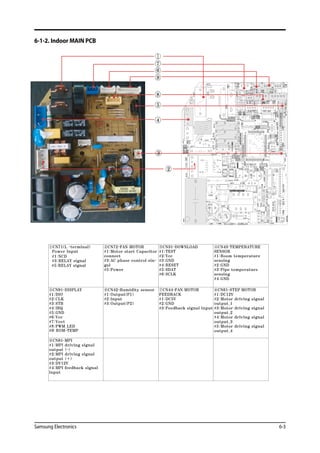
6-1-2. Indoor MAIN PCB
⑨
⑧
⑥
⑤
④
③
②
⑦
①CN71(L -terminal)
Power Input
②CN72-FAN MOTOR
#1:Motor
#1:NCD
start Capacitor
connect
#3:AC#3:RELAY signal phase control sin-
gal
#5:Powe
#5:RELAY signal
r
③CN31-DOWNLOAD
#1:TEST
#2:Vcc
#3:GND
#4:RESET
#5:SDAT
#6:SCLK
④CN43-TEMPERATURE
SENSOR
#1:Room temperature
sensing
#2:GND
#3:Pipe temperature
sensing
#4:GND
⑤CN91-DISPLAY
#1:DIO
#2:CLK
#3:STB
#4:IRQ
#5:GND
#6:Vcc
#7:Vovt
#8:PWM_LED
#9: ROM-TEMP
⑥CN42-Humidity sensor
#1:Output(P1)
#2:Input
#3:Output(P2)
⑦CN44-FAN MOTOR
FEEDBACK
#1:DC5V
#2:GND
#3:Feedback signal input
⑧CN61-STEP MOTOR
#1:DC12V
#2:Motor driving signal
output_1
#3:Motor driving signal
output_2
#4:Motor driving signal
output_3
#5:Motor driving signal
output_4
⑨CN81-MPI
#1:MPI driving signal
output (-)
#2:MPI driving signal
output (+)
#3:DV12V
#4:MPI feedback signal
input
6-4 Samsung Electronics
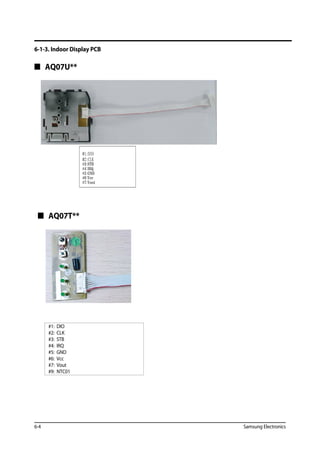
6-1-3. Indoor Display PCB
#1: DIO
#2: CLK
#3: STB
#4: IRQ
#5: GND
#6: Vcc
#7: Vout
#9: NTC01
#3:STB
#4:IRQ
#5:GND
#6:Vcc
#7:Voot
#2:CLK
#1:DIO
 AQ07U**
 AQ07T**
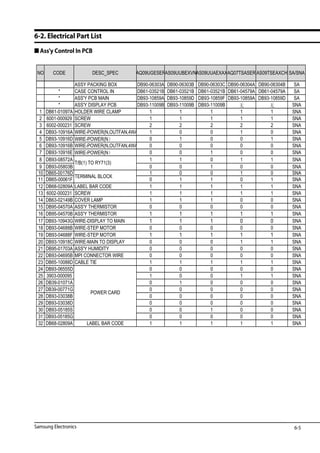
6-2. Electrical Part List
 Ass'y Control In PCB
ASSY PACKING BOX DB90-06303A DB90-06303B DB90-06303C DB90-06304A DB90-06304B SA
AS09UUBEXVNAS09UUAEXAXAQ07TSASER AS09TSEAXCH SA/SNANO CODE DESC_SPEC AQ09UGESER
* CASE CONTROL IN DB61-03521B DB61-03521B DB61-03521B DB61-04579A DB61-04579A SA
* ASS'Y PCB MAIN DB93-10859A DB93-10859D DB93-10859F DB93-10859A DB93-10859D SA
* ASS'Y DISPLAY PCB DB93-11009B DB93-11009B DB93-11009B SNA
1 DB61 01097A HOLDER WIRE CLAMP 1 1 1 1 1 SNA1 DB61-01097A HOLDER WIRE CLAMP 1 1 1 1 1 SNA
2 6001-000929 SCREW 1 1 1 1 1 SNA
3 6002-000231 SCREW 2 2 2 2 2 SNA
4 DB93-10916A WIRE-POWER(N OUTFAN 4WA 1 0 0 1 0 SNA4 DB93-10916A WIRE-POWER(N,OUTFAN,4WA 1 0 0 1 0 SNA
5 DB93-10916D WIRE-POWER(N 0 1 0 0 1 SNA
6 DB93-10916B WIRE-POWER(N,OUTFAN,4WA 0 0 0 0 0 SNA
7 DB93-10916E WIRE-POWER(N 0 0 1 0 0 SNA(
8 DB93-08572A 1 1 0 1 1 SNA
9 DB93-05803B 0 0 1 0 0 SNA
10 DB65-00176D 1 0 0 1 0 SNA
11 DB65 00061F 0 1 1 0 1 SNA
TERMINAL BLOCK
T/B(1) TO RY71(3)
11 DB65-00061F 0 1 1 0 1 SNA
12 DB68-02809A LABEL BAR CODE 1 1 1 1 1 SNA
13 6002-000231 SCREW 1 1 1 1 1 SNA
14 DB63-02149B COVER LAMP 1 1 1 0 0 SNA
TERMINAL BLOCK
14 DB63-02149B COVER LAMP 1 1 1 0 0 SNA
15 DB95-04570A ASS'Y THERMISTOR 0 0 0 0 0 SNA
16 DB95-04570B ASS'Y THERMISTOR 1 1 1 1 1 SNA
17 DB93-10943G WIRE-DISPLAY TO MAIN 1 1 1 0 0 SNA
18 DB93-04688B WIRE-STEP MOTOR 0 0 0 0 0 SNA
19 DB93-04688F WIRE-STEP MOTOR 1 1 1 1 1 SNA
20 DB93-10918C WIRE-MAIN TO DISPLAY 0 0 0 1 1 SNA
21 DB95 01703A ASS'Y HUMIDITY 0 0 0 0 0 SNA21 DB95-01703A ASS'Y HUMIDITY 0 0 0 0 0 SNA
22 DB93-04695B MPI CONNECTOR WIRE 0 0 0 0 0 SNA
23 DB65-10088D CABLE TIE 1 1 1 1 1 SNA
24 DB93-06555D 0 0 0 0 0 SNA24 DB93-06555D 0 0 0 0 0 SNA
25 3903-000095 1 0 0 1 1 SNA
26 DB39-01071A 0 1 0 0 0 SNA
27 DB39-00771G 0 0 0 0 0 SNA
POWER CARD
39 00 G 0 0 0 0 0 S
28 DB93-03038B 0 0 0 0 0 SNA
29 DB93-03038D 0 0 0 0 0 SNA
30 DB93-05185S 0 0 1 0 0 SNA
31 DB93 05185G 0 0 0 0 0 SNA
POWER CARD
31 DB93-05185G 0 0 0 0 0 SNA
32 DB68-02809A LABEL BAR CODE 1 1 1 1 1 SNA
6-5Samsung Electronics
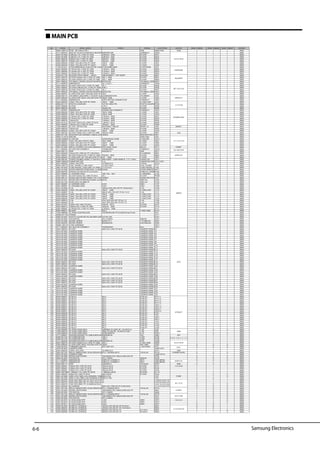
 MAIN PCB
Samsung Electronics
1 DB41-00971A PCB 90*120mm,FR-1 PCB MAIN PCB PCB 1 1 1 SNA
2 3711-004379 BOX,4P,1R,2mm,STRAIGHT,SN,WHT SMW200-04P CONNECT CN43 1 1 1 SNA
3 2007-001068 6.8Kohm,1%,1/10W,TP,1608 6.8Kohm 1608 R-CHIP R401 1 1 1 SNA
4 2007-001068 6.8Kohm,1%,1/10W,TP,1608 6.8Kohm 1608 R-CHIP R402 1 1 1 SNA
NO CODE DESC_SPEC PARA1 PARA2 LOCATION BLOCK DB93-10859A DB93-10859D DB93-10859F SA/SNA
4 2007-001068 6.8Kohm,1%,1/10W,TP,1608 6.8Kohm 1608 R-CHIP R402 1 1 1 SNA
5 2007-000076 330ohm,5%,1/10W,TP,1608 330ohm 1608 R-CHIP R403 1 1 1 SNA
6 2007-000076 330ohm,5%,1/10W,TP,1608 330ohm 1608 R-CHIP R404 1 1 1 SNA
7 2203-005249 100nF,10%,50V,X7R,TP,100nF 100nF 1608 C-CHIP C401 1 1 1 SNA
8 2203-005249 100nF,10%,50V,X7R,TP,100nF 100nF 1608 C-CHIP C402 1 1 1 SNA
9 1103-001431 AT24C08BN,8Kbit,1Kx8,SOP,8P,4.9x3AT24C08BN,8Kbit IC-EEPROM IC03 1 1 1 SNA
10 2007-000084 4.7Kohm,5%,1/10W,TP,1608 4.7Kohm 1608 R-CHIP R502 1 1 1 SNA
11 2007-000084 4.7Kohm,5%,1/10W,TP,1608 4.7Kohm 1608 R-CHIP R503 1 1 1 SNA
12 2007-000084 4.7Kohm,5%,1/10W,TP,1608 4.7Kohm 1608 R-CHIP R504 1 1 1 SNA
13 3002-001129 BUZZER-PIEZO;85DB,-,-,2KHZ,- CBE2220BPC / TDP-2020P BUZZER BZ61 1 1 1 SNA
14 2007-000076 R-CHIP;330ohm,5%,1/10W,TP,1608 330-J 1608 R-CHIP R601 1 1 1 SNA
15 2007-000076 R-CHIP;330ohm,5%,1/10W,TP,1608 330-J 1608 R-CHIP R602 1 1 1 SNA
16 0501-000534 TR-SMALL SIGNAL;2SC2412K,NPN,2 2SC2412K TR-SMALL SIGNQ601 1 1 1 SNA
17 3711-000879 SMW250-03 AC CONNECT CN44 1 1 1 SNA
18 2007-000078 R-CHIP;1Kohm,5%,1/10W,TP,1608 1K-J R-CHIP R405 1 1 1 SNA
19 2007-000087 R-CHIP;6.8Kohm,5%,1/10W,TP,1608 6.8K-J R-CHIP R406 1 1 1 SNA
20 2007-000078 R-CHIP;1Kohm,5%,1/10W,TP,1608 1K-J R-CHIP R407 1 1 1 SNA
21 0501-000534 TR-SMALL SIGNAL;2SC2412K,NPN,2 2SC2412K TR-SMALL SIGNQ401 1 1 1 SNA
22 2203-000257 C-CER,CHIP;10nF,10%,50V,X7R,TP,110nF C-CHIP C403 1 1 1 SNA
23 0506-000175 TR-ARRAY;2003,NPN,7,1W,SOP-16,SULN2003D013TR TR-ARRAY IC05 1 1 1 SNA
24 2203-005249 C-CER,CHIP;100nF,10%,50V,X7R,TP,100nF,1608 C-CHIP C504 1 1 1 SNA
25 3711-004484 SMW200-05 STEP MOTOR CONNECTOR CONNECT CN61 1 1 1 SNA
26 2203-005249 100nF,10%,50V,X7R,TP,100nF 100nF 1608 C-CER,CHIP C201 1 1 1 SNA
27 0604-001172 PHOTO-COUPLER TLP181-GRH-TPL PHOTO-COUPLEPC02 1 1 1 SNA
28 2007-000084 R-CHIP 4.7K-J R-CHIP R205 1 1 1 SNA
29 2007-000078 R-CHIP 1Kohm 5% R-CHIP R206 1 1 1 SNA
EEPROM
BUZZER
AC
2003
29 2007-000078 R-CHIP 1Kohm,5% R-CHIP R206 1 1 1 SNA
30 3711-007067 SMW200-06 DOWNLOAD CONNECT CONNECT CN31 1 1 1 SNA
31 2203-005249 100nF,10%,50V,X7R,TP,1608 100nF,1608 C-CHIP C301 1 1 1 SNA
32 2203-005249 100nF,10%,50V,X7R,TP,1608 100nF,1608 C-CHIP C303 1 1 1 SNA
33 2007-000084 4.7Kohm,5%,1/10W,TP,1608 4.7Kohm 1608 R-CHIP R301 1 1 1 SNA
34 2007-000084 4.7Kohm,5%,1/10W,TP,1608 4.7Kohm 1608 R-CHIP R302 1 1 1 SNA
35 2007-000078 1Kohm,5% 1.0Kohm 1608 R-CHIP R304 1 1 1 SNA
36 2007-001318 R-CHIP;1Kohm,5%,1/4W,TP,3216 1.0Kohm 3216 R-CHIP R305 1 1 1 SNA
37 2007-000090 10Kohm,5%,1/10W,TP,1608 10Kohm 1608 R-CHIP R306 1 1 1 SNA
38 1203-006245 IC-VOL. DETECTOR KIA7033AT,TSM,3P RESET IC IC06 RESET 1 1 1 SNA
39 2007-000078 1Kohm,5% 1.0Kohm 1608 R-CHIP R303 1 1 1 SNA
40 2203-005249 100nF,10%,50V,X7R,TP,100nF 100nF 1608 C-CHIP C302 1 1 1 SNA
41 2007-000109 R-CHIP;1Mohm,5%,1/10W,TP,1608 1Mohm,1608 R-CHIP R501 1 1 1 SNA
42 2802-001198 RESONATOR-CERAMIC;10MHZ,0.5%10MHZ RESONATOR-CEX501 1 1 1 SNA
43 DB91-01167A MICOM ASSY-MIC IC04 1 1 1 SNA
44 DB09-00588A IC MICOM S3F84VBXZZ-QT8B IC MICOM IC04-1 1 1 1 SNA
45 2203-000257 10nF,10%,50V,X7R,TP,1608 10nF,1608 C-CHIP C501 1 1 1 SNA
46 2203-005249 100nF,10%,50V,X7R,TP,100nF 100nF 1608 C-CHIP C502 1 1 1 SNA
47 2203-005249 100nF,10%,50V,X7R,TP,100nF 100nF 1608 C-CHIP C503 1 1 1 SNA
48 3501-001268 RELAY-POWER;12V,0.9W,25000mA,SPST,20mS,10mS RELAY RY71 COMP 1 1 1 SNA
49 3711-000262 AC MOTOR CONNECT YW396-05AV CONNECT CN72 1 1 1 SNA
50 3502-000115 SSR AQG22212 SSR SS71 1 1 1 SNA
51 2001-000429 1Kohm,5%,1/8W,AA,TP,1.8x3.2mm R-CARBON R901 1 1 1 SNA
52 2007-000097 R-CHIP;47Kohm,5%,1/10W,TP,1608 47Kohm 1608 R-CHIP R902 1 1 1 SNA
53 2203-000440 C-CER,CHIP;1nF,10%,50V,X7R,TP,161nF 1608 C-CHIP C901 1 1 1 SNA
54 1405 000160 VARISTOR;680V 4500A 17 5x6 5mm TINR14D681 / GNR14D681K 7 5mm VARISTOR VA71 1 1 1 SNA
DOWNLOAD
AC MOTOR
DISPLAY
54 1405-000160 VARISTOR;680V,4500A,17.5x6.5mm,TINR14D681 / GNR14D681K, ,7.5mm VARISTOR VA71 1 1 1 SNA
55 DB67-00942A VARISTOR CAP VARISTOR-CAP VA71-CAP 1 1 1 SNA
56 2301-002032 100nF,10%,275V 12.5X6X12.0 C-FILM XC72 1 1 1 SNA
57 DB27-00017A COIL CHOKE;JL-004-15mH JL-004-15mH COIL CHOKE FT71 1 1 1 SNA
58 3601-001209 FUSE-RADIAL LEAD;250V,1A,TIME-L LT-5-010-H FUSE-RADIAL L F702 1 1 1 SNA
59 0402-001298 DIODE-BRIDGE;DF06S,600V,1A,SMDDF06S DIODE-BRIDGE BD71 1 1 1 SNA
60 2003-000706 47Kohm,5%,2W,AA,TP,4.3x12mm R-METAL OXIDER105 1 1 1 SNA
61 2201-000983 C-CERAMIC,DISC 1NF,10% 2KV C-CERAMIC C103 1 1 1 SNA
62 2007-000781 R-CHIP;33ohm,5%,1/8W,TP,2012 33-J R-CHIP R106 1 1 1 SNA
63 0402-000137 DIODE-RECTIFIER;1N4007,1KV,1A,D 1N4007 DIODE-RECTIFIED101 1 1 1 SNA
64 0402-001427 DIODE-RECTIFIER;ES1D,200V,1A,DOES1D 200V/1A D102 1 1 1 SNA
65 0402-001192 ES2D,200V,2A,SMB,TP 200V,2A D103 1 1 1 SNA
66 2201-000987 C-CERAMIC,DISC 2.2nF 400V C107 1 1 1 SNA
67 2201-000987 C-CERAMIC,DISC 2.2nF 400V C108 1 1 1 SNA
68 2401-001998 C-AL 1000uF,20%,25V,GP,TP,10x20,5mm C-AL C109 1 1 1 SNA
69 2203-005249 100nF,10%,50V,X7R,TP,100nF 100nF 1608 C-CER,CHIP C110 1 1 1 SNA
70 2401-000807 C-AL 220uF,20%,16V,GP,TP,8x11.5,5 C-AL C111 1 1 1 SNA
71 2203-005249 100nF,10%,50V,X7R,TP,100nF 100nF 1608 C-CER,CHIP C112 1 1 1 SNA
72 2203-005249 100nF,10%,50V,X7R,TP,100nF 100nF 1608 C-CER,CHIP C113 1 1 1 SNA
73 2203-005249 100nF,10%,50V,X7R,TP,100nF 100nF 1608 C-CER,CHIP C104 1 1 1 SNA
74 2401-002619 C-AL 47uF,20%,25V,GP,TP,5x11,5 C-AL C105 1 1 1 SNA
75 2401-000480 C-AL 10uF,20%,50V,GP,TP,5x11,5 C-AL C106 1 1 1 SNA
76 2007-001074 6.8ohm,5%,1/8W,TP,2012 6.8ohm 2012 R-CHIP R107 1 1 1 SNA
77 2007-000074 100ohm,5%,1/10W,TP,1608 100ohm 1608 R-CHIP R110 1 1 1 SNA
78 2007-000081 2.7Kohm,5%,1/10W,TP,1608 2.7Kohm 1608 R111 1 1 1 SNA
79 2007 000077 R CHIP 470 J 1/10W 1608 R112 1 1 1 SNA
SMPS
79 2007-000077 R-CHIP 470-J 1/10W,1608 R112 1 1 1 SNA
80 1203-006089 IC-PWM CONTROLLER TOP253PN,DIP,7P,6.35x9.57mm,PLAS IC01 1 1 1 SNA
81 DB26-00115A TRANS ST11 1 1 1 SNA
82 0604-001002 PHOTO-COUPLER;TR,100-600%,200 TLP181-GB PC01 1 1 1 SNA
83 0504-001064 TR-DIGITAL DTC114EKA 200mW Q101 1 1 1 SNA
84 0403-001285 DIODE-ZENER BZX84-C11 11V/350mW ZD01 1 1 1 SNA
85 0403-000258 DIODE-ZENER BZX84C5V6 5.6V/225mW ZD02 1 1 1 SNA
86 DB93-10917A 2 PIN HARNESS CN11 1 1 1 SNA
87 3711-000260 AC MOTOR CONNECT YW396-05AV BLU CN71 1 1 1 SNA
88 2007-000033 R-CHIP 0ohm,5%,1/4W,TP,3216 JUMPER WIRE,RJ2 1 1 1 SNA
89 3812-001283 JUMPER WIRE JUMPER WIRE J3 1 1 1 SNA
90 3812-001283 JUMPER WIRE JUMPER WIRE J4 1 1 1 SNA
91 3812-001283 JUMPER WIRE JUMPER WIRE J5 1 1 1 SNA
92 3812-001283 JUMPER WIRE JUMPER WIRE J6 1 1 1 SNA
93 3812-001283 JUMPER WIRE JUMPER WIRE J7 1 1 1 SNA
94 3812-001283 JUMPER WIRE JUMPER WIRE J8 1 1 1 SNA
95 3812-001283 JUMPER WIRE JUMPER WIRE J9 1 1 1 SNA
96 3812-001283 JUMPER WIRE JUMPER WIRE J10 1 1 1 SNA
97 3812-001283 JUMPER WIRE JUMPER WIRE J11 1 1 1 SNA
98 2007-000033 R-CHIP 0ohm,5%,1/4W,TP,3216 JUMPER WIRE,RJ12 1 1 1 SNA
99 3812-001283 JUMPER WIRE JUMPER WIRE J13 1 1 1 SNA
100 3812-001283 JUMPER WIRE JUMPER WIRE J14 1 1 1 SNA
101 3812-001283 JUMPER WIRE JUMPER WIRE J15 1 1 1 SNA
102 3812-001283 JUMPER WIRE JUMPER WIRE J16 1 1 1 SNA
103 3812-001283 JUMPER WIRE JUMPER WIRE J17 1 1 1 SNA
104 2007 000033 R CHIP 0 h 5% 1/4W TP 3216 JUMPER WIRE RJ18 1 1 1 SNA104 2007-000033 R-CHIP 0ohm,5%,1/4W,TP,3216 JUMPER WIRE,RJ18 1 1 1 SNA
105 2007-000033 R-CHIP 0ohm,5%,1/4W,TP,3216 JUMPER WIRE,RJ19 1 1 1 SNA
106 3812-001283 JUMPER WIRE JUMPER WIRE J20 1 1 1 SNA
107 2007-000033 R-CHIP 0ohm,5%,1/4W,TP,3216 JUMPER WIRE,RJ21 1 1 1 SNA
108 3812-001283 JUMPER WIRE JUMPER WIRE J22 1 1 1 SNA
109 3812-001283 JUMPER WIRE JUMPER WIRE J23 1 1 1 SNA
110 2007-000033 R-CHIP 0ohm,5%,1/4W,TP,3216 JUMPER WIRE,RJ24 1 1 1 SNA
111 3812-001283 JUMPER WIRE JUMPER WIRE J25 1 1 1 SNA
112 2007-000033 R-CHIP 0ohm,5%,1/4W,TP,3216 JUMPER WIRE,RJ26 1 1 1 SNA
113 2007-000033 R-CHIP 0ohm,5%,1/4W,TP,3216 JUMPER WIRE,RJ27 1 1 1 SNA
114 2007-000033 R-CHIP 0ohm,5%,1/4W,TP,3216 JUMPER WIRE,RJ28 1 1 1 SNA
115 3812-001283 JUMPER WIRE JUMPER WIRE J29 1 1 1 SNA
116 2007-000033 R-CHIP 0ohm,5%,1/4W,TP,3216 JUMPER WIRE,RJ30 1 1 1 SNA
117 3812-001283 JUMPER WIRE JUMPER WIRE J31 1 1 1 SNA
118 3812-001283 JUMPER WIRE JUMPER WIRE J32 1 1 1 SNA
119 3812-001283 JUMPER WIRE JUMPER WIRE J33 1 1 1 SNA
120 3812-001283 JUMPER WIRE JUMPER WIRE J34 1 1 1 SNA
121 6042-000001 EYELET 3.0 EYELET RY71-1 1 1 1 SNA
122 6042-000001 EYELET 3.0 EYELET RY71-2 1 1 1 SNA
123 6042-000001 EYELET 3.0 EYELET RY71-3 1 1 1 SNA
124 6042-000001 EYELET 3.0 EYELET RY71-4 1 1 1 SNA
125 6042-000001 EYELET 3.0 EYELET CN71-1 1 1 1 SNA
126 6042-000001 EYELET 3.0 EYELET CN71-3 1 1 1 SNA
127 6042-000001 EYELET 3.0 EYELET CN72-1 1 1 1 SNA
128 6042-000001 EYELET 3.0 EYELET CN72-3 1 1 1 SNA
EYELET
129 6042-000002 EYELET 2.2 EYELET F701 1 1 1 SNA
130 6042-000002 EYELET 2.2 EYELET F701 1 1 1 SNA
131 6042-000002 EYELET 2.2 EYELET CR71 1 1 1 SNA
132 6042-000002 EYELET 2.2 EYELET CR71 1 1 1 SNA
133 6042-000002 EYELET 2.2 EYELET C101 1 1 1 SNA
134 6042-000002 EYELET 2.2 EYELET C101 1 1 1 SNA
135 6042-000002 EYELET 2.2 EYELET C102 1 1 1 SNA
136 6042-000002 EYELET 2.2 EYELET C102 1 1 1 SNA
137 1203-002560 IC-POSI.FIXED REG. NJM7805,TO-220F,3P,-,PLASTIC,4. 1.5A IC02 0 0 0 SNA
138 1203-000274 IC-POSI.FIXED REG. 7805,TO-220,3P,-,PLASTIC,4.8/5 1.0A IC02 1 1 1 SNA
139 1203-000429 IC-POSI.FIXED REG. KA78L05AZTA 0.1A IC02-1 0 0 0 SNA
140 3711-000941 HEADER-BOARD TO CABLE;BOX,4P SMW250-04 YEL CN81 SPI 1 1 1 SNA
141 2002-001104 R-COMPOSITION 12M-J 1/2W R108 1 1 1 SNA
142 2002-001104 R-COMPOSITION 12M-J 1/2W R109 1 1 1 SNA
143 3711-004349 HEADER-BOARD TO CABLE;BOX,3P SMW200-03 NTR CN42 1 1 1 SNA
144 2007-000076 R-CHIP;330ohm,5%,1/10W,TP,1608 330-J 1/10W,1608 R408 1 1 1 SNA
145 2203-005249 C-CER,CHIP;100nF,10%,50V,X7R,TP,100nF 50V,1608 C404 0 0 0 SNA
146 1404-001274 THERMISTOR-NTC NTC-22D-7(F) 1.4A/3100K NTC 0 0 0 SNA
147 3812-001283 JUMPER WIRE JUMP NTC 1 1 1 SNA
148 2301-002032 100nF,10%,275V 12.5X6X12.0 XC71 EMI 1 1 1 SNA
149 3501-001154 RELAY-MINIATURE;12Vdc,200mW,30PCJ-112D3MH,501X 12Vdc,3A RY74 POWER SAVE 0 0 0 SNA
150 3812-001283 JUMPER WIRE JUMP RY74 1 1 1 SNA
151 0401-001099 DIODE-SWITCHING 1N4148WS,75V,150mA,SOD-323,TP D702 0 0 0 SNA
152 0504-001064 TR-DIGITAL DTC114EKA 200mW Q702 0 0 0 SNA
153 3711-003843 SMW200-08 DISPLAY CONNECT WHT CN91(8PIN) 0 0 0 SNA
154 3711-004712 SMW200-09 DISPLAY CONNECT WHT CN91(9PIN) 1 1 1 SNA
155 3502 000115 SSR AQG22212 12Vd /2A SS72 SSR 0 0 0 SNA
EYELET
7805
AGND GAN
NTC
DISPLAY
155 3502-000115 SSR AQG22212 12Vdc/2A SS72 SSR 0 0 0 SNA
156 2007-000481 1Mohm,5%,1/4W,TP,3216 1Mohm,3216 R-CHIP R101 1 1 1 SNA
157 2007-000481 1Mohm,5%,1/4W,TP,3216 1Mohm,3216 R-CHIP R102 1 1 1 SNA
158 2007-000481 1Mohm,5%,1/4W,TP,3216 1Mohm,3216 R-CHIP R103 1 1 1 SNA
159 2007-007385 1.2Mohm,1%,1/4W,TP,3216 1.2Mohm,3216 R-CHIP R113 1 1 1 SNA
160 2007-000033 0ohm,5%,1/4W,TP,3216 0ohm,3216 R-CHIP R104 0 0 0 SNA
161 3601-001288 250V,2.5A,TIME-LAG,CERAMIC-TUBE250V,2.5A F701 FUSE 1 1 0 SNA
162 3601-001336 250V,3.15A,TIME-LAG,CERAMIC,5.25250V,3.15A F701 0 0 1 SNA
163 2401-003763 33uF,20%,450V,GP,TP,16x31.5mm,5mm C102( 1 1 1 SNA
164 2401-003763 33uF,20%,450V,GP,TP,16x31.5mm,5mm C101( 1 1 1 SNA
165 2401-004219 15uF,20%,500V,TP,12.5x20mm,5mm C101-1( 0 0 0 SNA
166 2001-000436 R-CARBON 0ohm,5%,1/4W,AA,TP,2.4x6.4mm J1( 0 0 0 SNA
167 3501-001154 RELAY-MINIATURE;12Vdc,200mW,30PCJ-112D3MH,501X 12Vdc,3A RY73 1 0 0 SNA
168 0401-001099 DIODE-SWITCHING 1N4148WS,75V,150mA,SOD-323,TP D601 1 0 0 SNA
169 0504-001064 TR-DIGITAL DTC114EKA Q602 1 0 0 SNA
170 3501-001154 RELAY-MINIATURE;12Vdc,200mW,30PCJ-112D3MH,501X 12Vdc,3A RY72 1 0 0 SNA
171 0401-001099 DIODE-SWITCHING 1N4148WS,75V,150mA,SOD-323,TP D701 1 0 0 SNA
172 0504-001064 TR-DIGITAL DTC114EKA Q701 1 0 0 SNA
173 2301-001915 C-FILM,LEAD-PPF 1.2uF 450V CR71 1 1 0 SNA
174 2301-001916 C-FILM,LEAD-PPF 2.0uF 450V CR71 0 0 0 SNA
175 2301-001917 C-FILM,LEAD-PPF 4.0uF 450V CR71 0 0 1 SNA
176 2003-001093 R-METAL OXIDE(S) 12Kohm,5%,2W,AA,TP,4x12mm R201 0 0 1 SNA
177 2003-000487 R-METAL OXIDE(S) 12Kohm,5%,2W,AF,TP,3.9x10mm R202 0 0 1 SNA
178 2003-002409 R-METAL OXIDE(S) 24Kohm,5%,2W,AA,TP 4x11mm R201 1 1 0 SNA
179 2003-000598 R-METAL OXIDE(S) 24Kohm,5%,2W,AA,TP 4x12mm R202 1 1 0 SNA
4-WAY
OUT FAN
6-6
Samsung Electronics 6-7
 Display PCB
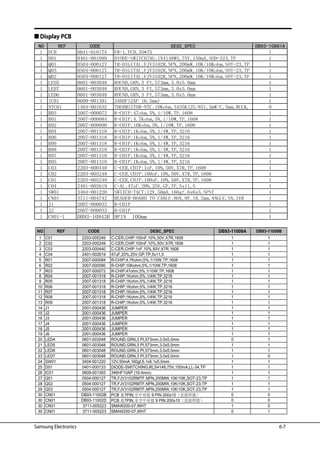
1 C01 2203-005249 C-CER,CHIP;100nF,10%,50V,X7R,1608 1 1
2 C02 2203-005249 C-CER,CHIP;100nF,10%,50V,X7R,1608 1 1
3 C03 2203-000440 C-CER,CHIP;1nF,10%,50V,X7R,1608 1 1
4 C04 2401-002619 47uF,20%,25V,GP,TP,5x11,5 1 1
5 R01 2007-000084 R-CHIP;4.7Kohm,5%,1/10W,TP,1608 1 1
6 R02 2007-000090 R-CHIP;10Kohm,5%,1/10W,TP,1608 1 1
7 R03 2007-000072 R-CHIP;47ohm,5%,1/10W,TP,1608 1 1
8 R04 2007-001318 R-CHIP;1Kohm,5%,1/4W,TP,3216 1 1
9 R05 2007-001318 R-CHIP;1Kohm,5%,1/4W,TP,3216 1 1
10 R06 2007-001318 R-CHIP;1Kohm,5%,1/4W,TP,3216 1 1
11 R07 2007-001318 R-CHIP;1Kohm,5%,1/4W,TP,3216 1 1
12 R08 2007-001318 R-CHIP;1Kohm,5%,1/4W,TP,3216 1 1
13 R09 2007-001318 R-CHIP;1Kohm,5%,1/4W,TP,3216 1 1
14 J1 2001-000436 JUMPER 1 1
15 J2 2001-000436 JUMPER 1 1
16 J3 2001-000436 JUMPER 1 1
17 J4 2001-000436 JUMPER 1 1
18 J5 2001-000436 JUMPER 1 1
19 J6 2001-000436 JUMPER 1 1
20 LED4 0601-003048 ROUND,GRN,3 PI,573mm,3.0x5.0mm 0 1
21 LED5 0601-003048 ROUND,GRN,3 PI,573mm,3.0x5.0mm 1 1
22 LED6 0601-003048 ROUND,GRN,3 PI,573mm,3.0x5.0mm 1 1
23 LED7 0601-003048 ROUND,GRN,3 PI,573mm,3.0x5.0mm 1 0
24 SW01 3404-001220 12V,50mA,160gf,6.1x6.1x5.0mm 1 1
25 D01 0401-000133 DIODE-SWITCHING;RLS4148,75V,150mA,LL-34,TP 1 1
26 IC01 0609-001393 346HF10AP (16.4mm) 1 1
27 Q01 0504-000127 TR,FJV3102RMTF,NPN,200MW,10K/10K,SOT-23,TP 1 1
28 Q02 0504-000127 TR,FJV3102RMTF,NPN,200MW,10K/10K,SOT-23,TP 1 1
29 Q03 0504-000127 TR,FJV3102RMTF,NPN,200MW,10K/10K,SOT-23,TP 1 1
30 CN01 DB93-11002B PCB 7PIN, 9 PIN 200±10 0 0
30 CN01 DB93-11002D PCB 7PIN, 9 PIN 200±10 0 0
30 CN01 3711-005223 SMAW200-07,WHT 1 0
30 CN01 3711-005223 SMAW200-07,WHT 0 1
DB93-11009BNO REF CODE DESC_SPEC DB93-11009A
Samsung Electronics
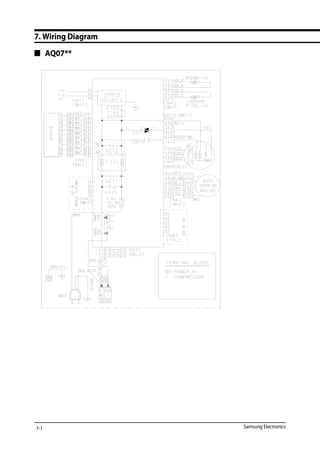
7. Wiring Diagram
 AQ07**
7-1
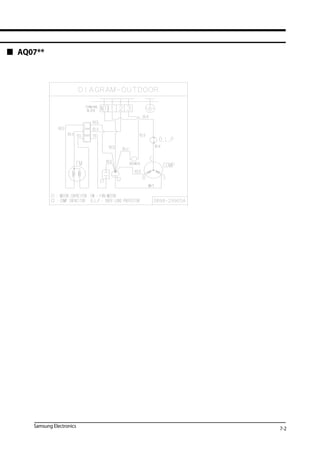
7-2Samsung Electronics
 AQ07**
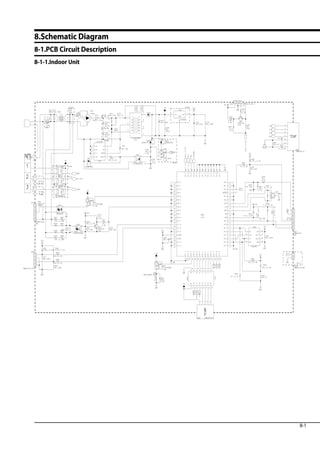
8.Schematic Diagram
8-1.PCB Circuit Description
8-1-1.Indoor Unit
Sam
sung
Confidential
8-1
Samsung Electronics
8-1-2.Display
Samsung Electronics
Samsung
Confidential
8-1.PCB Circuit Description
8-2
Samsung
Confidential
 AQ07T**
 AQ07U**
Samsung Electronics
9-1 Refrigerating Cycle Diagram
9. Reference Sheet
9-1
Cooling
Heating
Gas Leak Check Point
Indoor Unit Outdoor Unit
T1
T2
Heat
Exchanger
(Evaporator)
Heat
Exchanger
(Condenser)
PropellerFan
CrossFan
2 way valve
Capillary tube
Capillary tube
Check valve
※Note
3 way valve 4 way valve
Gas side
Liquid side
Compressor
Samsung Electronics
9-2 Index for Model Name
Model Code
 Project model code for overseas from 2008(For RAC Export Models)
(1) (2) Product Division
AS Cooling Only
AQ Heat Pump
(4) (5) Capacity
09 9,000 Btu
12 12,000 Btu
18 18,000 Btu
24 24,000 Btu
30 30,000 Btu
36 36,000 Btu
(3) Inverter
V Inverter
None Non Inverter
(6) Project classification
A Mont Blanc(Premium)
B BIG
C Max(Smart)
D Mont Blanc(Deluxe)
E Crystal(Vivaldi Deluxe)
F Forte
G GP
H HB
J WW Premium
K Jungfrau-PRM
L Forte Deluxe
M Moderato
N Neo Forte
P Maldives
R Vivaldi Smart
S Forte Smart(SSEC)
T Boracay
U MAX(Standard)
V Vivace
W WW
X Forte Smart (TSE)
Y Jungfrau-DLX
(6-1) Color of Grille
B Black
S Silver
W White
F La Fleur
U Blue
G Grey
(7)VERSION
A-K SSEC
L-S TSE
T-Z SEDA
A S V 1 8 H A M 1 DB
(1)
B 1X
9-2
(2) (3) (4) (5) (6) (6-1) (6-2) (7) (7-1) (7-2) (8) (9) (10)
(6-2) RatingVoltage
A 115V,60Hz
B 220V,60Hz
C 208~230V,60Hz
D 200~220V,50Hz
E 220~240V,50Hz
(8),(9),(10) Buyer Code
MID MIDDLE EASE
SER RUSSIA
Samsung Electronics
9-3 Pressure  Capacity mark
Power/Heat
W cal/s kcal/h Btu/h HP kg.m/s Ib.m/s
1 0.23885 0.85985 3.4121 0.001341 0.10197 0.73756
4.1868 1 3.6 14.286 0.0056146 0.42693 3.088
1.163 0.27778 1 3.9683 0.0015596 0.11859 0.85778
0.29307 0.06999 0.252 1 3.9302x10⁻⁴ 0.029885 0.21616
745.7 178.11 641.19 2,544.4 1 76.04 550
9.8067 2.3423 8.4322 33.462 0.013151 1 7.233
1.3558 0.32383 1.1658 4.6262 0.0018182 0.13826 199
9-3
Samsung Electronics
9-4 Low Refrigerant Pressure Distribution
Note :	• Please measure the refrigerant pressure after the air conditioner operates on testing cooling mode during more than		
10 minutes.
□ Indoor Temp. Variation : 21°C ~ 32°C
□ Outdoor Temp. Variation : 20°C ~ 45°C
3.5
4
4.5
5
5.5
6
6.5
20 25 30 35 40 45
Outdoor temperature[℃]
Ps[fgk/㎠]
Indoor temperature
21℃
27℃
32℃
3.5
4
4.5
5
5.5
6
6.5
20 25 30 35 40 45
Outdoor temperature[℃]
/fgk[sP㎠]
Indoor temperature
21℃
27℃
32℃
3.5
4
4.5
5
5.5
6
6.5
20 25 30 35 40 45
Outdoor temperature[℃]
f/gPs[k㎠]
Indoor temperature
21℃
27℃
32℃
3.5
4
4.5
5
5.5
6
6.5
20 25 30 35 40 45
Outdoor temperature[℃]
Ps[kgf/㎠]
Indoor temperature
21℃
27℃
32℃
**09**
**12**
**18**
**24**
9-4
Samsung Electronics
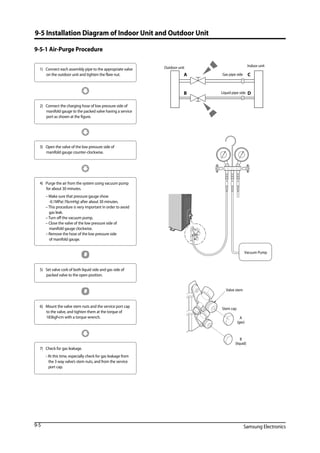
9-5 Installation Diagram of Indoor Unit and Outdoor Unit
9-5-1 Air-Purge Procedure
1)	 Connect each assembly pipe to the appropriate valve
on the outdoor unit and tighten the flare nut.
3)	 Open the valve of the low pressure side of 	
manifold gauge counter-clockwise.
4) 	 Purge the air from the system using vacuum pump 	
for about 30 minutes.
	 – Make sure that pressure gauge show 		
-0.1MPa(-76cmHg) after about 30 minutes.
	 – This procedure is very important in order to avoid 	
gas leak.
	 – Turn off the vacuum pump.
	 – Close the valve of the low pressure side of 	
manifold gauge clockwise.
	 – Remove the hose of the low pressure side 		
of manifold gauge.
7)	 Check for gas leakage.
	 - At this time, especially check for gas leakage from 	
the 3 way valve’s stem nuts, and from the service 	
port cap.
2)	 Connect the charging hose of low pressure side of
manifold gauge to the packed valve having a service
port as shown at the figure.
5)	 Set valve cork of both liquid side and gas side of
packed valve to the open position.
6)	 Mount the valve stem nuts and the service port cap 		
to the valve, and tighten them at the torque of 	
183kgf•cm with a torque wrench.
A
B
C
D
Outdoor unit Indoor unit
Gas pipe side
Liquid pipe side
Vacuum Pump
A
(gas)
B
(liquid)
Valve stem
Stem cap
9-5
Samsung Electronics 9-6
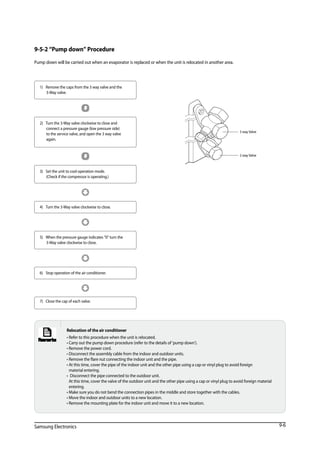
9-5-2 “Pump down” Procedure
Pump down will be carried out when an evaporator is replaced or when the unit is relocated in another area.
1)	 Remove the caps from the 3 way valve and the 		
3-way valve.
3)	 Set the unit to cool operation mode.		
(Check if the compressor is operating.)
4)	 Turn the 3-way valve clockwise to close.
7)	 Close the cap of each valve.
2)	 Turn the 3-way valve clockwise to close and 	
connect a pressure gauge (low pressure side) 		
to the service valve, and open the 3 way valve 	
again.
5)	 When the pressure gauge indicates 0 turn the 		
3-way valve clockwise to close.
6)	 Stop operation of the air conditioner.
3 way Valve
2 way Valve
Relocation of the air conditioner
• Refer to this procedure when the unit is relocated.
• Carry out the pump down procedure (refer to the details of 'pump down').
• Remove the power cord.
• Disconnect the assembly cable from the indoor and outdoor units.
• Remove the flare nut connecting the indoor unit and the pipe.
• At this time, cover the pipe of the indoor unit and the other pipe using a cap or vinyl plug to avoid foreign		
material entering.
• Disconnect the pipe connected to the outdoor unit.							
At this time, cover the valve of the outdoor unit and the other pipe using a cap or vinyl plug to avoid foreign material
entering.
• Make sure you do not bend the connection pipes in the middle and store together with the cables.
• Move the indoor and outdoor units to a new location.
• Remove the mounting plate for the indoor unit and move it to a new location.
Samsung Electronics10-1
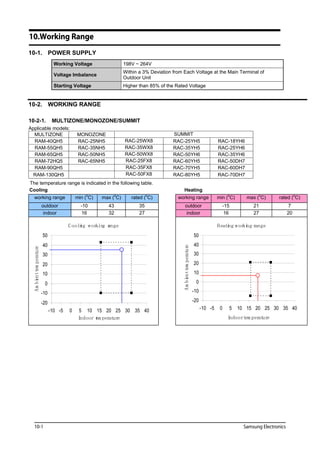
10.Working Range
10-1. POWER SUPPLY
Working Voltage 198V ~ 264V
Voltage Imbalance
Within a 3% Deviation from Each Voltage at the Main Terminal of
Outdoor Unit
Starting Voltage Higher than 85% of the Rated Voltage
10-2. WORKING RANGE
10-2-1. MULTIZONE/MONOZONE/SUMMIT
Applicable models:
MULTIZONE MONOZONE SUMMIT
RAM-40QH5 RAC-25NH5 RAC-25WX8 RAC-25YH5 RAC-18YH6
RAM-55QH5 RAC-35NH5 RAC-35WX8 RAC-35YH5 RAC-25YH6
RAM-65QH5 RAC-50NH5 RAC-50WX8 RAC-50YH6 RAC-35YH6
RAM-72HQ5 RAC-65NH5 RAC-25FX8 RAC-60YH5 RAC-50DH7
RAM-90QH5 RAC-35FX8 RAC-70YH5 RAC-60DH7
RAM-130QH5 RAC-50FX8 RAC-80YH5 RAC-70DH7
gnitaeHgnilooC
working range min (o
C) max (o
C) rated (o
C) working range min (o
C) max (o
C) rated (o
C)
outdoor -10 43 35 outdoor -15 21 7
indoor 16 32 27 indoor 16 27 20
Cooling working range
-20
-10
0
10
20
30
40
50
-10 -5 0 5 10 15 20 25 30 35 40
Indoor tem perature
Ambeitntemperature
Heating working range
-20
-10
0
10
20
30
40
50
-10 -5 0 5 10 15 20 25 30 35 40
Indoortem perature
Ambienttemperature
Samsung Electronics 10-2
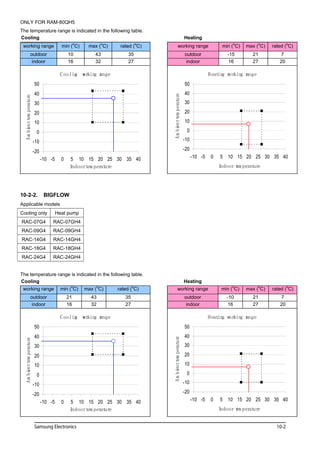
gnitaeHgnilooC
working range min (
o
C) max (
o
C) rated (
o
C) working range min (
o
C) max (
o
C) rated (
o
C)
outdoor 10 43 35 outdoor -15 21 7
indoor 16 32 27 indoor 16 27 20
Cooling working range
-20
-10
0
10
20
30
40
50
-10 -5 0 5 10 15 20 25 30 35 40
Indoortem perature
Ambietntemperature
Heating working range
-20
-10
0
10
20
30
40
50
-10 -5 0 5 10 15 20 25 30 35 40
Indoor tem perature
Ambienttemperature
10-2-2. BIGFLOW
gnitaeHgnilooC
working range min (o
C) max (o
C) rated (o
C) working range min (o
C) max (o
C) rated (o
C)
outdoor 21 43 35 outdoor -10 21 7
indoor 16 32 27 indoor 16 27 20
Cooling working range
-20
-10
0
10
20
30
40
50
-10 -5 0 5 10 15 20 25 30 35 40
Indoortem perature
Ambietntemperature
Heating working range
-20
-10
0
10
20
30
40
50
-10 -5 0 5 10 15 20 25 30 35 40
Indoor tem perature
Ambienttemperature
15-2
This Service Manual is a property of Samsung Electronics Co., Ltd.
Any unauthorized use of Manual can be punished under applicable
International and/or domestic law.
©	Samsung Electronics Co., Ltd. Dec. 2010.	
GSPN(Global Service Partner Network)
Area Web Site
North America http://service.samsungportal.com
Latin America http://latin.samsungportal.com
CIS http://cis.samsungportal.com
Europe http://europe.samsungportal.com
China http://china.samsungportal.com
Asia http://asia.samsungportal.com
Mideast  Africa http://mea.samsungportal.com

(Sm) aq07 tsbnser eng

  • 1.
    Refer to theservice manual in the GSPN(see the rear cover) for the more information. AIR CONDITIONER CONTENTS SPLIT-TYPEAIR CONDITIONER Basic : AQ09RAN(X)SER Model: AQ07**SER Model Code : AQ07TSBN(X)SER  good' sleep Mode  Catechin Filter  Silver Nano Evaporator  Deodorizing Filter  Anti-Bacterial Cross Fan AQ07TSBNSER AQ07TSBXSER
  • 2.
    Operating Instructions andInstallation Samsung Electronics Contents 11. Precautions ......................................................................................................................................... 1-1 1-1 Precautions for the Service .............................................................................................................. 1-1 1-2 Precautions for the Static Electricity and PL ................................................................................. 1-1 1-3 Precautions for the Safety ................................................................................................................ 1-2 12. Product Specifications ................................................................................................................ 2-1 2-1 The Feature of Product ..................................................................................................................... 2-1   2-1-1 The Feature of Product ............................................................................................................ 2-1   2-1-2 Modified items compared with Basic model ...................................................................... 2-2 2-2 The Comparative Specifications of Product ................................................................................. 2-3 2-3 Accessory and Option Specifications ............................................................................................ 2-5   2-3-1 Accessories ................................................................................................................................ 2-4   2-3-2 Filter ............................................................................................................................................ 2-5 2-3-3 Accessories................................................................................................................................. 2-6 2-4 Details for Operation Property ........................................................................................................ 2-7 13. Disassembly and Reassembly ............................................................................................... 3-1 3-1 Indoor Unit .......................................................................................................................................... 3-2 3-2 Outdoor Unit ...................................................................................................................................... 3-9 14. Troubleshooting ............................................................................................................................. 4-1 4-1 Setting Option Setup Method ........................................................................................................ 4-1 4-2 Display Error and Check Method ................................................................................................... 4-3   4-2-1 Display Error mode .................................................................................................................. 4-3 4-3 Fault Diagnosis by Symptom ......................................................................................................... 4-4   4-3-1 Indoor Temperature Sensor ErrorWhen is diplayed ........................................ 4-4   4-3-2 Indoor Heat Exchanger Temperature Sensor ErrorWhen is diplayed .......... 4-5   4-3-3 Indoor Fan Motor Speed Detecting ErrorWhen is diplayed .......................... 4-6 4-3-4 EEPROM Error or Option Error ............................................................................................... 4-7 4-3-5 MPI Feedback ErrorWhen E186 is displayed .................................................................. 4-7   4-3-6 No Power (completely dead)-Initial diagnosis (Not displayed) ....................................... 4-8   4-3-7 WhentheUp/DownLouverMotorDoesNotOperate.(InitialDiagnosis)(Notdisplayed) ....... 4-9   4-3-8 When the remote control is not receiving .......................................................................... 4-9 4-4 PCB Inspection Method ................................................................................................................... 4-10   4-4-1 Pre-inspection Notices.............................................................................................................................. 4-10   4-4-2 Inspection Procedure................................................................................................................................ 4-10   4-4-3 Indoor Detailed Inspection Procedure.............................................................................................. 4-10 4-5 Main Part Inspection Method ......................................................................................................... 4-11
  • 3.
    Samsung Electronics Contents 15. Exploded Views and Parts List .............................................................................................. 5-1 5-1 Indoor Unit .......................................................................................................................................... 5-1 5-2 Outdoor Unit ...................................................................................................................................... 5-3 16. PCB Diagram and Parts List .................................................................................................... 6-1 6-1. Block Diagram ................................................................................................................................... 6-1   6-1-1. Ass'y Control In.......................................................................................................................................... 6-1 6-1-2. Indoor Main PCB........................................................................................................................................ 6-3   6-1-3. Indoor Display PCB.................................................................................................................................... 6-4 6-2. Electrical Parts List ............................................................................................................................ 6-5 17. Wiring Diagram ............................................................................................................................... 7-1 18. Schematic Diagram ....................................................................................................................... 8-1 8-1.PCB Circuit Description ..................................................................................................................... 8-1   8-1-1.Indoor Unit..................................................................................................................................................... 8-1   8-1-2.Display............................................................................................................................................................. 8-2 19. Reference Sheet............................................................................................................................... 9-1 9-1 Refrigerating Cycle Diagram ........................................................................................................... 9-1 9-2 Index for Model Name ...................................................................................................................... 9-2 9-3 Pressure Capacity mark ................................................................................................................ 9-3 9-4 Low Refrigerant Pressure Distribution .......................................................................................... 9-4 9-5 Installation Diagram of Indoor Unit and Outdoor Unit .............................................................. 9-5 10.Woking Range...................................................................................................................................... 10-1 10-1 Power Supply ................................................................................................................................... 10-1 10-2 Working Range ................................................................................................................................ 10-1 10-2-1 MULTIZONE/MONOZONE/SUMMIT .................................................................................. 10-1 10-2-2 BIGFLOW................................................................................................................................. 10-2
  • 4.
    Samsung Electronics 1-1 1.Precautions 1-1 Precautions for the Service  Use the standard parts when replacing the electric parts. - Confirm the model name, rated voltage, rated current of the electric parts.  Repair the disconnection of HARNESS securely when repairing the break down. - If there is any connection error, it causes an abnormal noise and incorrect operation.  In case that you assemble or disassemble the products with laying it on the side, do work on the work cloth. - If not, the exterior of products can be scratched.  Removedustandforeignmaterialsfromharness,connectionpart,andinspectionpartthoroughlywhenrepairingthebreakdown. - It protects the danger of fire such as tracking and short.  Tighten tightly the service valve of outdoor unit and the cap of charging valve with a monkey spanner.  Check the assembly status of parts after repairing the break down. - It should be same as the status before repairing. 1-2 Precautions for the Static Electricity and PL  As the PCB power terminal has a weakness for the static electricity, pay attention to it during the repair and measurement. - Work with insulation gloves during the repair and measurement of PCB.  Check the distance between the product and the other electronic appliances such asTV,Video, and audio. It should be over 2m. - If not, it causes a bad picture quality or a noise.  Repairing the products by consumer should be strictly prohibited. - There is a danger of electric shock or fire due to incorrect disassembly.
  • 5.
    1-2 Samsung Electronics 1-3Precautions for the Safety  Do not pull any electric wires and do not touch an auxiliary power switch with a wet hand. - There is a danger of electric shock or fire.  In case any wire or power plug has been damaged, replace it to eliminate any possible danger.  Do not bend the power cord by force and do not put any heavy object on the power cord. - There is a danger of electric shock or fire.  Do not use multi socket. - There is a danger of electric shock or fire.  Ground the product if necessary. - Be sure to ground the product if there is any danger of electric leakage due to water or moisture.  Be sure to turn off the auxiliary power switch or pull out the power plug during replacement or repair of electric parts. - There is a danger of electric shock.  In case the product will not be in use for a long time, the battery of remote control should be kept separately. - Leakage of inside fluid can cause break down of remote control.
  • 6.
    Samsung Electronics 2-1 2.Product Specifications 2-1 The Feature of Product  good' sleep Mode good’sleep mode can help you sleep quickly and soundly and wake up refreshed.  Catechin Filter Catechin,extracted from the green tea,is contained in the filter and deactivates captured bacteria and unpleasant odors.  Silver Nano Evaporator  Deodorizing Filter Activated carbon is incorporated in the filter,efficiently absorbing cigarette smoke, pet odors, and other unpleasant smells, replacing them with clean,refreshing air.  Anti-Bacterial Cross Fan 2-1-1 The Feature of Product
  • 7.
    2-2 Samsung Electronics 2-1-2Modified items compared with Basic model Modified part New contents and characteristic Basic model New model AQ09RAN(X)SER AQ07TSBN(X)SER Indoor Indoor Design changed Front Display changed Outdoor chassis changed
  • 8.
    Samsung Electronics 2-3 2-2The Comparative Specifications of Product Comparative Model AQ07TSBSER WALL MOUNTED WALL MOUNTED KW - - BTU/h 2.05/2.1 9000/9500 kcal - - I/h - - Noise Indoor/outdoor dB(H/L) 40/55 40/55 Cooling/Heating (ISO) Btu/w·h 10 9.05/10.22 Cooling/Heating (SASO) Btu/w·h - ph/V/HZ Cooling/Heating (ISO) W 635/581 995/930 Cooling/Heating SASO) Btu/w·h - - Cooling/Heating (ISO) A 2.9/2.8 Cooling/Heating (SASO) A - - Power factor Cooling/Heating % 95/93 A 21 21 Length m 2 2 Number of core wir - 5 5 Capacity A 10 10 Indoor 728*255*175 728*255*185 Outdoor 660*242*475 660*242*475 Indoor 6.6 Outdoor 21.2 liquid 9.52*4850 9.52*4850 gas 6.35*4850 6.35*4850 D*L(mm) 18*2000 18*2000 Φ7.0, 2Rx10Sx540 Φ7.0, 1Rx20Sx667 g R410A 600 cc 340 340 Capillary tube Capillary tube UG4C065JUAEB, Rotary KA-125-LYB0927PB - INDOOR UNIT: 16°C to 32°C , OUTDOOR UNIT: 15°C to 43°C type MODEL ITEM Development Model Design Indoor Unit Outdoor Unit performance Cooling/Heating(ISO) EER Power Cooling/Heating(SASO) Dehumidifying power Power consumptio Operating current Starting current Power cord size Outer Dimension W*H*D(mm) Refrigerant pipe weight(net) kg Drain Hose D*L(mm) Heat exchanger Indoor Outdoor Refrigerant Freezer oil capacity Refrigerant Control unit Compressor Cooling Test Condition Protection device(OLP) Air purifying system INDOOR UNIT: DB27°C/WB19°C , OUTDOOR UNIT: DB35°C/WB24°C Heating operating condition Cooling operating condition Φ7.0,2R*10S*540 - RBC12166-12510,2stage INDOOR UNIT: 27°C or less , OUTDOOR UNIT: -5°C to 24°C 44B102DXEEL, Rotary - 220~240V / 50Hz AQ09RASER 4.6/4.2 97/97 6.8 25 Φ7.0, 1Rx20(21)Sx667 R22 500 220~240V / 50Hz
  • 9.
    2-4 Samsung Electronics 2-3Accessory and Option Specifications 2-3-1 Accessories Item Descriptions Code-No. Q'TY Remark Plate-hanger DB90-03727A 1 Indoor Unit Remote Control DB93-11115K 1 Batteries for Remote Control DB47-90024A 2 OWNER'S INSTRUCTIONS MANUAL DE INSTRUCCIONES ISTRUZIONI PER L'USO MANUAL DE INSTRU‚ÍES MANUEL D'UTILISATION GEBRAUCHSANWEISUNG Splut-type Room Air Conditioner Aire acondicionado domŽstico sistema Split Condizionatore d'aria per ambienti ad unitˆ Separate Aparelho de ar condicionado tipo Split Climatiseur de type sŽparŽ Geteilte raumklimaanlag e User And Installation Manual DB98-32707A) 1 2-3-2 Filter Image Part name Code no Remark FILTER-PRE DB63-02756A Wash in water
  • 10.
    Samsung Electronics 2-5 2-3Accessory and Option Specifications 2-3-3 Accessories Item Descriptions Code-No. Q'TY Remark Rubber Leg DB73-20134A 4 Outdoor Unit Drain Plug DB67-20011A 1
  • 11.
    2-6 Samsung Electronics 2-4Details for Operation Property 1 AUTO MODE : In this mode, operation mode (COOL,HEAT) is selected automatically by the room temperature of initial operation. (Set Temp. : 24°C) 2 COOL MODE : The unit operates according to the difference between the setting and room temperature.(16°C ~ 30°C) 3 HEAT MODE : The unit operates according to the difference between the setting and room temperature.(16°C ~ 30°C) *Prevention against cold wind : In order to prevent the cool air from flowing out at the heat mode, the indoor fan does not operate or orperates very slowly in the following cases. At this time, the indoor heat exchanger will be preheating. - For 3~5 minutes after the initial operation - For deicing operation - The operation of an indoor fan in accordance with the temperature of an indoor heat exchanger. *High temperature release function: It is a function to detect an outdoor overload by the sensor of an indoor exchanger and to turn the outdoor fan or the compressor ON/OFF for safety. *Deice : Deicing opertion is controlled by indoor unit's heat exchanger temperature and accumulating time of compressor's operation. Deice ends by sensing of the processing time by deice condition. 4 DRY MODE : Has 3 states, each determined by room temperature. The unit operates in DRY mode. *Compressor ON/OFF time is controlled compulsorily (can not set up the fan speed, always breeze) *Protective function : Low temperature release. (Prevention against freeze) 9 EVAP. CLEAN MODE : The unit operates according to the below. *When the air conditioner is turned off. The Evaporator clean indicator on the indoor unit display appears and the Evaporator cleaning function runs. *When the air conditioner is turned on. The Evaporator clean indicator on the indoor unit display appears and the Evaporator cleaning function runs after stopping the air conditioner operation. *Evaporator cleaning time can vary, depending on the previously used mode. 1) Auto(COOL),COOL,DRY MODE : approximately 30 minutes. 2) Auto(HEAT),HEAT,FAN MODE : approximately 15 minutes. 6 GOOD'SLEEP MODE : Default good'sleep time is set to 8 hours. But the good'sleep time can be set up to 12 hours, increasing in 30 minute unit up to first 3 hours and in hourly unit after first 3 hours. *Temperature/Fan speed/Air swing can be adjusted after setting good'sleep in HEAT MODE. *Temperature can be adjusted and the air conditioner automatically adjusts Fan speed/Air swing after setting good'sleep in COOL MODE. 7 FAN SPEED : Manual (3step),Auto (4 step) Fan speed automatically varies depending on both the difference between setting and the room temperature. 8 COMPULSORY OPERATION : For operating the air conditioner without the remote control. *The air conditioner starts up in the most suitable mode for the room temperature. 5 TURBO MODE : This mode is available in AUTO, COOL,HEAT,DRY,FAN MODE. When this button is pressed at first, the air conditioner is operated powerful state for 30 minutes regardless of the set temperature, room termperature. When this button is pressed again, or when the operating time is 30 minutes, turbo operation mode is canceled and returned to the previous mode. *But, if you press the TURBO button in DRY or FAN mode that is changed with AUTO mode automatically. The temperature of indoor heat exchanger indoor fan speed below 28°C off 28°C~below 34°C LL speed 34°C~below 40°C L speed above 40°C Setting speed Option Mode Heat pump option selected Auto mode Cooling only option selected Cooling mode
  • 12.
    Samsung Electronics 3-1 3.Disassembly and Reassembly  Necessary Tools Item Remark +SCREW DRIVER MONKEY SPANNER
  • 13.
    Operating Instructions andInstallation 3-2 Samsung Electronics 3-1 Indoor Unit No Parts Procedure Remark 1 PANEL-FRONT 1) Stop the driving of air conditioner and shut off main power supply. 2) Open the FRONT-GRILLE and pull out from the PANEL-FRONT. 3) Detach COVER-TERMINAL from the PANEL- FRONT.(use + Screw Driver) 4) Loosen connector wire(white) and detach the temperature sensor wire. 5) To detach the FRONT-PANEL the main frame, unfasten 2 screw at the bottom.(use + Screw Driver) 6) Take off the FRONT-PANEL,lifting up the bottom.
  • 14.
    Operating Instructions andInstallation Samsung Electronics 3-3 No Parts Procedure Remark 2 TRAY DRAIN 1) Loosen stepping motor wire and detach the hook of main frame. 2) To detach TRAY-DRAIN from the main frame, pull the bottom of the TRAY-DRAIN towards you. 3 CONTROL IN 1) Unfasten the earth screw.(use + Screw Driver) 2) Detach the temperature sensor and Humidity sensor. 3) Detach COVER-CONTROL from the CASE- CONTROL. 4) Loosen MPI connector wire(yellow), and MOTOR wires(white,blue). 5) Take off the CASE-CONTROL from the main frame.
  • 15.
    Operating Instructions andInstallation 3-4 Samsung Electronics No Parts Procedure Remark 4 PBA 1) Unfasten the screw. 2) Cut the cable tie. 3) Loosen the terminal block wires. (Total 4EA: #N(1)-2EA, #2-1EA, #3-1EA)  Caution: The terminal is the locking type. So, when you separate terminals, pull pressing the button. Button
  • 16.
    Operating Instructions andInstallation Samsung Electronics 3-5 No Parts Procedure Remark 4 PBA 4) Loosen the Motor Feedback connector(CN44).  Caution: When you separate the connector, pull pressing the locking button. 5) Loosen the Humidity sensor connector(CN42).  Option connector.  Caution: When you separate the connector, pull pressing the locking button. 6) Loosen the MPI connector(CN81).  Option connector.  Caution: When you separate the connector, pull pressing the locking button. 7) Loosen the Relay #4 blue-connector(RY71).  Caution: The terminal is locking type. So, when you separate terminals, pull pressing the button. Button
  • 17.
    Operating Instructions andInstallation 3-6 Samsung Electronics No Parts Procedure Remark 4 PBA 8) Loosen the Relay #3 red-connector(RY71).  Caution: The terminal is locking type. So, when you separate terminals, pull pressing the button. 9) Loosen the Step motor connector.  Caution: When you separate the connector, pull pressing the locking button. 10) Loosen the Thermistor wire connector(CN43).  Caution: When you take off the PBA, don’t touch the components. Please hold the PBA both side. 11) Loosen the Motor connector(CN71).  Caution: When you separate the connector, pull pressing the locking button. 12) Take off the main PBA from the ASS’Y Control in.  Caution: When you take off the PBA, don’t touch the components. Please hold the PBA both side. Button
  • 18.
    Operating Instructions andInstallation Samsung Electronics 3-7 No Parts Procedure Remark 5 EVAPORATOR 1) Unfasten the screw at the right side. (use + Screw Driver) 2) Unfasten the screw at the left side. (use + Screw Driver) 3) Detach the HOLDER PIPE. 4) Take off the EVAPORATOR from the main frame.
  • 19.
    3-8 Samsung Electronics NoParts Procedure Remark 6 FAN MOTOR CROSS FAN 1) Unfasten the screw in the HOLDER-EVAP on the left side of evaporator.(use + Screw Driver) 2) unfasten the 3 points screws in the CASE- CONTROL, and then detach the CASE. (use + Screw Driver) 3) unfasten the screw a little.(use + Screw Driver) 4) Lift up the evaporator slightly and pull the CROSS-FAN to the left side. Operating Instructions and Installation
  • 20.
    Operating Instructions andInstallation Samsung Electronics 3-9 3-2 Outdoor Unit No Parts Procedure Remark 1 Common Work 1) Loosen 2 fixing screws and separate the Cover Terminal. 2) Loosen 2 fixing screws and separate the Cover Control. 3) Separate the connection wire from the Terminal Block. 4) Loosen 6 fixing screws and separate the Cabinet Front. 5) Loosen 1 fixing screw of Ass’y E-part. 6) Loosen 12 fixing screws and separate the Cabinet-Side
  • 21.
    3-10 Samsung Electronics NoParts Procedure Remark 2 Fan Motor 1) Remove the Nut Flange. (Turn to the clockwise) 2) Separate the Fan. 3) Loosen 4 fixing screws to separate the Motor. 4) Loosen 2 fixing screws and separate the Motor Bracket from the Base. 3 Heat Exchanger 1) Loosen 2 fixing screws of left and right side. 2) Disassemble the inlet and outlet pipe by welding. 3) Separate the Heat Exchanger. Before you disassemble the pipes and Condenser, be sure that there should be no refrigerant remained in the unit. 4 Compressor 1) Open the Terminal Cover of Compressor and unscrew the Connection Terminal. 2) Disassemble the inlet and outlet pipe of Compressor by welding. 3) Loosen 3 bolts of the lower part. 4) Separate the Compressor. Operating Instructions and Installation
  • 22.
    Samsung Electronics 4-1 4-1Setting Option Setup Method 4. Troubleshooting SEG21 SEG22 SEG23 SEG24SEG16 SEG17 SEG18 SEG19 SEG20SEG11 SEG12 SEG13 SEG14 SEG15SEG6 SEG7 SEG8 SEG9 SEG10SEG1 SEG2 SEG3 SEG4 SEG5 NOTE: SEG1,SEG7,SEG13,SEG19 need not to be pressed in,so in fact the Option No.we should press in is as below.
  • 23.
    4-2 Samsung Electronics 4-1Setting Option Setup Method(continue)
  • 24.
    Samsung Electronics 4-3 OPTION ITEMS Error Mode CauseAQ07/09/12T** AQ07/09/12T** 7-SEG OPRATION TIMER SMART SAVER INDOOR TEMPERATURE SENSOR ERROR INDOOR HEAT EXCHANGER TEMPERATURE SENSOR ERROR INDOOR FAN MOTOR SPEED DETECTING ERROR E162,LED BLINKING EEPROM ERROR (LED RANDOM BLINKING) 7-SEG,LED BLINKING OPTION ERROR (LED RANDOM BLINKING) NO USED HUMIDITY SENSOR ERROR(IN TEST MODE) MPI FEED BACK ERROR  LED ON LED OFF LED BLINKING 4-2 Display Error and Check Method 4-2-1 Display Error mode  E162 Error is displayed only in test mode. So, if you want to check,please push the power button of indoor unit. REMOCON MODEL SEG1 SEG2 SEG3 SEG4 SEG5 SEG6 SEG7 SEG8 SEG9 SEG10 SEG11 SEG12 SEG13 SEG14 SEG15 SEG16 SEG17 SEG18 SEG19 SEG20 SEG21 SEG22 SEG23 SEG24 AQ07TSBSER 0 3 7 A 2 5 1 7 C 2 4 C 2 8 1 1 0 0 3 0 0 0 0 0
  • 25.
    4-4 Samsung Electronics 4-3-1Indoor Temperature Sensor ErrorWhen is diplayed 1. Checklist : 1) Is the indoor units temperature sensor connected correctly? 2. Troubleshooting procedure Yes No No Poor ASS’Y PCB Replace Yes Poor ASS’Y PCB Replace Yes ASS’Y Sensor Replace SENSOR Resistance Value : 20°C-12.09kΩ 30°C-8.31kΩ 35°C-6.94kΩ 40°C-5.83kΩ NoIs the sensor resistance value 10KΩ ±3% at the room temperature of 25°C? Detach the assembly sensor from the ASS’Y PCB CN43 connector and measure the sensor resistance of #1 and #2 with an ohmmeter (tester). Below 0.5V? Over 4.9V? MICOM Error or Connector(CN43) check Connect the sensor to CN43, supply power, and measure the voltage of #1 and #2 of the CN43 connector. 4-3 Fault Diagnosis by Symptom
  • 26.
    Samsung Electronics 4-5 4-3-2Indoor Heat Exchanger Temperature Sensor ErrorWhen is diplayed 1. Checklist : 1) Is the indoor units temperature sensor connected correctly? 2. Troubleshooting procedure Yes No No Poor ASS’Y PCB Replace Yes Poor ASS’Y PCB Replace Yes ASS’Y Sensor Replace SENSOR Resistance Value : 20°C-12.09kΩ 30°C-8.31kΩ 35°C-6.94kΩ 40°C-5.83kΩ NoIs the sensor resistance value 10KΩ ±3% at the room temperature of 25°C? Detach the assembly sensor from the ASS’Y PCB CN43 connector and measure the sensor resistance of #3 and #4 with an ohmmeter (tester). Below 0.5V? Over 4.9V? MICOM Error or Connector(CN43) check Connect the sensor to CN43, supply power, and measure the voltage of #3 and #4 of the CN43 connector.
  • 27.
    4-6 Samsung Electronics 4-3-3Indoor Fan Motor Speed Detecting ErrorWhen is diplayed 1. Checklist : 1) Is the indoor unit fan motor properly connected with the connector (CN72)? 2) Is the AC voltage correct? 3) Is HALL IC in indoor fan motor properly connected with the connector (CN44)? 4) Is the running capacitor (CR71) properly connected with PCB board? 2. Troubleshooting procedure Micom is out of order. Check as in the procedure “No power parts” No Does the OPERATION lamp blink? After unplugging out the power cord should be reconnected within 5 seconds. Does the Solid State Relay(SS71) work properly? Test rod location Normal Voltage+ - SS71- SS71- 12V Is the supply voltage of the fan motor sufficient? Test rod location Normal VoltagePCB CN72 Condition pin #3 and #5 Fan operate About AC 180V Micom should be replaced PCB is out of order. PCB should be replaced. Yes Yes Yes No No Yes Motor Fan-Capacitor is out of order Replace Motor Fan-Capacitor Fan motor is out of order. Fan motor should be replaced.
  • 28.
    Samsung Electronics 4-7 4-3-4EEPROM Error or Option Error 1. Checklist : 1) If all lamps of Indoor unit are blinking or E162 is displayed,plug out,plug in power plug again and press ON/OFF key to retry. 2) If the unit is not working properly or all lamps are continuously blinking or E162 is displayed after resetting the option code, see if the correct option code is set up for its model. 3) Nevertheless, if all lamps are blinking or E162 is displayed, exchange the main PBA. 4-3-5 MPI Feedback Error  When E186 is displayed 1. Checklist : 1) Is the mpi connector properly connected with the connector(CN81)? 2. Troubleshooting procedure Poor MPI Replace Yes Normal No Check as in the procedure No power parts No Does the Operation Lamp blink? After unplugging out the power cord should be reconnected within 5 seconds Press the mpi button Yes E186 is displayed? Measure the voltage of #4 of the CN81 connector and #2 of the CN44 connector. Below 11V? Poor Ass'y PCB Replace Yes No No Yes
  • 29.
    4-8 Samsung Electronics 4-3-6No Power (completely dead)-Initial diagnosis (Not displayed) 1. Checklist : 1) Is input voltage normal? 2) Is AC power linked correctly? 3) Is input voltage of DC regulator IC KA7805 (IC02) normal? (11VDC-12.5VDC) 4) Is output voltage of DC regulator IC KA7805 (IC02) normal? (4.5VDC-5.5VDC) 2. Troubleshooting procedure PCB should be replaced No Replace fuse No Reconnect wires correctly No  Check the display board operate Press the Power Button on the remote control unit to operate the air conditioner Unplug the power cord and plug it after 30 seconds Check the indoor unit control board does not operate Check whether 2 wires of power cord are connected correctly to the terminal block and control board. Check whether the fuse on the control board is normal. FUSE(F701) : T3.15[A]/250[V] or T2.5[A]/250[V] Check the output of SMPS on the control board. Input power: AC230±15%[V] IC02 Input: DC12[V] IC02 output: DC5[V]  Check the setting temperature Yes Yes Yes Yes
  • 30.
    Samsung Electronics 4-9 4-3-7When the Up/Down Louver Motor Does Not Operate. (Initial Diagnosis) (Not displayed) 1. Checklist : 1) Is input voltage normal? 2) Is the Up/Down louver motor properly connected with the connector (CN61)? 2. Troubleshooting procedure Yes No Yes Yes Driver IC05 (ULN2003A) is faulty. No Micom (IC04) is faulty. No Normal Yes Check as in the procedure No Power. No Does the operation lamp blink? Unplug the power cord and plug it after 30 seconds Does operation start when swing button of the remote control unit pushed? Voltage at pin #58~#61 of micom (IC04) change?(Squarewave) Voltage at pin #2 ~ #5 of CN61(motor connector) change?(Squarewave) Up/Down louver motor is faulty. 4-3-8 When the remote control is not receiving 1. Check if the connector was normally assembled. 2. Put the set in operation and check the voltage of No. 7(+) and No. 5(-) of the main PCB CN91 while operating the remote control. When the voltage descends below 3V, the assembly module PCB is normal and the main PCB is poor. Then replace the main PCB. 3. Replace the assembly display PCB because the module PCB is poor if the voltage between No. 7~5 of CN91 maintains 5V after the remote control starts operation.
  • 31.
    4-10 Samsung Electronics 4-4PCB Inspection Method 4-4-1 Pre-inspection Notices 1. Check if you pulled out the AC power plug when you eliminate the PCB or front panel. 2. Don’t hold the PCB side not impose excessive force on it to eliminate the PCB. 3. Don’t pull the lead wire but hold the whole housing to connect or disconnect a connector to the PCB. 4-4-2 Inspection Procedure 1. Check connector connection and peeling of PCB or bronze coating pattern when you think the PCB is broken. 2. The PCB is composed of the 2 parts. 1.  Indoor Main PCB Part : MICOM and surrounding circuit, relay, room fan motor driving circuit and control circuit, sensor driving circuit, power circuit of DC12V and DC5V, and buzzer driving circuit. 1.  Display part : LED lamp, Switch, Remocon module 4-4-3 Indoor Detailed Inspection Procedure No Procedure Inspection Method Cause 1 Plug out and pull the PCB out of the electronic box. Check the PCB fuse. 1) Is the fuse disconnected? • Over current • Indoor Fan Motor Short • AC Part Pattern Short of the MAIN PCB 2 Supply power. If the operating lamp twinkles at this time, the above 1)~3) have no relation. Checking the power voltage. 1) Is the BD71 input voltage AC200V~AC240V? • Power Cord is fault, Fuse open. Wrong Power Cable Wiring, AC Part is faulty. 2) Is the voltage between both terminals of the C109 on the 2 side of the transformer DC12V ±0.5V? • Switching Trans or Power Circuit is faulty 3) Is the voltage between both terminals of OUT and GND of IC02(KA7805) DC5V ±0.5V? • Power Circuit is faulty, Load Short 3 Press the ON/OFF button. Checking the power voltage. 1) Is the voltage over AC180V being imposed on 1) terminal #3 and #5 of the fan motor connector(CN72)? • Fan Motor of the indoor is faulty 2) Check the voltage of both terminals of terminal block 1 and N(1) after 3 minute operation.: AC220V • Relay(RY71) Contact is faulty 4 Press the ON/OFF button. 1. FAN Speed [High] 2. Continuous Operation 1) Is the voltage over AC180V being imposed on 1) terminal #3 and #5 of the fan motor connector(CN72)? • Fan Motor of the indoor is faulty 2) The fan motor of the indoor unit doesn’t run. • Fan Motor Connector(CN72) is faulty 3) The power voltage between terminal #3 and #5 of the connector(CN72) is 0V. • ASS’Y Main PCB is faulty • Connection is faulty
  • 32.
    Samsung Electronics 4-11 4-5Main Part Inspection Method Part Breakdown Inspection Method Room Temperature Sensor Measure resistance with a tester Normal At the normal temperature 37kΩ~ 8.3kΩ(-7˚C~+30˚C) . Abnormal ∞, 0Ω . . . Open or Short Room Fan Motor Measure the resistance between terminals of the connector (CN72) with a tester. Normal At the normal temperature (10˚C ~ 30˚C) Abnormal ∞, 0Ω . . . Open or Short Stepping Motor Measure the resistance between the red wire and each terminal wire with a tester. Normal About 300Ω at the normal temperature (20˚C ~ 30˚C) Abnormal ∞, 0Ω . . . Open or Short Compare terminal Resistance Remark STEP MOTOR Red-Pink,Yel,Blu,Org 120±7% GRILLE STEP MOTOR Red-Pink,Yel,Blu,Org 300±7% BLADE FAN MOTOR Yellow, Blue 385Ω±10% main Yellow, Red 388Ω±10% sub
  • 33.
    Operating Instructions andInstallation Samsung Electronics 5. Exploded Views and Parts List 5-1 Indoor Unit Exploded Views and Parts List AQ07TSBNSER 5-1
  • 34.
    Samsung Electronics  PartsList 5-2 Exploded Views and Parts List No. Code No. Description Specification Q'ty SA/SNA AQ07TSBNSER 1 DB94-01647C ASSY-BODY BACK ASSY 1 SA 1-1 DB61-03524B BODY BACK HIPS 1 SA 2 DB92-02265A ASSY PANEL FRONT ASSY 1 SA 2-1 DB64-02581A PANEL FRONT HIPS 1 SA 2-2 DB93-10861A ASSY PCB SUB-DISPLAY ASSY 1 SA 2-3 DB90-06116A ASSY COVER DISPLAY ASSY 1 SA 2-4 DB63-02756A FILTER-PRE PP 2 SA 3 DB92-02266A ASSY GRILLE ASSY 1 SA 3-1 DB64-02565A GRILLE-AIR INLET HIPS 1 SA 3-2 DB64-02552B DECORATION-GRILLE HIPS 1 SA 4 DB93-11012A ASSY CONTROL IN PARTS ASSY 1 SNA 4-1 DB90-06304A ASSY CASE CONTROL IN ASSY 1 SA 4-2 DB93-10859A ASSY PCB MAIN-IN ASSY 1 SA 4-3 DB90-06286A ASSY COVER CONTROL IN ASSY 1 SA 5 DB96-15199C ASST EVAP TOTAL ASSY 1 SA 5-1 DB63-01975A COVER-BEARING ABS 1 SA 6 DB94-02950A ASSY TRAY DRAIN ASSY 1 SA 6-1 DB63-01984A TRAY DRAIN ABS 1 SA 6-2 DB61-03522A BLADE-V PP 2 SA 6-3 DB66-01601A BLADE-H ABS 1 SA 6-4 DB31-00371A MOTOR STEP DC12V,600gf.cm 1 SA 6-5 DB63-01976A TRAY-STABILIZER HIPS 1 SA 6-6 DB94-01975A ASSY DRAIN-HOSE ASSY 1 SA 6-7 DB63-02084A GUARD FILTER HSWR 1 SA 7 DB94-00455B ASSY-RUBBER BEARING ASSY 1 SA 8 DB94-01939A ASSY-CROSS FAN ASSY 1 SA 9 DB31-00530A MOTOR FAN Y4S476A52 1 SA 10 DB97-11240C ASSY COVER TERMINAL ASSY 1 SA 11 DB61-03508A HOLDER-PIPE LOW HIPS 1 SA 12 DB90-03727A ASSY-PLATE HANGER ASSY 1 SA 13 DB93-11115K ASSY REMOCON ASSY 1 SA
  • 35.
    Samsung Electronics Exploded Viewsand Parts List 5-2 Outdoor Unit 19 20 22 21 11-1 17 18 13 14 15 11 12 11-3 11-5 11-4 11-2 11-6 16 AQ07TSBXSER
  • 36.
    Samsung Electronics  PartsList Exploded Views and Parts List No. Code No. Description Specification Q'TY SA/SNA AQ07TSBXSER 1 DB90-01875A ASSY-BASE OUT PAINT ASSY 1 SA 2 DB94-00927A ASSY BRACKET VALVE PP 1 SA 3 DB90-04423B ASSY BRACKET MOTOR ASSY 1 SA 4 DB94-00431J ASSY PARTION ASSY 1 SA 5 DB90-02372E ASSY CABI FRONT ASSY 1 SA 5-1 DB64-01517A CABINET FRONT PP 1 SA 5-2 DB81-00650A BELL MOUSE PP 1 SA 6 DB90-04293C ASSY CABI SIDE ASSY 1 SA 7 DB63-01428A COVER CONTROL OUT PP 1 SA 8 DB67-00971B FAN PROPELLER PP 1 SA 9 DB31-00426C MOTOR FAN YDK30-6C-4(AL) 1 SA 10 DC02-10009A SCREW MACHINE M6*L12 1 SA 11 DB93-07293Y ASSY CONTROL OUT ASSY 1 SNA 11-1 2501-001235 C-OIL 25uF/450VAC 1 SA 11-2 DB93-11259A ASSY CONNECTOR WIRE ASSY 1 SA 11-3 DB65-00230D TERMINAL BLOCK 4P 1 SA 11-4 2301-001910 C-FILM,LEAD 1.5uF/450VAC 1 SA 11-5 DB61-03752A CASE CONTROL OUT SGCC-M.T0.6 1 SA 11-6 DB96-06803B ASSY SOLENOID ASSY 1 SA 12 UG4C065JUAEBSS COMPRESSOR R22 1 SA 13 6021-001142 NUT-HEXGON FLANGE M5,ZPC(YEL) 1 SA 14 DB63-02312A COVER TERMINAL SABIC N1250 1 SA 15 DB63-01416C GASKET SIR 1 SA 16 DB35-00091S RELAY PROTECTOR - 1 SA 17 DB60-00319A FLANGE-NUT M8,ZPC(WHT) 3 SA 18 DB63-02296A GROMMET ISOLATOR NR 3 SA 19 DB63-02846A FELT-COMP - 1 SA 20 DB96-08337A ASSY COND ASSY 1 SA 21 DB96-15555A ASSY VALVE 4WAY ASSY 1 SA 22 DB96-15556A ASSY TUBE CAPILLARY ASSY 1 SA
  • 37.
    Samsung Electronics 6-1 6.PCB Diagram and Parts List 6-1. Block Diagram 6-1-1. Ass'y Control In
  • 38.
  • 39.
    Samsung Electronics 6-3 6-1-2.Indoor MAIN PCB ⑨ ⑧ ⑥ ⑤ ④ ③ ② ⑦ ①CN71(L -terminal) Power Input ②CN72-FAN MOTOR #1:Motor #1:NCD start Capacitor connect #3:AC#3:RELAY signal phase control sin- gal #5:Powe #5:RELAY signal r ③CN31-DOWNLOAD #1:TEST #2:Vcc #3:GND #4:RESET #5:SDAT #6:SCLK ④CN43-TEMPERATURE SENSOR #1:Room temperature sensing #2:GND #3:Pipe temperature sensing #4:GND ⑤CN91-DISPLAY #1:DIO #2:CLK #3:STB #4:IRQ #5:GND #6:Vcc #7:Vovt #8:PWM_LED #9: ROM-TEMP ⑥CN42-Humidity sensor #1:Output(P1) #2:Input #3:Output(P2) ⑦CN44-FAN MOTOR FEEDBACK #1:DC5V #2:GND #3:Feedback signal input ⑧CN61-STEP MOTOR #1:DC12V #2:Motor driving signal output_1 #3:Motor driving signal output_2 #4:Motor driving signal output_3 #5:Motor driving signal output_4 ⑨CN81-MPI #1:MPI driving signal output (-) #2:MPI driving signal output (+) #3:DV12V #4:MPI feedback signal input
  • 40.
    6-4 Samsung Electronics 6-1-3.Indoor Display PCB #1: DIO #2: CLK #3: STB #4: IRQ #5: GND #6: Vcc #7: Vout #9: NTC01 #3:STB #4:IRQ #5:GND #6:Vcc #7:Voot #2:CLK #1:DIO  AQ07U**  AQ07T**
  • 41.
    6-2. Electrical PartList  Ass'y Control In PCB ASSY PACKING BOX DB90-06303A DB90-06303B DB90-06303C DB90-06304A DB90-06304B SA AS09UUBEXVNAS09UUAEXAXAQ07TSASER AS09TSEAXCH SA/SNANO CODE DESC_SPEC AQ09UGESER * CASE CONTROL IN DB61-03521B DB61-03521B DB61-03521B DB61-04579A DB61-04579A SA * ASS'Y PCB MAIN DB93-10859A DB93-10859D DB93-10859F DB93-10859A DB93-10859D SA * ASS'Y DISPLAY PCB DB93-11009B DB93-11009B DB93-11009B SNA 1 DB61 01097A HOLDER WIRE CLAMP 1 1 1 1 1 SNA1 DB61-01097A HOLDER WIRE CLAMP 1 1 1 1 1 SNA 2 6001-000929 SCREW 1 1 1 1 1 SNA 3 6002-000231 SCREW 2 2 2 2 2 SNA 4 DB93-10916A WIRE-POWER(N OUTFAN 4WA 1 0 0 1 0 SNA4 DB93-10916A WIRE-POWER(N,OUTFAN,4WA 1 0 0 1 0 SNA 5 DB93-10916D WIRE-POWER(N 0 1 0 0 1 SNA 6 DB93-10916B WIRE-POWER(N,OUTFAN,4WA 0 0 0 0 0 SNA 7 DB93-10916E WIRE-POWER(N 0 0 1 0 0 SNA( 8 DB93-08572A 1 1 0 1 1 SNA 9 DB93-05803B 0 0 1 0 0 SNA 10 DB65-00176D 1 0 0 1 0 SNA 11 DB65 00061F 0 1 1 0 1 SNA TERMINAL BLOCK T/B(1) TO RY71(3) 11 DB65-00061F 0 1 1 0 1 SNA 12 DB68-02809A LABEL BAR CODE 1 1 1 1 1 SNA 13 6002-000231 SCREW 1 1 1 1 1 SNA 14 DB63-02149B COVER LAMP 1 1 1 0 0 SNA TERMINAL BLOCK 14 DB63-02149B COVER LAMP 1 1 1 0 0 SNA 15 DB95-04570A ASS'Y THERMISTOR 0 0 0 0 0 SNA 16 DB95-04570B ASS'Y THERMISTOR 1 1 1 1 1 SNA 17 DB93-10943G WIRE-DISPLAY TO MAIN 1 1 1 0 0 SNA 18 DB93-04688B WIRE-STEP MOTOR 0 0 0 0 0 SNA 19 DB93-04688F WIRE-STEP MOTOR 1 1 1 1 1 SNA 20 DB93-10918C WIRE-MAIN TO DISPLAY 0 0 0 1 1 SNA 21 DB95 01703A ASS'Y HUMIDITY 0 0 0 0 0 SNA21 DB95-01703A ASS'Y HUMIDITY 0 0 0 0 0 SNA 22 DB93-04695B MPI CONNECTOR WIRE 0 0 0 0 0 SNA 23 DB65-10088D CABLE TIE 1 1 1 1 1 SNA 24 DB93-06555D 0 0 0 0 0 SNA24 DB93-06555D 0 0 0 0 0 SNA 25 3903-000095 1 0 0 1 1 SNA 26 DB39-01071A 0 1 0 0 0 SNA 27 DB39-00771G 0 0 0 0 0 SNA POWER CARD 39 00 G 0 0 0 0 0 S 28 DB93-03038B 0 0 0 0 0 SNA 29 DB93-03038D 0 0 0 0 0 SNA 30 DB93-05185S 0 0 1 0 0 SNA 31 DB93 05185G 0 0 0 0 0 SNA POWER CARD 31 DB93-05185G 0 0 0 0 0 SNA 32 DB68-02809A LABEL BAR CODE 1 1 1 1 1 SNA 6-5Samsung Electronics
  • 42.
     MAIN PCB SamsungElectronics 1 DB41-00971A PCB 90*120mm,FR-1 PCB MAIN PCB PCB 1 1 1 SNA 2 3711-004379 BOX,4P,1R,2mm,STRAIGHT,SN,WHT SMW200-04P CONNECT CN43 1 1 1 SNA 3 2007-001068 6.8Kohm,1%,1/10W,TP,1608 6.8Kohm 1608 R-CHIP R401 1 1 1 SNA 4 2007-001068 6.8Kohm,1%,1/10W,TP,1608 6.8Kohm 1608 R-CHIP R402 1 1 1 SNA NO CODE DESC_SPEC PARA1 PARA2 LOCATION BLOCK DB93-10859A DB93-10859D DB93-10859F SA/SNA 4 2007-001068 6.8Kohm,1%,1/10W,TP,1608 6.8Kohm 1608 R-CHIP R402 1 1 1 SNA 5 2007-000076 330ohm,5%,1/10W,TP,1608 330ohm 1608 R-CHIP R403 1 1 1 SNA 6 2007-000076 330ohm,5%,1/10W,TP,1608 330ohm 1608 R-CHIP R404 1 1 1 SNA 7 2203-005249 100nF,10%,50V,X7R,TP,100nF 100nF 1608 C-CHIP C401 1 1 1 SNA 8 2203-005249 100nF,10%,50V,X7R,TP,100nF 100nF 1608 C-CHIP C402 1 1 1 SNA 9 1103-001431 AT24C08BN,8Kbit,1Kx8,SOP,8P,4.9x3AT24C08BN,8Kbit IC-EEPROM IC03 1 1 1 SNA 10 2007-000084 4.7Kohm,5%,1/10W,TP,1608 4.7Kohm 1608 R-CHIP R502 1 1 1 SNA 11 2007-000084 4.7Kohm,5%,1/10W,TP,1608 4.7Kohm 1608 R-CHIP R503 1 1 1 SNA 12 2007-000084 4.7Kohm,5%,1/10W,TP,1608 4.7Kohm 1608 R-CHIP R504 1 1 1 SNA 13 3002-001129 BUZZER-PIEZO;85DB,-,-,2KHZ,- CBE2220BPC / TDP-2020P BUZZER BZ61 1 1 1 SNA 14 2007-000076 R-CHIP;330ohm,5%,1/10W,TP,1608 330-J 1608 R-CHIP R601 1 1 1 SNA 15 2007-000076 R-CHIP;330ohm,5%,1/10W,TP,1608 330-J 1608 R-CHIP R602 1 1 1 SNA 16 0501-000534 TR-SMALL SIGNAL;2SC2412K,NPN,2 2SC2412K TR-SMALL SIGNQ601 1 1 1 SNA 17 3711-000879 SMW250-03 AC CONNECT CN44 1 1 1 SNA 18 2007-000078 R-CHIP;1Kohm,5%,1/10W,TP,1608 1K-J R-CHIP R405 1 1 1 SNA 19 2007-000087 R-CHIP;6.8Kohm,5%,1/10W,TP,1608 6.8K-J R-CHIP R406 1 1 1 SNA 20 2007-000078 R-CHIP;1Kohm,5%,1/10W,TP,1608 1K-J R-CHIP R407 1 1 1 SNA 21 0501-000534 TR-SMALL SIGNAL;2SC2412K,NPN,2 2SC2412K TR-SMALL SIGNQ401 1 1 1 SNA 22 2203-000257 C-CER,CHIP;10nF,10%,50V,X7R,TP,110nF C-CHIP C403 1 1 1 SNA 23 0506-000175 TR-ARRAY;2003,NPN,7,1W,SOP-16,SULN2003D013TR TR-ARRAY IC05 1 1 1 SNA 24 2203-005249 C-CER,CHIP;100nF,10%,50V,X7R,TP,100nF,1608 C-CHIP C504 1 1 1 SNA 25 3711-004484 SMW200-05 STEP MOTOR CONNECTOR CONNECT CN61 1 1 1 SNA 26 2203-005249 100nF,10%,50V,X7R,TP,100nF 100nF 1608 C-CER,CHIP C201 1 1 1 SNA 27 0604-001172 PHOTO-COUPLER TLP181-GRH-TPL PHOTO-COUPLEPC02 1 1 1 SNA 28 2007-000084 R-CHIP 4.7K-J R-CHIP R205 1 1 1 SNA 29 2007-000078 R-CHIP 1Kohm 5% R-CHIP R206 1 1 1 SNA EEPROM BUZZER AC 2003 29 2007-000078 R-CHIP 1Kohm,5% R-CHIP R206 1 1 1 SNA 30 3711-007067 SMW200-06 DOWNLOAD CONNECT CONNECT CN31 1 1 1 SNA 31 2203-005249 100nF,10%,50V,X7R,TP,1608 100nF,1608 C-CHIP C301 1 1 1 SNA 32 2203-005249 100nF,10%,50V,X7R,TP,1608 100nF,1608 C-CHIP C303 1 1 1 SNA 33 2007-000084 4.7Kohm,5%,1/10W,TP,1608 4.7Kohm 1608 R-CHIP R301 1 1 1 SNA 34 2007-000084 4.7Kohm,5%,1/10W,TP,1608 4.7Kohm 1608 R-CHIP R302 1 1 1 SNA 35 2007-000078 1Kohm,5% 1.0Kohm 1608 R-CHIP R304 1 1 1 SNA 36 2007-001318 R-CHIP;1Kohm,5%,1/4W,TP,3216 1.0Kohm 3216 R-CHIP R305 1 1 1 SNA 37 2007-000090 10Kohm,5%,1/10W,TP,1608 10Kohm 1608 R-CHIP R306 1 1 1 SNA 38 1203-006245 IC-VOL. DETECTOR KIA7033AT,TSM,3P RESET IC IC06 RESET 1 1 1 SNA 39 2007-000078 1Kohm,5% 1.0Kohm 1608 R-CHIP R303 1 1 1 SNA 40 2203-005249 100nF,10%,50V,X7R,TP,100nF 100nF 1608 C-CHIP C302 1 1 1 SNA 41 2007-000109 R-CHIP;1Mohm,5%,1/10W,TP,1608 1Mohm,1608 R-CHIP R501 1 1 1 SNA 42 2802-001198 RESONATOR-CERAMIC;10MHZ,0.5%10MHZ RESONATOR-CEX501 1 1 1 SNA 43 DB91-01167A MICOM ASSY-MIC IC04 1 1 1 SNA 44 DB09-00588A IC MICOM S3F84VBXZZ-QT8B IC MICOM IC04-1 1 1 1 SNA 45 2203-000257 10nF,10%,50V,X7R,TP,1608 10nF,1608 C-CHIP C501 1 1 1 SNA 46 2203-005249 100nF,10%,50V,X7R,TP,100nF 100nF 1608 C-CHIP C502 1 1 1 SNA 47 2203-005249 100nF,10%,50V,X7R,TP,100nF 100nF 1608 C-CHIP C503 1 1 1 SNA 48 3501-001268 RELAY-POWER;12V,0.9W,25000mA,SPST,20mS,10mS RELAY RY71 COMP 1 1 1 SNA 49 3711-000262 AC MOTOR CONNECT YW396-05AV CONNECT CN72 1 1 1 SNA 50 3502-000115 SSR AQG22212 SSR SS71 1 1 1 SNA 51 2001-000429 1Kohm,5%,1/8W,AA,TP,1.8x3.2mm R-CARBON R901 1 1 1 SNA 52 2007-000097 R-CHIP;47Kohm,5%,1/10W,TP,1608 47Kohm 1608 R-CHIP R902 1 1 1 SNA 53 2203-000440 C-CER,CHIP;1nF,10%,50V,X7R,TP,161nF 1608 C-CHIP C901 1 1 1 SNA 54 1405 000160 VARISTOR;680V 4500A 17 5x6 5mm TINR14D681 / GNR14D681K 7 5mm VARISTOR VA71 1 1 1 SNA DOWNLOAD AC MOTOR DISPLAY 54 1405-000160 VARISTOR;680V,4500A,17.5x6.5mm,TINR14D681 / GNR14D681K, ,7.5mm VARISTOR VA71 1 1 1 SNA 55 DB67-00942A VARISTOR CAP VARISTOR-CAP VA71-CAP 1 1 1 SNA 56 2301-002032 100nF,10%,275V 12.5X6X12.0 C-FILM XC72 1 1 1 SNA 57 DB27-00017A COIL CHOKE;JL-004-15mH JL-004-15mH COIL CHOKE FT71 1 1 1 SNA 58 3601-001209 FUSE-RADIAL LEAD;250V,1A,TIME-L LT-5-010-H FUSE-RADIAL L F702 1 1 1 SNA 59 0402-001298 DIODE-BRIDGE;DF06S,600V,1A,SMDDF06S DIODE-BRIDGE BD71 1 1 1 SNA 60 2003-000706 47Kohm,5%,2W,AA,TP,4.3x12mm R-METAL OXIDER105 1 1 1 SNA 61 2201-000983 C-CERAMIC,DISC 1NF,10% 2KV C-CERAMIC C103 1 1 1 SNA 62 2007-000781 R-CHIP;33ohm,5%,1/8W,TP,2012 33-J R-CHIP R106 1 1 1 SNA 63 0402-000137 DIODE-RECTIFIER;1N4007,1KV,1A,D 1N4007 DIODE-RECTIFIED101 1 1 1 SNA 64 0402-001427 DIODE-RECTIFIER;ES1D,200V,1A,DOES1D 200V/1A D102 1 1 1 SNA 65 0402-001192 ES2D,200V,2A,SMB,TP 200V,2A D103 1 1 1 SNA 66 2201-000987 C-CERAMIC,DISC 2.2nF 400V C107 1 1 1 SNA 67 2201-000987 C-CERAMIC,DISC 2.2nF 400V C108 1 1 1 SNA 68 2401-001998 C-AL 1000uF,20%,25V,GP,TP,10x20,5mm C-AL C109 1 1 1 SNA 69 2203-005249 100nF,10%,50V,X7R,TP,100nF 100nF 1608 C-CER,CHIP C110 1 1 1 SNA 70 2401-000807 C-AL 220uF,20%,16V,GP,TP,8x11.5,5 C-AL C111 1 1 1 SNA 71 2203-005249 100nF,10%,50V,X7R,TP,100nF 100nF 1608 C-CER,CHIP C112 1 1 1 SNA 72 2203-005249 100nF,10%,50V,X7R,TP,100nF 100nF 1608 C-CER,CHIP C113 1 1 1 SNA 73 2203-005249 100nF,10%,50V,X7R,TP,100nF 100nF 1608 C-CER,CHIP C104 1 1 1 SNA 74 2401-002619 C-AL 47uF,20%,25V,GP,TP,5x11,5 C-AL C105 1 1 1 SNA 75 2401-000480 C-AL 10uF,20%,50V,GP,TP,5x11,5 C-AL C106 1 1 1 SNA 76 2007-001074 6.8ohm,5%,1/8W,TP,2012 6.8ohm 2012 R-CHIP R107 1 1 1 SNA 77 2007-000074 100ohm,5%,1/10W,TP,1608 100ohm 1608 R-CHIP R110 1 1 1 SNA 78 2007-000081 2.7Kohm,5%,1/10W,TP,1608 2.7Kohm 1608 R111 1 1 1 SNA 79 2007 000077 R CHIP 470 J 1/10W 1608 R112 1 1 1 SNA SMPS 79 2007-000077 R-CHIP 470-J 1/10W,1608 R112 1 1 1 SNA 80 1203-006089 IC-PWM CONTROLLER TOP253PN,DIP,7P,6.35x9.57mm,PLAS IC01 1 1 1 SNA 81 DB26-00115A TRANS ST11 1 1 1 SNA 82 0604-001002 PHOTO-COUPLER;TR,100-600%,200 TLP181-GB PC01 1 1 1 SNA 83 0504-001064 TR-DIGITAL DTC114EKA 200mW Q101 1 1 1 SNA 84 0403-001285 DIODE-ZENER BZX84-C11 11V/350mW ZD01 1 1 1 SNA 85 0403-000258 DIODE-ZENER BZX84C5V6 5.6V/225mW ZD02 1 1 1 SNA 86 DB93-10917A 2 PIN HARNESS CN11 1 1 1 SNA 87 3711-000260 AC MOTOR CONNECT YW396-05AV BLU CN71 1 1 1 SNA 88 2007-000033 R-CHIP 0ohm,5%,1/4W,TP,3216 JUMPER WIRE,RJ2 1 1 1 SNA 89 3812-001283 JUMPER WIRE JUMPER WIRE J3 1 1 1 SNA 90 3812-001283 JUMPER WIRE JUMPER WIRE J4 1 1 1 SNA 91 3812-001283 JUMPER WIRE JUMPER WIRE J5 1 1 1 SNA 92 3812-001283 JUMPER WIRE JUMPER WIRE J6 1 1 1 SNA 93 3812-001283 JUMPER WIRE JUMPER WIRE J7 1 1 1 SNA 94 3812-001283 JUMPER WIRE JUMPER WIRE J8 1 1 1 SNA 95 3812-001283 JUMPER WIRE JUMPER WIRE J9 1 1 1 SNA 96 3812-001283 JUMPER WIRE JUMPER WIRE J10 1 1 1 SNA 97 3812-001283 JUMPER WIRE JUMPER WIRE J11 1 1 1 SNA 98 2007-000033 R-CHIP 0ohm,5%,1/4W,TP,3216 JUMPER WIRE,RJ12 1 1 1 SNA 99 3812-001283 JUMPER WIRE JUMPER WIRE J13 1 1 1 SNA 100 3812-001283 JUMPER WIRE JUMPER WIRE J14 1 1 1 SNA 101 3812-001283 JUMPER WIRE JUMPER WIRE J15 1 1 1 SNA 102 3812-001283 JUMPER WIRE JUMPER WIRE J16 1 1 1 SNA 103 3812-001283 JUMPER WIRE JUMPER WIRE J17 1 1 1 SNA 104 2007 000033 R CHIP 0 h 5% 1/4W TP 3216 JUMPER WIRE RJ18 1 1 1 SNA104 2007-000033 R-CHIP 0ohm,5%,1/4W,TP,3216 JUMPER WIRE,RJ18 1 1 1 SNA 105 2007-000033 R-CHIP 0ohm,5%,1/4W,TP,3216 JUMPER WIRE,RJ19 1 1 1 SNA 106 3812-001283 JUMPER WIRE JUMPER WIRE J20 1 1 1 SNA 107 2007-000033 R-CHIP 0ohm,5%,1/4W,TP,3216 JUMPER WIRE,RJ21 1 1 1 SNA 108 3812-001283 JUMPER WIRE JUMPER WIRE J22 1 1 1 SNA 109 3812-001283 JUMPER WIRE JUMPER WIRE J23 1 1 1 SNA 110 2007-000033 R-CHIP 0ohm,5%,1/4W,TP,3216 JUMPER WIRE,RJ24 1 1 1 SNA 111 3812-001283 JUMPER WIRE JUMPER WIRE J25 1 1 1 SNA 112 2007-000033 R-CHIP 0ohm,5%,1/4W,TP,3216 JUMPER WIRE,RJ26 1 1 1 SNA 113 2007-000033 R-CHIP 0ohm,5%,1/4W,TP,3216 JUMPER WIRE,RJ27 1 1 1 SNA 114 2007-000033 R-CHIP 0ohm,5%,1/4W,TP,3216 JUMPER WIRE,RJ28 1 1 1 SNA 115 3812-001283 JUMPER WIRE JUMPER WIRE J29 1 1 1 SNA 116 2007-000033 R-CHIP 0ohm,5%,1/4W,TP,3216 JUMPER WIRE,RJ30 1 1 1 SNA 117 3812-001283 JUMPER WIRE JUMPER WIRE J31 1 1 1 SNA 118 3812-001283 JUMPER WIRE JUMPER WIRE J32 1 1 1 SNA 119 3812-001283 JUMPER WIRE JUMPER WIRE J33 1 1 1 SNA 120 3812-001283 JUMPER WIRE JUMPER WIRE J34 1 1 1 SNA 121 6042-000001 EYELET 3.0 EYELET RY71-1 1 1 1 SNA 122 6042-000001 EYELET 3.0 EYELET RY71-2 1 1 1 SNA 123 6042-000001 EYELET 3.0 EYELET RY71-3 1 1 1 SNA 124 6042-000001 EYELET 3.0 EYELET RY71-4 1 1 1 SNA 125 6042-000001 EYELET 3.0 EYELET CN71-1 1 1 1 SNA 126 6042-000001 EYELET 3.0 EYELET CN71-3 1 1 1 SNA 127 6042-000001 EYELET 3.0 EYELET CN72-1 1 1 1 SNA 128 6042-000001 EYELET 3.0 EYELET CN72-3 1 1 1 SNA EYELET 129 6042-000002 EYELET 2.2 EYELET F701 1 1 1 SNA 130 6042-000002 EYELET 2.2 EYELET F701 1 1 1 SNA 131 6042-000002 EYELET 2.2 EYELET CR71 1 1 1 SNA 132 6042-000002 EYELET 2.2 EYELET CR71 1 1 1 SNA 133 6042-000002 EYELET 2.2 EYELET C101 1 1 1 SNA 134 6042-000002 EYELET 2.2 EYELET C101 1 1 1 SNA 135 6042-000002 EYELET 2.2 EYELET C102 1 1 1 SNA 136 6042-000002 EYELET 2.2 EYELET C102 1 1 1 SNA 137 1203-002560 IC-POSI.FIXED REG. NJM7805,TO-220F,3P,-,PLASTIC,4. 1.5A IC02 0 0 0 SNA 138 1203-000274 IC-POSI.FIXED REG. 7805,TO-220,3P,-,PLASTIC,4.8/5 1.0A IC02 1 1 1 SNA 139 1203-000429 IC-POSI.FIXED REG. KA78L05AZTA 0.1A IC02-1 0 0 0 SNA 140 3711-000941 HEADER-BOARD TO CABLE;BOX,4P SMW250-04 YEL CN81 SPI 1 1 1 SNA 141 2002-001104 R-COMPOSITION 12M-J 1/2W R108 1 1 1 SNA 142 2002-001104 R-COMPOSITION 12M-J 1/2W R109 1 1 1 SNA 143 3711-004349 HEADER-BOARD TO CABLE;BOX,3P SMW200-03 NTR CN42 1 1 1 SNA 144 2007-000076 R-CHIP;330ohm,5%,1/10W,TP,1608 330-J 1/10W,1608 R408 1 1 1 SNA 145 2203-005249 C-CER,CHIP;100nF,10%,50V,X7R,TP,100nF 50V,1608 C404 0 0 0 SNA 146 1404-001274 THERMISTOR-NTC NTC-22D-7(F) 1.4A/3100K NTC 0 0 0 SNA 147 3812-001283 JUMPER WIRE JUMP NTC 1 1 1 SNA 148 2301-002032 100nF,10%,275V 12.5X6X12.0 XC71 EMI 1 1 1 SNA 149 3501-001154 RELAY-MINIATURE;12Vdc,200mW,30PCJ-112D3MH,501X 12Vdc,3A RY74 POWER SAVE 0 0 0 SNA 150 3812-001283 JUMPER WIRE JUMP RY74 1 1 1 SNA 151 0401-001099 DIODE-SWITCHING 1N4148WS,75V,150mA,SOD-323,TP D702 0 0 0 SNA 152 0504-001064 TR-DIGITAL DTC114EKA 200mW Q702 0 0 0 SNA 153 3711-003843 SMW200-08 DISPLAY CONNECT WHT CN91(8PIN) 0 0 0 SNA 154 3711-004712 SMW200-09 DISPLAY CONNECT WHT CN91(9PIN) 1 1 1 SNA 155 3502 000115 SSR AQG22212 12Vd /2A SS72 SSR 0 0 0 SNA EYELET 7805 AGND GAN NTC DISPLAY 155 3502-000115 SSR AQG22212 12Vdc/2A SS72 SSR 0 0 0 SNA 156 2007-000481 1Mohm,5%,1/4W,TP,3216 1Mohm,3216 R-CHIP R101 1 1 1 SNA 157 2007-000481 1Mohm,5%,1/4W,TP,3216 1Mohm,3216 R-CHIP R102 1 1 1 SNA 158 2007-000481 1Mohm,5%,1/4W,TP,3216 1Mohm,3216 R-CHIP R103 1 1 1 SNA 159 2007-007385 1.2Mohm,1%,1/4W,TP,3216 1.2Mohm,3216 R-CHIP R113 1 1 1 SNA 160 2007-000033 0ohm,5%,1/4W,TP,3216 0ohm,3216 R-CHIP R104 0 0 0 SNA 161 3601-001288 250V,2.5A,TIME-LAG,CERAMIC-TUBE250V,2.5A F701 FUSE 1 1 0 SNA 162 3601-001336 250V,3.15A,TIME-LAG,CERAMIC,5.25250V,3.15A F701 0 0 1 SNA 163 2401-003763 33uF,20%,450V,GP,TP,16x31.5mm,5mm C102( 1 1 1 SNA 164 2401-003763 33uF,20%,450V,GP,TP,16x31.5mm,5mm C101( 1 1 1 SNA 165 2401-004219 15uF,20%,500V,TP,12.5x20mm,5mm C101-1( 0 0 0 SNA 166 2001-000436 R-CARBON 0ohm,5%,1/4W,AA,TP,2.4x6.4mm J1( 0 0 0 SNA 167 3501-001154 RELAY-MINIATURE;12Vdc,200mW,30PCJ-112D3MH,501X 12Vdc,3A RY73 1 0 0 SNA 168 0401-001099 DIODE-SWITCHING 1N4148WS,75V,150mA,SOD-323,TP D601 1 0 0 SNA 169 0504-001064 TR-DIGITAL DTC114EKA Q602 1 0 0 SNA 170 3501-001154 RELAY-MINIATURE;12Vdc,200mW,30PCJ-112D3MH,501X 12Vdc,3A RY72 1 0 0 SNA 171 0401-001099 DIODE-SWITCHING 1N4148WS,75V,150mA,SOD-323,TP D701 1 0 0 SNA 172 0504-001064 TR-DIGITAL DTC114EKA Q701 1 0 0 SNA 173 2301-001915 C-FILM,LEAD-PPF 1.2uF 450V CR71 1 1 0 SNA 174 2301-001916 C-FILM,LEAD-PPF 2.0uF 450V CR71 0 0 0 SNA 175 2301-001917 C-FILM,LEAD-PPF 4.0uF 450V CR71 0 0 1 SNA 176 2003-001093 R-METAL OXIDE(S) 12Kohm,5%,2W,AA,TP,4x12mm R201 0 0 1 SNA 177 2003-000487 R-METAL OXIDE(S) 12Kohm,5%,2W,AF,TP,3.9x10mm R202 0 0 1 SNA 178 2003-002409 R-METAL OXIDE(S) 24Kohm,5%,2W,AA,TP 4x11mm R201 1 1 0 SNA 179 2003-000598 R-METAL OXIDE(S) 24Kohm,5%,2W,AA,TP 4x12mm R202 1 1 0 SNA 4-WAY OUT FAN 6-6
  • 43.
    Samsung Electronics 6-7 Display PCB 1 C01 2203-005249 C-CER,CHIP;100nF,10%,50V,X7R,1608 1 1 2 C02 2203-005249 C-CER,CHIP;100nF,10%,50V,X7R,1608 1 1 3 C03 2203-000440 C-CER,CHIP;1nF,10%,50V,X7R,1608 1 1 4 C04 2401-002619 47uF,20%,25V,GP,TP,5x11,5 1 1 5 R01 2007-000084 R-CHIP;4.7Kohm,5%,1/10W,TP,1608 1 1 6 R02 2007-000090 R-CHIP;10Kohm,5%,1/10W,TP,1608 1 1 7 R03 2007-000072 R-CHIP;47ohm,5%,1/10W,TP,1608 1 1 8 R04 2007-001318 R-CHIP;1Kohm,5%,1/4W,TP,3216 1 1 9 R05 2007-001318 R-CHIP;1Kohm,5%,1/4W,TP,3216 1 1 10 R06 2007-001318 R-CHIP;1Kohm,5%,1/4W,TP,3216 1 1 11 R07 2007-001318 R-CHIP;1Kohm,5%,1/4W,TP,3216 1 1 12 R08 2007-001318 R-CHIP;1Kohm,5%,1/4W,TP,3216 1 1 13 R09 2007-001318 R-CHIP;1Kohm,5%,1/4W,TP,3216 1 1 14 J1 2001-000436 JUMPER 1 1 15 J2 2001-000436 JUMPER 1 1 16 J3 2001-000436 JUMPER 1 1 17 J4 2001-000436 JUMPER 1 1 18 J5 2001-000436 JUMPER 1 1 19 J6 2001-000436 JUMPER 1 1 20 LED4 0601-003048 ROUND,GRN,3 PI,573mm,3.0x5.0mm 0 1 21 LED5 0601-003048 ROUND,GRN,3 PI,573mm,3.0x5.0mm 1 1 22 LED6 0601-003048 ROUND,GRN,3 PI,573mm,3.0x5.0mm 1 1 23 LED7 0601-003048 ROUND,GRN,3 PI,573mm,3.0x5.0mm 1 0 24 SW01 3404-001220 12V,50mA,160gf,6.1x6.1x5.0mm 1 1 25 D01 0401-000133 DIODE-SWITCHING;RLS4148,75V,150mA,LL-34,TP 1 1 26 IC01 0609-001393 346HF10AP (16.4mm) 1 1 27 Q01 0504-000127 TR,FJV3102RMTF,NPN,200MW,10K/10K,SOT-23,TP 1 1 28 Q02 0504-000127 TR,FJV3102RMTF,NPN,200MW,10K/10K,SOT-23,TP 1 1 29 Q03 0504-000127 TR,FJV3102RMTF,NPN,200MW,10K/10K,SOT-23,TP 1 1 30 CN01 DB93-11002B PCB 7PIN, 9 PIN 200±10 0 0 30 CN01 DB93-11002D PCB 7PIN, 9 PIN 200±10 0 0 30 CN01 3711-005223 SMAW200-07,WHT 1 0 30 CN01 3711-005223 SMAW200-07,WHT 0 1 DB93-11009BNO REF CODE DESC_SPEC DB93-11009A
  • 44.
    Samsung Electronics 7. WiringDiagram  AQ07** 7-1
  • 45.
  • 46.
    8.Schematic Diagram 8-1.PCB CircuitDescription 8-1-1.Indoor Unit Sam sung Confidential 8-1
  • 47.
    Samsung Electronics 8-1-2.Display Samsung Electronics Samsung Confidential 8-1.PCBCircuit Description 8-2 Samsung Confidential  AQ07T**  AQ07U**
  • 48.
    Samsung Electronics 9-1 RefrigeratingCycle Diagram 9. Reference Sheet 9-1 Cooling Heating Gas Leak Check Point Indoor Unit Outdoor Unit T1 T2 Heat Exchanger (Evaporator) Heat Exchanger (Condenser) PropellerFan CrossFan 2 way valve Capillary tube Capillary tube Check valve ※Note 3 way valve 4 way valve Gas side Liquid side Compressor
  • 49.
    Samsung Electronics 9-2 Indexfor Model Name Model Code  Project model code for overseas from 2008(For RAC Export Models) (1) (2) Product Division AS Cooling Only AQ Heat Pump (4) (5) Capacity 09 9,000 Btu 12 12,000 Btu 18 18,000 Btu 24 24,000 Btu 30 30,000 Btu 36 36,000 Btu (3) Inverter V Inverter None Non Inverter (6) Project classification A Mont Blanc(Premium) B BIG C Max(Smart) D Mont Blanc(Deluxe) E Crystal(Vivaldi Deluxe) F Forte G GP H HB J WW Premium K Jungfrau-PRM L Forte Deluxe M Moderato N Neo Forte P Maldives R Vivaldi Smart S Forte Smart(SSEC) T Boracay U MAX(Standard) V Vivace W WW X Forte Smart (TSE) Y Jungfrau-DLX (6-1) Color of Grille B Black S Silver W White F La Fleur U Blue G Grey (7)VERSION A-K SSEC L-S TSE T-Z SEDA A S V 1 8 H A M 1 DB (1) B 1X 9-2 (2) (3) (4) (5) (6) (6-1) (6-2) (7) (7-1) (7-2) (8) (9) (10) (6-2) RatingVoltage A 115V,60Hz B 220V,60Hz C 208~230V,60Hz D 200~220V,50Hz E 220~240V,50Hz (8),(9),(10) Buyer Code MID MIDDLE EASE SER RUSSIA
  • 50.
    Samsung Electronics 9-3 Pressure Capacity mark Power/Heat W cal/s kcal/h Btu/h HP kg.m/s Ib.m/s 1 0.23885 0.85985 3.4121 0.001341 0.10197 0.73756 4.1868 1 3.6 14.286 0.0056146 0.42693 3.088 1.163 0.27778 1 3.9683 0.0015596 0.11859 0.85778 0.29307 0.06999 0.252 1 3.9302x10⁻⁴ 0.029885 0.21616 745.7 178.11 641.19 2,544.4 1 76.04 550 9.8067 2.3423 8.4322 33.462 0.013151 1 7.233 1.3558 0.32383 1.1658 4.6262 0.0018182 0.13826 199 9-3
  • 51.
    Samsung Electronics 9-4 LowRefrigerant Pressure Distribution Note : • Please measure the refrigerant pressure after the air conditioner operates on testing cooling mode during more than 10 minutes. □ Indoor Temp. Variation : 21°C ~ 32°C □ Outdoor Temp. Variation : 20°C ~ 45°C 3.5 4 4.5 5 5.5 6 6.5 20 25 30 35 40 45 Outdoor temperature[℃] Ps[fgk/㎠] Indoor temperature 21℃ 27℃ 32℃ 3.5 4 4.5 5 5.5 6 6.5 20 25 30 35 40 45 Outdoor temperature[℃] /fgk[sP㎠] Indoor temperature 21℃ 27℃ 32℃ 3.5 4 4.5 5 5.5 6 6.5 20 25 30 35 40 45 Outdoor temperature[℃] f/gPs[k㎠] Indoor temperature 21℃ 27℃ 32℃ 3.5 4 4.5 5 5.5 6 6.5 20 25 30 35 40 45 Outdoor temperature[℃] Ps[kgf/㎠] Indoor temperature 21℃ 27℃ 32℃ **09** **12** **18** **24** 9-4
  • 52.
    Samsung Electronics 9-5 InstallationDiagram of Indoor Unit and Outdoor Unit 9-5-1 Air-Purge Procedure 1) Connect each assembly pipe to the appropriate valve on the outdoor unit and tighten the flare nut. 3) Open the valve of the low pressure side of manifold gauge counter-clockwise. 4) Purge the air from the system using vacuum pump for about 30 minutes. – Make sure that pressure gauge show -0.1MPa(-76cmHg) after about 30 minutes. – This procedure is very important in order to avoid gas leak. – Turn off the vacuum pump. – Close the valve of the low pressure side of manifold gauge clockwise. – Remove the hose of the low pressure side of manifold gauge. 7) Check for gas leakage. - At this time, especially check for gas leakage from the 3 way valve’s stem nuts, and from the service port cap. 2) Connect the charging hose of low pressure side of manifold gauge to the packed valve having a service port as shown at the figure. 5) Set valve cork of both liquid side and gas side of packed valve to the open position. 6) Mount the valve stem nuts and the service port cap to the valve, and tighten them at the torque of 183kgf•cm with a torque wrench. A B C D Outdoor unit Indoor unit Gas pipe side Liquid pipe side Vacuum Pump A (gas) B (liquid) Valve stem Stem cap 9-5
  • 53.
    Samsung Electronics 9-6 9-5-2“Pump down” Procedure Pump down will be carried out when an evaporator is replaced or when the unit is relocated in another area. 1) Remove the caps from the 3 way valve and the 3-way valve. 3) Set the unit to cool operation mode. (Check if the compressor is operating.) 4) Turn the 3-way valve clockwise to close. 7) Close the cap of each valve. 2) Turn the 3-way valve clockwise to close and connect a pressure gauge (low pressure side) to the service valve, and open the 3 way valve again. 5) When the pressure gauge indicates 0 turn the 3-way valve clockwise to close. 6) Stop operation of the air conditioner. 3 way Valve 2 way Valve Relocation of the air conditioner • Refer to this procedure when the unit is relocated. • Carry out the pump down procedure (refer to the details of 'pump down'). • Remove the power cord. • Disconnect the assembly cable from the indoor and outdoor units. • Remove the flare nut connecting the indoor unit and the pipe. • At this time, cover the pipe of the indoor unit and the other pipe using a cap or vinyl plug to avoid foreign material entering. • Disconnect the pipe connected to the outdoor unit. At this time, cover the valve of the outdoor unit and the other pipe using a cap or vinyl plug to avoid foreign material entering. • Make sure you do not bend the connection pipes in the middle and store together with the cables. • Move the indoor and outdoor units to a new location. • Remove the mounting plate for the indoor unit and move it to a new location.
  • 54.
    Samsung Electronics10-1 10.Working Range 10-1.POWER SUPPLY Working Voltage 198V ~ 264V Voltage Imbalance Within a 3% Deviation from Each Voltage at the Main Terminal of Outdoor Unit Starting Voltage Higher than 85% of the Rated Voltage 10-2. WORKING RANGE 10-2-1. MULTIZONE/MONOZONE/SUMMIT Applicable models: MULTIZONE MONOZONE SUMMIT RAM-40QH5 RAC-25NH5 RAC-25WX8 RAC-25YH5 RAC-18YH6 RAM-55QH5 RAC-35NH5 RAC-35WX8 RAC-35YH5 RAC-25YH6 RAM-65QH5 RAC-50NH5 RAC-50WX8 RAC-50YH6 RAC-35YH6 RAM-72HQ5 RAC-65NH5 RAC-25FX8 RAC-60YH5 RAC-50DH7 RAM-90QH5 RAC-35FX8 RAC-70YH5 RAC-60DH7 RAM-130QH5 RAC-50FX8 RAC-80YH5 RAC-70DH7 gnitaeHgnilooC working range min (o C) max (o C) rated (o C) working range min (o C) max (o C) rated (o C) outdoor -10 43 35 outdoor -15 21 7 indoor 16 32 27 indoor 16 27 20 Cooling working range -20 -10 0 10 20 30 40 50 -10 -5 0 5 10 15 20 25 30 35 40 Indoor tem perature Ambeitntemperature Heating working range -20 -10 0 10 20 30 40 50 -10 -5 0 5 10 15 20 25 30 35 40 Indoortem perature Ambienttemperature
  • 55.
    Samsung Electronics 10-2 gnitaeHgnilooC workingrange min ( o C) max ( o C) rated ( o C) working range min ( o C) max ( o C) rated ( o C) outdoor 10 43 35 outdoor -15 21 7 indoor 16 32 27 indoor 16 27 20 Cooling working range -20 -10 0 10 20 30 40 50 -10 -5 0 5 10 15 20 25 30 35 40 Indoortem perature Ambietntemperature Heating working range -20 -10 0 10 20 30 40 50 -10 -5 0 5 10 15 20 25 30 35 40 Indoor tem perature Ambienttemperature 10-2-2. BIGFLOW gnitaeHgnilooC working range min (o C) max (o C) rated (o C) working range min (o C) max (o C) rated (o C) outdoor 21 43 35 outdoor -10 21 7 indoor 16 32 27 indoor 16 27 20 Cooling working range -20 -10 0 10 20 30 40 50 -10 -5 0 5 10 15 20 25 30 35 40 Indoortem perature Ambietntemperature Heating working range -20 -10 0 10 20 30 40 50 -10 -5 0 5 10 15 20 25 30 35 40 Indoor tem perature Ambienttemperature 15-2
  • 56.
    This Service Manualis a property of Samsung Electronics Co., Ltd. Any unauthorized use of Manual can be punished under applicable International and/or domestic law. © Samsung Electronics Co., Ltd. Dec. 2010. GSPN(Global Service Partner Network) Area Web Site North America http://service.samsungportal.com Latin America http://latin.samsungportal.com CIS http://cis.samsungportal.com Europe http://europe.samsungportal.com China http://china.samsungportal.com Asia http://asia.samsungportal.com Mideast Africa http://mea.samsungportal.com