50 Hz
http://www.MyPoolSpas.com
                                               Technical Service Manual


                            Wholesale Pool and Spa Parts        920-925-3094
Table of Contents

    Balboa Control Service Checklist                                                         Test the System, Pump . . . . . . . . . . . . . . . . . . . . . . . .9
                                                                                             Test the Blower . . . . . . . . . . . . . . . . . . . . . . . . . . . . .10
      Preface . . . . . . . . . . . . . . . . . . . . . . . . . . . . . . . . . . . .3       Test the Amperage Draw . . . . . . . . . . . . . . . . . . . . . .10
      Tools Required . . . . . . . . . . . . . . . . . . . . . . . . . . . . . .3            Test the Soldered-in Fuse . . . . . . . . . . . . . . . . . . . . .10
      System Components Required . . . . . . . . . . . . . . . . . . .3                      Transformer Installation Requirement . . . . . . . . . . . .11
      Safety Tips . . . . . . . . . . . . . . . . . . . . . . . . . . . . . . . . .3
                                                                                         Topside Control Panel
    System Description
                                                                                             Preliminary Panel Check . . . . . . . . . . . . . . . . . . . . . .12
      Topside Control Panel . . . . . . . . . . . . . . . . . . . . . . . . .4               Bulb Replacement . . . . . . . . . . . . . . . . . . . . . . . . . . .12
      Circuit Board . . . . . . . . . . . . . . . . . . . . . . . . . . . . . . .4           Remote Panel Troubleshooting . . . . . . . . . . . . . . . . .12
      Temperature Sensor . . . . . . . . . . . . . . . . . . . . . . . . . .4
      High-limit Sensor . . . . . . . . . . . . . . . . . . . . . . . . . . . .4         Panel Messages
    Wiring Checks                                                                            OH . . . . . . . . . . . . . . . . . . . . . . . . . . . . . . . . . . . . . .13
                                                                                             SN1 . . . . . . . . . . . . . . . . . . . . . . . . . . . . . . . . . . . . .14
      Wiring Check Precautions . . . . . . . . . . . . . . . . . . . . . .5                  SN3 . . . . . . . . . . . . . . . . . . . . . . . . . . . . . . . . . . . . .14
      System Box Wire Gauge Check . . . . . . . . . . . . . . . . . . .5                     FLO (Continuous and Flashing) . . . . . . . . . . . . . . . . .14
      R.C.D. Wiring Check . . . . . . . . . . . . . . . . . . . . . . . . . .5               COOL . . . . . . . . . . . . . . . . . . . . . . . . . . . . . . . . . . . .15
      R.C.D. Line-in Wiring Check . . . . . . . . . . . . . . . . . . . .6                   ICE . . . . . . . . . . . . . . . . . . . . . . . . . . . . . . . . . . . . . .15
      R.C.D. Line-out Wiring Check                                                           Pd . . . . . . . . . . . . . . . . . . . . . . . . . . . . . . . . . . . . . .15
           230 V Dedicated . . . . . . . . . . . . . . . . . . . . . . . . .6                O3 . . . . . . . . . . . . . . . . . . . . . . . . . . . . . . . . . . . . . .15
                                                                                             pH50 . . . . . . . . . . . . . . . . . . . . . . . . . . . . . . . . . . . .15
    Voltage Checks                                                                           pH90 . . . . . . . . . . . . . . . . . . . . . . . . . . . . . . . . . . . .15
      Breaker Box Voltage Check . . . . . . . . . . . . . . . . . . . . .7                   ILOC . . . . . . . . . . . . . . . . . . . . . . . . . . . . . . . . . . . . .15
      R.C.D. Line-in Voltage Check                                                           Unexplained Error Messages . . . . . . . . . . . . . . . . . . .15
           230 V Dedicated . . . . . . . . . . . . . . . . . . . . . . . . .7                Pressure Switch Calibration . . . . . . . . . . . . . . . . . . . .15
      R.C.D. Load Out Voltage Check                                                               Continuous FLO . . . . . . . . . . . . . . . . . . . . . . . . .15
           230V Dedicated . . . . . . . . . . . . . . . . . . . . . . . . .7                      Flashing FLO . . . . . . . . . . . . . . . . . . . . . . . . . . .16
      System Box Check (at TB1)
           230 V Dedicated . . . . . . . . . . . . . . . . . . . . . . . . .7            R.C.D. Troubleshooting
      Peak Load Check . . . . . . . . . . . . . . . . . . . . . . . . . . . .7               If Correct Wiring is Verified . . . . . . . . . . . . . . . . . . . .17
           Peak Load Check for 230 V Dedicated . . . . . . . .7                              To Disconnect the Heater . . . . . . . . . . . . . . . . . . . . .17
           Wiring Schematic . . . . . . . . . . . . . . . . . . . . . . . .8

    Basic Control System Troubleshooting
      Low Voltage . . . . . . . . . . . . . . . . . . . . . . . . . . . . . . . .9
      Brown Outs . . . . . . . . . . . . . . . . . . . . . . . . . . . . . . . .9
      Checking the System Power Input Fuse . . . . . . . . . . . .9
          Deluxe or Standard Digital System . . . . . . . . . . . .9
          Duplex System . . . . . . . . . . . . . . . . . . . . . . . . . .9
          To Determine if Fuse Replacement is Necessary . .9


2                                                                                                                                               001.714.438.3820
          http://www.MyPoolSpas.com                                    Wholesale Pool and Spa Parts                                             920-925-3094
Table of Contents (cont.)

Testing the Circuit Board Output
  To use the Balboa Quick Check . . . . . . . . . . . . . . . . .18
                                                                                      240V System Power
                                                                                      When checking for proper voltage in
Changing a System Circuit Board                                                       countries where 240V is standard, the
  How to Remove a System Circuit Board . . . . . . . . . . .19                        acceptable range is between 216V and
  How to Replace a System Circuit Board . . . . . . . . . . .19                       264V (+ 10% of recommended voltage).
Filter Settings
  Filter Setting Information . . . . . . . . . . . . . . . . . . . . . .20

Optional Features
  Ozone Generator Indicator . . . . . . . . . . . . . . . . . . . . 20
  Pump 2 Enable . . . . . . . . . . . . . . . . . . . . . . . . . . . . . 20
  Heater Disable . . . . . . . . . . . . . . . . . . . . . . . . . . . . . 20

Millennium TUV Circuit Board
  Millennium TUV Circuit Board. . . . . . . . . . . . . . . . . . 21

Super Duplex Digital TUV Circuit Board
  Super Duplex TUV Circuit Board . . . . . . . . . . . . . . . .22

Lite Leader TUV Circuit Board
  Lite Leader TUV Circuit Board . . . . . . . . . . . . . . . . . . 23


   www.balboa-instruments.com                                                                                                   3
           http://www.MyPoolSpas.com                                Wholesale Pool and Spa Parts                 920-925-3094
Balboa Control Service Checklist

    Preface                                                               System Components Required
       This manual is provided to aid the qualified service               • Fuses (30 and 20A time delay plus 20,
    technician in troubleshooting and correcting problems                   10 and 3A)
    found in spas with control systems manufactured by                    • System Transformers 230 V
    Balboa Instruments, Inc.                                              • System Sensor Assembly
    Tools Required                                                        • System Panel(s)
                                                                          • System Circuit Board
    • Ammeter (50A)
    • Digital Multi-meter                                                              Important
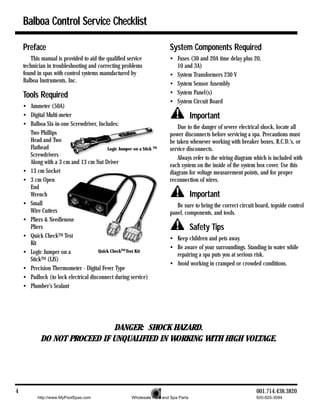
    • Balboa Six-in-one Screwdriver, Includes:                                Due to the danger of severe electrical shock, locate all
      Two Phillips                                                        power disconnects before servicing a spa. Precautions must
      Head and Two                                                        be taken whenever working with breaker boxes, R.C.D.’s, or
      Flathead                            Logic Jumper on a Stick TM      service disconnects.
      Screwdrivers                                                            Always refer to the wiring diagram which is included with
      Along with a 3 cm and 13 cm Nut Driver                              each system on the inside of the system box cover. Use this
    • 13 cm Socket                                                        diagram for voltage measurement points, and for proper
    • 3 cm Open                                                           reconnection of wires.
      End
      Wrench                                                                           Important
    • Small                                                                  Be sure to bring the correct circuit board, topside control
      Wire Cutters                                                        panel, components, and tools.
    • Pliers & Needlenose
      Pliers                                                                           Safety Tips
    • Quick CheckTM Test                                                  • Keep children and pets away.
      Kit
                                                                          • Be aware of your surroundings. Standing in water while
    • Logic Jumper on a               Quick CheckTM Test Kit
                                                                            repairing a spa puts you at serious risk.
      StickTM (LJS)
                                                                          • Avoid working in cramped or crowded conditions.
    • Precision Thermometer - Digital Fever Type
    • Padlock (to lock electrical disconnect during service)
    • Plumber’s Sealant


                              DANGER: SHOCK HAZARD.
            DO NOT PROCEED IF UNQUALIFIED IN WORKING WITH HIGH VOLTAGE.


4                                                                                                                 001.714.438.3820
          http://www.MyPoolSpas.com                     Wholesale Pool and Spa Parts                              920-925-3094
System Description

Highly advanced microprocessor technology has been combined with solid-state
electronic switches to produce the world’s finest, high quality
state-of-the-art digital control systems. Balboa control systems are
technologically sophisticated, yet easy to understand, use, and troubleshoot.

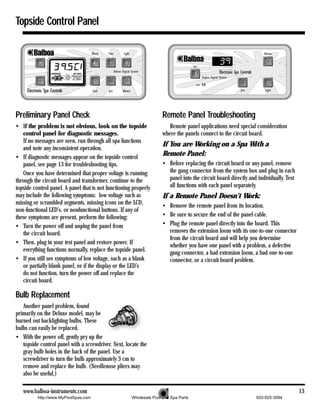
Topside Control Panel                                               Temperature Sensor
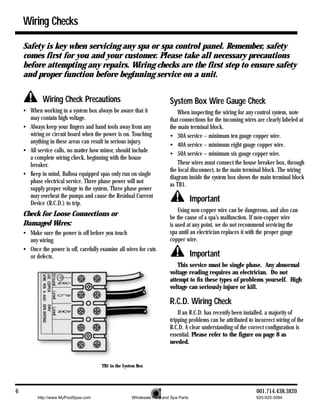
   The control panel activates functions at the touch of a             The temperature sensor is normally located in the tub
button. Each function will echo from the circuit board to the       wall or filter bucket, but may be installed in the plumbing. Its
LCD in a corresponding manner. The panel will also display          main function is to monitor the spa water temperature. If this
diagnostic messages which enable the service technician to          sensor reads a temperature above 44.5° C, all output relays
easily troubleshoot the system.                                     are opened and the spa is shut down. The display will flash
                                                                        . The spa will reset automatically at 43° C.
Circuit Board
   A typical circuit board has the following output
capabilities:
• 230 VAC System
• Two-speed pump
   230 VAC, 50 Hz, 2 HP
• Single-speed pump
   230 VAC, 50 Hz, 2 HP
• Blower
   230 VAC, 50 Hz, 2 HP                                               High-limit Sensor        Temperature Sensor
• Heater                                                                 (at the heater)          (in the spa)
   230 VAC, 50 Hz, 5.5 kW
• Light                                                             High-limit Sensor
   12 V, 12 W, 50 Hz, 1A or
   230 V, 100 W                                                         The high-limit sensor is located on the heater. Its main
                                                                    function is to detect both freeze and high-limit conditions. If
   In addition to these outputs, the board receives input
                                                                    the sensor reads a temperature below 4° C, the system will
from the spa temperature sensor, high-limit sensor, and flow
                                                                    automatically turn on all pumps to circulate the water. The
or pressure switch.
                                                                    display will show      . If the sensor reads a temperature
                                                                    above 48° C, the high-limit relays will open and the spa will
         Important                                                  shut down. The display will flash      . This sensor must cool
   Do not remove and replace the circuit board unless you           down to 43° C before the spa can be manually reset by
have tested all other components and proven that the circuit        touching a panel button.
board is actually causing the problem.


   www.balboa-instruments.com                                                                                                          5
          http://www.MyPoolSpas.com                  Wholesale Pool and Spa Parts                               920-925-3094
Wiring Checks

    Safety is key when servicing any spa or spa control panel. Remember, safety
    comes first for you and your customer. Please take all necessary precautions
    before attempting any repairs. Wiring checks are the first step to ensure safety
    and proper function before beginning service on a unit.


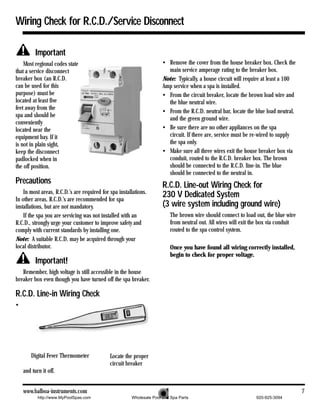
             Wiring Check Precautions                                    System Box Wire Gauge Check
    • When working in a system box always be aware that it                   When inspecting the wiring for any control system, note
      may contain high voltage.                                          that connections for the incoming wires are clearly labeled at
    • Always keep your fingers and hand tools away from any              the main terminal block.
      wiring or circuit board when the power is on. Touching             • 30A service – minimum ten gauge copper wire.
      anything in these areas can result in serious injury.
                                                                         • 40A service – minimum eight gauge copper wire.
    • All service calls, no matter how minor, should include
                                                                         • 50A service – minimum six gauge copper wire.
      a complete wiring check, beginning with the house
      breaker.                                                               These wires must connect the house breaker box, through
                                                                         the local disconnect, to the main terminal block. The wiring
    • Keep in mind, Balboa equipped spas only run on single
                                                                         diagram inside the system box shows the main terminal block
      phase electrical service. Three phase power will not
                                                                         as TB1.
      supply proper voltage to the system. Three phase power
      may overheat the pumps and cause the Residual Current
      Device (R.C.D.) to trip.
                                                                                      Important
                                                                             Using non-copper wire can be dangerous, and also can
    Check for Loose Connections or                                       be the cause of a spa’s malfunction. If non-copper wire
    Damaged Wires:                                                       is used at any point, we do not recommend servicing the
    • Make sure the power is off before you touch                        spa until an electrician replaces it with the proper gauge
      any wiring.                                                        copper wire.
    • Once the power is off, carefully examine all wires for cuts
      or defects.                                                                     Important
                                                                            This service must be single phase. Any abnormal
                                                                         voltage reading requires an electrician. Do not
                                                                         attempt to fix these types of problems yourself. High
                                                                         voltage can seriously injure or kill.

                                                                         R.C.D. Wiring Check
                                                                             If an R.C.D. has recently been installed, a majority of
                                                                         tripping problems can be attributed to incorrect wiring of the
                                                                         R.C.D. A clear understanding of the correct configuration is
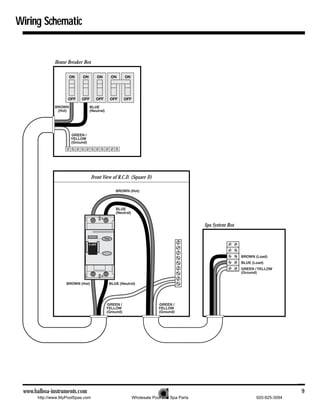
                                                                         essential. Please refer to the figure on page 8 as
                                                                         needed.


                                        TB1 in the System Box


6                                                                                                                001.714.438.3820
          http://www.MyPoolSpas.com                    Wholesale Pool and Spa Parts                              920-925-3094
Wiring Check for R.C.D./Service Disconnect

          Important
    Most regional codes state                                         • Remove the cover from the house breaker box. Check the
that a service disconnect                                               main service amperage rating to the breaker box.
breaker box (an R.C.D.                                                Note: Typically, a house circuit will require at least a 100
can be used for this                                                  Amp service when a spa is installed.
purpose) must be                                                      • From the circuit breaker, locate the brown load wire and
located at least five                                                   the blue neutral wire.
feet away from the
                                                                      • From the R.C.D. neutral bar, locate the blue load neutral,
spa and should be
                                                                        and the green ground wire.
conveniently
located near the                                                      • Be sure there are no other appliances on the spa
equipment bay. If it                                                    circuit. If there are, service must be re-wired to supply
is not in plain sight,                                                  the spa only.
keep the disconnect                                                   • Make sure all three wires exit the house breaker box via
padlocked when in                                                       conduit, routed to the R.C.D. breaker box. The brown
the off position.                                                       should be connected to the R.C.D. line-in. The blue
                                                                        should be connected to the neutral in.
Precautions                                                           R.C.D. Line-out Wiring Check for
    In most areas, R.C.D.’s are required for spa installations.
In other areas, R.C.D.’s are recommended for spa
                                                                      230 V Dedicated System
installations, but are not mandatory.                                 (3 wire system including ground wire)
    If the spa you are servicing was not installed with an               The brown wire should connect to load out, the blue wire
R.C.D., strongly urge your customer to improve safety and                from neutral out. All wires will exit the box via conduit
comply with current standards by installing one.                         routed to the spa control system.
Note: A suitable R.C.D. may be acquired through your
local distributor.                                                       Once you have found all wiring correctly installed,
                                                                         begin to check for proper voltage.
          Important!
   Remember, high voltage is still accessible in the house
breaker box even though you have turned off the spa breaker.

R.C.D. Line-in Wiring Check
•


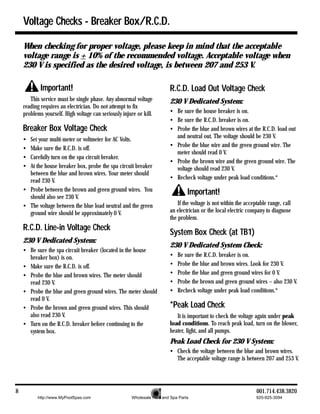
        Digital Fever Thermometer            Locate the proper
                                             circuit breaker
    and turn it off.


    www.balboa-instruments.com                                                                                                       7
           http://www.MyPoolSpas.com                   Wholesale Pool and Spa Parts                             920-925-3094
Voltage Checks - Breaker Box/R.C.D.

    When checking for proper voltage, please keep in mind that the acceptable
    voltage range is + 10% of the recommended voltage. Acceptable voltage when
    230 V is specified as the desired voltage, is between 207 and 253 V.

            Important!                                                   R.C.D. Load Out Voltage Check
       This service must be single phase. Any abnormal voltage           230 V Dedicated System:
    reading requires an electrician. Do not attempt to fix
    problems yourself. High voltage can seriously injure or kill.        • Be sure the house breaker is on.
                                                                         • Be sure the R.C.D. breaker is on.
    Breaker Box Voltage Check                                            • Probe the blue and brown wires at the R.C.D. load out
                                                                           and neutral out. The voltage should be 230 V.
    • Set your multi-meter or voltmeter for AC Volts.
                                                                         • Probe the blue wire and the green ground wire. The
    • Make sure the R.C.D. is off.
                                                                           meter should read 0 V.
    • Carefully turn on the spa circuit breaker.
                                                                         • Probe the brown wire and the green ground wire. The
    • At the house breaker box, probe the spa circuit breaker              voltage should read 230 V.
      between the blue and brown wires. Your meter should
                                                                         • Recheck voltage under peak load conditions.*
      read 230 V.
    • Probe between the brown and green ground wires. You                         Important!
      should also see 230 V.
    • The voltage between the blue load neutral and the green                If the voltage is not within the acceptable range, call
      ground wire should be approximately 0 V.                           an electrician or the local electric company to diagnose
                                                                         the problem.
    R.C.D. Line-in Voltage Check
                                                                         System Box Check (at TB1)
    230 V Dedicated System:
                                                                         230 V Dedicated System Check:
    • Be sure the spa circuit breaker (located in the house
      breaker box) is on.                                                •   Be sure the R.C.D. breaker is on.
    • Make sure the R.C.D. is off.                                       •   Probe the blue and brown wires. Look for 230 V.
    • Probe the blue and brown wires. The meter should                   •   Probe the blue and green ground wires for 0 V.
      read 230 V.                                                        •   Probe the brown and green ground wires – also 230 V.
    • Probe the blue and green ground wires. The meter should            •   Recheck voltage under peak load conditions.*
      read 0 V.
    • Probe the brown and green ground wires. This should                *Peak Load Check
      also read 230 V.                                                      It is important to check the voltage again under peak
    • Turn on the R.C.D. breaker before continuing to the                load conditions. To reach peak load, turn on the blower,
      system box.                                                        heater, light, and all pumps.
                                                                         Peak Load Check for 230 V System:
                                                                         • Check the voltage between the blue and brown wires.
                                                                           The acceptable voltage range is between 207 and 253 V.


8                                                                                                                  001.714.438.3820
          http://www.MyPoolSpas.com                    Wholesale Pool and Spa Parts                                920-925-3094
Wiring Schematic


             House Breaker Box


                                  Front View of R.C.D. (Square D)


                                                                                     Spa System Box


 www.balboa-instruments.com                                                                                          9
      http://www.MyPoolSpas.com                       Wholesale Pool and Spa Parts                    920-925-3094
Basic Control System Troubleshooting

     Low Voltage
                                                                                       Important
         At Balboa, it’s been our experience that the majority of
     the problems associated with electronic control systems are              If the voltage is not in the acceptable range, call an
     due to low voltage.                                                  electrician or the local electric company to diagnose the
                                                                          problem.
     Brown outs                                                           To Determine if Fuse Replacement is
         “Brown outs” can have an effect on the spa’s operation in        Necessary:
     a variety of ways. The control panel may go blank, have                  To determine if fuse replacement is necessary, perform
     scrambled messages on the LCD, or only a few features will           the following sequence of tests:
     function.
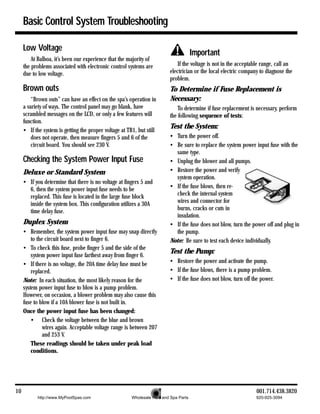
     • If the system is getting the proper voltage at TB1, but still
                                                                          Test the System:
         does not operate, then measure fingers 5 and 6 of the            • Turn the power off.
         circuit board. You should see 230 V.                             • Be sure to replace the system power input fuse with the
                                                                            same type.
     Checking the System Power Input Fuse                                 • Unplug the blower and all pumps.
     Deluxe or Standard System                                            • Restore the power and verify
                                                                            system operation.
     • If you determine that there is no voltage at fingers 5 and
       6, then the system power input fuse needs to be                    • If the fuse blows, then re-
       replaced. This fuse is located in the large fuse block               check the internal system
       inside the system box. This configuration utilizes a 30A             wires and connector for
       time delay fuse.                                                     burns, cracks or cuts in
                                                                            insulation.
     Duplex System                                                        • If the fuse does not blow, turn the power off and plug in
     • Remember, the system power input fuse may snap directly              the pump.
         to the circuit board next to finger 6.                           Note: Be sure to test each device individually.
     • To check this fuse, probe finger 5 and the side of the
         system power input fuse farthest away from finger 6.
                                                                          Test the Pump:
     • If there is no voltage, the 20A time delay fuse must be            • Restore the power and activate the pump.
         replaced.                                                        • If the fuse blows, there is a pump problem.
     Note: In each situation, the most likely reason for the              • If the fuse does not blow, turn off the power.
     system power input fuse to blow is a pump problem.
     However, on occasion, a blower problem may also cause this
     fuse to blow if a 10A blower fuse is not built in.
     Once the power input fuse has been changed:
         • Check the voltage between the blue and brown
               wires again. Acceptable voltage range is between 207
               and 253 V.
         These readings should be taken under peak load
         conditions.


10                                                                                                                 001.714.438.3820
           http://www.MyPoolSpas.com                    Wholesale Pool and Spa Parts                              920-925-3094
Troubleshooting (cont.)

Test the Blower:
• Plug in the blower.                                                Note: Miswiring of the spa is the most common reason for
• Power up the system and activate the blower.                       this fuse to blow. However, a lightning strike in the area is a
• If the fuse blows, then there is a blower problem.                 possible, though less likely, cause of the failure.
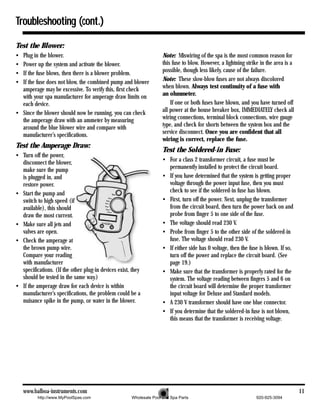
• If the fuse does not blow, the combined pump and blower            Note: These slow-blow fuses are not always discolored
  amperage may be excessive. To verify this, first check             when blown. Always test continuity of a fuse with
  with your spa manufacturer for amperage draw limits on             an ohmmeter.
  each device.                                                           If one or both fuses have blown, and you have turned off
• Since the blower should now be running, you can check              all power at the house breaker box, IMMEDIATELY check all
  the amperage draw with an ammeter by measuring                     wiring connections, terminal block connections, wire gauge
  around the blue blower wire and compare with                       type, and check for shorts between the system box and the
  manufacturer’s specifications.                                     service disconnect. Once you are confident that all
                                                                     wiring is correct, replace the fuse.
Test the Amperage Draw:
                                                                     Test the Soldered-in Fuse:
• Turn off the power,
  disconnect the blower,                                             • For a class 2 transformer circuit, a fuse must be
  make sure the pump                                                   permanently installed to protect the circuit board.
  is plugged in, and                                                 • If you have determined that the system is getting proper
  restore power.                                                       voltage through the power input fuse, then you must
• Start the pump and                                                   check to see if the soldered-in fuse has blown.
  switch to high speed (if                                           • First, turn off the power. Next, unplug the transformer
  available), this should                                              from the circuit board, then turn the power back on and
  draw the most current.                                               probe from finger 5 to one side of the fuse.
• Make sure all jets and                                             • The voltage should read 230 V.
  valves are open.                                                   • Probe from finger 5 to the other side of the soldered-in
• Check the amperage at                                                fuse. The voltage should read 230 V.
  the brown pump wire.                                               • If either side has 0 voltage, then the fuse is blown. If so,
  Compare your reading                                                 turn off the power and replace the circuit board. (See
  with manufacturer                                                    page 19.)
  specifications. (If the other plug-in devices exist, they          • Make sure that the transformer is properly rated for the
  should be tested in the same way.)                                   system. The voltage reading between fingers 5 and 6 on
• If the amperage draw for each device is within                       the circuit board will determine the proper transformer
  manufacturer’s specifications, the problem could be a                input voltage for Deluxe and Standard models.
  nuisance spike in the pump, or water in the blower.                • A 230 V transformer should have one blue connector.
                                                                     • If you determine that the soldered-in fuse is not blown,
                                                                       this means that the transformer is receiving voltage.


    www.balboa-instruments.com                                                                                                         11
          http://www.MyPoolSpas.com                   Wholesale Pool and Spa Parts                               920-925-3094
Troubleshooting (cont.)

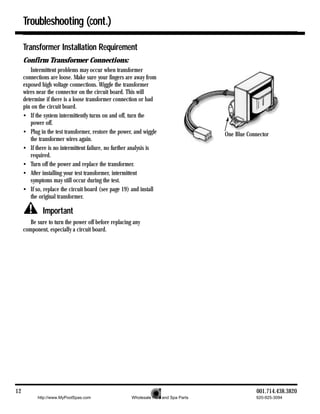
     Transformer Installation Requirement
     Confirm Transformer Connections:
        Intermittent problems may occur when transformer
     connections are loose. Make sure your fingers are away from
     exposed high voltage connections. Wiggle the transformer
     wires near the connector on the circuit board. This will
     determine if there is a loose transformer connection or bad
     pin on the circuit board.
     • If the system intermittently turns on and off, turn the
        power off.
     • Plug in the test transformer, restore the power, and wiggle                   One Blue Connector
        the transformer wires again.
     • If there is no intermittent failure, no further analysis is
        required.
     • Turn off the power and replace the transformer.
     • After installing your test transformer, intermittent
        symptoms may still occur during the test.
     • If so, replace the circuit board (see page 19) and install
        the original transformer.

             Important
        Be sure to turn the power off before replacing any
     component, especially a circuit board.


12                                                                                               001.714.438.3820
           http://www.MyPoolSpas.com                  Wholesale Pool and Spa Parts               920-925-3094
Topside Control Panel


Preliminary Panel Check                                              Remote Panel Troubleshooting
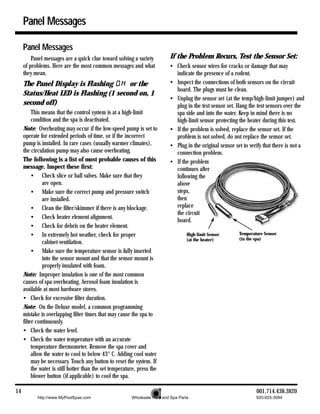
• If the problem is not obvious, look on the topside                    Remote panel applications need special consideration
   control panel for diagnostic messages.                            where the panels connect to the circuit board.
   If no messages are seen, run through all spa functions
                                                                     If You are Working on a Spa With a
   and note any inconsistent operation.
• If diagnostic messages appear on the topside control
                                                                     Remote Panel:
   panel, see page 13 for troubleshooting tips.                      • Before replacing the circuit board or any panel, remove
   Once you have determined that proper voltage is running             the gang connector from the system box and plug in each
through the circuit board and transformer, continue to the             panel into the circuit board directly and individually. Test
topside control panel. A panel that is not functioning properly        all functions with each panel separately.
may include the following symptoms: low voltage such as              If a Remote Panel Doesn’t Work:
missing or scrambled segments, missing icons on the LCD,             • Remove the remote panel from its location.
non-functional LED’s, or nonfunctional buttons. If any of
these symptoms are present, perform the following:                   • Be sure to secure the end of the panel cable.
• Turn the power off and unplug the panel from                       • Plug the remote panel directly into the board. This
   the circuit board.                                                  removes the extension loom with its one-to-one connector
                                                                       from the circuit board and will help you determine
• Then, plug in your test panel and restore power. If                  whether you have one panel with a problem, a defective
   everything functions normally, replace the topside panel.           gang connector, a bad extension loom, a bad one-to-one
• If you still see symptoms of low voltage, such as a blank            connector, or a circuit board problem.
   or partially blank panel, or if the display or the LED’s
   do not function, turn the power off and replace the
   circuit board.

Bulb Replacement
   Another panel problem, found
primarily on the Deluxe model, may be
burned out backlighting bulbs. These
bulbs can easily be replaced.
• With the power off, gently pry up the
   topside control panel with a screwdriver. Next, locate the
   gray bulb holes in the back of the panel. Use a
   screwdriver to turn the bulb approximately 3 cm to
   remove and replace the bulb. (Needlenose pliers may
   also be useful.)

   www.balboa-instruments.com                                                                                                         13
          http://www.MyPoolSpas.com                   Wholesale Pool and Spa Parts                              920-925-3094
Panel Messages

     Panel Messages
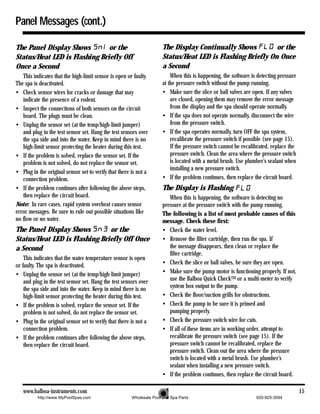
         Panel messages are a quick clue toward solving a variety           If the Problem Recurs, Test the Sensor Set:
     of problems. Here are the most common messages and what                • Check sensor wires for cracks or damage that may
     they mean.                                                               indicate the presence of a rodent.
     The Panel Display is Flashing      or the                              • Inspect the connections of both sensors on the circuit
                                                                              board. The plugs must be clean.
     Status/Heat LED is Flashing (1 second on, 1
                                                                            • Unplug the sensor set (at the temp/high-limit jumper) and
     second off)                                                              plug in the test sensor set. Hang the test sensors over the
          This means that the control system is at a high-limit               spa side and into the water. Keep in mind there is no
          condition and the spa is deactivated.                               high-limit sensor protecting the heater during this test.
     Note: Overheating may occur if the low-speed pump is set to            • If the problem is solved, replace the sensor set. If the
     operate for extended periods of time, or if the incorrect                problem is not solved, do not replace the sensor set.
     pump is installed. In rare cases (usually warmer climates),            • Plug in the original sensor set to verify that there is not a
     the circulation pump may also cause overheating.                         connection problem.
     The following is a list of most probable causes of this                • If the problem
     message. Inspect these first:                                            continues after
          • Check slice or ball valves. Make sure that they                   following the
               are open.                                                      above
          • Make sure the correct pump and pressure switch                    steps,
               are installed.                                                 then
          • Clean the filter/skimmer if there is any blockage.                replace
                                                                              the circuit
          • Check heater element alignment.
                                                                              board.
          • Check for debris on the heater element.
          • In extremely hot weather, check for proper                               High-limit Sensor      Temperature Sensor
                                                                                     (at the heater)        (in the spa)
               cabinet ventilation.
          • Make sure the temperature sensor is fully inserted
               into the sensor mount and that the sensor mount is
               properly insulated with foam.
     Note: Improper insulation is one of the most common
     causes of spa overheating. Aerosol foam insulation is
     available at most hardware stores.
     • Check for excessive filter duration.
     Note: On the Deluxe model, a common programming
     mistake is overlapping filter times that may cause the spa to
     filter continuously.
     • Check the water level.
     • Check the water temperature with an accurate
          temperature thermometer. Remove the spa cover and
          allow the water to cool to below 43° C. Adding cool water
          may be necessary. Touch any button to reset the system. If
          the water is still hotter than the set temperature, press the
          blower button (if applicable) to cool the spa.

14                                                                                                                  001.714.438.3820
            http://www.MyPoolSpas.com                     Wholesale Pool and Spa Parts                              920-925-3094
Panel Messages (cont.)

The Panel Display Shows        or the                                 The Display Continually Shows         or the
Status/Heat LED is Flashing Briefly Off                               Status/Heat LED is Flashing Briefly On Once
Once a Second                                                         a Second
   This indicates that the high-limit sensor is open or faulty.           When this is happening, the software is detecting pressure
The spa is deactivated.                                               at the pressure switch without the pump running.
• Check sensor wires for cracks or damage that may                    • Make sure the slice or ball valves are open. If any valves
   indicate the presence of a rodent.                                     are closed, opening them may remove the error message
• Inspect the connections of both sensors on the circuit                  from the display and the spa should operate normally.
   board. The plugs must be clean.                                    • If the spa does not operate normally, disconnect the wire
• Unplug the sensor set (at the temp/high-limit jumper)                   from the pressure switch.
   and plug in the test sensor set. Hang the test sensors over        • If the spa operates normally, turn OFF the spa system,
   the spa side and into the water. Keep in mind there is no              recalibrate the pressure switch if possible (see page 15).
   high-limit sensor protecting the heater during this test.              If the pressure switch cannot be recalibrated, replace the
• If the problem is solved, replace the sensor set. If the                pressure switch. Clean the area where the pressure switch
   problem is not solved, do not replace the sensor set.                  is located with a metal brush. Use plumber’s sealant when
                                                                          installing a new pressure switch.
• Plug in the original sensor set to verify that there is not a
   connection problem.                                                • If the problem continues, then replace the circuit board.
• If the problem continues after following the above steps,           The Display is Flashing
   then replace the circuit board.                                       When this is happening, the software is detecting no
Note: In rare cases, rapid system overheat causes sensor              pressure at the pressure switch with the pump running.
error messages. Be sure to rule out possible situations like          The following is a list of most probable causes of this
no flow or no water.                                                  message. Check these first:
The Panel Display Shows        or the                                 • Check the water level.
Status/Heat LED is Flashing Briefly Off Once                          • Remove the filter cartridge, then run the spa. If
a Second                                                                 the message disappears, then clean or replace the
                                                                         filter cartridge.
    This indicates that the water temperature sensor is open
or faulty. The spa is deactivated.                                    • Check the slice or ball valves, be sure they are open.
• Unplug the sensor set (at the temp/high-limit jumper)               • Make sure the pump motor is functioning properly. If not,
    and plug in the test sensor set. Hang the test sensors over          use the Balboa Quick CheckTM or a multi-meter to verify
    the spa side and into the water. Keep in mind there is no            system box output to the pump.
    high-limit sensor protecting the heater during this test.         • Check the floor/suction grills for obstructions.
• If the problem is solved, replace the sensor set. If the            • Check the pump to be sure it is primed and
    problem is not solved, do not replace the sensor set.                pumping properly.
• Plug in the original sensor set to verify that there is not a       • Check the pressure switch wire for cuts.
    connection problem.                                               • If all of these items are in working order, attempt to
• If the problem continues after following the above steps,              recalibrate the pressure switch (see page 15). If the
    then replace the circuit board.                                      pressure switch cannot be recalibrated, replace the
                                                                         pressure switch. Clean out the area where the pressure
                                                                         switch is located with a metal brush. Use plumber’s
                                                                         sealant when installing a new pressure switch.
                                                                      • If the problem continues, then replace the circuit board.

   www.balboa-instruments.com                                                                                                          15
          http://www.MyPoolSpas.com                    Wholesale Pool and Spa Parts                              920-925-3094
Panel Messages (cont.)

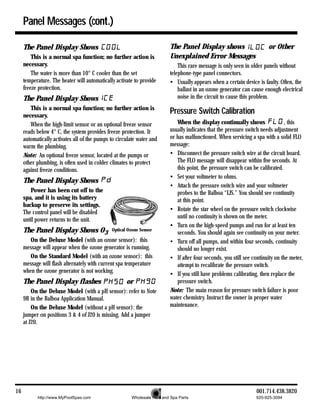
     The Panel Display Shows                                              The Panel Display shows                       or Other
         This is a normal spa function; no further action is              Unexplained Error Messages
     necessary.                                                               This rare message is only seen in older panels without
         The water is more than 10° C cooler than the set                 telephone-type panel connectors.
     temperature. The heater will automatically activate to provide       • Usually appears when a certain device is faulty. Often, the
     freeze protection.                                                       ballast in an ozone generator can cause enough electrical
     The Panel Display Shows                                                  noise in the circuit to cause this problem.
        This is a normal spa function; no further action is
     necessary.
                                                                          Pressure Switch Calibration
        When the high-limit sensor or an optional freeze sensor              When the display continually shows                 , this
     reads below 4° C, the system provides freeze protection. It          usually indicates that the pressure switch needs adjustment
     automatically activates all of the pumps to circulate water and      or has malfunctioned. When servicing a spa with a solid FLO
     warm the plumbing.                                                   message:
     Note: An optional freeze sensor, located at the pumps or             • Disconnect the pressure switch wire at the circuit board.
     other plumbing, is often used in colder climates to protect             The FLO message will disappear within five seconds. At
     against freeze conditions.                                              this point, the pressure switch can be calibrated.
                                                                          • Set your voltmeter to ohms.
     The Panel Display Shows
                                                                          • Attach the pressure switch wire and your voltmeter
        Power has been cut off to the                                        probes to the Balboa “LJS.” You should see continuity
     spa, and it is using its battery                                        at this point.
     backup to preserve its settings.
                                                                          • Rotate the star wheel on the pressure switch clockwise
     The control panel will be disabled
                                                                             until no continuity is shown on the meter.
     until power returns to the unit.
                                                                          • Turn on the high-speed pumps and run for at least ten
     The Panel Display Shows O3               Optical Ozone Sensor
                                                                             seconds. You should again see continuity on your meter.
        On the Deluxe Model (with an ozone sensor): this                  • Turn off all pumps, and within four seconds, continuity
     message will appear when the ozone generator is running.                should no longer exist.
        On the Standard Model (with an ozone sensor): this                • If after four seconds, you still see continuity on the meter,
     message will flash alternately with current spa temperature             attempt to recalibrate the pressure switch.
     when the ozone generator is not working.                             • If you still have problems calibrating, then replace the
     The Panel Display flashes                       or                      pressure switch.
         On the Deluxe Model (with a pH sensor): refer to Note            Note: The main reason for pressure switch failure is poor
     9B in the Balboa Application Manual.                                 water chemistry. Instruct the owner in proper water
         On the Deluxe Model (without a pH sensor): the                   maintenance.
     jumper on positions 3 & 4 of J20 is missing. Add a jumper
     at J20.


16                                                                                                                 001.714.438.3820
           http://www.MyPoolSpas.com                    Wholesale Pool and Spa Parts                              920-925-3094
Pressure Switch Calibration (cont.)

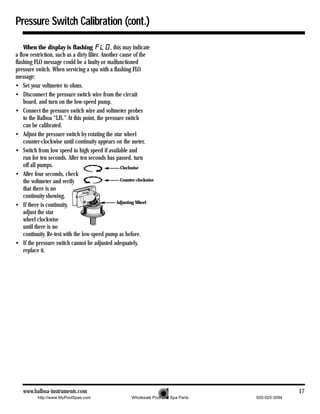
    When the display is flashing                , this may indicate
a flow restriction, such as a dirty filter. Another cause of the
flashing FLO message could be a faulty or malfunctioned
pressure switch. When servicing a spa with a flashing FLO
message:
• Set your voltmeter to ohms.
• Disconnect the pressure switch wire from the circuit
    board, and turn on the low-speed pump.
• Connect the pressure switch wire and voltmeter probes
    to the Balboa “LJS.” At this point, the pressure switch
    can be calibrated.
• Adjust the pressure switch by rotating the star wheel
    counter-clockwise until continuity appears on the meter.
• Switch from low speed to high speed if available and
    run for ten seconds. After ten seconds has passed, turn
    off all pumps.                                    Clockwise
• After four seconds, check
    the voltmeter and verify                          Counter-clockwise
    that there is no
    continuity showing.
                                                    Adjusting Wheel
• If there is continuity,
    adjust the star
    wheel clockwise
    until there is no
    continuity. Re-test with the low-speed pump as before.
• If the pressure switch cannot be adjusted adequately,
    replace it.


   www.balboa-instruments.com                                                                            17
           http://www.MyPoolSpas.com                       Wholesale Pool and Spa Parts   920-925-3094
R.C.D. Troubleshooting

     Keep in mind that a majority of R.C.D. tripping problems can be attributed to
     incorrect wiring. R.C.D. troubleshooting usually finds the problem.

     If Correct Wiring is Verified                                        To Disconnect the Heater
     • Check to see if the proper R.C.D. is installed.                    • First, turn off the main circuit breaker, then remove both
     • Check the label in the system box near TB1 to determine              heater straps or wires from the terminal block, not the
       the maximum amperage draw for the system.                            heater itself.
     • Be sure the R.C.D. is rated for more amperage than the             • After restoring the power, try to reset the R.C.D. again. If it
       system will draw.                                                    no longer trips after the system calls for heat, then
                                                                            replace the heater.
     • For a 230 V dedicated system, a 2-pole or a 4-pole R.C.D.
       is acceptable.                                                     • If the R.C.D. still trips, look for pinched or shorted wires
                                                                            at the transformer. Make sure that the screws that attach
     • For a detailed wiring checklist, please review the previous
                                                                            the transformer to the system box have not pinched or
       segment of this manual on proper R.C.D. wiring or the
                                                                            damaged the insulation of the transformer wires.
       R.C.D. manufacturer’s instructions.
     • If the wiring is correct and the R.C.D. will not reset, then       • If the transformer wires are undamaged, check for any
                                                                            other pinched wires. Refer to the wiring diagram to verify
       unplug the pump and try to reset the R.C.D.
                                                                            the correct wiring of the control system.
       If the R.C.D. trips again, then unplug the blower and push
       the reset button. If the R.C.D. continues to trip, then do         • If everything looks to be in perfect working order, then
                                                                            the R.C.D. may be defective.
       the same procedure for the ozone generator.
     • If the R.C.D. stops tripping after you unplugged one of the
       spa’s components, turn off the power to the spa then plug
       in each component except the one that tripped the R.C.D.
     • Power up the system. If the R.C.D. no longer trips,
       then you have correctly identified the problem.
       Repair or replace the component as instructed by
       the spa manufacturer.
     • If you have unplugged all of the spa’s components and the
       R.C.D. still doesn’t reset, then the problem is most likely a
       ground fault in the heater.


18                                                                                                                 001.714.438.3820
           http://www.MyPoolSpas.com                    Wholesale Pool and Spa Parts                               920-925-3094
Testing the Circuit Board Output

Testing the Circuit Board Output                                    • If you do not have correct voltage, double check the input
                                                                        voltage before you replace the circuit board.
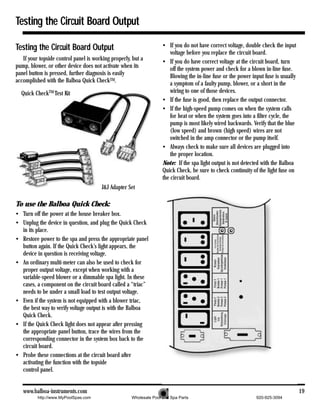
   If your topside control panel is working properly, but a         • If you do have correct voltage at the circuit board, turn
pump, blower, or other device does not activate when its                off the system power and check for a blown in-line fuse.
panel button is pressed, further diagnosis is easily                    Blowing the in-line fuse or the power input fuse is usually
accomplished with the Balboa Quick CheckTM.                             a symptom of a faulty pump, blower, or a short in the
  Quick CheckTM Test Kit                                                wiring to one of those devices.
                                                                    • If the fuse is good, then replace the output connector.
                                                                    • If the high-speed pump comes on when the system calls
                                                                        for heat or when the system goes into a filter cycle, the
                                                                        pump is most likely wired backwards. Verify that the blue
                                                                        (low speed) and brown (high speed) wires are not
                                                                        switched in the amp connector or the pump itself.
                                                                    • Always check to make sure all devices are plugged into
                                                                        the proper location.
                                                                    Note: If the spa light output is not detected with the Balboa
                                                                    Quick Check, be sure to check continuity of the light fuse on
                                                                    the circuit board.
                                       J&J Adapter Set

To use the Balboa Quick Check:
• Turn off the power at the house breaker box.
• Unplug the device in question, and plug the Quick Check
  in its place.
• Restore power to the spa and press the appropriate panel
  button again. If the Quick Check’s light appears, the
  device in question is receiving voltage.
• An ordinary multi-meter can also be used to check for
  proper output voltage, except when working with a
  variable-speed blower or a dimmable spa light. In these
  cases, a component on the circuit board called a “triac”
  needs to be under a small load to test output voltage.
• Even if the system is not equipped with a blower triac,
  the best way to verify voltage output is with the Balboa
  Quick Check.
• If the Quick Check light does not appear after pressing
  the appropriate panel button, trace the wires from the
  corresponding connector in the system box back to the
  circuit board.
• Probe these connections at the circuit board after
  activating the function with the topside
  control panel.


   www.balboa-instruments.com                                                                                                         19
          http://www.MyPoolSpas.com                  Wholesale Pool and Spa Parts                               920-925-3094
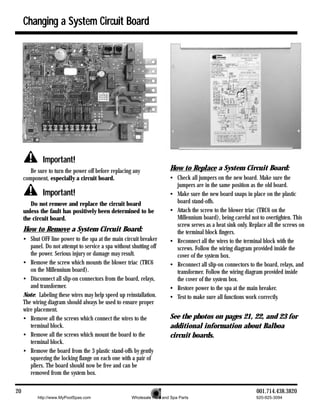
Changing a System Circuit Board


              Important!
        Be sure to turn the power off before replacing any               How to Replace a System Circuit Board:
     component, especially a circuit board.                              • Check all jumpers on the new board. Make sure the
                                                                           jumpers are in the same position as the old board.
              Important!                                                 • Make sure the new board snaps in place on the plastic
        Do not remove and replace the circuit board                        board stand-offs.
     unless the fault has positively been determined to be               • Attach the screw to the blower triac (TRC6 on the
     the circuit board.                                                    Millennium board), being careful not to overtighten. This
                                                                           screw serves as a heat sink only. Replace all the screws on
     How to Remove a System Circuit Board:                                 the terminal block fingers.
     • Shut OFF line power to the spa at the main circuit breaker        • Reconnect all the wires to the terminal block with the
        panel. Do not attempt to service a spa without shutting off        screws. Follow the wiring diagram provided inside the
        the power. Serious injury or damage may result.                    cover of the system box.
     • Remove the screw which mounts the blower triac (TRC6              • Reconnect all slip-on connectors to the board, relays, and
        on the Millennium board).                                          transformer. Follow the wiring diagram provided inside
     • Disconnect all slip-on connectors from the board, relays,           the cover of the system box.
        and transformer.                                                 • Restore power to the spa at the main breaker.
     Note: Labeling these wires may help speed up reinstallation.        • Test to make sure all functions work correctly.
     The wiring diagram should always be used to ensure proper
     wire placement.
     • Remove all the screws which connect the wires to the              See the photos on pages 21, 22, and 23 for
        terminal block.                                                  additional information about Balboa
     • Remove all the screws which mount the board to the                circuit boards.
        terminal block.
     • Remove the board from the 3 plastic stand-offs by gently
        squeezing the locking flange on each one with a pair of
        pliers. The board should now be free and can be
        removed from the system box.

20                                                                                                              001.714.438.3820
           http://www.MyPoolSpas.com                   Wholesale Pool and Spa Parts                             920-925-3094
Filter Settings
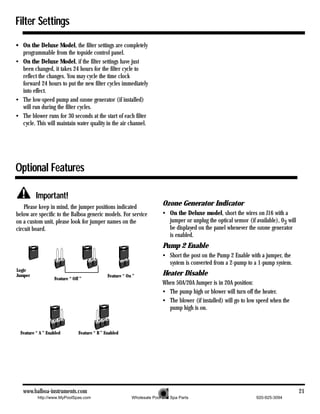
• On the Deluxe Model, the filter settings are completely
  programmable from the topside control panel.
• On the Deluxe Model, if the filter settings have just
  been changed, it takes 24 hours for the filter cycle to
  reflect the changes. You may cycle the time clock
  forward 24 hours to put the new filter cycles immediately
  into effect.
• The low-speed pump and ozone generator (if installed)
  will run during the filter cycles.
• The blower runs for 30 seconds at the start of each filter
  cycle. This will maintain water quality in the air channel.


Optional Features

          Important!
    Please keep in mind, the jumper positions indicated
                                                                          Ozone Generator Indicator
below are specific to the Balboa generic models. For service              • On the Deluxe model, short the wires on J16 with a
on a custom unit, please look for jumper names on the                       jumper or unplug the optical sensor (if available), 03 will
circuit board.                                                              be displayed on the panel whenever the ozone generator
                                                                            is enabled.
                                                                          Pump 2 Enable
                                                                          • Short the post on the Pump 2 Enable with a jumper, the
                                                                            system is converted from a 2-pump to a 1-pump system.
Logic
Jumper                                         Feature “ On ”             Heater Disable
                   Feature “ Off ”
                                                                          When 50A/20A Jumper is in 20A position:
                                                                          • The pump high or blower will turn off the heater.
                                                                          • The blower (if installed) will go to low speed when the
                                                                            pump high is on.


  Feature “ A ” Enabled         Feature “ B ” Enabled


   www.balboa-instruments.com                                                                                                             21
           http://www.MyPoolSpas.com                       Wholesale Pool and Spa Parts                             920-925-3094
Millennium TUV Circuit Board
                                            9    10       8                              4         21

         27                                                          14    19
                                                      7
        17                                                            23

                                       28
                                                                  12
         13

                                                                                                        16


                                                                                   26                                                   5
                                                                                              24
                                                                                                                                        6
              25


         11
                                                                                                                               1


                                            15        2         18         20            22                  3      Multi-speed blower option

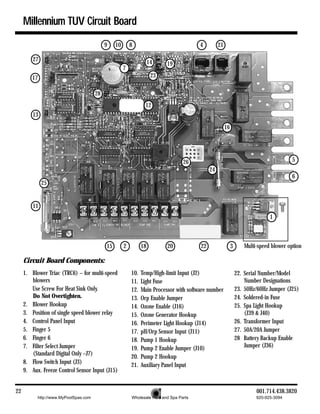
     Circuit Board Components:
     1. Blower Triac (TRC6) – for multi-speed             10.   Temp/High-limit Input (J2)                       22. Serial Number/Model
        blowers                                           11.   Light Fuse                                           Number Designations
        Use Screw For Heat Sink Only.                     12.   Main Processor with software number              23. 50Hz/60Hz Jumper (J25)
        Do Not Overtighten.                               13.   Orp Enable Jumper                                24. Soldered-in Fuse
     2. Blower Hookup                                     14.   Ozone Enable (J16)                               25. Spa Light Hookup
     3. Position of single speed blower relay             15.   Ozone Generator Hookup                               (J39 & J40)
     4. Control Panel Input                               16.   Perimeter Light Hookup (J14)                     26. Transformer Input
     5. Finger 5                                          17.   pH/Orp Sensor Input (J11)                        27. 50A/20A Jumper
     6. Finger 6                                          18.   Pump 1 Hookup                                    28 Battery Backup Enable
     7. Filter Select Jumper                              19.   Pump 2 Enable Jumper (J10)                           Jumper (J36)
        (Standard Digital Only –J7)                       20.   Pump 2 Hookup
     8. Flow Switch Input (J3)                            21.   Auxiliary Panel Input
     9. Aux. Freeze Control Sensor Input (J15)


22                                                                                                                       001.714.438.3820
           http://www.MyPoolSpas.com                      Wholesale Pool and Spa Parts                                   920-925-3094
Super Duplex TUV Circuit Board

                              10        7       3                 8
                                                                                               20


                                                                  21

                                                                                      22
                                                                            12                  9


                        4           25
                                                                                 15                 16   13
                       24           17                           14                                              5
                                                      11

                                                                                                                 6
                                                                            19


                                                       23
                                                                                           1
                            18                                                   2
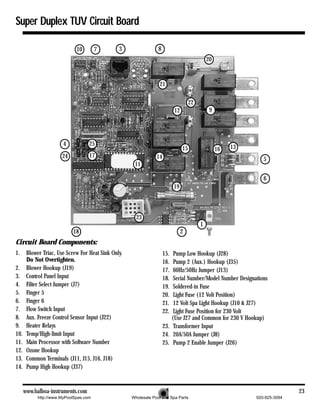
Circuit Board Components:
1.     Blower Triac, Use Screw For Heat Sink Only.                    15.  Pump Low Hookup (J28)
       Do Not Overtighten.                                            16.  Pump 2 (Aux.) Hookup (J35)
2.     Blower Hookup (J19)                                            17.  60Hz/50Hz Jumper (J13)
3.     Control Panel Input                                            18.  Serial Number/Model Number Designations
4.     Filter Select Jumper (J7)                                      19.  Soldered-in Fuse
5.     Finger 5                                                       20.  Light Fuse (12 Volt Position)
6.     Finger 6                                                       21.  12 Volt Spa Light Hookup (J10 & J27)
7.     Flow Switch Input                                              22.  Light Fuse Position for 230 Volt
8.     Aux. Freeze Control Sensor Input (J22)                             (Use J27 and Common for 230 V Hookup)
9.     Heater Relays                                                  23. Transformer Input
10.    Temp/High-limit Input                                          24. 20A/50A Jumper (J8)
11.    Main Processor with Software Number                            25. Pump 2 Enable Jumper (J26)
12.    Ozone Hookup
13.    Common Terminals (J11, J15, J16, J18)
14.    Pump High Hookup (J37)


      www.balboa-instruments.com                                                                                             23
            http://www.MyPoolSpas.com                Wholesale Pool and Spa Parts                             920-925-3094
Lite Digital TUV Circuit Board


                                                   14                                                   10
                                                                  5
                                     16

                                     17                       9                                     8
                                                15
                                                                  4
                                 6      7
                                                                                                             11           10
                                                                           13

                                                         20
                                     18       21
                                                                                                                               1
                            19


                                                                      12                      2     3


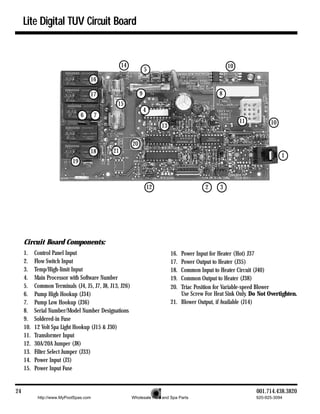
     Circuit Board Components:
     1.    Control Panel Input                                                  16. Power Input for Heater (Hot) J37
     2.    Flow Switch Input                                                    17. Power Output to Heater (J35)
     3.    Temp/High-limit Input                                                18. Common Input to Heater Circuit (J40)
     4.    Main Processor with Software Number                                  19. Common Output to Heater (J38)
     5.    Common Terminals (J4, J5, J7, J8, J13, J26)                          20. Triac Position for Variable-speed Blower
     6.    Pump High Hookup (J34)                                                   Use Screw For Heat Sink Only. Do Not Overtighten.
     7.    Pump Low Hookup (J36)                                                21. Blower Output, if Available (J14)
     8.    Serial Number/Model Number Designations
     9.    Soldered-in Fuse
     10.   12 Volt Spa Light Hookup (J15 & J30)
     11.   Transformer Input
     12.   30A/20A Jumper (J8)
     13.   Filter Select Jumper (J33)
     14.   Power Input (J3)
     15.   Power Input Fuse


24                                                                                                                  001.714.438.3820
            http://www.MyPoolSpas.com                    Wholesale Pool and Spa Parts                              920-925-3094
Notes


 www.balboa-instruments.com                                                     25
      http://www.MyPoolSpas.com   Wholesale Pool and Spa Parts   920-925-3094
http://www.MyPoolSpas.com   Wholesale Pool and Spa Parts Copyright   1999 Balboa Instruments, Inc. 06/02/99
                                                                                        920-925-3094

50hz eng non_m7

  • 1.
    50 Hz http://www.MyPoolSpas.com Technical Service Manual Wholesale Pool and Spa Parts 920-925-3094
  • 2.
    Table of Contents Balboa Control Service Checklist Test the System, Pump . . . . . . . . . . . . . . . . . . . . . . . .9 Test the Blower . . . . . . . . . . . . . . . . . . . . . . . . . . . . .10 Preface . . . . . . . . . . . . . . . . . . . . . . . . . . . . . . . . . . . .3 Test the Amperage Draw . . . . . . . . . . . . . . . . . . . . . .10 Tools Required . . . . . . . . . . . . . . . . . . . . . . . . . . . . . .3 Test the Soldered-in Fuse . . . . . . . . . . . . . . . . . . . . .10 System Components Required . . . . . . . . . . . . . . . . . . .3 Transformer Installation Requirement . . . . . . . . . . . .11 Safety Tips . . . . . . . . . . . . . . . . . . . . . . . . . . . . . . . . .3 Topside Control Panel System Description Preliminary Panel Check . . . . . . . . . . . . . . . . . . . . . .12 Topside Control Panel . . . . . . . . . . . . . . . . . . . . . . . . .4 Bulb Replacement . . . . . . . . . . . . . . . . . . . . . . . . . . .12 Circuit Board . . . . . . . . . . . . . . . . . . . . . . . . . . . . . . .4 Remote Panel Troubleshooting . . . . . . . . . . . . . . . . .12 Temperature Sensor . . . . . . . . . . . . . . . . . . . . . . . . . .4 High-limit Sensor . . . . . . . . . . . . . . . . . . . . . . . . . . . .4 Panel Messages Wiring Checks OH . . . . . . . . . . . . . . . . . . . . . . . . . . . . . . . . . . . . . .13 SN1 . . . . . . . . . . . . . . . . . . . . . . . . . . . . . . . . . . . . .14 Wiring Check Precautions . . . . . . . . . . . . . . . . . . . . . .5 SN3 . . . . . . . . . . . . . . . . . . . . . . . . . . . . . . . . . . . . .14 System Box Wire Gauge Check . . . . . . . . . . . . . . . . . . .5 FLO (Continuous and Flashing) . . . . . . . . . . . . . . . . .14 R.C.D. Wiring Check . . . . . . . . . . . . . . . . . . . . . . . . . .5 COOL . . . . . . . . . . . . . . . . . . . . . . . . . . . . . . . . . . . .15 R.C.D. Line-in Wiring Check . . . . . . . . . . . . . . . . . . . .6 ICE . . . . . . . . . . . . . . . . . . . . . . . . . . . . . . . . . . . . . .15 R.C.D. Line-out Wiring Check Pd . . . . . . . . . . . . . . . . . . . . . . . . . . . . . . . . . . . . . .15 230 V Dedicated . . . . . . . . . . . . . . . . . . . . . . . . .6 O3 . . . . . . . . . . . . . . . . . . . . . . . . . . . . . . . . . . . . . .15 pH50 . . . . . . . . . . . . . . . . . . . . . . . . . . . . . . . . . . . .15 Voltage Checks pH90 . . . . . . . . . . . . . . . . . . . . . . . . . . . . . . . . . . . .15 Breaker Box Voltage Check . . . . . . . . . . . . . . . . . . . . .7 ILOC . . . . . . . . . . . . . . . . . . . . . . . . . . . . . . . . . . . . .15 R.C.D. Line-in Voltage Check Unexplained Error Messages . . . . . . . . . . . . . . . . . . .15 230 V Dedicated . . . . . . . . . . . . . . . . . . . . . . . . .7 Pressure Switch Calibration . . . . . . . . . . . . . . . . . . . .15 R.C.D. Load Out Voltage Check Continuous FLO . . . . . . . . . . . . . . . . . . . . . . . . .15 230V Dedicated . . . . . . . . . . . . . . . . . . . . . . . . .7 Flashing FLO . . . . . . . . . . . . . . . . . . . . . . . . . . .16 System Box Check (at TB1) 230 V Dedicated . . . . . . . . . . . . . . . . . . . . . . . . .7 R.C.D. Troubleshooting Peak Load Check . . . . . . . . . . . . . . . . . . . . . . . . . . . .7 If Correct Wiring is Verified . . . . . . . . . . . . . . . . . . . .17 Peak Load Check for 230 V Dedicated . . . . . . . .7 To Disconnect the Heater . . . . . . . . . . . . . . . . . . . . .17 Wiring Schematic . . . . . . . . . . . . . . . . . . . . . . . .8 Basic Control System Troubleshooting Low Voltage . . . . . . . . . . . . . . . . . . . . . . . . . . . . . . . .9 Brown Outs . . . . . . . . . . . . . . . . . . . . . . . . . . . . . . . .9 Checking the System Power Input Fuse . . . . . . . . . . . .9 Deluxe or Standard Digital System . . . . . . . . . . . .9 Duplex System . . . . . . . . . . . . . . . . . . . . . . . . . .9 To Determine if Fuse Replacement is Necessary . .9 2 001.714.438.3820 http://www.MyPoolSpas.com Wholesale Pool and Spa Parts 920-925-3094
  • 3.
    Table of Contents(cont.) Testing the Circuit Board Output To use the Balboa Quick Check . . . . . . . . . . . . . . . . .18 240V System Power When checking for proper voltage in Changing a System Circuit Board countries where 240V is standard, the How to Remove a System Circuit Board . . . . . . . . . . .19 acceptable range is between 216V and How to Replace a System Circuit Board . . . . . . . . . . .19 264V (+ 10% of recommended voltage). Filter Settings Filter Setting Information . . . . . . . . . . . . . . . . . . . . . .20 Optional Features Ozone Generator Indicator . . . . . . . . . . . . . . . . . . . . 20 Pump 2 Enable . . . . . . . . . . . . . . . . . . . . . . . . . . . . . 20 Heater Disable . . . . . . . . . . . . . . . . . . . . . . . . . . . . . 20 Millennium TUV Circuit Board Millennium TUV Circuit Board. . . . . . . . . . . . . . . . . . 21 Super Duplex Digital TUV Circuit Board Super Duplex TUV Circuit Board . . . . . . . . . . . . . . . .22 Lite Leader TUV Circuit Board Lite Leader TUV Circuit Board . . . . . . . . . . . . . . . . . . 23 www.balboa-instruments.com 3 http://www.MyPoolSpas.com Wholesale Pool and Spa Parts 920-925-3094
  • 4.
    Balboa Control ServiceChecklist Preface System Components Required This manual is provided to aid the qualified service • Fuses (30 and 20A time delay plus 20, technician in troubleshooting and correcting problems 10 and 3A) found in spas with control systems manufactured by • System Transformers 230 V Balboa Instruments, Inc. • System Sensor Assembly Tools Required • System Panel(s) • System Circuit Board • Ammeter (50A) • Digital Multi-meter Important • Balboa Six-in-one Screwdriver, Includes: Due to the danger of severe electrical shock, locate all Two Phillips power disconnects before servicing a spa. Precautions must Head and Two be taken whenever working with breaker boxes, R.C.D.’s, or Flathead Logic Jumper on a Stick TM service disconnects. Screwdrivers Always refer to the wiring diagram which is included with Along with a 3 cm and 13 cm Nut Driver each system on the inside of the system box cover. Use this • 13 cm Socket diagram for voltage measurement points, and for proper • 3 cm Open reconnection of wires. End Wrench Important • Small Be sure to bring the correct circuit board, topside control Wire Cutters panel, components, and tools. • Pliers & Needlenose Pliers Safety Tips • Quick CheckTM Test • Keep children and pets away. Kit • Be aware of your surroundings. Standing in water while • Logic Jumper on a Quick CheckTM Test Kit repairing a spa puts you at serious risk. StickTM (LJS) • Avoid working in cramped or crowded conditions. • Precision Thermometer - Digital Fever Type • Padlock (to lock electrical disconnect during service) • Plumber’s Sealant DANGER: SHOCK HAZARD. DO NOT PROCEED IF UNQUALIFIED IN WORKING WITH HIGH VOLTAGE. 4 001.714.438.3820 http://www.MyPoolSpas.com Wholesale Pool and Spa Parts 920-925-3094
  • 5.
    System Description Highly advancedmicroprocessor technology has been combined with solid-state electronic switches to produce the world’s finest, high quality state-of-the-art digital control systems. Balboa control systems are technologically sophisticated, yet easy to understand, use, and troubleshoot. Topside Control Panel Temperature Sensor The control panel activates functions at the touch of a The temperature sensor is normally located in the tub button. Each function will echo from the circuit board to the wall or filter bucket, but may be installed in the plumbing. Its LCD in a corresponding manner. The panel will also display main function is to monitor the spa water temperature. If this diagnostic messages which enable the service technician to sensor reads a temperature above 44.5° C, all output relays easily troubleshoot the system. are opened and the spa is shut down. The display will flash . The spa will reset automatically at 43° C. Circuit Board A typical circuit board has the following output capabilities: • 230 VAC System • Two-speed pump 230 VAC, 50 Hz, 2 HP • Single-speed pump 230 VAC, 50 Hz, 2 HP • Blower 230 VAC, 50 Hz, 2 HP High-limit Sensor Temperature Sensor • Heater (at the heater) (in the spa) 230 VAC, 50 Hz, 5.5 kW • Light High-limit Sensor 12 V, 12 W, 50 Hz, 1A or 230 V, 100 W The high-limit sensor is located on the heater. Its main function is to detect both freeze and high-limit conditions. If In addition to these outputs, the board receives input the sensor reads a temperature below 4° C, the system will from the spa temperature sensor, high-limit sensor, and flow automatically turn on all pumps to circulate the water. The or pressure switch. display will show . If the sensor reads a temperature above 48° C, the high-limit relays will open and the spa will Important shut down. The display will flash . This sensor must cool Do not remove and replace the circuit board unless you down to 43° C before the spa can be manually reset by have tested all other components and proven that the circuit touching a panel button. board is actually causing the problem. www.balboa-instruments.com 5 http://www.MyPoolSpas.com Wholesale Pool and Spa Parts 920-925-3094
  • 6.
    Wiring Checks Safety is key when servicing any spa or spa control panel. Remember, safety comes first for you and your customer. Please take all necessary precautions before attempting any repairs. Wiring checks are the first step to ensure safety and proper function before beginning service on a unit. Wiring Check Precautions System Box Wire Gauge Check • When working in a system box always be aware that it When inspecting the wiring for any control system, note may contain high voltage. that connections for the incoming wires are clearly labeled at • Always keep your fingers and hand tools away from any the main terminal block. wiring or circuit board when the power is on. Touching • 30A service – minimum ten gauge copper wire. anything in these areas can result in serious injury. • 40A service – minimum eight gauge copper wire. • All service calls, no matter how minor, should include • 50A service – minimum six gauge copper wire. a complete wiring check, beginning with the house breaker. These wires must connect the house breaker box, through the local disconnect, to the main terminal block. The wiring • Keep in mind, Balboa equipped spas only run on single diagram inside the system box shows the main terminal block phase electrical service. Three phase power will not as TB1. supply proper voltage to the system. Three phase power may overheat the pumps and cause the Residual Current Device (R.C.D.) to trip. Important Using non-copper wire can be dangerous, and also can Check for Loose Connections or be the cause of a spa’s malfunction. If non-copper wire Damaged Wires: is used at any point, we do not recommend servicing the • Make sure the power is off before you touch spa until an electrician replaces it with the proper gauge any wiring. copper wire. • Once the power is off, carefully examine all wires for cuts or defects. Important This service must be single phase. Any abnormal voltage reading requires an electrician. Do not attempt to fix these types of problems yourself. High voltage can seriously injure or kill. R.C.D. Wiring Check If an R.C.D. has recently been installed, a majority of tripping problems can be attributed to incorrect wiring of the R.C.D. A clear understanding of the correct configuration is essential. Please refer to the figure on page 8 as needed. TB1 in the System Box 6 001.714.438.3820 http://www.MyPoolSpas.com Wholesale Pool and Spa Parts 920-925-3094
  • 7.
    Wiring Check forR.C.D./Service Disconnect Important Most regional codes state • Remove the cover from the house breaker box. Check the that a service disconnect main service amperage rating to the breaker box. breaker box (an R.C.D. Note: Typically, a house circuit will require at least a 100 can be used for this Amp service when a spa is installed. purpose) must be • From the circuit breaker, locate the brown load wire and located at least five the blue neutral wire. feet away from the • From the R.C.D. neutral bar, locate the blue load neutral, spa and should be and the green ground wire. conveniently located near the • Be sure there are no other appliances on the spa equipment bay. If it circuit. If there are, service must be re-wired to supply is not in plain sight, the spa only. keep the disconnect • Make sure all three wires exit the house breaker box via padlocked when in conduit, routed to the R.C.D. breaker box. The brown the off position. should be connected to the R.C.D. line-in. The blue should be connected to the neutral in. Precautions R.C.D. Line-out Wiring Check for In most areas, R.C.D.’s are required for spa installations. In other areas, R.C.D.’s are recommended for spa 230 V Dedicated System installations, but are not mandatory. (3 wire system including ground wire) If the spa you are servicing was not installed with an The brown wire should connect to load out, the blue wire R.C.D., strongly urge your customer to improve safety and from neutral out. All wires will exit the box via conduit comply with current standards by installing one. routed to the spa control system. Note: A suitable R.C.D. may be acquired through your local distributor. Once you have found all wiring correctly installed, begin to check for proper voltage. Important! Remember, high voltage is still accessible in the house breaker box even though you have turned off the spa breaker. R.C.D. Line-in Wiring Check • Digital Fever Thermometer Locate the proper circuit breaker and turn it off. www.balboa-instruments.com 7 http://www.MyPoolSpas.com Wholesale Pool and Spa Parts 920-925-3094
  • 8.
    Voltage Checks -Breaker Box/R.C.D. When checking for proper voltage, please keep in mind that the acceptable voltage range is + 10% of the recommended voltage. Acceptable voltage when 230 V is specified as the desired voltage, is between 207 and 253 V. Important! R.C.D. Load Out Voltage Check This service must be single phase. Any abnormal voltage 230 V Dedicated System: reading requires an electrician. Do not attempt to fix problems yourself. High voltage can seriously injure or kill. • Be sure the house breaker is on. • Be sure the R.C.D. breaker is on. Breaker Box Voltage Check • Probe the blue and brown wires at the R.C.D. load out and neutral out. The voltage should be 230 V. • Set your multi-meter or voltmeter for AC Volts. • Probe the blue wire and the green ground wire. The • Make sure the R.C.D. is off. meter should read 0 V. • Carefully turn on the spa circuit breaker. • Probe the brown wire and the green ground wire. The • At the house breaker box, probe the spa circuit breaker voltage should read 230 V. between the blue and brown wires. Your meter should • Recheck voltage under peak load conditions.* read 230 V. • Probe between the brown and green ground wires. You Important! should also see 230 V. • The voltage between the blue load neutral and the green If the voltage is not within the acceptable range, call ground wire should be approximately 0 V. an electrician or the local electric company to diagnose the problem. R.C.D. Line-in Voltage Check System Box Check (at TB1) 230 V Dedicated System: 230 V Dedicated System Check: • Be sure the spa circuit breaker (located in the house breaker box) is on. • Be sure the R.C.D. breaker is on. • Make sure the R.C.D. is off. • Probe the blue and brown wires. Look for 230 V. • Probe the blue and brown wires. The meter should • Probe the blue and green ground wires for 0 V. read 230 V. • Probe the brown and green ground wires – also 230 V. • Probe the blue and green ground wires. The meter should • Recheck voltage under peak load conditions.* read 0 V. • Probe the brown and green ground wires. This should *Peak Load Check also read 230 V. It is important to check the voltage again under peak • Turn on the R.C.D. breaker before continuing to the load conditions. To reach peak load, turn on the blower, system box. heater, light, and all pumps. Peak Load Check for 230 V System: • Check the voltage between the blue and brown wires. The acceptable voltage range is between 207 and 253 V. 8 001.714.438.3820 http://www.MyPoolSpas.com Wholesale Pool and Spa Parts 920-925-3094
  • 9.
    Wiring Schematic House Breaker Box Front View of R.C.D. (Square D) Spa System Box www.balboa-instruments.com 9 http://www.MyPoolSpas.com Wholesale Pool and Spa Parts 920-925-3094
  • 10.
    Basic Control SystemTroubleshooting Low Voltage Important At Balboa, it’s been our experience that the majority of the problems associated with electronic control systems are If the voltage is not in the acceptable range, call an due to low voltage. electrician or the local electric company to diagnose the problem. Brown outs To Determine if Fuse Replacement is “Brown outs” can have an effect on the spa’s operation in Necessary: a variety of ways. The control panel may go blank, have To determine if fuse replacement is necessary, perform scrambled messages on the LCD, or only a few features will the following sequence of tests: function. • If the system is getting the proper voltage at TB1, but still Test the System: does not operate, then measure fingers 5 and 6 of the • Turn the power off. circuit board. You should see 230 V. • Be sure to replace the system power input fuse with the same type. Checking the System Power Input Fuse • Unplug the blower and all pumps. Deluxe or Standard System • Restore the power and verify system operation. • If you determine that there is no voltage at fingers 5 and 6, then the system power input fuse needs to be • If the fuse blows, then re- replaced. This fuse is located in the large fuse block check the internal system inside the system box. This configuration utilizes a 30A wires and connector for time delay fuse. burns, cracks or cuts in insulation. Duplex System • If the fuse does not blow, turn the power off and plug in • Remember, the system power input fuse may snap directly the pump. to the circuit board next to finger 6. Note: Be sure to test each device individually. • To check this fuse, probe finger 5 and the side of the system power input fuse farthest away from finger 6. Test the Pump: • If there is no voltage, the 20A time delay fuse must be • Restore the power and activate the pump. replaced. • If the fuse blows, there is a pump problem. Note: In each situation, the most likely reason for the • If the fuse does not blow, turn off the power. system power input fuse to blow is a pump problem. However, on occasion, a blower problem may also cause this fuse to blow if a 10A blower fuse is not built in. Once the power input fuse has been changed: • Check the voltage between the blue and brown wires again. Acceptable voltage range is between 207 and 253 V. These readings should be taken under peak load conditions. 10 001.714.438.3820 http://www.MyPoolSpas.com Wholesale Pool and Spa Parts 920-925-3094
  • 11.
    Troubleshooting (cont.) Test theBlower: • Plug in the blower. Note: Miswiring of the spa is the most common reason for • Power up the system and activate the blower. this fuse to blow. However, a lightning strike in the area is a • If the fuse blows, then there is a blower problem. possible, though less likely, cause of the failure. • If the fuse does not blow, the combined pump and blower Note: These slow-blow fuses are not always discolored amperage may be excessive. To verify this, first check when blown. Always test continuity of a fuse with with your spa manufacturer for amperage draw limits on an ohmmeter. each device. If one or both fuses have blown, and you have turned off • Since the blower should now be running, you can check all power at the house breaker box, IMMEDIATELY check all the amperage draw with an ammeter by measuring wiring connections, terminal block connections, wire gauge around the blue blower wire and compare with type, and check for shorts between the system box and the manufacturer’s specifications. service disconnect. Once you are confident that all wiring is correct, replace the fuse. Test the Amperage Draw: Test the Soldered-in Fuse: • Turn off the power, disconnect the blower, • For a class 2 transformer circuit, a fuse must be make sure the pump permanently installed to protect the circuit board. is plugged in, and • If you have determined that the system is getting proper restore power. voltage through the power input fuse, then you must • Start the pump and check to see if the soldered-in fuse has blown. switch to high speed (if • First, turn off the power. Next, unplug the transformer available), this should from the circuit board, then turn the power back on and draw the most current. probe from finger 5 to one side of the fuse. • Make sure all jets and • The voltage should read 230 V. valves are open. • Probe from finger 5 to the other side of the soldered-in • Check the amperage at fuse. The voltage should read 230 V. the brown pump wire. • If either side has 0 voltage, then the fuse is blown. If so, Compare your reading turn off the power and replace the circuit board. (See with manufacturer page 19.) specifications. (If the other plug-in devices exist, they • Make sure that the transformer is properly rated for the should be tested in the same way.) system. The voltage reading between fingers 5 and 6 on • If the amperage draw for each device is within the circuit board will determine the proper transformer manufacturer’s specifications, the problem could be a input voltage for Deluxe and Standard models. nuisance spike in the pump, or water in the blower. • A 230 V transformer should have one blue connector. • If you determine that the soldered-in fuse is not blown, this means that the transformer is receiving voltage. www.balboa-instruments.com 11 http://www.MyPoolSpas.com Wholesale Pool and Spa Parts 920-925-3094
  • 12.
    Troubleshooting (cont.) Transformer Installation Requirement Confirm Transformer Connections: Intermittent problems may occur when transformer connections are loose. Make sure your fingers are away from exposed high voltage connections. Wiggle the transformer wires near the connector on the circuit board. This will determine if there is a loose transformer connection or bad pin on the circuit board. • If the system intermittently turns on and off, turn the power off. • Plug in the test transformer, restore the power, and wiggle One Blue Connector the transformer wires again. • If there is no intermittent failure, no further analysis is required. • Turn off the power and replace the transformer. • After installing your test transformer, intermittent symptoms may still occur during the test. • If so, replace the circuit board (see page 19) and install the original transformer. Important Be sure to turn the power off before replacing any component, especially a circuit board. 12 001.714.438.3820 http://www.MyPoolSpas.com Wholesale Pool and Spa Parts 920-925-3094
  • 13.
    Topside Control Panel PreliminaryPanel Check Remote Panel Troubleshooting • If the problem is not obvious, look on the topside Remote panel applications need special consideration control panel for diagnostic messages. where the panels connect to the circuit board. If no messages are seen, run through all spa functions If You are Working on a Spa With a and note any inconsistent operation. • If diagnostic messages appear on the topside control Remote Panel: panel, see page 13 for troubleshooting tips. • Before replacing the circuit board or any panel, remove Once you have determined that proper voltage is running the gang connector from the system box and plug in each through the circuit board and transformer, continue to the panel into the circuit board directly and individually. Test topside control panel. A panel that is not functioning properly all functions with each panel separately. may include the following symptoms: low voltage such as If a Remote Panel Doesn’t Work: missing or scrambled segments, missing icons on the LCD, • Remove the remote panel from its location. non-functional LED’s, or nonfunctional buttons. If any of these symptoms are present, perform the following: • Be sure to secure the end of the panel cable. • Turn the power off and unplug the panel from • Plug the remote panel directly into the board. This the circuit board. removes the extension loom with its one-to-one connector from the circuit board and will help you determine • Then, plug in your test panel and restore power. If whether you have one panel with a problem, a defective everything functions normally, replace the topside panel. gang connector, a bad extension loom, a bad one-to-one • If you still see symptoms of low voltage, such as a blank connector, or a circuit board problem. or partially blank panel, or if the display or the LED’s do not function, turn the power off and replace the circuit board. Bulb Replacement Another panel problem, found primarily on the Deluxe model, may be burned out backlighting bulbs. These bulbs can easily be replaced. • With the power off, gently pry up the topside control panel with a screwdriver. Next, locate the gray bulb holes in the back of the panel. Use a screwdriver to turn the bulb approximately 3 cm to remove and replace the bulb. (Needlenose pliers may also be useful.) www.balboa-instruments.com 13 http://www.MyPoolSpas.com Wholesale Pool and Spa Parts 920-925-3094
  • 14.
    Panel Messages Panel Messages Panel messages are a quick clue toward solving a variety If the Problem Recurs, Test the Sensor Set: of problems. Here are the most common messages and what • Check sensor wires for cracks or damage that may they mean. indicate the presence of a rodent. The Panel Display is Flashing or the • Inspect the connections of both sensors on the circuit board. The plugs must be clean. Status/Heat LED is Flashing (1 second on, 1 • Unplug the sensor set (at the temp/high-limit jumper) and second off) plug in the test sensor set. Hang the test sensors over the This means that the control system is at a high-limit spa side and into the water. Keep in mind there is no condition and the spa is deactivated. high-limit sensor protecting the heater during this test. Note: Overheating may occur if the low-speed pump is set to • If the problem is solved, replace the sensor set. If the operate for extended periods of time, or if the incorrect problem is not solved, do not replace the sensor set. pump is installed. In rare cases (usually warmer climates), • Plug in the original sensor set to verify that there is not a the circulation pump may also cause overheating. connection problem. The following is a list of most probable causes of this • If the problem message. Inspect these first: continues after • Check slice or ball valves. Make sure that they following the are open. above • Make sure the correct pump and pressure switch steps, are installed. then • Clean the filter/skimmer if there is any blockage. replace the circuit • Check heater element alignment. board. • Check for debris on the heater element. • In extremely hot weather, check for proper High-limit Sensor Temperature Sensor (at the heater) (in the spa) cabinet ventilation. • Make sure the temperature sensor is fully inserted into the sensor mount and that the sensor mount is properly insulated with foam. Note: Improper insulation is one of the most common causes of spa overheating. Aerosol foam insulation is available at most hardware stores. • Check for excessive filter duration. Note: On the Deluxe model, a common programming mistake is overlapping filter times that may cause the spa to filter continuously. • Check the water level. • Check the water temperature with an accurate temperature thermometer. Remove the spa cover and allow the water to cool to below 43° C. Adding cool water may be necessary. Touch any button to reset the system. If the water is still hotter than the set temperature, press the blower button (if applicable) to cool the spa. 14 001.714.438.3820 http://www.MyPoolSpas.com Wholesale Pool and Spa Parts 920-925-3094
  • 15.
    Panel Messages (cont.) ThePanel Display Shows or the The Display Continually Shows or the Status/Heat LED is Flashing Briefly Off Status/Heat LED is Flashing Briefly On Once Once a Second a Second This indicates that the high-limit sensor is open or faulty. When this is happening, the software is detecting pressure The spa is deactivated. at the pressure switch without the pump running. • Check sensor wires for cracks or damage that may • Make sure the slice or ball valves are open. If any valves indicate the presence of a rodent. are closed, opening them may remove the error message • Inspect the connections of both sensors on the circuit from the display and the spa should operate normally. board. The plugs must be clean. • If the spa does not operate normally, disconnect the wire • Unplug the sensor set (at the temp/high-limit jumper) from the pressure switch. and plug in the test sensor set. Hang the test sensors over • If the spa operates normally, turn OFF the spa system, the spa side and into the water. Keep in mind there is no recalibrate the pressure switch if possible (see page 15). high-limit sensor protecting the heater during this test. If the pressure switch cannot be recalibrated, replace the • If the problem is solved, replace the sensor set. If the pressure switch. Clean the area where the pressure switch problem is not solved, do not replace the sensor set. is located with a metal brush. Use plumber’s sealant when installing a new pressure switch. • Plug in the original sensor set to verify that there is not a connection problem. • If the problem continues, then replace the circuit board. • If the problem continues after following the above steps, The Display is Flashing then replace the circuit board. When this is happening, the software is detecting no Note: In rare cases, rapid system overheat causes sensor pressure at the pressure switch with the pump running. error messages. Be sure to rule out possible situations like The following is a list of most probable causes of this no flow or no water. message. Check these first: The Panel Display Shows or the • Check the water level. Status/Heat LED is Flashing Briefly Off Once • Remove the filter cartridge, then run the spa. If a Second the message disappears, then clean or replace the filter cartridge. This indicates that the water temperature sensor is open or faulty. The spa is deactivated. • Check the slice or ball valves, be sure they are open. • Unplug the sensor set (at the temp/high-limit jumper) • Make sure the pump motor is functioning properly. If not, and plug in the test sensor set. Hang the test sensors over use the Balboa Quick CheckTM or a multi-meter to verify the spa side and into the water. Keep in mind there is no system box output to the pump. high-limit sensor protecting the heater during this test. • Check the floor/suction grills for obstructions. • If the problem is solved, replace the sensor set. If the • Check the pump to be sure it is primed and problem is not solved, do not replace the sensor set. pumping properly. • Plug in the original sensor set to verify that there is not a • Check the pressure switch wire for cuts. connection problem. • If all of these items are in working order, attempt to • If the problem continues after following the above steps, recalibrate the pressure switch (see page 15). If the then replace the circuit board. pressure switch cannot be recalibrated, replace the pressure switch. Clean out the area where the pressure switch is located with a metal brush. Use plumber’s sealant when installing a new pressure switch. • If the problem continues, then replace the circuit board. www.balboa-instruments.com 15 http://www.MyPoolSpas.com Wholesale Pool and Spa Parts 920-925-3094
  • 16.
    Panel Messages (cont.) The Panel Display Shows The Panel Display shows or Other This is a normal spa function; no further action is Unexplained Error Messages necessary. This rare message is only seen in older panels without The water is more than 10° C cooler than the set telephone-type panel connectors. temperature. The heater will automatically activate to provide • Usually appears when a certain device is faulty. Often, the freeze protection. ballast in an ozone generator can cause enough electrical The Panel Display Shows noise in the circuit to cause this problem. This is a normal spa function; no further action is necessary. Pressure Switch Calibration When the high-limit sensor or an optional freeze sensor When the display continually shows , this reads below 4° C, the system provides freeze protection. It usually indicates that the pressure switch needs adjustment automatically activates all of the pumps to circulate water and or has malfunctioned. When servicing a spa with a solid FLO warm the plumbing. message: Note: An optional freeze sensor, located at the pumps or • Disconnect the pressure switch wire at the circuit board. other plumbing, is often used in colder climates to protect The FLO message will disappear within five seconds. At against freeze conditions. this point, the pressure switch can be calibrated. • Set your voltmeter to ohms. The Panel Display Shows • Attach the pressure switch wire and your voltmeter Power has been cut off to the probes to the Balboa “LJS.” You should see continuity spa, and it is using its battery at this point. backup to preserve its settings. • Rotate the star wheel on the pressure switch clockwise The control panel will be disabled until no continuity is shown on the meter. until power returns to the unit. • Turn on the high-speed pumps and run for at least ten The Panel Display Shows O3 Optical Ozone Sensor seconds. You should again see continuity on your meter. On the Deluxe Model (with an ozone sensor): this • Turn off all pumps, and within four seconds, continuity message will appear when the ozone generator is running. should no longer exist. On the Standard Model (with an ozone sensor): this • If after four seconds, you still see continuity on the meter, message will flash alternately with current spa temperature attempt to recalibrate the pressure switch. when the ozone generator is not working. • If you still have problems calibrating, then replace the The Panel Display flashes or pressure switch. On the Deluxe Model (with a pH sensor): refer to Note Note: The main reason for pressure switch failure is poor 9B in the Balboa Application Manual. water chemistry. Instruct the owner in proper water On the Deluxe Model (without a pH sensor): the maintenance. jumper on positions 3 & 4 of J20 is missing. Add a jumper at J20. 16 001.714.438.3820 http://www.MyPoolSpas.com Wholesale Pool and Spa Parts 920-925-3094
  • 17.
    Pressure Switch Calibration(cont.) When the display is flashing , this may indicate a flow restriction, such as a dirty filter. Another cause of the flashing FLO message could be a faulty or malfunctioned pressure switch. When servicing a spa with a flashing FLO message: • Set your voltmeter to ohms. • Disconnect the pressure switch wire from the circuit board, and turn on the low-speed pump. • Connect the pressure switch wire and voltmeter probes to the Balboa “LJS.” At this point, the pressure switch can be calibrated. • Adjust the pressure switch by rotating the star wheel counter-clockwise until continuity appears on the meter. • Switch from low speed to high speed if available and run for ten seconds. After ten seconds has passed, turn off all pumps. Clockwise • After four seconds, check the voltmeter and verify Counter-clockwise that there is no continuity showing. Adjusting Wheel • If there is continuity, adjust the star wheel clockwise until there is no continuity. Re-test with the low-speed pump as before. • If the pressure switch cannot be adjusted adequately, replace it. www.balboa-instruments.com 17 http://www.MyPoolSpas.com Wholesale Pool and Spa Parts 920-925-3094
  • 18.
    R.C.D. Troubleshooting Keep in mind that a majority of R.C.D. tripping problems can be attributed to incorrect wiring. R.C.D. troubleshooting usually finds the problem. If Correct Wiring is Verified To Disconnect the Heater • Check to see if the proper R.C.D. is installed. • First, turn off the main circuit breaker, then remove both • Check the label in the system box near TB1 to determine heater straps or wires from the terminal block, not the the maximum amperage draw for the system. heater itself. • Be sure the R.C.D. is rated for more amperage than the • After restoring the power, try to reset the R.C.D. again. If it system will draw. no longer trips after the system calls for heat, then replace the heater. • For a 230 V dedicated system, a 2-pole or a 4-pole R.C.D. is acceptable. • If the R.C.D. still trips, look for pinched or shorted wires at the transformer. Make sure that the screws that attach • For a detailed wiring checklist, please review the previous the transformer to the system box have not pinched or segment of this manual on proper R.C.D. wiring or the damaged the insulation of the transformer wires. R.C.D. manufacturer’s instructions. • If the wiring is correct and the R.C.D. will not reset, then • If the transformer wires are undamaged, check for any other pinched wires. Refer to the wiring diagram to verify unplug the pump and try to reset the R.C.D. the correct wiring of the control system. If the R.C.D. trips again, then unplug the blower and push the reset button. If the R.C.D. continues to trip, then do • If everything looks to be in perfect working order, then the R.C.D. may be defective. the same procedure for the ozone generator. • If the R.C.D. stops tripping after you unplugged one of the spa’s components, turn off the power to the spa then plug in each component except the one that tripped the R.C.D. • Power up the system. If the R.C.D. no longer trips, then you have correctly identified the problem. Repair or replace the component as instructed by the spa manufacturer. • If you have unplugged all of the spa’s components and the R.C.D. still doesn’t reset, then the problem is most likely a ground fault in the heater. 18 001.714.438.3820 http://www.MyPoolSpas.com Wholesale Pool and Spa Parts 920-925-3094
  • 19.
    Testing the CircuitBoard Output Testing the Circuit Board Output • If you do not have correct voltage, double check the input voltage before you replace the circuit board. If your topside control panel is working properly, but a • If you do have correct voltage at the circuit board, turn pump, blower, or other device does not activate when its off the system power and check for a blown in-line fuse. panel button is pressed, further diagnosis is easily Blowing the in-line fuse or the power input fuse is usually accomplished with the Balboa Quick CheckTM. a symptom of a faulty pump, blower, or a short in the Quick CheckTM Test Kit wiring to one of those devices. • If the fuse is good, then replace the output connector. • If the high-speed pump comes on when the system calls for heat or when the system goes into a filter cycle, the pump is most likely wired backwards. Verify that the blue (low speed) and brown (high speed) wires are not switched in the amp connector or the pump itself. • Always check to make sure all devices are plugged into the proper location. Note: If the spa light output is not detected with the Balboa Quick Check, be sure to check continuity of the light fuse on the circuit board. J&J Adapter Set To use the Balboa Quick Check: • Turn off the power at the house breaker box. • Unplug the device in question, and plug the Quick Check in its place. • Restore power to the spa and press the appropriate panel button again. If the Quick Check’s light appears, the device in question is receiving voltage. • An ordinary multi-meter can also be used to check for proper output voltage, except when working with a variable-speed blower or a dimmable spa light. In these cases, a component on the circuit board called a “triac” needs to be under a small load to test output voltage. • Even if the system is not equipped with a blower triac, the best way to verify voltage output is with the Balboa Quick Check. • If the Quick Check light does not appear after pressing the appropriate panel button, trace the wires from the corresponding connector in the system box back to the circuit board. • Probe these connections at the circuit board after activating the function with the topside control panel. www.balboa-instruments.com 19 http://www.MyPoolSpas.com Wholesale Pool and Spa Parts 920-925-3094
  • 20.
    Changing a SystemCircuit Board Important! Be sure to turn the power off before replacing any How to Replace a System Circuit Board: component, especially a circuit board. • Check all jumpers on the new board. Make sure the jumpers are in the same position as the old board. Important! • Make sure the new board snaps in place on the plastic Do not remove and replace the circuit board board stand-offs. unless the fault has positively been determined to be • Attach the screw to the blower triac (TRC6 on the the circuit board. Millennium board), being careful not to overtighten. This screw serves as a heat sink only. Replace all the screws on How to Remove a System Circuit Board: the terminal block fingers. • Shut OFF line power to the spa at the main circuit breaker • Reconnect all the wires to the terminal block with the panel. Do not attempt to service a spa without shutting off screws. Follow the wiring diagram provided inside the the power. Serious injury or damage may result. cover of the system box. • Remove the screw which mounts the blower triac (TRC6 • Reconnect all slip-on connectors to the board, relays, and on the Millennium board). transformer. Follow the wiring diagram provided inside • Disconnect all slip-on connectors from the board, relays, the cover of the system box. and transformer. • Restore power to the spa at the main breaker. Note: Labeling these wires may help speed up reinstallation. • Test to make sure all functions work correctly. The wiring diagram should always be used to ensure proper wire placement. • Remove all the screws which connect the wires to the See the photos on pages 21, 22, and 23 for terminal block. additional information about Balboa • Remove all the screws which mount the board to the circuit boards. terminal block. • Remove the board from the 3 plastic stand-offs by gently squeezing the locking flange on each one with a pair of pliers. The board should now be free and can be removed from the system box. 20 001.714.438.3820 http://www.MyPoolSpas.com Wholesale Pool and Spa Parts 920-925-3094
  • 21.
    Filter Settings • Onthe Deluxe Model, the filter settings are completely programmable from the topside control panel. • On the Deluxe Model, if the filter settings have just been changed, it takes 24 hours for the filter cycle to reflect the changes. You may cycle the time clock forward 24 hours to put the new filter cycles immediately into effect. • The low-speed pump and ozone generator (if installed) will run during the filter cycles. • The blower runs for 30 seconds at the start of each filter cycle. This will maintain water quality in the air channel. Optional Features Important! Please keep in mind, the jumper positions indicated Ozone Generator Indicator below are specific to the Balboa generic models. For service • On the Deluxe model, short the wires on J16 with a on a custom unit, please look for jumper names on the jumper or unplug the optical sensor (if available), 03 will circuit board. be displayed on the panel whenever the ozone generator is enabled. Pump 2 Enable • Short the post on the Pump 2 Enable with a jumper, the system is converted from a 2-pump to a 1-pump system. Logic Jumper Feature “ On ” Heater Disable Feature “ Off ” When 50A/20A Jumper is in 20A position: • The pump high or blower will turn off the heater. • The blower (if installed) will go to low speed when the pump high is on. Feature “ A ” Enabled Feature “ B ” Enabled www.balboa-instruments.com 21 http://www.MyPoolSpas.com Wholesale Pool and Spa Parts 920-925-3094
  • 22.
    Millennium TUV CircuitBoard 9 10 8 4 21 27 14 19 7 17 23 28 12 13 16 26 5 24 6 25 11 1 15 2 18 20 22 3 Multi-speed blower option Circuit Board Components: 1. Blower Triac (TRC6) – for multi-speed 10. Temp/High-limit Input (J2) 22. Serial Number/Model blowers 11. Light Fuse Number Designations Use Screw For Heat Sink Only. 12. Main Processor with software number 23. 50Hz/60Hz Jumper (J25) Do Not Overtighten. 13. Orp Enable Jumper 24. Soldered-in Fuse 2. Blower Hookup 14. Ozone Enable (J16) 25. Spa Light Hookup 3. Position of single speed blower relay 15. Ozone Generator Hookup (J39 & J40) 4. Control Panel Input 16. Perimeter Light Hookup (J14) 26. Transformer Input 5. Finger 5 17. pH/Orp Sensor Input (J11) 27. 50A/20A Jumper 6. Finger 6 18. Pump 1 Hookup 28 Battery Backup Enable 7. Filter Select Jumper 19. Pump 2 Enable Jumper (J10) Jumper (J36) (Standard Digital Only –J7) 20. Pump 2 Hookup 8. Flow Switch Input (J3) 21. Auxiliary Panel Input 9. Aux. Freeze Control Sensor Input (J15) 22 001.714.438.3820 http://www.MyPoolSpas.com Wholesale Pool and Spa Parts 920-925-3094
  • 23.
    Super Duplex TUVCircuit Board 10 7 3 8 20 21 22 12 9 4 25 15 16 13 24 17 14 5 11 6 19 23 1 18 2 Circuit Board Components: 1. Blower Triac, Use Screw For Heat Sink Only. 15. Pump Low Hookup (J28) Do Not Overtighten. 16. Pump 2 (Aux.) Hookup (J35) 2. Blower Hookup (J19) 17. 60Hz/50Hz Jumper (J13) 3. Control Panel Input 18. Serial Number/Model Number Designations 4. Filter Select Jumper (J7) 19. Soldered-in Fuse 5. Finger 5 20. Light Fuse (12 Volt Position) 6. Finger 6 21. 12 Volt Spa Light Hookup (J10 & J27) 7. Flow Switch Input 22. Light Fuse Position for 230 Volt 8. Aux. Freeze Control Sensor Input (J22) (Use J27 and Common for 230 V Hookup) 9. Heater Relays 23. Transformer Input 10. Temp/High-limit Input 24. 20A/50A Jumper (J8) 11. Main Processor with Software Number 25. Pump 2 Enable Jumper (J26) 12. Ozone Hookup 13. Common Terminals (J11, J15, J16, J18) 14. Pump High Hookup (J37) www.balboa-instruments.com 23 http://www.MyPoolSpas.com Wholesale Pool and Spa Parts 920-925-3094
  • 24.
    Lite Digital TUVCircuit Board 14 10 5 16 17 9 8 15 4 6 7 11 10 13 20 18 21 1 19 12 2 3 Circuit Board Components: 1. Control Panel Input 16. Power Input for Heater (Hot) J37 2. Flow Switch Input 17. Power Output to Heater (J35) 3. Temp/High-limit Input 18. Common Input to Heater Circuit (J40) 4. Main Processor with Software Number 19. Common Output to Heater (J38) 5. Common Terminals (J4, J5, J7, J8, J13, J26) 20. Triac Position for Variable-speed Blower 6. Pump High Hookup (J34) Use Screw For Heat Sink Only. Do Not Overtighten. 7. Pump Low Hookup (J36) 21. Blower Output, if Available (J14) 8. Serial Number/Model Number Designations 9. Soldered-in Fuse 10. 12 Volt Spa Light Hookup (J15 & J30) 11. Transformer Input 12. 30A/20A Jumper (J8) 13. Filter Select Jumper (J33) 14. Power Input (J3) 15. Power Input Fuse 24 001.714.438.3820 http://www.MyPoolSpas.com Wholesale Pool and Spa Parts 920-925-3094
  • 25.
    Notes www.balboa-instruments.com 25 http://www.MyPoolSpas.com Wholesale Pool and Spa Parts 920-925-3094
  • 26.
    http://www.MyPoolSpas.com Wholesale Pool and Spa Parts Copyright 1999 Balboa Instruments, Inc. 06/02/99 920-925-3094