© 2004 IBM Corporation
IBM ^
IBM Mainframe Basic Concept Of ISPF
Presented By : Anil Kumar Bharti
© 2004 IBM Corporation
IBM ^
Objective:
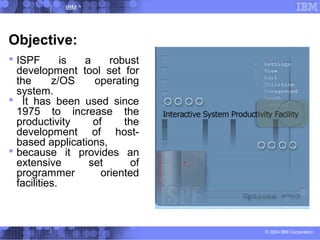
 ISPF is a robust
development tool set for
the z/OS operating
system.
 It has been used since
1975 to increase the
productivity of the
development of host-
based applications,
 because it provides an
extensive set of
programmer oriented
facilities.
© 2004 IBM Corporation
IBM ^
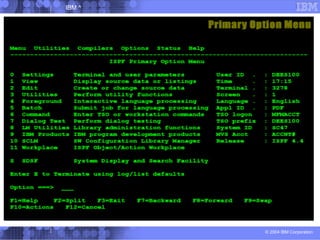
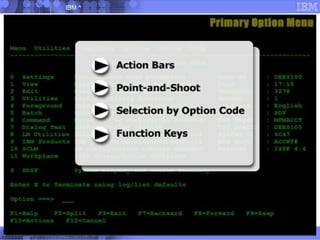
Primary Option Menu:
© 2004 IBM Corporation
IBM ^
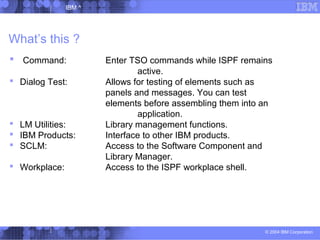
What’s this ?
 Command: Enter TSO commands while ISPF remains
active.
 Dialog Test: Allows for testing of elements such as
panels and messages. You can test
elements before assembling them into an
application.
 LM Utilities: Library management functions.
 IBM Products: Interface to other IBM products.
 SCLM: Access to the Software Component and
Library Manager.
 Workplace: Access to the ISPF workplace shell.
© 2004 IBM Corporation
IBM ^
© 2004 IBM Corporation
IBM ^
© 2004 IBM Corporation
IBM ^
Point-and-shoot means that you can move the cursor to one of the
menu selections in the area illustrated here, then press the Enter key in
order to make your selection.
This feature is not available on every z/OS system.
© 2004 IBM Corporation
IBM ^
 The command area for
menu screens is identified
by:
Option ===>
 For other screens, ISPF
identifies the command
area by:
Command ===>
 You can get to the
command area quickly by
pressing the Home key. No
matter where the cursor
may be, the home key will
immediately place the
cursor in the command
area.
© 2004 IBM Corporation
IBM ^
Function Key :
© 2004 IBM Corporation
IBM ^
© 2004 IBM Corporation
IBM ^
Some important key :
© 2004 IBM Corporation
IBM ^
Scroll Command: HALF, PAGE, N, CSR, DATA,MAX
© 2004 IBM Corporation
IBM ^
ISPF contains four major components:
 Dialog Manager (DM)
 Program Development Facility (PDF)
 Software Configuration Library
Manager (SCLM)
 Client/Server (C/S)
© 2004 IBM Corporation
IBM ^
© 2004 IBM Corporation
IBM ^
Profile Commands:
© 2004 IBM Corporation
IBM ^
© 2004 IBM Corporation
IBM ^
© 2004 IBM Corporation
IBM ^
© 2004 IBM Corporation
IBM ^
© 2004 IBM Corporation
IBM ^
© 2004 IBM Corporation
IBM ^
© 2004 IBM Corporation
IBM ^
© 2004 IBM Corporation
IBM ^
© 2004 IBM Corporation
IBM ^
© 2004 IBM Corporation
IBM ^
© 2004 IBM Corporation
IBM ^
Options that operate on an entire
library:
 C Compress data set
 X Print index listing
 L Print entire data set
 I Data set information
 S Short data set information
© 2004 IBM Corporation
IBM ^
Options that operate on a specific
Member:
 V View member
 B Browse member
 D Delete member
 R Rename member
 P Print member
© 2004 IBM Corporation
IBM ^
© 2004 IBM Corporation
IBM ^
© 2004 IBM Corporation
IBM ^
© 2004 IBM Corporation
IBM ^
© 2004 IBM Corporation
IBM ^
© 2004 IBM Corporation
IBM ^
© 2004 IBM Corporation
IBM ^
© 2004 IBM Corporation
IBM ^
© 2004 IBM Corporation
IBM ^
© 2004 IBM Corporation
IBM ^
© 2004 IBM Corporation
IBM ^
© 2004 IBM Corporation
IBM ^
© 2004 IBM Corporation
IBM ^
© 2004 IBM Corporation
IBM ^
© 2004 IBM Corporation
IBM ^
© 2004 IBM Corporation
IBM ^
© 2004 IBM Corporation
IBM ^
© 2004 IBM Corporation
IBM ^
Thank You !!!

Introduction of ISPF

  • 1.
    © 2004 IBMCorporation IBM ^ IBM Mainframe Basic Concept Of ISPF Presented By : Anil Kumar Bharti
  • 2.
    © 2004 IBMCorporation IBM ^ Objective:  ISPF is a robust development tool set for the z/OS operating system.  It has been used since 1975 to increase the productivity of the development of host- based applications,  because it provides an extensive set of programmer oriented facilities.
  • 3.
    © 2004 IBMCorporation IBM ^ Primary Option Menu:
  • 4.
    © 2004 IBMCorporation IBM ^ What’s this ?  Command: Enter TSO commands while ISPF remains active.  Dialog Test: Allows for testing of elements such as panels and messages. You can test elements before assembling them into an application.  LM Utilities: Library management functions.  IBM Products: Interface to other IBM products.  SCLM: Access to the Software Component and Library Manager.  Workplace: Access to the ISPF workplace shell.
  • 5.
    © 2004 IBMCorporation IBM ^
  • 6.
    © 2004 IBMCorporation IBM ^
  • 7.
    © 2004 IBMCorporation IBM ^ Point-and-shoot means that you can move the cursor to one of the menu selections in the area illustrated here, then press the Enter key in order to make your selection. This feature is not available on every z/OS system.
  • 8.
    © 2004 IBMCorporation IBM ^  The command area for menu screens is identified by: Option ===>  For other screens, ISPF identifies the command area by: Command ===>  You can get to the command area quickly by pressing the Home key. No matter where the cursor may be, the home key will immediately place the cursor in the command area.
  • 9.
    © 2004 IBMCorporation IBM ^ Function Key :
  • 10.
    © 2004 IBMCorporation IBM ^
  • 11.
    © 2004 IBMCorporation IBM ^ Some important key :
  • 12.
    © 2004 IBMCorporation IBM ^ Scroll Command: HALF, PAGE, N, CSR, DATA,MAX
  • 13.
    © 2004 IBMCorporation IBM ^ ISPF contains four major components:  Dialog Manager (DM)  Program Development Facility (PDF)  Software Configuration Library Manager (SCLM)  Client/Server (C/S)
  • 14.
    © 2004 IBMCorporation IBM ^
  • 15.
    © 2004 IBMCorporation IBM ^ Profile Commands:
  • 16.
    © 2004 IBMCorporation IBM ^
  • 17.
    © 2004 IBMCorporation IBM ^
  • 18.
    © 2004 IBMCorporation IBM ^
  • 19.
    © 2004 IBMCorporation IBM ^
  • 20.
    © 2004 IBMCorporation IBM ^
  • 21.
    © 2004 IBMCorporation IBM ^
  • 22.
    © 2004 IBMCorporation IBM ^
  • 23.
    © 2004 IBMCorporation IBM ^
  • 24.
    © 2004 IBMCorporation IBM ^
  • 25.
    © 2004 IBMCorporation IBM ^
  • 26.
    © 2004 IBMCorporation IBM ^ Options that operate on an entire library:  C Compress data set  X Print index listing  L Print entire data set  I Data set information  S Short data set information
  • 27.
    © 2004 IBMCorporation IBM ^ Options that operate on a specific Member:  V View member  B Browse member  D Delete member  R Rename member  P Print member
  • 28.
    © 2004 IBMCorporation IBM ^
  • 29.
    © 2004 IBMCorporation IBM ^
  • 30.
    © 2004 IBMCorporation IBM ^
  • 31.
    © 2004 IBMCorporation IBM ^
  • 32.
    © 2004 IBMCorporation IBM ^
  • 33.
    © 2004 IBMCorporation IBM ^
  • 34.
    © 2004 IBMCorporation IBM ^
  • 35.
    © 2004 IBMCorporation IBM ^
  • 36.
    © 2004 IBMCorporation IBM ^
  • 37.
    © 2004 IBMCorporation IBM ^
  • 38.
    © 2004 IBMCorporation IBM ^
  • 39.
    © 2004 IBMCorporation IBM ^
  • 40.
    © 2004 IBMCorporation IBM ^
  • 41.
    © 2004 IBMCorporation IBM ^
  • 42.
    © 2004 IBMCorporation IBM ^
  • 43.
    © 2004 IBMCorporation IBM ^
  • 44.
    © 2004 IBMCorporation IBM ^
  • 45.
    © 2004 IBMCorporation IBM ^ Thank You !!!

Editor's Notes

  • #6 The action bar appears at the very top of the panel, and the choices presented vary from panel to panel.
  • #12 PA1 Attention: Interrupt the current position. PA2 Reshow: Redisplay the current screen. PF1/13 Help: Enter the tutorial, or view help. PF2/14 Split: Enter split screen mode. PF3/15 End: Terminate the current operation.