Downloaded 397 times

![Topic: COBOL
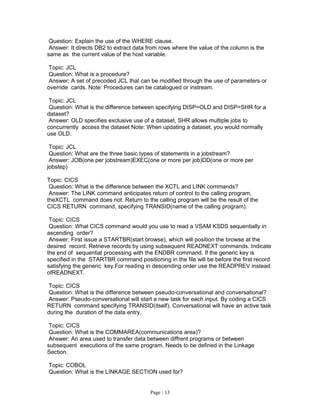
Question: what is Pic 9v99 Indicates?
Answer: PICTURE 9v99 is a three position Numeric field with an implied or assumed
decimal point after the first position; the v means an implied decimal point.
Topic: CICS
Question: WHAT ARE DIFFERENT WAYS OF INITIATING TRANSACTION IN CICS
Answer: WE CAN INITIATE CICS TRANSACTION a) BY GIVING TRANSACTION ID b)
BY GIVING CICS START COMMAND C) AUTOMATIC TASK INITIATION.
Topic: COBOL
Question: WHAT GUIDELINES SHOULD BE FOLLOWED TO WRITE A STRUCTURED
COBOL PRG'M?
Answer: 1) USE 'EVALUATE' STMT FOR CONSTRUCTING CASES. 2) USE SCOPE
TERMINATORS FOR NESTING. 3) USE IN LINE PERFORM STMT FOR WRITING
'DO’ CONSTRUCTIONS. 4) USE TEST BEFORE AND TEST AFTER IN THE
PERFORM STMT FOR WRITING DO-WHILE CONSTRUCTIONS.
Topic: DB2
Question: How do you achieve record locking in DB2 in the versions, which do not
support record level locking?
Answer: Y'day I had posted this queue. The answer should hv read as follows: By having
the record length more than half of the page size ! Sorry again & Thanks
Topic: DB2
Question: How do u achieve record level locking in DB2 versions when record level
locking is not allowed?
Answer: By having the length of the record greater than that of a page!
Topic: DB2,CICS
Question: In a DB2-CICS program, which is, acts as co-coordinator and which is
participant?
Answer: DB2 - participant CICS- coordinator
Topic: Cobol
Question: read the following code. 01 ws-n Pic 9(2) value zero. a-Para move 5 to ws-n.
Perform b-Para ws-n times. b-Para. move 10 to ws-n. how many times will b-Para be
executed ?
Answer: 5 times only. it will not take the value 10 that is initialized in the loop.
Topic: JCL
Question: What is a Dummy Utility and what it does?
Answer: IEFBR14 is a Dummy utility and it is used for the sake of EXEC PGM statement
in JCL[when used it wouldn't perform any task]. e.g. While Allocating a dataset you don't
have to run any utility [this could be done by giving disp=new in DD statement]. But for a
PGM name must be given in EXEC statement, it is used.
Topic: CICS
Question: What is the difference between LINK and XCTL?
Page : 6](https://image.slidesharecdn.com/mainframe-interview-121204212217-phpapp02/85/Mainframe-interview-6-320.jpg)

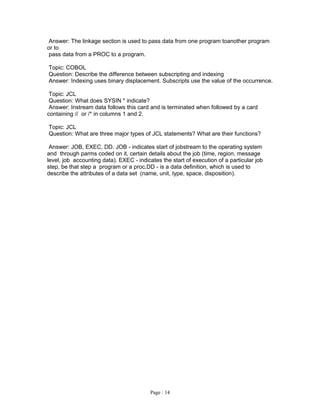
![Topic: CICS.
Question: What CICS facilities can you use to save data between the transactions?
Answer: COMMONAREA, TSQ & TDQ.
Topic: CICS.
Question: What CICS facilities can you use to save data between the transactions?
Answer: COMMONAREA, TSQ & TDQ.
Topic: CICS
Question: How would you release control of the record in a READ for UPDATE?
Answer: By issuing a REWRITE,DELETE, or UNLOCK command or by ending the task.
Topic: CICS
Question: How would you release control of the record in a READ for UPDATE?
Answer: By issuing a REWRITE,DELETE, or UNLOCK command or by ending the task.
Topic: JCL, COBOL, etc.
Question: How do you code Cobol to access a parameter that has been defined in JCL?
And do
you code the PARM parameter on the EXEC line in JCL?
Answer: 1) using jcl with sysin.//sysin dd *here u code the parameters(value) to pass in
to cobol program/*and in program you use accept variable name(one accept will read
one row)/.another way.2) in jcl using parm statement ex:in exec statement
parm='john','david'in cbol pgm u have to code linkage sectionin that for first value you
code length variable and variable name say, abc pic x(4).it will take john insideto read
next value u have to code another variable in the same way above mentioned.]ganesa
Topic: CICS
Question: What is the difference between a RETURN with TRANSID and XCTL ?For
example Prog. A is issuing REUTRN with TRANSID to Prog B. Prog A. is issuing XCTL
to prog B.
Answer: In RETURN with TRANSID the control goes to the CICS region and the user
have to transfer the control to prog. B by pressing any of the AID KEYS. In XCTL the
control is directly transfer to prog. B.
Topic: DB2
Question: What is the difference between Where and Having Clause
Answer: WHERE is for Rows and HAVING is for Groups
Topic: DB2
Question: How to see the structure of db2 table??
Answer: Using QMF.
Topic: COBOL.
Question: Why do we code s9(4)comp.Inspite of knowing comp-3 willoccupy less space.
Answer: Here s9(4)comp is small integer ,so two words equal to i byteso totally it will
occupy 2 bytes(4 words).here in s9(4) comp-3 as one word is equal to 1/2 byte.4 words
equal to 2 bytes and sign will occupy 1/2 byteso totally it will occupy 3 bytes.
Topic: JCL
Page : 10](https://image.slidesharecdn.com/mainframe-interview-121204212217-phpapp02/85/Mainframe-interview-10-320.jpg)

Here are the key steps to reorganize an HDAM IMS database: 1. Back up the database before starting the reorganization process. This provides a recovery point in case of errors. 2. Run the DBDGEN utility to generate a new DBD for the database. This will incorporate any schema changes. 3. Run the HD Reorganization Unload (DFSURGU0) utility to unload all segments from the database to a sequential file. 4. Run the HD Reorganization Reload (DFSURGL0) utility to reload the segments from the sequential file into a new database with the new DBD. This rebuilds the database in a more efficient structure. 5. Run


