JCL – JOB CONTROL LANGUAGE – SIMPLE TUTORIAL
INTRODUCTION

Job control language. It is a means of communication between a program that
can be written in COBOL , ASSEMBER or PL/I and the MVS operating system. Without
a JCL, you cant able to run a job on MVS operating system.

Let us start with an example jcl, how it looks like, The following jcl is
used to run an cobol program. I will explain in this chapter each and every
line of this jcl. If you are already fimiliar with jcl, please skip first
6 chapters.

(First 1 - 6 chapters intended for beginners)

JCL , used to run a cobol program

//JOB1      JOB    (034D),'RAMESH',CLASS='A',PRTY=6
//STEP01    EXEC   PGM=COBPROG.
//INFILE    DD     DSN=SED.GLOB.DES.INFILE,DISP=SHR
//OUTIFLE   DD     DSN=SED.GLOB.DES.OUTFILE,
//                 DISP=(NEW,CATLG,DELETE),
//                 UNIT=DISK,
//                 SPACE=(CYL,(1,5),RLSE),
//                 DCB=(RECFM=FB,LERECL=70,BLKSIZE=700)


see the source code of cobol program COBPROG

IDENTIFICATION DIVISION.
  PROGRAM-ID.    COBPROG.
*
  ENVIRONMENT DIVISION.
  CONFIGURATION SECTION.
  INPUT-OUTPUT SECTION.
  FILE-CONTROL.
       SELECT INPUT-FILE ASSIGN TO INFILE.
       SELECT OUTPUT-FILE ASSIGN TO OUTFILE.
*
  DATA DIVISOIN.
  FILE SECTION.

 FD INPUT-FILE
    01 INPUT-REC                PIC   X(40).

 FD OUTPUT-FILE
    01 OUTPUT-REC               PIC   X(50).
*
 WORKING-STORAGE SECTION.
 01 END-OF-DATA-EF              PIC   X(3) VALUE SPACES.
    88 END-OF-DATA              PIC   VALUE 'YES'.
*
 PROCEDURE DIVISION.
 MAIN-PARA.

     PERFORM 1000-INITILIZATION-PARA.

     PERFORM 2000-PROCESS-PARA THRU 2000-EXIT UNTIL END-OF-DATA.

     PERFORM 3000-CLOSE-PARA.

                                                                                   1
*
 1000-INITILIZATION-PARA.

         OPEN INPUT INPUT-FILE.
         OPEN OUTPUT PRINT-FILE.
*
 2000-PROCESS-PARA.

         READ INPUT-FILE AT END
              MOVE 'YES' TO END-OF-DATA-EF
                    GO TO 2000-EXIT.
         MOVE INPUT-REC TO OUPUT-REC.
         WRITE OUTPUT-REC.
*
 2000-EXIT.
     EXIT.
*
 3000-CLOSE-FILES.
     CLOSE INPUT-FILE OUTPUT-FILE.
*
 3000-EXIT
     EXIT.


Now let us discuss JCL which we have seen.

Before explaining, I will explain few basics about JCL

All JCL statements can consists of up to five types of
fields

    // The two forward slashes are required at the beginning of each
       JCL statement in Columns 1 and 2.

    Name field - This is an optional field. If coded, should start at
                 Column 3. It maximum length is 8.

    Operation field - Which indicates the operation that is to be performed

    Operand - This field must appear after Operation field. Must start at 16
              column

    Comments - Comments begin one space after the last operand. Our simple
               example has no comments.

    //    Name                 Operation             OPerand
    //    JOB1           JOB                 (034D),
                                             'RAMESH',
                                             CLASS='A',
                                             PRTY=6

    //     STEP01         EXEC               PGM=COBPROG

    //     INFILE         DD                 DSN=SED.GLOB.DES.INFILE,
                                             DISP=SHR
    //     OUTIFLE        DD                 DSN=SED.GLOB.DES.OUTFILE,
    //                                       DISP=(NEW,CATLG,DELETE),
    //                                       UNIT=DISK,
    //                                       SPACE=(CYL,(1,5),RLSE),
    //                                       DCB=(RECFM=FB,
    //                                       LERECL=70,BLKSIZE=700)
                                                                               2
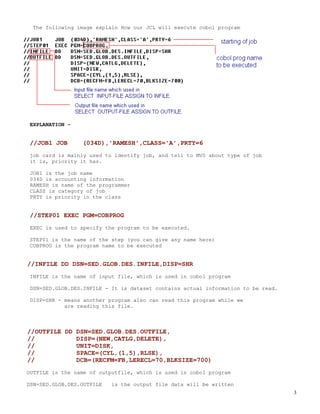
The following image explain How our JCL will execute cobol program


 EXPLANATION -


 //JOB1 JOB      (034D),'RAMESH',CLASS='A',PRTY=6
 job card is mainly used to identify job, and tell to MVS about type of job
 it is, priority it has.

 JOB1 is the job name
 034D is accounting information
 RAMESH is name of the programmer
 CLASS is category of job
 PRTY is priority in the class


 //STEP01 EXEC PGM=COBPROG
 EXEC is used to specify the program to be executed.

 STEP01 is the name of the step (you can give any name here)
 COBPROG is the program name to be executed


//INFILE DD DSN=SED.GLOB.DES.INFILE,DISP=SHR
 INFILE is the name of input file, which is used in cobol program

 DSN=SED.GLOB.DES.INFILE - It is dataset contains actual information to be read.

 DISP=SHR - means another program also can read this program while we
            are reading this file.


//OUTFILE DD DSN=SED.GLOB.DES.OUTFILE,
//           DISP=(NEW,CATLG,DELETE),
//           UNIT=DISK,
//           SPACE=(CYL,(1,5),RLSE),
//           DCB=(RECFM=FB,LERECL=70,BLKSIZE=700)
OUTFILE is the name of outputfile, which is used in cobol program

DSN=SED.GLOB.DES.OUTFILE   is the output file data will be written
                                                                                   3
DISP=(NEW,CATLG,DELETE)      Disp specifies the disposition of dataset,

      NEW - Dataset not exists, need to create
      CATLG - If step executed successfully, dataset should be cataloged
  DELETE - If any error occurred, Dataset should be deleted


JOB STATEMENT
As we discussed in Chapter-1 , Three important input operations are

1. JOB

2. EXEC

3. DD


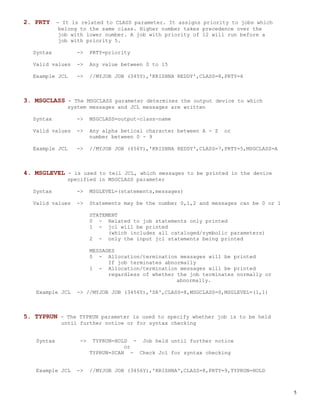
Now let us look at JOB statement


Syntax of JOB Statement


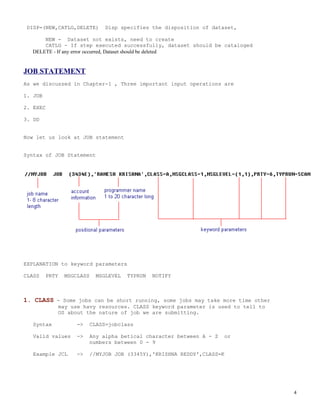
EXPLANATION to keyword parameters

CLASS    PRTY   MSGCLASS   MSGLEVEL   TYPRUN   NOTIFY


1. CLASS - Some jobs can be short running, some jobs may take more time other
             may use havy resources. CLASS keyword parameter is used to tell to
             OS about the nature of job we are submitting.

   Syntax           ->   CLASS=jobclass

   Valid values     ->   Any alpha betical character between A - Z   or
                         numbers between 0 - 9

   Example JCL      ->   //MYJOB JOB (3345Y),'KRISHNA REDDY',CLASS=K


                                                                                  4
2. PRTY - It is related to CLASS parameter. It assigns priority to jobs which
            belong to the same class. Higher number takes precedence over the
            job with lower number. A job with priority of 12 will run before a
            job with priority 5.

  Syntax          ->    PRTY=priority

  Valid values    ->    Any value between 0 to 15

  Example JCL     ->    //MYJOB JOB (345Y),'KRISHNA REDDY',CLASS=8,PRTY=6


3. MSGCLASS - The MSGCLASS parameter determines the output device to which
               system messages and JCL messages are written

  Syntax          ->    MSGCLASS=output-class-name

  Valid values    ->    Any alpha betical character between A - Z   or
                        number between 0 - 9

  Example JCL     ->    //MYJOB JOB (456Y),'KRISHNA REDDY',CLASS=7,PRTY=5,MSGCLASS=A


4. MSGLEVEL - is used to tell JCL, which messages to be printed in the device
               specified in MSGCLASS parameter

  Syntax          ->    MSGLEVEL=(statements,messages)

  Valid values    ->    Statements may be the number 0,1,2 and messages can be 0 or 1

                        STATEMENT
                        0 - Related to job statements only printed
                        1 - jcl will be printed
                              (which includes all cataloged/symbolic parameters)
                        2 - only the input jcl statements being printed

                        MESSAGES
                        0 - Allocation/termination messages will be printed
                              If job terminates abnormally
                        1 - Allocation/termination messages will be printed
                              regardless of whether the job terminates normally or
                                                    abnormally.

   Example JCL    -> //MYJOB JOB (3456Y),'SR',CLASS=8,MSGCLASS=S,MSGLEVEL=(1,1)


5. TYPRUN - The TYPRUN parameter is used to specify whether job is to be held
             until further notice or for syntax checking


   Syntax          ->    TYPRUN=HOLD - Job held until further notice
                                   or
                        TYPRUN=SCAN - Check Jcl for syntax checking


   Example JCL    ->    //MYJOB JOB (3456Y),'KRISHNA',CLASS=8,PRTY=9,TYPRUN=HOLD


                                                                                        5
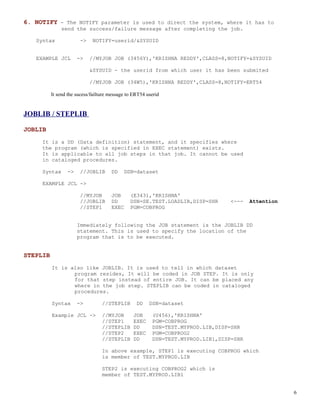
6. NOTIFY - The NOTIFY parameter is used to direct the system, where it has to
              send the success/failure message after completing the job.

   Syntax              ->    NOTIFY=userid/&SYSUID


   EXAMPLE JCL        ->    //MYJOB JOB (3456Y),'KRISHNA REDDY',CLASS=8,NOTIFY=&SYSUID

                            &SYSUID - the userid from which user it has been submited

                            //MYJOB JOB (34W5),'KRISHNA REDDY',CLASS=8,NOTIFY=ERT54

          It send the sucess/failture message to ERT54 userid


JOBLIB / STEPLIB

JOBLIB
     It is a DD (Data definition) statement, and it specifies where
     the program (which is specified in EXEC statement) exists.
     It is applicable to all job steps in that job. It cannot be used
     in cataloged procedures.

     Syntax      ->    //JOBLIB       DD    DSN=dataset

     EXAMPLE JCL ->

                       //MYJOB        JOB      (E343),'KRISHNA'
                       //JOBLIB       DD       DSN=SE.TEST.LOADLIB,DISP=SHR       <---   Attention
                       //STEP1        EXEC     PGM=COBPROG


                      Immediately following the JOB statement is the JOBLIB DD
                      statement. This is used to specify the location of the
                      program that is to be executed.


STEPLIB
          It is also like JOBLIB. It is used to tell in which dataset
                 program resides, It will be coded in JOB STEP. It is only
                 for that step instead of entire JOB. It can be placed any
                 where in the job step. STEPLIB can be coded in cataloged
                 procedures.

          Syntax      ->          //STEPLIB       DD    DSN=dataset

          Example JCL ->          //MYJOB       JOB      (U456),'KRISHNA'
                                  //STEP1       EXEC     PGM=COBPROG
                                  //STEPLIB     DD       DSN=TEST.MYPROD.LIB,DISP=SHR
                                  //STEP2       EXEC     PGM=COBPROG2
                                  //STEPLIB     DD       DSN=TEST.MYPROD.LIB1,DISP=SHR

                                  In above example, STEP1 is executing COBPROG which
                                  is member of TEST.MYPROD.LIB

                                  STEP2 is executing COBPROG2 which is
                                  member of TEST.MYPROD.LIB1


                                                                                                     6
If both the JOBLIB and STEPLIB statements are coded, then the STEPLIB specification will override
         JOBLIB specification.


EXEC statement

EXEC statement
EXEC statement is used to execute a program/procedure

A maximum of 255 EXEC statement can code in an single job

Syntax     - //stepname EXEC PGM=program-name,keyword parameters

                Positional parameter            -   Program-name


Keyword parameters for EXEC

                PARM     ACCT ADDRSPC DPRTY PERFORM RD

PARM
              PARAM parameter is used to pass information to program

              Syntax     ->    PARM=value

                               Value is a string can be 1 to 100 characters long.


            PASSING PARAMETER USING PARM PARAMETER


            PARM-INDICATOR will contain "RAMESH"

            PARM-LENGTH contains length of string.


Remaining parameters , We wont use much

ACCT        - accounting information for that step

ADDRSPC - used to indicate to the system that the job step is use either
              virtual or real storage

DPRTY       - used to assign priority to the job step

PERFORM - specifies the rate at which system resources used by job step

RD         - restart definition is used to specify automatic restart of a job
             if it abends


                                                                                                             7
Q. If there is a situation, where we need to code more than 255
  steps in a JOB?
  A. We need to split jcl into two jcls , at the end of the first jcl
  check the condition
  code and initiate the second jcl.


PARAMETERS IN BOTH STATEMENTS (JOB and EXEC)


PARAMETERS IN BOTH STATEMENTS (JOB and EXEC)
COND   REGION     TIME

These parameters can code in both JOB and EXEC statements, When we code
these parameters on both statement,

JOB - REGION          will override              EXEC - REGION

JOB - COND            will override              EXEC - COND

EXEC - TIME           will overrirde             JOB - TIME


Now let us see details of these parameters


REGION - Specifies the amount of space should be used at the time of
           running a job/step

           Syntax     ->          REGION=< value >K
                                       or
                                  REGION=< value >M

           Example JCL -> //MYJOB             JOB     (AE32),'RAMESH'
                          //STEP1             EXEC    PGM=COBPROG,
                          //                         REGION=67K


       All available storage is assigned to the job or jobstep, If REGION is coded 0K or 0M


COND   - Each step sends an a return code to the system upon completion.
        This is called condition code. COND parameter is used to control
        the execution of subsequent job steps, depending on the condition
        code that is returned for prior step.

         Return code number between 0 and 4095


  Syntax     ->    COND=(comparsion-code,condition)
                                  (If coded on job)

                                                                                              8
COND=(comparsion-code,condition [,stepname] [,EVEN / ONLY])
                                                       (If coded on step)

              condition can be GT,GE,LT,LE,EQ,NE


Example JCL   ->   COND coded on JOB

                   //MYJOB    JOB    (R475),'KRISHNA REDDY'
                   //                COND=(4,GT)
                   //STEP1    EXEC   PGM=COBPROG
                   //STEP2    EXEC   PGM=COBPROG2

                   In this example we are specifing that if the number
                   4 is grater than the return code of STEP1, then STEP2
                   is to be bypassed. It is elaborated further in the
                   following image


                    COND coded on EXEC statement

                    //MYJOB    JOB (U769),'KRISHNA REDDY'
                    //STEP1    EXEC PGM=PROG1
                    //STEP2    EXEC PGM=COBPROG,
                    //              COND=(8,EQ,STEP1)
                    //

                    In this example the COND parameter is used to specify that
                    STEP2 should be by passed if 8 is equal to the return code
                    issued by STEP1.


                                                                                 9
TIME -    The time parameter is used to specify the amount of CPU time that a
         job or job step is permitted to utilize.

 Syntax      -> TIME=minutes
                    OR
                TIME=([minutes] [,seconds])

                minutes can be between 1 and 1439
                seconds can be between 1 and 59


 Example JCL ->     If coded on JOB

                  //MYJOB     JOB     (E234),'RAMESH KRISHNA',TIME=(20,30)
                  //STEP1     EXEC    PGM=COBPROG1
                  //STEP2     EXEC    PGM=COBPROG2
                  //STEP3     EXEC    PGM=COBPROG3

                  In this example 20 minutes 30 seconds time alloted
                             to job. All steps in this job STEP1 STEP2 STEP3 should
                             complete its task within 20 min. 30 sec.


                  If coded on STEP

                  //MYJOB     JOB     (R567),'KRISHNA'
                  //STEP1     EXEC    PGM=COBPRO
                  //                  TIME=30

                  In this example 30 min. time is alloted to STEP1.
                  If STEP1 requires more than 30 min. MYJOB will
                  terminate abnormally.


                  If coded on both STEP AND JOB

                  //SECOND JOB        ,'R. KRISHNA',TIME=3
                  //STEP1 EXEC        PGM=C,TIME=2
                  //STEP2 EXEC        PGM=D,TIME=2


                In this example, the job is allowed 3 minutes of execution time.
                Each step is allowed 2 minutes of execution time. Should either
                step try to execute beyond 2 minutes, the job will terminate
                beginning with that step. If STEP1 executes in 1.74 minutes and
                if STEP2 tries to execute beyond 1.26 minutes, the job will be
                terminated because of the 3-minute time limit specified on the
                JOB statement.


     By coding TIME=1440 or TIME=NOLIMIT, It will give a job or step an unlimited
     amount of time.


     To allow a job or step to use the maximum amount of time, code TIME=MAXIMUM.
     Coding TIME=MAXIMUM allows the job or step to run for 357912 minutes. (Approx.
     248 days)


                                                                                      10
DD STATEMENT
The DD statement (Data Definition), is used to identify the source of input
and the placement of output information


Syntax   ->   //ddname   DD   < positional / keyword parameters >

              ddname must be unique in the job


              Positional parameters -       *
                                            DATA
                                            DUMMY
                                            DYNAM

              Keyword Parameters      -     DSN
                                            DISP
                                            UNIT
                                            SPACE
                                            DCB
                                            VOLUME

DSN PARAMETER
    DSN parameter is used specify the data set name

    Syntax    ->   DSN=dataset name

    Example JCL ->     //MYJOB     JOB     (ER3),'RAMESH R'
                       //STEP1     EXEC    PGM=COBPROG
                       //INFILE    DD      DSN=TEST.GLOB.MYLIB

                       TEST.GLOB.MYLIB will be used in the COBPROG program.


TEMPORARY DATA SETS
    Temporary data set is created during job and deleted at the end of the job.

    Temporary data set can be coded by using two ampersands followed by name.

    Example JCL     --> //MYJOB     JOB     (E456),'RAMESH'
                        //STEP1     EXEC    PGM=COBPROG
                        //INFILE    DD      DSN=&&TEMP

    Here TEMP is an temporary dataset will be deleted upon job completion.


DISP PARAMETER
   The DISP parameter is used specify the disposition of dataset which is
   coded on DSN parameter.

   Syntax     ->


                                                                                  11
Parameter on the DISP statement


       Status                             Normal Disposition                 Abnormal
Disposition

        NEW                          DELETE                        DELETE
        OLD                          CATLG                         CATLG
        MOD                          UNCATLG                       KEEP
        SHR                          KEEP                          UNCATLG
                                     PASS


   STATUS
         NEW    -   Dataset   will be created. (file should not exists)
         OLD    -   Dataset   should exists.
         MOD    -   Dataset   will be created If not exists.
         SHR    -   Dataset   can be used by other jobs also


   NORMAL DISPOSITION
   (Happened upon sucessful execution of job step)

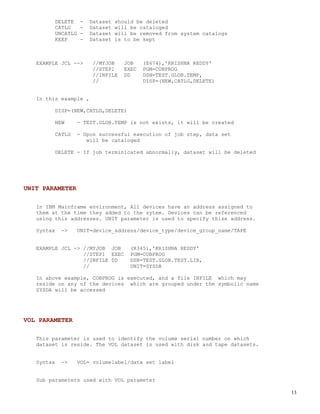
         DELETE     -   Dataset should be deleted
         CATLG      -   Dataset will be cataloged
         UNCATLG    -   Dataset will be removed from system catalogs
         KEEP       -   Dataset will be retained (This parameter should
                        be used with permanent data sets)
         PASS       -   Dataset is to be passed subsequent job step in
                        the same job


   ABNORMAL DISPOSITION
   (Happened upon unsucessful execution of job step)


                                                                                        12
DELETE    -   Dataset   should be deleted
         CATLG     -   Dataset   will be cataloged
         UNCATLG   -   Dataset   will be removed from system catalogs
         KEEP      -   Dataset   is to be kept


   EXAMPLE JCL -->      //MYJOB     JOB    (E674),'KRISHNA REDDY'
                        //STEP1     EXEC   PGM=COBPROG
                        //INFILE    DD     DSN=TEST.GLOB.TEMP,
                        //                 DISP=(NEW,CATLG,DELETE)


   In this example ,

         DISP=(NEW,CATLG,DELETE)

         NEW     - TEST.GLOB.TEMP is not exists, it will be created

         CATLG   - Upon successful execution of job step, data set
                    will be cataloged

         DELETE - If job terminicated abnormally, dataset will be deleted


UNIT PARAMETER

   In IBM Mainframe environment, All devices have an address assigned to
   them at the time they added to the sytem. Devices can be referenced
   using this addresses. UNIT parameter is used to specify thise address.

   Syntax   ->   UNIT=device_address/device_type/device_group_name/TAPE


   EXAMPLE JCL -> //MYJOB JOB        (R345),'KRISHNA REDDY'
                  //STEP1 EXEC       PGM=COBPROG
                  //INFILE DD        DSN=TEST.GLOB.TEST.LIB,
                  //                 UNIT=SYSDA

   In above example, COBPROG is executed, and a file INFILE which may
   reside on any of the devices which are grouped under the symbolic name
   SYSDA will be accessed


VOL PARAMETER

   This parameter is used to identify the volume serial number on which
   dataset is reside. The VOL dataset is used with disk and tape datasets.


   Syntax   ->   VOL= volumelabel/data set label


   Sub parameters used with VOL parameter

                                                                             13
SER        -   Specification of serial number
       REF        -   Referencing VOL specification from a prior step
       PRIVATE    -   Allowing access to volume by single user
       RETAIN     -   Inhibiting dismounting of volume until end of job
       SEQ        -   Specification of sequence in which volumes are to be mounted


   EXAMPLE JCL -->      //MYJOB     JOB    (E454),'KRISHNA REDDY'
                        //STEP1     EXEC   PGM=COBPROG
                        //INFILE    DD     DSN=TEST.GLOB.TEMP,
                        //                 VOL=SER=(VOL1,VOL2,VOL3)

   In this example the data set called DATA3 resides on 3 volumes whose
   serial numbers are VOL1,VOL2,VOL3. The Operating system will request
   that all volumes be mounted at the same time.


SPACE PARAMETER
    The SPACE parameter is used to allocate space for datasets.
    We can allocate space in Cylinders/Tracks/Blocks

    Syntax   ->    SPACE=(CYL,(primary,secondary,directory),RLSE,CONTIG,MXIG,ROUND)

                   Instead of CYL, We can use TRK or BLK


    Meaning of Sub Parameter

             TRK           -   Requesting space in track

             CYL           -   Requesting space in cylinders

             PRIMARY       -   Primary storage to be allocated at the time of
                               data set created

             SECONDARY -       Additional storage to be allocated ,
                                          If primary storage is not sufficient

             DIRECTORY -       Space for recording of name and location of partitioned
                               data sets

             RLSE          -   Request for release of space previously allocated unused
                               space after completion of job

             CONTIG        -   Request for contiguous space

             MXIG          -   Request for large aread of contiguous space

             ROUND         -   Request for entire cylinder for storage of data set


     EXAMPLE JCL      ->    //MYJOB   JOB   (W345),'KRISHNA REDDY'
                             //STEP1   EXEC PGM=COBPROG
                             //INFILE DD     DSN=TEST.GLOB.LIB
                             //              UNIT=4560
                             //              SPACE=(CYL,(30,4))

     In this example, 30 cylinders are requested as primary space and 4
     additional cyliders as secondary space.
                                                                                          14
Upto 15 extends of secondary space ( in our example it is 4 ) will be alloted , If space
     is not sufficient.


DCB PARAMETER
   Records in dataset may contain FIXED length / VARIABLE length.
   The DCB (Data Control Block) parameter is used to specify record
   format,record length, block size etc..


   Syntax    ->    //ddname        DD    DCB=< parameters >


   Subparameters in DCB

            RECFM       -    Specification        of   record format            -   F/FB/V/VB/U
            LRECL       -    Specification        of   record length
            BLKSIZE     -    Specification        of   block size
            BUFNO       -    Specification        of   buffers


   EXAMPLE JCL       ->     //MYJCL       JOB       (E3445),'RAMESH'
                            //STEP1       EXEC      PROG=COBPROG
                            //INFILE      DD        DSN=TEST.GLOB.LIB
                            //                      UNIT=234,
                            //                      DSN=(LRECL=80,
                            //                           RECFM=FB,
                            //                           BLKSIZE=800,
                            //                           BUFNO=30)


   In this example, The DCB parameter specifies that this file is to
   have a logical record length of 80 bytes, it will have a fixed block
   record format, and the block will 800 (800 is multiple of 80). The
   BUFNO parameter is set to 30, indicating upto 30 buffers may be
   utilized in virtual storage for this data set.

   Default buffers are 5,if you not specified any thing


     When you specified V for RECFM parameter, LRECL value is largest record in the
     file plus 4 bytes. These four bytes contain the actual length of each variable length
     record in the file


SPECIAL DD STATEMENT
                                                                                                  15
1.   DUMMY
     DSN=NULLFILE

2.   Concatenating Data sets

3.   Passing data to cobol program             using -      SYSIN DD *

4.   SYSOUT

5.   SYSUDUMP

6.   SYSADUMP


1. DUMMY or DSN=NULLFILE
       Some times we need to testing of program, without using actual datasets.

       Then we can use DUMMY or DSN=NULLFILE.

       If we use DUMMY, operating system simulates the presence of a file. When
       you reading Operating system sends end of file request to program.

        Example JCL      -->      //MYJOB       JOB      (W345),'KRISHNA REDDY'
                                  //STEP1       EXEC     PGM=COBPROG
                                  //INFILE      DD       DUMMY


2. CONCATENATING DATA SETS
       In JCL , we can concatenate different files by giving their name one after
           another. All data sets concated must be of the same type. For example,
           partitioned data sets can be concatenated only with partitioned data sets.

       Example JCL      -->      //MYJOB       JOB      (W345),'KRISHNA REDDY'
                                 //STEP1       EXEC     PGM=COBPROG
                                 //INFILE      DD       DSN=TEST.GLOB.FILE1
                                 //                     DSN=TEST.GLOB.FILE2
                                 //                     DSN=TEST.GLOB.FILE3

       In program , we will read it as an single file. concatination of three
       files done by operating system.


        Maximum of 255 sequential data sets can be concatenated together
        Maximum of 16 partitioned data sets can be concatenated together


3. PASS DATA TO COBOL PROGRAM USING - SYSIN DD *
        This is the one of the way of passing data to program. There are two
        syntax's to pass data.

                       Syntax1     ->    //MYJOB        JOB     (W234),'RAMESH'
                                         //STEP1        EXEC    PGM=COBPROG
                                         //SYSIN        DD      *

                                                                                        16
/*

                    Syntax2      ->   //MYJOB       JOB     (E345),'KRISHNA REDDY'
                                      //STEP1       EXEC    PGM=COBPROG
                                      //SYSIN       DD      DATA

                                      /*


4. SYSOUT
     The SYSOUT parameter is used to send the output which is generated during
     job execution.

                                       Syntax          ->    //ddname        DD   SYSOUT=class

                   EXAMPLE JCL ->        //MYJOB JOB (R456),'KRISHNA REDDY'
                                         //STEP1 EXEC PGM=COBPROG
                                         //INFILE DD  SYSOUT=A

                   In this example, COBPROG is executed and all generated outputs
                   are directed to class ( here it is letter A)


     If * used with SYSOUT (SYSOUT=*) parameter, The class assigned to the
     MSGCLASS parameter will be used to SYSOUT.


5. SYSUDUMP
    SYSUDUMP is used to dump the content of various registers, variables and
    datasets acccessed at the time of abnormal termination, into a dataset.
    The dump is in hexadecimal.
                                                                                                 17
Syntax   -->   //SYSUDUMP    DD     .....

                  EXAMPLE JCL -->     //MYJOB        JOB    (W345),'RAMESH'
                                      //STEP1        EXEC   PGM=COBPROG
                                      //SYSUDUMP     DD     DSN=TEST.PROD.LIB


6. SYSABEND
      SYSABEND is used to dump the contents of various registers variables ,
      datasets accessed and The nucleus at the time of abnormal termination.
      The dump is in hexadecimal.

                  Syntax   -->   //SYSABEND   DD    .....

                  EXAMPLE JCL -->   //MYJOB        JOB    (WE345),'KRISHNA REDDY'
                                    //STEP1        EXEC   PGM=COBPROG


INSTREAM and CATALOGED PROCEDURES
1. Introduction

2. Instream Procedure

3. Cataloged procedure

4. Modify statements in a procedure

5. Symbolic parameters


INTRODUCTION
   In JCL, We have an important concept reusability in the form of
   Instream and Cataloged procedures, Often, in work environments
   users can utilized same JCL. Using instream / cataloged procedures
   we can reuse the jcl code which was stored in another data set, in
   our data set.


   Syntax for Executing procedure

   -->   EXEC   [PROC=]procedure-name


INSTREAM PROCEDURE
   A JCL Procedure is a pre-written segment of code, that you can include
   in your JOB. You code instream data set within the job and use it in

                                                                                    18
that job as many times as you want.


  An Instream Procedure JCL Example


   EXPLANATION
  - Instream procedure should be defined , before any EXEC statement defined

  - Instream procedure startes with PROC and ends with PEND statements

  - Instream procedure is executed when we main jcl called.


      The maximum number of instream procedures you can in any job is 15


CATALOGED PROCEDURES
     Pre-written segment of code (which is stored as an member of PDS),
     which you can use as many times you want in any job in the system.
     IBM supplies a utility program called IEBUPDTE; this program places
     cataloged procedures into partitioned data sets. These procedures
     are placed inside a system library called SYS1.PROCLIB.


     Developing Catalog Procedure


     STEP1:
     Write an Cataloged procedure in MYLIB.EXAMPLES.TEST(CATALOG1)

     //CATLOG1       PROC
     //STEP1         EXEC    PGM=COBPROG
                                                                               19
//INFILE        DD        DSN=TEST.GLOB.LIB,
      //                        DISP=SHR
      //OUTFILE       DD        DSN=TEST.GLOB.SPACE.LIB,
      //                        DISP=SHR


      STEP2 :
      Write Main JCL which will call out CATALOG1 JCL

      //MYJOB      JOB          (WE234),'RAMESH',CLASS=A
      //           JCLLIB       ORDER=(MYLIB.EXAMPLES.TEST)                       <--    Attention
      //STEP1      EXEC         CATALOG1                                          <--    Attention
      //


      EXPLANATION
          - When you executing CATALOGED PROCEDURE, If you not specified
            where it is with JCLLIB statement , it will serach for this
            procedure in system procedure library SYS1.PROCLIB

          - There many IBM-supplied procedures that compile, link, and run programs


     Job will search the JCLLIB libraries first, in the order in which they’re coded. If the
     procedure is not found in any of the named libraries, SYS1.PROCLIB is searched.


      The following statements cannot be included within the procedure
      JOB
      DD * or DD DATA
      JES2 or JES3 control statements


MODIFY STATEMENTS IN A PROCEDURE

     There are times, when we want to change procedure statements according
     to our requirement, IBM provided a way without changing actual procedure,
     we can add/modify contents of procedure. Let us discuss what are the ways

     There are two types of modification we can do ,


     1. on EXEC statement

     2. on DD statement


     on EXEC statement

                                                                                                     20
We can do following functions on EXEC statement in a procedure


  -   Modify parameter on EXEC statements
      PROCEDURE STATEMENT - //STEP10 EXEC PGM=COBPROG,TIME=30

      PARAMETER OVERRIDE   - //MYSTEP EXEC PROC=MYPROC,TIME.STEP10=40

          Now Resultant TIME value for that step (in proc) is 40


  -   Adding parameter to an EXEC statement / all EXEC statement
      PROCEDURE STATEMENT - //STEP10 EXEC PGM=COBPROG,TIME=30

      PARAMETER ADDING     - //MYSTEP EXEC PROC=MYPROC,REGION.STEP10=56K
      (for single step)

      REGION will be added to the STEP10 in MYPROC procedure

      PARAMETER ADDING     - //MYSTEP EXEC PROC=MYPROC,REGION=56K
      (for single step)

      If REGION is not available for any step in that procedure.
      REGION will be added to all steps in procedure. If REGION
      is available for any step in procedure, REGION value will
      be override existing value on that step.


  -   Nullifying the parameter value
      PROCEDURE STATEMENT - //STEP10 EXEC PGM=COBPROG,TIME=30

      PARAMETER ADDING     - //MYSTEP EXEC PROC=MYPROC,TIME.STEP10=


      Dont give any value for that parameter, it will nullifying
      that parameter value in procedure


on DD statement

      -   Syntax for add/modify DD statements in a procedure
      //name                    EXEC   [PROC=]procedure-name
      //[procstepname].ddname   DD     parameter=value
      //

  We can do following functions on EXEC statement in a
         procedure using above syntax

  -   Modify existing parameter on DD statements within a procedure
                                                                           21
-    Add parameter to existing DD statement within a procedure
        -    Add DD statement to a job step
        -    Nullify the effect of parameter on DD statement in a procedure


SYMBOLIC PARAMETERS
  Usaually, the same JCL can be used by different programmers to
  implement common tasks, such as the opening, reading, and writing
  of data sets. In those cases , we can use symbolic parameters.
  Using symbolic parameters we can pass value to a    parameter which
  is used in procedure. A symbolic parameter on a DD statement is
  coded the parameter preceded by an ampersand.

  Syntax for assigning values to symbolic parameters in a procedure

  //[name]     EXEC   [PROC=]procedure-name,symbolic-parameter=value


  EXAMPLE JCL ->        Procedure which is using symbolic parameter

                      //MYPROC    PROC
                      //MYSTEP    EXEC   PGM=COBPROG
                      //INFILE    DD     DSN=&DOC..TEST.LIB,DISP=SHR
                      //OUTFILE   DD     DSN=&DOC..TEST.OUT,
                      //                 DISP=(NEW,KEEP,DELETE),
                      //                 UNIT=SYSDA,
                      //                 SPACE=(CYL,(&SPACE))


                      The invoking EXEC statement

                      //STEPA1    EXEC   MYPROC,DOC=MYLIB,SPACE='10,5'


                      The effective JCL

                      //MYPROC    PROC
                      //MYSTEP    EXEC   PGM=COBPROG
                      //INFILE    DD     DSN=MYLIB.TEST.LIB,DISP=SHR
                      //OUTFILE   DD     DSN=MYLIB.TEST.OUT,
                      //                 DISP=(NEW,KEEP,DELETE),
                      //                 UNIT=SYSDA,
                      //                 SPACE=(CYL,('10,5'))


            EXPLANATION -
            In above example, &DOC,&SPACE are symbolic parameters in MYPROC procedure

            We are passing values from invoking JCL,these value will be override the
            &DOC and &SPACE where ever they find in the procedure


Generation Data Groups (GDG)
                                                                                        22
1. INTRODUCTION

2. CREATION OF GDG

3. USING GDG

4. ALTERING GDG DEFINITION

5. DELETING GDG

6. IMPORTANT PRACTICAL QUESTIONS


1. INTRODUCTION

   Generation Data Groups or GDGs are a group of data sets which
   are related to each other chronologically and functionally.
   These related Data Sets share a unique Data Set Name.


   Every GDG data set has a Generation number and Version number assigned
   to each data set.


   EXAMPLE --      'MYLIB.LIB.TEST.G0001V00'
                  'MYLIB.LIB.TEST.G0002V00'
                  'MYLIB.LIB.TEST.G0003V00'      <-- Current Version


                  Generation Number ->   GaaaaVnn
                                         aaaa is between 0000 to 9999
                                         nn   is between 00   to 99


                  In JCL, we refer current version with 0   ( Ex.   MYLIB.LIB.TEST(0) )
                  new version going to create with +1       ( Ex.   MYLIB.LIB.TEST(+1) )

                  older versions , refer with -1 -2 -3 etc....
                                        ( Ex. MYLIB.LIB.TEST(-1) )      <- OLDER VERSION


   Example for where we can use this GDGs.
                                                                                           23
Usually, In production environment, for every month we need
        to run jobs to create reports for that month.


        Let us suppose for January, We can code it     MYLIB.LIB.TEST.JAN
                           for FEB, We can code it     MYLIB.LIB.TEST.FEB
                           for MAR, We can code it     MYLIB.LIB.TEST.MAR


        So , Every month we need change dataset name in JCL, before
        submitting the job. Whenever we enterred into another year,
        We need to delete old years data sets.

        We need to do above task carefully, If we use GDG, It will take
               care following things

        -   It will maintain all generation of data sets
        -   It will delete/uncatalog older generation
        -   Very easily, we can refer current and older versions of data sets
        -   No need of change the JCL every time when we submit


2. CREATION OF GDG
    Before using GDG , We need to create GDG index and model.
    IDCAMS (the 'AMS' stands for Access Method Services), utility
    is used to create GDG index.


    Example JCL for creating GDG index
            //MYJOB    JOB (W234),'RAMESH'
            //STEP1    EXEC PGM=IDCAMS
            //SYSIN    DD   *
               DEFINE GDG(NAME(MYLIB.LIB.TEST)    -
                          LIMIT(10)               -
                          NOEMPTY                 -
                          SCRATCH)
            /*
            //


            In this example, IDCAMS utility is used to create an index
            for a GDG called MYLIB.LIB.TEST. The number of generations
            that can exist in this GDG is limited to ten. NOEMPTY parameter
            is used to specify , Once the limit is reached, the system is
            instructed to uncatalog the oldest generation data set within the
            GDG. SCRATCH parameter is used to specify to physically delete
            the data set which was uncataloged.


    PARAMETERS WE CAN PASS TO IDCAMS
     NAME                -   This parameter is used to specify the name of the

                                                                                 24
data set that is to be created.

    LIMIT                -   This parameter is used to specify the the total number
                             of generations that the GDG may contain

    EMPTY/NOEMPTY        -   These two parameters are mutually exclusive. EMPTY
                             specifies that all existing generations of the GDG
                             are to be uncataloged whever the generations of GDG
                             reached the maximum limit NOEMPTY specifies that only
                             the oldest generation of the GDG is to be uncataloged
                             if the limit is reached

    SCRATCH/NOSCRATCH -      These two parameters are mutually exclusive. SCRATCH
                             parameter specifies that whenever entry of the GDG is
                             removed from the index, it should be deleted physically
                             and uncataloged. NOSCRATCH parameter specifies that
                             whenever entry of the GDG is removed from the index, it
                             should be uncataloged, not physically deleted


       SCRATCH and NOEMPTY are default parameters


    CREATING MODEL
     Once the index has been created, a model data set must be created.
     This model data set contains specifications for the DCB subparameters
     for all data sets that will belong to that GDG. Programmer can override
     this default values if he want.


     EXAMPLE JCL
     //MYJOB    JOB    (W983),'KRISHNA'
     //STEP1    EXEC    PGM=IDCAMS
     //SYSIN    DD      *
       DEFINE   GDG(                      -
                  NAME(MYLIB.LIB.TEST)    -
                  LIMIT(10)               -
                  NOEMPTY                 -
                  SCRATCH)
     //STEP2 EXEC PGM=IEFBR14
     //MODEL1 DD  DSN=MYLIB.LIB.TEST,
     //           DISP=(NEW,KEEP,DELETE),
     //           UNIT=SYSDA,
     //           SPACE(TRK,0),
     //           DCB=(LRECL=80,RECFM=FB,BLKSIZE=800)
     //

     Using IEFBR14, we have created the model, Now GDG is ready to use, In
     next section you will learn how we will use this created GDG.


3. USING GDG
                                                                                       25
To use created GDG in our JCL, we need to use name
    (with +1 for new generation) which we used in DEFINE
    GDG command. (i.e. MYLIB.LIB.TEST)

    EXAMPLE JCL
    //MYJOB     JOB (SD345),'KRISHNA REDDY'
    //STEP1     EXEC PGM=COBPROG
    //INFILE    DD   DSN=MYLIB.LIB.TEST(+1),
    //               DISP=(NEW,CATLG,DELETE),
    //               UNIT=SYSDA,
    //               SPACE=(TRK,(20,10),RLSE),
    //               DCB=(MODEL.DCB,RECFM=FB,
    //               LRECL=80,
    //               BLKSIZE=800)
    //

    The program COBPROG is executed. A new generation data set is
    created via the statement

        //INFILE      DD   DSN=MYLIB.LIB.TEST(+1)

    Since we used (+1) with GDG name, it creates a new generation
    data set.

    The DISP parameter must be set to CATLG for all new generation
    data sets , DISP=(NEW,CATLG,DELETE)


    We used MODEL.DCB in DCB parameter to instruct system to use
    subparameters specified in model GDG.


     The DSN and UNIT parameters must be coded for all new generation data sets


4. ALTERING GDG DEFINITION

    Some times there are situtations where we need to change the
    attributes of GDG. These types of tasks can be performed using
    ALTER command. We will use IDCAMS utitlity to alter GDG attributes.


    In last section, I have create MYLIB.LIB.TEST GDG with NOEMPTY SCRATCH
    subparameters, now I want to change them to EMPTY NOSCRATCH respectively.
    Here is the JCL that will do this:

    //MYJOB    JOB (WE345),'KRISHNA'
    //STEP1    EXEC PGM=IDCAMS
    //SYSPRINT DD   SYSOUT=A
    //SYSIN    DD   *
        ALTER MYLIB.LIB.TEST EMPTY NOSCRATCH
    /*
    //
                                                                                  26
In this example, the ALTER statement is used to modify the features of
    the GDG called MYLIB.LIB.TEST. Any generations that may exist for that
    GDG will now contain the modified features as well. Any new generations
    that are created for this GDG will now be created based on these new
    features.


5. DELETING GDG

    We can delete an generation of GDG             with IEFBR14, Here is the
    JCL to do that

    //MYJOB   JOB (ER456),'RAMESH'
    //STEP1   EXEC PGM=IEFBR14
    //DEL1    DD   DSN=MYLIB.LIB.TEST(0)    <-- Current Version
    //             DISP=(OLD,DELETE,DELETE)
    //


    In this example JCL, the program IEFBR14 is executed. The current
    generation of MYLIB.LIB.TEST is deleted.


    To delete GDG index/generations , We need to use DELETE command in
    IDCAMS utility. There are two sub parameters we can use with DELETE
    command.


    They are PURGE and       FORCE


    PURGE sub parameter is used in conjunction with DELETE statement to
    delete the GDG index, even if its retention period has not expired.

    FORCE parameter can be coded on the DELETE statement to delete the
    GDG index, the model, and all related generation data sets, if they
    exist.


    EXAMPLE JCL for FORCE

    //MYJOB JOB (W234),'KRISHNA'
    //STEP1 EXEC PGM=IDCAMS
    //SYSIN DD     *
       DELETE(MYLIB.LIB.TEST) GDG FORCE
    /*


    MYLIB.LIB.TEST GDG index, the model and all related generation data
    sets will be deleted upon successful execution of this job step.


        Maximum of 255 data sets exist within one GDG


                                                                               27
6. IMPORTANT PRACTICAL QUESTIONS
Q. In my JCL, In step1 I will going to create a new generation data
   set for that i gave gdgname(+1). In step2 I want to use same data
   set created by previous step? what number i should give to refer that
   data set (i.e 0 or +1 or +2 )?   (STEP1 EXECUTED SUCCESSFULLY)

A. +1

Q. Why?

A. Even step1 executed successfully, It is not become the current generation
   of GDG. At the end of the job only it will become the current version of GDG.
   So within the job we need to refer it as new generation only, even that step
   completed sucessfully.


Control Job Processing (IF THEN ELSE) in JCL

There are two ways to control job processing in JCL, One way is by
coding COND parameter either on JOB or on EXEC, Second way is ,
using IF condition.

In previous chapters, we have discussed about COND parameter on both
JOB as well as EXEC.


Now let us discuss about IF condition in JCL

Using IF construct is more powerful than COND.

     - The COND parameter on the first step of a job is ignored
       However,the IF construct is tested

     - We can code symbolic parameters in the IF conditions

     - We can code many types of relational-expressions in IF condition


Syntax of IF
//name IF < condition > THEN
   .
   .
//name1 ELSE
   .
   .
//      ENDIF

The condition (ralational expression) consists of:

  Comparison operators
  Logical operators
  Not (¬) operators
  Relational expression keywords.


                                                                                   28
Example JCL
//EXAMPLE    JOB
//S1         EXEC MYPROC1
//COND01     IF RC = 0 THEN
//C01OK      EXEC MYPROC2
//CONDE      ELSE
//C01ELS     EXEC MYPROC3
//           ENDIF

EXPLANATION
In above example, S1 is first job step
In 3 rd line, we check the Recturn code of S1 step
if return code is zero then C01OK step will execute
else step C01ELS will going to execute

A Keyword List

Keyword     Purpose
ABEND       Tests for an abnormal end of a program
            Tests that an abnormal end of a program did not
¬ABEND
           occur
ABENDCC Examines an ABEND condition code
RC          Examines a return code
RUN         Tests if a job step executed
¬RUN        Tests if a job step did not execute


All the keywords can include a stepname and procstepname to refine
the test to a specific job step.

The format is stepname.procstepname.keyword.


RC - checks a return code.

EXAMPLE JCLs
     IF   RC = 0      THEN

     IF   STEP1.RC < 12         THEN

     If you not given the stepname, then the highest return code from all
     job steps is taken for checking.


ABENDCC - Checks an ABEND condition code
Using ABENDCC we can check System/User completion codes

EXAMPLE
IF ABENDCC = S0C7 THEN
                                                                            29
Suppose you want to check error code of particular step,
give stepnname.ABENDCC, If you not given the stepname,
most recent ABEND code that occured is taken for checking


ABEND - checks for an abnormal end of a program

EXAMPLE JCL
 IF   ABEND    THEN

 IF   STEP4.PROCAS01.ABEND = TRUE             THEN

If you not given any stepname, all steps prior to this
condition will be checked


RUN - to check whether a job step executed or not

EXAMPLE JCL
Suppose there is a job which contains STEP2, STEP3,STEP4
I have an if condition for STEP2 and STEP3, if condition
is true then STEP2 will be executed, If condition is false
then STEP3 will be executed

I want to execute STEP4 if STEP2 executes,
we can code in the following way

 //CHE01    IF    STEP2.RUN THEN
 //STEP4    EXEC MYPROC1
 //         ENDIF


       Either the THEN clause or ELSE clause must contain at least one EXEC statement.


       You can nest another IF construct after the THEN clause or the ELSE clause. You can
       nest IF/THEN/ELSE/ENDIF statement constructs up to 15 levels of nesting.


Restarting and checkpoint in jcl
Restarts are specified using the RD and RESTART parameters.

The RD parameter is used to request an automatic restart of a
job if the job fails.

The RESTART parameter is used to specify a restart point when
a job is resubmitted.

The RD parameter can be used within JOB and EXEC statements to request
an automatic restart if the job fails.


                                                                                             30
JOB RD Overrides EXEC RD


RESTART is used when we want to restart a job from a step , when
it abended in a step


Restarting When the System Failed in a JES2 System

JES2 requeues the job for execution if RESTART=Y is in the JES2
/*JOBPARM statement Re-execution is from the beginning of the job.

  Example JCL:

         //J3    JOB ,'R. KRISHNA'
         /*JOBPARM RESTART=Y
                    .
                    .


Restarting When the System Failed in a JES3 System

If the job was executing when the system failed, the FAILURE parameter
on the JES3 //*MAIN statement tells JES3 how to   handle the job. The
job can be restarted, cancelled, held, or printed and then held for restart.

  Example JCL:

     //J4    JOB ,'R. KRISHNA',RD=NC
     //*MAIN FAILURE=RESTART
                 .
                 .


            ------------------------ END OF TUTORIAL   -------------------------------------


                                     SORT TUTORIAL
ASSUMPTIONS
Before discussing about SORT,let us assume following things

Input file has following data and structure


                   INPUT FILE
MOHANK    23423423434534344 KIRAN
MOHANK    13342345345345345 RAJEEV
ARAMES    34535345325354324 SURESH
SURESH    98347385385933987 PULI
RAMESH    67575789769876785 MADHU
KRISHN    50830948530859340 OIIED
KRISHN    30495849572938495 MADHU
SURESH    98347385385933987 PULI

                                                                                               31
Simple SORT jcl structue is as follows ----

.
.
//STEP10 EXEC PGM=SORT,REGION=1024K,PARM=parameters
//SYSOUT    DD SYSOUT=*          Output messages from SORT
//SORTIN    DD DSN=...,DISP=SHR  Input if SORT request
//SORTOUT   DD DSN=...           Output for SORT request
//SORTOFxx DD DSN=...            OUTFILE output data sets
//SORTXSUM DD DSN=...            Output eliminated by the SUM stm
//SORTWKnn DD UNIT=SYSDA,        Work files if SORT request
//SYSIN     DD *                 Control statement input data set
   sort control statements
/*
.
.


FOLLOWING ARE THE SORTCARDS FOR DIFFERENT TYPES OF SORTS

TASK 1. SORT A GIVEN FILE


//SYSIN    DD *
   SORT FIELDS=(1,3,CH,A,9,3,CH,A)
/*


                 OUTPUT FILE
ARAMES   34535345325354324 SURESH
KRISHN   30495849572938495 MADHU
KRISHN   50830948530859340 OIIED
MOHANK   13342345345345345 RAJEEV
MOHANK   23423423434534344 KIRAN
RAMESH   67575789769876785 MADHU
SURESH   98347385385933987 PULI


EXPLANATION
Above syntax of SORT sorted the recrods, depends
on keys we have provided
(we have provided two keys in FIELDS parameter)


FIRST KEY
1,3,CH,A - first key started at col 1 , its length is 3


SECOND KEY
9,3,CH,A - second key started at col 9, its length is 3
                                                                    32
In the above example,
CH- means character we may use BI for binary
A - Ascending order


TASK 2. ELEMINATE DUPLICATES


//SYSIN    DD *
      SORT FIELDS=(1,3,CH,A)
      SUM FIELDS=NONE
/*


                   OUTFILE
ARAMES   34535345325354324 SURESH
KRISHN   50830948530859340 OIIED
MOHANK   23423423434534344 KIRAN
RAMESH   67575789769876785 MADHU
SURESH   98347385385933987 PULI


EXPLANATION
if we give SUM FIELDS=NONE it will eliminate duplicates


TASK 3. SPLIT FILE INTO TWO OR THREE FILES DEPENDS ON CONDITIONS


.
.
.
//SORTOF01 DD DSN=DFC2.VENR07.GLOB.FFB.SFILE4,
//            DISP=(NEW,CATLG,DELETE),UNIT=SYSDA,
//            SPACE=(CYL,(1,4),RLSE),
//            DCB=(RECFM=FB,LRECL=80,BLKSIZE=0)
//SORTOF02 DD DSN=DFC2.VENR07.GLOB.FFB.SFILE5,
//            DISP=(NEW,CATLG,DELETE),UNIT=SYSDA,
//            SPACE=(CYL,(1,4),RLSE),
//            DCB=(RECFM=FB,LRECL=80,BLKSIZE=0)
//SORTOF03 DD DSN=DFC2.VENR07.GLOB.FFB.SFILE6,
//            DISP=(NEW,CATLG,DELETE),UNIT=SYSDA,
//            SPACE=(CYL,(1,4),RLSE),
//            DCB=(RECFM=FB,LRECL=80,BLKSIZE=0)
                                                                   33
.
.
.

//SYSIN    DD *
      SORT FIELDS=COPY
      OUTFIL FILES=01,INCLUDE=(1,6,CH,EQ,C'MOHANK')
      OUTFIL FILES=02,INCLUDE=(1,6,CH,EQ,C'SURESH')
      OUTFIL FILES=03,INCLUDE=(1,6,CH,EQ,C'KRISHN')
/*


                   SORTOF01
MOHANK   23423423434534344 KIRAN
MOHANK   13342345345345345 RAJEEV


                   SORTOF02
SURESH   98347385385933987 PULI


                   SORTOF03
KRISHN   50830948530859340 OIIED
KRISHN   30495849572938495 MADHU


EXPLANATION
1.   SORT FIELDS=COPY - indicate , it for copy of records, not for sort

2.   OUTFIL FILES=01,INCLUDE=(1,6,CH,EQ,C'MOHANK')
     OUTFIL FILES=02,INCLUDE=(1,6,CH,EQ,C'SURESH')
     OUTFIL FILES=03,INCLUDE=(1,6,CH,EQ,C'KRISHN')

- SYNCSORT will take data from 1st positionn to 6th position of input
  file and it will compare that data with MOHANK or SURESH or KRISHN

- If data equals to MOHANK then that recordd will copies to dataset defined
  in SORTOF01 step. ( because we defined FILES=01 in second condition )

- If data equals to SURESH then that recordd will pass to dataset defined
  in SORTOF02 step. ( because we defined FILES=02 in second condition )

- If data equals to KRISHN then that recordd will copied to dataset difned
  in SORTOF03 step. ( because we defined FILES=03 in third condition )


                                                                              34
TASK 4. COPY ELIMINATED DUPLICATES INTO ANOTHER FILE


.
.
//SORTXSUM DD DSN=DFC2.VENR07.GLOB.FFB.SFILE8,
//            DISP=(NEW,CATLG,DELETE),UNIT=SYSDA,
//            SPACE=(CYL,(1,4),RLSE),
//            DCB=(RECFM=FB,LRECL=80,BLKSIZE=800)
.
.
//SYSIN    DD *
    SORT FIELDS=(1,3,CH,A)
    SUM FIELDS=NONE,XSUM
/*


                   SORTOUT
ARAMES   34535345325354324 SURESH
KRISHN   50830948530859340 OIIED
MOHANK   23423423434534344 KIRAN
RAMESH   67575789769876785 MADHU
SURESH   98347385385933987 PULI


                  SORTXSUM
KRISHN   30495849572938495 MADHU
MOHANK   13342345345345345 RAJEEV
SURESH   98347385385933987 PULI


EXPLANATION
1. SORT FIELDS=(1,3,CH,A)
 Input file will be sorted depending up on the key specified above
 1,3,CH,A - key starting position is 1 and length 3, comparing type
            character, sorting is don in ascending order

2. SUM FIELDS=NONE,XSUM

 SUM FIELDS=NONE means it will eliminate duplicates
 XSUM options will copy all records eliminated in sort
      process will copy to another data set defined in
      SORTXSUM step


TASK 5. COPY RECORDS DEPENDING UPON CONDITION


                                                                      35
//SYSIN    DD *
    SORT FIELDS=COPY
     INCLUDE COND=(1,6,CH,EQ,C'SURESH')
/*


                  OUTPUTFILE
SURESH   98347385385933987 PULI


EXPLANATION
above card is to copy records from input file which
contains SURESH at 1st position


TASK 6. FORMATING A FILE (USING INREC)


//SYSIN DD *
 SORT FIELDS=COPY
   INREC FIELDS=(7:2,5,20:10,3)
/*


                 OUTPUT FILE
      OHANK        342
      OHANK        334
      RAMES        453
      URESH        834
      AMESH        757
      RISHN        083
      RISHN        049
      URESH        834


EXPLANATION
1. SORT FIELDS=COPY

   It is for copy records to output file

2. INREC FIELDS=(7:2,5,20:10,3)    (for formatting)

   Here we have two formattings,

                                                      36
1. 7:2,5 - data at 2nd position of input file with length 5
                copied to 7th position of output file

     2. 20:10,3 - data at 10th position of input file with length 3
                  copied to 20th position of output file


In above example, we can use OUTREC instread of INREC,

INREC adds, deletes, or reformats fields before the
records are sorted or merged. so that performance will
be improved

OUTREC adds, deletes, or reformats fields after the
records are sorted or merged.


Other parameters we can pass with sort card


  SKIPREC=n
     causes sort to skip over 'n' records in the input file before
     starting a sorting or copying operation.

  STOPAFT=n
     causes sort to stop after 'n' records in the input file have
     been sorted or copied.


Below are successfully executed SORT cards
This is provided for reference (no explanation is given)


1.
 SORT FIELDS=COPY
 OUTFIL FILES=1,
 INCLUDE=(81,2,CH,EQ,C'GM')
 OUTFIL FILES=2,
 INCLUDE=(81,2,CH,NE,C'GM')


2.

SORT FIELDS=(1,16,CH,A)
OUTREC FIELDS=(1:1,10,C'00',13:11,26)


3.

SORT FIELDS=COPY
INCLUDE COND=(110,8,CH,EQ,C'                        ')
OUTREC FIELDS=(1:45,17,18:78,8)
                                                                      37
4.

SORT FIELDS=COPY
OMIT COND=(10,12,CH,EQ,C'026480101509',OR,
                           10,12,CH,EQ,C'959333101179')


5.
SORT FIELDS=COPY
OUTFIL FILES=01,
   INCLUDE=(5,2,CH,EQ,C'21',OR,
            5,2,CH,EQ,C'92',OR,
            5,2,CH,EQ,C'68',OR,
            5,2,CH,EQ,C'66',OR,
            5,2,CH,EQ,C'40',OR,
            5,2,CH,EQ,C'91',OR,
            5,2,CH,EQ,C'33',OR,
            5,2,CH,EQ,C'77',OR,
            5,2,CH,EQ,C'76',OR,
            5,2,CH,EQ,C'03',OR,
            5,2,CH,EQ,C'98',OR,
            5,2,CH,EQ,C'02',OR,
            5,2,CH,EQ,C'22',OR,
            5,2,CH,EQ,C'45',OR,
            5,2,CH,EQ,C'58',OR,
            5,2,CH,EQ,C'61',OR,
            5,2,CH,EQ,C'67',OR,
            5,2,CH,EQ,C'69',OR,
            5,2,CH,EQ,C'70',OR,
            5,2,CH,EQ,C'82',OR,
            5,2,CH,EQ,C'83',OR,
            5,2,CH,EQ,C'96')
OUTFIL FILES=02,
   INCLUDE=(5,2,CH,EQ,C'53',OR,
            5,2,CH,EQ,C'54',OR,
            5,2,CH,EQ,C'94',OR,
            5,2,CH,EQ,C'43',OR,
            5,2,CH,EQ,C'41',OR,
            5,2,CH,EQ,C'42',OR,
            5,2,CH,EQ,C'44',OR,
            5,2,CH,EQ,C'01',OR,
            5,2,CH,EQ,C'04',OR,
            5,2,CH,EQ,C'55',OR,
            5,2,CH,EQ,C'57',OR,
            5,2,CH,EQ,C'46',OR,
            5,2,CH,EQ,C'50',OR,
            5,2,CH,EQ,C'31',OR,
            5,2,CH,EQ,C'32',OR,
            5,2,CH,EQ,C'84')


6.
SORT FIELDS=COPY
   OUTFIL FILES=1,ENDREC=1000
   OUTFIL FILES=2,STARTREC=1001,ENDREC=2000
   OUTFIL FILES=3,STARTREC=2001,ENDREC=3000
   OUTFIL FILES=4,STARTREC=3001,ENDREC=4000
                                                          38
OUTFIL FILES=5,STARTREC=4001,ENDREC=4500
   OUTFIL FILES=6,STARTREC=4501,ENDREC=4600
   OUTFIL FILES=7,STARTREC=4601,ENDREC=5000


7.
SORT FIELDS=(1,10,CH,A)
INCLUDE COND=(43,2,CH,EQ,C'AC')
INREC FIELDS=(1:11,10,11:43,2)
SUM FIELDS=NONE


JCT – JOB CONTROL LANGUAGE – SIMPLE TUTORIAL


     CHAPTER-1     INTRODUCTION TO JCL     (for dummies)

     CHAPTER-2     JOB SATATEMENT

     CHAPTER-3     JOBLIB/STEPLIB

     CHAPTER-4     EXEC STATEMENT

     CHAPTER-5     COMMON PARAMETER IN BOTH JOB AND EXEC STATEMENTS

     CHAPTER-6     DD STATEMENT

     CHAPTER-7     SPECIAL DD STATEMENTS

     CHAPTER-8     INSTREAM and CATALOGED PROCEDURES

     CHAPTER-9     Generation Data Groups (GDG)

     CHAPTER-10    Control Job Processing (IF THEN ELSE) in JCL

     CHAPTER-11    Restarting and checkpoint in jcl


                                                      Prepared By, C.Kumaresan . MCA


                                                                                  39

Jcl tutor

  • 1.
    JCL – JOBCONTROL LANGUAGE – SIMPLE TUTORIAL INTRODUCTION Job control language. It is a means of communication between a program that can be written in COBOL , ASSEMBER or PL/I and the MVS operating system. Without a JCL, you cant able to run a job on MVS operating system. Let us start with an example jcl, how it looks like, The following jcl is used to run an cobol program. I will explain in this chapter each and every line of this jcl. If you are already fimiliar with jcl, please skip first 6 chapters. (First 1 - 6 chapters intended for beginners) JCL , used to run a cobol program //JOB1 JOB (034D),'RAMESH',CLASS='A',PRTY=6 //STEP01 EXEC PGM=COBPROG. //INFILE DD DSN=SED.GLOB.DES.INFILE,DISP=SHR //OUTIFLE DD DSN=SED.GLOB.DES.OUTFILE, // DISP=(NEW,CATLG,DELETE), // UNIT=DISK, // SPACE=(CYL,(1,5),RLSE), // DCB=(RECFM=FB,LERECL=70,BLKSIZE=700) see the source code of cobol program COBPROG IDENTIFICATION DIVISION. PROGRAM-ID. COBPROG. * ENVIRONMENT DIVISION. CONFIGURATION SECTION. INPUT-OUTPUT SECTION. FILE-CONTROL. SELECT INPUT-FILE ASSIGN TO INFILE. SELECT OUTPUT-FILE ASSIGN TO OUTFILE. * DATA DIVISOIN. FILE SECTION. FD INPUT-FILE 01 INPUT-REC PIC X(40). FD OUTPUT-FILE 01 OUTPUT-REC PIC X(50). * WORKING-STORAGE SECTION. 01 END-OF-DATA-EF PIC X(3) VALUE SPACES. 88 END-OF-DATA PIC VALUE 'YES'. * PROCEDURE DIVISION. MAIN-PARA. PERFORM 1000-INITILIZATION-PARA. PERFORM 2000-PROCESS-PARA THRU 2000-EXIT UNTIL END-OF-DATA. PERFORM 3000-CLOSE-PARA. 1
  • 2.
    * 1000-INITILIZATION-PARA. OPEN INPUT INPUT-FILE. OPEN OUTPUT PRINT-FILE. * 2000-PROCESS-PARA. READ INPUT-FILE AT END MOVE 'YES' TO END-OF-DATA-EF GO TO 2000-EXIT. MOVE INPUT-REC TO OUPUT-REC. WRITE OUTPUT-REC. * 2000-EXIT. EXIT. * 3000-CLOSE-FILES. CLOSE INPUT-FILE OUTPUT-FILE. * 3000-EXIT EXIT. Now let us discuss JCL which we have seen. Before explaining, I will explain few basics about JCL All JCL statements can consists of up to five types of fields // The two forward slashes are required at the beginning of each JCL statement in Columns 1 and 2. Name field - This is an optional field. If coded, should start at Column 3. It maximum length is 8. Operation field - Which indicates the operation that is to be performed Operand - This field must appear after Operation field. Must start at 16 column Comments - Comments begin one space after the last operand. Our simple example has no comments. // Name Operation OPerand // JOB1 JOB (034D), 'RAMESH', CLASS='A', PRTY=6 // STEP01 EXEC PGM=COBPROG // INFILE DD DSN=SED.GLOB.DES.INFILE, DISP=SHR // OUTIFLE DD DSN=SED.GLOB.DES.OUTFILE, // DISP=(NEW,CATLG,DELETE), // UNIT=DISK, // SPACE=(CYL,(1,5),RLSE), // DCB=(RECFM=FB, // LERECL=70,BLKSIZE=700) 2
  • 3.
    The following imageexplain How our JCL will execute cobol program EXPLANATION - //JOB1 JOB (034D),'RAMESH',CLASS='A',PRTY=6 job card is mainly used to identify job, and tell to MVS about type of job it is, priority it has. JOB1 is the job name 034D is accounting information RAMESH is name of the programmer CLASS is category of job PRTY is priority in the class //STEP01 EXEC PGM=COBPROG EXEC is used to specify the program to be executed. STEP01 is the name of the step (you can give any name here) COBPROG is the program name to be executed //INFILE DD DSN=SED.GLOB.DES.INFILE,DISP=SHR INFILE is the name of input file, which is used in cobol program DSN=SED.GLOB.DES.INFILE - It is dataset contains actual information to be read. DISP=SHR - means another program also can read this program while we are reading this file. //OUTFILE DD DSN=SED.GLOB.DES.OUTFILE, // DISP=(NEW,CATLG,DELETE), // UNIT=DISK, // SPACE=(CYL,(1,5),RLSE), // DCB=(RECFM=FB,LERECL=70,BLKSIZE=700) OUTFILE is the name of outputfile, which is used in cobol program DSN=SED.GLOB.DES.OUTFILE is the output file data will be written 3
  • 4.
    DISP=(NEW,CATLG,DELETE) Disp specifies the disposition of dataset, NEW - Dataset not exists, need to create CATLG - If step executed successfully, dataset should be cataloged DELETE - If any error occurred, Dataset should be deleted JOB STATEMENT As we discussed in Chapter-1 , Three important input operations are 1. JOB 2. EXEC 3. DD Now let us look at JOB statement Syntax of JOB Statement EXPLANATION to keyword parameters CLASS PRTY MSGCLASS MSGLEVEL TYPRUN NOTIFY 1. CLASS - Some jobs can be short running, some jobs may take more time other may use havy resources. CLASS keyword parameter is used to tell to OS about the nature of job we are submitting. Syntax -> CLASS=jobclass Valid values -> Any alpha betical character between A - Z or numbers between 0 - 9 Example JCL -> //MYJOB JOB (3345Y),'KRISHNA REDDY',CLASS=K 4
  • 5.
    2. PRTY -It is related to CLASS parameter. It assigns priority to jobs which belong to the same class. Higher number takes precedence over the job with lower number. A job with priority of 12 will run before a job with priority 5. Syntax -> PRTY=priority Valid values -> Any value between 0 to 15 Example JCL -> //MYJOB JOB (345Y),'KRISHNA REDDY',CLASS=8,PRTY=6 3. MSGCLASS - The MSGCLASS parameter determines the output device to which system messages and JCL messages are written Syntax -> MSGCLASS=output-class-name Valid values -> Any alpha betical character between A - Z or number between 0 - 9 Example JCL -> //MYJOB JOB (456Y),'KRISHNA REDDY',CLASS=7,PRTY=5,MSGCLASS=A 4. MSGLEVEL - is used to tell JCL, which messages to be printed in the device specified in MSGCLASS parameter Syntax -> MSGLEVEL=(statements,messages) Valid values -> Statements may be the number 0,1,2 and messages can be 0 or 1 STATEMENT 0 - Related to job statements only printed 1 - jcl will be printed (which includes all cataloged/symbolic parameters) 2 - only the input jcl statements being printed MESSAGES 0 - Allocation/termination messages will be printed If job terminates abnormally 1 - Allocation/termination messages will be printed regardless of whether the job terminates normally or abnormally. Example JCL -> //MYJOB JOB (3456Y),'SR',CLASS=8,MSGCLASS=S,MSGLEVEL=(1,1) 5. TYPRUN - The TYPRUN parameter is used to specify whether job is to be held until further notice or for syntax checking Syntax -> TYPRUN=HOLD - Job held until further notice or TYPRUN=SCAN - Check Jcl for syntax checking Example JCL -> //MYJOB JOB (3456Y),'KRISHNA',CLASS=8,PRTY=9,TYPRUN=HOLD 5
  • 6.
    6. NOTIFY -The NOTIFY parameter is used to direct the system, where it has to send the success/failure message after completing the job. Syntax -> NOTIFY=userid/&SYSUID EXAMPLE JCL -> //MYJOB JOB (3456Y),'KRISHNA REDDY',CLASS=8,NOTIFY=&SYSUID &SYSUID - the userid from which user it has been submited //MYJOB JOB (34W5),'KRISHNA REDDY',CLASS=8,NOTIFY=ERT54 It send the sucess/failture message to ERT54 userid JOBLIB / STEPLIB JOBLIB It is a DD (Data definition) statement, and it specifies where the program (which is specified in EXEC statement) exists. It is applicable to all job steps in that job. It cannot be used in cataloged procedures. Syntax -> //JOBLIB DD DSN=dataset EXAMPLE JCL -> //MYJOB JOB (E343),'KRISHNA' //JOBLIB DD DSN=SE.TEST.LOADLIB,DISP=SHR <--- Attention //STEP1 EXEC PGM=COBPROG Immediately following the JOB statement is the JOBLIB DD statement. This is used to specify the location of the program that is to be executed. STEPLIB It is also like JOBLIB. It is used to tell in which dataset program resides, It will be coded in JOB STEP. It is only for that step instead of entire JOB. It can be placed any where in the job step. STEPLIB can be coded in cataloged procedures. Syntax -> //STEPLIB DD DSN=dataset Example JCL -> //MYJOB JOB (U456),'KRISHNA' //STEP1 EXEC PGM=COBPROG //STEPLIB DD DSN=TEST.MYPROD.LIB,DISP=SHR //STEP2 EXEC PGM=COBPROG2 //STEPLIB DD DSN=TEST.MYPROD.LIB1,DISP=SHR In above example, STEP1 is executing COBPROG which is member of TEST.MYPROD.LIB STEP2 is executing COBPROG2 which is member of TEST.MYPROD.LIB1 6
  • 7.
    If both theJOBLIB and STEPLIB statements are coded, then the STEPLIB specification will override JOBLIB specification. EXEC statement EXEC statement EXEC statement is used to execute a program/procedure A maximum of 255 EXEC statement can code in an single job Syntax - //stepname EXEC PGM=program-name,keyword parameters Positional parameter - Program-name Keyword parameters for EXEC PARM ACCT ADDRSPC DPRTY PERFORM RD PARM PARAM parameter is used to pass information to program Syntax -> PARM=value Value is a string can be 1 to 100 characters long. PASSING PARAMETER USING PARM PARAMETER PARM-INDICATOR will contain "RAMESH" PARM-LENGTH contains length of string. Remaining parameters , We wont use much ACCT - accounting information for that step ADDRSPC - used to indicate to the system that the job step is use either virtual or real storage DPRTY - used to assign priority to the job step PERFORM - specifies the rate at which system resources used by job step RD - restart definition is used to specify automatic restart of a job if it abends 7
  • 8.
    Q. If thereis a situation, where we need to code more than 255 steps in a JOB? A. We need to split jcl into two jcls , at the end of the first jcl check the condition code and initiate the second jcl. PARAMETERS IN BOTH STATEMENTS (JOB and EXEC) PARAMETERS IN BOTH STATEMENTS (JOB and EXEC) COND REGION TIME These parameters can code in both JOB and EXEC statements, When we code these parameters on both statement, JOB - REGION will override EXEC - REGION JOB - COND will override EXEC - COND EXEC - TIME will overrirde JOB - TIME Now let us see details of these parameters REGION - Specifies the amount of space should be used at the time of running a job/step Syntax -> REGION=< value >K or REGION=< value >M Example JCL -> //MYJOB JOB (AE32),'RAMESH' //STEP1 EXEC PGM=COBPROG, // REGION=67K All available storage is assigned to the job or jobstep, If REGION is coded 0K or 0M COND - Each step sends an a return code to the system upon completion. This is called condition code. COND parameter is used to control the execution of subsequent job steps, depending on the condition code that is returned for prior step. Return code number between 0 and 4095 Syntax -> COND=(comparsion-code,condition) (If coded on job) 8
  • 9.
    COND=(comparsion-code,condition [,stepname] [,EVEN/ ONLY]) (If coded on step) condition can be GT,GE,LT,LE,EQ,NE Example JCL -> COND coded on JOB //MYJOB JOB (R475),'KRISHNA REDDY' // COND=(4,GT) //STEP1 EXEC PGM=COBPROG //STEP2 EXEC PGM=COBPROG2 In this example we are specifing that if the number 4 is grater than the return code of STEP1, then STEP2 is to be bypassed. It is elaborated further in the following image COND coded on EXEC statement //MYJOB JOB (U769),'KRISHNA REDDY' //STEP1 EXEC PGM=PROG1 //STEP2 EXEC PGM=COBPROG, // COND=(8,EQ,STEP1) // In this example the COND parameter is used to specify that STEP2 should be by passed if 8 is equal to the return code issued by STEP1. 9
  • 10.
    TIME - The time parameter is used to specify the amount of CPU time that a job or job step is permitted to utilize. Syntax -> TIME=minutes OR TIME=([minutes] [,seconds]) minutes can be between 1 and 1439 seconds can be between 1 and 59 Example JCL -> If coded on JOB //MYJOB JOB (E234),'RAMESH KRISHNA',TIME=(20,30) //STEP1 EXEC PGM=COBPROG1 //STEP2 EXEC PGM=COBPROG2 //STEP3 EXEC PGM=COBPROG3 In this example 20 minutes 30 seconds time alloted to job. All steps in this job STEP1 STEP2 STEP3 should complete its task within 20 min. 30 sec. If coded on STEP //MYJOB JOB (R567),'KRISHNA' //STEP1 EXEC PGM=COBPRO // TIME=30 In this example 30 min. time is alloted to STEP1. If STEP1 requires more than 30 min. MYJOB will terminate abnormally. If coded on both STEP AND JOB //SECOND JOB ,'R. KRISHNA',TIME=3 //STEP1 EXEC PGM=C,TIME=2 //STEP2 EXEC PGM=D,TIME=2 In this example, the job is allowed 3 minutes of execution time. Each step is allowed 2 minutes of execution time. Should either step try to execute beyond 2 minutes, the job will terminate beginning with that step. If STEP1 executes in 1.74 minutes and if STEP2 tries to execute beyond 1.26 minutes, the job will be terminated because of the 3-minute time limit specified on the JOB statement. By coding TIME=1440 or TIME=NOLIMIT, It will give a job or step an unlimited amount of time. To allow a job or step to use the maximum amount of time, code TIME=MAXIMUM. Coding TIME=MAXIMUM allows the job or step to run for 357912 minutes. (Approx. 248 days) 10
  • 11.
    DD STATEMENT The DDstatement (Data Definition), is used to identify the source of input and the placement of output information Syntax -> //ddname DD < positional / keyword parameters > ddname must be unique in the job Positional parameters - * DATA DUMMY DYNAM Keyword Parameters - DSN DISP UNIT SPACE DCB VOLUME DSN PARAMETER DSN parameter is used specify the data set name Syntax -> DSN=dataset name Example JCL -> //MYJOB JOB (ER3),'RAMESH R' //STEP1 EXEC PGM=COBPROG //INFILE DD DSN=TEST.GLOB.MYLIB TEST.GLOB.MYLIB will be used in the COBPROG program. TEMPORARY DATA SETS Temporary data set is created during job and deleted at the end of the job. Temporary data set can be coded by using two ampersands followed by name. Example JCL --> //MYJOB JOB (E456),'RAMESH' //STEP1 EXEC PGM=COBPROG //INFILE DD DSN=&&TEMP Here TEMP is an temporary dataset will be deleted upon job completion. DISP PARAMETER The DISP parameter is used specify the disposition of dataset which is coded on DSN parameter. Syntax -> 11
  • 12.
    Parameter on theDISP statement Status Normal Disposition Abnormal Disposition NEW DELETE DELETE OLD CATLG CATLG MOD UNCATLG KEEP SHR KEEP UNCATLG PASS STATUS NEW - Dataset will be created. (file should not exists) OLD - Dataset should exists. MOD - Dataset will be created If not exists. SHR - Dataset can be used by other jobs also NORMAL DISPOSITION (Happened upon sucessful execution of job step) DELETE - Dataset should be deleted CATLG - Dataset will be cataloged UNCATLG - Dataset will be removed from system catalogs KEEP - Dataset will be retained (This parameter should be used with permanent data sets) PASS - Dataset is to be passed subsequent job step in the same job ABNORMAL DISPOSITION (Happened upon unsucessful execution of job step) 12
  • 13.
    DELETE - Dataset should be deleted CATLG - Dataset will be cataloged UNCATLG - Dataset will be removed from system catalogs KEEP - Dataset is to be kept EXAMPLE JCL --> //MYJOB JOB (E674),'KRISHNA REDDY' //STEP1 EXEC PGM=COBPROG //INFILE DD DSN=TEST.GLOB.TEMP, // DISP=(NEW,CATLG,DELETE) In this example , DISP=(NEW,CATLG,DELETE) NEW - TEST.GLOB.TEMP is not exists, it will be created CATLG - Upon successful execution of job step, data set will be cataloged DELETE - If job terminicated abnormally, dataset will be deleted UNIT PARAMETER In IBM Mainframe environment, All devices have an address assigned to them at the time they added to the sytem. Devices can be referenced using this addresses. UNIT parameter is used to specify thise address. Syntax -> UNIT=device_address/device_type/device_group_name/TAPE EXAMPLE JCL -> //MYJOB JOB (R345),'KRISHNA REDDY' //STEP1 EXEC PGM=COBPROG //INFILE DD DSN=TEST.GLOB.TEST.LIB, // UNIT=SYSDA In above example, COBPROG is executed, and a file INFILE which may reside on any of the devices which are grouped under the symbolic name SYSDA will be accessed VOL PARAMETER This parameter is used to identify the volume serial number on which dataset is reside. The VOL dataset is used with disk and tape datasets. Syntax -> VOL= volumelabel/data set label Sub parameters used with VOL parameter 13
  • 14.
    SER - Specification of serial number REF - Referencing VOL specification from a prior step PRIVATE - Allowing access to volume by single user RETAIN - Inhibiting dismounting of volume until end of job SEQ - Specification of sequence in which volumes are to be mounted EXAMPLE JCL --> //MYJOB JOB (E454),'KRISHNA REDDY' //STEP1 EXEC PGM=COBPROG //INFILE DD DSN=TEST.GLOB.TEMP, // VOL=SER=(VOL1,VOL2,VOL3) In this example the data set called DATA3 resides on 3 volumes whose serial numbers are VOL1,VOL2,VOL3. The Operating system will request that all volumes be mounted at the same time. SPACE PARAMETER The SPACE parameter is used to allocate space for datasets. We can allocate space in Cylinders/Tracks/Blocks Syntax -> SPACE=(CYL,(primary,secondary,directory),RLSE,CONTIG,MXIG,ROUND) Instead of CYL, We can use TRK or BLK Meaning of Sub Parameter TRK - Requesting space in track CYL - Requesting space in cylinders PRIMARY - Primary storage to be allocated at the time of data set created SECONDARY - Additional storage to be allocated , If primary storage is not sufficient DIRECTORY - Space for recording of name and location of partitioned data sets RLSE - Request for release of space previously allocated unused space after completion of job CONTIG - Request for contiguous space MXIG - Request for large aread of contiguous space ROUND - Request for entire cylinder for storage of data set EXAMPLE JCL -> //MYJOB JOB (W345),'KRISHNA REDDY' //STEP1 EXEC PGM=COBPROG //INFILE DD DSN=TEST.GLOB.LIB // UNIT=4560 // SPACE=(CYL,(30,4)) In this example, 30 cylinders are requested as primary space and 4 additional cyliders as secondary space. 14
  • 15.
    Upto 15 extendsof secondary space ( in our example it is 4 ) will be alloted , If space is not sufficient. DCB PARAMETER Records in dataset may contain FIXED length / VARIABLE length. The DCB (Data Control Block) parameter is used to specify record format,record length, block size etc.. Syntax -> //ddname DD DCB=< parameters > Subparameters in DCB RECFM - Specification of record format - F/FB/V/VB/U LRECL - Specification of record length BLKSIZE - Specification of block size BUFNO - Specification of buffers EXAMPLE JCL -> //MYJCL JOB (E3445),'RAMESH' //STEP1 EXEC PROG=COBPROG //INFILE DD DSN=TEST.GLOB.LIB // UNIT=234, // DSN=(LRECL=80, // RECFM=FB, // BLKSIZE=800, // BUFNO=30) In this example, The DCB parameter specifies that this file is to have a logical record length of 80 bytes, it will have a fixed block record format, and the block will 800 (800 is multiple of 80). The BUFNO parameter is set to 30, indicating upto 30 buffers may be utilized in virtual storage for this data set. Default buffers are 5,if you not specified any thing When you specified V for RECFM parameter, LRECL value is largest record in the file plus 4 bytes. These four bytes contain the actual length of each variable length record in the file SPECIAL DD STATEMENT 15
  • 16.
    1. DUMMY DSN=NULLFILE 2. Concatenating Data sets 3. Passing data to cobol program using - SYSIN DD * 4. SYSOUT 5. SYSUDUMP 6. SYSADUMP 1. DUMMY or DSN=NULLFILE Some times we need to testing of program, without using actual datasets. Then we can use DUMMY or DSN=NULLFILE. If we use DUMMY, operating system simulates the presence of a file. When you reading Operating system sends end of file request to program. Example JCL --> //MYJOB JOB (W345),'KRISHNA REDDY' //STEP1 EXEC PGM=COBPROG //INFILE DD DUMMY 2. CONCATENATING DATA SETS In JCL , we can concatenate different files by giving their name one after another. All data sets concated must be of the same type. For example, partitioned data sets can be concatenated only with partitioned data sets. Example JCL --> //MYJOB JOB (W345),'KRISHNA REDDY' //STEP1 EXEC PGM=COBPROG //INFILE DD DSN=TEST.GLOB.FILE1 // DSN=TEST.GLOB.FILE2 // DSN=TEST.GLOB.FILE3 In program , we will read it as an single file. concatination of three files done by operating system. Maximum of 255 sequential data sets can be concatenated together Maximum of 16 partitioned data sets can be concatenated together 3. PASS DATA TO COBOL PROGRAM USING - SYSIN DD * This is the one of the way of passing data to program. There are two syntax's to pass data. Syntax1 -> //MYJOB JOB (W234),'RAMESH' //STEP1 EXEC PGM=COBPROG //SYSIN DD * 16
  • 17.
    /* Syntax2 -> //MYJOB JOB (E345),'KRISHNA REDDY' //STEP1 EXEC PGM=COBPROG //SYSIN DD DATA /* 4. SYSOUT The SYSOUT parameter is used to send the output which is generated during job execution. Syntax -> //ddname DD SYSOUT=class EXAMPLE JCL -> //MYJOB JOB (R456),'KRISHNA REDDY' //STEP1 EXEC PGM=COBPROG //INFILE DD SYSOUT=A In this example, COBPROG is executed and all generated outputs are directed to class ( here it is letter A) If * used with SYSOUT (SYSOUT=*) parameter, The class assigned to the MSGCLASS parameter will be used to SYSOUT. 5. SYSUDUMP SYSUDUMP is used to dump the content of various registers, variables and datasets acccessed at the time of abnormal termination, into a dataset. The dump is in hexadecimal. 17
  • 18.
    Syntax --> //SYSUDUMP DD ..... EXAMPLE JCL --> //MYJOB JOB (W345),'RAMESH' //STEP1 EXEC PGM=COBPROG //SYSUDUMP DD DSN=TEST.PROD.LIB 6. SYSABEND SYSABEND is used to dump the contents of various registers variables , datasets accessed and The nucleus at the time of abnormal termination. The dump is in hexadecimal. Syntax --> //SYSABEND DD ..... EXAMPLE JCL --> //MYJOB JOB (WE345),'KRISHNA REDDY' //STEP1 EXEC PGM=COBPROG INSTREAM and CATALOGED PROCEDURES 1. Introduction 2. Instream Procedure 3. Cataloged procedure 4. Modify statements in a procedure 5. Symbolic parameters INTRODUCTION In JCL, We have an important concept reusability in the form of Instream and Cataloged procedures, Often, in work environments users can utilized same JCL. Using instream / cataloged procedures we can reuse the jcl code which was stored in another data set, in our data set. Syntax for Executing procedure --> EXEC [PROC=]procedure-name INSTREAM PROCEDURE A JCL Procedure is a pre-written segment of code, that you can include in your JOB. You code instream data set within the job and use it in 18
  • 19.
    that job asmany times as you want. An Instream Procedure JCL Example EXPLANATION - Instream procedure should be defined , before any EXEC statement defined - Instream procedure startes with PROC and ends with PEND statements - Instream procedure is executed when we main jcl called. The maximum number of instream procedures you can in any job is 15 CATALOGED PROCEDURES Pre-written segment of code (which is stored as an member of PDS), which you can use as many times you want in any job in the system. IBM supplies a utility program called IEBUPDTE; this program places cataloged procedures into partitioned data sets. These procedures are placed inside a system library called SYS1.PROCLIB. Developing Catalog Procedure STEP1: Write an Cataloged procedure in MYLIB.EXAMPLES.TEST(CATALOG1) //CATLOG1 PROC //STEP1 EXEC PGM=COBPROG 19
  • 20.
    //INFILE DD DSN=TEST.GLOB.LIB, // DISP=SHR //OUTFILE DD DSN=TEST.GLOB.SPACE.LIB, // DISP=SHR STEP2 : Write Main JCL which will call out CATALOG1 JCL //MYJOB JOB (WE234),'RAMESH',CLASS=A // JCLLIB ORDER=(MYLIB.EXAMPLES.TEST) <-- Attention //STEP1 EXEC CATALOG1 <-- Attention // EXPLANATION - When you executing CATALOGED PROCEDURE, If you not specified where it is with JCLLIB statement , it will serach for this procedure in system procedure library SYS1.PROCLIB - There many IBM-supplied procedures that compile, link, and run programs Job will search the JCLLIB libraries first, in the order in which they’re coded. If the procedure is not found in any of the named libraries, SYS1.PROCLIB is searched. The following statements cannot be included within the procedure JOB DD * or DD DATA JES2 or JES3 control statements MODIFY STATEMENTS IN A PROCEDURE There are times, when we want to change procedure statements according to our requirement, IBM provided a way without changing actual procedure, we can add/modify contents of procedure. Let us discuss what are the ways There are two types of modification we can do , 1. on EXEC statement 2. on DD statement on EXEC statement 20
  • 21.
    We can dofollowing functions on EXEC statement in a procedure - Modify parameter on EXEC statements PROCEDURE STATEMENT - //STEP10 EXEC PGM=COBPROG,TIME=30 PARAMETER OVERRIDE - //MYSTEP EXEC PROC=MYPROC,TIME.STEP10=40 Now Resultant TIME value for that step (in proc) is 40 - Adding parameter to an EXEC statement / all EXEC statement PROCEDURE STATEMENT - //STEP10 EXEC PGM=COBPROG,TIME=30 PARAMETER ADDING - //MYSTEP EXEC PROC=MYPROC,REGION.STEP10=56K (for single step) REGION will be added to the STEP10 in MYPROC procedure PARAMETER ADDING - //MYSTEP EXEC PROC=MYPROC,REGION=56K (for single step) If REGION is not available for any step in that procedure. REGION will be added to all steps in procedure. If REGION is available for any step in procedure, REGION value will be override existing value on that step. - Nullifying the parameter value PROCEDURE STATEMENT - //STEP10 EXEC PGM=COBPROG,TIME=30 PARAMETER ADDING - //MYSTEP EXEC PROC=MYPROC,TIME.STEP10= Dont give any value for that parameter, it will nullifying that parameter value in procedure on DD statement - Syntax for add/modify DD statements in a procedure //name EXEC [PROC=]procedure-name //[procstepname].ddname DD parameter=value // We can do following functions on EXEC statement in a procedure using above syntax - Modify existing parameter on DD statements within a procedure 21
  • 22.
    - Add parameter to existing DD statement within a procedure - Add DD statement to a job step - Nullify the effect of parameter on DD statement in a procedure SYMBOLIC PARAMETERS Usaually, the same JCL can be used by different programmers to implement common tasks, such as the opening, reading, and writing of data sets. In those cases , we can use symbolic parameters. Using symbolic parameters we can pass value to a parameter which is used in procedure. A symbolic parameter on a DD statement is coded the parameter preceded by an ampersand. Syntax for assigning values to symbolic parameters in a procedure //[name] EXEC [PROC=]procedure-name,symbolic-parameter=value EXAMPLE JCL -> Procedure which is using symbolic parameter //MYPROC PROC //MYSTEP EXEC PGM=COBPROG //INFILE DD DSN=&DOC..TEST.LIB,DISP=SHR //OUTFILE DD DSN=&DOC..TEST.OUT, // DISP=(NEW,KEEP,DELETE), // UNIT=SYSDA, // SPACE=(CYL,(&SPACE)) The invoking EXEC statement //STEPA1 EXEC MYPROC,DOC=MYLIB,SPACE='10,5' The effective JCL //MYPROC PROC //MYSTEP EXEC PGM=COBPROG //INFILE DD DSN=MYLIB.TEST.LIB,DISP=SHR //OUTFILE DD DSN=MYLIB.TEST.OUT, // DISP=(NEW,KEEP,DELETE), // UNIT=SYSDA, // SPACE=(CYL,('10,5')) EXPLANATION - In above example, &DOC,&SPACE are symbolic parameters in MYPROC procedure We are passing values from invoking JCL,these value will be override the &DOC and &SPACE where ever they find in the procedure Generation Data Groups (GDG) 22
  • 23.
    1. INTRODUCTION 2. CREATIONOF GDG 3. USING GDG 4. ALTERING GDG DEFINITION 5. DELETING GDG 6. IMPORTANT PRACTICAL QUESTIONS 1. INTRODUCTION Generation Data Groups or GDGs are a group of data sets which are related to each other chronologically and functionally. These related Data Sets share a unique Data Set Name. Every GDG data set has a Generation number and Version number assigned to each data set. EXAMPLE -- 'MYLIB.LIB.TEST.G0001V00' 'MYLIB.LIB.TEST.G0002V00' 'MYLIB.LIB.TEST.G0003V00' <-- Current Version Generation Number -> GaaaaVnn aaaa is between 0000 to 9999 nn is between 00 to 99 In JCL, we refer current version with 0 ( Ex. MYLIB.LIB.TEST(0) ) new version going to create with +1 ( Ex. MYLIB.LIB.TEST(+1) ) older versions , refer with -1 -2 -3 etc.... ( Ex. MYLIB.LIB.TEST(-1) ) <- OLDER VERSION Example for where we can use this GDGs. 23
  • 24.
    Usually, In productionenvironment, for every month we need to run jobs to create reports for that month. Let us suppose for January, We can code it MYLIB.LIB.TEST.JAN for FEB, We can code it MYLIB.LIB.TEST.FEB for MAR, We can code it MYLIB.LIB.TEST.MAR So , Every month we need change dataset name in JCL, before submitting the job. Whenever we enterred into another year, We need to delete old years data sets. We need to do above task carefully, If we use GDG, It will take care following things - It will maintain all generation of data sets - It will delete/uncatalog older generation - Very easily, we can refer current and older versions of data sets - No need of change the JCL every time when we submit 2. CREATION OF GDG Before using GDG , We need to create GDG index and model. IDCAMS (the 'AMS' stands for Access Method Services), utility is used to create GDG index. Example JCL for creating GDG index //MYJOB JOB (W234),'RAMESH' //STEP1 EXEC PGM=IDCAMS //SYSIN DD * DEFINE GDG(NAME(MYLIB.LIB.TEST) - LIMIT(10) - NOEMPTY - SCRATCH) /* // In this example, IDCAMS utility is used to create an index for a GDG called MYLIB.LIB.TEST. The number of generations that can exist in this GDG is limited to ten. NOEMPTY parameter is used to specify , Once the limit is reached, the system is instructed to uncatalog the oldest generation data set within the GDG. SCRATCH parameter is used to specify to physically delete the data set which was uncataloged. PARAMETERS WE CAN PASS TO IDCAMS NAME - This parameter is used to specify the name of the 24
  • 25.
    data set thatis to be created. LIMIT - This parameter is used to specify the the total number of generations that the GDG may contain EMPTY/NOEMPTY - These two parameters are mutually exclusive. EMPTY specifies that all existing generations of the GDG are to be uncataloged whever the generations of GDG reached the maximum limit NOEMPTY specifies that only the oldest generation of the GDG is to be uncataloged if the limit is reached SCRATCH/NOSCRATCH - These two parameters are mutually exclusive. SCRATCH parameter specifies that whenever entry of the GDG is removed from the index, it should be deleted physically and uncataloged. NOSCRATCH parameter specifies that whenever entry of the GDG is removed from the index, it should be uncataloged, not physically deleted SCRATCH and NOEMPTY are default parameters CREATING MODEL Once the index has been created, a model data set must be created. This model data set contains specifications for the DCB subparameters for all data sets that will belong to that GDG. Programmer can override this default values if he want. EXAMPLE JCL //MYJOB JOB (W983),'KRISHNA' //STEP1 EXEC PGM=IDCAMS //SYSIN DD * DEFINE GDG( - NAME(MYLIB.LIB.TEST) - LIMIT(10) - NOEMPTY - SCRATCH) //STEP2 EXEC PGM=IEFBR14 //MODEL1 DD DSN=MYLIB.LIB.TEST, // DISP=(NEW,KEEP,DELETE), // UNIT=SYSDA, // SPACE(TRK,0), // DCB=(LRECL=80,RECFM=FB,BLKSIZE=800) // Using IEFBR14, we have created the model, Now GDG is ready to use, In next section you will learn how we will use this created GDG. 3. USING GDG 25
  • 26.
    To use createdGDG in our JCL, we need to use name (with +1 for new generation) which we used in DEFINE GDG command. (i.e. MYLIB.LIB.TEST) EXAMPLE JCL //MYJOB JOB (SD345),'KRISHNA REDDY' //STEP1 EXEC PGM=COBPROG //INFILE DD DSN=MYLIB.LIB.TEST(+1), // DISP=(NEW,CATLG,DELETE), // UNIT=SYSDA, // SPACE=(TRK,(20,10),RLSE), // DCB=(MODEL.DCB,RECFM=FB, // LRECL=80, // BLKSIZE=800) // The program COBPROG is executed. A new generation data set is created via the statement //INFILE DD DSN=MYLIB.LIB.TEST(+1) Since we used (+1) with GDG name, it creates a new generation data set. The DISP parameter must be set to CATLG for all new generation data sets , DISP=(NEW,CATLG,DELETE) We used MODEL.DCB in DCB parameter to instruct system to use subparameters specified in model GDG. The DSN and UNIT parameters must be coded for all new generation data sets 4. ALTERING GDG DEFINITION Some times there are situtations where we need to change the attributes of GDG. These types of tasks can be performed using ALTER command. We will use IDCAMS utitlity to alter GDG attributes. In last section, I have create MYLIB.LIB.TEST GDG with NOEMPTY SCRATCH subparameters, now I want to change them to EMPTY NOSCRATCH respectively. Here is the JCL that will do this: //MYJOB JOB (WE345),'KRISHNA' //STEP1 EXEC PGM=IDCAMS //SYSPRINT DD SYSOUT=A //SYSIN DD * ALTER MYLIB.LIB.TEST EMPTY NOSCRATCH /* // 26
  • 27.
    In this example,the ALTER statement is used to modify the features of the GDG called MYLIB.LIB.TEST. Any generations that may exist for that GDG will now contain the modified features as well. Any new generations that are created for this GDG will now be created based on these new features. 5. DELETING GDG We can delete an generation of GDG with IEFBR14, Here is the JCL to do that //MYJOB JOB (ER456),'RAMESH' //STEP1 EXEC PGM=IEFBR14 //DEL1 DD DSN=MYLIB.LIB.TEST(0) <-- Current Version // DISP=(OLD,DELETE,DELETE) // In this example JCL, the program IEFBR14 is executed. The current generation of MYLIB.LIB.TEST is deleted. To delete GDG index/generations , We need to use DELETE command in IDCAMS utility. There are two sub parameters we can use with DELETE command. They are PURGE and FORCE PURGE sub parameter is used in conjunction with DELETE statement to delete the GDG index, even if its retention period has not expired. FORCE parameter can be coded on the DELETE statement to delete the GDG index, the model, and all related generation data sets, if they exist. EXAMPLE JCL for FORCE //MYJOB JOB (W234),'KRISHNA' //STEP1 EXEC PGM=IDCAMS //SYSIN DD * DELETE(MYLIB.LIB.TEST) GDG FORCE /* MYLIB.LIB.TEST GDG index, the model and all related generation data sets will be deleted upon successful execution of this job step. Maximum of 255 data sets exist within one GDG 27
  • 28.
    6. IMPORTANT PRACTICALQUESTIONS Q. In my JCL, In step1 I will going to create a new generation data set for that i gave gdgname(+1). In step2 I want to use same data set created by previous step? what number i should give to refer that data set (i.e 0 or +1 or +2 )? (STEP1 EXECUTED SUCCESSFULLY) A. +1 Q. Why? A. Even step1 executed successfully, It is not become the current generation of GDG. At the end of the job only it will become the current version of GDG. So within the job we need to refer it as new generation only, even that step completed sucessfully. Control Job Processing (IF THEN ELSE) in JCL There are two ways to control job processing in JCL, One way is by coding COND parameter either on JOB or on EXEC, Second way is , using IF condition. In previous chapters, we have discussed about COND parameter on both JOB as well as EXEC. Now let us discuss about IF condition in JCL Using IF construct is more powerful than COND. - The COND parameter on the first step of a job is ignored However,the IF construct is tested - We can code symbolic parameters in the IF conditions - We can code many types of relational-expressions in IF condition Syntax of IF //name IF < condition > THEN . . //name1 ELSE . . // ENDIF The condition (ralational expression) consists of: Comparison operators Logical operators Not (¬) operators Relational expression keywords. 28
  • 29.
    Example JCL //EXAMPLE JOB //S1 EXEC MYPROC1 //COND01 IF RC = 0 THEN //C01OK EXEC MYPROC2 //CONDE ELSE //C01ELS EXEC MYPROC3 // ENDIF EXPLANATION In above example, S1 is first job step In 3 rd line, we check the Recturn code of S1 step if return code is zero then C01OK step will execute else step C01ELS will going to execute A Keyword List Keyword Purpose ABEND Tests for an abnormal end of a program Tests that an abnormal end of a program did not ¬ABEND occur ABENDCC Examines an ABEND condition code RC Examines a return code RUN Tests if a job step executed ¬RUN Tests if a job step did not execute All the keywords can include a stepname and procstepname to refine the test to a specific job step. The format is stepname.procstepname.keyword. RC - checks a return code. EXAMPLE JCLs IF RC = 0 THEN IF STEP1.RC < 12 THEN If you not given the stepname, then the highest return code from all job steps is taken for checking. ABENDCC - Checks an ABEND condition code Using ABENDCC we can check System/User completion codes EXAMPLE IF ABENDCC = S0C7 THEN 29
  • 30.
    Suppose you wantto check error code of particular step, give stepnname.ABENDCC, If you not given the stepname, most recent ABEND code that occured is taken for checking ABEND - checks for an abnormal end of a program EXAMPLE JCL IF ABEND THEN IF STEP4.PROCAS01.ABEND = TRUE THEN If you not given any stepname, all steps prior to this condition will be checked RUN - to check whether a job step executed or not EXAMPLE JCL Suppose there is a job which contains STEP2, STEP3,STEP4 I have an if condition for STEP2 and STEP3, if condition is true then STEP2 will be executed, If condition is false then STEP3 will be executed I want to execute STEP4 if STEP2 executes, we can code in the following way //CHE01 IF STEP2.RUN THEN //STEP4 EXEC MYPROC1 // ENDIF Either the THEN clause or ELSE clause must contain at least one EXEC statement. You can nest another IF construct after the THEN clause or the ELSE clause. You can nest IF/THEN/ELSE/ENDIF statement constructs up to 15 levels of nesting. Restarting and checkpoint in jcl Restarts are specified using the RD and RESTART parameters. The RD parameter is used to request an automatic restart of a job if the job fails. The RESTART parameter is used to specify a restart point when a job is resubmitted. The RD parameter can be used within JOB and EXEC statements to request an automatic restart if the job fails. 30
  • 31.
    JOB RD OverridesEXEC RD RESTART is used when we want to restart a job from a step , when it abended in a step Restarting When the System Failed in a JES2 System JES2 requeues the job for execution if RESTART=Y is in the JES2 /*JOBPARM statement Re-execution is from the beginning of the job. Example JCL: //J3 JOB ,'R. KRISHNA' /*JOBPARM RESTART=Y . . Restarting When the System Failed in a JES3 System If the job was executing when the system failed, the FAILURE parameter on the JES3 //*MAIN statement tells JES3 how to handle the job. The job can be restarted, cancelled, held, or printed and then held for restart. Example JCL: //J4 JOB ,'R. KRISHNA',RD=NC //*MAIN FAILURE=RESTART . . ------------------------ END OF TUTORIAL ------------------------------------- SORT TUTORIAL ASSUMPTIONS Before discussing about SORT,let us assume following things Input file has following data and structure INPUT FILE MOHANK 23423423434534344 KIRAN MOHANK 13342345345345345 RAJEEV ARAMES 34535345325354324 SURESH SURESH 98347385385933987 PULI RAMESH 67575789769876785 MADHU KRISHN 50830948530859340 OIIED KRISHN 30495849572938495 MADHU SURESH 98347385385933987 PULI 31
  • 32.
    Simple SORT jclstructue is as follows ---- . . //STEP10 EXEC PGM=SORT,REGION=1024K,PARM=parameters //SYSOUT DD SYSOUT=* Output messages from SORT //SORTIN DD DSN=...,DISP=SHR Input if SORT request //SORTOUT DD DSN=... Output for SORT request //SORTOFxx DD DSN=... OUTFILE output data sets //SORTXSUM DD DSN=... Output eliminated by the SUM stm //SORTWKnn DD UNIT=SYSDA, Work files if SORT request //SYSIN DD * Control statement input data set sort control statements /* . . FOLLOWING ARE THE SORTCARDS FOR DIFFERENT TYPES OF SORTS TASK 1. SORT A GIVEN FILE //SYSIN DD * SORT FIELDS=(1,3,CH,A,9,3,CH,A) /* OUTPUT FILE ARAMES 34535345325354324 SURESH KRISHN 30495849572938495 MADHU KRISHN 50830948530859340 OIIED MOHANK 13342345345345345 RAJEEV MOHANK 23423423434534344 KIRAN RAMESH 67575789769876785 MADHU SURESH 98347385385933987 PULI SURESH 98347385385933987 PULI EXPLANATION Above syntax of SORT sorted the recrods, depends on keys we have provided (we have provided two keys in FIELDS parameter) FIRST KEY 1,3,CH,A - first key started at col 1 , its length is 3 SECOND KEY 9,3,CH,A - second key started at col 9, its length is 3 32
  • 33.
    In the aboveexample, CH- means character we may use BI for binary A - Ascending order TASK 2. ELEMINATE DUPLICATES //SYSIN DD * SORT FIELDS=(1,3,CH,A) SUM FIELDS=NONE /* OUTFILE ARAMES 34535345325354324 SURESH KRISHN 50830948530859340 OIIED MOHANK 23423423434534344 KIRAN RAMESH 67575789769876785 MADHU SURESH 98347385385933987 PULI EXPLANATION if we give SUM FIELDS=NONE it will eliminate duplicates TASK 3. SPLIT FILE INTO TWO OR THREE FILES DEPENDS ON CONDITIONS . . . //SORTOF01 DD DSN=DFC2.VENR07.GLOB.FFB.SFILE4, // DISP=(NEW,CATLG,DELETE),UNIT=SYSDA, // SPACE=(CYL,(1,4),RLSE), // DCB=(RECFM=FB,LRECL=80,BLKSIZE=0) //SORTOF02 DD DSN=DFC2.VENR07.GLOB.FFB.SFILE5, // DISP=(NEW,CATLG,DELETE),UNIT=SYSDA, // SPACE=(CYL,(1,4),RLSE), // DCB=(RECFM=FB,LRECL=80,BLKSIZE=0) //SORTOF03 DD DSN=DFC2.VENR07.GLOB.FFB.SFILE6, // DISP=(NEW,CATLG,DELETE),UNIT=SYSDA, // SPACE=(CYL,(1,4),RLSE), // DCB=(RECFM=FB,LRECL=80,BLKSIZE=0) 33
  • 34.
    . . . //SYSIN DD * SORT FIELDS=COPY OUTFIL FILES=01,INCLUDE=(1,6,CH,EQ,C'MOHANK') OUTFIL FILES=02,INCLUDE=(1,6,CH,EQ,C'SURESH') OUTFIL FILES=03,INCLUDE=(1,6,CH,EQ,C'KRISHN') /* SORTOF01 MOHANK 23423423434534344 KIRAN MOHANK 13342345345345345 RAJEEV SORTOF02 SURESH 98347385385933987 PULI SURESH 98347385385933987 PULI SORTOF03 KRISHN 50830948530859340 OIIED KRISHN 30495849572938495 MADHU EXPLANATION 1. SORT FIELDS=COPY - indicate , it for copy of records, not for sort 2. OUTFIL FILES=01,INCLUDE=(1,6,CH,EQ,C'MOHANK') OUTFIL FILES=02,INCLUDE=(1,6,CH,EQ,C'SURESH') OUTFIL FILES=03,INCLUDE=(1,6,CH,EQ,C'KRISHN') - SYNCSORT will take data from 1st positionn to 6th position of input file and it will compare that data with MOHANK or SURESH or KRISHN - If data equals to MOHANK then that recordd will copies to dataset defined in SORTOF01 step. ( because we defined FILES=01 in second condition ) - If data equals to SURESH then that recordd will pass to dataset defined in SORTOF02 step. ( because we defined FILES=02 in second condition ) - If data equals to KRISHN then that recordd will copied to dataset difned in SORTOF03 step. ( because we defined FILES=03 in third condition ) 34
  • 35.
    TASK 4. COPYELIMINATED DUPLICATES INTO ANOTHER FILE . . //SORTXSUM DD DSN=DFC2.VENR07.GLOB.FFB.SFILE8, // DISP=(NEW,CATLG,DELETE),UNIT=SYSDA, // SPACE=(CYL,(1,4),RLSE), // DCB=(RECFM=FB,LRECL=80,BLKSIZE=800) . . //SYSIN DD * SORT FIELDS=(1,3,CH,A) SUM FIELDS=NONE,XSUM /* SORTOUT ARAMES 34535345325354324 SURESH KRISHN 50830948530859340 OIIED MOHANK 23423423434534344 KIRAN RAMESH 67575789769876785 MADHU SURESH 98347385385933987 PULI SORTXSUM KRISHN 30495849572938495 MADHU MOHANK 13342345345345345 RAJEEV SURESH 98347385385933987 PULI EXPLANATION 1. SORT FIELDS=(1,3,CH,A) Input file will be sorted depending up on the key specified above 1,3,CH,A - key starting position is 1 and length 3, comparing type character, sorting is don in ascending order 2. SUM FIELDS=NONE,XSUM SUM FIELDS=NONE means it will eliminate duplicates XSUM options will copy all records eliminated in sort process will copy to another data set defined in SORTXSUM step TASK 5. COPY RECORDS DEPENDING UPON CONDITION 35
  • 36.
    //SYSIN DD * SORT FIELDS=COPY INCLUDE COND=(1,6,CH,EQ,C'SURESH') /* OUTPUTFILE SURESH 98347385385933987 PULI SURESH 98347385385933987 PULI EXPLANATION above card is to copy records from input file which contains SURESH at 1st position TASK 6. FORMATING A FILE (USING INREC) //SYSIN DD * SORT FIELDS=COPY INREC FIELDS=(7:2,5,20:10,3) /* OUTPUT FILE OHANK 342 OHANK 334 RAMES 453 URESH 834 AMESH 757 RISHN 083 RISHN 049 URESH 834 EXPLANATION 1. SORT FIELDS=COPY It is for copy records to output file 2. INREC FIELDS=(7:2,5,20:10,3) (for formatting) Here we have two formattings, 36
  • 37.
    1. 7:2,5 -data at 2nd position of input file with length 5 copied to 7th position of output file 2. 20:10,3 - data at 10th position of input file with length 3 copied to 20th position of output file In above example, we can use OUTREC instread of INREC, INREC adds, deletes, or reformats fields before the records are sorted or merged. so that performance will be improved OUTREC adds, deletes, or reformats fields after the records are sorted or merged. Other parameters we can pass with sort card SKIPREC=n causes sort to skip over 'n' records in the input file before starting a sorting or copying operation. STOPAFT=n causes sort to stop after 'n' records in the input file have been sorted or copied. Below are successfully executed SORT cards This is provided for reference (no explanation is given) 1. SORT FIELDS=COPY OUTFIL FILES=1, INCLUDE=(81,2,CH,EQ,C'GM') OUTFIL FILES=2, INCLUDE=(81,2,CH,NE,C'GM') 2. SORT FIELDS=(1,16,CH,A) OUTREC FIELDS=(1:1,10,C'00',13:11,26) 3. SORT FIELDS=COPY INCLUDE COND=(110,8,CH,EQ,C' ') OUTREC FIELDS=(1:45,17,18:78,8) 37
  • 38.
    4. SORT FIELDS=COPY OMIT COND=(10,12,CH,EQ,C'026480101509',OR, 10,12,CH,EQ,C'959333101179') 5. SORT FIELDS=COPY OUTFIL FILES=01, INCLUDE=(5,2,CH,EQ,C'21',OR, 5,2,CH,EQ,C'92',OR, 5,2,CH,EQ,C'68',OR, 5,2,CH,EQ,C'66',OR, 5,2,CH,EQ,C'40',OR, 5,2,CH,EQ,C'91',OR, 5,2,CH,EQ,C'33',OR, 5,2,CH,EQ,C'77',OR, 5,2,CH,EQ,C'76',OR, 5,2,CH,EQ,C'03',OR, 5,2,CH,EQ,C'98',OR, 5,2,CH,EQ,C'02',OR, 5,2,CH,EQ,C'22',OR, 5,2,CH,EQ,C'45',OR, 5,2,CH,EQ,C'58',OR, 5,2,CH,EQ,C'61',OR, 5,2,CH,EQ,C'67',OR, 5,2,CH,EQ,C'69',OR, 5,2,CH,EQ,C'70',OR, 5,2,CH,EQ,C'82',OR, 5,2,CH,EQ,C'83',OR, 5,2,CH,EQ,C'96') OUTFIL FILES=02, INCLUDE=(5,2,CH,EQ,C'53',OR, 5,2,CH,EQ,C'54',OR, 5,2,CH,EQ,C'94',OR, 5,2,CH,EQ,C'43',OR, 5,2,CH,EQ,C'41',OR, 5,2,CH,EQ,C'42',OR, 5,2,CH,EQ,C'44',OR, 5,2,CH,EQ,C'01',OR, 5,2,CH,EQ,C'04',OR, 5,2,CH,EQ,C'55',OR, 5,2,CH,EQ,C'57',OR, 5,2,CH,EQ,C'46',OR, 5,2,CH,EQ,C'50',OR, 5,2,CH,EQ,C'31',OR, 5,2,CH,EQ,C'32',OR, 5,2,CH,EQ,C'84') 6. SORT FIELDS=COPY OUTFIL FILES=1,ENDREC=1000 OUTFIL FILES=2,STARTREC=1001,ENDREC=2000 OUTFIL FILES=3,STARTREC=2001,ENDREC=3000 OUTFIL FILES=4,STARTREC=3001,ENDREC=4000 38
  • 39.
    OUTFIL FILES=5,STARTREC=4001,ENDREC=4500 OUTFIL FILES=6,STARTREC=4501,ENDREC=4600 OUTFIL FILES=7,STARTREC=4601,ENDREC=5000 7. SORT FIELDS=(1,10,CH,A) INCLUDE COND=(43,2,CH,EQ,C'AC') INREC FIELDS=(1:11,10,11:43,2) SUM FIELDS=NONE JCT – JOB CONTROL LANGUAGE – SIMPLE TUTORIAL CHAPTER-1 INTRODUCTION TO JCL (for dummies) CHAPTER-2 JOB SATATEMENT CHAPTER-3 JOBLIB/STEPLIB CHAPTER-4 EXEC STATEMENT CHAPTER-5 COMMON PARAMETER IN BOTH JOB AND EXEC STATEMENTS CHAPTER-6 DD STATEMENT CHAPTER-7 SPECIAL DD STATEMENTS CHAPTER-8 INSTREAM and CATALOGED PROCEDURES CHAPTER-9 Generation Data Groups (GDG) CHAPTER-10 Control Job Processing (IF THEN ELSE) in JCL CHAPTER-11 Restarting and checkpoint in jcl Prepared By, C.Kumaresan . MCA 39