ProQuest’s
SIRS Issues
Researcher
A Ready Reference Instructional Guide
 SIRS is a general reference subscription database geared towards novice
researchers and upper middle school and high school learners.
 Allows students to explore a range of viewpoints regarding complex social issues
and global controversies relevant to today.
 Provides students with carefully organized, 100% full text, that has been curated
from over 2,000+ reputable domestic and international newspapers, magazines,
and government documents.
 Updated on a regular basis to ensure publications and editorial features remain
current and relevant.
 SIRS Issues Researcher is a ProQuest product. ProQuest is a part of Clarivate- a
leading global information services provider.
SIRS Issues Researcher
 The easiest way to access SIRS Issues Researcher is through the
Chicago Public Library website
 After accessing CPL’s website by either clicking the hyperlink
provided or typing in https://www.chipublib.org/ to your web
browser, your first step is to login into your account.
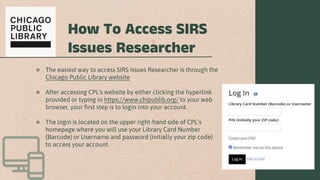
 The login is located on the upper right-hand side of CPL’s
homepage where you will use your Library Card Number
(Barcode) or Username and password (initially your zip code)
to access your account.
How To Access SIRS
Issues Researcher
How to Access SIRS Issues Researcher
 There are several ways to access SIRS Issues
Researcher on CPL’s website by browsing by
audience, by format, etc.
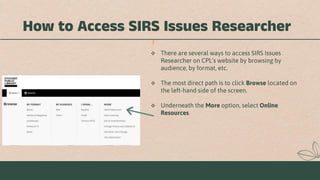
 The most direct path is to click Browse located on
the left-hand side of the screen.
 Underneath the More option, select Online
Resources.
How to Access SIRS Issues Researcher
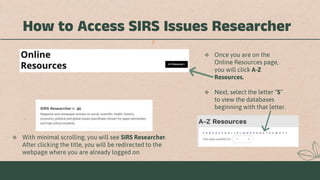
 Once you are on the
Online Resources page,
you will click A-Z
Resources.
 Next, select the letter “S”
to view the databases
beginning with that letter.
 With minimal scrolling, you will see SIRS Researcher.
After clicking the title, you will be redirected to the
webpage where you are already logged on
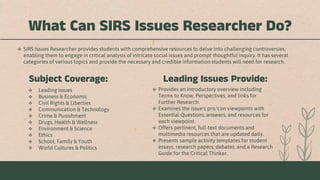
What Can SIRS Issues Researcher Do?
 Leading Issues
 Business & Economic
 Civil Rights & Liberties
 Communication & Technology
 Crime & Punishment
 Drugs, Health & Wellness
 Environment & Science
 Ethics
 School, Family & Youth
 World Cultures & Politics
 Provides an introductory overview including
Terms to Know, Perspectives, and links for
Further Research.
 Examines the issue's pro/con viewpoints with
Essential Questions, answers, and resources for
each viewpoint.
 Offers pertinent, full-text documents and
multimedia resources that are updated daily.
 Presents sample activity templates for student
essays, research papers, debates, and a Research
Guide for the Critical Thinker.
Subject Coverage: Leading Issues Provide:
 SIRS Issues Researcher provides students with comprehensive resources to delve into challenging controversies,
enabling them to engage in critical analysis of intricate social issues and prompt thoughtful inquiry. It has several
categories of various topics and provide the necessary and credible information students will need for research.
How Information is Arranged
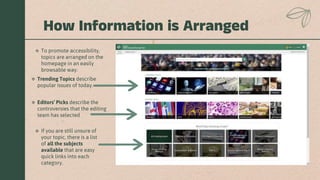
 To promote accessibility,
topics are arranged on the
homepage in an easily
browsable way.
 If you are still unsure of
your topic, there is a list
of all the subjects
available that are easy
quick links into each
category.
 Trending Topics describe
popular issues of today.
 Editors’ Picks describe the
controversies that the editing
team has selected
How Information is Arranged
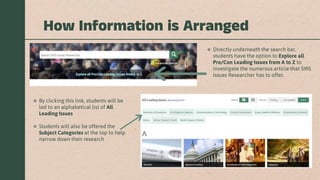
 Directly underneath the search bar,
students have the option to Explore all
Pro/Con Leading Issues from A to Z to
investigate the numerous article that SIRS
Issues Researcher has to offer.
 By clicking this link, students will be
led to an alphabetical list of All
Leading Issues
 Students will also be offered the
Subject Categories at the top to help
narrow down their research
Browsing Capabilities
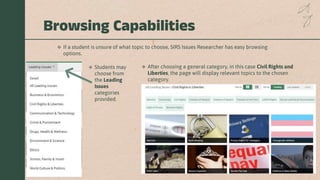
 If a student is unsure of what topic to choose, SIRS Issues Researcher has easy browsing
options.
 Students may
choose from
the Leading
Issues
categories
provided.
 After choosing a general category, in this case Civil Rights and
Liberties, the page will display relevant topics to the chosen
category.
Browsing Capabilities
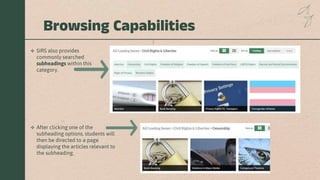
 SIRS also provides
commonly searched
subheadings within this
category.
 After clicking one of the
subheading options, students will
then be directed to a page
displaying the articles relevant to
the subheading.
How to Search:
Simple Search
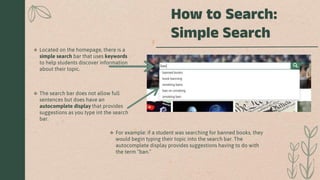
 Located on the homepage, there is a
simple search bar that uses keywords
to help students discover information
about their topic.
 The search bar does not allow full
sentences but does have an
autocomplete display that provides
suggestions as you type int the search
bar.
 For example: if a student was searching for banned books, they
would begin typing their topic into the search bar. The
autocomplete display provides suggestions having to do with
the term “ban.”
How to Search:
Simple Search
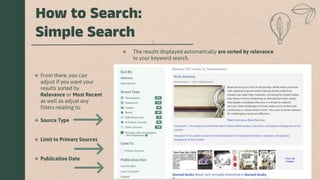
 From there, you can
adjust if you want your
results sorted by
Relevance or Most Recent
as well as adjust any
filters relating to:
 Source Type
 Limit to Primary Sources
 Publication Date
 The results displayed automatically are sorted by relevance
to your keyword search.
How to Search:
Advanced Search
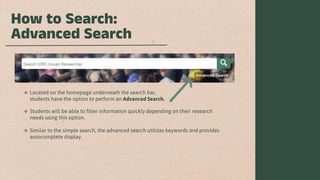
 Located on the homepage underneath the search bar,
students have the option to perform an Advanced Search.
 Students will be able to filter information quickly depending on their research
needs using this option.
 Similar to the simple search, the advanced search utilizes keywords and provides
autocomplete display.
How to Search:
Advanced Search
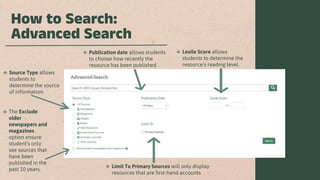
 Source Type allows
students to
determine the source
of information.
 Publication date allows students
to choose how recently the
resource has been published.
 Limit To Primary Sources will only display
resources that are first-hand accounts.
 Lexile Score allows
students to determine the
resource’s reading level.
 The Exclude
older
newspapers and
magazines
option ensure
student’s only
see sources that
have been
published in the
past 10 years.
Searching Example
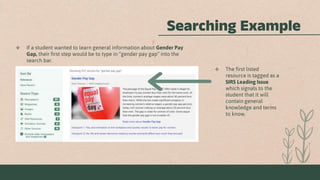
 If a student wanted to learn general information about Gender Pay
Gap, their first step would be to type in “gender pay gap” into the
search bar.
 The first listed
resource is tagged as a
SIRS Leading Issue
which signals to the
student that it will
contain general
knowledge and terms
to know.
Searching Example
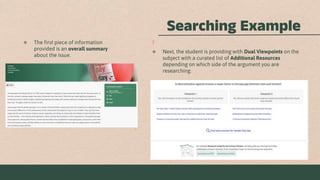
 The first piece of information
provided is an overall summary
about the issue.
 Next, the student is providing with Dual Viewpoints on the
subject with a curated list of Additional Resources
depending on which side of the argument you are
researching.
Searching Example
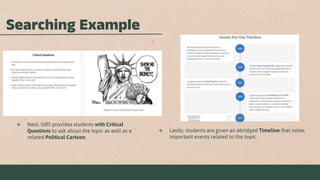
 Next, SIRS provides students with Critical
Questions to ask about the topic as well as a
related Political Cartoon.
 Lastly, students are given an abridged Timeline that notes
important events related to the topic.
ProQuest. (n.d.). Home - SIRS issues researcher - libguides at ProQuest. ProQuest LibGuides.
https://proquest.libguides.com/IssuesResearcher
ProQuest. (n.d.). SIRS issues researcher product updates - ProQuest. ProQuest Support.
https://support.proquest.com/s/article/SIRS-Issues-Researcher-Product-
Updates?language=en_US
ProQuest. (n.d.). SIRS Issues Researcher. SIRS Issues Researcher Homepage.
https://explore.proquest.com/sirsissuesresearcher
ProQuest. (n.d.). SIRS® issues researcher - proquest. SIRS Issues Researcher.
https://about.proquest.com/en/products-services/sirs_researcher/
Resources
Ask a
Librarian
If you have any questions, concerns, or
are seeking clarity for any of the
information provided, please don’t
hesitate to reach out to our Ask a
Librarian service where we would be
more than happy to help with any
additional needs.
This ready reference instructional guide was
created by Max Mostek 12/12/23

SIRS Issues Researcher Instructional Presentation

  • 1.
    ProQuest’s SIRS Issues Researcher A ReadyReference Instructional Guide
  • 2.
     SIRS isa general reference subscription database geared towards novice researchers and upper middle school and high school learners.  Allows students to explore a range of viewpoints regarding complex social issues and global controversies relevant to today.  Provides students with carefully organized, 100% full text, that has been curated from over 2,000+ reputable domestic and international newspapers, magazines, and government documents.  Updated on a regular basis to ensure publications and editorial features remain current and relevant.  SIRS Issues Researcher is a ProQuest product. ProQuest is a part of Clarivate- a leading global information services provider. SIRS Issues Researcher
  • 3.
     The easiestway to access SIRS Issues Researcher is through the Chicago Public Library website  After accessing CPL’s website by either clicking the hyperlink provided or typing in https://www.chipublib.org/ to your web browser, your first step is to login into your account.  The login is located on the upper right-hand side of CPL’s homepage where you will use your Library Card Number (Barcode) or Username and password (initially your zip code) to access your account. How To Access SIRS Issues Researcher
  • 4.
    How to AccessSIRS Issues Researcher  There are several ways to access SIRS Issues Researcher on CPL’s website by browsing by audience, by format, etc.  The most direct path is to click Browse located on the left-hand side of the screen.  Underneath the More option, select Online Resources.
  • 5.
    How to AccessSIRS Issues Researcher  Once you are on the Online Resources page, you will click A-Z Resources.  Next, select the letter “S” to view the databases beginning with that letter.  With minimal scrolling, you will see SIRS Researcher. After clicking the title, you will be redirected to the webpage where you are already logged on
  • 6.
    What Can SIRSIssues Researcher Do?  Leading Issues  Business & Economic  Civil Rights & Liberties  Communication & Technology  Crime & Punishment  Drugs, Health & Wellness  Environment & Science  Ethics  School, Family & Youth  World Cultures & Politics  Provides an introductory overview including Terms to Know, Perspectives, and links for Further Research.  Examines the issue's pro/con viewpoints with Essential Questions, answers, and resources for each viewpoint.  Offers pertinent, full-text documents and multimedia resources that are updated daily.  Presents sample activity templates for student essays, research papers, debates, and a Research Guide for the Critical Thinker. Subject Coverage: Leading Issues Provide:  SIRS Issues Researcher provides students with comprehensive resources to delve into challenging controversies, enabling them to engage in critical analysis of intricate social issues and prompt thoughtful inquiry. It has several categories of various topics and provide the necessary and credible information students will need for research.
  • 7.
    How Information isArranged  To promote accessibility, topics are arranged on the homepage in an easily browsable way.  If you are still unsure of your topic, there is a list of all the subjects available that are easy quick links into each category.  Trending Topics describe popular issues of today.  Editors’ Picks describe the controversies that the editing team has selected
  • 8.
    How Information isArranged  Directly underneath the search bar, students have the option to Explore all Pro/Con Leading Issues from A to Z to investigate the numerous article that SIRS Issues Researcher has to offer.  By clicking this link, students will be led to an alphabetical list of All Leading Issues  Students will also be offered the Subject Categories at the top to help narrow down their research
  • 9.
    Browsing Capabilities  Ifa student is unsure of what topic to choose, SIRS Issues Researcher has easy browsing options.  Students may choose from the Leading Issues categories provided.  After choosing a general category, in this case Civil Rights and Liberties, the page will display relevant topics to the chosen category.
  • 10.
    Browsing Capabilities  SIRSalso provides commonly searched subheadings within this category.  After clicking one of the subheading options, students will then be directed to a page displaying the articles relevant to the subheading.
  • 11.
    How to Search: SimpleSearch  Located on the homepage, there is a simple search bar that uses keywords to help students discover information about their topic.  The search bar does not allow full sentences but does have an autocomplete display that provides suggestions as you type int the search bar.  For example: if a student was searching for banned books, they would begin typing their topic into the search bar. The autocomplete display provides suggestions having to do with the term “ban.”
  • 12.
    How to Search: SimpleSearch  From there, you can adjust if you want your results sorted by Relevance or Most Recent as well as adjust any filters relating to:  Source Type  Limit to Primary Sources  Publication Date  The results displayed automatically are sorted by relevance to your keyword search.
  • 13.
    How to Search: AdvancedSearch  Located on the homepage underneath the search bar, students have the option to perform an Advanced Search.  Students will be able to filter information quickly depending on their research needs using this option.  Similar to the simple search, the advanced search utilizes keywords and provides autocomplete display.
  • 14.
    How to Search: AdvancedSearch  Source Type allows students to determine the source of information.  Publication date allows students to choose how recently the resource has been published.  Limit To Primary Sources will only display resources that are first-hand accounts.  Lexile Score allows students to determine the resource’s reading level.  The Exclude older newspapers and magazines option ensure student’s only see sources that have been published in the past 10 years.
  • 15.
    Searching Example  Ifa student wanted to learn general information about Gender Pay Gap, their first step would be to type in “gender pay gap” into the search bar.  The first listed resource is tagged as a SIRS Leading Issue which signals to the student that it will contain general knowledge and terms to know.
  • 16.
    Searching Example  Thefirst piece of information provided is an overall summary about the issue.  Next, the student is providing with Dual Viewpoints on the subject with a curated list of Additional Resources depending on which side of the argument you are researching.
  • 17.
    Searching Example  Next,SIRS provides students with Critical Questions to ask about the topic as well as a related Political Cartoon.  Lastly, students are given an abridged Timeline that notes important events related to the topic.
  • 18.
    ProQuest. (n.d.). Home- SIRS issues researcher - libguides at ProQuest. ProQuest LibGuides. https://proquest.libguides.com/IssuesResearcher ProQuest. (n.d.). SIRS issues researcher product updates - ProQuest. ProQuest Support. https://support.proquest.com/s/article/SIRS-Issues-Researcher-Product- Updates?language=en_US ProQuest. (n.d.). SIRS Issues Researcher. SIRS Issues Researcher Homepage. https://explore.proquest.com/sirsissuesresearcher ProQuest. (n.d.). SIRS® issues researcher - proquest. SIRS Issues Researcher. https://about.proquest.com/en/products-services/sirs_researcher/ Resources
  • 19.
    Ask a Librarian If youhave any questions, concerns, or are seeking clarity for any of the information provided, please don’t hesitate to reach out to our Ask a Librarian service where we would be more than happy to help with any additional needs. This ready reference instructional guide was created by Max Mostek 12/12/23