cxpartners 1
@gilescolborne
Simplicity
2
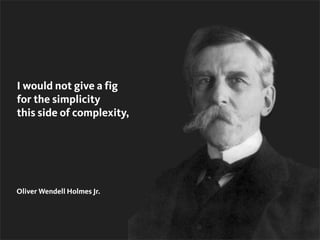
I would not give a fig
for the simplicity
this side of complexity,
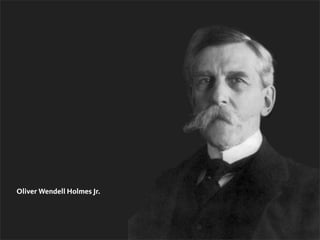
Oliver Wendell Holmes Jr.
2
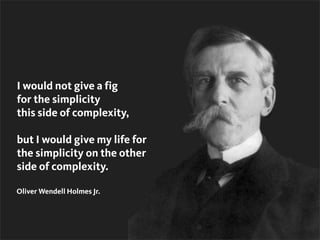
I would not give a fig
for the simplicity
this side of complexity,
but I would give my life for
the simplicity on the other
side of complexity.
Oliver Wendell Holmes Jr.
Advanced simplicity
@gilescolborne
3
141
See it at Amazon US
See it at Amazon UK
4
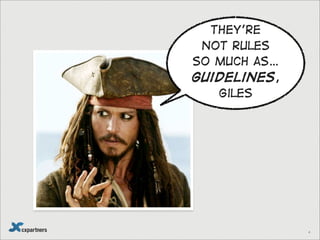
They’re
not rules
so much as…
guidelines,
Giles
5
6
7
8
http://www.flickr.com/photos/vanf/5321214369/
9
10
11
12
13
http://www.flickr.com/photos/iwouldstay/145628030/
14
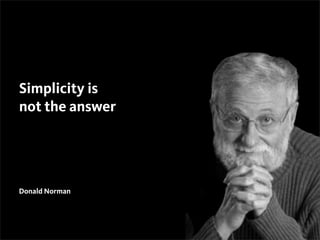
Donald Norman
15
Simplicity is
not the answer
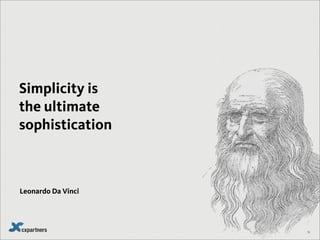
Leonardo Da Vinci
16
Simplicity is
the ultimate
sophistication
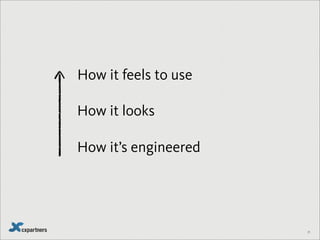
Simplicity is an experience
17
18
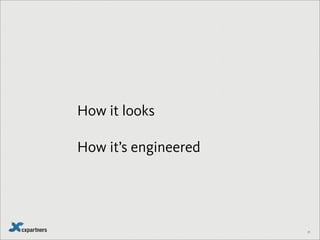
How it’s engineered
19
20
How it feels to use
21
How it’s engineered
How it looks
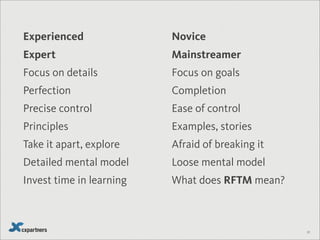
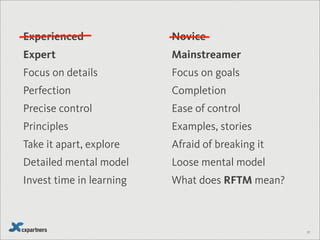
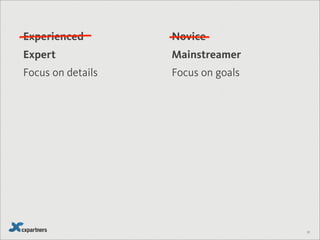
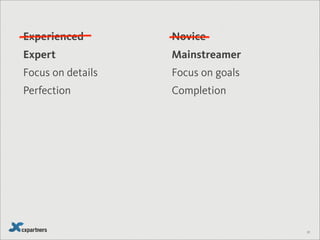
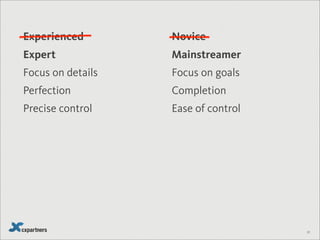
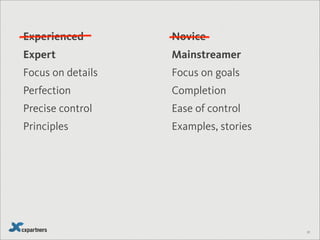
Expert Mainstreamer
Focus on details Focus on goals
Perfection Completion
Precise control Ease of control
Principles Examples, stories
Take it apart, explore Afraid of breaking it
Detailed mental model Loose mental model
Invest time in learning What does RFTM mean?
22
Experienced Novice
Not everyone wants simplicity
23
24
25
26
27
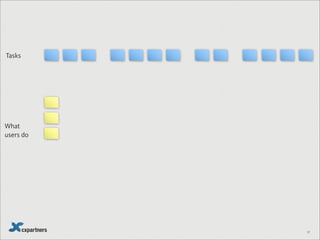
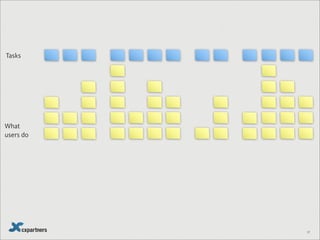
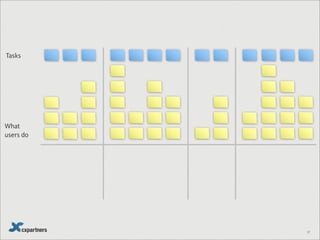
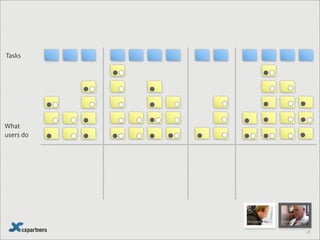
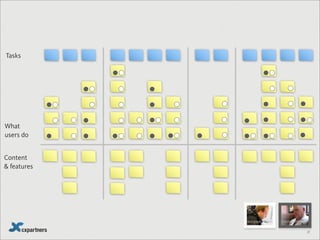
What
users do
Tasks
Content
& features
Thinking like an expert
28
29
30
31
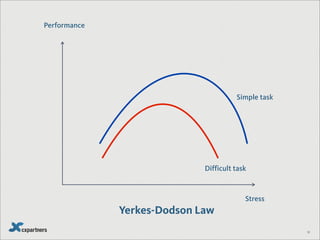
Performance
Stress
Difficult task
Simple task
Yerkes-Dodson Law
32
33
34
Feels simple
to my (mainstream) users
35
36
What is minimal?GO
37
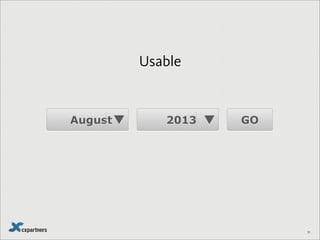
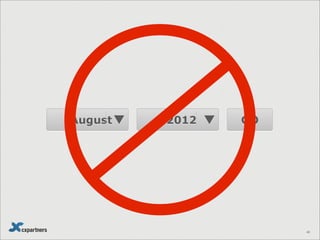
August 2013 GO
38
August 2013 GO
Usable
38
Nov 2013 GO
39
Nov 2013 GO
39
August 2012 GO
40
August 2012 GO
40
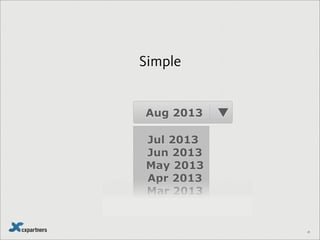
Aug 2013
Jul 2013
Jun 2013
May 2013
Apr 2013
Mar 2013
41
Aug 2013
Jul 2013
Jun 2013
May 2013
Apr 2013
Mar 2013
41
Simple
Simplicity = Extreme usability
42
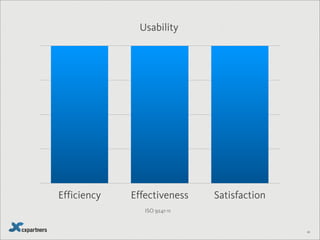
Efficiency Effectiveness Satisfaction
Usability
ISO 9241-11
43
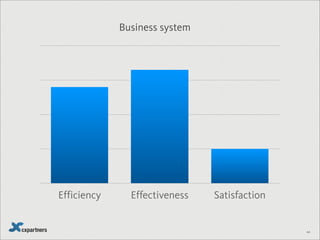
Efficiency Effectiveness Satisfaction
Business system
44
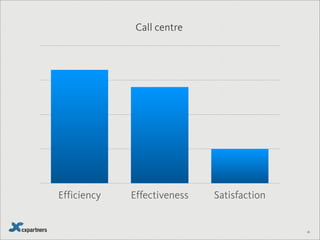
Efficiency Effectiveness Satisfaction
Call centre
45
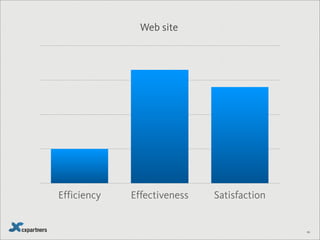
Efficiency Effectiveness Satisfaction
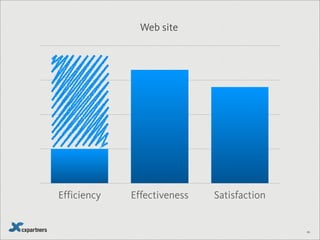
Web site
46
Efficiency Effectiveness Satisfaction
Web site
46
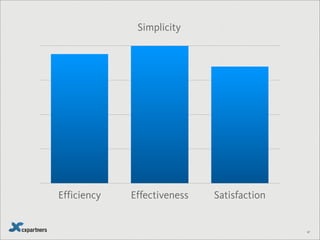
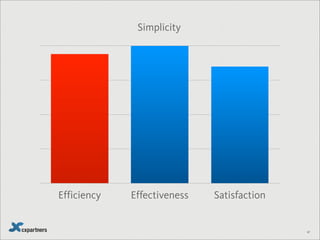
Efficiency Effectiveness Satisfaction
Simplicity
47
48
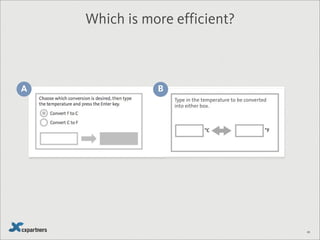
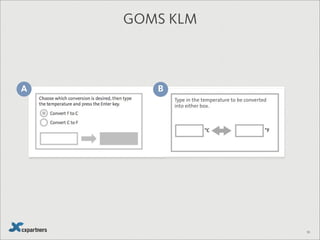
A B
Which is more efficient?
49
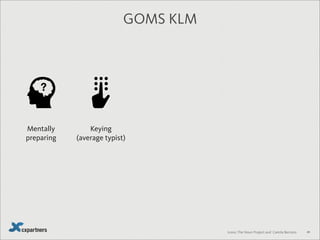
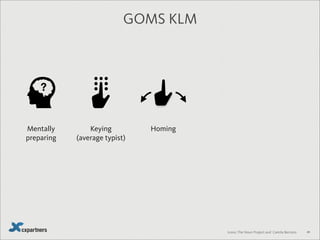
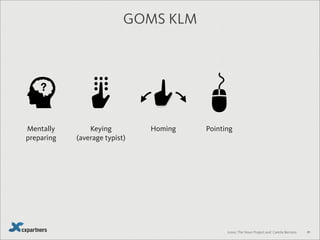
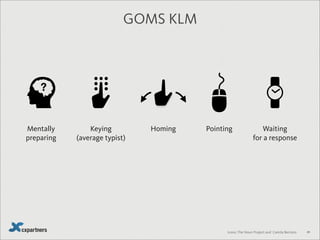
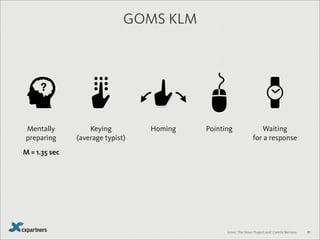
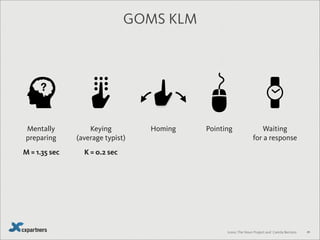
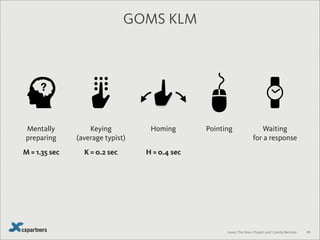
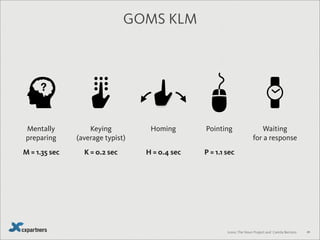
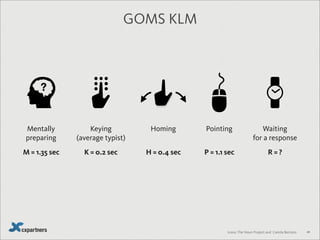
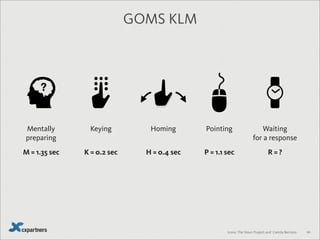
Keying
(average typist)
PointingHomingMentally
preparing
Waiting
for a response
Icons: The Noun Project and Camila Bertoco
GOMS KLM
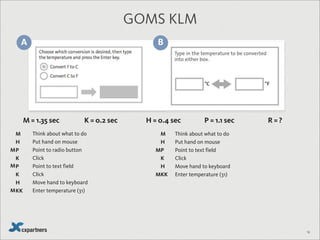
M = 1.35 sec K = 0.2 sec H = 0.4 sec P = 1.1 sec R = ?
50
A B
GOMS KLM
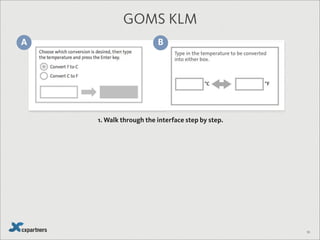
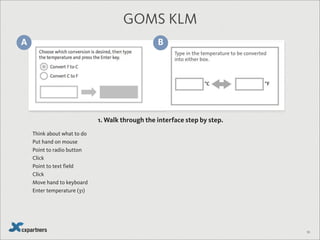
1. Walk through the interface step by step.
50
A B
GOMS KLM
Think about what to do
Put hand on mouse
Point to radio button
Click
Point to text field
Click
Move hand to keyboard
Enter temperature (31)
1. Walk through the interface step by step.
50
A B
GOMS KLM
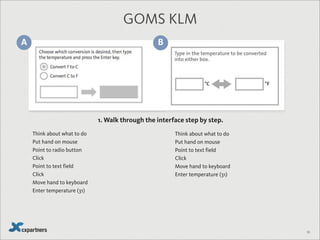
Think about what to do
Put hand on mouse
Point to radio button
Click
Point to text field
Click
Move hand to keyboard
Enter temperature (31)
Think about what to do
Put hand on mouse
Point to text field
Click
Move hand to keyboard
Enter temperature (31)
1. Walk through the interface step by step.
51
A B
GOMS KLM
Think about what to do
Put hand on mouse
Point to radio button
Click
Point to text field
Click
Move hand to keyboard
Enter temperature (31)
Think about what to do
Put hand on mouse
Point to text field
Click
Move hand to keyboard
Enter temperature (31)
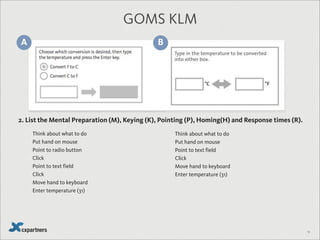
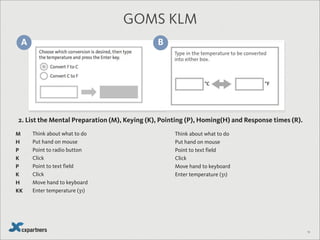
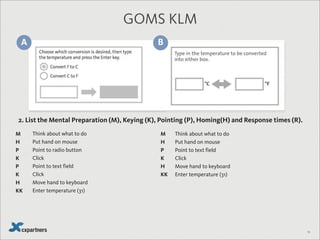
2. List the Mental Preparation (M), Keying (K), Pointing (P), Homing(H) and Response times (R).
51
A B
GOMS KLM
Think about what to do
Put hand on mouse
Point to radio button
Click
Point to text field
Click
Move hand to keyboard
Enter temperature (31)
Think about what to do
Put hand on mouse
Point to text field
Click
Move hand to keyboard
Enter temperature (31)
2. List the Mental Preparation (M), Keying (K), Pointing (P), Homing(H) and Response times (R).
M
H
P
K
P
K
H
KK
51
A B
GOMS KLM
Think about what to do
Put hand on mouse
Point to radio button
Click
Point to text field
Click
Move hand to keyboard
Enter temperature (31)
Think about what to do
Put hand on mouse
Point to text field
Click
Move hand to keyboard
Enter temperature (31)
2. List the Mental Preparation (M), Keying (K), Pointing (P), Homing(H) and Response times (R).
M
H
P
K
P
K
H
KK
M
H
P
K
H
KK
52
A B
GOMS KLM
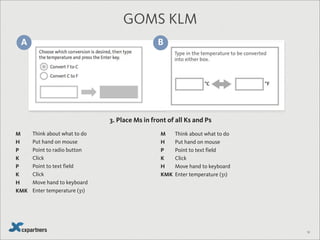
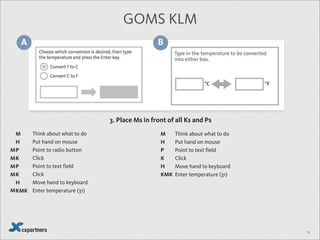
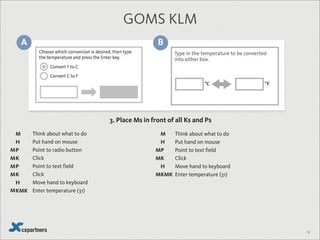
3. Place Ms in front of all Ks and Ps
Think about what to do
Put hand on mouse
Point to radio button
Click
Point to text field
Click
Move hand to keyboard
Enter temperature (31)
Think about what to do
Put hand on mouse
Point to text field
Click
Move hand to keyboard
Enter temperature (31)
M
H
P
K
P
K
H
KMK
M
H
P
K
H
KMK
52
A B
GOMS KLM
3. Place Ms in front of all Ks and Ps
Think about what to do
Put hand on mouse
Point to radio button
Click
Point to text field
Click
Move hand to keyboard
Enter temperature (31)
Think about what to do
Put hand on mouse
Point to text field
Click
Move hand to keyboard
Enter temperature (31)
M
H
P
K
P
K
H
KMK
M
H
P
K
H
KMK
M
M
M
M
M
52
A B
GOMS KLM
3. Place Ms in front of all Ks and Ps
Think about what to do
Put hand on mouse
Point to radio button
Click
Point to text field
Click
Move hand to keyboard
Enter temperature (31)
Think about what to do
Put hand on mouse
Point to text field
Click
Move hand to keyboard
Enter temperature (31)
M
H
P
K
P
K
H
KMK
M
H
P
K
H
KMK
M
M
M
M
M
M
M
M
53
A B
GOMS KLM
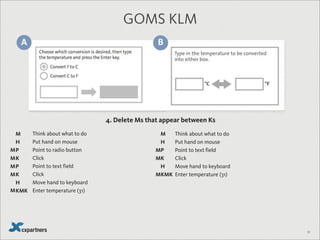
4. Delete Ms that appear between Ks
Think about what to do
Put hand on mouse
Point to radio button
Click
Point to text field
Click
Move hand to keyboard
Enter temperature (31)
Think about what to do
Put hand on mouse
Point to text field
Click
Move hand to keyboard
Enter temperature (31)
M
H
P
K
P
K
H
KMK
M
H
P
K
H
KMK
M
M
M
M
M
M
M
M
54
A B
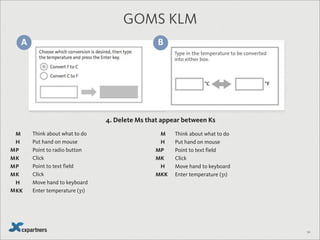
GOMS KLM
4. Delete Ms that appear between Ks
Think about what to do
Put hand on mouse
Point to radio button
Click
Point to text field
Click
Move hand to keyboard
Enter temperature (31)
Think about what to do
Put hand on mouse
Point to text field
Click
Move hand to keyboard
Enter temperature (31)
M
H
P
K
P
K
H
KK
M
H
P
K
H
KK
M
M
M
M
M
M
M
M
55
A B
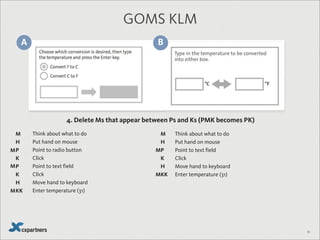
GOMS KLM
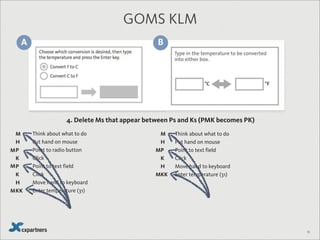
4. Delete Ms that appear between Ps and Ks (PMK becomes PK)
Think about what to do
Put hand on mouse
Point to radio button
Click
Point to text field
Click
Move hand to keyboard
Enter temperature (31)
Think about what to do
Put hand on mouse
Point to text field
Click
Move hand to keyboard
Enter temperature (31)
M
H
P
K
P
K
H
KK
M
H
P
K
H
KK
M
M
M
M
M
55
A B
GOMS KLM
4. Delete Ms that appear between Ps and Ks (PMK becomes PK)
Think about what to do
Put hand on mouse
Point to radio button
Click
Point to text field
Click
Move hand to keyboard
Enter temperature (31)
Think about what to do
Put hand on mouse
Point to text field
Click
Move hand to keyboard
Enter temperature (31)
M
H
P
K
P
K
H
KK
M
H
P
K
H
KK
M
M
M
M
M
56
A B
GOMS KLM
Think about what to do
Put hand on mouse
Point to radio button
Click
Point to text field
Click
Move hand to keyboard
Enter temperature (31)
Think about what to do
Put hand on mouse
Point to text field
Click
Move hand to keyboard
Enter temperature (31)
M
H
P
K
P
K
H
KK
M
H
P
K
H
KK
M
M
M
M
M
M = 1.35 sec K = 0.2 sec H = 0.4 sec P = 1.1 sec R = ?
57
A B
GOMS KLM
Think about what to do
Put hand on mouse
Point to radio button
Click
Point to text field
Click
Move hand to keyboard
Enter temperature (31)
Think about what to do
Put hand on mouse
Point to text field
Click
Move hand to keyboard
Enter temperature (31)
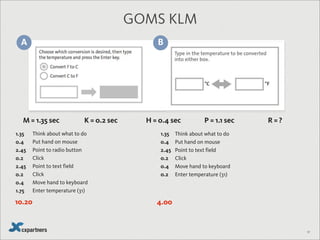
1.35
0.4
2.45
0.2
2.45
0.2
0.4
1.75
1.35
0.4
2.45
0.2
0.4
0.2
M = 1.35 sec K = 0.2 sec H = 0.4 sec P = 1.1 sec R = ?
10.20 4.00
58
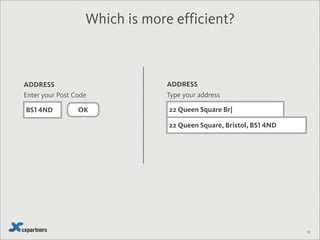
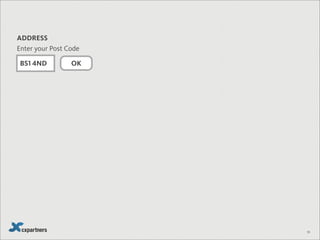
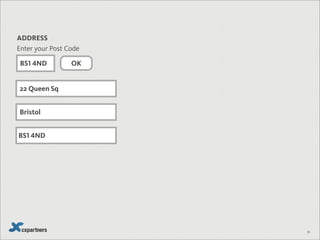
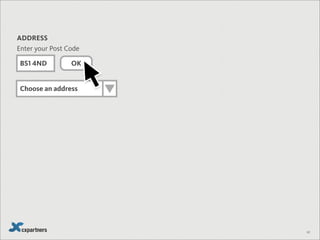
Enter your Post Code
BS1 4ND OK
ADDRESS
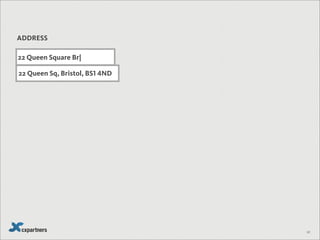
Type your address
22 Queen Square Br|
ADDRESS
Which is more efficient?
22 Queen Square, Bristol, BS1 4ND
OK
59
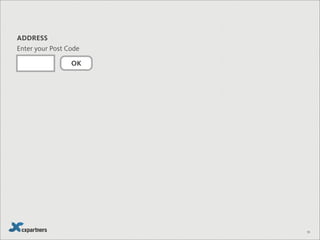
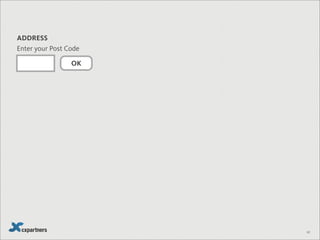
Enter your Post Code
ADDRESS
OK
59
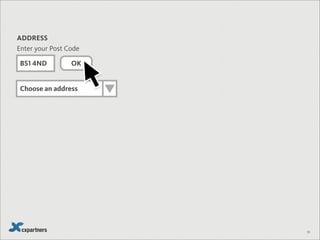
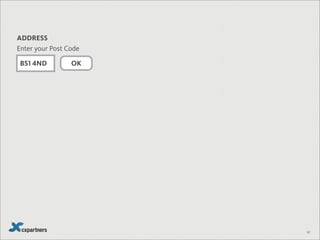
Enter your Post Code
ADDRESS
BS1 4ND
OK
59
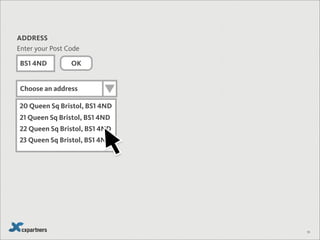
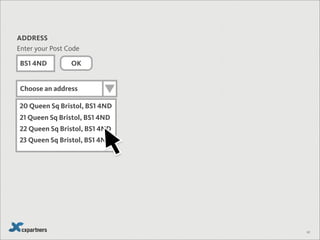
Enter your Post Code
ADDRESS
BS1 4ND
Choose an address
OK
20 Queen Sq Bristol, BS1 4ND
21 Queen Sq Bristol, BS1 4ND
22 Queen Sq Bristol, BS1 4ND
23 Queen Sq Bristol, BS1 4ND
59
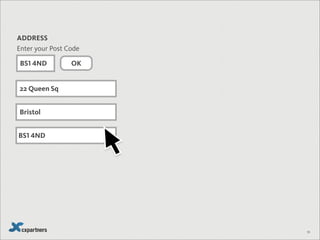
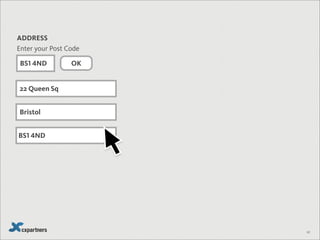
Enter your Post Code
ADDRESS
BS1 4ND
Choose an address
22 Queen Sq
Bristol
BS1 4ND
OK
59
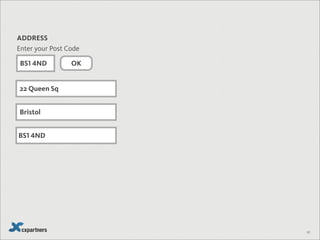
Enter your Post Code
ADDRESS
BS1 4ND
22 Queen Sq
Bristol
BS1 4ND
OK
59
Enter your Post Code
ADDRESS
BS1 4ND
60
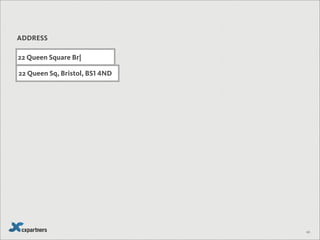
ADDRESS
22 Queen Square Br|
22 Queen Sq, Bristol, BS1 4ND
60
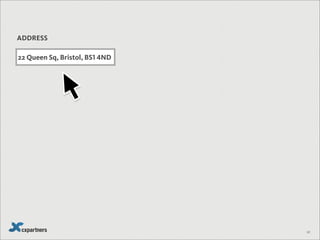
ADDRESS
60
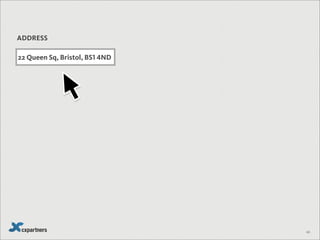
ADDRESS
22 Queen Sq, Bristol, BS1 4ND
61
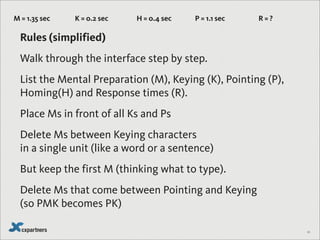
Rules (simplified)
Walk through the interface step by step.
List the Mental Preparation (M), Keying (K), Pointing (P),
Homing(H) and Response times (R).
Place Ms in front of all Ks and Ps
Delete Ms between Keying characters
in a single unit (like a word or a sentence)
But keep the first M (thinking what to type).
Delete Ms that come between Pointing and Keying
(so PMK becomes PK)
M = 1.35 sec K = 0.2 sec H = 0.4 sec P = 1.1 sec R = ?
22 Queen Sq
Bristol
BS1 4ND
OK
62
Enter your Post Code
ADDRESS
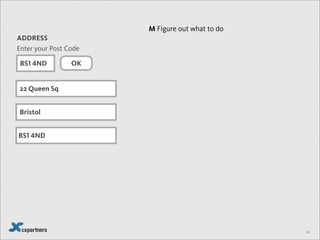
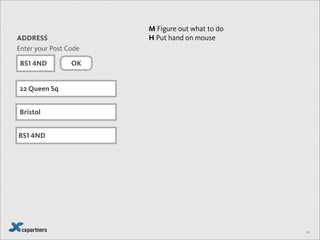
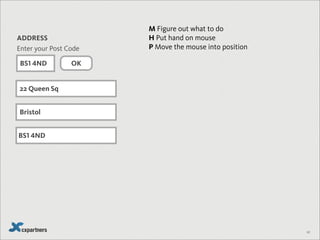
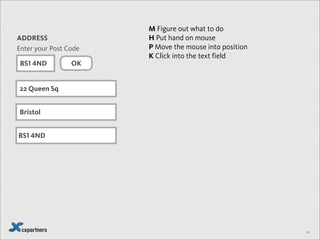
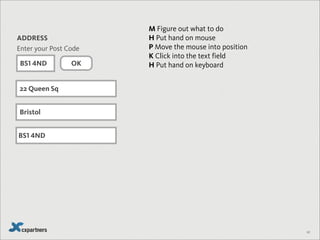
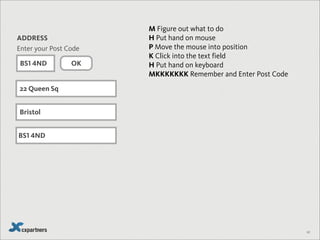
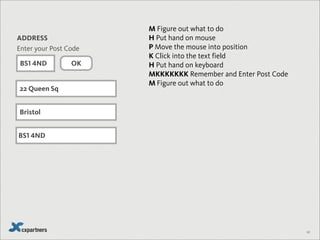
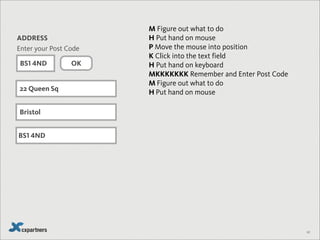
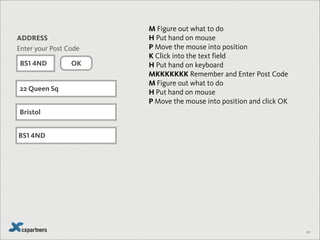
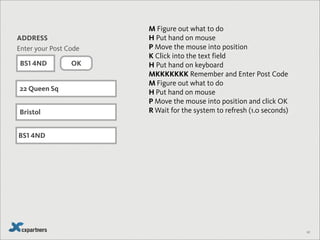
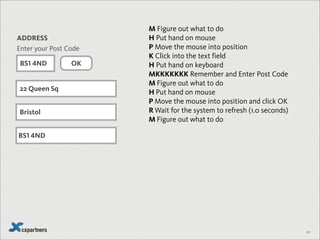
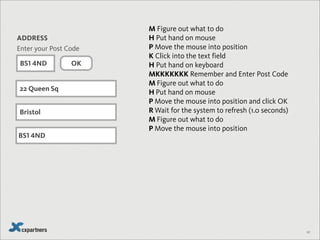
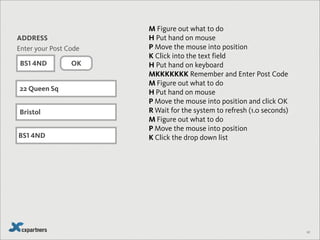
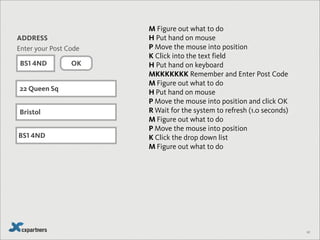
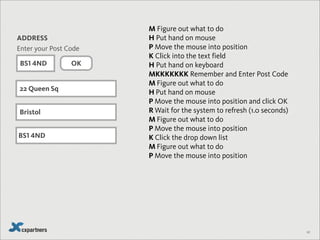
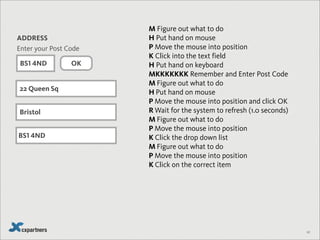
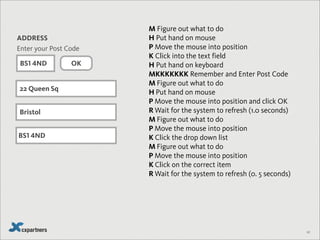
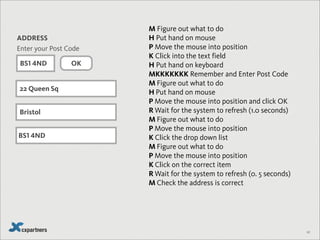
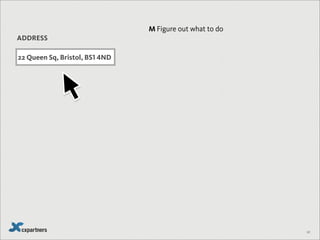
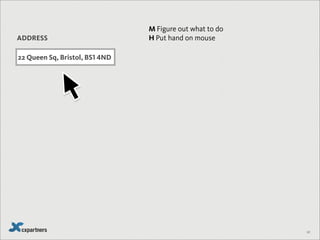
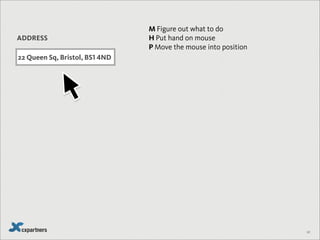
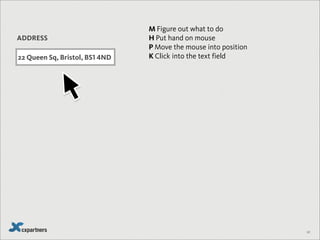
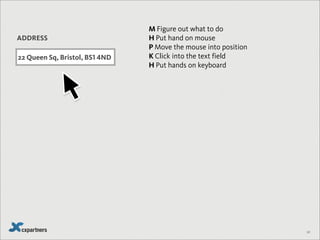
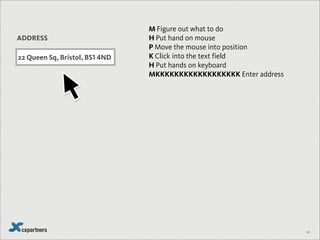
M Figure out what to do
H Put hand on mouse
P Move the mouse into position
K Click into the text field
H Put hand on keyboard
MKKKKKKK Remember and Enter Post Code
M Figure out what to do
H Put hand on mouse
P Move the mouse into position and click OK
R Wait for the system to refresh (1.0 seconds)
M Figure out what to do
P Move the mouse into position
K Click the drop down list
M Figure out what to do
P Move the mouse into position
K Click on the correct item
R Wait for the system to refresh (0. 5 seconds)
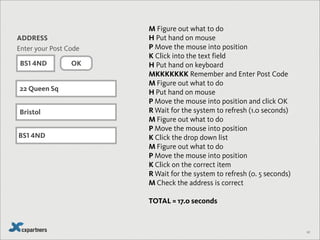
M Check the address is correct
TOTAL = 17.0 seconds
BS1 4ND
22 Queen Sq
Bristol
BS1 4ND
OK
62
Enter your Post Code
ADDRESS
M Figure out what to do
H Put hand on mouse
P Move the mouse into position
K Click into the text field
H Put hand on keyboard
MKKKKKKK Remember and Enter Post Code
M Figure out what to do
H Put hand on mouse
P Move the mouse into position and click OK
R Wait for the system to refresh (1.0 seconds)
M Figure out what to do
P Move the mouse into position
K Click the drop down list
M Figure out what to do
P Move the mouse into position
K Click on the correct item
R Wait for the system to refresh (0. 5 seconds)
M Check the address is correct
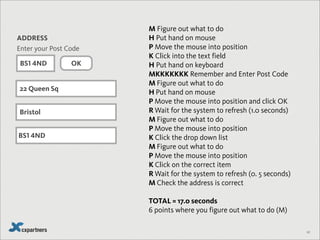
TOTAL = 17.0 seconds
6 points where you figure out what to do (M)
BS1 4ND
63
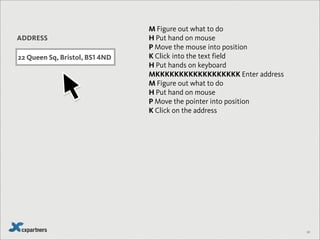
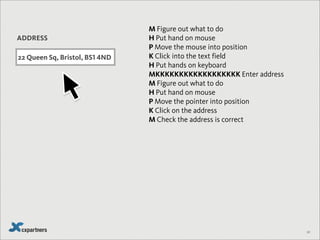
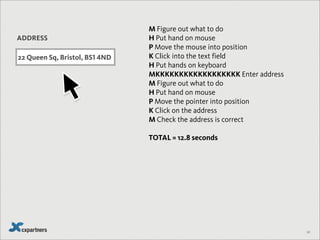
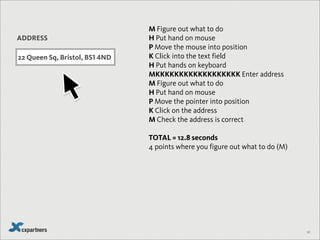
ADDRESS
22 Queen Sq, Bristol, BS1 4ND
M Figure out what to do
H Put hand on mouse
P Move the mouse into position
K Click into the text field
H Put hands on keyboard
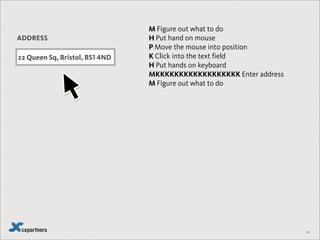
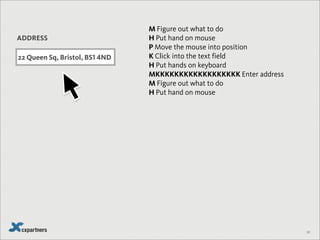
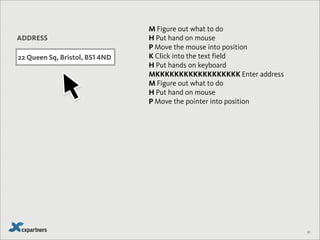
MKKKKKKKKKKKKKKKKKK Enter address
M Figure out what to do
H Put hand on mouse
P Move the pointer into position
K Click on the address
M Check the address is correct
TOTAL = 12.8 seconds
4 points where you figure out what to do (M)
64
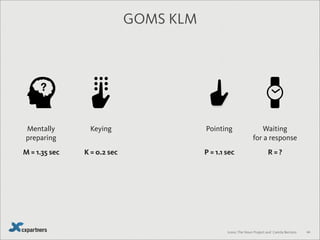
Keying PointingHomingMentally
preparing
Waiting
for a response
Icons: The Noun Project and Camila Bertoco
GOMS KLM
M = 1.35 sec K = 0.2 sec H = 0.4 sec P = 1.1 sec R = ?
64
Keying PointingMentally
preparing
Waiting
for a response
Icons: The Noun Project and Camila Bertoco
GOMS KLM
M = 1.35 sec K = 0.2 sec P = 1.1 sec R = ?
65
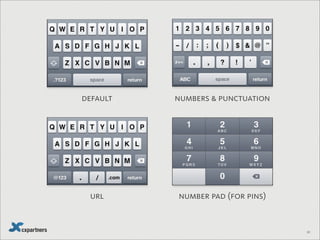
default numbers & punctuation
number pad (for pins)url
66
67
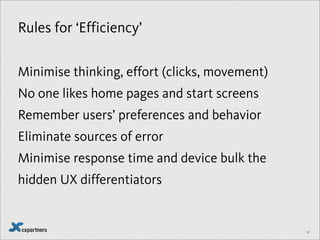
Rules for ‘Efficiency’
Minimise thinking, effort (clicks, movement)
No one likes home pages and start screens
Remember users’ preferences and behavior
Eliminate sources of error
Minimise response time and device bulk the
hidden UX differentiators
Don’t make experienced users act like novices
68
69
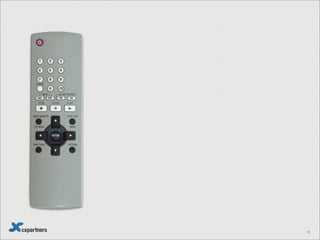
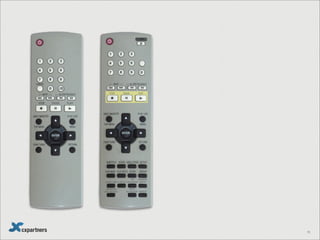
Your turn
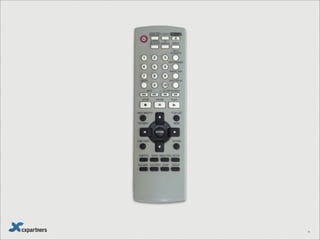
Simplify this!
70
71
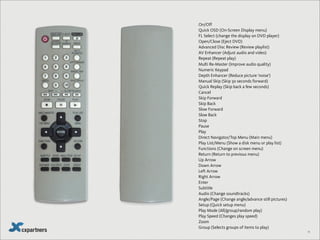
On/Off
Quick OSD (On-Screen Display menu)
FL Select (change the display on DVD player)
Open/Close (Eject DVD)
Advanced Disc Review (Review playlist)
AV Enhancer (Adjust audio and video)
Repeat (Repeat play)
Multi Re-Master (Improve audio quality)
Numeric Keypad
Depth Enhancer (Reduce picture ‘noise’)
Manual Skip (Skip 30 seconds forward)
Quick Replay (Skip back a few seconds)
Cancel
Skip Forward
Skip Back
Slow Forward
Slow Back
Stop
Pause
Play
Direct Navigator/Top Menu (Main menu)
Play List/Menu (Show a disk menu or play list)
Functions (Change on screen menu)
Return (Return to previous menu)
Up Arrow
Down Arrow
Left Arrow
Right Arrow
Enter
Subtitle
Audio (Change soundtracks)
Angle/Page (Change angle/advance still pictures)
Setup (Quick setup menu)
Play Mode (All/group/random play)
Play Speed (Changes play speed)
Zoom
Group (Selects groups of items to play)
71
72
#1
Remove
73
74
Perfection is achieved
not when there is nothing
more to add
but when there is
nothing more to take away
75
Antoine de Saint Exupery
Reduce,
thoughtfully
76
John Maeda
77
78
79
Expert Mainstreamer
Focus on details focus on goals
Precise control Ease of control
Perfection Good enough
Principles Examples, stories
Deferred gratification I want it now!
invest time in learning What does RFTM mean?
80
81
82
Rules for ‘Remove’
Features that add steps for unneeded fine control
Multiple ways of doing the same thing
Features that are responsible for a lot of errors
Unnecessary options and preferences
Visual clutter
Details that distract
#2
Organise
83
84
Ready?
85
19
7
2 6 4 83
5
86
?
87
Ready?
88
1 2 3 4 5 6 7 8 9
89
?
90
91
91
92
93
94
95
96
97
98
Projects Photos Garden Tax Travel School
Credit Music Video Boat Bike Car
99
Finance Office Home Projects Photos Garden
100
Rules for ‘Organise’
Follow patterns that the user knows
Clearly frame your terms of reference
Simple, consistent groupings
Highlight the single most important thing
Don’t force the user to learn codes
#3
Hide
101
102
103
104
105
106
107
108
109
110
111
Rules for ‘Hide’
Organise around patterns of use, not frequency
Look for behaviours that signal patterns of use
Let users go from general to specific
Ensure mainstreamer tasks are visible and
dominant
Trust expert users to find expert features
#4
Displace
112
113
LONDON
OXFORD
STRATFORD-UPON-AVON
BATH
My Travel Plan
114
LONDON
OXFORD
STRATFORD-UPON-AVON
BATH
The Roman Baths
Lorem ipsum dolor sit amet, consectetuer adipiscing
elit. Morbi commodo, ipsum sed pharetra gravida, orci
magna rhoncus neque, id pulvinar odio lorem non
turpis.
Mon-Fri 0900-1830 (includes Bank Holidays)
Sat-Sun 0900-1730
Christmas: Closed
£10 Adults, £5 Children / Student / Over 65
Allow 1 hour minimum Add this
My Travel Plan
115
LONDON
OXFORD
STRATFORD-UPON-AVON
BATH
LOCATION ACTIVITY TIME
Bath
Excelsior
Hotel
N/A
Bath
The Roman
Baths
0930-1030
Bath
Train to
Oxford
1042-1153
Oxford
The King’s
Head
1230-1400
Oxford Punting 1415-1515
Oxford
Ashmolean
Museum
1530-1700
Oxford
Train to
London
1722-1835
My Travel Plan
The Roman Baths
Lorem ipsum dolor sit amet, consectetuer adipiscing
elit. Morbi commodo, ipsum sed pharetra gravida, orci
magna rhoncus neque, id pulvinar odio lorem non
turpis.
Mon-Fri 0900-1830 (includes Bank Holidays)
Sat-Sun 0900-1730
Christmas: Closed
£10 Adults, £5 Children / Student / Over 65
Allow 1 hour minimum Add this
116
LONDON
OXFORD
STRATFORD-UPON-AVON
BATH
LOCATION ACTIVITY TIME
Bath
Excelsior
Hotel
N/A
Bath
The Roman
Baths
0930-1030
Bath
Train to
Oxford
1042-1153
Oxford
The King’s
Head
1230-1400
Oxford Punting 1415-1515
Oxford
Ashmolean
Museum
1530-1700
Oxford
Train to
London
1722-1835
My Travel Plan
117
No plan
survives
contact with
the enemy
Helmuth von Moltke
118
Tuesday
Wednesday
Thursday
119
Tuesday
Kid’s things
Travel discounts
120
121
So, in order:
1. Displace
2. Remove
3. Organise
4. Hide
122
BONUS!
The trouble with simplicity is...
it’s boring.
(Right?)
123
124
Simplicity does not mean the absence of
any decoration.
It means that the decor should belong
intimately to the design proper, and that
anything foreign to it should be taken
away.
Paul Jacques Grillo
125
Modern Traditional Elegant
126
Logos Pathos Ethos
127
Name of product / service
Practical: it makes Simpler
Emotional: it makes me feel
Values: What it says about me
Experience Cheat Sheet
128
Name of product / service
Practical: it makes Simpler
Emotional: it makes me feel
Values: What it says about me
Experience CHeat Sheet
Photojojo
Buying Photo
supplies
Playful
i’m Creative
129
130
131
Name of product / service
Practical: it makes Simpler
Emotional: it makes me feel
Values: What it says about me
Experience Cheat Sheet
132
What
users do
Tasks
Content
& features
132
What
users do
Tasks
Content
& features
132
What
users do
Tasks
Content
& features
133
Rules for ‘Satisfaction’
Make something that works!
Remove pain points, errors, waiting
NEVER punish errors or experimentation
Turn key interactions and unavoidable pain points
into ‘signature moments’
Continual, small improvements
134
Step by step
1. Displace
2. Remove
3. Organise
4. Hide
5. Add character
135
Ever had a
problem selling
simplicity to your
team?
136
Ever have
success selling
simplicity to your
team?
137
BUY!
138
A B
247
139
No matter how cool your user
interface…
...it would be better
if there were less of it
140
Alan Cooper

Simplicity2013

  • 1.
  • 2.
    2 I would notgive a fig for the simplicity this side of complexity, Oliver Wendell Holmes Jr.
  • 3.
    2 I would notgive a fig for the simplicity this side of complexity, but I would give my life for the simplicity on the other side of complexity. Oliver Wendell Holmes Jr.
  • 4.
  • 5.
    141 See it atAmazon US See it at Amazon UK
  • 6.
    4 They’re not rules so muchas… guidelines, Giles
  • 7.
  • 8.
  • 9.
  • 10.
  • 11.
  • 12.
  • 13.
  • 14.
  • 15.
  • 16.
  • 17.
  • 18.
    Leonardo Da Vinci 16 Simplicityis the ultimate sophistication
  • 19.
    Simplicity is anexperience 17
  • 20.
  • 21.
  • 22.
  • 23.
    How it feelsto use 21 How it’s engineered How it looks
  • 24.
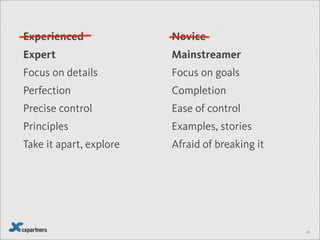
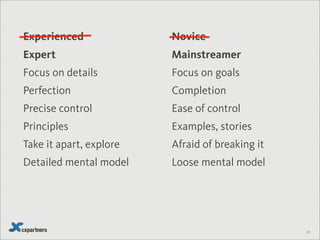
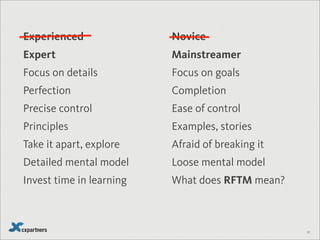
    Expert Mainstreamer Focus ondetails Focus on goals Perfection Completion Precise control Ease of control Principles Examples, stories Take it apart, explore Afraid of breaking it Detailed mental model Loose mental model Invest time in learning What does RFTM mean? 22 Experienced Novice
  • 25.
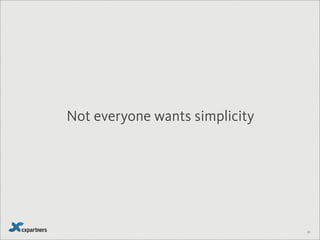
    Not everyone wantssimplicity 23
  • 26.
  • 27.
  • 28.
  • 29.
  • 30.
  • 31.
  • 32.
  • 33.
  • 34.
  • 35.
  • 36.
  • 37.
    Feels simple to my(mainstream) users 35
  • 38.
  • 39.
  • 40.
  • 41.
  • 42.
  • 43.
  • 44.
  • 45.
  • 46.
    Aug 2013 Jul 2013 Jun2013 May 2013 Apr 2013 Mar 2013 41
  • 47.
    Aug 2013 Jul 2013 Jun2013 May 2013 Apr 2013 Mar 2013 41 Simple
  • 48.
  • 49.
  • 50.
  • 51.
  • 52.
  • 53.
  • 54.
  • 55.
    48 A B Which ismore efficient?
  • 56.
    49 Keying (average typist) PointingHomingMentally preparing Waiting for aresponse Icons: The Noun Project and Camila Bertoco GOMS KLM M = 1.35 sec K = 0.2 sec H = 0.4 sec P = 1.1 sec R = ?
  • 57.
    50 A B GOMS KLM 1.Walk through the interface step by step.
  • 58.
    50 A B GOMS KLM Thinkabout what to do Put hand on mouse Point to radio button Click Point to text field Click Move hand to keyboard Enter temperature (31) 1. Walk through the interface step by step.
  • 59.
    50 A B GOMS KLM Thinkabout what to do Put hand on mouse Point to radio button Click Point to text field Click Move hand to keyboard Enter temperature (31) Think about what to do Put hand on mouse Point to text field Click Move hand to keyboard Enter temperature (31) 1. Walk through the interface step by step.
  • 60.
    51 A B GOMS KLM Thinkabout what to do Put hand on mouse Point to radio button Click Point to text field Click Move hand to keyboard Enter temperature (31) Think about what to do Put hand on mouse Point to text field Click Move hand to keyboard Enter temperature (31) 2. List the Mental Preparation (M), Keying (K), Pointing (P), Homing(H) and Response times (R).
  • 61.
    51 A B GOMS KLM Thinkabout what to do Put hand on mouse Point to radio button Click Point to text field Click Move hand to keyboard Enter temperature (31) Think about what to do Put hand on mouse Point to text field Click Move hand to keyboard Enter temperature (31) 2. List the Mental Preparation (M), Keying (K), Pointing (P), Homing(H) and Response times (R). M H P K P K H KK
  • 62.
    51 A B GOMS KLM Thinkabout what to do Put hand on mouse Point to radio button Click Point to text field Click Move hand to keyboard Enter temperature (31) Think about what to do Put hand on mouse Point to text field Click Move hand to keyboard Enter temperature (31) 2. List the Mental Preparation (M), Keying (K), Pointing (P), Homing(H) and Response times (R). M H P K P K H KK M H P K H KK
  • 63.
    52 A B GOMS KLM 3.Place Ms in front of all Ks and Ps Think about what to do Put hand on mouse Point to radio button Click Point to text field Click Move hand to keyboard Enter temperature (31) Think about what to do Put hand on mouse Point to text field Click Move hand to keyboard Enter temperature (31) M H P K P K H KMK M H P K H KMK
  • 64.
    52 A B GOMS KLM 3.Place Ms in front of all Ks and Ps Think about what to do Put hand on mouse Point to radio button Click Point to text field Click Move hand to keyboard Enter temperature (31) Think about what to do Put hand on mouse Point to text field Click Move hand to keyboard Enter temperature (31) M H P K P K H KMK M H P K H KMK M M M M M
  • 65.
    52 A B GOMS KLM 3.Place Ms in front of all Ks and Ps Think about what to do Put hand on mouse Point to radio button Click Point to text field Click Move hand to keyboard Enter temperature (31) Think about what to do Put hand on mouse Point to text field Click Move hand to keyboard Enter temperature (31) M H P K P K H KMK M H P K H KMK M M M M M M M M
  • 66.
    53 A B GOMS KLM 4.Delete Ms that appear between Ks Think about what to do Put hand on mouse Point to radio button Click Point to text field Click Move hand to keyboard Enter temperature (31) Think about what to do Put hand on mouse Point to text field Click Move hand to keyboard Enter temperature (31) M H P K P K H KMK M H P K H KMK M M M M M M M M
  • 67.
    54 A B GOMS KLM 4.Delete Ms that appear between Ks Think about what to do Put hand on mouse Point to radio button Click Point to text field Click Move hand to keyboard Enter temperature (31) Think about what to do Put hand on mouse Point to text field Click Move hand to keyboard Enter temperature (31) M H P K P K H KK M H P K H KK M M M M M M M M
  • 68.
    55 A B GOMS KLM 4.Delete Ms that appear between Ps and Ks (PMK becomes PK) Think about what to do Put hand on mouse Point to radio button Click Point to text field Click Move hand to keyboard Enter temperature (31) Think about what to do Put hand on mouse Point to text field Click Move hand to keyboard Enter temperature (31) M H P K P K H KK M H P K H KK M M M M M
  • 69.
    55 A B GOMS KLM 4.Delete Ms that appear between Ps and Ks (PMK becomes PK) Think about what to do Put hand on mouse Point to radio button Click Point to text field Click Move hand to keyboard Enter temperature (31) Think about what to do Put hand on mouse Point to text field Click Move hand to keyboard Enter temperature (31) M H P K P K H KK M H P K H KK M M M M M
  • 70.
    56 A B GOMS KLM Thinkabout what to do Put hand on mouse Point to radio button Click Point to text field Click Move hand to keyboard Enter temperature (31) Think about what to do Put hand on mouse Point to text field Click Move hand to keyboard Enter temperature (31) M H P K P K H KK M H P K H KK M M M M M M = 1.35 sec K = 0.2 sec H = 0.4 sec P = 1.1 sec R = ?
  • 71.
    57 A B GOMS KLM Thinkabout what to do Put hand on mouse Point to radio button Click Point to text field Click Move hand to keyboard Enter temperature (31) Think about what to do Put hand on mouse Point to text field Click Move hand to keyboard Enter temperature (31) 1.35 0.4 2.45 0.2 2.45 0.2 0.4 1.75 1.35 0.4 2.45 0.2 0.4 0.2 M = 1.35 sec K = 0.2 sec H = 0.4 sec P = 1.1 sec R = ? 10.20 4.00
  • 72.
    58 Enter your PostCode BS1 4ND OK ADDRESS Type your address 22 Queen Square Br| ADDRESS Which is more efficient? 22 Queen Square, Bristol, BS1 4ND
  • 73.
  • 74.
    OK 59 Enter your PostCode ADDRESS BS1 4ND
  • 75.
    OK 59 Enter your PostCode ADDRESS BS1 4ND Choose an address
  • 76.
    OK 20 Queen SqBristol, BS1 4ND 21 Queen Sq Bristol, BS1 4ND 22 Queen Sq Bristol, BS1 4ND 23 Queen Sq Bristol, BS1 4ND 59 Enter your Post Code ADDRESS BS1 4ND Choose an address
  • 77.
    22 Queen Sq Bristol BS14ND OK 59 Enter your Post Code ADDRESS BS1 4ND
  • 78.
    22 Queen Sq Bristol BS14ND OK 59 Enter your Post Code ADDRESS BS1 4ND
  • 79.
  • 80.
    22 Queen SquareBr| 22 Queen Sq, Bristol, BS1 4ND 60 ADDRESS
  • 81.
    60 ADDRESS 22 Queen Sq,Bristol, BS1 4ND
  • 82.
    61 Rules (simplified) Walk throughthe interface step by step. List the Mental Preparation (M), Keying (K), Pointing (P), Homing(H) and Response times (R). Place Ms in front of all Ks and Ps Delete Ms between Keying characters in a single unit (like a word or a sentence) But keep the first M (thinking what to type). Delete Ms that come between Pointing and Keying (so PMK becomes PK) M = 1.35 sec K = 0.2 sec H = 0.4 sec P = 1.1 sec R = ?
  • 83.
    22 Queen Sq Bristol BS14ND OK 62 Enter your Post Code ADDRESS M Figure out what to do H Put hand on mouse P Move the mouse into position K Click into the text field H Put hand on keyboard MKKKKKKK Remember and Enter Post Code M Figure out what to do H Put hand on mouse P Move the mouse into position and click OK R Wait for the system to refresh (1.0 seconds) M Figure out what to do P Move the mouse into position K Click the drop down list M Figure out what to do P Move the mouse into position K Click on the correct item R Wait for the system to refresh (0. 5 seconds) M Check the address is correct TOTAL = 17.0 seconds BS1 4ND
  • 84.
    22 Queen Sq Bristol BS14ND OK 62 Enter your Post Code ADDRESS M Figure out what to do H Put hand on mouse P Move the mouse into position K Click into the text field H Put hand on keyboard MKKKKKKK Remember and Enter Post Code M Figure out what to do H Put hand on mouse P Move the mouse into position and click OK R Wait for the system to refresh (1.0 seconds) M Figure out what to do P Move the mouse into position K Click the drop down list M Figure out what to do P Move the mouse into position K Click on the correct item R Wait for the system to refresh (0. 5 seconds) M Check the address is correct TOTAL = 17.0 seconds 6 points where you figure out what to do (M) BS1 4ND
  • 85.
    63 ADDRESS 22 Queen Sq,Bristol, BS1 4ND M Figure out what to do H Put hand on mouse P Move the mouse into position K Click into the text field H Put hands on keyboard MKKKKKKKKKKKKKKKKKK Enter address M Figure out what to do H Put hand on mouse P Move the pointer into position K Click on the address M Check the address is correct TOTAL = 12.8 seconds 4 points where you figure out what to do (M)
  • 86.
    64 Keying PointingHomingMentally preparing Waiting for aresponse Icons: The Noun Project and Camila Bertoco GOMS KLM M = 1.35 sec K = 0.2 sec H = 0.4 sec P = 1.1 sec R = ?
  • 87.
    64 Keying PointingMentally preparing Waiting for aresponse Icons: The Noun Project and Camila Bertoco GOMS KLM M = 1.35 sec K = 0.2 sec P = 1.1 sec R = ?
  • 88.
    65 default numbers &punctuation number pad (for pins)url
  • 89.
  • 90.
    67 Rules for ‘Efficiency’ Minimisethinking, effort (clicks, movement) No one likes home pages and start screens Remember users’ preferences and behavior Eliminate sources of error Minimise response time and device bulk the hidden UX differentiators Don’t make experienced users act like novices
  • 91.
  • 92.
  • 93.
  • 94.
  • 95.
    On/Off Quick OSD (On-ScreenDisplay menu) FL Select (change the display on DVD player) Open/Close (Eject DVD) Advanced Disc Review (Review playlist) AV Enhancer (Adjust audio and video) Repeat (Repeat play) Multi Re-Master (Improve audio quality) Numeric Keypad Depth Enhancer (Reduce picture ‘noise’) Manual Skip (Skip 30 seconds forward) Quick Replay (Skip back a few seconds) Cancel Skip Forward Skip Back Slow Forward Slow Back Stop Pause Play Direct Navigator/Top Menu (Main menu) Play List/Menu (Show a disk menu or play list) Functions (Change on screen menu) Return (Return to previous menu) Up Arrow Down Arrow Left Arrow Right Arrow Enter Subtitle Audio (Change soundtracks) Angle/Page (Change angle/advance still pictures) Setup (Quick setup menu) Play Mode (All/group/random play) Play Speed (Changes play speed) Zoom Group (Selects groups of items to play) 71
  • 96.
  • 97.
  • 98.
  • 99.
    Perfection is achieved notwhen there is nothing more to add but when there is nothing more to take away 75 Antoine de Saint Exupery
  • 100.
  • 101.
  • 102.
  • 103.
  • 104.
    Expert Mainstreamer Focus ondetails focus on goals Precise control Ease of control Perfection Good enough Principles Examples, stories Deferred gratification I want it now! invest time in learning What does RFTM mean? 80
  • 105.
  • 106.
    82 Rules for ‘Remove’ Featuresthat add steps for unneeded fine control Multiple ways of doing the same thing Features that are responsible for a lot of errors Unnecessary options and preferences Visual clutter Details that distract
  • 107.
  • 108.
  • 109.
  • 110.
    19 7 2 6 483 5 86
  • 111.
  • 112.
  • 113.
    1 2 34 5 6 7 8 9 89
  • 114.
  • 115.
  • 116.
  • 117.
  • 118.
  • 119.
  • 120.
  • 121.
  • 122.
  • 123.
    98 Projects Photos GardenTax Travel School Credit Music Video Boat Bike Car
  • 124.
    99 Finance Office HomeProjects Photos Garden
  • 125.
    100 Rules for ‘Organise’ Followpatterns that the user knows Clearly frame your terms of reference Simple, consistent groupings Highlight the single most important thing Don’t force the user to learn codes
  • 126.
  • 127.
  • 128.
  • 129.
  • 130.
  • 131.
  • 132.
  • 133.
  • 134.
  • 135.
  • 136.
    111 Rules for ‘Hide’ Organisearound patterns of use, not frequency Look for behaviours that signal patterns of use Let users go from general to specific Ensure mainstreamer tasks are visible and dominant Trust expert users to find expert features
  • 137.
  • 138.
  • 139.
  • 140.
    LONDON OXFORD STRATFORD-UPON-AVON BATH The Roman Baths Loremipsum dolor sit amet, consectetuer adipiscing elit. Morbi commodo, ipsum sed pharetra gravida, orci magna rhoncus neque, id pulvinar odio lorem non turpis. Mon-Fri 0900-1830 (includes Bank Holidays) Sat-Sun 0900-1730 Christmas: Closed £10 Adults, £5 Children / Student / Over 65 Allow 1 hour minimum Add this My Travel Plan 115
  • 141.
    LONDON OXFORD STRATFORD-UPON-AVON BATH LOCATION ACTIVITY TIME Bath Excelsior Hotel N/A Bath TheRoman Baths 0930-1030 Bath Train to Oxford 1042-1153 Oxford The King’s Head 1230-1400 Oxford Punting 1415-1515 Oxford Ashmolean Museum 1530-1700 Oxford Train to London 1722-1835 My Travel Plan The Roman Baths Lorem ipsum dolor sit amet, consectetuer adipiscing elit. Morbi commodo, ipsum sed pharetra gravida, orci magna rhoncus neque, id pulvinar odio lorem non turpis. Mon-Fri 0900-1830 (includes Bank Holidays) Sat-Sun 0900-1730 Christmas: Closed £10 Adults, £5 Children / Student / Over 65 Allow 1 hour minimum Add this 116
  • 142.
    LONDON OXFORD STRATFORD-UPON-AVON BATH LOCATION ACTIVITY TIME Bath Excelsior Hotel N/A Bath TheRoman Baths 0930-1030 Bath Train to Oxford 1042-1153 Oxford The King’s Head 1230-1400 Oxford Punting 1415-1515 Oxford Ashmolean Museum 1530-1700 Oxford Train to London 1722-1835 My Travel Plan 117
  • 143.
    No plan survives contact with theenemy Helmuth von Moltke 118
  • 144.
  • 145.
  • 146.
    121 So, in order: 1.Displace 2. Remove 3. Organise 4. Hide
  • 147.
  • 148.
    The trouble withsimplicity is... it’s boring. (Right?) 123
  • 149.
    124 Simplicity does notmean the absence of any decoration. It means that the decor should belong intimately to the design proper, and that anything foreign to it should be taken away. Paul Jacques Grillo
  • 150.
  • 151.
  • 152.
    127 Name of product/ service Practical: it makes Simpler Emotional: it makes me feel Values: What it says about me Experience Cheat Sheet
  • 153.
    128 Name of product/ service Practical: it makes Simpler Emotional: it makes me feel Values: What it says about me Experience CHeat Sheet Photojojo Buying Photo supplies Playful i’m Creative
  • 154.
  • 155.
  • 156.
    131 Name of product/ service Practical: it makes Simpler Emotional: it makes me feel Values: What it says about me Experience Cheat Sheet
  • 157.
  • 158.
  • 159.
  • 160.
    133 Rules for ‘Satisfaction’ Makesomething that works! Remove pain points, errors, waiting NEVER punish errors or experimentation Turn key interactions and unavoidable pain points into ‘signature moments’ Continual, small improvements
  • 161.
    134 Step by step 1.Displace 2. Remove 3. Organise 4. Hide 5. Add character
  • 162.
    135 Ever had a problemselling simplicity to your team?
  • 163.
  • 164.
  • 165.
  • 166.
  • 167.
    No matter howcool your user interface… ...it would be better if there were less of it 140 Alan Cooper