LeadPro Lead Management  Email Marketing Online Surveys
Contents Anagha Group – Solutions and Service Areas Lead Management - Business Benefits Lead Management - Overview Lead Management – Reports and Samples Email Marketing - Process Overview Email Marketing - Business Benefits Email Marketing - Functional Overview and Applications Email Campaign Snapshot Domain Analysis (List / Campaign), Activities Tracking List Management, Sign-up Forms setup and customization Campaign Definition Address Filters for Target Marketing Email Design and Templates CAN-SPAM Compliance Increasing Delivery Rates Reports and Performance Analytics Online Surveys – Business Benefits Online Surveys – Functional Overview Online Surveys – Reporting and Analytics LeadPro Feature Highlights Contact Information
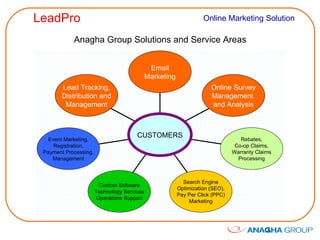
Anagha Group Solutions and Service Areas Lead Tracking, Distribution and Management Event Marketing, Registration, Payment Processing, Management Custom Software Technology Services Operations Support Search Engine Optimization (SEO), Pay Per Click (PPC) Marketing Rebates, Co-op Claims, Warranty Claims Processing Online Survey Management  and Analysis Email Marketing CUSTOMERS
Lead Management - Business Benefits Integrate Leads from multiple sources for efficient management Customize Lead Profile Properties based on product / service / business requirements Automate Lead Capture processes Acquire more leads / prospects Distribute Leads to Inside sales, Field sales, Lead Buyers Follow-up Leads promptly Nurture Leads with Drip Emails, Convert to customers Integrate with Email Marketing for reminders and follow-up Accelerate Sales Cycle Increase Win / Close rates Cross-sell, Up-sell, Grow sales and profits Reduce paperwork and manual process errors Maximize MarComm ROI
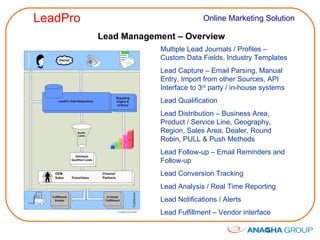
Lead Management – Overview Multiple Lead Journals / Profiles – Custom Data Fields, Industry Templates Lead Capture – Email Parsing, Manual Entry, Import from other Sources, API Interface to 3 rd  party / in-house systems Lead Qualification  Lead Distribution – Business Area, Product / Service Line, Geography, Region, Sales Area, Dealer, Round Robin, PULL & Push Methods Lead Follow-up – Email Reminders and Follow-up Lead Conversion Tracking  Lead Analysis / Real Time Reporting Lead Notifications / Alerts Lead Fulfillment – Vendor interface
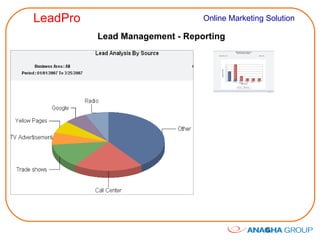
Lead Management - Reporting
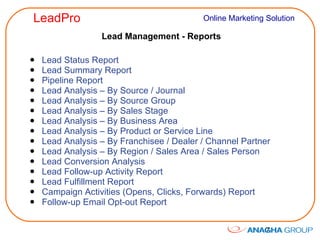
Lead Management - Reports Lead Status Report Lead Summary Report Pipeline Report Lead Analysis – By Source / Journal Lead Analysis – By Source Group Lead Analysis – By Sales Stage Lead Analysis – By Business Area Lead Analysis – By Product or Service Line Lead Analysis – By Franchisee / Dealer / Channel Partner Lead Analysis – By Region / Sales Area / Sales Person Lead Conversion Analysis Lead Follow-up Activity Report Lead Fulfillment Report Campaign Activities (Opens, Clicks, Forwards) Report Follow-up Email Opt-out Report
Email Marketing - Business Benefits Drive more traffic to your web sites Deliver Special Offers, Coupons, product information and Event Invitations effectively at low cost Acquire more leads / prospects Integrate with Lead management, Nurture leads, Convert to customers Educate and engage customers and prospects Retain existing customers, reduce churn Cross-sell, Up-sell, Grow sales and profits Integrate with Online Survey tool to get prospect / customer feedback Survey Panel Management Survey Response Tracking Complement traditional marketing media Reach prospects with targeted e-messages Maximize MarComm ROI
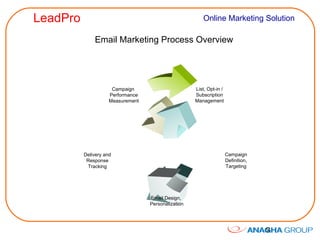
Email Marketing Process Overview List, Opt-in / Subscription Management Delivery and Response Tracking Campaign  Performance Measurement Email Design,  Personalization Campaign Definition, Targeting
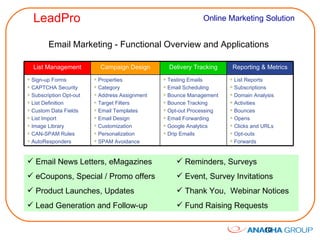
Email Marketing - Functional Overview and Applications Email News Letters, eMagazines eCoupons, Special / Promo offers Product Launches, Updates Lead Generation and Follow-up Reminders, Surveys Event, Survey Invitations Thank You,  Webinar Notices Fund Raising Requests List Management Campaign Design Delivery Tracking Reporting & Metrics Sign-up Forms CAPTCHA Security Subscription Opt-out List Definition  Custom Data Fields List Import Image Library CAN-SPAM Rules AutoResponders Properties Category Address Assignment Target Filters Email Templates Email Design Customization Personalization SPAM Avoidance Testing Emails Email Scheduling Bounce Management Bounce Tracking Opt-out Processing Email Forwarding Google Analytics Drip Emails List Reports Subscriptions Domain Analysis Activities Bounces Opens Clicks and URLs Opt-outs Forwards
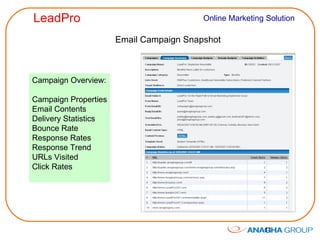
Email Campaign Snapshot Campaign Overview: Campaign Properties Email Contents Delivery Statistics Bounce Rate Response Rates Response Trend URLs Visited Click Rates
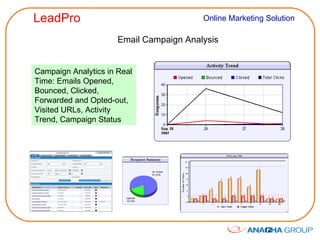
Email Campaign Analysis Campaign Analytics in Real Time: Emails Opened, Bounced, Clicked, Forwarded and Opted-out, Visited URLs, Activity Trend, Campaign Status
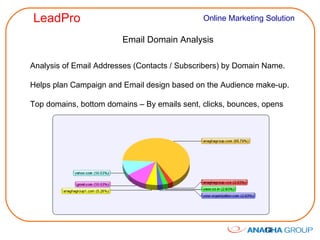
Email Domain Analysis Analysis of Email Addresses (Contacts / Subscribers) by Domain Name. Helps plan Campaign and Email design based on the Audience make-up. Top domains, bottom domains – By emails sent, clicks, bounces, opens
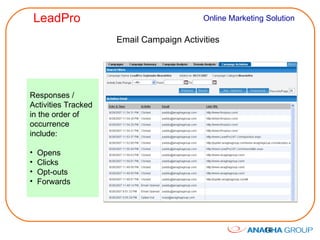
Email Campaign Activities Responses /  Activities Tracked in the order of occurrence include: Opens Clicks Opt-outs Forwards
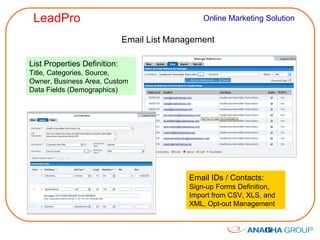
Email List Management List Properties Definition:  Title, Categories, Source, Owner, Business Area, Custom Data Fields (Demographics) Email IDs / Contacts:  Sign-up Forms Definition, Import from CSV, XLS, and XML, Opt-out Management
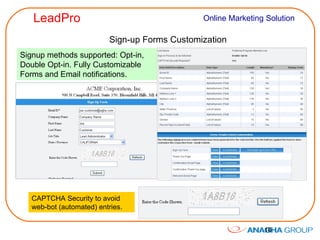
Sign-up Forms Customization Signup methods supported: Opt-in, Double Opt-in. Fully Customizable Forms and Email notifications. CAPTCHA Security to avoid web-bot (automated) entries.
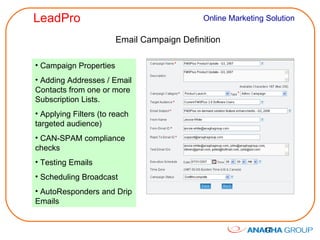
Email Campaign Definition Campaign Properties Adding Addresses / Email Contacts from one or more Subscription Lists. Applying Filters (to reach targeted audience) CAN-SPAM compliance checks Testing Emails Scheduling Broadcast AutoResponders and Drip Emails
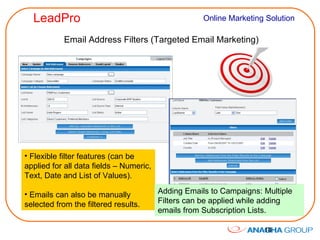
Email Address Filters (Targeted Email Marketing) Flexible filter features (can be applied for all data fields – Numeric, Text, Date and List of Values).  Emails can also be manually selected from the filtered results. Adding Emails to Campaigns: Multiple Filters can be applied while adding emails from Subscription Lists.
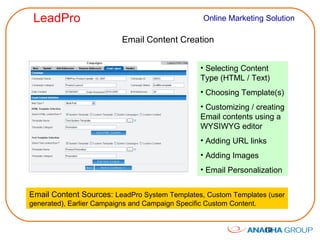
Email Content Creation Selecting Content Type (HTML / Text) Choosing Template(s) Customizing / creating Email contents using a WYSIWYG editor Adding URL links Adding Images Email Personalization Email Content Sources:  LeadPro System Templates, Custom Templates (user generated), Earlier Campaigns and Campaign Specific Custom Content.
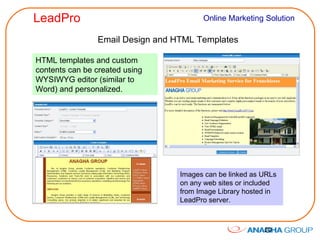
Email Design and HTML Templates HTML templates and custom contents can be created using WYSIWYG editor (similar to Word) and personalized. Images can be linked as URLs on any web sites or included from Image Library hosted in LeadPro server.
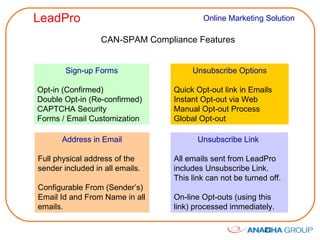
CAN-SPAM Compliance Features Sign-up Forms Opt-in (Confirmed) Double Opt-in (Re-confirmed) CAPTCHA Security Forms / Email Customization Unsubscribe Options Quick Opt-out link in Emails Instant Opt-out via Web Manual Opt-out Process Global Opt-out  Address in Email Full physical address of the sender included in all emails. Configurable From (Sender’s) Email Id and From Name in all emails. Unsubscribe Link  All emails sent from LeadPro includes Unsubscribe Link. This link can not be turned off. On-line Opt-outs (using this link) processed immediately.
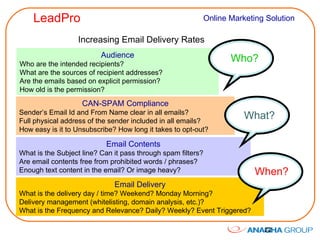
Increasing Email Delivery Rates Audience Who are the intended recipients? What are the sources of recipient addresses? Are the emails based on explicit permission? How old is the permission? Email Delivery What is the delivery day / time? Weekend? Monday Morning? Delivery management (whitelisting, domain analysis, etc.)? What is the Frequency and Relevance? Daily? Weekly? Event Triggered? CAN-SPAM Compliance Sender’s Email Id and From Name clear in all emails? Full physical address of the sender included in all emails? How easy is it to Unsubscribe? How long it takes to opt-out? Email Contents What is the Subject line? Can it pass through spam filters? Are email contents free from prohibited words / phrases? Enough text content in the email? Or image heavy? Who? What? When?
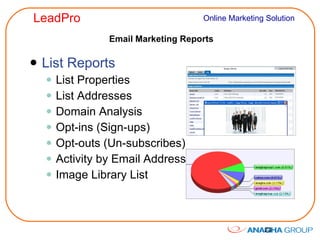
Email Marketing Reports List Reports List Properties List Addresses Domain Analysis Opt-ins (Sign-ups) Opt-outs (Un-subscribes) Activity by Email Address Image Library List
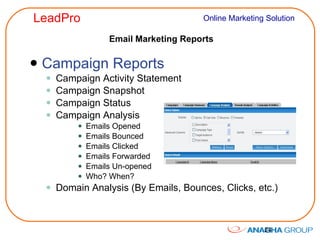
Email Marketing Reports Campaign Reports Campaign Activity Statement Campaign Snapshot Campaign Status Campaign Analysis Emails Opened Emails Bounced Emails Clicked Emails Forwarded Emails Un-opened Who? When? Domain Analysis (By Emails, Bounces, Clicks, etc.)
Online Surveys - Business Benefits Listen to Prospects, Customers, Business Partners, Members and Employees using on-line Surveys Find out New Product / Service requirements Address Surveys to specific market segments by using Advanced Filtering Reduce Waste in product development and marketing by knowing the customer needs Reduce Customer Churn Increase Customer Satisfaction Integrated with Email Marketing for Panel List Management
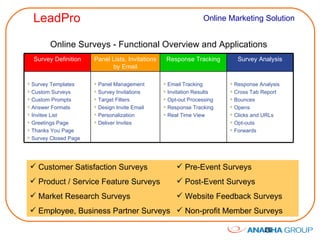
Online Surveys - Functional Overview and Applications Customer Satisfaction Surveys Product / Service Feature Surveys Market Research Surveys Employee, Business Partner Surveys Pre-Event Surveys  Post-Event Surveys Website Feedback Surveys Non-profit Member Surveys Survey Definition Panel Lists, Invitations by Email Response Tracking Survey Analysis Survey Templates Custom Surveys Custom Prompts Answer Formats Invitee List Greetings Page Thanks You Page Survey Closed Page Panel Management Survey Invitations Target Filters Design Invite Email Personalization Deliver Invites Email Tracking Invitation Results Opt-out Processing Response Tracking Real Time View Response Analysis Cross Tab Report Bounces Opens Clicks and URLs Opt-outs Forwards
Online Surveys - Reporting Survey Snapshot Survey Response Summary View Individual Survey Responses Cross Tab Analysis, TURF Report Survey Response Data Download/Export Graphs / Charts for Interpretation Drill Down Features Panel Management Reports
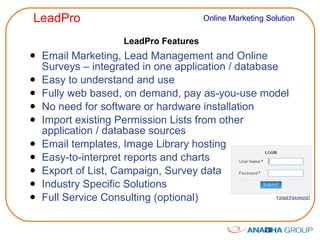
LeadPro Features Email Marketing, Lead Management and Online Surveys – integrated in one application / database Easy to understand and use Fully web based, on demand, pay as-you-use model No need for software or hardware installation Import existing Permission Lists from other application / database sources Email templates, Image Library hosting Easy-to-interpret reports and charts Export of List, Campaign, Survey data Industry Specific Solutions Full Service Consulting (optional)
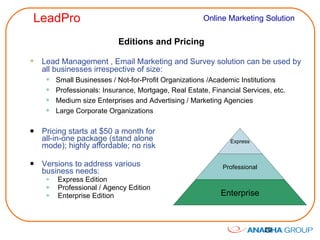
Editions and Pricing Pricing starts at $50 a month for all-in-one package (stand alone mode); highly affordable; no risk Versions to address various business needs: Express Edition Professional / Agency Edition Enterprise Edition Lead Management , Email Marketing and Survey solution can be used by all businesses irrespective of size: Small Businesses / Not-for-Profit Organizations /Academic Institutions Professionals: Insurance, Mortgage, Real Estate, Financial Services, etc. Medium size Enterprises and Advertising / Marketing Agencies Large Corporate Organizations Express Professional Enterprise
Additional Information Website:  www.LeadPro247.Com   Toll free: 1-877-9-LEADPRO International: 1-248-327-4333 Corporate Website:  www.AnaghaGroup.Com ?

LeadPro Marketing Automation Suite V3

  • 1.
    LeadPro Lead Management Email Marketing Online Surveys
  • 2.
    Contents Anagha Group– Solutions and Service Areas Lead Management - Business Benefits Lead Management - Overview Lead Management – Reports and Samples Email Marketing - Process Overview Email Marketing - Business Benefits Email Marketing - Functional Overview and Applications Email Campaign Snapshot Domain Analysis (List / Campaign), Activities Tracking List Management, Sign-up Forms setup and customization Campaign Definition Address Filters for Target Marketing Email Design and Templates CAN-SPAM Compliance Increasing Delivery Rates Reports and Performance Analytics Online Surveys – Business Benefits Online Surveys – Functional Overview Online Surveys – Reporting and Analytics LeadPro Feature Highlights Contact Information
  • 3.
    Anagha Group Solutionsand Service Areas Lead Tracking, Distribution and Management Event Marketing, Registration, Payment Processing, Management Custom Software Technology Services Operations Support Search Engine Optimization (SEO), Pay Per Click (PPC) Marketing Rebates, Co-op Claims, Warranty Claims Processing Online Survey Management and Analysis Email Marketing CUSTOMERS
  • 4.
    Lead Management -Business Benefits Integrate Leads from multiple sources for efficient management Customize Lead Profile Properties based on product / service / business requirements Automate Lead Capture processes Acquire more leads / prospects Distribute Leads to Inside sales, Field sales, Lead Buyers Follow-up Leads promptly Nurture Leads with Drip Emails, Convert to customers Integrate with Email Marketing for reminders and follow-up Accelerate Sales Cycle Increase Win / Close rates Cross-sell, Up-sell, Grow sales and profits Reduce paperwork and manual process errors Maximize MarComm ROI
  • 5.
    Lead Management –Overview Multiple Lead Journals / Profiles – Custom Data Fields, Industry Templates Lead Capture – Email Parsing, Manual Entry, Import from other Sources, API Interface to 3 rd party / in-house systems Lead Qualification Lead Distribution – Business Area, Product / Service Line, Geography, Region, Sales Area, Dealer, Round Robin, PULL & Push Methods Lead Follow-up – Email Reminders and Follow-up Lead Conversion Tracking Lead Analysis / Real Time Reporting Lead Notifications / Alerts Lead Fulfillment – Vendor interface
  • 6.
  • 7.
    Lead Management -Reports Lead Status Report Lead Summary Report Pipeline Report Lead Analysis – By Source / Journal Lead Analysis – By Source Group Lead Analysis – By Sales Stage Lead Analysis – By Business Area Lead Analysis – By Product or Service Line Lead Analysis – By Franchisee / Dealer / Channel Partner Lead Analysis – By Region / Sales Area / Sales Person Lead Conversion Analysis Lead Follow-up Activity Report Lead Fulfillment Report Campaign Activities (Opens, Clicks, Forwards) Report Follow-up Email Opt-out Report
  • 8.
    Email Marketing -Business Benefits Drive more traffic to your web sites Deliver Special Offers, Coupons, product information and Event Invitations effectively at low cost Acquire more leads / prospects Integrate with Lead management, Nurture leads, Convert to customers Educate and engage customers and prospects Retain existing customers, reduce churn Cross-sell, Up-sell, Grow sales and profits Integrate with Online Survey tool to get prospect / customer feedback Survey Panel Management Survey Response Tracking Complement traditional marketing media Reach prospects with targeted e-messages Maximize MarComm ROI
  • 9.
    Email Marketing ProcessOverview List, Opt-in / Subscription Management Delivery and Response Tracking Campaign Performance Measurement Email Design, Personalization Campaign Definition, Targeting
  • 10.
    Email Marketing -Functional Overview and Applications Email News Letters, eMagazines eCoupons, Special / Promo offers Product Launches, Updates Lead Generation and Follow-up Reminders, Surveys Event, Survey Invitations Thank You, Webinar Notices Fund Raising Requests List Management Campaign Design Delivery Tracking Reporting & Metrics Sign-up Forms CAPTCHA Security Subscription Opt-out List Definition Custom Data Fields List Import Image Library CAN-SPAM Rules AutoResponders Properties Category Address Assignment Target Filters Email Templates Email Design Customization Personalization SPAM Avoidance Testing Emails Email Scheduling Bounce Management Bounce Tracking Opt-out Processing Email Forwarding Google Analytics Drip Emails List Reports Subscriptions Domain Analysis Activities Bounces Opens Clicks and URLs Opt-outs Forwards
  • 11.
    Email Campaign SnapshotCampaign Overview: Campaign Properties Email Contents Delivery Statistics Bounce Rate Response Rates Response Trend URLs Visited Click Rates
  • 12.
    Email Campaign AnalysisCampaign Analytics in Real Time: Emails Opened, Bounced, Clicked, Forwarded and Opted-out, Visited URLs, Activity Trend, Campaign Status
  • 13.
    Email Domain AnalysisAnalysis of Email Addresses (Contacts / Subscribers) by Domain Name. Helps plan Campaign and Email design based on the Audience make-up. Top domains, bottom domains – By emails sent, clicks, bounces, opens
  • 14.
    Email Campaign ActivitiesResponses / Activities Tracked in the order of occurrence include: Opens Clicks Opt-outs Forwards
  • 15.
    Email List ManagementList Properties Definition: Title, Categories, Source, Owner, Business Area, Custom Data Fields (Demographics) Email IDs / Contacts: Sign-up Forms Definition, Import from CSV, XLS, and XML, Opt-out Management
  • 16.
    Sign-up Forms CustomizationSignup methods supported: Opt-in, Double Opt-in. Fully Customizable Forms and Email notifications. CAPTCHA Security to avoid web-bot (automated) entries.
  • 17.
    Email Campaign DefinitionCampaign Properties Adding Addresses / Email Contacts from one or more Subscription Lists. Applying Filters (to reach targeted audience) CAN-SPAM compliance checks Testing Emails Scheduling Broadcast AutoResponders and Drip Emails
  • 18.
    Email Address Filters(Targeted Email Marketing) Flexible filter features (can be applied for all data fields – Numeric, Text, Date and List of Values). Emails can also be manually selected from the filtered results. Adding Emails to Campaigns: Multiple Filters can be applied while adding emails from Subscription Lists.
  • 19.
    Email Content CreationSelecting Content Type (HTML / Text) Choosing Template(s) Customizing / creating Email contents using a WYSIWYG editor Adding URL links Adding Images Email Personalization Email Content Sources: LeadPro System Templates, Custom Templates (user generated), Earlier Campaigns and Campaign Specific Custom Content.
  • 20.
    Email Design andHTML Templates HTML templates and custom contents can be created using WYSIWYG editor (similar to Word) and personalized. Images can be linked as URLs on any web sites or included from Image Library hosted in LeadPro server.
  • 21.
    CAN-SPAM Compliance FeaturesSign-up Forms Opt-in (Confirmed) Double Opt-in (Re-confirmed) CAPTCHA Security Forms / Email Customization Unsubscribe Options Quick Opt-out link in Emails Instant Opt-out via Web Manual Opt-out Process Global Opt-out Address in Email Full physical address of the sender included in all emails. Configurable From (Sender’s) Email Id and From Name in all emails. Unsubscribe Link All emails sent from LeadPro includes Unsubscribe Link. This link can not be turned off. On-line Opt-outs (using this link) processed immediately.
  • 22.
    Increasing Email DeliveryRates Audience Who are the intended recipients? What are the sources of recipient addresses? Are the emails based on explicit permission? How old is the permission? Email Delivery What is the delivery day / time? Weekend? Monday Morning? Delivery management (whitelisting, domain analysis, etc.)? What is the Frequency and Relevance? Daily? Weekly? Event Triggered? CAN-SPAM Compliance Sender’s Email Id and From Name clear in all emails? Full physical address of the sender included in all emails? How easy is it to Unsubscribe? How long it takes to opt-out? Email Contents What is the Subject line? Can it pass through spam filters? Are email contents free from prohibited words / phrases? Enough text content in the email? Or image heavy? Who? What? When?
  • 23.
    Email Marketing ReportsList Reports List Properties List Addresses Domain Analysis Opt-ins (Sign-ups) Opt-outs (Un-subscribes) Activity by Email Address Image Library List
  • 24.
    Email Marketing ReportsCampaign Reports Campaign Activity Statement Campaign Snapshot Campaign Status Campaign Analysis Emails Opened Emails Bounced Emails Clicked Emails Forwarded Emails Un-opened Who? When? Domain Analysis (By Emails, Bounces, Clicks, etc.)
  • 25.
    Online Surveys -Business Benefits Listen to Prospects, Customers, Business Partners, Members and Employees using on-line Surveys Find out New Product / Service requirements Address Surveys to specific market segments by using Advanced Filtering Reduce Waste in product development and marketing by knowing the customer needs Reduce Customer Churn Increase Customer Satisfaction Integrated with Email Marketing for Panel List Management
  • 26.
    Online Surveys -Functional Overview and Applications Customer Satisfaction Surveys Product / Service Feature Surveys Market Research Surveys Employee, Business Partner Surveys Pre-Event Surveys Post-Event Surveys Website Feedback Surveys Non-profit Member Surveys Survey Definition Panel Lists, Invitations by Email Response Tracking Survey Analysis Survey Templates Custom Surveys Custom Prompts Answer Formats Invitee List Greetings Page Thanks You Page Survey Closed Page Panel Management Survey Invitations Target Filters Design Invite Email Personalization Deliver Invites Email Tracking Invitation Results Opt-out Processing Response Tracking Real Time View Response Analysis Cross Tab Report Bounces Opens Clicks and URLs Opt-outs Forwards
  • 27.
    Online Surveys -Reporting Survey Snapshot Survey Response Summary View Individual Survey Responses Cross Tab Analysis, TURF Report Survey Response Data Download/Export Graphs / Charts for Interpretation Drill Down Features Panel Management Reports
  • 28.
    LeadPro Features EmailMarketing, Lead Management and Online Surveys – integrated in one application / database Easy to understand and use Fully web based, on demand, pay as-you-use model No need for software or hardware installation Import existing Permission Lists from other application / database sources Email templates, Image Library hosting Easy-to-interpret reports and charts Export of List, Campaign, Survey data Industry Specific Solutions Full Service Consulting (optional)
  • 29.
    Editions and PricingPricing starts at $50 a month for all-in-one package (stand alone mode); highly affordable; no risk Versions to address various business needs: Express Edition Professional / Agency Edition Enterprise Edition Lead Management , Email Marketing and Survey solution can be used by all businesses irrespective of size: Small Businesses / Not-for-Profit Organizations /Academic Institutions Professionals: Insurance, Mortgage, Real Estate, Financial Services, etc. Medium size Enterprises and Advertising / Marketing Agencies Large Corporate Organizations Express Professional Enterprise
  • 30.
    Additional Information Website: www.LeadPro247.Com Toll free: 1-877-9-LEADPRO International: 1-248-327-4333 Corporate Website: www.AnaghaGroup.Com ?