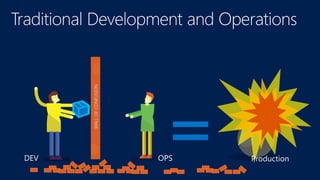
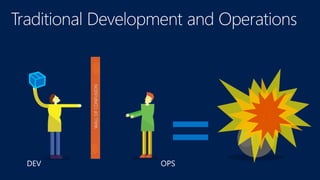

OPSDEV
https://puppetlabs.com/
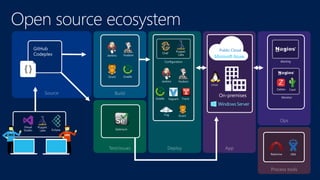
Configuration Alerting
Monitor
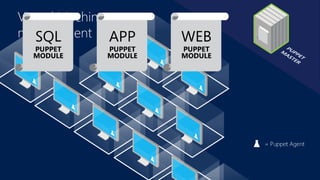
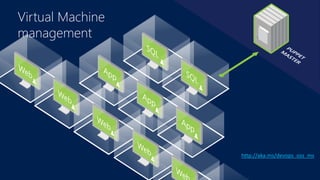
Virtual Machine
management
Virtual Machine
management
http://aka.ms/devops_oss_ms
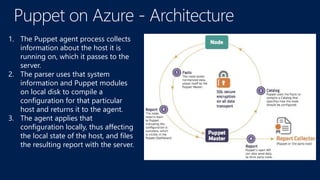
1. The Puppet agent process collects
information about the host it is
running on, which it passes to the
server.
2. The parser uses that system
information and Puppet modules
on local disk to compile a
configuration for that particular
host and returns it to the agent.
3. The agent applies that
configuration locally, thus affecting
the local state of the host, and files
the resulting report with the server.
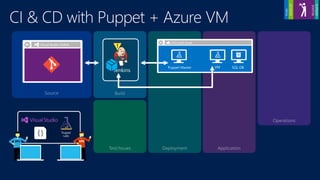
OPERATERELEASE
SQL DBPuppet Master VM
cspkg
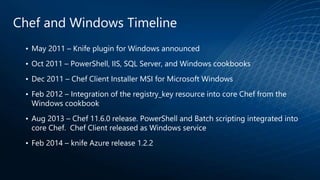
Chef and Windows Timeline
• May 2011 – Knife plugin for Windows announced
• Oct 2011 – PowerShell, IIS, SQL Server, and Windows cookbooks
• Dec 2011 – Chef Client Installer MSI for Microsoft Windows
• Feb 2012 – Integration of the registry_key resource into core Chef from the
Windows cookbook
• Aug 2013 – Chef 11.6.0 release. PowerShell and Batch scripting integrated into
core Chef. Chef Client released as Windows service
• Feb 2014 – knife Azure release 1.2.2
Why Chef on Azure
• Chef Community - community.opscode.com
– +25,000 registered users
– 1,300 individual contributors
– 200 corporate contributors
– 900 cookbooks
• Support for on-Premise Windows and Windows Azure in
the Cloud
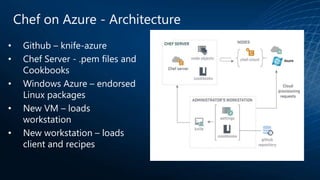
Chef on Azure - Architecture
• Github – knife-azure
• Chef Server - .pem files and
Cookbooks
• Windows Azure – endorsed
Linux packages
• New VM – loads
workstation
• New workstation – loads
client and recipes
Overview of Chef Resources on
Windows
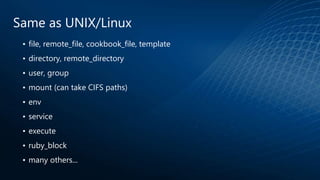
Same as UNIX/Linux
• file, remote_file, cookbook_file, template
• directory, remote_directory
• user, group
• mount (can take CIFS paths)
• env
• service
• execute
• ruby_block
• many others...
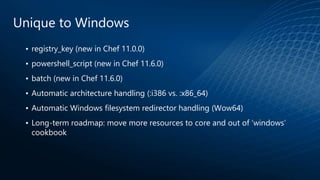
Unique to Windows
• registry_key (new in Chef 11.0.0)
• powershell_script (new in Chef 11.6.0)
• batch (new in Chef 11.6.0)
• Automatic architecture handling (:i386 vs. :x86_64)
• Automatic Windows filesystem redirector handling (Wow64)
• Long-term roadmap: move more resources to core and out of ‘windows’
cookbook
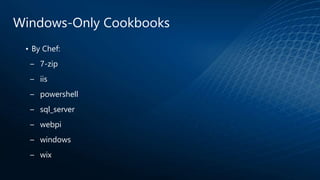
Windows-Only Cookbooks
• By Chef:
– 7-zip
– iis
– powershell
– sql_server
– webpi
– windows
– wix
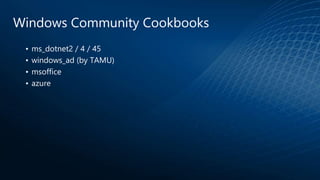
Windows Community Cookbooks
• ms_dotnet2 / 4 / 45
• windows_ad (by TAMU)
• msoffice
• azure
# Set system’s proxy settings to be the same as used for Chef
proxy = URI.parse(Chef::Config[:http_proxy])
registry_key 'HKCUSoftwareMicrosoftWindowsCurrentVersionInternet Settings'
do
values [{:name => 'ProxyEnable', :type => :reg_dword, :data => 1},
{:name => 'ProxyServer', :data => "#{proxy.host}:#{proxy.port}"},
{:name => 'ProxyOverride', :type => :reg_string, :data => '<local>'}]
action :create
end
registry_key example
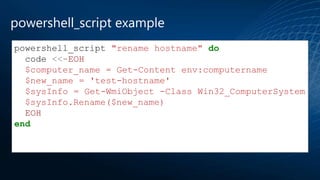
powershell_script "rename hostname" do
code <<-EOH
$computer_name = Get-Content env:computername
$new_name = 'test-hostname'
$sysInfo = Get-WmiObject -Class Win32_ComputerSystem
$sysInfo.Rename($new_name)
EOH
end
powershell_script example
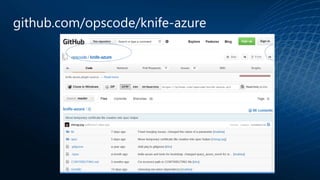
github.com/opscode/knife-azure
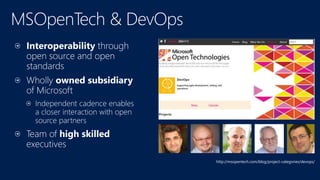
http://msopentech.com/blog/project-categories/devops/
http://aka.ms/devops_oss_ms
Microsoft Virtual Academyhttp://azure.Microsoft.com
Puppet and Chef on Azure
Sim, a Microsoft usa Open Source em DevOps

Sim, a Microsoft usa Open Source em DevOps

  • 6.
  • 7.
  • 9.
  • 11.
  • 12.
  • 13.
    1. The Puppetagent process collects information about the host it is running on, which it passes to the server. 2. The parser uses that system information and Puppet modules on local disk to compile a configuration for that particular host and returns it to the agent. 3. The agent applies that configuration locally, thus affecting the local state of the host, and files the resulting report with the server.
  • 14.
  • 15.
    Chef and WindowsTimeline • May 2011 – Knife plugin for Windows announced • Oct 2011 – PowerShell, IIS, SQL Server, and Windows cookbooks • Dec 2011 – Chef Client Installer MSI for Microsoft Windows • Feb 2012 – Integration of the registry_key resource into core Chef from the Windows cookbook • Aug 2013 – Chef 11.6.0 release. PowerShell and Batch scripting integrated into core Chef. Chef Client released as Windows service • Feb 2014 – knife Azure release 1.2.2
  • 16.
    Why Chef onAzure • Chef Community - community.opscode.com – +25,000 registered users – 1,300 individual contributors – 200 corporate contributors – 900 cookbooks • Support for on-Premise Windows and Windows Azure in the Cloud
  • 17.
    Chef on Azure- Architecture • Github – knife-azure • Chef Server - .pem files and Cookbooks • Windows Azure – endorsed Linux packages • New VM – loads workstation • New workstation – loads client and recipes
  • 18.
    Overview of ChefResources on Windows
  • 19.
    Same as UNIX/Linux •file, remote_file, cookbook_file, template • directory, remote_directory • user, group • mount (can take CIFS paths) • env • service • execute • ruby_block • many others...
  • 20.
    Unique to Windows •registry_key (new in Chef 11.0.0) • powershell_script (new in Chef 11.6.0) • batch (new in Chef 11.6.0) • Automatic architecture handling (:i386 vs. :x86_64) • Automatic Windows filesystem redirector handling (Wow64) • Long-term roadmap: move more resources to core and out of ‘windows’ cookbook
  • 21.
    Windows-Only Cookbooks • ByChef: – 7-zip – iis – powershell – sql_server – webpi – windows – wix
  • 22.
    Windows Community Cookbooks •ms_dotnet2 / 4 / 45 • windows_ad (by TAMU) • msoffice • azure
  • 23.
    # Set system’sproxy settings to be the same as used for Chef proxy = URI.parse(Chef::Config[:http_proxy]) registry_key 'HKCUSoftwareMicrosoftWindowsCurrentVersionInternet Settings' do values [{:name => 'ProxyEnable', :type => :reg_dword, :data => 1}, {:name => 'ProxyServer', :data => "#{proxy.host}:#{proxy.port}"}, {:name => 'ProxyOverride', :type => :reg_string, :data => '<local>'}] action :create end registry_key example
  • 24.
    powershell_script "rename hostname"do code <<-EOH $computer_name = Get-Content env:computername $new_name = 'test-hostname' $sysInfo = Get-WmiObject -Class Win32_ComputerSystem $sysInfo.Rename($new_name) EOH end powershell_script example
  • 25.
  • 26.
  • 29.

Editor's Notes

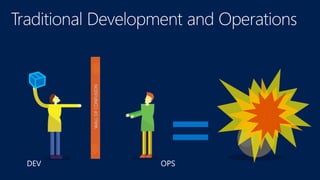
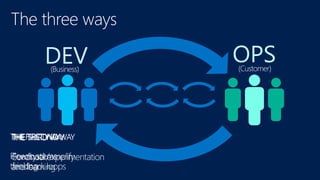
  • #7 http://itrevolution.com/a-personal-reinterpretation-of-the-three-ways/ 1st - IT places Dev as the business representative and Ops as the customer representative, with the value flowing in one direction (from the business to the customer). When we can think as a system we can focus clearly on the business value that flows between our Business, Dev, Ops and the end users. We can see each piece as it fits into the whole, and can identify its constraints. We can also properly define our work and when we can see and think in terms of the Flow of our system, we see the following benefits: increased value flow due to the visibility into what it takes to produce our end product our downstream step always gets what they need, how they need it, when they need it faster time to market we bring Ops in earlier in the development process, letting them plan appropriately for the changes that Dev will be making (because we know that all changes can affect how our product is delivered) which leads to less unplanned work or rushed changes because work is visible, Ops can see the work coming and better prepare We can identify and address constraints or bottleneck points in our system 2nd Way - It adds a backward facing channel of communications between OPs and Dev. It enforces the idea that to better the product, we always need to communicate. Dev continually improves as an organization when it better sees the outcomes of it’s work. This can be small (inviting the other Tribes to our stand ups) or it can be larger (Including Dev in the on-call rotation, tools development, architecture planning and/or incident management process) But to truly increase our Flow and improve the business value being delivered to the customer our Tribes need to know ‘what happens’, ‘when it happens’. When we increase our Feedback and create a stable Feedback loop we see the following benefits: Tribal knowledge grows, and we foster a community of sharing With sharing comes trust and with trust comes greater levels of collaboration. This collaboration will lead to more stability and better Flow We better understand all of our customers (Ops as a customer, Dev as a Business, but especially our end users, to whom we deliver value.) We fix our defects faster, and are more aware of what is needed to make sure that type of problem doesn’t happen again We adapt our processes as we learn more about the inner workings or our other Tribes We increase our delivery speeds and decrease unplanned work 3rd Way: When we have achieved the first Two Ways we can feel comfortable knowing that we can push the boundaries. We can experiment, and fail fast, or achieve greatness. We have a constant feedback loop for each small experiment that allows us to validate our theories quickly. we fail often and sometimes intentionally to learn how to respond properly and where our limits are we inject faults into the production system and early as possible in the delivery pipeline we practice for outages and find innovative ways to deal with them we push ourselves into the unknown more frequently and become comfortable in the uncomfortable we innovate and iterate in a ‘controlled’ manner, knowing when should keep pushing and when we should stop our code commits are more reliable, and production ready we test our business hypotheses (at the beginning of the product pipeline), and measure the business results we constantly put pressure into the system, striving to decrease cycle times and improve flow
  • #10 http://www.redmine.org/ https://www.atlassian.com/software/jira/