Object Oriented Programming
with Java
 What is computer.
 Developer basic skills.
 Memory management in computer.
 Introduction to java.
 What is OOP.
 Why OOP.
Course Content
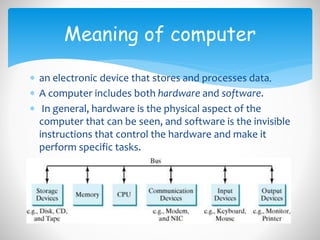
 an electronic device that stores and processes data.
 A computer includes both hardware and software.
 In general, hardware is the physical aspect of the
computer that can be seen, and software is the invisible
instructions that control the hardware and make it
perform specific tasks.
Meaning of computer
 Good knowledge with two things
what will developer interact with ..?
How I will deal with it…?
Developer basic skills
 Computers use zeros and ones because digital devices
have two stable states, referred to as zero and one by
convention.
 Data of various kinds, such as numbers, characters, and
strings, are encoded as a series of bits (binary digits:
zeros and ones).
 A memory unit is an ordered sequence of bytes, each
holding eight bits.
Memory management in
computer
 Brief history of java.
 Java principles.
 Java features.
 Memory Management in java.
Introduction to java
 Java was created by sun microsystems in may 1995.
 Idea was to create a language to control any
hardware.
 Team who achieved java was green team.
 Leader of team was James Gosling.
Brief history of java
 Java is used in
Desktop applications.
Wed applications.
Mobile applications.
Embedded applications.
Brief history of java
 Simple object oriented and easy to learn.
 Secure.
 Architecture neutral and portable.
 Compiled and interpreted.
 Execute with high performance.
 Treaded and dynamic.
Java Principles
 Java is easy to learn
Syntax of C++.
Dynamic memory management
(garbage collection).
No pointers.
Java features
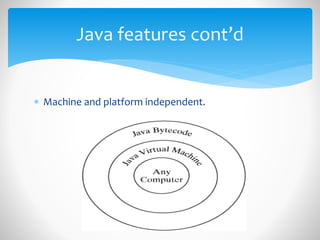
 Machine and platform independent.
Java features cont’d
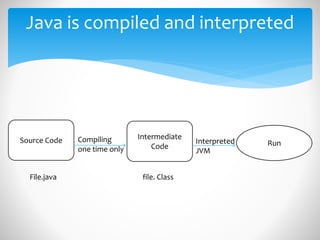
Java is compiled and interpreted
Source Code Intermediate
Code RunCompiling
one time only
Interpreted
JVM
File.java file. Class
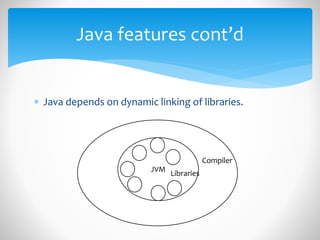
 Java depends on dynamic linking of libraries.
Java features cont’d
JVM
Libraries
Compiler
 Java is fully Object Oriented
Map up of classes.
No multiple inheritance.
Java features cont’d
 Java is multithreaded language
you can create programs that run multiple
threads of execution in parallel.
Java features cont’d
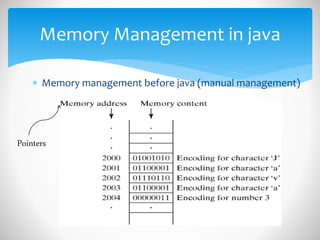
 Memory management before java (manual management)
Memory Management in java
Pointers
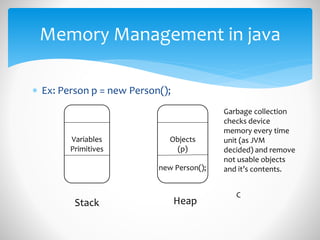
 Ex: Person p = new Person();
Memory Management in java
Variables
Primitives
Objects
(p)
Stack Heap
Garbage collection
checks device
memory every time
unit (as JVM
decided) and remove
not usable objects
and it’s contents.new Person();
C
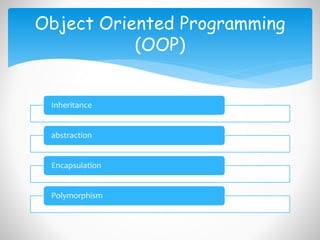
Inheritance
abstraction
Encapsulation
Polymorphism
Object Oriented Programming
(OOP)
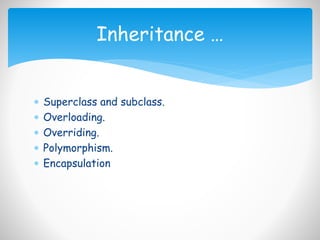
 Superclass and subclass.
 Overloading.
 Overriding.
 Polymorphism.
 Encapsulation
Inheritance …
 The whole idea behind encapsulation is to hide
the implementation details from users. If a data
member is private it means it can only be
accessed within the same class.
 Encapsulation also known as data hiding.
Encapsulation
 Ex:
public class A{
private int age;
private String name;
public void setAge(int newAge){Age = newAge;}
public int getAge(){
Return age;}}
Public class MainClass{
Public static void main(String[]args){
A a = new A();
a.setAge(10);
a.getAge();}
}
Encapsulation cont’d
• What is an exception?
Definition of exception
reasons of exceptions
when exceptions occur
• Difference among exception and error
• Why should handling exception
Exceptions
 An Exception can be anything which interrupts the
normal flow of the program. When an exception
occurs program processing gets terminated and
doesn’t continue further.
 In such cases we get a system generated error
message. The good thing about exceptions is that
they can be handled. We will cover the handling part
later in this same tutorial.
Exception definition
 There can be several reasons for an exception. For
example, following situations can cause an exception
- Opening a non-existing file, Network connection
problem, Operands being manipulated are out of
prescribed ranges, class file missing which was
supposed to be loaded and so on.
Reasons of exception
 Exception can occur at runtime (known as runtime
exceptions) as well as at compile-time (known
Compile-time exceptions).
When exception occurs …?
 Errors indicate serious problems and abnormal conditions
that most applications should not try to handle. Error
defines problems that are not expected to be caught
under normal circumstances by our program. For example
memory error, hardware error, JVM error etc.
Exceptions are conditions within the code. A developer
can handle such conditions and take necessary corrective
actions. Few examples -
 DivideByZero exception
 NullPointerException
 ArithmeticException
 ArrayIndexOutOfBoundsException
Difference among exception
and error

Short notes of oop with java

  • 1.
  • 2.
     What iscomputer.  Developer basic skills.  Memory management in computer.  Introduction to java.  What is OOP.  Why OOP. Course Content
  • 3.
     an electronicdevice that stores and processes data.  A computer includes both hardware and software.  In general, hardware is the physical aspect of the computer that can be seen, and software is the invisible instructions that control the hardware and make it perform specific tasks. Meaning of computer
  • 4.
     Good knowledgewith two things what will developer interact with ..? How I will deal with it…? Developer basic skills
  • 5.
     Computers usezeros and ones because digital devices have two stable states, referred to as zero and one by convention.  Data of various kinds, such as numbers, characters, and strings, are encoded as a series of bits (binary digits: zeros and ones).  A memory unit is an ordered sequence of bytes, each holding eight bits. Memory management in computer
  • 6.
     Brief historyof java.  Java principles.  Java features.  Memory Management in java. Introduction to java
  • 7.
     Java wascreated by sun microsystems in may 1995.  Idea was to create a language to control any hardware.  Team who achieved java was green team.  Leader of team was James Gosling. Brief history of java
  • 8.
     Java isused in Desktop applications. Wed applications. Mobile applications. Embedded applications. Brief history of java
  • 9.
     Simple objectoriented and easy to learn.  Secure.  Architecture neutral and portable.  Compiled and interpreted.  Execute with high performance.  Treaded and dynamic. Java Principles
  • 10.
     Java iseasy to learn Syntax of C++. Dynamic memory management (garbage collection). No pointers. Java features
  • 11.
     Machine andplatform independent. Java features cont’d
  • 12.
    Java is compiledand interpreted Source Code Intermediate Code RunCompiling one time only Interpreted JVM File.java file. Class
  • 13.
     Java dependson dynamic linking of libraries. Java features cont’d JVM Libraries Compiler
  • 14.
     Java isfully Object Oriented Map up of classes. No multiple inheritance. Java features cont’d
  • 15.
     Java ismultithreaded language you can create programs that run multiple threads of execution in parallel. Java features cont’d
  • 16.
     Memory managementbefore java (manual management) Memory Management in java Pointers
  • 17.
     Ex: Personp = new Person(); Memory Management in java Variables Primitives Objects (p) Stack Heap Garbage collection checks device memory every time unit (as JVM decided) and remove not usable objects and it’s contents.new Person(); C
  • 18.
  • 19.
     Superclass andsubclass.  Overloading.  Overriding.  Polymorphism.  Encapsulation Inheritance …
  • 20.
     The wholeidea behind encapsulation is to hide the implementation details from users. If a data member is private it means it can only be accessed within the same class.  Encapsulation also known as data hiding. Encapsulation
  • 21.
     Ex: public classA{ private int age; private String name; public void setAge(int newAge){Age = newAge;} public int getAge(){ Return age;}} Public class MainClass{ Public static void main(String[]args){ A a = new A(); a.setAge(10); a.getAge();} } Encapsulation cont’d
  • 22.
    • What isan exception? Definition of exception reasons of exceptions when exceptions occur • Difference among exception and error • Why should handling exception Exceptions
  • 23.
     An Exceptioncan be anything which interrupts the normal flow of the program. When an exception occurs program processing gets terminated and doesn’t continue further.  In such cases we get a system generated error message. The good thing about exceptions is that they can be handled. We will cover the handling part later in this same tutorial. Exception definition
  • 24.
     There canbe several reasons for an exception. For example, following situations can cause an exception - Opening a non-existing file, Network connection problem, Operands being manipulated are out of prescribed ranges, class file missing which was supposed to be loaded and so on. Reasons of exception
  • 25.
     Exception canoccur at runtime (known as runtime exceptions) as well as at compile-time (known Compile-time exceptions). When exception occurs …?
  • 26.
     Errors indicateserious problems and abnormal conditions that most applications should not try to handle. Error defines problems that are not expected to be caught under normal circumstances by our program. For example memory error, hardware error, JVM error etc. Exceptions are conditions within the code. A developer can handle such conditions and take necessary corrective actions. Few examples -  DivideByZero exception  NullPointerException  ArithmeticException  ArrayIndexOutOfBoundsException Difference among exception and error