







Hello
Shoot to Thrill
Getting the best from
 your iPhone camera
It's all about the image

  It's about making the best of the
  constraints of the iPhone camera
  NOT about high megapixel
  perfection
  A great shot is still a great shot,
  even if it's only 600px wide on
  your screen
The camera never lies, or
  Once you point a lens you've already
  made a decision - to take a photo in the
  first place!
  Then you're choosing angles, framing,
  exposure control etc.
  Processing the final image to enhance, or
  change it is part of the same process -
  it's ALL selective
  There is no such thing as photographing
  something 'as it was'
The iPhone is making me
a better photographer!
 I'm shooting more
 I concentrate more on what I'm looking
 at shooting
 I pay less attention to the mechanics
 of how I'm getting the shot
 It's faster and more direct, I feel closer
 to the image I'm shooting
 No auto-review - so no time wasted
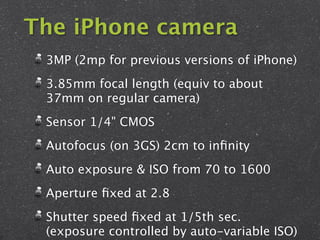
The iPhone camera
 3MP (2mp for previous versions of iPhone)
 3.85mm focal length (equiv to about
 37mm on regular camera)
 Sensor 1/4" CMOS
 Autofocus (on 3GS) 2cm to infinity
 Auto exposure & ISO from 70 to 1600
 Aperture fixed at 2.8
 Shutter speed fixed at 1/5th sec.
 (exposure controlled by auto-variable ISO)
But it's not a real camera!
  No such beast! Mostly camera marketing BS

  Any camera is as real or serious as YOU
  make it

  ANYTHING that captures an image is a
  camera, from a cardboard box pinhole to a
  Hasselblad

  A few short years ago 3mp cameras were top
  of the line for SLRs

  Quality of iPhone camera is more than
Constraints of
   the iPhone
 camera are far
 outweighed by
its convenience,
    because...
The best camera
    you have
is the one that's
    with You
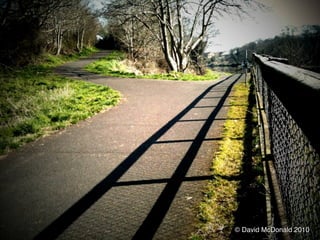
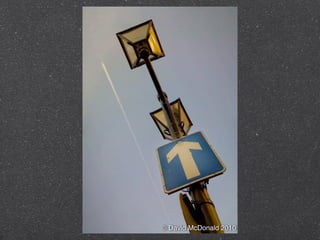
iPhone is perfect
 for unplanned,
  or unexpected
    photo-ops
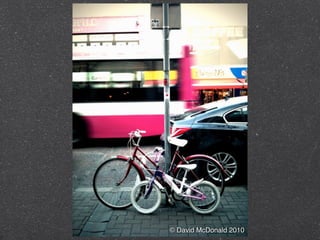
© David McDonald 2010
F8 and be there!
 Small, discreet, easy to take shots
 without attracting a lot of attention
 iPhone has a huge high-res preview
 screen, excellent for seeing the
 quality of what you've just shot
 It's also extremely efficient at
 directly uploading to the various
 photo-sharing sites
The Best Camera
you have is the one
you have with you.
             Laterally relevant:
This is a good case history of how to create,
 market and profit in the iPhone economy
Chase Jarvis and Best Camera
  Excellent and insanely dedicated
  photographer
  Totally comfortable in the digital
  realm, not just for the core
  photography, but the whole
  business
  Saw potential in the iPhone - even
  back in early 2009 with the 3G
  Started shooting with iPhone
Chase Jarvis and Best Camera
  Collected vast amount of images
  - remember shooting is cheap
  Used all existing iPhone camera apps,
  studied their strengths & weaknesses
  - thought he could do better
  Designed a new iPhone photography app
  based on his Photography experience &
  use of iPhone & R&D on apps
  Built a community website for the app
  Published a book to promote the app &
  website - using the photos he started
Physical aspects
   of iPhone
   shooting
  techniques
Holding the iPhone
 You have no control over the shutter
 speed selected so:
 Hold with two hands, if possible
 Hold close if you can, tuck your elbows
 in
 Remember on 3GS you also have to
 touch select focus too
 Brace yourself against a wall or support
The shutter release

 In case you haven't figured this
 out yet - the shutter actually
 takes the picture when you
 RELEASE your finger from it
 It's important to know this as
 timing is already tricky on these
 types of cameras
Tripod/Support

 Joby Gorilla tripod
 Moviepeg
 Sellotape/Bluetack - anything that
 holds it still, or props it up
 You need a self-timer app for this
 (Joby made one)
Keep it Clean!
  Outer element of lens nearly always
  has oil from your skin on it, or other
  materials. Gross, I know!
  Always wipe the outmost glass on
  something clean (maybe a few
  times) before taking a shot.
  An optical wipe is great, if you
  happen to have them.
  Otherwise image quality can be
Touch to select on 3GS
 A sophisticated solution for this type of device

 Makes for a much greater photo than more
 megapixels

 Take care how to use: try several areas in your frame,
 often a balance between extremes is needed, bracket
 plenty!

 This tech actually does three things: sets exposure,
 focus and white-balance.

 THIS ALSO affects how you're holding the iPhone for
 the shot - and not in a good way!

 For maximum hilarity try doing this while shading the
 lens from flare! ;-)
Lights,
   Camera,
   Action!
Good light is critical
Beware of Flare

 When shooting towards any
 light-source always try to
 shade the lens if the source is
 out of frame, it makes a huge
 difference to the shot...
© David McDonald 2010
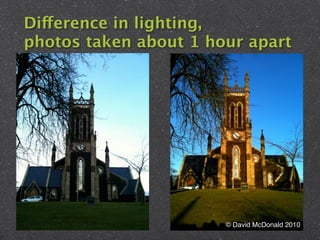
Difference in lighting,
photos taken about 1 hour apart


                       © David McDonald 2010
Also bear in mind
 As with most small sensor cameras
 performance in low-light is not very
 good
 Careful of highlight burn-out in very
 bright areas (due to narrow dynamic
 range)
 No Flash, but you can still modify the
 light
   Use a reflector
   Move your subject into the light - OR into the
   shade
Be more Composed
 iPhone image quality is not great, go
 for strong composition, geometric,
 graphic, contrast - look at the shapes
 on the view screen, move around, re-
 compose if necessary
 The big iPhone screen is an advantage
 when used as a viewfinder - make the
 most of it
 Of course try vertical and landscape
 orientations - sometimes even an
 obviously vertical opportunity can
Be more Composed
 iPhone lens has a wide-angle
 lens & it does not zoom, that
 means YOU have to
 Get your lens in a different
 place!
 - Joe McNally
 (Easier to do with a small device like the iPhone)
Due Process
 Taking the shot on the iPhone is
 only the first step
 Although you should always aim
 to capture the shot as best you
 can the iPhone Photography apps
 really allow you to make
 significant improvements to your
 images...
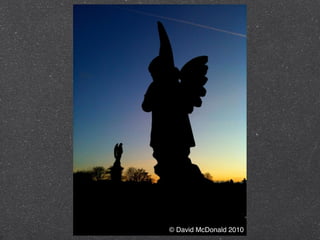
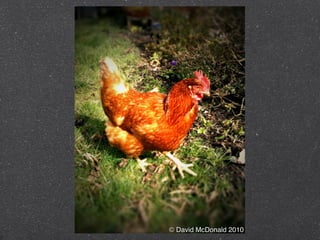
© David McDonald 2010
Choose good, well-
designed apps that
 best fit how you
   want to work
Check out what other good
iPhone photographers use
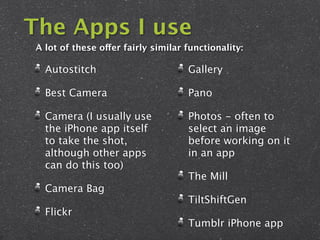
The Apps I use
A lot of these offer fairly similar functionality:

  Autostitch                        Gallery

  Best Camera                       Pano

  Camera (I usually use             Photos - often to
  the iPhone app itself             select an image
  to take the shot,                 before working on it
  although other apps               in an app
  can do this too)
                                    The Mill
  Camera Bag
                                    TiltShiftGen
  Flickr
                                    Tumblr iPhone app
Sharing is Caring
 Careful of auto-resizing when
 exporting or emailing
 Remember to tag, caption etc. -
 you are unlikely to do that later
 iPhone also records GPS data,
 very useful, but often stripped out
 on export/upload
HAVE
 FUN!

Shoot to thrill

  • 1.
  • 3.
    Shoot to Thrill Gettingthe best from your iPhone camera
  • 4.
    It's all aboutthe image It's about making the best of the constraints of the iPhone camera NOT about high megapixel perfection A great shot is still a great shot, even if it's only 600px wide on your screen
  • 5.
    The camera neverlies, or Once you point a lens you've already made a decision - to take a photo in the first place! Then you're choosing angles, framing, exposure control etc. Processing the final image to enhance, or change it is part of the same process - it's ALL selective There is no such thing as photographing something 'as it was'
  • 6.
    The iPhone ismaking me a better photographer! I'm shooting more I concentrate more on what I'm looking at shooting I pay less attention to the mechanics of how I'm getting the shot It's faster and more direct, I feel closer to the image I'm shooting No auto-review - so no time wasted
  • 7.
    The iPhone camera 3MP (2mp for previous versions of iPhone) 3.85mm focal length (equiv to about 37mm on regular camera) Sensor 1/4" CMOS Autofocus (on 3GS) 2cm to infinity Auto exposure & ISO from 70 to 1600 Aperture fixed at 2.8 Shutter speed fixed at 1/5th sec. (exposure controlled by auto-variable ISO)
  • 8.
    But it's nota real camera! No such beast! Mostly camera marketing BS Any camera is as real or serious as YOU make it ANYTHING that captures an image is a camera, from a cardboard box pinhole to a Hasselblad A few short years ago 3mp cameras were top of the line for SLRs Quality of iPhone camera is more than
  • 9.
    Constraints of the iPhone camera are far outweighed by its convenience, because...
  • 10.
    The best camera you have is the one that's with You
  • 11.
    iPhone is perfect for unplanned, or unexpected photo-ops
  • 12.
  • 13.
  • 14.
  • 15.
  • 16.
  • 17.
    F8 and bethere! Small, discreet, easy to take shots without attracting a lot of attention iPhone has a huge high-res preview screen, excellent for seeing the quality of what you've just shot It's also extremely efficient at directly uploading to the various photo-sharing sites
  • 18.
    The Best Camera youhave is the one you have with you. Laterally relevant: This is a good case history of how to create, market and profit in the iPhone economy
  • 19.
    Chase Jarvis andBest Camera Excellent and insanely dedicated photographer Totally comfortable in the digital realm, not just for the core photography, but the whole business Saw potential in the iPhone - even back in early 2009 with the 3G Started shooting with iPhone
  • 20.
    Chase Jarvis andBest Camera Collected vast amount of images - remember shooting is cheap Used all existing iPhone camera apps, studied their strengths & weaknesses - thought he could do better Designed a new iPhone photography app based on his Photography experience & use of iPhone & R&D on apps Built a community website for the app Published a book to promote the app & website - using the photos he started
  • 21.
    Physical aspects of iPhone shooting techniques
  • 22.
    Holding the iPhone You have no control over the shutter speed selected so: Hold with two hands, if possible Hold close if you can, tuck your elbows in Remember on 3GS you also have to touch select focus too Brace yourself against a wall or support
  • 23.
    The shutter release In case you haven't figured this out yet - the shutter actually takes the picture when you RELEASE your finger from it It's important to know this as timing is already tricky on these types of cameras
  • 24.
    Tripod/Support Joby Gorillatripod Moviepeg Sellotape/Bluetack - anything that holds it still, or props it up You need a self-timer app for this (Joby made one)
  • 25.
    Keep it Clean! Outer element of lens nearly always has oil from your skin on it, or other materials. Gross, I know! Always wipe the outmost glass on something clean (maybe a few times) before taking a shot. An optical wipe is great, if you happen to have them. Otherwise image quality can be
  • 26.
    Touch to selecton 3GS A sophisticated solution for this type of device Makes for a much greater photo than more megapixels Take care how to use: try several areas in your frame, often a balance between extremes is needed, bracket plenty! This tech actually does three things: sets exposure, focus and white-balance. THIS ALSO affects how you're holding the iPhone for the shot - and not in a good way! For maximum hilarity try doing this while shading the lens from flare! ;-)
  • 27.
    Lights, Camera, Action! Good light is critical
  • 28.
    Beware of Flare When shooting towards any light-source always try to shade the lens if the source is out of frame, it makes a huge difference to the shot...
  • 29.
  • 30.
  • 31.
    Difference in lighting, photostaken about 1 hour apart © David McDonald 2010
  • 32.
    Also bear inmind As with most small sensor cameras performance in low-light is not very good Careful of highlight burn-out in very bright areas (due to narrow dynamic range) No Flash, but you can still modify the light Use a reflector Move your subject into the light - OR into the shade
  • 33.
    Be more Composed iPhone image quality is not great, go for strong composition, geometric, graphic, contrast - look at the shapes on the view screen, move around, re- compose if necessary The big iPhone screen is an advantage when used as a viewfinder - make the most of it Of course try vertical and landscape orientations - sometimes even an obviously vertical opportunity can
  • 34.
    Be more Composed iPhone lens has a wide-angle lens & it does not zoom, that means YOU have to Get your lens in a different place! - Joe McNally (Easier to do with a small device like the iPhone)
  • 35.
    Due Process Takingthe shot on the iPhone is only the first step Although you should always aim to capture the shot as best you can the iPhone Photography apps really allow you to make significant improvements to your images...
  • 36.
  • 37.
  • 38.
  • 39.
  • 40.
  • 41.
  • 42.
    Choose good, well- designedapps that best fit how you want to work Check out what other good iPhone photographers use
  • 43.
    The Apps Iuse A lot of these offer fairly similar functionality: Autostitch Gallery Best Camera Pano Camera (I usually use Photos - often to the iPhone app itself select an image to take the shot, before working on it although other apps in an app can do this too) The Mill Camera Bag TiltShiftGen Flickr Tumblr iPhone app
  • 44.
    Sharing is Caring Careful of auto-resizing when exporting or emailing Remember to tag, caption etc. - you are unlikely to do that later iPhone also records GPS data, very useful, but often stripped out on export/upload
  • 45.

Editor's Notes

  • #6 Notes will appear here. More here Third line position.