M
A
D
E
F
O
R
T
H
I
S
M
O
M
E
N
T
MADE FOR THIS MOMENT
#shotoniphon
e
M
A
D
E
F
O
R
T
H
I
S
M
O
M
E
N
T
4
Author. Speaker. Influencer. Leading expert on iPhone photography.
M
A
D
E
F
O
R
T
H
I
S
M
O
M
E
N
T
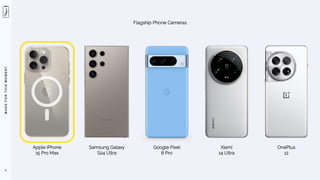
Apple iPhone
15 Pro Max
5
Flagship Phone Cameras
Samsung Galaxy
S24 Ultra
Google Pixel
8 Pro
Xiami
14 Ultra
OnePlus
12
M
A
D
E
F
O
R
T
H
I
S
M
O
M
E
N
T
6
While I exclusively use iPhone cameras,
much of what I say here will be equally applicable to Android devices.
It’s not the device, but the photographer.
M
A
D
E
F
O
R
T
H
I
S
M
O
M
E
N
T
MADE FOR THIS MOMENT
#shotoniphon
e
PHOTOGRAPHICALLY SPEAKING
M
A
D
E
F
O
R
T
H
I
S
M
O
M
E
N
T
PHOTO
8
Greek word ‘foto’ meaning light
LIGHT
SNAPPERS
Think of iPhone as a camera
Love to shoot
Greek word ‘grafía’ meaning drawing
DRAWING
TAPPERS
Think of iPhone as a canvas
Love to edit
M
A
D
E
F
O
R
T
H
I
S
M
O
M
E
N
T
9
The buttons and hardware on your iPhone may look different than what you see here,
depending on the model device you own & use.
M
A
D
E
F
O
R
T
H
I
S
M
O
M
E
N
T
10
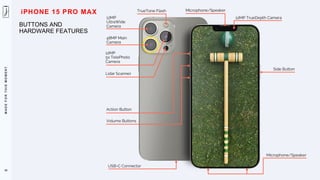
BUTTONS AND
HARDWARE FEATURES
12MP TrueDepth Camera
Microphone/Speaker
Side Button
TrueTone Flash
12MP
UltraWide
Camera
12MP
5x TelePhoto
Camera
USB-C Connector
Microphone/Speaker
Action Button
Volume Buttons
48MP Main
Camera
iPHONE 15 PRO MAX
Lidar Scanner
M
A
D
E
F
O
R
T
H
I
S
M
O
M
E
N
T
11
I cannot stress enough that my approach (bias) to iPhone photography
is unashamedly ‘photographic’ and I mostly use only 2 apps.
M
A
D
E
F
O
R
T
H
I
S
M
O
M
E
N
T
12
99%
M
A
D
E
F
O
R
T
H
I
S
M
O
M
E
N
T
MADE FOR THIS MOMENT
#shotoniphon
e
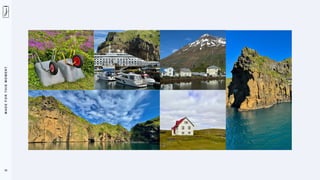
ICELAND
M
A
D
E
F
O
R
T
H
I
S
M
O
M
E
N
T
15
M
A
D
E
F
O
R
T
H
I
S
M
O
M
E
N
T
17
M
A
D
E
F
O
R
T
H
I
S
M
O
M
E
N
T
19
M
A
D
E
F
O
R
T
H
I
S
M
O
M
E
N
T
21
M
A
D
E
F
O
R
T
H
I
S
M
O
M
E
N
T
MADE FOR THIS MOMENT
#shotoniphon
e
SETTINGS
M
A
D
E
F
O
R
T
H
I
S
M
O
M
E
N
T
23
I am going to go through these settings quickly
and revisit the more critical ones in our next lesson together.
M
A
D
E
F
O
R
T
H
I
S
M
O
M
E
N
T
24
Settings > General > About > Name
Enjoy distraction-free creativity with
‘Do Not Disturb’ (DND) to silence calls,
alerts, and notifications.
M
A
D
E
F
O
R
T
H
I
S
M
O
M
E
N
T
25
Settings > General > About > Name
Give your iPhone a personal
and recognizable name.
M
A
D
E
F
O
R
T
H
I
S
M
O
M
E
N
T
26
Settings > General > Software Update > Automatic Updates > On
Keep your iPhone software automatically
updated (while in Wi-Fi).
M
A
D
E
F
O
R
T
H
I
S
M
O
M
E
N
T
27
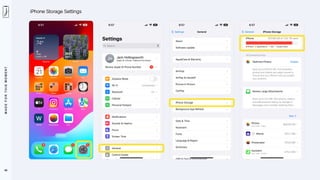
Settings > General > iPhone Storage
Constantly check how much
available iPhone storage you
have for photography and video.
M
A
D
E
F
O
R
T
H
I
S
M
O
M
E
N
T
28
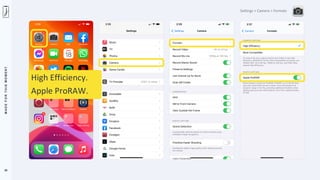
Settings > Camera > Formats
High Efficiency.
Apple ProRAW.
M
A
D
E
F
O
R
T
H
I
S
M
O
M
E
N
T
29
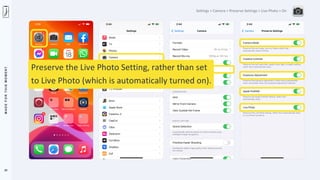
Settings > Camera > Preserve Settings > Live Photo > On
Preserve the Live Photo Setting, rather than set
to Live Photo (which is automatically turned on).
M
A
D
E
F
O
R
T
H
I
S
M
O
M
E
N
T
30
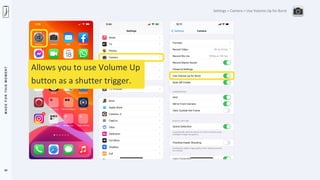
Settings > Camera > Use Volume Up for Burst
Allows you to use Volume Up
button as a shutter trigger.
M
A
D
E
F
O
R
T
H
I
S
M
O
M
E
N
T
31
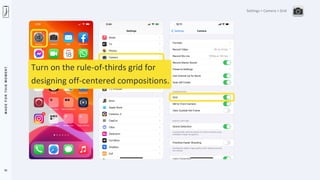
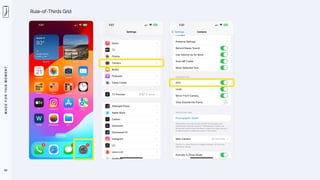
Settings > Camera > Grid
Turn on the rule-of-thirds grid for
designing off-centered compositions.
M
A
D
E
F
O
R
T
H
I
S
M
O
M
E
N
T
32
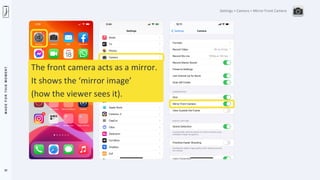
Settings > Camera > Mirror Front Camera
The front camera acts as a mirror.
It shows the ‘mirror image’
(how the viewer sees it).
M
A
D
E
F
O
R
T
H
I
S
M
O
M
E
N
T
33
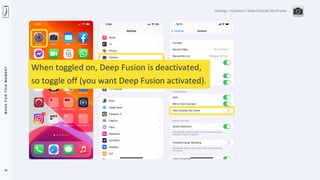
Settings > Camera > View Outside the Frame
When toggled on, Deep Fusion is deactivated,
so toggle off (you want Deep Fusion activated).
M
A
D
E
F
O
R
T
H
I
S
M
O
M
E
N
T
34
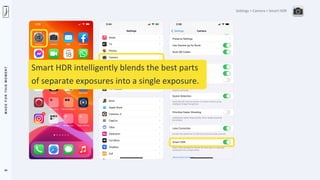
Settings > Camera > Smart HDR
Smart HDR intelligently blends the best parts
of separate exposures into a single exposure.
M
A
D
E
F
O
R
T
H
I
S
M
O
M
E
N
T
35
Settings > Photos > iCloud Photos
Automatically upload and safely
store all your photos and videos in
iCloud so you can browse, search,
and share from any of your devices.
M
A
D
E
F
O
R
T
H
I
S
M
O
M
E
N
T
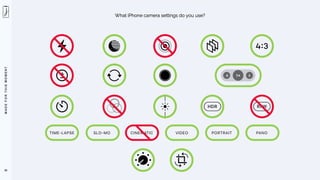
What iPhone camera settings do you use?
36
M
A
D
E
F
O
R
T
H
I
S
M
O
M
E
N
T
MADE FOR THIS MOMENT
#shotoniphon
e
ESSENTIALS FOR iPHONE PHOTOGRAPHY
M
A
D
E
F
O
R
T
H
I
S
M
O
M
E
N
T
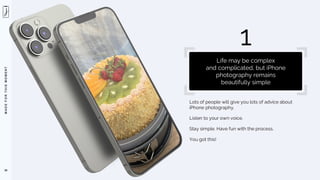
Lots of people will give you lots of advice about
iPhone photography.
Listen to your own voice.
Stay simple. Have fun with the process.
You got this!
38
1
Life may be complex
and complicated, but iPhone
photography remains
beautifully simple
M
A
D
E
F
O
R
T
H
I
S
M
O
M
E
N
T
39
Instinct. Impulse. Intuition.
M
A
D
E
F
O
R
T
H
I
S
M
O
M
E
N
T
40
Don’t get attached to your backstory.
M
A
D
E
F
O
R
T
H
I
S
M
O
M
E
N
T
41
What you EXCLUDE from a photograph
is often more important than what you INCLUDE.
M
A
D
E
F
O
R
T
H
I
S
M
O
M
E
N
T
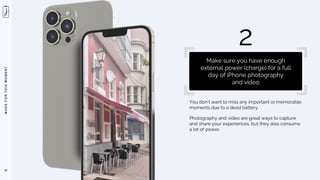
You don’t want to miss any important or memorable
moments due to a dead battery.
Photography and video are great ways to capture
and share your experiences, but they also consume
a lot of power.
42
2
Make sure you have enough
external power (charge) for a full
day of iPhone photography
and video
M
A
D
E
F
O
R
T
H
I
S
M
O
M
E
N
T
43
Battery Percentage
M
A
D
E
F
O
R
T
H
I
S
M
O
M
E
N
T
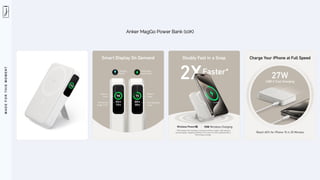
Anker MagGo Power Bank (10K)
M
A
D
E
F
O
R
T
H
I
S
M
O
M
E
N
T
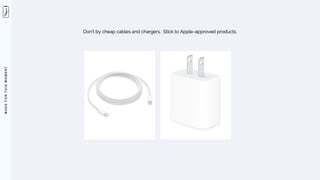
Don’t by cheap cables and chargers. Stick to Apple-approved products.
M
A
D
E
F
O
R
T
H
I
S
M
O
M
E
N
T
46
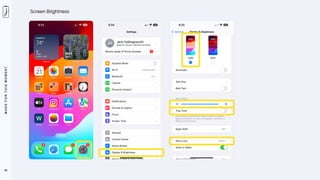
Screen Brightness
M
A
D
E
F
O
R
T
H
I
S
M
O
M
E
N
T
Your Camera Roll is not really a storage device.
If your iPhone storage is almost full, you may want
to transfer some of your photos and videos to a
simple thumb drive (when you get home).
A thumb drive is a small device that can store your
files and plug into your computer or other devices.
47
3
Make sure you have enough storage
space available on your iPhone for
what you plan on shooting
M
A
D
E
F
O
R
T
H
I
S
M
O
M
E
N
T
48
iPhone Storage Settings
M
A
D
E
F
O
R
T
H
I
S
M
O
M
E
N
T
49
To ensure your iPhone runs smoothly and can handle iOS updates,
I recommend the following amounts of FREE space:
NECESSITY: 5GB
IDEALLY: 10GB
M
A
D
E
F
O
R
T
H
I
S
M
O
M
E
N
T
50
The main disadvantage of using ”Optimize iPhone Storage” is that you need
an internet connection, preferably Wi-Fi, to download the original, full-
resolution photo from iCloud BEFORE you can edit or share them.
WARNING
M
A
D
E
F
O
R
T
H
I
S
M
O
M
E
N
T
51
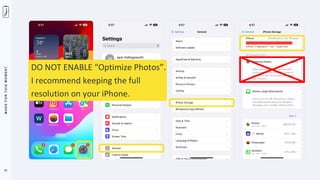
DO NOT ENABLE “Optimize Photos”.
I recommend keeping the full
resolution on your iPhone.
M
A
D
E
F
O
R
T
H
I
S
M
O
M
E
N
T
52
Megapixel vs Megabyte
Megapixel
Refers to the
resolution and detail
of the image
Megabyte
Refers to the
file size and storage space
the image occupies
M
A
D
E
F
O
R
T
H
I
S
M
O
M
E
N
T
Your Camera Roll is not really a storage device.
If your iPhone storage is almost full, you may want
to transfer some of your photos and videos to a
simple thumb drive (when you get home).
This small device that can store your files and plug
into your computer or other devices.
53
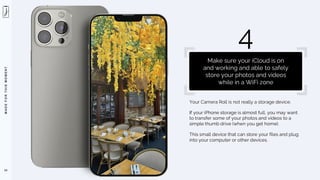
4
Make sure your iCloud is on
and working and able to safely
store your photos and videos
while in a WiFi zone
M
A
D
E
F
O
R
T
H
I
S
M
O
M
E
N
T
54
Apple iCloud, in my opinion, is less of a STORAGE service
and more of a SYNCING service
(between apple devices)
M
A
D
E
F
O
R
T
H
I
S
M
O
M
E
N
T
55
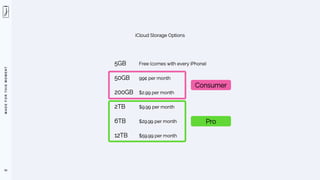
iCloud Storage Options
5GB Free (comes with every iPhone)
50GB 99¢ per month
200GB $2.99 per month
2TB $9.99 per month
6TB $29.99 per month
12TB $59.99 per month
Consumer
Pro
M
A
D
E
F
O
R
T
H
I
S
M
O
M
E
N
T
56
How to find your iCloud account:
1. Go to iCloud.com
2. Enter your Apple ID and password
M
A
D
E
F
O
R
T
H
I
S
M
O
M
E
N
T
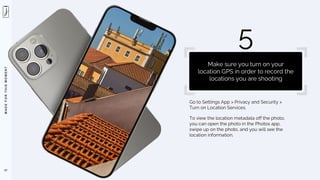
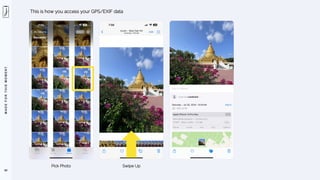
Go to Settings App > Privacy and Security >
Turn on Location Services.
To view the location metadata off the photo,
you can open the photo in the Photos app,
swipe up on the photo, and you will see the
location information.
57
5
Make sure you turn on your
location GPS in order to record the
locations you are shooting
M
A
D
E
F
O
R
T
H
I
S
M
O
M
E
N
T
58
Activate your GPS
M
A
D
E
F
O
R
T
H
I
S
M
O
M
E
N
T
59
A word about “Location Services” when travelling:
1. GPS Functionality
Turning off data roaming will not affect the GPS functionality of your iPhone. Your iPhone GPS can
still determine your location using satellite signals, even without a data connection.
2. Location Services
When Location Services is enabled for the Camera app, it uses information from GPS, Wi-Fi, and
Bluetooth to determine the location of your photos. This means that as long as Location Services is
turned on, your iPhone camera will still record the location metadata (EXIF) of your photos, even if
data roaming is turned off.
3. Offline Maps
While GPS will work without data roaming, map apps typically require a data connection to
download map data. To navigate without data, you can download offline maps before your trip.
M
A
D
E
F
O
R
T
H
I
S
M
O
M
E
N
T
60
This is how you access your GPS/EXIF data
Pick Photo Swipe Up
M
A
D
E
F
O
R
T
H
I
S
M
O
M
E
N
T
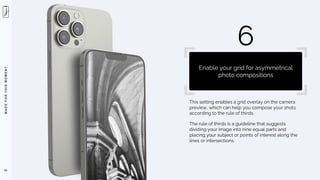
This setting enables a grid overlay on the camera
preview, which can help you compose your shots
according to the rule of thirds.
The rule of thirds is a guideline that suggests
dividing your image into nine equal parts and

placing your subject or points of interest along the
lines or intersections.
61
6
Enable your grid for asymmetrical
photo compositions
M
A
D
E
F
O
R
T
H
I
S
M
O
M
E
N
T
62
Rule-of-Thirds Grid
M
A
D
E
F
O
R
T
H
I
S
M
O
M
E
N
T
63
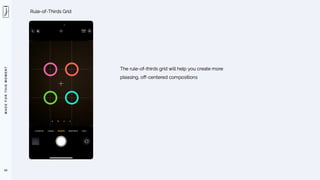
Rule-of-Thirds Grid
The rule-of-thirds grid will help you create more
pleasing, off-centered compositions
M
A
D
E
F
O
R
T
H
I
S
M
O
M
E
N
T
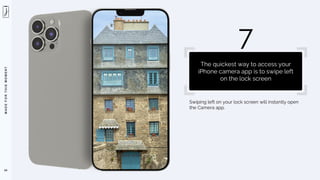
Swiping left on your lock screen will instantly open
the Camera app.
64
7
The quickest way to access your
iPhone camera app is to swipe left


on the lock screen
M
A
D
E
F
O
R
T
H
I
S
M
O
M
E
N
T
65
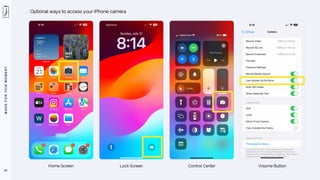
Optional ways to access your iPhone camera
Home Screen Lock Screen Control Center Volume Button
M
A
D
E
F
O
R
T
H
I
S
M
O
M
E
N
T
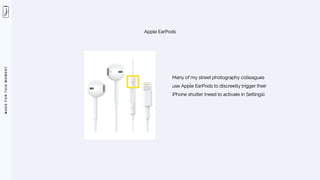
Apple EarPods
Many of my street photography colleagues
use Apple EarPods to discreetly trigger their
iPhone shutter (need to activate in Settings).
M
A
D
E
F
O
R
T
H
I
S
M
O
M
E
N
T
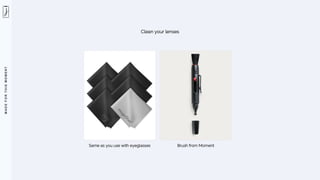
Gently wipe the iPhone’s camera lenses with a soft,
lint-free cloth, such as a microfiber cloth, to remove
fingerprints and dust before taking photos.
67
8
Clean your tiny lenses often
M
A
D
E
F
O
R
T
H
I
S
M
O
M
E
N
T
Clean your lenses
Same as you use with eyeglasses Brush from Moment
M
A
D
E
F
O
R
T
H
I
S
M
O
M
E
N
T
Take multiple shots of your subject from various
angles and distances.
It’s important to have a selection to choose
the best image from.
Experiment with different compositions and
perspectives.
69
9
Even of the same subject, scene
or scenario, shoot more than you
think you want or need
M
A
D
E
F
O
R
T
H
I
S
M
O
M
E
N
T
70
Postcard shot first.
Experiments, second.
M
A
D
E
F
O
R
T
H
I
S
M
O
M
E
N
T
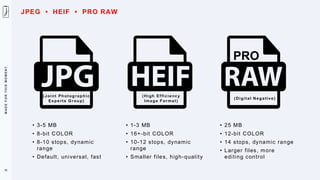
JPEG and HEIF are both raster file types that
can store detailed photographs, but they have
some differences in compression, size, quality,
and compatibility.
JPEG is more widely supported and compatible
than HEIF, which is a newer format that may not
work with some older devices or software.
71
10
Most Compatible (JPEG/H.264)
and High Efficiency (HEIF/H.265)
is a toss up, depending on your
personal workflow
M
A
D
E
F
O
R
T
H
I
S
M
O
M
E
N
T
(Joint Photographic
Experts Group)
• 3-5 MB
• 8-bit COLOR
• 8-10 stops, dynamic
range
• Default, universal, fast
(High Efficiency
Image Format)
• 1-3 MB
• 16+-bit COLOR
• 10-12 stops, dynamic
range
• Smaller files, high-quality
72
(Digital Negative)
• 25 MB
• 12-bit COLOR
• 14 stops, dynamic range
• Larger files, more
editing control
PRO
JPEG • HEIF • PRO RAW
M
A
D
E
F
O
R
T
H
I
S
M
O
M
E
N
T
(Joint Photographic
Experts Group)
• 3-5 MB
• 8-bit COLOR
• 8-10 stops, dynamic
range
• Default, universal, fast
(High Efficiency
Image Format)
• 1-3 MB
• 16+-bit COLOR
• 10-12 stops, dynamic
range
• Smaller files, high-quality
73
(Digital Negative)
• 25 MB
• 12-bit COLOR
• 14 stops, dynamic range
• Larger files, more
editing control
PRO
Best choice if you mostly
share your work online
JPEG • HEIF • PRO RAW
M
A
D
E
F
O
R
T
H
I
S
M
O
M
E
N
T
(Joint Photographic
Experts Group)
• 3-5 MB
• 8-bit COLOR
• 8-10 stops, dynamic
range
• Default, universal, fast
(High Efficiency
Image Format)
• 1-3 MB
• 16+-bit COLOR
• 10-12 stops, dynamic
range
• Smaller files, high-quality
74
(Digital Negative)
• 25 MB
• 12-bit COLOR
• 14 stops, dynamic range
• Larger files, more
editing control
PRO
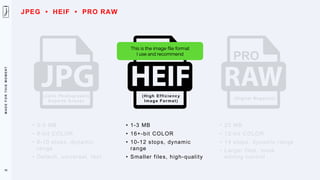
This is the image file format
I use and recommend
JPEG • HEIF • PRO RAW
M
A
D
E
F
O
R
T
H
I
S
M
O
M
E
N
T
(Joint Photographic
Experts Group)
• 3-5 MB
• 8-bit COLOR
• 8-10 stops, dynamic
range
• Default, universal, fast
(High Efficiency
Image Format)
• 1-3 MB
• 16+-bit COLOR
• 10-12 stops, dynamic
range
• Smaller files, high-quality
75
(Digital Negative)
• 25 MB
• 12-bit COLOR
• 14 stops, dynamic range
• Larger files, more
editing control
PRO
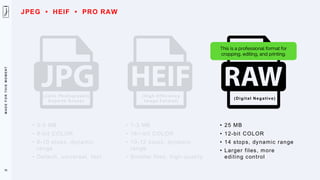
This is a professional format for
cropping, editing, and printing.
JPEG • HEIF • PRO RAW
M
A
D
E
F
O
R
T
H
I
S
M
O
M
E
N
T
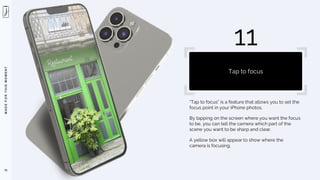
“Tap to focus” is a feature that allows you to set the
focus point in your iPhone photos.
By tapping on the screen where you want the focus

to be, you can tell the camera which part of the
scene you want to be sharp and clear.
A yellow box will appear to show where the
camera is focusing.
76
11
Tap to focus
M
A
D
E
F
O
R
T
H
I
S
M
O
M
E
N
T
77
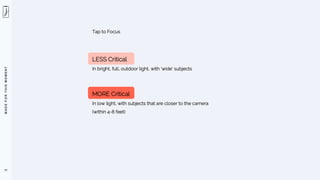
Tap to Focus
LESS Critical
In bright, full, outdoor light, with ‘wide’ subjects
MORE Critical
In low light, with subjects that are closer to the camera
(within 4-8 feet)
M
A
D
E
F
O
R
T
H
I
S
M
O
M
E
N
T
78
I find the Tap-to-Focus feature, on the iPhone, an indispensable and creative tool that
allows you (the photographer) to emphasize specific parts of your composition.
M
A
D
E
F
O
R
T
H
I
S
M
O
M
E
N
T
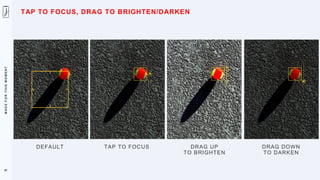
To use the Brightness slider, you need to open the
Camera app and tap on the screen where you want
to set the focus point.
A yellow box will appear to show where the camera
is focusing. Next to the focus area, you will see a
sun icon with a vertical line.
This is the Brightness slider. You can drag it up or
down to make the photo brighter or darker. You will
see a preview of the exposure change on the
screen.
79
12
Drag to exposure
M
A
D
E
F
O
R
T
H
I
S
M
O
M
E
N
T
80
M
A
D
E
F
O
R
T
H
I
S
M
O
M
E
N
T
81
M
A
D
E
F
O
R
T
H
I
S
M
O
M
E
N
T
82
M
A
D
E
F
O
R
T
H
I
S
M
O
M
E
N
T
83
M
A
D
E
F
O
R
T
H
I
S
M
O
M
E
N
T
84
M
A
D
E
F
O
R
T
H
I
S
M
O
M
E
N
T
85
The Auto Exposure feature on the iPhone is the best of all phone cameras.
Point. Shoot. Voila.
Like magic!
M
A
D
E
F
O
R
T
H
I
S
M
O
M
E
N
T
86
If you want more control over focus or exposure on your iPhone,
try Tap-to-Focus
M
A
D
E
F
O
R
T
H
I
S
M
O
M
E
N
T
DEFAULT TAP TO FOCUS DRAG UP
TO BRIGHTEN
DRAG DOWN
TO DARKEN
87
TAP TO FOCUS, DRAG TO BRIGHTEN/DARKEN
M
A
D
E
F
O
R
T
H
I
S
M
O
M
E
N
T
F I L M I C
F I R S T L I G H
T
L I G H T R O O M P H O T O
& V I D E O E D I T O R
P R O C A M E R A
B Y M O M E N T
C A M E R A +
H A L I D E
M A R K I I
O B S C U R A -
P R O C A M E R A
88
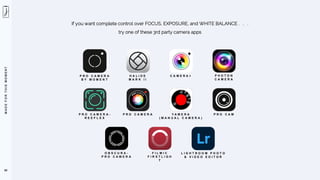
If you want complete control over FOCUS, EXPOSURE, and WHITE BALANCE . . .
try one of these 3rd party camera apps
P H O T O N
C A M E R A
P R O C A M E R A -
R E E F L E X
P R O C A M E R A Y A M E R A
( M A N U A L C A M E R A )
P R O C A M
M
A
D
E
F
O
R
T
H
I
S
M
O
M
E
N
T
Move closer or further away from your subject to
change the composition instead of using the digital
zoom feature, which results in lower image quality.
89
13
Zoom with your feet,
not your fingers
M
A
D
E
F
O
R
T
H
I
S
M
O
M
E
N
T
90
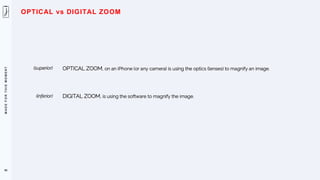
OPTICAL ZOOM, on an iPhone (or any camera) is using the optics (lenses) to magnify an image.
OPTICAL vs DIGITAL ZOOM
DIGITAL ZOOM, is using the software to magnify the image.
(superior)
(inferior)
M
A
D
E
F
O
R
T
H
I
S
M
O
M
E
N
T
91
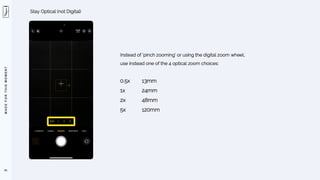
Stay Optical (not Digital)
Instead of ‘pinch zooming’ or using the digital zoom wheel,
use instead one of the 4 optical zoom choices:
0.5x 13mm
1x 24mm
2x 48mm
5x 120mm
M
A
D
E
F
O
R
T
H
I
S
M
O
M
E
N
T
92
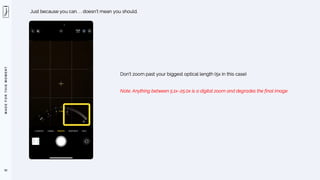
Just because you can. . . doesn’t mean you should.
Don’t zoom past your biggest optical length (5x in this case)
Note: Anything between 5.1x–25.0x is a digital zoom and degrades the final image
M
A
D
E
F
O
R
T
H
I
S
M
O
M
E
N
T
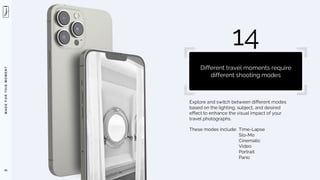
Explore and switch between different modes
based on the lighting, subject, and desired
effect to enhance the visual impact of your
travel photographs.
These modes include: Time-Lapse
Slo-Mo
Cinematic
Video
Portrait
Pano
93
14
Different travel moments require
different shooting modes
M
A
D
E
F
O
R
T
H
I
S
M
O
M
E
N
T
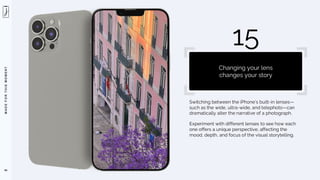
Switching between the iPhone’s built-in lenses—
such as the wide, ultra-wide, and telephoto—can
dramatically alter the narrative of a photograph.
Experiment with different lenses to see how each
one offers a unique perspective, affecting the
mood, depth, and focus of the visual storytelling.
94
15
Changing your lens
changes your story
M
A
D
E
F
O
R
T
H
I
S
M
O
M
E
N
T
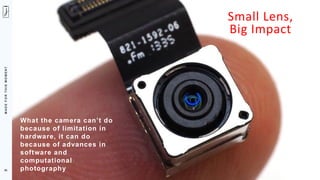
Small Lens,
Big Impact
What the camera can’t do
because of limitation in
hardware, it can do
because of advances in
software and
computational
photography
95
M
A
D
E
F
O
R
T
H
I
S
M
O
M
E
N
T
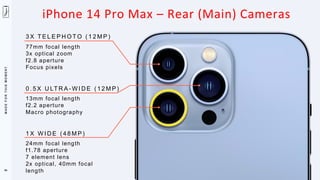
3 X T E L E P H O T O ( 1 2 M P )
77mm focal length
3x optical zoom
f2.8 aperture
Focus pixels
0 . 5 X U LT R A - W I D E ( 1 2 M P )
13mm focal length
f2.2 aperture
Macro photography
1 X W I D E ( 4 8 M P )
24mm focal length
f1.78 aperture
7 element lens
2x optical, 40mm focal
length
iPhone 14 Pro Max – Rear (Main) Cameras
96
M
A
D
E
F
O
R
T
H
I
S
M
O
M
E
N
T
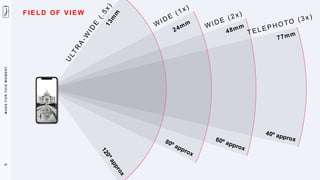
F IE LD OF VI EW
97
M
A
D
E
F
O
R
T
H
I
S
M
O
M
E
N
T
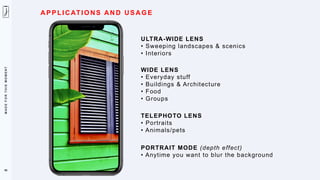
A PP LI CATI O NS AN D US AG E
ULTRA-WIDE LENS
• Sweeping landscapes & scenics
• Interiors
WIDE LENS
• Everyday stuff
• Buildings & Architecture
• Food
• Groups
TELEPHOTO LENS
• Portraits
• Animals/pets
PORTRAIT MODE (depth effect)
• Anytime you want to blur the background
98
M
A
D
E
F
O
R
T
H
I
S
M
O
M
E
N
T
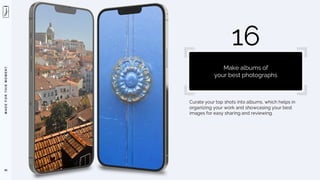
Curate your top shots into albums, which helps in
organizing your work and showcasing your best
images for easy sharing and reviewing.
99
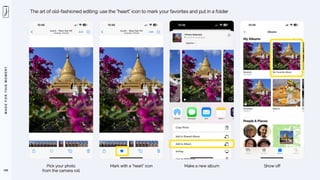
16
Make albums of
your best photographs
M
A
D
E
F
O
R
T
H
I
S
M
O
M
E
N
T
100
The art of old-fashioned editing: use the “heart” icon to mark your favorites and put in a folder
Pick your photo
from the camera roll
Mark with a ”heart” icon Make a new album Show off
M
A
D
E
F
O
R
T
H
I
S
M
O
M
E
N
T
This can help stabilize the shot when holding the
iPhone with both hands, reducing shake.
101
17
Use the volume button
as the shutter
M
A
D
E
F
O
R
T
H
I
S
M
O
M
E
N
T
Try using the “auto” magic wand adjustment slider
for instant edits.
102
18
Edit for impact
M
A
D
E
F
O
R
T
H
I
S
M
O
M
E
N
T
103
Many people don’t edit their iPhone photos at all.
As a matter of fact, there are even popular hashtags that discourage editing.
#noediting
#nofilter
#SOOC (straight out of camera)
M
A
D
E
F
O
R
T
H
I
S
M
O
M
E
N
T
104
My personal philosophy on this, as a career photographer,
is that almost all digital files (even iPhone files)
need a little bit of editing help to make them
snap, crackle, and pop!
M
A
D
E
F
O
R
T
H
I
S
M
O
M
E
N
T
105
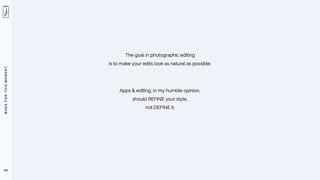
The goal in photographic editing
is to make your edits look as natural as possible.
Apps & editing, in my humble opinion,
should REFINE your style,
not DEFINE it.
M
A
D
E
F
O
R
T
H
I
S
M
O
M
E
N
T
106
Edit your photos in seconds using the ”Magic Wand” feature
M
A
D
E
F
O
R
T
H
I
S
M
O
M
E
N
T
107
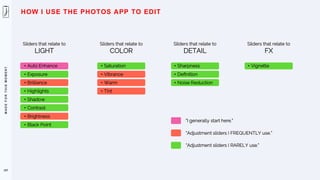
HOW I USE THE PHOTOS APP TO EDIT
Sliders that relate to
LIGHT
• Auto Enhance
• Exposure
• Brilliance
• Highlights
• Shadow
• Contrast
• Brightness
• Black Point
Sliders that relate to
COLOR
• Saturation
• Vibrance
• Warm
• Tint
Sliders that relate to
DETAIL
• Sharpness
• Definition
• Noise Reduction
Sliders that relate to
FX
• Vignette
“I generally start here.”
“Adjustment sliders I FREQUENTLY use.”
“Adjustment sliders I RARELY use.”
M
A
D
E
F
O
R
T
H
I
S
M
O
M
E
N
T
Think about the story you want to tell with your
photo, whether it’s the vastness of the landscape
or the detail of a single flower.
108
19
Storytelling
M
A
D
E
F
O
R
T
H
I
S
M
O
M
E
N
T
109
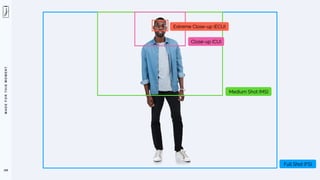
Extreme Close-up (ECU)
Close-up (CU)
Medium Shot (MS)
Full Shot (FS)
M
A
D
E
F
O
R
T
H
I
S
M
O
M
E
N
T
Every time you head out with your camera, expect
some magic to happen.
Make it a goal to get 3-5 “hero” shots per day.
110
20
Manage your
photographic expectations
M
A
D
E
F
O
R
T
H
I
S
M
O
M
E
N
T
No matter how great your subject is, you still need
great light to make your photos stand out.
111
21
Shoot in beautiful light
M
A
D
E
F
O
R
T
H
I
S
M
O
M
E
N
T
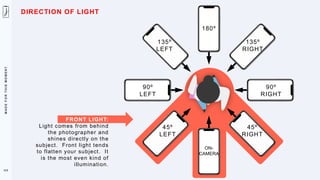
FRONT LIGHT:
Light comes from behind
the photographer and
shines directly on the
subject. Front light tends
to flatten your subject. It
is the most even kind of
illumination.
90º
LEFT
90º
RIGHT
135º
RIGHT
135º
LEFT
45º
RIGHT
45º
LEFT
180º
ON-
CAMERA
112
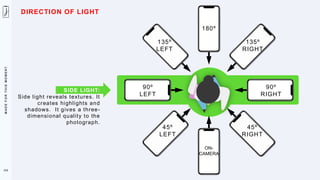
DIRECTION OF LIGHT
M
A
D
E
F
O
R
T
H
I
S
M
O
M
E
N
T
SIDE LIGHT:
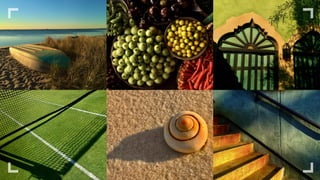
Side light reveals textures. It
creates highlights and
shadows. It gives a three-
dimensional quality to the
photograph.
90º
LEFT
90º
RIGHT
135º
RIGHT
135º
LEFT
45º
RIGHT
45º
LEFT
180º
ON-
CAMERA
115
DIRECTION OF LIGHT
M
A
D
E
F
O
R
T
H
I
S
M
O
M
E
N
T
90º
LEFT
90º
RIGHT
135º
RIGHT
135º
LEFT
45º
RIGHT
45º
LEFT
180º
ON-
CAMERA
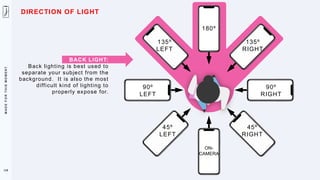
BACK LIGHT:
Back lighting is best used to
separate your subject from the
background. It is also the most
difficult kind of lighting to
properly expose for.
118
DIRECTION OF LIGHT
M
A
D
E
F
O
R
T
H
I
S
M
O
M
E
N
T
Light makes photography. Embrace light. Admire it. Love it. But above all, know light.
Know it for all you are worth, and you will know the key to photography.
George Eastman
121
M
A
D
E
F
O
R
T
H
I
S
M
O
M
E
N
T
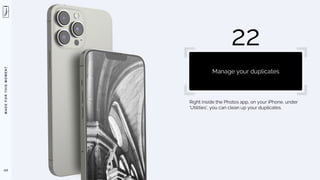
Right inside the Photos app, on your iPhone, under
‘Utilities’, you can clean up your duplicates.
122
22
Manage your duplicates
M
A
D
E
F
O
R
T
H
I
S
M
O
M
E
N
T
123
Managing Duplicates
M
A
D
E
F
O
R
T
H
I
S
M
O
M
E
N
T
124
CleanMy®Phone
Delete Duplicate Photos Space
Great app for decluttering your camera roll
M
A
D
E
F
O
R
T
H
I
S
M
O
M
E
N
T
125
I AM
here for you
M
A
D
E
F
O
R
T
H
I
S
M
O
M
E
N
T
MADE FOR THIS MOMENT
#shotoniphon
e
STAY IN TOUCH
M
A
D
E
F
O
R
T
H
I
S
M
O
M
E
N
T
EMAIL
jack@jackhollingsworth.com
127
M
A
D
E
F
O
R
T
H
I
S
M
O
M
E
N
T
BLOG – iphonejack.pro/journal
M
A
D
E
F
O
R
T
H
I
S
M
O
M
E
N
T
ONLINE COURSE: INTENTIONAL PHOTOGRAPHY – iphonejack.thinkific.com
M
A
D
E
F
O
R
T
H
I
S
M
O
M
E
N
T
130
iPHONE PHOTOGRAPHY WORKSHOP
Cape Cod. Nantucket. Martha’s Vineyard. Annual.
(Summer/Fall)
M
A
D
E
F
O
R
T
H
I
S
M
O
M
E
N
T
131
TWITTER (X) – twitter.com/photojack
I am super active on Twitter and talk a lot about iPhone photography.
M
A
D
E
F
O
R
T
H
I
S
M
O
M
E
N
T
132
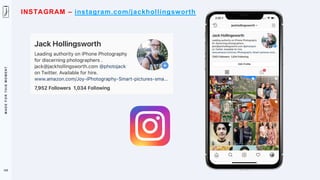
INSTAGRAM – instagram.com/jackhollingsworth
M
A
D
E
F
O
R
T
H
I
S
M
O
M
E
N
T
133
BOOKS TO PURCHASE ON AMAZON
Popular Technical
M
A
D
E
F
O
R
T
H
I
S
M
O
M
E
N
T
We are living in the golden age of consumer photography.
The opportunities for mobile photography, filmmaking and storytelling. . . abound.
Seize the day. We are made for this moment. Tell your story.
134
M
A
D
E
F
O
R
T
H
I
S
M
O
M
E
N
T
MADE FOR THIS MOMENT
#shotoniphon
e
THANK YOU FOR YOUR TIME TODAY

20 Essentials for Improving Your iPhone Photography