














How To Do More With 
iPhone Photography 
Sarabeth Jones
Let’s start with BEFORE you shoot. Here 
are some things to keep in mind! Take 
LOTS. Never snap just one, check what you 
have before you leave scene, give yourself 
choices in editing later.
ANGLES. Get low, higher. Overhead. Bend 
down to street level. Come at it from 
another side.
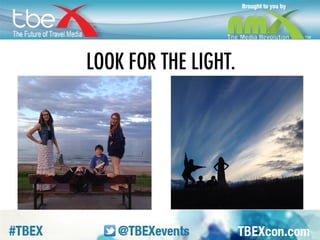
LIGHT. Look for where it’s coming from. 
This is the same photo, with light behind & 
light on faces.
COLOR. It’s important. Can be a pop. Don’t 
let it overwhelm.
B&W. Some pics are way stronger in B & W. 
Use contrast strongly if you go that way. 
Buildings, lines, or when color is 
distracting.
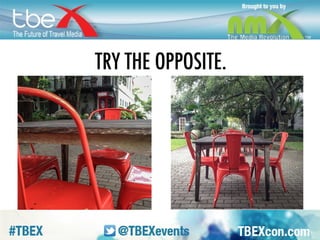
OPPOSITE. This is the cheat rule. If you 
can’t remember all this other stuff, then 
remember to take a bunch and try the 
opposite of what you just did. Close/far. 
Light front/back. Straight on/side/overhead.
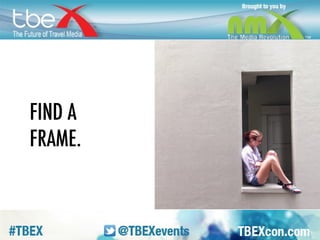
FRAME. Look for natural frames, help 
anchor photos or emphasize subject.
LINES. Leading lines make you want to go 
into the picture. Give a photo great interest.
THIRDS. Imagine a grid laid over your 
image. Like a tic tac toe board, dividing it 
into thirds horizontally & vertically. Instead 
of centering things dead on, try to place 
objects of interest along those lines. Or at 
the intersections of lines.
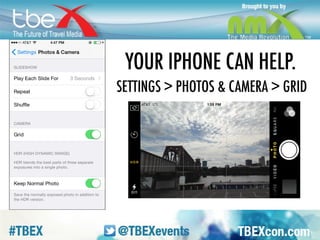
GRID. If you need help visualizing the rule 
of thirds, turn the grid on your phone on.
Now let’s talk about things to NOT DO. 
Bless your heart is our way of saying 
“Don’t be an idiot” in the South. FLASH. 
Don’t use it, you don’t need it. It flattens 
and washes everything out. DIGITAL 
ZOOM. Don’t zoom when you shoot, zoom 
later when you’re editing. BROWN FOOD. It 
might be tasty, but it looks like poop on 
screen.
WHILE YOU SHOOT: some great tools. 
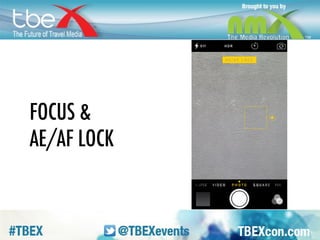
AE/AF LOCK. Click for focus, but hold to 
lock it.
EX OF AE/AF LOCK. Helps on a pic like 
this.
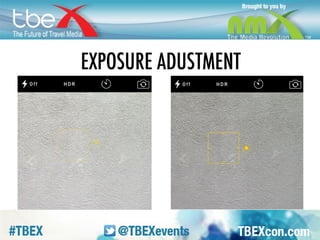
EXP ADJ. Roll that little sun up to lighten, 
down to darken.
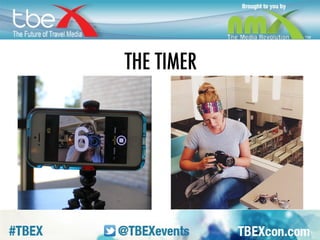
TIMER. Set your timer for 3 or 10 seconds. 
Works on regular or front-facing camera. 
Great for selfies or when your camera 
needs to be still (no shake).
HEADPHONES. You can fire your camera 
with the up volume button on your 
headphones.
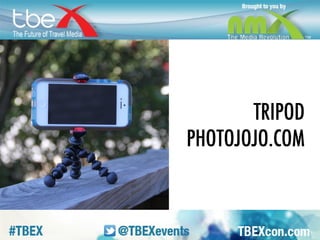
TRIPOD. Great for use with timer or 
headphones – keeps things still, allows you 
to be in shot. Can get a great, fairly 
inexpensive one from photojojo.com. Not 
sponsored, just love the site.
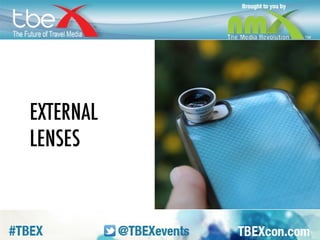
LENSES. You can get external lenses – 
again, I love these photojojo ones – 
affordable, and you can attach to your 
phone while the case is on. Not true for 
Olio.
MACRO. Beautiful photos but not super 
practical. Have to get verrrry close.
WIDE. Think this would be super helpful for 
buildings, areas where you want to fit a 
little more in the frame. This is regular vs. 
wide-angle.
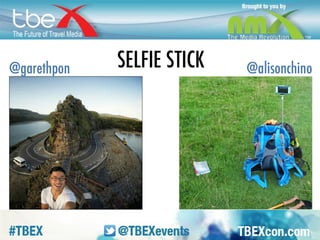
SELFIE STICK. Great to put yourself in the 
surroundings, can really get a lot of the 
location. Gives you a great angle. Also 
really good if you’re trying to to take a big 
groupie. More people fit. Or how about 
using it as a makeshift tripod while you 
vlog?
AFTER YOU SHOOT: favorite apps. 
SNAPSEED. It’s my go-to. Great for 
enhancing but still having a natural look. I 
use the tune image – always up your 
contrast and saturation – and details. 
Structure provides crispness to pic. DSLR-ish.
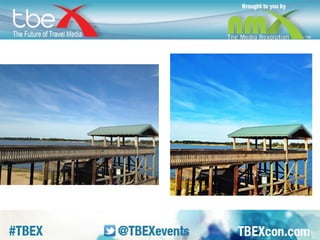
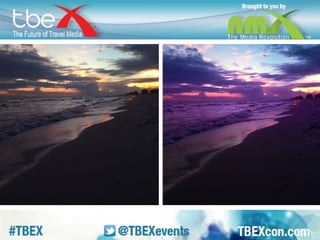
EX of SNAPSEED. Shot/edited shot
VSCOCAM. Great camera (instead of 
default iPhone camera) and beautiful filters. 
Also has toolkit for contrast, sat, details, 
etc.
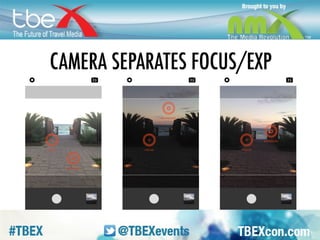
CAM. You can separate the focus point 
from the exposure point in the VSCO 
camera, move it around on the screen until 
you have the light just right. Also? Whole 
bottom bar of screen is button.
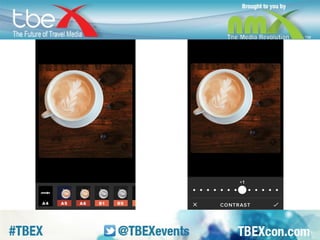
EX of VSCO. Previews and sliders, little diff 
from Snapseed.
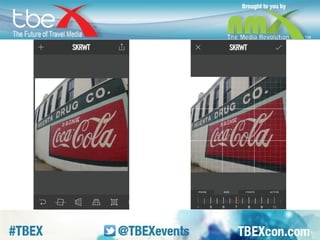
SKRWT. Corrects perspective. This thing is 
amazing.
EX of SKRWT. When you take a pic of a 
building, door, window, etc, and one corner 
is out of perspective, this can fix it. This is 
what the editing screen looks like, there all 
all these different ways you can stretch and 
bend the picture…
TYPIC PRO. For all your text-on-photo 
needs. Also has great design elements in it. 
If you need a badge for your blog, you 
could make it in here.
EXIF-FI. Starting to get a little nerdy, but 
this can be handy if location tagging is 
important to you. When you’re traveling 
and you have data turned off to your phone, 
and you take a picture, it doesn’t record the 
location where you took it. So, if you want 
you pic to come up when people are 
looking by location, you need to add it. This 
app lets you do that.
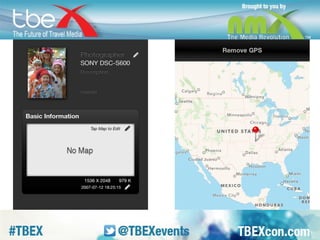
EX of EXIF-FI. You just open your picture, 
and drop a pin where you were when you 
took it. Then, when you post your picture to 
instagram etc., it will come up with the 
correct choices for that location.
MEXTURES. For heavier editing, ones that 
obviously are edited. Fantastical rather 
than realistic. Not just filters, but textures, 
blending modes, and a toolkit with editing 
tools and film looks. You can go on and on.
EX of MEXTURES. Also, these apps have 
hashtags & communities – esp Mextures, 
Snapseed, VSCO. Can see what folks are 
doing out there!
Questions? 
Sarabeth Jones 
@sarabethjones
How to do more with iPhone Photography - TBEX 2014

How to do more with iPhone Photography - TBEX 2014

  • 1.
    How To DoMore With iPhone Photography Sarabeth Jones
  • 2.
    Let’s start withBEFORE you shoot. Here are some things to keep in mind! Take LOTS. Never snap just one, check what you have before you leave scene, give yourself choices in editing later.
  • 3.
    ANGLES. Get low,higher. Overhead. Bend down to street level. Come at it from another side.
  • 4.
    LIGHT. Look forwhere it’s coming from. This is the same photo, with light behind & light on faces.
  • 5.
    COLOR. It’s important.Can be a pop. Don’t let it overwhelm.
  • 6.
    B&W. Some picsare way stronger in B & W. Use contrast strongly if you go that way. Buildings, lines, or when color is distracting.
  • 7.
    OPPOSITE. This isthe cheat rule. If you can’t remember all this other stuff, then remember to take a bunch and try the opposite of what you just did. Close/far. Light front/back. Straight on/side/overhead.
  • 8.
    FRAME. Look fornatural frames, help anchor photos or emphasize subject.
  • 9.
    LINES. Leading linesmake you want to go into the picture. Give a photo great interest.
  • 10.
    THIRDS. Imagine agrid laid over your image. Like a tic tac toe board, dividing it into thirds horizontally & vertically. Instead of centering things dead on, try to place objects of interest along those lines. Or at the intersections of lines.
  • 11.
    GRID. If youneed help visualizing the rule of thirds, turn the grid on your phone on.
  • 12.
    Now let’s talkabout things to NOT DO. Bless your heart is our way of saying “Don’t be an idiot” in the South. FLASH. Don’t use it, you don’t need it. It flattens and washes everything out. DIGITAL ZOOM. Don’t zoom when you shoot, zoom later when you’re editing. BROWN FOOD. It might be tasty, but it looks like poop on screen.
  • 13.
    WHILE YOU SHOOT:some great tools. AE/AF LOCK. Click for focus, but hold to lock it.
  • 14.
    EX OF AE/AFLOCK. Helps on a pic like this.
  • 15.
    EXP ADJ. Rollthat little sun up to lighten, down to darken.
  • 16.
    TIMER. Set yourtimer for 3 or 10 seconds. Works on regular or front-facing camera. Great for selfies or when your camera needs to be still (no shake).
  • 17.
    HEADPHONES. You canfire your camera with the up volume button on your headphones.
  • 18.
    TRIPOD. Great foruse with timer or headphones – keeps things still, allows you to be in shot. Can get a great, fairly inexpensive one from photojojo.com. Not sponsored, just love the site.
  • 19.
    LENSES. You canget external lenses – again, I love these photojojo ones – affordable, and you can attach to your phone while the case is on. Not true for Olio.
  • 20.
    MACRO. Beautiful photosbut not super practical. Have to get verrrry close.
  • 21.
    WIDE. Think thiswould be super helpful for buildings, areas where you want to fit a little more in the frame. This is regular vs. wide-angle.
  • 22.
    SELFIE STICK. Greatto put yourself in the surroundings, can really get a lot of the location. Gives you a great angle. Also really good if you’re trying to to take a big groupie. More people fit. Or how about using it as a makeshift tripod while you vlog?
  • 23.
    AFTER YOU SHOOT:favorite apps. SNAPSEED. It’s my go-to. Great for enhancing but still having a natural look. I use the tune image – always up your contrast and saturation – and details. Structure provides crispness to pic. DSLR-ish.
  • 24.
    EX of SNAPSEED.Shot/edited shot
  • 25.
    VSCOCAM. Great camera(instead of default iPhone camera) and beautiful filters. Also has toolkit for contrast, sat, details, etc.
  • 26.
    CAM. You canseparate the focus point from the exposure point in the VSCO camera, move it around on the screen until you have the light just right. Also? Whole bottom bar of screen is button.
  • 27.
    EX of VSCO.Previews and sliders, little diff from Snapseed.
  • 28.
    SKRWT. Corrects perspective.This thing is amazing.
  • 29.
    EX of SKRWT.When you take a pic of a building, door, window, etc, and one corner is out of perspective, this can fix it. This is what the editing screen looks like, there all all these different ways you can stretch and bend the picture…
  • 30.
    TYPIC PRO. Forall your text-on-photo needs. Also has great design elements in it. If you need a badge for your blog, you could make it in here.
  • 31.
    EXIF-FI. Starting toget a little nerdy, but this can be handy if location tagging is important to you. When you’re traveling and you have data turned off to your phone, and you take a picture, it doesn’t record the location where you took it. So, if you want you pic to come up when people are looking by location, you need to add it. This app lets you do that.
  • 32.
    EX of EXIF-FI.You just open your picture, and drop a pin where you were when you took it. Then, when you post your picture to instagram etc., it will come up with the correct choices for that location.
  • 33.
    MEXTURES. For heavierediting, ones that obviously are edited. Fantastical rather than realistic. Not just filters, but textures, blending modes, and a toolkit with editing tools and film looks. You can go on and on.
  • 34.
    EX of MEXTURES.Also, these apps have hashtags & communities – esp Mextures, Snapseed, VSCO. Can see what folks are doing out there!
  • 35.