DBA Repository - A Repository of Oracle EBS & Database Administration
1
Shell Scripts for your
Oracle Database &
Oracle E-Business Suite
Akhash Ramnath
Doyensys Pvt Ltd
DBA Repository
A Repository of Oracle EBS & Database Administration
DBA Repository - A Repository of Oracle EBS & Database Administration
2
Overview
Shell scripts converts a DBA’s manual effort into a proactive
automated operation. Shell Scripts are very important for an
Oracle EBS & Database environment. In this document i have
Incorporated some important shell scripts to perform an
efficient reactive monitoring to your Oracle EBS and Database
Systems.
 These scripts work in a unique way with a common env file that has
all the necessary information for the scripts to work. This helps us to
manage operation of Shell Scripts from a centralized env file.
 These Shell Scripts sends alerts to the respective team only when
there is an issue and maintains a log for reference.
 Having a centralized env file for Shell Scripts will help us reduce the
effort in making any modifications in the future without disturbing all
scripts.
 The following scripts will be shared as part of this document,
Database Scripts EBS Scripts
Database Instance Availability Application Services Availability
Database Listener Availability Concurrent Manager Availability
Tablespace Alert Long Running Concurrent Requests
Check for errors in Database Alert log Workflow Notification Status
Blocking Session Alert Kill Forms Runaway Processes
Database Full Backup Important Concurrent Requests Status
Database Incremental Backup Cost Manager Status
Archivelog Backup Application Backup
Purge Archivelog Pending standby count Monitor
DB All Monitor Script All Apps/EBS Monitor Script
DBA Repository - A Repository of Oracle EBS & Database Administration
3
In order to easily maintain and manage the Shell Scripts performing the following will help us a lot in
many aspects,
A. Create & Maintain a common env file for the shell script and include all important variables required
for the scripts in the common env file
B. Decrypt the passwords called/used in the Shell Scripts and maintain it in a hidden file
C. Maintain a log of every important tasks for reference,forecasting, etc.
Pre req,
 In your DB/Application server first create a directory MONITOR.
 Under MONITOR Directory create sub directories ENV, SCRIPTS, LOG
 The ENV directory is to store the envfile, hidden file.
 SCRIPTS directory is to store the actula shell scripts.
 LOG directory will have all the logfiles of the scripts.
 Inside LOG, create another directory MAIL_MESSAGE.
 The directory MAIL_MESSAGE will store the mail content that will be mailed to the user.
For the sake of this document lets assume our locations as follows,
Scripts Location for DB Server - home/oracle/MONITOR
Scripts Location for EBS Server - home/applmgr/MONITOR
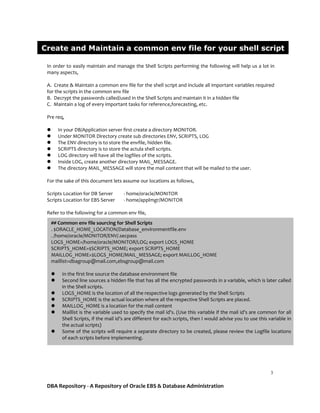
Refer to the following for a common env file,
Create and Maintain a common env file for your shell script
## Common env file sourcing for Shell Scripts
. $ORACLE_HOME_LOCATION/Database_environmentfile.env
. /home/oracle/MONITOR/ENV/.secpass
LOGS_HOME=/home/oracle/MONITOR/LOG; export LOGS_HOME
SCRIPTS_HOME=$SCRIPTS_HOME; export SCRIPTS_HOME
MAILLOG_HOME=$LOGS_HOME/MAIL_MESSAGE; export MAILLOG_HOME
maillist=dbagroup@mail.com,ebsgroup@mail.com
 In the first line source the database environment file
 Second line sources a hidden file that has all the encrypted passwords in a variable, which is later called
in the Shell scripts.
 LOGS_HOME is the location of all the respective logs generated by the Shell Scripts
 SCRIPTS_HOME is the actual location where all the respective Shell Scripts are placed.
 MAILLOG_HOME is a location for the mail content
 Maillist is the variable used to specify the mail id’s. (Use this variable if the mail id’s are common for all
Shell Scripts, if the mail id’s are different for each scripts, then I would advise you to use this variable in
the actual scripts)
 Some of the scripts will require a separate directory to be created, please review the Logfile locations
of each scripts before implementing.
DBA Repository - A Repository of Oracle EBS & Database Administration
4
Hidden password file - /home/oracle/MONITOR/ENV/.secpass
Using the user credentials(Username/Password) in the Shell Scripts are very common.
Saving the Username & Password in a common hidden file and calling them in the script is a simple
method. It allows the Administrator to make sure that the password is unknown/hidden in all the Shell
Scripts and if there is a change in the credentials in the future we don't have to modify the credentials
in each and every script, just changing it in the common hidden file will be enough.
We could also encrypt/decrypt the passwords so that the password is unknown to the persons who
are not DBA’s. Here i have Incorporated a simple built in OS Utility openssl to encrypt/decrypt the
passwords.
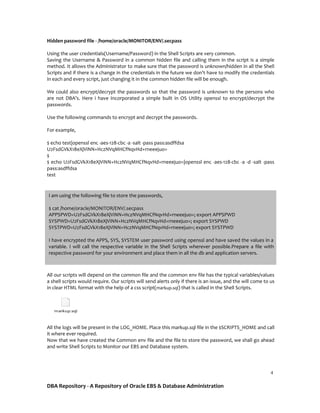
Use the following commands to encrypt and decrypt the passwords.
For example,
$ echo test|openssl enc -aes-128-cbc -a -salt -pass pass:asdffdsa
U2FsdGVkX18eXjViNN+HczNVqMHCfNqvHd+rneeejuo=
$
$ echo U2FsdGVkX18eXjViNN+HczNVqMHCfNqvHd+rneeejuo=|openssl enc -aes-128-cbc -a -d -salt -pass
pass:asdffdsa
test
All our scripts will depend on the common file and the common env file has the typical variables/values
a shell scripts would require. Our scripts will send alerts only if there is an issue, and the will come to us
in clear HTML format with the help of a css script(markup.sql) that is called in the Shell Scripts.
markup.sql
All the logs will be present in the LOG_HOME. Place this markup.sql file in the $SCRIPTS_HOME and call
it where ever required.
Now that we have created the Common env file and the file to store the password, we shall go ahead
and write Shell Scripts to Monitor our EBS and Database system.
I am using the following file to store the passwords,
$ cat /home/oracle/MONITOR/ENV/.secpass
APPSPWD=U2FsdGVkX18eXjViNN+HczNVqMHCfNqvHd+rneeejuo=; export APPSPWD
SYSPWD=U2FsdGVkX18eXjViNN+HczNVqMHCfNqvHd+rneeejuo=; export SYSPWD
SYSTPWD=U2FsdGVkX18eXjViNN+HczNVqMHCfNqvHd+rneeejuo=; export SYSTPWD
I have encrypted the APPS, SYS, SYSTEM user password using openssl and have saved the values in a
variable. I will call the respective variable in the Shell Scripts wherever possible.Prepare a file with
respective password for your environment and place them in all the db and application servers.
DBA Repository - A Repository of Oracle EBS & Database Administration
5
Script to check if the database instance is up and running.
This is a simple script to check the availability of the Database Instance. The database
availability log is stored in dbstatus_hist.log file. Alert will be sent to the users in the
distribution list only if the database is not available.
Database Instance Availability
#Script to check db status
. /home/oracle/MONITOR/ENV/scr_envcall_db
dateis=`date +"%a"" ""%d"/"%b"/"%Y"" ""%H":"%M":"%S"`; export dateis
status_log=$LOGS_HOME/dbstatus_hist.log; export status_log
status_log1=$LOGS_HOME/dbstatus1.log; export status_log1
mail_message=$MAILLOG_HOME/db_status_message.log; export mail_message
sqlplus -s "/as sysdba" <<EOF > $status_log1
select name, open_mode from v$database;
quit
EOF
if cat $status_log1|grep -i 'READ WRITE' > /dev/null && ps -ef|grep -i "$ORACLE_SID"|grep -i
pmon|grep -v grep > /dev/null
then
echo "Database $ORACLE_SID is Up and Running Fine - $dateis" >> $status_log
else
echo "Database $ORACLE_SID might be Down or Unavailable - $dateis" >> $status_log
echo -e "Team,nnDatabase $ORACLE_SID might be Down on `hostname`, please cheack
ASAP!!!n" > $mail_message
cat $status_log1 >> $mail_message
echo -e "Refer log files $status_log and $status_log1n" >> $mail_message
echo -e "Thanks,nDBA Team" >> $mail_message
mailx -s "CRITICAL:Alarm:$ORACLE_SID Database is Down - $dateis" $maillist < $mail_message
fi
DBA Repository - A Repository of Oracle EBS & Database Administration
6
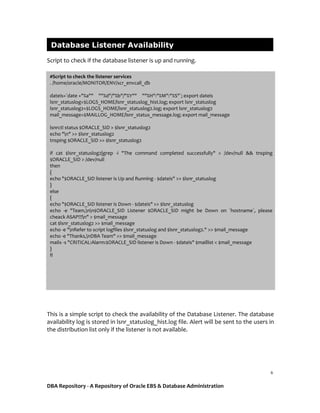
Script to check if the database listener is up and running.
This is a simple script to check the availability of the Database Listener. The database
availability log is stored in lsnr_statuslog_hist.log file. Alert will be sent to the users in
the distribution list only if the listener is not available.
Database Listener Availability
#Script to check the listener services
. /home/oracle/MONITOR/ENV/scr_envcall_db
dateis=`date +"%a"" ""%d"/"%b"/"%Y"" ""%H":"%M":"%S"`; export dateis
lsnr_statuslog=$LOGS_HOME/lsnr_statuslog_hist.log; export lsnr_statuslog
lsnr_statuslog2=$LOGS_HOME/lsnr_statuslog2.log; export lsnr_statuslog2
mail_message=$MAILLOG_HOME/lsnr_status_message.log; export mail_message
lsnrctl status $ORACLE_SID > $lsnr_statuslog2
echo "n" >> $lsnr_statuslog2
tnsping $ORACLE_SID >> $lsnr_statuslog2
if cat $lsnr_statuslog2|grep -i "The command completed successfully" > /dev/null && tnsping
$ORACLE_SID > /dev/null
then
{
echo "$ORACLE_SID listener is Up and Running - $dateis" >> $lsnr_statuslog
}
else
{
echo "$ORACLE_SID listener is Down - $dateis" >> $lsnr_statuslog
echo -e "Team,nn$ORACLE_SID Listener $ORACLE_SID might be Down on `hostname`, please
cheack ASAP!!!n" > $mail_message
cat $lsnr_statuslog2 >> $mail_message
echo -e "nRefer to script logfiles $lsnr_statuslog and $lsnr_statuslog2." >> $mail_message
echo -e "Thanks,nDBA Team" >> $mail_message
mailx -s "CRITICAL:Alarm:$ORACLE_SID listener is Down - $dateis" $maillist < $mail_message
}
fi
DBA Repository - A Repository of Oracle EBS & Database Administration
7
Scripts to check used/free space of the tablespace.
The script will check for tablespace’s used space and if the used space has crossed
95% the users in the distribution list will get alerts.
Tablespace Alert
#Script to check tablespace size
. /home/oracle/MONITOR/ENV/scr_envcall_db
dateis=`date +"%a"" ""%d"/"%b"/"%Y"" ""%H":"%M":"%S"`; export dateis
tbsrpt_rep=$LOGS_HOME/tbschkrpt.html; export tbsrpt_rep
sqlplus -silent -S -M "HTML ON TABLE 'BORDER="2"'" "/as sysdba" << EOF > $tbsrpt_rep
@$SCRIPTS_HOME/markup.sql
set feedback on;
prompt <i>Team,</i><br>
prompt <i>Tablespaces running out of space in $ORACLE_SID on `hostname`,</i><br>
select total.ts "Tablespace Name",
total.mb "Total Size in MB",
NVL(total.mb - free.mb,total.mb) "Used Size in MB",
NVL(free.mb,0) "Free Size in MB",
DECODE(total.mb,NULL,0,NVL(ROUND((total.mb - free.mb)/(total.mb)*100,2),100)) "Pct Used"
from
(select tablespace_name ts, sum(bytes)/1024/1024 mb from dba_data_files group by tablespace_name)
total,
(select tablespace_name ts, sum(bytes)/1024/1024 mb from dba_free_space group by
tablespace_name) free
where total.ts=free.ts(+)
AND DECODE(total.mb,NULL,0,NVL(ROUND((total.mb - free.mb)/(total.mb)*100,2),100)) > 95
UNION ALL
select sh.tablespace_name,
SUM(sh.bytes_used+sh.bytes_free)/1024/1024 "total_mb",
SUM(sh.bytes_used)/1024/1024 "used_mb",
SUM(sh.bytes_free)/1024/1024 "free_mb",
ROUND(SUM(sh.bytes_used)/SUM(sh.bytes_used+sh.bytes_free)*100,2) "pct_used"
FROM v$temp_space_header sh
having ROUND(SUM(sh.bytes_used)/SUM(sh.bytes_used+sh.bytes_free)*100,2) >95
GROUP BY tablespace_name
order by 5 desc;
prompt <i>Please do the needful.</i><br>
prompt <i>Thanks,</i>
prompt <i>DBA Team</i>
set markup html off;
quit;
EOF
cnt=`cat $tbsrpt_rep|grep -i "no rows selected"|wc -l`; export cnt
if [ $cnt -eq 0 ]
then
cat $tbsrpt_rep|grep -v "selected."|mutt -e 'set content_type=text/html' -s 'Critical - Tablespaces with less space
in '$ORACLE_SID' on '$dateis'' $maillist
fi
DBA Repository - A Repository of Oracle EBS & Database Administration
8
#Script to check for errors in the alert log of the database
Script checks for error in the database alert log
This script will check for any new ORA- errors in the database alert log file and send
an alert to the users in the distribution list.Please source the alert log of the database
in alert_log variable.
Check for errors in Database Alert log
#Script to check for errors in alert log
. /home/oracle/MONITOR/ENV/scr_envcall_db
dateis=`date +"%a"" ""%d"/"%b"/"%Y"" ""%H":"%M":"%S"`; export dateis
alert_log=/alert_log_location/alert_logfile_name.log; export alert_log
temp_alert_log=$LOGS_HOME/temp_alert_$ORACLE_SID.log
error_log_hist=$LOGS_HOME/error_log_"$ORACLE_SID"_hist.log
error_log=$LOGS_HOME/error_log_$ORACLE_SID.log
mail_message=$MAILLOG_HOME/alert_check_message.log; export mail_message
diff $alert_log $temp_alert_log |grep -i "ora-"|sed 's/<//' > $error_log
ec=`cat $error_log|wc -l`; export error_log
if [ $ec -gt 0 ]
then
echo -e "Team,nnPlease find the errors in the Alertlog of $ORACLE_SID on `hostname` as
follows,n" > $mail_message
cat $error_log >> $mail_message
echo -e "nThanks,nDBA Team" >> $mail_message
cat $mail_message|mailx -s "Errors in Alert log - $ORACLE_SID on $dateis" $maillist
echo "----------------" >> $error_log_hist
echo "New errors found in the Alert log of $ORACLE_SID - $dateis" >> $error_log_hist
cat $error_log >> $error_log_hist
echo "----------------" >> $error_log_hist
else
echo "No new errors in the Alert log of $ORACLE_SID - $dateis" >> $error_log_hist
fi
cp $alert_log $temp_alert_log
DBA Repository - A Repository of Oracle EBS & Database Administration
9
Script to check for blocking session in a database.
This script will check for blocking session in the database, kindly place the block.sql
file under $SCRIPTS_HOME directory.
block.sql
Script sends out an alert to the users in distribution list if there are any blocking
sessions.
Blocking Session Alert
# Script to check for blocking session
. /home/oracle/MONITOR/ENV/scr_envcall_db
dateis=`date +"%a"" ""%d"/"%b"/"%Y"" ""%H":"%M":"%S"`; export dateis
blocking_sess_det=$LOGS_HOME/blocking_sess_det.html; export blocking_sess_det
sqlplus -silent -S -M "HTML ON TABLE 'BORDER="2"'" "/as sysdba" << EOF > $blocking_sess_det
@$SCRIPTS_HOME/markup.sql
set feedback on;
prompt <i>Team,</i><br>
prompt <i>There are blocking sessions in $ORACLE_SID on `hostname`,pls check ASAP!!!</i><br>
@$SCRIPTS_HOME/block.sql
prompt <i>Thanks,</i>
prompt <i>DBA Team</i>
set markup html off;
quit;
EOF
cnt=`cat $blocking_sess_det|grep -i "no rows selected"|wc -l`; export cnt
if [ $cnt -eq 0 ]
then
#cat $blocking_sess_det|grep -v "selected."|mailx -s "$(echo -e "Blocking session in $ORACLE_SID -
$dateisnContent-Type: text/html")" $maillist
cat $blocking_sess_det|grep -v "selected."|mutt -e 'set content_type=text/html' -s 'Blocking session
in '$ORACLE_SID' - '$dateis'' $maillist
fi
DBA Repository - A Repository of Oracle EBS & Database Administration
10
Please create a directory RMAN under $LOGS_HOME and under RMAN directory
create two directories DB and ARC for db and archive log backup logfiles respectively.
backup_db.rman
Place this file under $SCRIPTS_HOME, the script will take a full backup of the
database and check if the backup has got completed successfully. If there are any
errors in the backup, an alert will be sent by the script to the users.
The script also maintains a log of the backup status every time it is executed in the
$LOGS_HOME directory.
Database Full Backup
#Script to take backup of Database (Full backup) db
. /home/oracle/MONITOR/ENV/scr_envcall_db
dateis=`date +"%a"" ""%d"/"%b"/"%Y"" ""%H":"%M":"%S"`; export dateis
rman_dbfull_log=$LOGS_HOME/RMAN/DB/dbfull_bkp_`date +%d%b%y_%H%M`.log;export
rman_dbfull_log
rman_dbfull_log_hist=$LOGS_HOME/RMAN/DB/rman_dbfull_log_hist.log; export
rman_dbfull_log_hist
mail_message=$MAILLOG_HOME/dbfull_bkp_message.log; export mail_message
rman target / cmdfile=$SCRIPTS_HOME/backup_db.rman > $rman_dbfull_log
#rman_err=`cat $rman_dbfull_log|grep -i 'rman-|ora-'`; export rman_err
rman_err_cnt=`cat $rman_dbfull_log|grep -i 'rman-|ora-'|wc -l`; export rman_err_cnt
if [ $rman_err_cnt -gt 0 ]
then
echo "RMAN DB Full backup has failed/have errors at $dateis in $ORACLE_SID" >>
$rman_dbfull_log_hist
echo -e "Team,nnDB Full backup has completed with errors or have failed in $ORACLE_SID on
`hostname`.n" > $mail_message
echo -e "Please find the log as follows,n" >> $mail_message
cat $rman_dbfull_log >> $mail_message
echo -e "nRefer to script logfiles $rman_dbfull_log and $rman_dbfull_log_hist.n" >>
$mail_message
echo -e "Thanks,nDBA Team" >> $mail_message
mailx -s "$ORACLE_SID DB Full Backup has failed - $dateis!!! " $maillist < $mail_message
else
echo "RMAN DB Full backup has completed successfully at $dateis in $ORACLE_SID" >>
$rman_dbfull_log_hist
fi
DBA Repository - A Repository of Oracle EBS & Database Administration
11
Full Backup
backup_db_incr.r
man
Place this file under $SCRIPTS_HOME, the script will take an Incremental backup of
the database and check if the backup has got completed successfully. If there are any
errors in the backup, an alert will be sent by the script to the users.
The script also maintains a log of the backup status every time it is executed in the
$LOGS_HOME directory.
Database Incremental Backup
#Script to take backup of Database (Incremental backup) db
. /home/oracle/MONITOR/ENV/scr_envcall_db
dateis=`date +"%a"" ""%d"/"%b"/"%Y"" ""%H":"%M":"%S"`; export dateis
rman_dbincr_log=$LOGS_HOME/RMAN/DB/dbincr_bkp_`date +%d%b%y_%H%M`.log;export rman_dbincr_log
rman_dbincr_log_hist=$LOGS_HOME/RMAN/DB/rman_dbincr_log_hist.log; export rman_dbincr_log_hist
mail_message=$MAILLOG_HOME/dbincr_bkp_message.log; export mail_message
rman target / cmdfile=$SCRIPTS_HOME/backup_db_incr.rman > $rman_dbincr_log
#rman_err=`cat $rman_dbincr_log|grep -i 'rman-|ora-'`; export rman_err
rman_err_cnt=`cat $rman_dbincr_log|grep -i 'rman-|ora-'|wc -l`; export rman_err_cnt
if [ $rman_err_cnt -gt 0 ]
then
echo "RMAN DB Incremental backup has failed/have errors at $dateis in $ORACLE_SID" >>
$rman_dbincr_log_hist
echo -e "Team,nnDB Incremental backup has completed with errors or have failed in $ORACLE_SID on
`hostname`.n" > $mail_message
echo -e "Please find the log as follows,n" >> $mail_message
cat $rman_dbincr_log >> $mail_message
echo -e "nRefer to script logfiles $rman_dbincr_log and $rman_dbincr_log_hist.n" >> $mail_message
echo -e "Thanks,nDBA Team" >> $mail_message
mailx -s "$ORACLE_SID DB Incremental Backup has failed - $dateis!!! " $maillist < $mail_message
else
echo "RMAN DB Incremental backup has completed successIncrementaly at $dateis in $ORACLE_SID" >>
$rman_dbincr_log_hist
fi
DBA Repository - A Repository of Oracle EBS & Database Administration
12
backup_arch.rma
n
Place this file under $SCRIPTS_HOME, the script will take a backup of the Archivelogs
of the database and check if the backup has got completed successfully. If there are
any errors in the backup, an alert will be sent by the script to the users.
The script also maintains a log of the backup status every time it is executed in the
$LOGS_HOME directory.
Archivelog Backup
#Script to take backup of Archive logs db
. /home/oracle/MONITOR/ENV/scr_envcall_db
dateis=`date +"%a"" ""%d"/"%b"/"%Y"" ""%H":"%M":"%S"`; export dateis
rman_arc_log=$LOGS_HOME/RMAN/ARC/archive_bkp_`date +%d%b%y_%H%M`.log;export rman_arc_log
rman_arc_log_hist=$LOGS_HOME/RMAN/ARC/rman_arc_log_hist.log; export rman_arc_log_hist
mail_message=$MAILLOG_HOME/arc_bkp_message.log; export mail_message
rman target / cmdfile=$SCRIPTS_HOME/backup_arch.rman > $rman_arc_log
#rman_err=`cat $rman_arc_log|grep -i 'rman-|ora-'`; export rman_err
rman_err_cnt=`cat $rman_arc_log|grep -i 'rman-|ora-'|wc -l`; export rman_err_cnt
if [ $rman_err_cnt -gt 0 ]
then
echo "RMAN Archivelogs backup has failed/have errors at $dateis in $ORACLE_SID" >>
$rman_arc_log_hist
echo -e "Team,nnArchivelog backup has completed with errors or have failed in $ORACLE_SID on
`hostname`.n" > $mail_message
echo -e "Please find the log as follows,n" >> $mail_message
cat $rman_arc_log >> $mail_message
echo -e "nRefer to script logfiles $rman_arc_log and $rman_arc_log_hist.n" >> $mail_message
echo -e "Thanks,nDBA Team" >> $mail_message
mailx -s "$ORACLE_SID Archivelog Backup has failed - $dateis!!! " $maillist < $mail_message
else
echo "RMAN Archivelogs backup completed successfully at $dateis in $ORACLE_SID" >>
$rman_arc_log_hist
fi
DBA Repository - A Repository of Oracle EBS & Database Administration
13
This Script will delete archive logs older than 2 days and also check for expired
archive logs and remove them if any.
Purge Archivelog
#Script to purge Archive logs db
. /home/oracle/MONITOR/ENV/scr_envcall_db
dateis=`date +"%a"" ""%d"/"%b"/"%Y"" ""%H":"%M":"%S"`; export dateis
rman_del_log1=$LOGS_HOME/archive_purge.log;export rman_del_log1
rman_del_log2=$LOGS_HOME/archive_purge1.log;export rman_del_log2
rman_crosschk_log=$LOGS_HOME/rman_cross_check.log;export rman_crosschk_log
mail_message=$MAILLOG_HOME/arc_purge_message.log; export mail_message
rman target / << EOF > $rman_crosschk_log
crosscheck archivelog all;
delete noprompt expired archivelog all;
EOF
rman target / << EOF > $rman_del_log2
delete noprompt archivelog until time 'sysdate-2';
EOF
rman target / << EOF >> $rman_crosschk_log
crosscheck archivelog all;
EOF
echo "####################### Script ran at $dateis ####################### " >>$rman_del_log1
cat $rman_del_log2>>$rman_del_log1
echo -e "Team,nnArchivelog's are purged in $ORACLE_SID on `hostname`.n" > $mail_message
echo -e "Please find the log as follows,n" >> $mail_message
cat $rman_del_log2 >> $mail_message
echo -e "nRefer to script logfiles $rman_del_log1 and $rman_del_log2." >> $mail_message
echo -e "Thanks,nDBA Team" >> $mail_message
mailx -s "$ORACLE_SID Archivelog purge status - $dateis" $maillist < $mail_message
DBA Repository - A Repository of Oracle EBS & Database Administration
14
This is a bonus script that does a basic sanity check to your database and sends a
report to the users. Please create a directory “dbaallmonitor” under $LOGS_HOME.
DB All Monitor Script
#Script to perform basic Sanity check
. /home/oracle/MONITOR/ENV/scr_envcall_db
monitor_log=$LOGS_HOME/dballmonitor/dballmonitor_"$ORACLE_SID"_`date +%d%b%y_%H%M`.html;
export monitor_log
dateis=`date +"%a"" ""%d"/"%b"/"%Y"" ""%H":"%M":"%S"`; export dateis
mountpnt_log=$LOGS_HOME/mountpnt_log.log; export mountpnt_log
mail_message=$MAILLOG_HOME/dballmonitormail.log; export mail_message
echo -e "<caption><b center><font size="2" font face="verdana" color="blue"><center>Complete
Health Check report for $ORACLE_SID Database on $dateis</center></font></b></caption>n" >
$monitor_log
echo "<br>" >> $monitor_log
sqlplus -silent -S -M "HTML ON TABLE 'BORDER="2"'" "/as sysdba" << EOF >> $monitor_log
@$SCRIPTS_HOME/markup.sql
set feedback off;
alter session set nls_numeric_characters='.''' nls_date_format='Day DD. Month, YYYY';
prompt <i>Here is the complete Database health check report per &_DATE</i><br>
@$SCRIPTS_HOME/db_det.sql
set markup html off;
quit;
EOF
#echo "<br>" >> $monitor_log
tnsping $ORACLE_SID 1>/dev/null
if [ $? = 0 ]; then
echo "<td><b><font size="2" face="verdana" color="green">Listener is up and running FOR
$ORACLE_SID</font></b></td>" >> $monitor_log
echo "<br>" >> $monitor_log
else
echo "<td><b><font size="2" face="verdana" color="red">Listener is not running for
$ORACLE_SID !!!!</font></b></td>" >> $monitor_log
echo "<br>" >> $monitor_log
fi
echo "<br>" >> $monitor_log
sqlplus -silent -S -M "HTML ON TABLE 'BORDER="2"'" "/as sysdba" << EOF >> $monitor_log
set feedback off;
@$SCRIPTS_HOME/markup.sql
@$SCRIPTS_HOME/db_det2.sql
set markup html off;
quit;
EOF
DBA Repository - A Repository of Oracle EBS & Database Administration
15
db_det.sql db_det2.sql
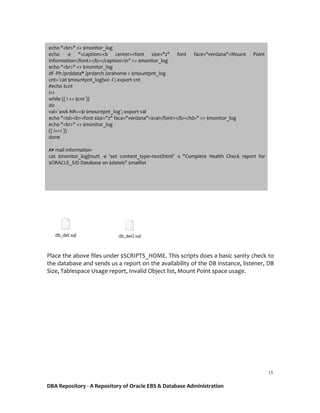
Place the above files under $SCRIPTS_HOME. This scripts does a basic sanity check to
the database and sends us a report on the availability of the DB instance, listener, DB
Size, Tablespace Usage report, Invalid Object list, Mount Point space usage.
echo "<br>" >> $monitor_log
echo -e "<caption><b center><font size="2" font face="verdana">Mount Point
Information</font></b></caption>n" >> $monitor_log
echo "<br>" >> $monitor_log
df -Ph /prddata* /prdarch /orahome > $mountpnt_log
cnt=`cat $mountpnt_log|wc -l`; export cnt
#echo $cnt
i=1
while (( i <= $cnt ))
do
val=`awk NR==$i $mountpnt_log`; export val
echo "<td><b><font size="2" face="verdana">$val</font></b></td>" >> $monitor_log
echo "<br>" >> $monitor_log
(( i+=1 ))
done
## mail information
cat $monitor_log|mutt -e 'set content_type=text/html' -s "Complete Health Check report for
$ORACLE_SID Database on $dateis" $maillist
DBA Repository - A Repository of Oracle EBS & Database Administration
16
Application Services Availability
#Script to check Application services availability
. /home/applmgr/MONITOR/ENV/scr_envcall_apps
appsserviceapp_monlog=$LOGS_HOME/appsserviceapp_monlog.log; export appsserviceapp_monlog
app_monlog1=$LOGS_HOME/appsmonitor1.log; export app_monlog1
app_monlog2=$LOGS_HOME/appsmonitor2.log; export app_monlog2
temp_app_monlog=$LOGS_HOME/temp_app_monlog.log; export temp_app_monlog
dateis=`date +"%a"" ""%d"/"%b"/"%Y"" ""%H":"%M":"%S"`; export dateis
mail_log=$MAILLOG_HOME/mailappsservices_log.log; export mail_log
web_prt=`cat $CONTEXT_FILE |grep -i s_webport|cut -d '>' -f 2|cut -d '<' -f1`; export web_prt
sh $ADMIN_SCRIPTS_HOME/adopmnctl.sh status > $app_monlog1
cat $app_monlog1|grep Alive|awk '{print $3 " is " $7}' > $temp_app_monlog
oacore_cnt=`cat $temp_app_monlog|grep -i oacore|grep -i alive|wc -l`; export oacore_cnt
forms_cnt=`cat $temp_app_monlog|grep -i forms|grep -i alive|wc -l`; export forms_cnt
if cat $temp_app_monlog|grep -i "HTTP_"|grep -i alive > /dev/null
then
{
echo "Apache services are Up" > $app_monlog2
}
else
{
echo "Apache services are Down !!!!" > $app_monlog2
}
fi
if cat $temp_app_monlog|grep -i "oacore"|grep -i alive > /dev/null && [ "$oacore_cnt" -eq '4' ]
then
{
echo "Oacore Services are Up" >> $app_monlog2
}
else
{
echo "Oacore Services are Down !!!!" >> $app_monlog2
}
fi
if cat $temp_app_monlog|grep -i "forms"|grep -i alive > /dev/null && [ "$forms_cnt" -eq '2' ]
then
{
echo "Forms Services are Up" >> $app_monlog2
}
else
{
echo "Forms Services are Down !!!!" >> $app_monlog2
}
fi
DBA Repository - A Repository of Oracle EBS & Database Administration
17
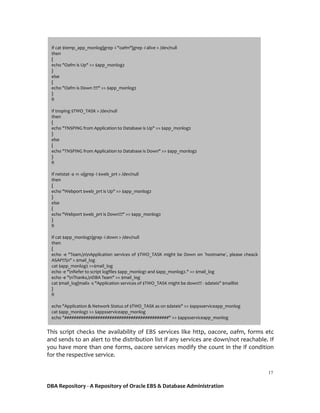
This script checks the availability of EBS services like http, oacore, oafm, forms etc
and sends to an alert to the distribution list if any services are down/not reachable. If
you have more than one forms, oacore services modify the count in the if condition
for the respective service.
if cat $temp_app_monlog|grep -i "oafm"|grep -i alive > /dev/null
then
{
echo "Oafm is Up" >> $app_monlog2
}
else
{
echo "Oafm is Down !!!!" >> $app_monlog2
}
fi
if tnsping $TWO_TASK > /dev/null
then
{
echo "TNSPING from Application to Database is Up" >> $app_monlog2
}
else
{
echo "TNSPING from Application to Database is Down" >> $app_monlog2
}
fi
if netstat -a -n -o|grep -i $web_prt > /dev/null
then
{
echo "Webport $web_prt is Up" >> $app_monlog2
}
else
{
echo "Webport $web_prt is Down!!!" >> $app_monlog2
}
fi
if cat $app_monlog2|grep -i down > /dev/null
then
{
echo -e "Team,nnApplication services of $TWO_TASK might be Down on `hostname`, please cheack
ASAP!!!n" > $mail_log
cat $app_monlog2 >>$mail_log
echo -e "nRefer to script logfiles $app_monlog1 and $app_monlog2." >> $mail_log
echo -e "nThanks,nDBA Team" >> $mail_log
cat $mail_log|mailx -s "Application services of $TWO_TASK might be down!!! - $dateis" $maillist
}
fi
echo "Application & Network Status of $TWO_TASK as on $dateis" >> $appsserviceapp_monlog
cat $app_monlog2 >> $appsserviceapp_monlog
echo "############################################" >> $appsserviceapp_monlog
DBA Repository - A Repository of Oracle EBS & Database Administration
18
Script to check the concurrent manager status, script will send out an alert to the
users if the concurrent managers are down/unavailable.Also we shall set a threshold
for number of concurrent managers running in a node, the script will alert the users if
there is any reduction in the no of concurrent managers running.
Concurrent Manager Availability
# Script to check Concurrent Managers Status
. /home/applmgr/MONITOR/ENV/scr_envcall_apps
dateis=`date +"%a"" ""%d"/"%b"/"%Y"" ""%H":"%M":"%S"`; export dateis
mail_log=$MAILLOG_HOME/mailconcservice_log.log; export mail_log
conc_monlog=$LOGS_HOME/concmonitor.log; export conc_monlog
conc_monlog1=$LOGS_HOME/concmonitor1.log; export conc_monlog1
watw=`echo $APPSPWD|openssl enc -aes-128-cbc -a -d -salt -pass pass:asdffdsa`; export watw
sh $ADMIN_SCRIPTS_HOME/adcmctl.sh status apps/"$watw" > $conc_monlog1
conc_sermon=`ps -ef |grep -i applmgr|grep -i FNDLIBR |grep -v grep |wc -l`; export conc_sermon
if cat $conc_monlog1|grep -i "Internal Concurrent Manager is Active" > /dev/null && [ "$conc_sermon" -gt '40' ]
then
{
echo "Concurrents Managers are up and running fine - $dateis" >> $conc_monlog
echo "FNDLIBR count is - $conc_sermon - $dateis" >> $conc_monlog
}
else
{
echo "Concurrents Managers might be Down - $dateis" >> $conc_monlog
echo "FNDLIBR count is - $conc_sermon - $dateis" >> $conc_monlog
echo -e "Team,nnConcurrent Manager services of $TWO_TASK might be Down on `hostname`, please cheack
ASAP!!!n" > $mail_log
cat $conc_monlog1 >>$mail_log
echo "FNDLIBR count is - $conc_sermon" >>$mail_log
echo -e "nRefer to script logfiles $conc_monlog1 and $conc_monlog" >> $mail_log
echo -e "nThanks,nDBA Team" >> $mail_log
cat $mail_log|mailx -s "Critical: Alarm - Concurrent Manager services of $TWO_TASK might be Down!!! - $dateis"
$maillist
}
fi
DBA Repository - A Repository of Oracle EBS & Database Administration
19
Script to check for long running concurrent request, threshold is set to 120 mins.
The script will sent out alerts with the details of the concurrent request.
Long Running Concurrent Requests
# Script to Check Long Running Concurrent Requests
. /home/applmgr/MONITOR/ENV/scr_envcall_apps
longrun_rep=$LOGS_HOME/longrun_rep.log;export longrun_rep
longrun_out=$LOGS_HOME/longrun_rep.html;export longrun_out
watw=`echo $APPSPWD|openssl enc -aes-128-cbc -a -d -salt -pass pass:asdffdsa`; export watw
dateis=`date +"%a"" ""%d"/"%b"/"%Y"" ""%H":"%M":"%S"`; export dateis
sqlplus -silent -S -M "HTML ON TABLE 'BORDER="2"'" "apps/$watw" << EOF > $longrun_out
@$SCRIPTS_HOME/markup.sql
set pages 300;
prompt <i>Team,</i><br>
prompt <i>Please find the long running Concurrent Programs in $TWO_TASK as follows,</i><br>
SELECT fcp.user_concurrent_program_name "Concurrent Program Name"
,fcr.request_id "Request Id"
,ROUND (((SYSDATE - fcr.actual_start_date) * 60 * 24), 2) "Runtime in Mins"
,TO_CHAR (fcr.actual_start_date, 'DD-MON-YYYY HH24:MI:SS') "Actual Start Date"
,DECODE (fcr.status_code, 'R', fcr.status_code) "Status"
,fcr.argument_text "Parameters"
FROM apps.fnd_concurrent_requests fcr
,apps.fnd_user fu
,apps.fnd_responsibility_tl fr
,apps.fnd_concurrent_programs_tl fcp
WHERE fcr.status_code LIKE 'R'
AND fu.user_id = fcr.requested_by
AND fr.responsibility_id = fcr.responsibility_id
AND fcr.concurrent_program_id = fcp.concurrent_program_id
AND fcr.program_application_id = fcp.application_id
AND ROUND (((SYSDATE - fcr.actual_start_date) * 60 * 24), 2) > 120
ORDER BY 3 desc;
prompt <i>Thanks,</i><br>
prompt <i>DBA Team</i><br>
set markup html off;
quit;
EOF
ct=`cat $longrun_out|grep -i "no rows selected"|wc -l`; export ct
if [ $ct -eq 0 ]
then
cat $longrun_out|grep -v "selected."| mutt -e 'set content_type=text/html' -s "Long running Concurrent request in
$TWO_TASK on $dateis" $maillist
fi
DBA Repository - A Repository of Oracle EBS & Database Administration
20
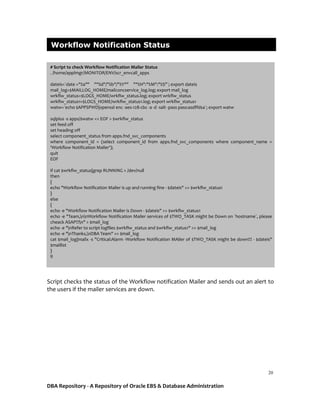
Script checks the status of the Workflow notification Mailer and sends out an alert to
the users if the mailer services are down.
Workflow Notification Status
# Script to check Workflow Notification Mailer Status
. /home/applmgr/MONITOR/ENV/scr_envcall_apps
dateis=`date +"%a"" ""%d"/"%b"/"%Y"" ""%H":"%M":"%S"`; export dateis
mail_log=$MAILLOG_HOME/mailconcservice_log.log; export mail_log
wrkflw_status=$LOGS_HOME/wrkflw_status.log; export wrkflw_status
wrkflw_status1=$LOGS_HOME/wrkflw_status1.log; export wrkflw_status1
watw=`echo $APPSPWD|openssl enc -aes-128-cbc -a -d -salt -pass pass:asdffdsa`; export watw
sqlplus -s apps/$watw << EOF > $wrkflw_status
set feed off
set heading off
select component_status from apps.fnd_svc_components
where component_id = (select component_id from apps.fnd_svc_components where component_name =
'Workflow Notification Mailer');
quit
EOF
if cat $wrkflw_status|grep RUNNING > /dev/null
then
{
echo "Workflow Notification Mailer is up and running fine - $dateis" >> $wrkflw_status1
}
else
{
echo -e "Workflow Notification Mailer is Down - $dateis" >> $wrkflw_status1
echo -e "Team,nnWorkflow Notification Mailer services of $TWO_TASK might be Down on `hostname`, please
cheack ASAP!!!n" > $mail_log
echo -e "nRefer to script logfiles $wrkflw_status and $wrkflw_status1" >> $mail_log
echo -e "nThanks,nDBA Team" >> $mail_log
cat $mail_log|mailx -s "Critical:Alarm -Workflow Notification MAiler of $TWO_TASK might be down!!! - $dateis"
$maillist
}
fi
DBA Repository - A Repository of Oracle EBS & Database Administration
21
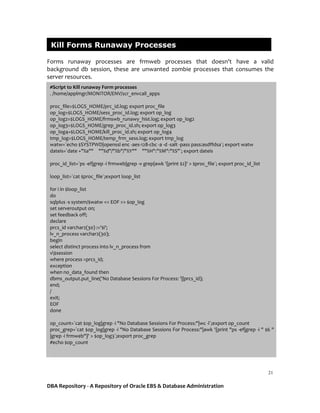
Forms runaway processes are frmweb processes that doesn't have a valid
background db session, these are unwanted zombie processes that consumes the
server resources.
Kill Forms Runaway Processes
#Script to Kill runaway Form processes
. /home/applmgr/MONITOR/ENV/scr_envcall_apps
proc_file=$LOGS_HOME/prc_id.log; export proc_file
op_log=$LOGS_HOME/sess_proc_id.log; export op_log
op_log2=$LOGS_HOME/frmswb_runawy_hist.log; export op_log2
op_log3=$LOGS_HOME/grep_proc_id.sh; export op_log3
op_log4=$LOGS_HOME/kill_proc_id.sh; export op_log4
tmp_log=$LOGS_HOME/temp_frm_sess.log; export tmp_log
watw=`echo $SYSTPWD|openssl enc -aes-128-cbc -a -d -salt -pass pass:asdffdsa`; export watw
dateis=`date +"%a"" ""%d"/"%b"/"%Y"" ""%H":"%M":"%S"`; export dateis
proc_id_list=`ps -ef|grep -i frmweb|grep -v grep|awk '{print $2}' > $proc_file`; export proc_id_list
loop_list=`cat $proc_file`;export loop_list
for i in $loop_list
do
sqlplus -s system/$watw << EOF >> $op_log
set serveroutput on;
set feedback off;
declare
prcs_id varchar2(30) :='$i';
lv_n_process varchar2(30);
begin
select distinct process into lv_n_process from
v$session
where process =prcs_id;
exception
when no_data_found then
dbms_output.put_line('No Database Sessions For Process: '||prcs_id);
end;
/
exit;
EOF
done
op_count=`cat $op_log|grep -i "No Database Sessions For Process:"|wc -l`;export op_count
proc_grep=`cat $op_log|grep -i "No Database Sessions For Process:"|awk '{print "ps -ef|grep -i " $6 "
|grep -i frmweb"}' > $op_log3`;export proc_grep
#echo $op_count
DBA Repository - A Repository of Oracle EBS & Database Administration
22
The script takes a list of frmweb prcesses running in the node and checks if each and
every one of them has a valid db session. If there are no valid db session for a frmweb
process, it is automatically killed by the script.
The script also maintains a log of what processes are getting killed with proper
timestamp.
if [ $op_count = 0 ]
then
echo -e "##########################################################################
n" >> $op_log2
echo -e "No Runaway Form Processes during last run at $dateis n" >> $op_log2
echo -e "##########################################################################
n" >> $op_log2
else
echo -e "##########################################################################
n" >> $op_log2
echo -e "tRunaway Form Processes during last run at $dateis as follows," >> $op_log2
cat $op_log >> $op_log2
echo -e "n" >> $op_log2
echo -e "ttGrepping the Form Processes(These Runaway Processes are going to be killed!!!!)" >>
$op_log2
sh "$op_log3"|grep -v grep >> $op_log2
echo -e "n" >> $op_log2
sh "$op_log3"|grep -v grep|awk '{print "kill -9 "$2}' > $op_log4
echo -e "tRunaway Processes that are killed!!!!" >> $op_log2
cat $op_log4 >> $op_log2
sh "$op_log4" >> $op_log2
echo -e "n" >> $op_log2
echo -e "##########################################################################
n" >> $op_log2
fi
#cat $op_log > $tmp_log
>$op_log
DBA Repository - A Repository of Oracle EBS & Database Administration
23
Every EBS environment has few business critical concurrent request that should
complete normal without fail, in case if they fail it is our duty to inform it to the
customer and diagnose why it failed and re submit it. The following scripts monitors
such concurrent requests.
Script will sent alert to the users in the distribution list if the mentioned concurrent
request did not complete successfully.
Important Concurrent Requests Status
# Script to Check failed concurrent requests
. /home/applmgr/MONITOR/ENV/scr_envcall_apps
failed_conc_req=$LOGS_HOME/failed_conc_req.html;export failed_conc_req
watw=`echo $APPSPWD|openssl enc -aes-128-cbc -a -d -salt -pass pass:asdffdsa`; export watw
dateis=`date +"%a"" ""%d"/"%b"/"%Y"" ""%H":"%M":"%S"`; export dateis
sqlplus -silent -S -M "HTML ON TABLE 'BORDER="2"'" "apps/$watw" << EOF > $failed_conc_req
@$SCRIPTS_HOME/markup.sql
set feedback on;
prompt <i>Team,</i><br>
prompt <i>Following Scheduled Concurrent request's have failed $TWO_TASK - `hostname`,</i><br>
SELECT c.USER_CONCURRENT_PROGRAM_NAME ,To_Char(a.actual_start_date,'DD-MON-YY HH24:MI:SS')
START_DATE,
To_Char(a.actual_completion_date,'DD-MON-YY HH24:MI:SS') END_DATE,
round(((a.actual_completion_date-a.actual_start_date)*24*60*60/60),2) AS Process_time,
a.request_id,a.parent_request_id,To_Char(a.request_date,'DD-MON-YY HH24:MI:SS') REQUEST_DATE,
DECODE(a.PHASE_CODE,'C', 'Completed','I', 'Inactive', 'P', 'Pending', 'R','Running')PHASE_CODE,
DECODE(a.STATUS_CODE,'D','Cancelled', 'E','Error', 'X','Terminated') STATUS_CODE
FROM apps.fnd_concurrent_requests a,
apps.fnd_concurrent_programs b ,
apps.FND_CONCURRENT_PROGRAMS_TL c,
apps.fnd_user d
WHERE a.concurrent_program_id= b.concurrent_program_id AND
b.concurrent_program_id=c.concurrent_program_id AND
a.requested_by =d.user_id AND
trunc(a.actual_completion_date) > trunc(sysdate-1) AND
a.status_code IN ('E','X','D') AND
c.USER_CONCURRENT_PROGRAM_NAME IN
('Name Of Concurrent Request 1','Name Of Concurrent Request 2','Name Of Concurrent Request 3') order by
start_date desc;
prompt <i>Thanks,</i>
prompt <i>DBA Team</i>
set markup html off;
quit;
EOF
cnt=`cat $failed_conc_req|grep -i "no rows selected"|wc -l`; export cnt
if [ $cnt -eq 0 ]
then
cat $failed_conc_req|grep -v "selected."|mutt -e 'set content_type=text/html' -s "Critical
Alert:'$TWO_TASK'-Scheduled Concurrent Request's failed to run" $maillist
fi
DBA Repository - A Repository of Oracle EBS & Database Administration
24
Script checks if the Cost Manager is up and running and sends out an alert to the
users if the Cost Manager is down/unreachable.
Cost Manager Status
#Script to check Cost Manager Concurrent Manager
. /home/applmgr/MONITOR/ENV/scr_envcall_apps
scr_log=$LOGS_HOME/cost_manager_status.log;export scr_log
scr_log2=$LOGS_HOME/costmanager.log;export scr_log2
watw=`echo $APPSPWD|openssl enc -aes-128-cbc -a -d -salt -pass pass:asdffdsa`; export watw
dateis=`date +"%a"" ""%d"/"%b"/"%Y"" ""%H":"%M":"%S"`; export dateis
mail_log=$MAILLOG_HOME/mailcostmanagerstatus.log; export mail_log
sqlplus -s apps/$watw << EOF > $scr_log2
set head off
set feed off
SELECT request_id RequestId,to_char(request_date,'DD-MM-YY:HH:MI:SS') RequestDt,
concurrent_program_name,phase_code Phase,status_code Status
FROM fnd_concurrent_requests fcr, fnd_concurrent_programs fcp
WHERE fcp.application_id = 702 AND
fcp.concurrent_program_name in ('CMCTCM', 'CMCMCW', 'CMCACW', 'CSTRCMCR', 'CSTRCMCR1',
'CSTRCMCR3') AND
fcr.concurrent_program_id = fcp.concurrent_program_id AND
fcr.program_application_id = 702 AND fcr.phase_code <> 'C';
EOF
cat $scr_log2 >> $scr_log
ct=`cat $scr_log2|wc -l`
if [ $ct -lt 1 ]
then
echo "Cost Manager Concurrent Mananer is down - $dateis" >> $scr_log
echo -e "Team,nnCost Manager Concurrent Mananer is down in $TWO_TASK on `hostname`, please
cheack ASAP!!!n" > $mail_log
echo -e "nRefer to script logfiles $scr_log and $scr_log2." >> $mail_log
echo -e "nThanks,nDBA Team" >> $mail_log
cat $mail_log|mailx -s "Cost Manager Concurrent Mananer is down in $TWO_TASK!!! - $dateis"
$maillist
fi
DBA Repository - A Repository of Oracle EBS & Database Administration
25
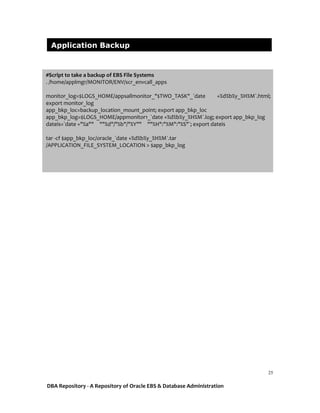
Application Backup
#Script to take a backup of EBS File Systems
. /home/applmgr/MONITOR/ENV/scr_envcall_apps
monitor_log=$LOGS_HOME/appsallmonitor_"$TWO_TASK"_`date +%d%b%y_%H%M`.html;
export monitor_log
app_bkp_loc=backup_location_mount_point; export app_bkp_loc
app_bkp_log=$LOGS_HOME/appmonitor1_`date +%d%b%y_%H%M`.log; export app_bkp_log
dateis=`date +"%a"" ""%d"/"%b"/"%Y"" ""%H":"%M":"%S"`; export dateis
tar -cf $app_bkp_loc/oracle_`date +%d%b%y_%H%M`.tar
/APPLICATION_FILE_SYSTEM_LOCATION > $app_bkp_log
DBA Repository - A Repository of Oracle EBS & Database Administration
26
Script checks the number of concurrent request in Pending-Standby status and sends
out an alert if the no of conc request in Pending-Standby is abnormal.
Pending standby count Monitor
# Script to Check increase in Pending Standby count
. /home/applmgr/MONITOR/ENV/scr_envcall_apps
pdnstb_rep=$LOGS_HOME/pdnstb_cnt.log;export pdnstb_rep
mail_log=$MAILLOG_HOME/mailpdnstb.log; export mail_log
watw=`echo $APPSPWD|openssl enc -aes-128-cbc -a -d -salt -pass pass:asdffdsa`; export watw
dateis=`date +"%a"" ""%d"/"%b"/"%Y"" ""%H":"%M":"%S"`; export dateis
sqlplus -s apps/$watw << EOF > $pdnstb_rep
set heading off;
set feedback off;
select count(*)
from APPLSYS.fnd_Concurrent_requests a,
APPLSYS.fnd_concurrent_programs_tl c2,
APPLSYS.fnd_concurrent_programs c,
applsys.fnd_lookup_values l1
where a.concurrent_program_id = c.concurrent_program_id
and a.program_application_id = c.application_id
and c2.concurrent_program_id = c.concurrent_program_id
and c2.language = 'US'
and c2.application_id = c.application_id
and a.actual_start_date is null
-- and a.status_code in ('A','H','I','M','P','Q','R')
and a.status_code in ('Q','I')
and a.phase_code in ('P','I')
and sysdate - a.requested_start_date < 2
and a.requested_start_date < sysdate
and l1.lookup_type = 'CP_STATUS_CODE'
and l1.lookup_code = a.status_code
and l1.language = 'US'
and l1.enabled_flag = 'Y'
and (l1.start_date_active <= sysdate and l1.start_date_active is not null)
and (l1.end_date_active > sysdate or l1.end_date_active is null)
order by 1;
quit;
EOF
ct=`cat $pdnstb_rep`; export ct
if [ $ct -gt 100 ]
then
echo -e "Team,nnConcurrent requests in Pending Standby has increased to $ct, please cheack ASAP!!! n" > $mail_log
echo -e "nThanks,nDBA Team" >> $mail_log
cat $mail_log|mailx -s "Pending Standby count has increased in $TWO_TASK!!! - $dateis" $maillist
fi
DBA Repository - A Repository of Oracle EBS & Database Administration
27
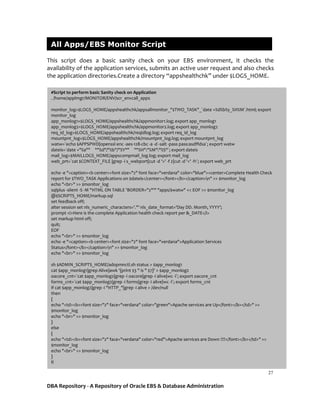
This script does a basic sanity check on your EBS environment, it checks the
availability of the application services, submits an active user request and also checks
the application directories.Create a directory “appshealthchk” under $LOGS_HOME.
All Apps/EBS Monitor Script
#Script to perform basic Sanity check on Application
. /home/applmgr/MONITOR/ENV/scr_envcall_apps
monitor_log=$LOGS_HOME/appshealthchk/appsallmonitor_"$TWO_TASK"_`date +%d%b%y_%H%M`.html; export
monitor_log
app_monlog1=$LOGS_HOME/appshealthchk/appmonitor1.log; export app_monlog1
app_monlog2=$LOGS_HOME/appshealthchk/appmonitor2.log; export app_monlog2
req_id_log=$LOGS_HOME/appshealthchk/reqidlog.log; export req_id_log
mountpnt_log=$LOGS_HOME/appshealthchk/mountpnt_log.log; export mountpnt_log
watw=`echo $APPSPWD|openssl enc -aes-128-cbc -a -d -salt -pass pass:asdffdsa`; export watw
dateis=`date +"%a"" ""%d"/"%b"/"%Y"" ""%H":"%M":"%S"`; export dateis
mail_log=$MAILLOGS_HOME/appscompmail_log.log; export mail_log
web_prt=`cat $CONTEXT_FILE |grep -i s_webport|cut -d '>' -f 2|cut -d '<' -f1`; export web_prt
echo -e "<caption><b center><font size="2" font face="verdana" color="blue"><center>Complete Health Check
report for $TWO_TASK Applications on $dateis</center></font></b></caption>n" >> $monitor_log
echo "<br>" >> $monitor_log
sqlplus -silent -S -M "HTML ON TABLE 'BORDER="2"'" "apps/$watw" << EOF >> $monitor_log
@$SCRIPTS_HOME/markup.sql
set feedback off;
alter session set nls_numeric_characters='.''' nls_date_format='Day DD. Month, YYYY';
prompt <i>Here is the complete Application health check report per &_DATE</i>
set markup html off;
quit;
EOF
echo "<br>" >> $monitor_log
echo -e "<caption><b center><font size="2" font face="verdana">Application Services
Status</font></b></caption>n" >> $monitor_log
echo "<br>" >> $monitor_log
sh $ADMIN_SCRIPTS_HOME/adopmnctl.sh status > $app_monlog1
cat $app_monlog1|grep Alive|awk '{print $3 " is " $7}' > $app_monlog2
oacore_cnt=`cat $app_monlog2|grep -i oacore|grep -i alive|wc -l`; export oacore_cnt
forms_cnt=`cat $app_monlog2|grep -i forms|grep -i alive|wc -l`; export forms_cnt
if cat $app_monlog2|grep -i "HTTP_"|grep -i alive > /dev/null
then
{
echo "<td><b><font size="2" face="verdana" color="green">Apache services are Up</font></b></td>" >>
$monitor_log
echo "<br>" >> $monitor_log
}
else
{
echo "<td><b><font size="2" face="verdana" color="red">Apache services are Down !!!!</font></b></td>" >>
$monitor_log
echo "<br>" >> $monitor_log
}
fi
DBA Repository - A Repository of Oracle EBS & Database Administration
28
if cat $app_monlog2|grep -i "oacore"|grep -i alive > /dev/null && [ "$oacore_cnt" -eq '4' ]
then
{
echo "<td><b><font size="2" face="verdana" color="green">Oacore Services are Up</font></b></td>" >>
$monitor_log
echo "<br>" >> $monitor_log
}
else
{
echo "<td><b><font size="2" face="verdana" color="red">Oacore Services are Down !!!!</font></b></td>" >>
$monitor_log
echo "<br>" >> $monitor_log
}
fi
if cat $app_monlog2|grep -i "forms"|grep -i alive > /dev/null && [ "$forms_cnt" -eq '2' ]
then
{
echo "<td><b><font size="2" face="verdana" color="green">Forms Services are Up</font></b></td>" >>
$monitor_log
echo "<br>" >> $monitor_log
}
else
{
echo "<td><b><font size="2" face="verdana" color="red">Forms Services are Down !!!!</font></b></td>" >>
$monitor_log
echo "<br>" >> $monitor_log
}
fi
if cat $app_monlog2|grep -i "oafm"|grep -i alive > /dev/null
then
{
echo "<td><b><font size="2" face="verdana" color="green">Oafm is Up</font></b></td>" >> $monitor_log
echo "<br>" >> $monitor_log
}
else
{
echo "<td><b><font size="2" face="verdana" color="red">Oafm is Down !!!!</font></b></td>" >> $monitor_log
echo "<br>" >> $monitor_log
}
fi
echo "<br>" >> $monitor_log
echo -e "<caption><b center><font size="2" font face="verdana">Port Status</font></b></caption>n" >>
$monitor_log
echo "<br>" >> $monitor_log
DBA Repository - A Repository of Oracle EBS & Database Administration
29
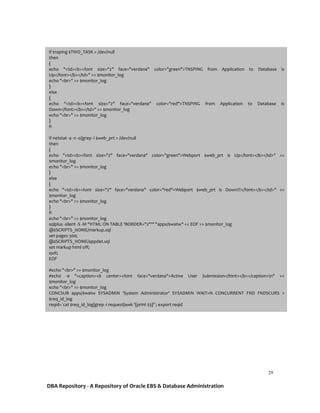
if tnsping $TWO_TASK > /dev/null
then
{
echo "<td><b><font size="2" face="verdana" color="green">TNSPING from Application to Database is
Up</font></b></td>" >> $monitor_log
echo "<br>" >> $monitor_log
}
else
{
echo "<td><b><font size="2" face="verdana" color="red">TNSPING from Application to Database is
Down</font></b></td>" >> $monitor_log
echo "<br>" >> $monitor_log
}
fi
if netstat -a -n -o|grep -i $web_prt > /dev/null
then
{
echo "<td><b><font size="2" face="verdana" color="green">Webport $web_prt is Up</font></b></td>" >>
$monitor_log
echo "<br>" >> $monitor_log
}
else
{
echo "<td><b><font size="2" face="verdana" color="red">Webport $web_prt is Down!!!</font></b></td>" >>
$monitor_log
echo "<br>" >> $monitor_log
}
fi
echo "<br>" >> $monitor_log
sqlplus -silent -S -M "HTML ON TABLE 'BORDER="2"'" "apps/$watw" << EOF >> $monitor_log
@$SCRIPTS_HOME/markup.sql
set pages 300;
@$SCRIPTS_HOME/appdet.sql
set markup html off;
quit;
EOF
#echo "<br>" >> $monitor_log
#echo -e "<caption><b center><font face="verdana">Active User Submission</font></b></caption>n" >>
$monitor_log
echo "<br>" >> $monitor_log
CONCSUB apps/$watw SYSADMIN 'System Administrator' SYSADMIN WAIT=N CONCURRENT FND FNDSCURS >
$req_id_log
reqid=`cat $req_id_log|grep -i request|awk '{print $3}'`; export reqid
DBA Repository - A Repository of Oracle EBS & Database Administration
30
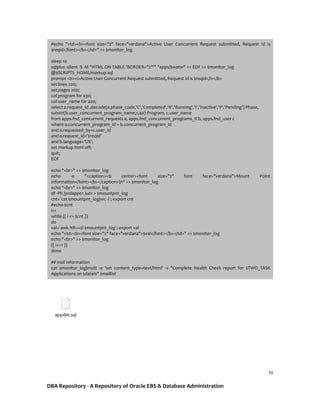
appdet.sql
#echo "<td><b><font size="2" face="verdana">Active User Concurrent Request submitted, Request Id is
$reqid</font></b></td>" >> $monitor_log
sleep 10
sqlplus -silent -S -M "HTML ON TABLE 'BORDER="2"'" "apps/$watw" << EOF >> $monitor_log
@$SCRIPTS_HOME/markup.sql
prompt <b><i>Active User Concurrent Request submitted, Request Id is $reqid</i></b>
set lines 200;
set pages 200;
col program for a30;
col user_name for a20;
select a.request_id ,decode(a.phase_code,'C','Completed','R','Running','I','Inactive','P','Pending') Phase,
substr(b.user_concurrent_program_name,1,40) Program, c.user_name
from apps.fnd_concurrent_requests a, apps.fnd_concurrent_programs_tl b, apps.fnd_user c
where a.concurrent_program_id = b.concurrent_program_id
and a.requested_by=c.user_id
and a.request_id='$reqid'
and b.language='US';
set markup html off;
quit;
EOF
echo "<br>" >> $monitor_log
echo -e "<caption><b center><font size="2" font face="verdana">Mount Point
Information</font></b></caption>n" >> $monitor_log
echo "<br>" >> $monitor_log
df -Ph /prdapp01 /u01 > $mountpnt_log
cnt=`cat $mountpnt_log|wc -l`; export cnt
#echo $cnt
i=1
while (( i <= $cnt ))
do
val=`awk NR==$i $mountpnt_log`; export val
echo "<td><b><font size="2" face="verdana">$val</font></b></td>" >> $monitor_log
echo "<br>" >> $monitor_log
(( i+=1 ))
done
## mail information
cat $monitor_log|mutt -e 'set content_type=text/html' -s "Complete Health Check report for $TWO_TASK
Applications on $dateis" $maillist
DBA Repository - A Repository of Oracle EBS & Database Administration
31
Prior to implementation of any scripts mentioned in this document EBS/Database
Administrators are strongly advised to review the deployment methods and test
them properly prior moving it to the Business.
Thank You
Please Note

Shell Scripts for Oracle Database and E-Business Suite.pdf

  • 1.
    DBA Repository -A Repository of Oracle EBS & Database Administration 1 Shell Scripts for your Oracle Database & Oracle E-Business Suite Akhash Ramnath Doyensys Pvt Ltd DBA Repository A Repository of Oracle EBS & Database Administration
  • 2.
    DBA Repository -A Repository of Oracle EBS & Database Administration 2 Overview Shell scripts converts a DBA’s manual effort into a proactive automated operation. Shell Scripts are very important for an Oracle EBS & Database environment. In this document i have Incorporated some important shell scripts to perform an efficient reactive monitoring to your Oracle EBS and Database Systems.  These scripts work in a unique way with a common env file that has all the necessary information for the scripts to work. This helps us to manage operation of Shell Scripts from a centralized env file.  These Shell Scripts sends alerts to the respective team only when there is an issue and maintains a log for reference.  Having a centralized env file for Shell Scripts will help us reduce the effort in making any modifications in the future without disturbing all scripts.  The following scripts will be shared as part of this document, Database Scripts EBS Scripts Database Instance Availability Application Services Availability Database Listener Availability Concurrent Manager Availability Tablespace Alert Long Running Concurrent Requests Check for errors in Database Alert log Workflow Notification Status Blocking Session Alert Kill Forms Runaway Processes Database Full Backup Important Concurrent Requests Status Database Incremental Backup Cost Manager Status Archivelog Backup Application Backup Purge Archivelog Pending standby count Monitor DB All Monitor Script All Apps/EBS Monitor Script
  • 3.
    DBA Repository -A Repository of Oracle EBS & Database Administration 3 In order to easily maintain and manage the Shell Scripts performing the following will help us a lot in many aspects, A. Create & Maintain a common env file for the shell script and include all important variables required for the scripts in the common env file B. Decrypt the passwords called/used in the Shell Scripts and maintain it in a hidden file C. Maintain a log of every important tasks for reference,forecasting, etc. Pre req,  In your DB/Application server first create a directory MONITOR.  Under MONITOR Directory create sub directories ENV, SCRIPTS, LOG  The ENV directory is to store the envfile, hidden file.  SCRIPTS directory is to store the actula shell scripts.  LOG directory will have all the logfiles of the scripts.  Inside LOG, create another directory MAIL_MESSAGE.  The directory MAIL_MESSAGE will store the mail content that will be mailed to the user. For the sake of this document lets assume our locations as follows, Scripts Location for DB Server - home/oracle/MONITOR Scripts Location for EBS Server - home/applmgr/MONITOR Refer to the following for a common env file, Create and Maintain a common env file for your shell script ## Common env file sourcing for Shell Scripts . $ORACLE_HOME_LOCATION/Database_environmentfile.env . /home/oracle/MONITOR/ENV/.secpass LOGS_HOME=/home/oracle/MONITOR/LOG; export LOGS_HOME SCRIPTS_HOME=$SCRIPTS_HOME; export SCRIPTS_HOME MAILLOG_HOME=$LOGS_HOME/MAIL_MESSAGE; export MAILLOG_HOME maillist=dbagroup@mail.com,ebsgroup@mail.com  In the first line source the database environment file  Second line sources a hidden file that has all the encrypted passwords in a variable, which is later called in the Shell scripts.  LOGS_HOME is the location of all the respective logs generated by the Shell Scripts  SCRIPTS_HOME is the actual location where all the respective Shell Scripts are placed.  MAILLOG_HOME is a location for the mail content  Maillist is the variable used to specify the mail id’s. (Use this variable if the mail id’s are common for all Shell Scripts, if the mail id’s are different for each scripts, then I would advise you to use this variable in the actual scripts)  Some of the scripts will require a separate directory to be created, please review the Logfile locations of each scripts before implementing.
  • 4.
    DBA Repository -A Repository of Oracle EBS & Database Administration 4 Hidden password file - /home/oracle/MONITOR/ENV/.secpass Using the user credentials(Username/Password) in the Shell Scripts are very common. Saving the Username & Password in a common hidden file and calling them in the script is a simple method. It allows the Administrator to make sure that the password is unknown/hidden in all the Shell Scripts and if there is a change in the credentials in the future we don't have to modify the credentials in each and every script, just changing it in the common hidden file will be enough. We could also encrypt/decrypt the passwords so that the password is unknown to the persons who are not DBA’s. Here i have Incorporated a simple built in OS Utility openssl to encrypt/decrypt the passwords. Use the following commands to encrypt and decrypt the passwords. For example, $ echo test|openssl enc -aes-128-cbc -a -salt -pass pass:asdffdsa U2FsdGVkX18eXjViNN+HczNVqMHCfNqvHd+rneeejuo= $ $ echo U2FsdGVkX18eXjViNN+HczNVqMHCfNqvHd+rneeejuo=|openssl enc -aes-128-cbc -a -d -salt -pass pass:asdffdsa test All our scripts will depend on the common file and the common env file has the typical variables/values a shell scripts would require. Our scripts will send alerts only if there is an issue, and the will come to us in clear HTML format with the help of a css script(markup.sql) that is called in the Shell Scripts. markup.sql All the logs will be present in the LOG_HOME. Place this markup.sql file in the $SCRIPTS_HOME and call it where ever required. Now that we have created the Common env file and the file to store the password, we shall go ahead and write Shell Scripts to Monitor our EBS and Database system. I am using the following file to store the passwords, $ cat /home/oracle/MONITOR/ENV/.secpass APPSPWD=U2FsdGVkX18eXjViNN+HczNVqMHCfNqvHd+rneeejuo=; export APPSPWD SYSPWD=U2FsdGVkX18eXjViNN+HczNVqMHCfNqvHd+rneeejuo=; export SYSPWD SYSTPWD=U2FsdGVkX18eXjViNN+HczNVqMHCfNqvHd+rneeejuo=; export SYSTPWD I have encrypted the APPS, SYS, SYSTEM user password using openssl and have saved the values in a variable. I will call the respective variable in the Shell Scripts wherever possible.Prepare a file with respective password for your environment and place them in all the db and application servers.
  • 5.
    DBA Repository -A Repository of Oracle EBS & Database Administration 5 Script to check if the database instance is up and running. This is a simple script to check the availability of the Database Instance. The database availability log is stored in dbstatus_hist.log file. Alert will be sent to the users in the distribution list only if the database is not available. Database Instance Availability #Script to check db status . /home/oracle/MONITOR/ENV/scr_envcall_db dateis=`date +"%a"" ""%d"/"%b"/"%Y"" ""%H":"%M":"%S"`; export dateis status_log=$LOGS_HOME/dbstatus_hist.log; export status_log status_log1=$LOGS_HOME/dbstatus1.log; export status_log1 mail_message=$MAILLOG_HOME/db_status_message.log; export mail_message sqlplus -s "/as sysdba" <<EOF > $status_log1 select name, open_mode from v$database; quit EOF if cat $status_log1|grep -i 'READ WRITE' > /dev/null && ps -ef|grep -i "$ORACLE_SID"|grep -i pmon|grep -v grep > /dev/null then echo "Database $ORACLE_SID is Up and Running Fine - $dateis" >> $status_log else echo "Database $ORACLE_SID might be Down or Unavailable - $dateis" >> $status_log echo -e "Team,nnDatabase $ORACLE_SID might be Down on `hostname`, please cheack ASAP!!!n" > $mail_message cat $status_log1 >> $mail_message echo -e "Refer log files $status_log and $status_log1n" >> $mail_message echo -e "Thanks,nDBA Team" >> $mail_message mailx -s "CRITICAL:Alarm:$ORACLE_SID Database is Down - $dateis" $maillist < $mail_message fi
  • 6.
    DBA Repository -A Repository of Oracle EBS & Database Administration 6 Script to check if the database listener is up and running. This is a simple script to check the availability of the Database Listener. The database availability log is stored in lsnr_statuslog_hist.log file. Alert will be sent to the users in the distribution list only if the listener is not available. Database Listener Availability #Script to check the listener services . /home/oracle/MONITOR/ENV/scr_envcall_db dateis=`date +"%a"" ""%d"/"%b"/"%Y"" ""%H":"%M":"%S"`; export dateis lsnr_statuslog=$LOGS_HOME/lsnr_statuslog_hist.log; export lsnr_statuslog lsnr_statuslog2=$LOGS_HOME/lsnr_statuslog2.log; export lsnr_statuslog2 mail_message=$MAILLOG_HOME/lsnr_status_message.log; export mail_message lsnrctl status $ORACLE_SID > $lsnr_statuslog2 echo "n" >> $lsnr_statuslog2 tnsping $ORACLE_SID >> $lsnr_statuslog2 if cat $lsnr_statuslog2|grep -i "The command completed successfully" > /dev/null && tnsping $ORACLE_SID > /dev/null then { echo "$ORACLE_SID listener is Up and Running - $dateis" >> $lsnr_statuslog } else { echo "$ORACLE_SID listener is Down - $dateis" >> $lsnr_statuslog echo -e "Team,nn$ORACLE_SID Listener $ORACLE_SID might be Down on `hostname`, please cheack ASAP!!!n" > $mail_message cat $lsnr_statuslog2 >> $mail_message echo -e "nRefer to script logfiles $lsnr_statuslog and $lsnr_statuslog2." >> $mail_message echo -e "Thanks,nDBA Team" >> $mail_message mailx -s "CRITICAL:Alarm:$ORACLE_SID listener is Down - $dateis" $maillist < $mail_message } fi
  • 7.
    DBA Repository -A Repository of Oracle EBS & Database Administration 7 Scripts to check used/free space of the tablespace. The script will check for tablespace’s used space and if the used space has crossed 95% the users in the distribution list will get alerts. Tablespace Alert #Script to check tablespace size . /home/oracle/MONITOR/ENV/scr_envcall_db dateis=`date +"%a"" ""%d"/"%b"/"%Y"" ""%H":"%M":"%S"`; export dateis tbsrpt_rep=$LOGS_HOME/tbschkrpt.html; export tbsrpt_rep sqlplus -silent -S -M "HTML ON TABLE 'BORDER="2"'" "/as sysdba" << EOF > $tbsrpt_rep @$SCRIPTS_HOME/markup.sql set feedback on; prompt <i>Team,</i><br> prompt <i>Tablespaces running out of space in $ORACLE_SID on `hostname`,</i><br> select total.ts "Tablespace Name", total.mb "Total Size in MB", NVL(total.mb - free.mb,total.mb) "Used Size in MB", NVL(free.mb,0) "Free Size in MB", DECODE(total.mb,NULL,0,NVL(ROUND((total.mb - free.mb)/(total.mb)*100,2),100)) "Pct Used" from (select tablespace_name ts, sum(bytes)/1024/1024 mb from dba_data_files group by tablespace_name) total, (select tablespace_name ts, sum(bytes)/1024/1024 mb from dba_free_space group by tablespace_name) free where total.ts=free.ts(+) AND DECODE(total.mb,NULL,0,NVL(ROUND((total.mb - free.mb)/(total.mb)*100,2),100)) > 95 UNION ALL select sh.tablespace_name, SUM(sh.bytes_used+sh.bytes_free)/1024/1024 "total_mb", SUM(sh.bytes_used)/1024/1024 "used_mb", SUM(sh.bytes_free)/1024/1024 "free_mb", ROUND(SUM(sh.bytes_used)/SUM(sh.bytes_used+sh.bytes_free)*100,2) "pct_used" FROM v$temp_space_header sh having ROUND(SUM(sh.bytes_used)/SUM(sh.bytes_used+sh.bytes_free)*100,2) >95 GROUP BY tablespace_name order by 5 desc; prompt <i>Please do the needful.</i><br> prompt <i>Thanks,</i> prompt <i>DBA Team</i> set markup html off; quit; EOF cnt=`cat $tbsrpt_rep|grep -i "no rows selected"|wc -l`; export cnt if [ $cnt -eq 0 ] then cat $tbsrpt_rep|grep -v "selected."|mutt -e 'set content_type=text/html' -s 'Critical - Tablespaces with less space in '$ORACLE_SID' on '$dateis'' $maillist fi
  • 8.
    DBA Repository -A Repository of Oracle EBS & Database Administration 8 #Script to check for errors in the alert log of the database Script checks for error in the database alert log This script will check for any new ORA- errors in the database alert log file and send an alert to the users in the distribution list.Please source the alert log of the database in alert_log variable. Check for errors in Database Alert log #Script to check for errors in alert log . /home/oracle/MONITOR/ENV/scr_envcall_db dateis=`date +"%a"" ""%d"/"%b"/"%Y"" ""%H":"%M":"%S"`; export dateis alert_log=/alert_log_location/alert_logfile_name.log; export alert_log temp_alert_log=$LOGS_HOME/temp_alert_$ORACLE_SID.log error_log_hist=$LOGS_HOME/error_log_"$ORACLE_SID"_hist.log error_log=$LOGS_HOME/error_log_$ORACLE_SID.log mail_message=$MAILLOG_HOME/alert_check_message.log; export mail_message diff $alert_log $temp_alert_log |grep -i "ora-"|sed 's/<//' > $error_log ec=`cat $error_log|wc -l`; export error_log if [ $ec -gt 0 ] then echo -e "Team,nnPlease find the errors in the Alertlog of $ORACLE_SID on `hostname` as follows,n" > $mail_message cat $error_log >> $mail_message echo -e "nThanks,nDBA Team" >> $mail_message cat $mail_message|mailx -s "Errors in Alert log - $ORACLE_SID on $dateis" $maillist echo "----------------" >> $error_log_hist echo "New errors found in the Alert log of $ORACLE_SID - $dateis" >> $error_log_hist cat $error_log >> $error_log_hist echo "----------------" >> $error_log_hist else echo "No new errors in the Alert log of $ORACLE_SID - $dateis" >> $error_log_hist fi cp $alert_log $temp_alert_log
  • 9.
    DBA Repository -A Repository of Oracle EBS & Database Administration 9 Script to check for blocking session in a database. This script will check for blocking session in the database, kindly place the block.sql file under $SCRIPTS_HOME directory. block.sql Script sends out an alert to the users in distribution list if there are any blocking sessions. Blocking Session Alert # Script to check for blocking session . /home/oracle/MONITOR/ENV/scr_envcall_db dateis=`date +"%a"" ""%d"/"%b"/"%Y"" ""%H":"%M":"%S"`; export dateis blocking_sess_det=$LOGS_HOME/blocking_sess_det.html; export blocking_sess_det sqlplus -silent -S -M "HTML ON TABLE 'BORDER="2"'" "/as sysdba" << EOF > $blocking_sess_det @$SCRIPTS_HOME/markup.sql set feedback on; prompt <i>Team,</i><br> prompt <i>There are blocking sessions in $ORACLE_SID on `hostname`,pls check ASAP!!!</i><br> @$SCRIPTS_HOME/block.sql prompt <i>Thanks,</i> prompt <i>DBA Team</i> set markup html off; quit; EOF cnt=`cat $blocking_sess_det|grep -i "no rows selected"|wc -l`; export cnt if [ $cnt -eq 0 ] then #cat $blocking_sess_det|grep -v "selected."|mailx -s "$(echo -e "Blocking session in $ORACLE_SID - $dateisnContent-Type: text/html")" $maillist cat $blocking_sess_det|grep -v "selected."|mutt -e 'set content_type=text/html' -s 'Blocking session in '$ORACLE_SID' - '$dateis'' $maillist fi
  • 10.
    DBA Repository -A Repository of Oracle EBS & Database Administration 10 Please create a directory RMAN under $LOGS_HOME and under RMAN directory create two directories DB and ARC for db and archive log backup logfiles respectively. backup_db.rman Place this file under $SCRIPTS_HOME, the script will take a full backup of the database and check if the backup has got completed successfully. If there are any errors in the backup, an alert will be sent by the script to the users. The script also maintains a log of the backup status every time it is executed in the $LOGS_HOME directory. Database Full Backup #Script to take backup of Database (Full backup) db . /home/oracle/MONITOR/ENV/scr_envcall_db dateis=`date +"%a"" ""%d"/"%b"/"%Y"" ""%H":"%M":"%S"`; export dateis rman_dbfull_log=$LOGS_HOME/RMAN/DB/dbfull_bkp_`date +%d%b%y_%H%M`.log;export rman_dbfull_log rman_dbfull_log_hist=$LOGS_HOME/RMAN/DB/rman_dbfull_log_hist.log; export rman_dbfull_log_hist mail_message=$MAILLOG_HOME/dbfull_bkp_message.log; export mail_message rman target / cmdfile=$SCRIPTS_HOME/backup_db.rman > $rman_dbfull_log #rman_err=`cat $rman_dbfull_log|grep -i 'rman-|ora-'`; export rman_err rman_err_cnt=`cat $rman_dbfull_log|grep -i 'rman-|ora-'|wc -l`; export rman_err_cnt if [ $rman_err_cnt -gt 0 ] then echo "RMAN DB Full backup has failed/have errors at $dateis in $ORACLE_SID" >> $rman_dbfull_log_hist echo -e "Team,nnDB Full backup has completed with errors or have failed in $ORACLE_SID on `hostname`.n" > $mail_message echo -e "Please find the log as follows,n" >> $mail_message cat $rman_dbfull_log >> $mail_message echo -e "nRefer to script logfiles $rman_dbfull_log and $rman_dbfull_log_hist.n" >> $mail_message echo -e "Thanks,nDBA Team" >> $mail_message mailx -s "$ORACLE_SID DB Full Backup has failed - $dateis!!! " $maillist < $mail_message else echo "RMAN DB Full backup has completed successfully at $dateis in $ORACLE_SID" >> $rman_dbfull_log_hist fi
  • 11.
    DBA Repository -A Repository of Oracle EBS & Database Administration 11 Full Backup backup_db_incr.r man Place this file under $SCRIPTS_HOME, the script will take an Incremental backup of the database and check if the backup has got completed successfully. If there are any errors in the backup, an alert will be sent by the script to the users. The script also maintains a log of the backup status every time it is executed in the $LOGS_HOME directory. Database Incremental Backup #Script to take backup of Database (Incremental backup) db . /home/oracle/MONITOR/ENV/scr_envcall_db dateis=`date +"%a"" ""%d"/"%b"/"%Y"" ""%H":"%M":"%S"`; export dateis rman_dbincr_log=$LOGS_HOME/RMAN/DB/dbincr_bkp_`date +%d%b%y_%H%M`.log;export rman_dbincr_log rman_dbincr_log_hist=$LOGS_HOME/RMAN/DB/rman_dbincr_log_hist.log; export rman_dbincr_log_hist mail_message=$MAILLOG_HOME/dbincr_bkp_message.log; export mail_message rman target / cmdfile=$SCRIPTS_HOME/backup_db_incr.rman > $rman_dbincr_log #rman_err=`cat $rman_dbincr_log|grep -i 'rman-|ora-'`; export rman_err rman_err_cnt=`cat $rman_dbincr_log|grep -i 'rman-|ora-'|wc -l`; export rman_err_cnt if [ $rman_err_cnt -gt 0 ] then echo "RMAN DB Incremental backup has failed/have errors at $dateis in $ORACLE_SID" >> $rman_dbincr_log_hist echo -e "Team,nnDB Incremental backup has completed with errors or have failed in $ORACLE_SID on `hostname`.n" > $mail_message echo -e "Please find the log as follows,n" >> $mail_message cat $rman_dbincr_log >> $mail_message echo -e "nRefer to script logfiles $rman_dbincr_log and $rman_dbincr_log_hist.n" >> $mail_message echo -e "Thanks,nDBA Team" >> $mail_message mailx -s "$ORACLE_SID DB Incremental Backup has failed - $dateis!!! " $maillist < $mail_message else echo "RMAN DB Incremental backup has completed successIncrementaly at $dateis in $ORACLE_SID" >> $rman_dbincr_log_hist fi
  • 12.
    DBA Repository -A Repository of Oracle EBS & Database Administration 12 backup_arch.rma n Place this file under $SCRIPTS_HOME, the script will take a backup of the Archivelogs of the database and check if the backup has got completed successfully. If there are any errors in the backup, an alert will be sent by the script to the users. The script also maintains a log of the backup status every time it is executed in the $LOGS_HOME directory. Archivelog Backup #Script to take backup of Archive logs db . /home/oracle/MONITOR/ENV/scr_envcall_db dateis=`date +"%a"" ""%d"/"%b"/"%Y"" ""%H":"%M":"%S"`; export dateis rman_arc_log=$LOGS_HOME/RMAN/ARC/archive_bkp_`date +%d%b%y_%H%M`.log;export rman_arc_log rman_arc_log_hist=$LOGS_HOME/RMAN/ARC/rman_arc_log_hist.log; export rman_arc_log_hist mail_message=$MAILLOG_HOME/arc_bkp_message.log; export mail_message rman target / cmdfile=$SCRIPTS_HOME/backup_arch.rman > $rman_arc_log #rman_err=`cat $rman_arc_log|grep -i 'rman-|ora-'`; export rman_err rman_err_cnt=`cat $rman_arc_log|grep -i 'rman-|ora-'|wc -l`; export rman_err_cnt if [ $rman_err_cnt -gt 0 ] then echo "RMAN Archivelogs backup has failed/have errors at $dateis in $ORACLE_SID" >> $rman_arc_log_hist echo -e "Team,nnArchivelog backup has completed with errors or have failed in $ORACLE_SID on `hostname`.n" > $mail_message echo -e "Please find the log as follows,n" >> $mail_message cat $rman_arc_log >> $mail_message echo -e "nRefer to script logfiles $rman_arc_log and $rman_arc_log_hist.n" >> $mail_message echo -e "Thanks,nDBA Team" >> $mail_message mailx -s "$ORACLE_SID Archivelog Backup has failed - $dateis!!! " $maillist < $mail_message else echo "RMAN Archivelogs backup completed successfully at $dateis in $ORACLE_SID" >> $rman_arc_log_hist fi
  • 13.
    DBA Repository -A Repository of Oracle EBS & Database Administration 13 This Script will delete archive logs older than 2 days and also check for expired archive logs and remove them if any. Purge Archivelog #Script to purge Archive logs db . /home/oracle/MONITOR/ENV/scr_envcall_db dateis=`date +"%a"" ""%d"/"%b"/"%Y"" ""%H":"%M":"%S"`; export dateis rman_del_log1=$LOGS_HOME/archive_purge.log;export rman_del_log1 rman_del_log2=$LOGS_HOME/archive_purge1.log;export rman_del_log2 rman_crosschk_log=$LOGS_HOME/rman_cross_check.log;export rman_crosschk_log mail_message=$MAILLOG_HOME/arc_purge_message.log; export mail_message rman target / << EOF > $rman_crosschk_log crosscheck archivelog all; delete noprompt expired archivelog all; EOF rman target / << EOF > $rman_del_log2 delete noprompt archivelog until time 'sysdate-2'; EOF rman target / << EOF >> $rman_crosschk_log crosscheck archivelog all; EOF echo "####################### Script ran at $dateis ####################### " >>$rman_del_log1 cat $rman_del_log2>>$rman_del_log1 echo -e "Team,nnArchivelog's are purged in $ORACLE_SID on `hostname`.n" > $mail_message echo -e "Please find the log as follows,n" >> $mail_message cat $rman_del_log2 >> $mail_message echo -e "nRefer to script logfiles $rman_del_log1 and $rman_del_log2." >> $mail_message echo -e "Thanks,nDBA Team" >> $mail_message mailx -s "$ORACLE_SID Archivelog purge status - $dateis" $maillist < $mail_message
  • 14.
    DBA Repository -A Repository of Oracle EBS & Database Administration 14 This is a bonus script that does a basic sanity check to your database and sends a report to the users. Please create a directory “dbaallmonitor” under $LOGS_HOME. DB All Monitor Script #Script to perform basic Sanity check . /home/oracle/MONITOR/ENV/scr_envcall_db monitor_log=$LOGS_HOME/dballmonitor/dballmonitor_"$ORACLE_SID"_`date +%d%b%y_%H%M`.html; export monitor_log dateis=`date +"%a"" ""%d"/"%b"/"%Y"" ""%H":"%M":"%S"`; export dateis mountpnt_log=$LOGS_HOME/mountpnt_log.log; export mountpnt_log mail_message=$MAILLOG_HOME/dballmonitormail.log; export mail_message echo -e "<caption><b center><font size="2" font face="verdana" color="blue"><center>Complete Health Check report for $ORACLE_SID Database on $dateis</center></font></b></caption>n" > $monitor_log echo "<br>" >> $monitor_log sqlplus -silent -S -M "HTML ON TABLE 'BORDER="2"'" "/as sysdba" << EOF >> $monitor_log @$SCRIPTS_HOME/markup.sql set feedback off; alter session set nls_numeric_characters='.''' nls_date_format='Day DD. Month, YYYY'; prompt <i>Here is the complete Database health check report per &_DATE</i><br> @$SCRIPTS_HOME/db_det.sql set markup html off; quit; EOF #echo "<br>" >> $monitor_log tnsping $ORACLE_SID 1>/dev/null if [ $? = 0 ]; then echo "<td><b><font size="2" face="verdana" color="green">Listener is up and running FOR $ORACLE_SID</font></b></td>" >> $monitor_log echo "<br>" >> $monitor_log else echo "<td><b><font size="2" face="verdana" color="red">Listener is not running for $ORACLE_SID !!!!</font></b></td>" >> $monitor_log echo "<br>" >> $monitor_log fi echo "<br>" >> $monitor_log sqlplus -silent -S -M "HTML ON TABLE 'BORDER="2"'" "/as sysdba" << EOF >> $monitor_log set feedback off; @$SCRIPTS_HOME/markup.sql @$SCRIPTS_HOME/db_det2.sql set markup html off; quit; EOF
  • 15.
    DBA Repository -A Repository of Oracle EBS & Database Administration 15 db_det.sql db_det2.sql Place the above files under $SCRIPTS_HOME. This scripts does a basic sanity check to the database and sends us a report on the availability of the DB instance, listener, DB Size, Tablespace Usage report, Invalid Object list, Mount Point space usage. echo "<br>" >> $monitor_log echo -e "<caption><b center><font size="2" font face="verdana">Mount Point Information</font></b></caption>n" >> $monitor_log echo "<br>" >> $monitor_log df -Ph /prddata* /prdarch /orahome > $mountpnt_log cnt=`cat $mountpnt_log|wc -l`; export cnt #echo $cnt i=1 while (( i <= $cnt )) do val=`awk NR==$i $mountpnt_log`; export val echo "<td><b><font size="2" face="verdana">$val</font></b></td>" >> $monitor_log echo "<br>" >> $monitor_log (( i+=1 )) done ## mail information cat $monitor_log|mutt -e 'set content_type=text/html' -s "Complete Health Check report for $ORACLE_SID Database on $dateis" $maillist
  • 16.
    DBA Repository -A Repository of Oracle EBS & Database Administration 16 Application Services Availability #Script to check Application services availability . /home/applmgr/MONITOR/ENV/scr_envcall_apps appsserviceapp_monlog=$LOGS_HOME/appsserviceapp_monlog.log; export appsserviceapp_monlog app_monlog1=$LOGS_HOME/appsmonitor1.log; export app_monlog1 app_monlog2=$LOGS_HOME/appsmonitor2.log; export app_monlog2 temp_app_monlog=$LOGS_HOME/temp_app_monlog.log; export temp_app_monlog dateis=`date +"%a"" ""%d"/"%b"/"%Y"" ""%H":"%M":"%S"`; export dateis mail_log=$MAILLOG_HOME/mailappsservices_log.log; export mail_log web_prt=`cat $CONTEXT_FILE |grep -i s_webport|cut -d '>' -f 2|cut -d '<' -f1`; export web_prt sh $ADMIN_SCRIPTS_HOME/adopmnctl.sh status > $app_monlog1 cat $app_monlog1|grep Alive|awk '{print $3 " is " $7}' > $temp_app_monlog oacore_cnt=`cat $temp_app_monlog|grep -i oacore|grep -i alive|wc -l`; export oacore_cnt forms_cnt=`cat $temp_app_monlog|grep -i forms|grep -i alive|wc -l`; export forms_cnt if cat $temp_app_monlog|grep -i "HTTP_"|grep -i alive > /dev/null then { echo "Apache services are Up" > $app_monlog2 } else { echo "Apache services are Down !!!!" > $app_monlog2 } fi if cat $temp_app_monlog|grep -i "oacore"|grep -i alive > /dev/null && [ "$oacore_cnt" -eq '4' ] then { echo "Oacore Services are Up" >> $app_monlog2 } else { echo "Oacore Services are Down !!!!" >> $app_monlog2 } fi if cat $temp_app_monlog|grep -i "forms"|grep -i alive > /dev/null && [ "$forms_cnt" -eq '2' ] then { echo "Forms Services are Up" >> $app_monlog2 } else { echo "Forms Services are Down !!!!" >> $app_monlog2 } fi
  • 17.
    DBA Repository -A Repository of Oracle EBS & Database Administration 17 This script checks the availability of EBS services like http, oacore, oafm, forms etc and sends to an alert to the distribution list if any services are down/not reachable. If you have more than one forms, oacore services modify the count in the if condition for the respective service. if cat $temp_app_monlog|grep -i "oafm"|grep -i alive > /dev/null then { echo "Oafm is Up" >> $app_monlog2 } else { echo "Oafm is Down !!!!" >> $app_monlog2 } fi if tnsping $TWO_TASK > /dev/null then { echo "TNSPING from Application to Database is Up" >> $app_monlog2 } else { echo "TNSPING from Application to Database is Down" >> $app_monlog2 } fi if netstat -a -n -o|grep -i $web_prt > /dev/null then { echo "Webport $web_prt is Up" >> $app_monlog2 } else { echo "Webport $web_prt is Down!!!" >> $app_monlog2 } fi if cat $app_monlog2|grep -i down > /dev/null then { echo -e "Team,nnApplication services of $TWO_TASK might be Down on `hostname`, please cheack ASAP!!!n" > $mail_log cat $app_monlog2 >>$mail_log echo -e "nRefer to script logfiles $app_monlog1 and $app_monlog2." >> $mail_log echo -e "nThanks,nDBA Team" >> $mail_log cat $mail_log|mailx -s "Application services of $TWO_TASK might be down!!! - $dateis" $maillist } fi echo "Application & Network Status of $TWO_TASK as on $dateis" >> $appsserviceapp_monlog cat $app_monlog2 >> $appsserviceapp_monlog echo "############################################" >> $appsserviceapp_monlog
  • 18.
    DBA Repository -A Repository of Oracle EBS & Database Administration 18 Script to check the concurrent manager status, script will send out an alert to the users if the concurrent managers are down/unavailable.Also we shall set a threshold for number of concurrent managers running in a node, the script will alert the users if there is any reduction in the no of concurrent managers running. Concurrent Manager Availability # Script to check Concurrent Managers Status . /home/applmgr/MONITOR/ENV/scr_envcall_apps dateis=`date +"%a"" ""%d"/"%b"/"%Y"" ""%H":"%M":"%S"`; export dateis mail_log=$MAILLOG_HOME/mailconcservice_log.log; export mail_log conc_monlog=$LOGS_HOME/concmonitor.log; export conc_monlog conc_monlog1=$LOGS_HOME/concmonitor1.log; export conc_monlog1 watw=`echo $APPSPWD|openssl enc -aes-128-cbc -a -d -salt -pass pass:asdffdsa`; export watw sh $ADMIN_SCRIPTS_HOME/adcmctl.sh status apps/"$watw" > $conc_monlog1 conc_sermon=`ps -ef |grep -i applmgr|grep -i FNDLIBR |grep -v grep |wc -l`; export conc_sermon if cat $conc_monlog1|grep -i "Internal Concurrent Manager is Active" > /dev/null && [ "$conc_sermon" -gt '40' ] then { echo "Concurrents Managers are up and running fine - $dateis" >> $conc_monlog echo "FNDLIBR count is - $conc_sermon - $dateis" >> $conc_monlog } else { echo "Concurrents Managers might be Down - $dateis" >> $conc_monlog echo "FNDLIBR count is - $conc_sermon - $dateis" >> $conc_monlog echo -e "Team,nnConcurrent Manager services of $TWO_TASK might be Down on `hostname`, please cheack ASAP!!!n" > $mail_log cat $conc_monlog1 >>$mail_log echo "FNDLIBR count is - $conc_sermon" >>$mail_log echo -e "nRefer to script logfiles $conc_monlog1 and $conc_monlog" >> $mail_log echo -e "nThanks,nDBA Team" >> $mail_log cat $mail_log|mailx -s "Critical: Alarm - Concurrent Manager services of $TWO_TASK might be Down!!! - $dateis" $maillist } fi
  • 19.
    DBA Repository -A Repository of Oracle EBS & Database Administration 19 Script to check for long running concurrent request, threshold is set to 120 mins. The script will sent out alerts with the details of the concurrent request. Long Running Concurrent Requests # Script to Check Long Running Concurrent Requests . /home/applmgr/MONITOR/ENV/scr_envcall_apps longrun_rep=$LOGS_HOME/longrun_rep.log;export longrun_rep longrun_out=$LOGS_HOME/longrun_rep.html;export longrun_out watw=`echo $APPSPWD|openssl enc -aes-128-cbc -a -d -salt -pass pass:asdffdsa`; export watw dateis=`date +"%a"" ""%d"/"%b"/"%Y"" ""%H":"%M":"%S"`; export dateis sqlplus -silent -S -M "HTML ON TABLE 'BORDER="2"'" "apps/$watw" << EOF > $longrun_out @$SCRIPTS_HOME/markup.sql set pages 300; prompt <i>Team,</i><br> prompt <i>Please find the long running Concurrent Programs in $TWO_TASK as follows,</i><br> SELECT fcp.user_concurrent_program_name "Concurrent Program Name" ,fcr.request_id "Request Id" ,ROUND (((SYSDATE - fcr.actual_start_date) * 60 * 24), 2) "Runtime in Mins" ,TO_CHAR (fcr.actual_start_date, 'DD-MON-YYYY HH24:MI:SS') "Actual Start Date" ,DECODE (fcr.status_code, 'R', fcr.status_code) "Status" ,fcr.argument_text "Parameters" FROM apps.fnd_concurrent_requests fcr ,apps.fnd_user fu ,apps.fnd_responsibility_tl fr ,apps.fnd_concurrent_programs_tl fcp WHERE fcr.status_code LIKE 'R' AND fu.user_id = fcr.requested_by AND fr.responsibility_id = fcr.responsibility_id AND fcr.concurrent_program_id = fcp.concurrent_program_id AND fcr.program_application_id = fcp.application_id AND ROUND (((SYSDATE - fcr.actual_start_date) * 60 * 24), 2) > 120 ORDER BY 3 desc; prompt <i>Thanks,</i><br> prompt <i>DBA Team</i><br> set markup html off; quit; EOF ct=`cat $longrun_out|grep -i "no rows selected"|wc -l`; export ct if [ $ct -eq 0 ] then cat $longrun_out|grep -v "selected."| mutt -e 'set content_type=text/html' -s "Long running Concurrent request in $TWO_TASK on $dateis" $maillist fi
  • 20.
    DBA Repository -A Repository of Oracle EBS & Database Administration 20 Script checks the status of the Workflow notification Mailer and sends out an alert to the users if the mailer services are down. Workflow Notification Status # Script to check Workflow Notification Mailer Status . /home/applmgr/MONITOR/ENV/scr_envcall_apps dateis=`date +"%a"" ""%d"/"%b"/"%Y"" ""%H":"%M":"%S"`; export dateis mail_log=$MAILLOG_HOME/mailconcservice_log.log; export mail_log wrkflw_status=$LOGS_HOME/wrkflw_status.log; export wrkflw_status wrkflw_status1=$LOGS_HOME/wrkflw_status1.log; export wrkflw_status1 watw=`echo $APPSPWD|openssl enc -aes-128-cbc -a -d -salt -pass pass:asdffdsa`; export watw sqlplus -s apps/$watw << EOF > $wrkflw_status set feed off set heading off select component_status from apps.fnd_svc_components where component_id = (select component_id from apps.fnd_svc_components where component_name = 'Workflow Notification Mailer'); quit EOF if cat $wrkflw_status|grep RUNNING > /dev/null then { echo "Workflow Notification Mailer is up and running fine - $dateis" >> $wrkflw_status1 } else { echo -e "Workflow Notification Mailer is Down - $dateis" >> $wrkflw_status1 echo -e "Team,nnWorkflow Notification Mailer services of $TWO_TASK might be Down on `hostname`, please cheack ASAP!!!n" > $mail_log echo -e "nRefer to script logfiles $wrkflw_status and $wrkflw_status1" >> $mail_log echo -e "nThanks,nDBA Team" >> $mail_log cat $mail_log|mailx -s "Critical:Alarm -Workflow Notification MAiler of $TWO_TASK might be down!!! - $dateis" $maillist } fi
  • 21.
    DBA Repository -A Repository of Oracle EBS & Database Administration 21 Forms runaway processes are frmweb processes that doesn't have a valid background db session, these are unwanted zombie processes that consumes the server resources. Kill Forms Runaway Processes #Script to Kill runaway Form processes . /home/applmgr/MONITOR/ENV/scr_envcall_apps proc_file=$LOGS_HOME/prc_id.log; export proc_file op_log=$LOGS_HOME/sess_proc_id.log; export op_log op_log2=$LOGS_HOME/frmswb_runawy_hist.log; export op_log2 op_log3=$LOGS_HOME/grep_proc_id.sh; export op_log3 op_log4=$LOGS_HOME/kill_proc_id.sh; export op_log4 tmp_log=$LOGS_HOME/temp_frm_sess.log; export tmp_log watw=`echo $SYSTPWD|openssl enc -aes-128-cbc -a -d -salt -pass pass:asdffdsa`; export watw dateis=`date +"%a"" ""%d"/"%b"/"%Y"" ""%H":"%M":"%S"`; export dateis proc_id_list=`ps -ef|grep -i frmweb|grep -v grep|awk '{print $2}' > $proc_file`; export proc_id_list loop_list=`cat $proc_file`;export loop_list for i in $loop_list do sqlplus -s system/$watw << EOF >> $op_log set serveroutput on; set feedback off; declare prcs_id varchar2(30) :='$i'; lv_n_process varchar2(30); begin select distinct process into lv_n_process from v$session where process =prcs_id; exception when no_data_found then dbms_output.put_line('No Database Sessions For Process: '||prcs_id); end; / exit; EOF done op_count=`cat $op_log|grep -i "No Database Sessions For Process:"|wc -l`;export op_count proc_grep=`cat $op_log|grep -i "No Database Sessions For Process:"|awk '{print "ps -ef|grep -i " $6 " |grep -i frmweb"}' > $op_log3`;export proc_grep #echo $op_count
  • 22.
    DBA Repository -A Repository of Oracle EBS & Database Administration 22 The script takes a list of frmweb prcesses running in the node and checks if each and every one of them has a valid db session. If there are no valid db session for a frmweb process, it is automatically killed by the script. The script also maintains a log of what processes are getting killed with proper timestamp. if [ $op_count = 0 ] then echo -e "########################################################################## n" >> $op_log2 echo -e "No Runaway Form Processes during last run at $dateis n" >> $op_log2 echo -e "########################################################################## n" >> $op_log2 else echo -e "########################################################################## n" >> $op_log2 echo -e "tRunaway Form Processes during last run at $dateis as follows," >> $op_log2 cat $op_log >> $op_log2 echo -e "n" >> $op_log2 echo -e "ttGrepping the Form Processes(These Runaway Processes are going to be killed!!!!)" >> $op_log2 sh "$op_log3"|grep -v grep >> $op_log2 echo -e "n" >> $op_log2 sh "$op_log3"|grep -v grep|awk '{print "kill -9 "$2}' > $op_log4 echo -e "tRunaway Processes that are killed!!!!" >> $op_log2 cat $op_log4 >> $op_log2 sh "$op_log4" >> $op_log2 echo -e "n" >> $op_log2 echo -e "########################################################################## n" >> $op_log2 fi #cat $op_log > $tmp_log >$op_log
  • 23.
    DBA Repository -A Repository of Oracle EBS & Database Administration 23 Every EBS environment has few business critical concurrent request that should complete normal without fail, in case if they fail it is our duty to inform it to the customer and diagnose why it failed and re submit it. The following scripts monitors such concurrent requests. Script will sent alert to the users in the distribution list if the mentioned concurrent request did not complete successfully. Important Concurrent Requests Status # Script to Check failed concurrent requests . /home/applmgr/MONITOR/ENV/scr_envcall_apps failed_conc_req=$LOGS_HOME/failed_conc_req.html;export failed_conc_req watw=`echo $APPSPWD|openssl enc -aes-128-cbc -a -d -salt -pass pass:asdffdsa`; export watw dateis=`date +"%a"" ""%d"/"%b"/"%Y"" ""%H":"%M":"%S"`; export dateis sqlplus -silent -S -M "HTML ON TABLE 'BORDER="2"'" "apps/$watw" << EOF > $failed_conc_req @$SCRIPTS_HOME/markup.sql set feedback on; prompt <i>Team,</i><br> prompt <i>Following Scheduled Concurrent request's have failed $TWO_TASK - `hostname`,</i><br> SELECT c.USER_CONCURRENT_PROGRAM_NAME ,To_Char(a.actual_start_date,'DD-MON-YY HH24:MI:SS') START_DATE, To_Char(a.actual_completion_date,'DD-MON-YY HH24:MI:SS') END_DATE, round(((a.actual_completion_date-a.actual_start_date)*24*60*60/60),2) AS Process_time, a.request_id,a.parent_request_id,To_Char(a.request_date,'DD-MON-YY HH24:MI:SS') REQUEST_DATE, DECODE(a.PHASE_CODE,'C', 'Completed','I', 'Inactive', 'P', 'Pending', 'R','Running')PHASE_CODE, DECODE(a.STATUS_CODE,'D','Cancelled', 'E','Error', 'X','Terminated') STATUS_CODE FROM apps.fnd_concurrent_requests a, apps.fnd_concurrent_programs b , apps.FND_CONCURRENT_PROGRAMS_TL c, apps.fnd_user d WHERE a.concurrent_program_id= b.concurrent_program_id AND b.concurrent_program_id=c.concurrent_program_id AND a.requested_by =d.user_id AND trunc(a.actual_completion_date) > trunc(sysdate-1) AND a.status_code IN ('E','X','D') AND c.USER_CONCURRENT_PROGRAM_NAME IN ('Name Of Concurrent Request 1','Name Of Concurrent Request 2','Name Of Concurrent Request 3') order by start_date desc; prompt <i>Thanks,</i> prompt <i>DBA Team</i> set markup html off; quit; EOF cnt=`cat $failed_conc_req|grep -i "no rows selected"|wc -l`; export cnt if [ $cnt -eq 0 ] then cat $failed_conc_req|grep -v "selected."|mutt -e 'set content_type=text/html' -s "Critical Alert:'$TWO_TASK'-Scheduled Concurrent Request's failed to run" $maillist fi
  • 24.
    DBA Repository -A Repository of Oracle EBS & Database Administration 24 Script checks if the Cost Manager is up and running and sends out an alert to the users if the Cost Manager is down/unreachable. Cost Manager Status #Script to check Cost Manager Concurrent Manager . /home/applmgr/MONITOR/ENV/scr_envcall_apps scr_log=$LOGS_HOME/cost_manager_status.log;export scr_log scr_log2=$LOGS_HOME/costmanager.log;export scr_log2 watw=`echo $APPSPWD|openssl enc -aes-128-cbc -a -d -salt -pass pass:asdffdsa`; export watw dateis=`date +"%a"" ""%d"/"%b"/"%Y"" ""%H":"%M":"%S"`; export dateis mail_log=$MAILLOG_HOME/mailcostmanagerstatus.log; export mail_log sqlplus -s apps/$watw << EOF > $scr_log2 set head off set feed off SELECT request_id RequestId,to_char(request_date,'DD-MM-YY:HH:MI:SS') RequestDt, concurrent_program_name,phase_code Phase,status_code Status FROM fnd_concurrent_requests fcr, fnd_concurrent_programs fcp WHERE fcp.application_id = 702 AND fcp.concurrent_program_name in ('CMCTCM', 'CMCMCW', 'CMCACW', 'CSTRCMCR', 'CSTRCMCR1', 'CSTRCMCR3') AND fcr.concurrent_program_id = fcp.concurrent_program_id AND fcr.program_application_id = 702 AND fcr.phase_code <> 'C'; EOF cat $scr_log2 >> $scr_log ct=`cat $scr_log2|wc -l` if [ $ct -lt 1 ] then echo "Cost Manager Concurrent Mananer is down - $dateis" >> $scr_log echo -e "Team,nnCost Manager Concurrent Mananer is down in $TWO_TASK on `hostname`, please cheack ASAP!!!n" > $mail_log echo -e "nRefer to script logfiles $scr_log and $scr_log2." >> $mail_log echo -e "nThanks,nDBA Team" >> $mail_log cat $mail_log|mailx -s "Cost Manager Concurrent Mananer is down in $TWO_TASK!!! - $dateis" $maillist fi
  • 25.
    DBA Repository -A Repository of Oracle EBS & Database Administration 25 Application Backup #Script to take a backup of EBS File Systems . /home/applmgr/MONITOR/ENV/scr_envcall_apps monitor_log=$LOGS_HOME/appsallmonitor_"$TWO_TASK"_`date +%d%b%y_%H%M`.html; export monitor_log app_bkp_loc=backup_location_mount_point; export app_bkp_loc app_bkp_log=$LOGS_HOME/appmonitor1_`date +%d%b%y_%H%M`.log; export app_bkp_log dateis=`date +"%a"" ""%d"/"%b"/"%Y"" ""%H":"%M":"%S"`; export dateis tar -cf $app_bkp_loc/oracle_`date +%d%b%y_%H%M`.tar /APPLICATION_FILE_SYSTEM_LOCATION > $app_bkp_log
  • 26.
    DBA Repository -A Repository of Oracle EBS & Database Administration 26 Script checks the number of concurrent request in Pending-Standby status and sends out an alert if the no of conc request in Pending-Standby is abnormal. Pending standby count Monitor # Script to Check increase in Pending Standby count . /home/applmgr/MONITOR/ENV/scr_envcall_apps pdnstb_rep=$LOGS_HOME/pdnstb_cnt.log;export pdnstb_rep mail_log=$MAILLOG_HOME/mailpdnstb.log; export mail_log watw=`echo $APPSPWD|openssl enc -aes-128-cbc -a -d -salt -pass pass:asdffdsa`; export watw dateis=`date +"%a"" ""%d"/"%b"/"%Y"" ""%H":"%M":"%S"`; export dateis sqlplus -s apps/$watw << EOF > $pdnstb_rep set heading off; set feedback off; select count(*) from APPLSYS.fnd_Concurrent_requests a, APPLSYS.fnd_concurrent_programs_tl c2, APPLSYS.fnd_concurrent_programs c, applsys.fnd_lookup_values l1 where a.concurrent_program_id = c.concurrent_program_id and a.program_application_id = c.application_id and c2.concurrent_program_id = c.concurrent_program_id and c2.language = 'US' and c2.application_id = c.application_id and a.actual_start_date is null -- and a.status_code in ('A','H','I','M','P','Q','R') and a.status_code in ('Q','I') and a.phase_code in ('P','I') and sysdate - a.requested_start_date < 2 and a.requested_start_date < sysdate and l1.lookup_type = 'CP_STATUS_CODE' and l1.lookup_code = a.status_code and l1.language = 'US' and l1.enabled_flag = 'Y' and (l1.start_date_active <= sysdate and l1.start_date_active is not null) and (l1.end_date_active > sysdate or l1.end_date_active is null) order by 1; quit; EOF ct=`cat $pdnstb_rep`; export ct if [ $ct -gt 100 ] then echo -e "Team,nnConcurrent requests in Pending Standby has increased to $ct, please cheack ASAP!!! n" > $mail_log echo -e "nThanks,nDBA Team" >> $mail_log cat $mail_log|mailx -s "Pending Standby count has increased in $TWO_TASK!!! - $dateis" $maillist fi
  • 27.
    DBA Repository -A Repository of Oracle EBS & Database Administration 27 This script does a basic sanity check on your EBS environment, it checks the availability of the application services, submits an active user request and also checks the application directories.Create a directory “appshealthchk” under $LOGS_HOME. All Apps/EBS Monitor Script #Script to perform basic Sanity check on Application . /home/applmgr/MONITOR/ENV/scr_envcall_apps monitor_log=$LOGS_HOME/appshealthchk/appsallmonitor_"$TWO_TASK"_`date +%d%b%y_%H%M`.html; export monitor_log app_monlog1=$LOGS_HOME/appshealthchk/appmonitor1.log; export app_monlog1 app_monlog2=$LOGS_HOME/appshealthchk/appmonitor2.log; export app_monlog2 req_id_log=$LOGS_HOME/appshealthchk/reqidlog.log; export req_id_log mountpnt_log=$LOGS_HOME/appshealthchk/mountpnt_log.log; export mountpnt_log watw=`echo $APPSPWD|openssl enc -aes-128-cbc -a -d -salt -pass pass:asdffdsa`; export watw dateis=`date +"%a"" ""%d"/"%b"/"%Y"" ""%H":"%M":"%S"`; export dateis mail_log=$MAILLOGS_HOME/appscompmail_log.log; export mail_log web_prt=`cat $CONTEXT_FILE |grep -i s_webport|cut -d '>' -f 2|cut -d '<' -f1`; export web_prt echo -e "<caption><b center><font size="2" font face="verdana" color="blue"><center>Complete Health Check report for $TWO_TASK Applications on $dateis</center></font></b></caption>n" >> $monitor_log echo "<br>" >> $monitor_log sqlplus -silent -S -M "HTML ON TABLE 'BORDER="2"'" "apps/$watw" << EOF >> $monitor_log @$SCRIPTS_HOME/markup.sql set feedback off; alter session set nls_numeric_characters='.''' nls_date_format='Day DD. Month, YYYY'; prompt <i>Here is the complete Application health check report per &_DATE</i> set markup html off; quit; EOF echo "<br>" >> $monitor_log echo -e "<caption><b center><font size="2" font face="verdana">Application Services Status</font></b></caption>n" >> $monitor_log echo "<br>" >> $monitor_log sh $ADMIN_SCRIPTS_HOME/adopmnctl.sh status > $app_monlog1 cat $app_monlog1|grep Alive|awk '{print $3 " is " $7}' > $app_monlog2 oacore_cnt=`cat $app_monlog2|grep -i oacore|grep -i alive|wc -l`; export oacore_cnt forms_cnt=`cat $app_monlog2|grep -i forms|grep -i alive|wc -l`; export forms_cnt if cat $app_monlog2|grep -i "HTTP_"|grep -i alive > /dev/null then { echo "<td><b><font size="2" face="verdana" color="green">Apache services are Up</font></b></td>" >> $monitor_log echo "<br>" >> $monitor_log } else { echo "<td><b><font size="2" face="verdana" color="red">Apache services are Down !!!!</font></b></td>" >> $monitor_log echo "<br>" >> $monitor_log } fi
  • 28.
    DBA Repository -A Repository of Oracle EBS & Database Administration 28 if cat $app_monlog2|grep -i "oacore"|grep -i alive > /dev/null && [ "$oacore_cnt" -eq '4' ] then { echo "<td><b><font size="2" face="verdana" color="green">Oacore Services are Up</font></b></td>" >> $monitor_log echo "<br>" >> $monitor_log } else { echo "<td><b><font size="2" face="verdana" color="red">Oacore Services are Down !!!!</font></b></td>" >> $monitor_log echo "<br>" >> $monitor_log } fi if cat $app_monlog2|grep -i "forms"|grep -i alive > /dev/null && [ "$forms_cnt" -eq '2' ] then { echo "<td><b><font size="2" face="verdana" color="green">Forms Services are Up</font></b></td>" >> $monitor_log echo "<br>" >> $monitor_log } else { echo "<td><b><font size="2" face="verdana" color="red">Forms Services are Down !!!!</font></b></td>" >> $monitor_log echo "<br>" >> $monitor_log } fi if cat $app_monlog2|grep -i "oafm"|grep -i alive > /dev/null then { echo "<td><b><font size="2" face="verdana" color="green">Oafm is Up</font></b></td>" >> $monitor_log echo "<br>" >> $monitor_log } else { echo "<td><b><font size="2" face="verdana" color="red">Oafm is Down !!!!</font></b></td>" >> $monitor_log echo "<br>" >> $monitor_log } fi echo "<br>" >> $monitor_log echo -e "<caption><b center><font size="2" font face="verdana">Port Status</font></b></caption>n" >> $monitor_log echo "<br>" >> $monitor_log
  • 29.
    DBA Repository -A Repository of Oracle EBS & Database Administration 29 if tnsping $TWO_TASK > /dev/null then { echo "<td><b><font size="2" face="verdana" color="green">TNSPING from Application to Database is Up</font></b></td>" >> $monitor_log echo "<br>" >> $monitor_log } else { echo "<td><b><font size="2" face="verdana" color="red">TNSPING from Application to Database is Down</font></b></td>" >> $monitor_log echo "<br>" >> $monitor_log } fi if netstat -a -n -o|grep -i $web_prt > /dev/null then { echo "<td><b><font size="2" face="verdana" color="green">Webport $web_prt is Up</font></b></td>" >> $monitor_log echo "<br>" >> $monitor_log } else { echo "<td><b><font size="2" face="verdana" color="red">Webport $web_prt is Down!!!</font></b></td>" >> $monitor_log echo "<br>" >> $monitor_log } fi echo "<br>" >> $monitor_log sqlplus -silent -S -M "HTML ON TABLE 'BORDER="2"'" "apps/$watw" << EOF >> $monitor_log @$SCRIPTS_HOME/markup.sql set pages 300; @$SCRIPTS_HOME/appdet.sql set markup html off; quit; EOF #echo "<br>" >> $monitor_log #echo -e "<caption><b center><font face="verdana">Active User Submission</font></b></caption>n" >> $monitor_log echo "<br>" >> $monitor_log CONCSUB apps/$watw SYSADMIN 'System Administrator' SYSADMIN WAIT=N CONCURRENT FND FNDSCURS > $req_id_log reqid=`cat $req_id_log|grep -i request|awk '{print $3}'`; export reqid
  • 30.
    DBA Repository -A Repository of Oracle EBS & Database Administration 30 appdet.sql #echo "<td><b><font size="2" face="verdana">Active User Concurrent Request submitted, Request Id is $reqid</font></b></td>" >> $monitor_log sleep 10 sqlplus -silent -S -M "HTML ON TABLE 'BORDER="2"'" "apps/$watw" << EOF >> $monitor_log @$SCRIPTS_HOME/markup.sql prompt <b><i>Active User Concurrent Request submitted, Request Id is $reqid</i></b> set lines 200; set pages 200; col program for a30; col user_name for a20; select a.request_id ,decode(a.phase_code,'C','Completed','R','Running','I','Inactive','P','Pending') Phase, substr(b.user_concurrent_program_name,1,40) Program, c.user_name from apps.fnd_concurrent_requests a, apps.fnd_concurrent_programs_tl b, apps.fnd_user c where a.concurrent_program_id = b.concurrent_program_id and a.requested_by=c.user_id and a.request_id='$reqid' and b.language='US'; set markup html off; quit; EOF echo "<br>" >> $monitor_log echo -e "<caption><b center><font size="2" font face="verdana">Mount Point Information</font></b></caption>n" >> $monitor_log echo "<br>" >> $monitor_log df -Ph /prdapp01 /u01 > $mountpnt_log cnt=`cat $mountpnt_log|wc -l`; export cnt #echo $cnt i=1 while (( i <= $cnt )) do val=`awk NR==$i $mountpnt_log`; export val echo "<td><b><font size="2" face="verdana">$val</font></b></td>" >> $monitor_log echo "<br>" >> $monitor_log (( i+=1 )) done ## mail information cat $monitor_log|mutt -e 'set content_type=text/html' -s "Complete Health Check report for $TWO_TASK Applications on $dateis" $maillist
  • 31.
    DBA Repository -A Repository of Oracle EBS & Database Administration 31 Prior to implementation of any scripts mentioned in this document EBS/Database Administrators are strongly advised to review the deployment methods and test them properly prior moving it to the Business. Thank You Please Note