Mrs.M.Priyavani, MCA, DCHN, M.Phil., V.V.Vanniaperumal College for Women, Virudhunagar.
COOKIE
 A Cookie is a small file containing information that the server embeds on
the user’s computer.
 Each time the same computer requests a web page from a browser, it
sends the cookie with the requested web page.
 Using PHP we can create and retrieve cookies.
Mrs.M.Priyavani, MCA, DCHN, M.Phil., V.V.Vanniaperumal College for Women, Virudhunagar.
SESSION
 A session is used to store information that is used across multiple web
pages.
 Session stores information on a server, whereas cookie stores information
on a web site.
 Cookies and Sessions are vital keys for any hacker to steal confidential
information of the user.
 Using PHP we can start a session, add data to a session, read session
data, and end session.
Mrs.M.Priyavani, MCA, DCHN, M.Phil., V.V.Vanniaperumal College for Women, Virudhunagar.
WORKING WITH COOKIES
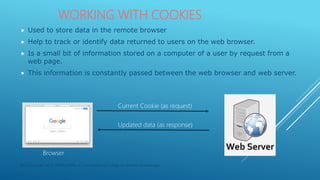
 Used to store data in the remote browser
 Help to track or identify data returned to users on the web browser.
 Is a small bit of information stored on a computer of a user by request from a
web page.
 This information is constantly passed between the web browser and web server.
Current Cookie (as request)
Updated data (as response)
Browser
Mrs.M.Priyavani, MCA, DCHN, M.Phil., V.V.Vanniaperumal College for Women, Virudhunagar.
EXPLORING COOKIE ATTRIBUTES
 A Cookie has several attributes
 These are used as parameters with setcookie() function
 The attributes contain vital information about the cookie (eg. Its name, domain name from where
it belongs to, address of valid path within the domain)
 Some of the commonly used attributes are:
Attribute Remarks
Name-Value Represents the variable name and corresponding value to be stored in the
cookie.
Expiration date Determines the time when to delete a cookie. It is represented as a unix time
stamp.
Valid domain Represents the domain name to which the cookie is sent. Eg. Gmail.com
Valid path Identifies sites within paths in the same domain. Setting this to the server root(/)
allows the entire domain to access the information in the cookie.
Security Flag Restricts a browser from sending cookie information over unsecured
connections. Default value is 0 (that allows the cookie to be sent over any type of
HTTP connection), or it may be set to 1 which permits the cookie to be sent over
a secure HTTP connection.
Mrs.M.Priyavani, MCA, DCHN, M.Phil., V.V.Vanniaperumal College for Women, Virudhunagar.
USING COOKIE HEADER
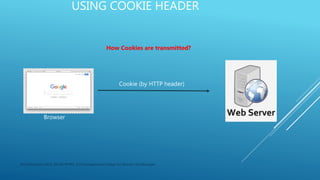
Cookie (by HTTP header)
Browser
How Cookies are transmitted?
Mrs.M.Priyavani, MCA, DCHN, M.Phil., V.V.Vanniaperumal College for Women, Virudhunagar.
USING COOKIE HEADER
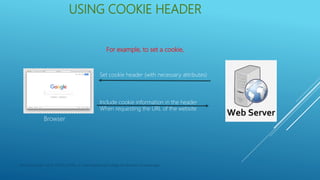
Include cookie information in the header
When requesting the URL of the website
Browser
For example, to set a cookie,
Set cookie header (with necessary attributes)
Mrs.M.Priyavani, MCA, DCHN, M.Phil., V.V.Vanniaperumal College for Women, Virudhunagar.
CREATING COOKIES
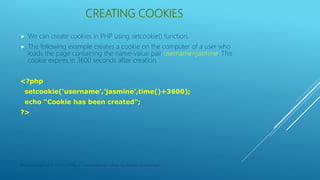
 We can create cookies in PHP using setcookie() function.
 The following example creates a cookie on the computer of a user who
loads the page containing the name-value pair username=jasmine. This
cookie expires in 3600 seconds after creation.
<?php
setcookie(‘username’,’jasmine’,time()+3600);
echo “Cookie has been created”;
?>
Mrs.M.Priyavani, MCA, DCHN, M.Phil., V.V.Vanniaperumal College for Women, Virudhunagar.
READING COOKIES
 We a user visits a page that can read cookie which is present in the user’s
computer, PHP automatically reads the cookie into a variable named the
same as the cookie, but prefixed with a $ sign.
 To read a cookie, simply reference its variable name.
<?php
echo “Reading Cookie value…<br>”;
echo “User Name = $_COOKIE[‘username’]”;
?>
Mrs.M.Priyavani, MCA, DCHN, M.Phil., V.V.Vanniaperumal College for Women, Virudhunagar.
REMOVING COOKIES
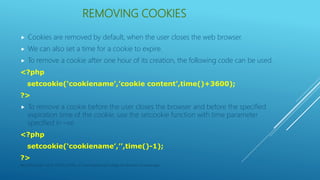
 Cookies are removed by default, when the user closes the web browser.
 We can also set a time for a cookie to expire.
 To remove a cookie after one hour of its creation, the following code can be used.
<?php
setcookie(‘cookiename’,’cookie content’,time()+3600);
?>
 To remove a cookie before the user closes the browser and before the specified
expiration time of the cookie, use the setcookie function with time parameter
specified in –ve.
<?php
setcookie(‘cookiename’,’’,time()-1);
?>
Mrs.M.Priyavani, MCA, DCHN, M.Phil., V.V.Vanniaperumal College for Women, Virudhunagar.
STORING ARRAYS IN COOKIES
 We can store an array in a Cookie. But we need to store each element of the array
separately within the cookie.
<?php
$address = $_SERVER[‘REMOTE_ADDR’];
$browser = $_SERVER[‘HTTP_USER_AGENT’];
$os = $_SERVER[‘OS’];
setcookie(“cookie[0]”,”$address”,time()+200);
setcookie(“cookie[1]”,”$browser”,time()+200);
setcookie(“cookie[2]”,”$os”,time()+200);
?>
 Although the array elements are stored separately, when we read the array it will be
returned as an array which can be accessed as follows:
$list = $_COOKIE[“cookie”];
Mrs.M.Priyavani, MCA, DCHN, M.Phil., V.V.Vanniaperumal College for Women, Virudhunagar.
STORING ARRAYS IN COOKIES
<?php
$address = $_SERVER[‘REMOTE_ADDR’];
$browser = $_SERVER[‘HTTP_USER_AGENT’];
$os = $_SERVER[‘OS’];
setcookie(“cookie[0]”,”$address”,time()+200);
setcookie(“cookie[1]”,”$browser”,time()+200);
setcookie(“cookie[2]”,”$os”,time()+200);
?>
<html>
<body>
<?php
$list = $_COOKIE[“cookie”];
echo “IP ADDRESS = $list[0] <br>”;
echo “CLIENT BROWSER = $list[1] <br>”;
echo “OPERATING SYSTEM = $list[2] <br>”;
?>
</body>
</html>
Mrs.M.Priyavani, MCA, DCHN, M.Phil., V.V.Vanniaperumal College for Women, Virudhunagar.

Cookies-PHP

  • 1.
    Mrs.M.Priyavani, MCA, DCHN,M.Phil., V.V.Vanniaperumal College for Women, Virudhunagar.
  • 2.
    COOKIE  A Cookieis a small file containing information that the server embeds on the user’s computer.  Each time the same computer requests a web page from a browser, it sends the cookie with the requested web page.  Using PHP we can create and retrieve cookies. Mrs.M.Priyavani, MCA, DCHN, M.Phil., V.V.Vanniaperumal College for Women, Virudhunagar.
  • 3.
    SESSION  A sessionis used to store information that is used across multiple web pages.  Session stores information on a server, whereas cookie stores information on a web site.  Cookies and Sessions are vital keys for any hacker to steal confidential information of the user.  Using PHP we can start a session, add data to a session, read session data, and end session. Mrs.M.Priyavani, MCA, DCHN, M.Phil., V.V.Vanniaperumal College for Women, Virudhunagar.
  • 4.
    WORKING WITH COOKIES Used to store data in the remote browser  Help to track or identify data returned to users on the web browser.  Is a small bit of information stored on a computer of a user by request from a web page.  This information is constantly passed between the web browser and web server. Current Cookie (as request) Updated data (as response) Browser Mrs.M.Priyavani, MCA, DCHN, M.Phil., V.V.Vanniaperumal College for Women, Virudhunagar.
  • 5.
    EXPLORING COOKIE ATTRIBUTES A Cookie has several attributes  These are used as parameters with setcookie() function  The attributes contain vital information about the cookie (eg. Its name, domain name from where it belongs to, address of valid path within the domain)  Some of the commonly used attributes are: Attribute Remarks Name-Value Represents the variable name and corresponding value to be stored in the cookie. Expiration date Determines the time when to delete a cookie. It is represented as a unix time stamp. Valid domain Represents the domain name to which the cookie is sent. Eg. Gmail.com Valid path Identifies sites within paths in the same domain. Setting this to the server root(/) allows the entire domain to access the information in the cookie. Security Flag Restricts a browser from sending cookie information over unsecured connections. Default value is 0 (that allows the cookie to be sent over any type of HTTP connection), or it may be set to 1 which permits the cookie to be sent over a secure HTTP connection. Mrs.M.Priyavani, MCA, DCHN, M.Phil., V.V.Vanniaperumal College for Women, Virudhunagar.
  • 6.
    USING COOKIE HEADER Cookie(by HTTP header) Browser How Cookies are transmitted? Mrs.M.Priyavani, MCA, DCHN, M.Phil., V.V.Vanniaperumal College for Women, Virudhunagar.
  • 7.
    USING COOKIE HEADER Includecookie information in the header When requesting the URL of the website Browser For example, to set a cookie, Set cookie header (with necessary attributes) Mrs.M.Priyavani, MCA, DCHN, M.Phil., V.V.Vanniaperumal College for Women, Virudhunagar.
  • 8.
    CREATING COOKIES  Wecan create cookies in PHP using setcookie() function.  The following example creates a cookie on the computer of a user who loads the page containing the name-value pair username=jasmine. This cookie expires in 3600 seconds after creation. <?php setcookie(‘username’,’jasmine’,time()+3600); echo “Cookie has been created”; ?> Mrs.M.Priyavani, MCA, DCHN, M.Phil., V.V.Vanniaperumal College for Women, Virudhunagar.
  • 9.
    READING COOKIES  Wea user visits a page that can read cookie which is present in the user’s computer, PHP automatically reads the cookie into a variable named the same as the cookie, but prefixed with a $ sign.  To read a cookie, simply reference its variable name. <?php echo “Reading Cookie value…<br>”; echo “User Name = $_COOKIE[‘username’]”; ?> Mrs.M.Priyavani, MCA, DCHN, M.Phil., V.V.Vanniaperumal College for Women, Virudhunagar.
  • 10.
    REMOVING COOKIES  Cookiesare removed by default, when the user closes the web browser.  We can also set a time for a cookie to expire.  To remove a cookie after one hour of its creation, the following code can be used. <?php setcookie(‘cookiename’,’cookie content’,time()+3600); ?>  To remove a cookie before the user closes the browser and before the specified expiration time of the cookie, use the setcookie function with time parameter specified in –ve. <?php setcookie(‘cookiename’,’’,time()-1); ?> Mrs.M.Priyavani, MCA, DCHN, M.Phil., V.V.Vanniaperumal College for Women, Virudhunagar.
  • 11.
    STORING ARRAYS INCOOKIES  We can store an array in a Cookie. But we need to store each element of the array separately within the cookie. <?php $address = $_SERVER[‘REMOTE_ADDR’]; $browser = $_SERVER[‘HTTP_USER_AGENT’]; $os = $_SERVER[‘OS’]; setcookie(“cookie[0]”,”$address”,time()+200); setcookie(“cookie[1]”,”$browser”,time()+200); setcookie(“cookie[2]”,”$os”,time()+200); ?>  Although the array elements are stored separately, when we read the array it will be returned as an array which can be accessed as follows: $list = $_COOKIE[“cookie”]; Mrs.M.Priyavani, MCA, DCHN, M.Phil., V.V.Vanniaperumal College for Women, Virudhunagar.
  • 12.
    STORING ARRAYS INCOOKIES <?php $address = $_SERVER[‘REMOTE_ADDR’]; $browser = $_SERVER[‘HTTP_USER_AGENT’]; $os = $_SERVER[‘OS’]; setcookie(“cookie[0]”,”$address”,time()+200); setcookie(“cookie[1]”,”$browser”,time()+200); setcookie(“cookie[2]”,”$os”,time()+200); ?> <html> <body> <?php $list = $_COOKIE[“cookie”]; echo “IP ADDRESS = $list[0] <br>”; echo “CLIENT BROWSER = $list[1] <br>”; echo “OPERATING SYSTEM = $list[2] <br>”; ?> </body> </html> Mrs.M.Priyavani, MCA, DCHN, M.Phil., V.V.Vanniaperumal College for Women, Virudhunagar.