The document discusses different methods for passing parameters and tracking user sessions in PHP, including passing parameters via HTML forms, using predefined PHP variables, cookies, sessions, and URL rewriting. It provides examples of setting and retrieving parameter values across pages using these different techniques.


![What is Parameter Passing & Session Tracking? -> Values of the text typed in user form is passed to other HTML and/or server side script is called parameter passing . -> A session refers to all the connections that a single client might make to a server in the course of viewing any pages associated with a given application.[1] -> Maintenance of user's state during session(e.g.login to logout) is called a Session Tracking .](https://image.slidesharecdn.com/3hiddenparamcookiesessionurlrewriting-100202043408-phpapp01/85/Parameter-Passing-Session-Tracking-in-PHP-2-320.jpg)
![Parameter Passing with <Form> Methods of passing parameters with <form> GET (smaller data i.e.1024 bytes) POST(bigger data, as well as file upload) PHP uses predefined variables $_GET['varname'] $_POST['varname']](https://image.slidesharecdn.com/3hiddenparamcookiesessionurlrewriting-100202043408-phpapp01/85/Parameter-Passing-Session-Tracking-in-PHP-4-320.jpg)
![Predefined Variables[2] PHP provides a large number of predefined variables represent everything from external variables to built-in environment variables, last error messages to last retrieved headers to all scripts. Superglobals — Superglobals are built-in variables that are always available in all scopes $GLOBALS — References all variables available in global scope $_SERVER — Server and execution environment information $_SERVER — Server and execution environment information $_GET — HTTP GET variables $_POST — HTTP POST variables $_FILES — HTTP File Upload variables](https://image.slidesharecdn.com/3hiddenparamcookiesessionurlrewriting-100202043408-phpapp01/85/Parameter-Passing-Session-Tracking-in-PHP-5-320.jpg)
![List of predefined variables [2]... $_REQUEST — HTTP Request variables $_SESSION — Session variables $_ENV — Environment variables $_COOKIE — HTTP Cookies $php_errormsg — The previous error message $HTTP_RAW_POST_DATA — Raw POST data $http_response_header — HTTP response headers $argc — The number of arguments passed to script $argv — Array of arguments passed to script](https://image.slidesharecdn.com/3hiddenparamcookiesessionurlrewriting-100202043408-phpapp01/85/Parameter-Passing-Session-Tracking-in-PHP-6-320.jpg)
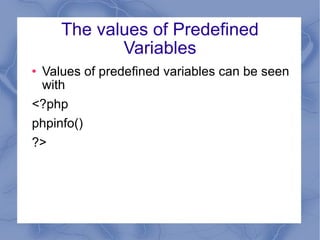
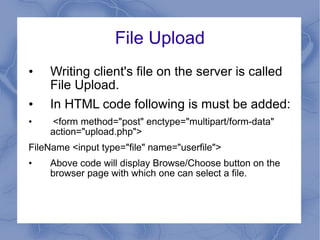
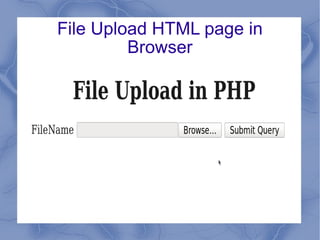
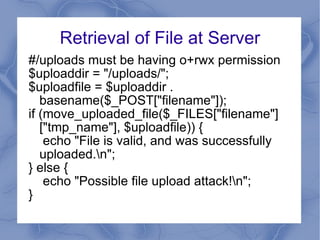
![Retrieval of File at Server #/uploads must be having o+rwx permission $uploaddir = "/uploads/"; $uploadfile = $uploaddir . basename($_POST["filename"]); if (move_uploaded_file($_FILES["filename"]["tmp_name"], $uploadfile)) { echo "File is valid, and was successfully uploaded.\n"; } else { echo "Possible file upload attack!\n"; }](https://image.slidesharecdn.com/3hiddenparamcookiesessionurlrewriting-100202043408-phpapp01/85/Parameter-Passing-Session-Tracking-in-PHP-11-320.jpg)
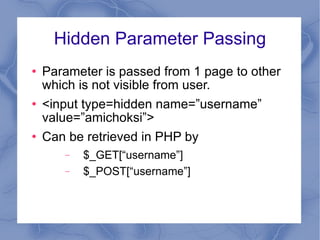
![Hidden Parameter Passing Parameter is passed from 1 page to other which is not visible from user. <input type=hidden name=”username” value=”amichoksi”> Can be retrieved in PHP by $_GET[“username”] $_POST[“username”]](https://image.slidesharecdn.com/3hiddenparamcookiesessionurlrewriting-100202043408-phpapp01/85/Parameter-Passing-Session-Tracking-in-PHP-13-320.jpg)
![Cookies [2] Cookies are a mechanism for storing data in the remote browser and thus tracking or identifying return users. Set Cookie bool setcookie ( string $name string $value , int $expire=0 , string $path , string $domain , bool $secure=false , bool $httponly=false) setcookie(“username”,”ami”,time()+300); Read Cookie $_COOKIE['name']](https://image.slidesharecdn.com/3hiddenparamcookiesessionurlrewriting-100202043408-phpapp01/85/Parameter-Passing-Session-Tracking-in-PHP-14-320.jpg)
![Session [2] A way to preserve certain data across subsequent accesses.](https://image.slidesharecdn.com/3hiddenparamcookiesessionurlrewriting-100202043408-phpapp01/85/Parameter-Passing-Session-Tracking-in-PHP-15-320.jpg)
![Session Functions [2] session_cache_expire — Return current cache expire session_cache_limiter — Get and/or set the current cache limiter session_commit — Alias of session_write_close session_decode — Decodes session data from a string session_destroy — Destroys all data registered to a session session_encode — Encodes the current session data as a string session_get_cookie_params — Get the session cookie parameters session_id — Get and/or set the current session id session_is_registered — Find out whether a global variable is registered in a session session_module_name — Get and/or set the current session module session_name — Get and/or set the current session name session_regenerate_id — Update the current session id with a newly generated one session_register — Register one or more global variables with the current session session_save_path — Get and/or set the current session save path session_set_cookie_params — Set the session cookie parameters session_set_save_handler — Sets user-level session storage functions session_start — Initialize session data session_unregister — Unregister a global variable from the current session session_unset — Free all session variables session_write_close — Write session data and end session](https://image.slidesharecdn.com/3hiddenparamcookiesessionurlrewriting-100202043408-phpapp01/85/Parameter-Passing-Session-Tracking-in-PHP-16-320.jpg)
![Examples File: Page1.php <?php session_start(); echo 'Welcome to page #1'; $_SESSION['favcolor'] = 'green'; $_SESSION['animal'] = 'cat'; $_SESSION['time'] = time(); session_set_cookie_params(10,"/","sun.com",true, false); ?>](https://image.slidesharecdn.com/3hiddenparamcookiesessionurlrewriting-100202043408-phpapp01/85/Parameter-Passing-Session-Tracking-in-PHP-17-320.jpg)
![Example... Filename Page2.php session_start(); echo 'Welcome to page #2<br />'; echo $_SESSION['favcolor']; // green echo $_SESSION['animal']; // cat echo date('Y m d H:i:s', $_SESSION['time']);?> session_unset ();//releasing session data Echo $_SESSION['time'];//no output](https://image.slidesharecdn.com/3hiddenparamcookiesessionurlrewriting-100202043408-phpapp01/85/Parameter-Passing-Session-Tracking-in-PHP-18-320.jpg)
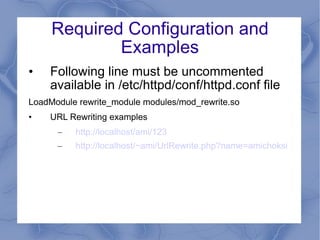
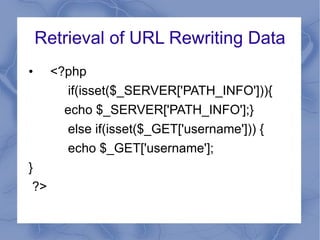
![Retrieval of URL Rewriting Data <?php if(isset($_SERVER['PATH_INFO'])){ echo $_SERVER['PATH_INFO'];} else if(isset($_GET['username'])) { echo $_GET['username']; } ?>](https://image.slidesharecdn.com/3hiddenparamcookiesessionurlrewriting-100202043408-phpapp01/85/Parameter-Passing-Session-Tracking-in-PHP-21-320.jpg)


![Follow my voice pp edits (july 4th) [1][2]](https://cdn.slidesharecdn.com/ss_thumbnails/followmyvoiceppeditsjuly4th12-121012135438-phpapp02-thumbnail.jpg?width=640&height=640&fit=bounds)


