iOS Application Development
Objective-C Basics
These are confidential sessions - please refrain from streaming, blogging, or taking pictures
Session 2
Vu Tran Lam
IAD-2013
• Objective-C introduction
• Creating your first Objective-C program
• Variables, data types and pointer
• Basic statements
• Conditions (if, switch)
• Loops (for, while, do... while)
• Primitives array
• Functions
• Exceptions
Today’s Topics
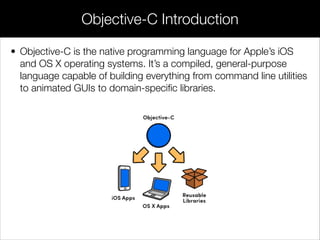
• Objective-C is the native programming language for Apple’s iOS
and OS X operating systems. It’s a compiled, general-purpose
language capable of building everything from command line utilities
to animated GUIs to domain-specific libraries.
Objective-C Introduction
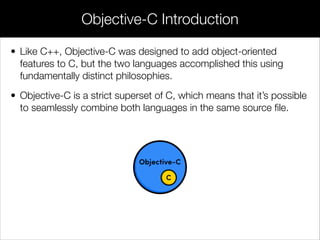
• Like C++, Objective-C was designed to add object-oriented
features to C, but the two languages accomplished this using
fundamentally distinct philosophies.
• Objective-C is a strict superset of C, which means that it’s possible
to seamlessly combine both languages in the same source file.
Objective-C Introduction
• Launching Xcode
• Creating “Command Line Tool” project
• Declaring project info
• Run your program
Create Your First Objective-C Program
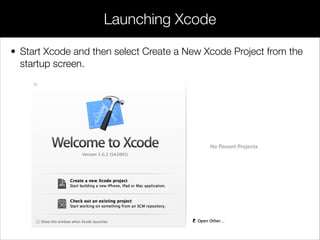
• Start Xcode and then select Create a New Xcode Project from the
startup screen.
Launching Xcode
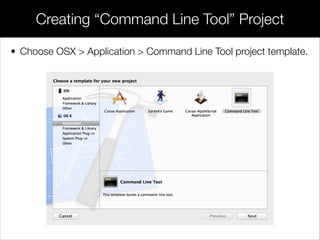
• Choose OSX > Application > Command Line Tool project template.
Creating “Command Line Tool” Project
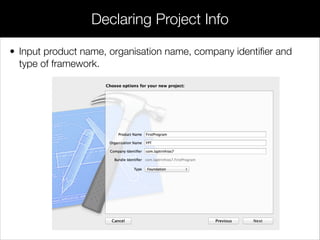
• Input product name, organisation name, company identifier and
type of framework.
Declaring Project Info
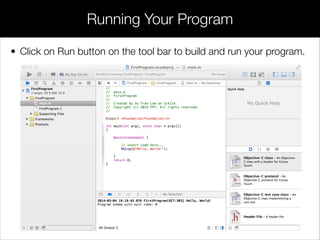
• Click on Run button on the tool bar to build and run your program.
Running Your Program
• Comments
• Data types
• Variables
• Operators
• Macros
• Typedef
• Structs
• Enums
• Pointers
Variables, Data Types and Pointer
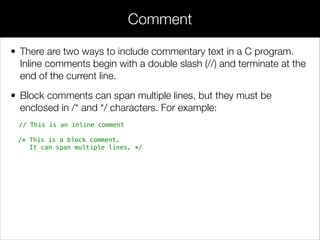
• There are two ways to include commentary text in a C program.
Inline comments begin with a double slash (//) and terminate at the
end of the current line.
• Block comments can span multiple lines, but they must be
enclosed in /* and */ characters. For example:
// This is an inline comment
/* This is a block comment.
It can span multiple lines. */
Comment
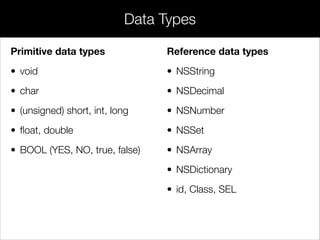
Primitive data types
• void
• char
• (unsigned) short, int, long
• float, double
• BOOL (YES, NO, true, false)
Data Types
Reference data types
• NSString
• NSDecimal
• NSNumber
• NSSet
• NSArray
• NSDictionary
• id, Class, SEL
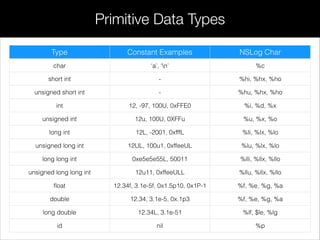
Primitive Data Types
Type Constant Examples NSLog Char
char ‘a’, ‘n’ %c
short int - %hi, %hx, %ho
unsigned short int - %hu, %hx, %ho
int 12, -97, 100U, 0xFFE0 %i, %d, %x
unsigned int 12u, 100U, 0XFFu %u, %x, %o
long int 12L, -2001, 0xfffL %li, %lx, %lo
unsigned long int 12UL, 100u1, 0xffeeUL %lu, %lx, %lo
long long int 0xe5e5e55L, 50011 %lli, %llx, %llo
unsigned long long int 12u11, 0xffeeULL %llu, %llx, %llo
float 12.34f, 3.1e-5f, 0x1.5p10, 0x1P-1 %f, %e, %g, %a
double 12.34, 3.1e-5, 0x.1p3 %f, %e, %g, %a
long double 12.34L, 3.1e-51 %lf, $le, %lg
id nil %p
• Variables are containers that can store different values. In C,
variables are statically typed, which means that you must explicitly
state what kind of value they will hold.
• To declare a variable, you use the <type> <name> syntax, and to
assign a value to it you use the = operator.
• If you need to interpret a variable as a different type, you can cast it
by prefixing it with the new type in parentheses.
Variables
#import <Foundation/Foundation.h>
!
int main(int argc, const char * argv[])
{
@autoreleasepool
{
char charType = 'A';
double doubleType = 9200.8;
// Casting double value to int value
int intType = (int)doubleType;
id idType = @"Hello World";
NSLog(@"Character value: %c", charType);
NSLog(@"Double value: %.1f", doubleType); // 9200.8
NSLog(@"Integer value: %d", intType); // 9200
NSLog(@"id value: %p", idType);
NSLog(@"id type description: %@", [idType description]);
}
return 0;
}
!
Variables Example
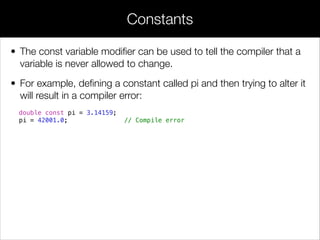
• The const variable modifier can be used to tell the compiler that a
variable is never allowed to change.
• For example, defining a constant called pi and then trying to alter it
will result in a compiler error:
double const pi = 3.14159;
pi = 42001.0; // Compile error
Constants
• Arithmetic operators (+, -, *, %, / )
• Relational operators (==, >, <, >=, <=)
• Logical operators (!, &&, ||)
• Assignment operator (=)
• Conditional operator (?)
Operators
• Arithmetic operators (+, -, *, %, / )
• Relational operators (==, >, <, >=, <=)
• Logical operators (!, &&, ||)
• Assignment operator (=)
• Conditional operator (?)
Operators
• Macros are a low-level way to define symbolic constants and
space-saving abbreviations.
• The #define directive maps a macro name to an expansion, which
is an arbitrary sequence of characters.
• Before the compiler tries to parse the code, the preprocessor
replaces all occurrences of the macro name with its expansion.
Macros
#import <Foundation/Foundation.h>
!
// Define macros
#define PI 3.14159
#define RAD_TO_DEG(radians) (radians * (180.0 / PI))
!
int main(int argc, const char * argv[])
{
@autoreleasepool
{
double angle = PI / 2; // 1.570795
NSLog(@"%f", RAD_TO_DEG(angle)); // 90.0
}
return 0;
}
Macros
• The typedef keyword lets you create new data types or redefine existing
ones.
• After typedef’ing an unsigned char in following example, we can use
ColorComponent just like we using char, int, double, or any other built-in
type:
#import <Foundation/Foundation.h>
!
typedef unsigned char ColorComponent;
!
int main(int argc, const char * argv[])
{
@autoreleasepool
{
ColorComponent red = 255;
ColorComponent green = 160;
ColorComponent blue = 0;
NSLog(@"Your paint job is (R: %hhu, G: %hhu, B: %hhu)", red, green, blue);
}
return 0;
}
Typedef
• A struct is like a simple, primitive C object. It lets you aggregate several
variables into a more complex data structure, but doesn’t provide any OOP
features (e.g., methods).
• For following example, allow you to create a struct to group the components
of an RGB color.
#import <Foundation/Foundation.h>
!
typedef struct
{
unsigned char red;
unsigned char green;
unsigned char blue;
} Color;
!
int main(int argc, const char * argv[])
{
@autoreleasepool
{
Color carColor = {255, 160, 0};
NSLog(@"Your paint job is (R: %hhu, G: %hhu, B: %hhu)", carColor.red,
carColor.green, carColor.blue);
}
return 0;
}
Structs
• The enum keyword is used to create an enumerated type, which is a
collection of related constants.
• Like structs, it’s often convenient to typedef enumerated types with a
descriptive name:
#import <Foundation/Foundation.h>
!
typedef struct
{
unsigned char red;
unsigned char green;
unsigned char blue;
} Color;
!
int main(int argc, const char * argv[])
{
@autoreleasepool
{
Color carColor = {255, 160, 0};
NSLog(@"Your paint job is (R: %hhu, G: %hhu, B: %hhu)", carColor.red,
carColor.green, carColor.blue);
}
return 0;
}
Enums
#import <Foundation/Foundation.h>
!
typedef enum
{
FORD,
HONDA,
NISSAN,
PORSCHE
} CarModel;
!
int main(int argc, const char * argv[])
{
@autoreleasepool
{
CarModel myCar = NISSAN;
switch (myCar)
{
case FORD:
case PORSCHE:
NSLog(@"You like Western cars?");
break;
case HONDA:
case NISSAN:
NSLog(@"You like Japanese cars?");
break;
default:
break;
}
}
return 0;
}
Enums
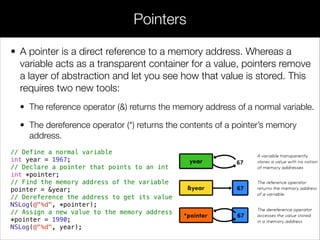
• A pointer is a direct reference to a memory address. Whereas a
variable acts as a transparent container for a value, pointers remove
a layer of abstraction and let you see how that value is stored. This
requires two new tools:
• The reference operator (&) returns the memory address of a normal variable.
• The dereference operator (*) returns the contents of a pointer’s memory
address.
// Define a normal variable
int year = 1967;
// Declare a pointer that points to an int
int *pointer;
// Find the memory address of the variable
pointer = &year;
// Dereference the address to get its value
NSLog(@"%d", *pointer);
// Assign a new value to the memory address
*pointer = 1990;
NSLog(@"%d", year);
Pointers
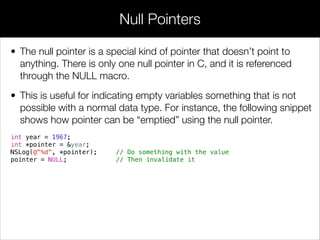
• The null pointer is a special kind of pointer that doesn’t point to
anything. There is only one null pointer in C, and it is referenced
through the NULL macro.
• This is useful for indicating empty variables something that is not
possible with a normal data type. For instance, the following snippet
shows how pointer can be “emptied” using the null pointer.
int year = 1967;
int *pointer = &year;
NSLog(@"%d", *pointer); // Do something with the value
pointer = NULL; // Then invalidate it
Null Pointers
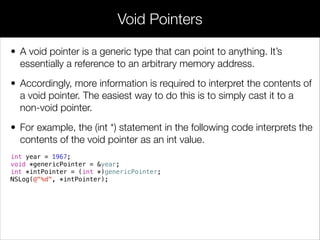
• A void pointer is a generic type that can point to anything. It’s
essentially a reference to an arbitrary memory address.
• Accordingly, more information is required to interpret the contents of
a void pointer. The easiest way to do this is to simply cast it to a
non-void pointer.
• For example, the (int *) statement in the following code interprets the
contents of the void pointer as an int value.
int year = 1967;
void *genericPointer = &year;
int *intPointer = (int *)genericPointer;
NSLog(@"%d", *intPointer);
Void Pointers
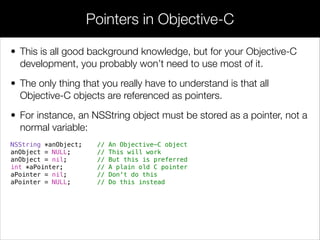
• This is all good background knowledge, but for your Objective-C
development, you probably won’t need to use most of it.
• The only thing that you really have to understand is that all
Objective-C objects are referenced as pointers.
• For instance, an NSString object must be stored as a pointer, not a
normal variable:
NSString *anObject; // An Objective-C object
anObject = NULL; // This will work
anObject = nil; // But this is preferred
int *aPointer; // A plain old C pointer
aPointer = nil; // Don't do this
aPointer = NULL; // Do this instead
Pointers in Objective-C
• Basic statements
• Conditions (if, switch)
• Loops (for, while, do... while)
Basic Statements
• if statement
• switch statement
Conditional Statements
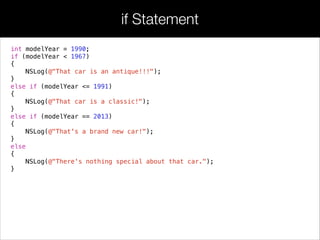
int modelYear = 1990;
if (modelYear < 1967)
{
NSLog(@"That car is an antique!!!");
}
else if (modelYear <= 1991)
{
NSLog(@"That car is a classic!");
}
else if (modelYear == 2013)
{
NSLog(@"That's a brand new car!");
}
else
{
NSLog(@"There's nothing special about that car.");
}
if Statement
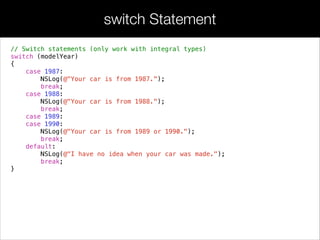
// Switch statements (only work with integral types)
switch (modelYear)
{
case 1987:
NSLog(@"Your car is from 1987.");
break;
case 1988:
NSLog(@"Your car is from 1988.");
break;
case 1989:
case 1990:
NSLog(@"Your car is from 1989 or 1990.");
break;
default:
NSLog(@"I have no idea when your car was made.");
break;
}
switch Statement
• for
• while
• do..while
Loop Statements
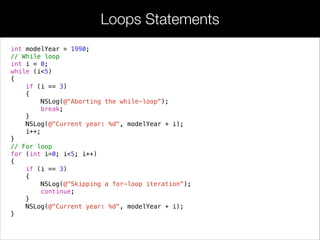
int modelYear = 1990;
// While loop
int i = 0;
while (i<5)
{
if (i == 3)
{
NSLog(@"Aborting the while-loop");
break;
}
NSLog(@"Current year: %d", modelYear + i);
i++;
}
// For loop
for (int i=0; i<5; i++)
{
if (i == 3)
{
NSLog(@"Skipping a for-loop iteration");
continue;
}
NSLog(@"Current year: %d", modelYear + i);
}
Loops Statements
• Since Objective-C is a superset of C, it has access to the primitive arrays
found in C.
• Generally, the higher-level NSArray and NSMutableArray classes provided by
the Foundation Framework are much more convenient than C arrays;
however, primitive arrays can still prove useful for performance intensive
environments.
• Their syntax is as follows:
#import <Foundation/Foundation.h>
!
int main(int argc, const char * argv[])
{
@autoreleasepool
{
int years[4] = {1968, 1970, 1989, 1999};
years[0] = 1967;
for (int i = 0; i < 4; i++)
{
NSLog(@"The year at index %d is: %d", i, years[i]);
}
}
return 0;
}
Primitives Arrays
• Along with variables, conditionals, and loops, functions are one of
the fundamental components of any modern programming
language.
• They let you reuse an arbitrary block of code throughout your
application, which is necessary for organizing and maintaining all
but the most trivial code bases.
• Type of functions:
• Build-in functions (NSLog, NSMakeRange, CFCreateImage,…)
• User-defined functions
User-defined Functions
• Along with variables, conditionals, and loops, functions are one of
the fundamental components of any modern programming
language.
• They let you reuse an arbitrary block of code throughout your
application, which is necessary for organizing and maintaining all
but the most trivial code bases.
• Type of functions:
• Build-in functions (NSLog, NSMakeRange, CFCreateImage,…)
• User-defined functions
User-defined Functions
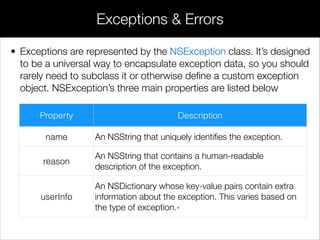
• Exceptions are represented by the NSException class. It’s designed
to be a universal way to encapsulate exception data, so you should
rarely need to subclass it or otherwise define a custom exception
object. NSException’s three main properties are listed below
Exceptions & Errors
Property Description
name An NSString that uniquely identifies the exception.
reason
An NSString that contains a human-readable
description of the exception.
userInfo
An NSDictionary whose key-value pairs contain extra
information about the exception. This varies based on
the type of exception.-
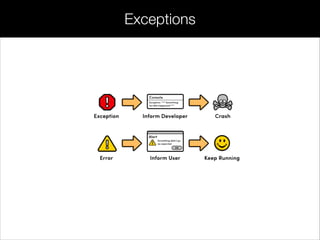
Exceptions
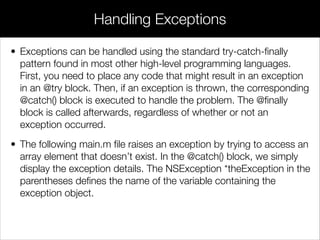
• Exceptions can be handled using the standard try-catch-finally
pattern found in most other high-level programming languages.
First, you need to place any code that might result in an exception
in an @try block. Then, if an exception is thrown, the corresponding
@catch() block is executed to handle the problem. The @finally
block is called afterwards, regardless of whether or not an
exception occurred.
• The following main.m file raises an exception by trying to access an
array element that doesn’t exist. In the @catch() block, we simply
display the exception details. The NSException *theException in the
parentheses defines the name of the variable containing the
exception object.
Handling Exceptions
#import <Foundation/Foundation.h>
!
int main(int argc, const char * argv[])
{
@autoreleasepool
{
NSArray *inventory = @[@"Honda Civic",
@"Nissan Versa",
@"Ford F-150"];
int selectedIndex = 3;
@try
{
NSString *car = inventory[selectedIndex];
NSLog(@"The selected car is: %@", car);
}
@catch(NSException *theException)
{
NSLog(@"An exception occurred: %@", theException.name);
NSLog(@"Here are some details: %@", theException.reason);
}
@finally
{
NSLog(@"Executing finally block");
}
}
return 0;
}
Handling Exceptions
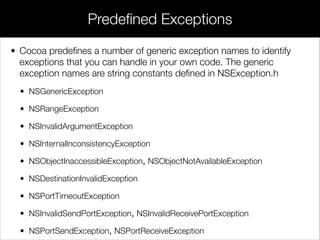
• Cocoa predefines a number of generic exception names to identify
exceptions that you can handle in your own code. The generic
exception names are string constants defined in NSException.h
• NSGenericException
• NSRangeException
• NSInvalidArgumentException
• NSInternalInconsistencyException
• NSObjectInaccessibleException, NSObjectNotAvailableException
• NSDestinationInvalidException
• NSPortTimeoutException
• NSInvalidSendPortException, NSInvalidReceivePortException
• NSPortSendException, NSPortReceiveException
Predefined Exceptions
Documentation
Programming with Objective-C
https://developer.apple.com/library/ios/documentation/Cocoa/Conceptual/ProgrammingWithObjectiveC/
Introduction/Introduction.html
Exception Programming Topics
https://developer.apple.com/library/mac/documentation/Cocoa/Conceptual/Exceptions/Concepts/
PredefinedExceptions.html
many thanks
to
lamvt@fpt.com.vn
please
say
Stanford University
https://developer.apple.com
Developer Center
http://www.stanford.edu/class/cs193p
xin
chào
Next: Object Oriented Programming with
Objective-C - Part 1

Session 2 - Objective-C basics

  • 1.
  • 2.
    Objective-C Basics These areconfidential sessions - please refrain from streaming, blogging, or taking pictures Session 2 Vu Tran Lam IAD-2013
  • 3.
    • Objective-C introduction •Creating your first Objective-C program • Variables, data types and pointer • Basic statements • Conditions (if, switch) • Loops (for, while, do... while) • Primitives array • Functions • Exceptions Today’s Topics
  • 4.
    • Objective-C isthe native programming language for Apple’s iOS and OS X operating systems. It’s a compiled, general-purpose language capable of building everything from command line utilities to animated GUIs to domain-specific libraries. Objective-C Introduction
  • 5.
    • Like C++,Objective-C was designed to add object-oriented features to C, but the two languages accomplished this using fundamentally distinct philosophies. • Objective-C is a strict superset of C, which means that it’s possible to seamlessly combine both languages in the same source file. Objective-C Introduction
  • 6.
    • Launching Xcode •Creating “Command Line Tool” project • Declaring project info • Run your program Create Your First Objective-C Program
  • 7.
    • Start Xcodeand then select Create a New Xcode Project from the startup screen. Launching Xcode
  • 8.
    • Choose OSX> Application > Command Line Tool project template. Creating “Command Line Tool” Project
  • 9.
    • Input productname, organisation name, company identifier and type of framework. Declaring Project Info
  • 10.
    • Click onRun button on the tool bar to build and run your program. Running Your Program
  • 11.
    • Comments • Datatypes • Variables • Operators • Macros • Typedef • Structs • Enums • Pointers Variables, Data Types and Pointer
  • 12.
    • There aretwo ways to include commentary text in a C program. Inline comments begin with a double slash (//) and terminate at the end of the current line. • Block comments can span multiple lines, but they must be enclosed in /* and */ characters. For example: // This is an inline comment /* This is a block comment. It can span multiple lines. */ Comment
  • 13.
    Primitive data types •void • char • (unsigned) short, int, long • float, double • BOOL (YES, NO, true, false) Data Types Reference data types • NSString • NSDecimal • NSNumber • NSSet • NSArray • NSDictionary • id, Class, SEL
  • 14.
    Primitive Data Types TypeConstant Examples NSLog Char char ‘a’, ‘n’ %c short int - %hi, %hx, %ho unsigned short int - %hu, %hx, %ho int 12, -97, 100U, 0xFFE0 %i, %d, %x unsigned int 12u, 100U, 0XFFu %u, %x, %o long int 12L, -2001, 0xfffL %li, %lx, %lo unsigned long int 12UL, 100u1, 0xffeeUL %lu, %lx, %lo long long int 0xe5e5e55L, 50011 %lli, %llx, %llo unsigned long long int 12u11, 0xffeeULL %llu, %llx, %llo float 12.34f, 3.1e-5f, 0x1.5p10, 0x1P-1 %f, %e, %g, %a double 12.34, 3.1e-5, 0x.1p3 %f, %e, %g, %a long double 12.34L, 3.1e-51 %lf, $le, %lg id nil %p
  • 15.
    • Variables arecontainers that can store different values. In C, variables are statically typed, which means that you must explicitly state what kind of value they will hold. • To declare a variable, you use the <type> <name> syntax, and to assign a value to it you use the = operator. • If you need to interpret a variable as a different type, you can cast it by prefixing it with the new type in parentheses. Variables
  • 16.
    #import <Foundation/Foundation.h> ! int main(intargc, const char * argv[]) { @autoreleasepool { char charType = 'A'; double doubleType = 9200.8; // Casting double value to int value int intType = (int)doubleType; id idType = @"Hello World"; NSLog(@"Character value: %c", charType); NSLog(@"Double value: %.1f", doubleType); // 9200.8 NSLog(@"Integer value: %d", intType); // 9200 NSLog(@"id value: %p", idType); NSLog(@"id type description: %@", [idType description]); } return 0; } ! Variables Example
  • 17.
    • The constvariable modifier can be used to tell the compiler that a variable is never allowed to change. • For example, defining a constant called pi and then trying to alter it will result in a compiler error: double const pi = 3.14159; pi = 42001.0; // Compile error Constants
  • 18.
    • Arithmetic operators(+, -, *, %, / ) • Relational operators (==, >, <, >=, <=) • Logical operators (!, &&, ||) • Assignment operator (=) • Conditional operator (?) Operators
  • 19.
    • Arithmetic operators(+, -, *, %, / ) • Relational operators (==, >, <, >=, <=) • Logical operators (!, &&, ||) • Assignment operator (=) • Conditional operator (?) Operators
  • 20.
    • Macros area low-level way to define symbolic constants and space-saving abbreviations. • The #define directive maps a macro name to an expansion, which is an arbitrary sequence of characters. • Before the compiler tries to parse the code, the preprocessor replaces all occurrences of the macro name with its expansion. Macros
  • 21.
    #import <Foundation/Foundation.h> ! // Definemacros #define PI 3.14159 #define RAD_TO_DEG(radians) (radians * (180.0 / PI)) ! int main(int argc, const char * argv[]) { @autoreleasepool { double angle = PI / 2; // 1.570795 NSLog(@"%f", RAD_TO_DEG(angle)); // 90.0 } return 0; } Macros
  • 22.
    • The typedefkeyword lets you create new data types or redefine existing ones. • After typedef’ing an unsigned char in following example, we can use ColorComponent just like we using char, int, double, or any other built-in type: #import <Foundation/Foundation.h> ! typedef unsigned char ColorComponent; ! int main(int argc, const char * argv[]) { @autoreleasepool { ColorComponent red = 255; ColorComponent green = 160; ColorComponent blue = 0; NSLog(@"Your paint job is (R: %hhu, G: %hhu, B: %hhu)", red, green, blue); } return 0; } Typedef
  • 23.
    • A structis like a simple, primitive C object. It lets you aggregate several variables into a more complex data structure, but doesn’t provide any OOP features (e.g., methods). • For following example, allow you to create a struct to group the components of an RGB color. #import <Foundation/Foundation.h> ! typedef struct { unsigned char red; unsigned char green; unsigned char blue; } Color; ! int main(int argc, const char * argv[]) { @autoreleasepool { Color carColor = {255, 160, 0}; NSLog(@"Your paint job is (R: %hhu, G: %hhu, B: %hhu)", carColor.red, carColor.green, carColor.blue); } return 0; } Structs
  • 24.
    • The enumkeyword is used to create an enumerated type, which is a collection of related constants. • Like structs, it’s often convenient to typedef enumerated types with a descriptive name: #import <Foundation/Foundation.h> ! typedef struct { unsigned char red; unsigned char green; unsigned char blue; } Color; ! int main(int argc, const char * argv[]) { @autoreleasepool { Color carColor = {255, 160, 0}; NSLog(@"Your paint job is (R: %hhu, G: %hhu, B: %hhu)", carColor.red, carColor.green, carColor.blue); } return 0; } Enums
  • 25.
    #import <Foundation/Foundation.h> ! typedef enum { FORD, HONDA, NISSAN, PORSCHE }CarModel; ! int main(int argc, const char * argv[]) { @autoreleasepool { CarModel myCar = NISSAN; switch (myCar) { case FORD: case PORSCHE: NSLog(@"You like Western cars?"); break; case HONDA: case NISSAN: NSLog(@"You like Japanese cars?"); break; default: break; } } return 0; } Enums
  • 26.
    • A pointeris a direct reference to a memory address. Whereas a variable acts as a transparent container for a value, pointers remove a layer of abstraction and let you see how that value is stored. This requires two new tools: • The reference operator (&) returns the memory address of a normal variable. • The dereference operator (*) returns the contents of a pointer’s memory address. // Define a normal variable int year = 1967; // Declare a pointer that points to an int int *pointer; // Find the memory address of the variable pointer = &year; // Dereference the address to get its value NSLog(@"%d", *pointer); // Assign a new value to the memory address *pointer = 1990; NSLog(@"%d", year); Pointers
  • 27.
    • The nullpointer is a special kind of pointer that doesn’t point to anything. There is only one null pointer in C, and it is referenced through the NULL macro. • This is useful for indicating empty variables something that is not possible with a normal data type. For instance, the following snippet shows how pointer can be “emptied” using the null pointer. int year = 1967; int *pointer = &year; NSLog(@"%d", *pointer); // Do something with the value pointer = NULL; // Then invalidate it Null Pointers
  • 28.
    • A voidpointer is a generic type that can point to anything. It’s essentially a reference to an arbitrary memory address. • Accordingly, more information is required to interpret the contents of a void pointer. The easiest way to do this is to simply cast it to a non-void pointer. • For example, the (int *) statement in the following code interprets the contents of the void pointer as an int value. int year = 1967; void *genericPointer = &year; int *intPointer = (int *)genericPointer; NSLog(@"%d", *intPointer); Void Pointers
  • 29.
    • This isall good background knowledge, but for your Objective-C development, you probably won’t need to use most of it. • The only thing that you really have to understand is that all Objective-C objects are referenced as pointers. • For instance, an NSString object must be stored as a pointer, not a normal variable: NSString *anObject; // An Objective-C object anObject = NULL; // This will work anObject = nil; // But this is preferred int *aPointer; // A plain old C pointer aPointer = nil; // Don't do this aPointer = NULL; // Do this instead Pointers in Objective-C
  • 30.
    • Basic statements •Conditions (if, switch) • Loops (for, while, do... while) Basic Statements
  • 31.
    • if statement •switch statement Conditional Statements
  • 32.
    int modelYear =1990; if (modelYear < 1967) { NSLog(@"That car is an antique!!!"); } else if (modelYear <= 1991) { NSLog(@"That car is a classic!"); } else if (modelYear == 2013) { NSLog(@"That's a brand new car!"); } else { NSLog(@"There's nothing special about that car."); } if Statement
  • 33.
    // Switch statements(only work with integral types) switch (modelYear) { case 1987: NSLog(@"Your car is from 1987."); break; case 1988: NSLog(@"Your car is from 1988."); break; case 1989: case 1990: NSLog(@"Your car is from 1989 or 1990."); break; default: NSLog(@"I have no idea when your car was made."); break; } switch Statement
  • 34.
    • for • while •do..while Loop Statements
  • 35.
    int modelYear =1990; // While loop int i = 0; while (i<5) { if (i == 3) { NSLog(@"Aborting the while-loop"); break; } NSLog(@"Current year: %d", modelYear + i); i++; } // For loop for (int i=0; i<5; i++) { if (i == 3) { NSLog(@"Skipping a for-loop iteration"); continue; } NSLog(@"Current year: %d", modelYear + i); } Loops Statements
  • 36.
    • Since Objective-Cis a superset of C, it has access to the primitive arrays found in C. • Generally, the higher-level NSArray and NSMutableArray classes provided by the Foundation Framework are much more convenient than C arrays; however, primitive arrays can still prove useful for performance intensive environments. • Their syntax is as follows: #import <Foundation/Foundation.h> ! int main(int argc, const char * argv[]) { @autoreleasepool { int years[4] = {1968, 1970, 1989, 1999}; years[0] = 1967; for (int i = 0; i < 4; i++) { NSLog(@"The year at index %d is: %d", i, years[i]); } } return 0; } Primitives Arrays
  • 37.
    • Along withvariables, conditionals, and loops, functions are one of the fundamental components of any modern programming language. • They let you reuse an arbitrary block of code throughout your application, which is necessary for organizing and maintaining all but the most trivial code bases. • Type of functions: • Build-in functions (NSLog, NSMakeRange, CFCreateImage,…) • User-defined functions User-defined Functions
  • 38.
    • Along withvariables, conditionals, and loops, functions are one of the fundamental components of any modern programming language. • They let you reuse an arbitrary block of code throughout your application, which is necessary for organizing and maintaining all but the most trivial code bases. • Type of functions: • Build-in functions (NSLog, NSMakeRange, CFCreateImage,…) • User-defined functions User-defined Functions
  • 39.
    • Exceptions arerepresented by the NSException class. It’s designed to be a universal way to encapsulate exception data, so you should rarely need to subclass it or otherwise define a custom exception object. NSException’s three main properties are listed below Exceptions & Errors Property Description name An NSString that uniquely identifies the exception. reason An NSString that contains a human-readable description of the exception. userInfo An NSDictionary whose key-value pairs contain extra information about the exception. This varies based on the type of exception.-
  • 40.
  • 41.
    • Exceptions canbe handled using the standard try-catch-finally pattern found in most other high-level programming languages. First, you need to place any code that might result in an exception in an @try block. Then, if an exception is thrown, the corresponding @catch() block is executed to handle the problem. The @finally block is called afterwards, regardless of whether or not an exception occurred. • The following main.m file raises an exception by trying to access an array element that doesn’t exist. In the @catch() block, we simply display the exception details. The NSException *theException in the parentheses defines the name of the variable containing the exception object. Handling Exceptions
  • 42.
    #import <Foundation/Foundation.h> ! int main(intargc, const char * argv[]) { @autoreleasepool { NSArray *inventory = @[@"Honda Civic", @"Nissan Versa", @"Ford F-150"]; int selectedIndex = 3; @try { NSString *car = inventory[selectedIndex]; NSLog(@"The selected car is: %@", car); } @catch(NSException *theException) { NSLog(@"An exception occurred: %@", theException.name); NSLog(@"Here are some details: %@", theException.reason); } @finally { NSLog(@"Executing finally block"); } } return 0; } Handling Exceptions
  • 43.
    • Cocoa predefinesa number of generic exception names to identify exceptions that you can handle in your own code. The generic exception names are string constants defined in NSException.h • NSGenericException • NSRangeException • NSInvalidArgumentException • NSInternalInconsistencyException • NSObjectInaccessibleException, NSObjectNotAvailableException • NSDestinationInvalidException • NSPortTimeoutException • NSInvalidSendPortException, NSInvalidReceivePortException • NSPortSendException, NSPortReceiveException Predefined Exceptions
  • 44.
    Documentation Programming with Objective-C https://developer.apple.com/library/ios/documentation/Cocoa/Conceptual/ProgrammingWithObjectiveC/ Introduction/Introduction.html ExceptionProgramming Topics https://developer.apple.com/library/mac/documentation/Cocoa/Conceptual/Exceptions/Concepts/ PredefinedExceptions.html
  • 45.
  • 46.
    Next: Object OrientedProgramming with Objective-C - Part 1