Agenda
 Introduction to Service Now.
ServiceNow – ITIL.
ServiceNow – Administration.
ServiceNow – Development.
What is ServiceNow?
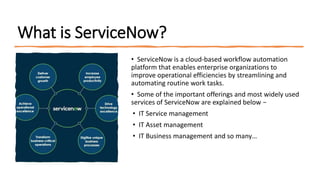
• ServiceNow is a cloud-based workflow automation
platform that enables enterprise organizations to
improve operational efficiencies by streamlining and
automating routine work tasks.
• Some of the important offerings and most widely used
services of ServiceNow are explained below −
• IT Service management
• IT Asset management
• IT Business management and so many…
ServiceNow – ITIL
ITIL(Information Technology Infrastructure Library) contains procedures, tasks, processes, and
checklists that are not necessarily specific to an organization or technology but are still applicable
to organizational strategies by delivering value and maintaining competency.
ITIL, owned by AXELOS Limited, provides recommendations and a framework that, while not an
industry standard, is widely adopted by thousands of organizations that are reaping the benefits of
a standardized approach. The ITIL framework improves the quality-of-service management,
outcomes, and operations for organizations that choose to commit to the ITIL framework.
ServiceNow – Administration
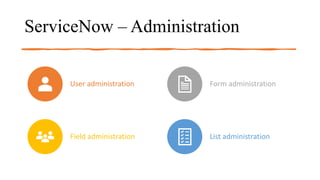
User administration Form administration
Field administration List administration
Personal
Developer
Instances
ServiceNow offers free Personal Developer
Instances (PDI) to registered users who
want to develop applications on the
ServiceNow platform or improve their skills
with ServiceNow. New Developer Program
members automatically receive a PDI
running the latest release. Members of the
ServiceNow Developer Program can use
their PDI if there is activity on the instance.
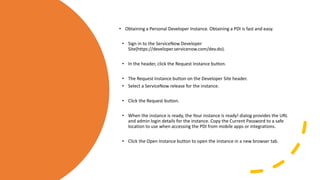
• Obtaining a Personal Developer Instance. Obtaining a PDI is fast and easy.
• Sign in to the ServiceNow Developer
Site(https://developer.servicenow.com/dev.do).
• In the header, click the Request Instance button.
• The Request Instance button on the Developer Site header.
• Select a ServiceNow release for the instance.
• Click the Request button.
• When the instance is ready, the Your instance is ready! dialog provides the URL
and admin login details for the instance. Copy the Current Password to a safe
location to use when accessing the PDI from mobile apps or integrations.
• Click the Open Instance button to open the instance in a new browser tab.
User Administration
• Creating users, groups, and roles provides
a flexible and scalable way to manage access
to features on the Now Platform. By creating
user accounts, assigning users to groups, and
defining roles and permissions,
administrators can ensure that users have
the appropriate level of access to
applications and data.
• This allows organizations to control
access to sensitive data, maintain
compliance with regulatory requirements,
and improve overall security. Additionally,
users, groups, and roles can be easily
managed and modified over time as
organizational needs change.
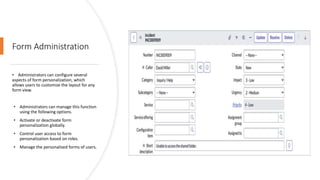
Form Administration
• Administrators can configure several
aspects of form personalization, which
allows users to customize the layout for any
form view.
• Administrators can manage this function
using the following options.
• Activate or deactivate form
personalization globally.
• Control user access to form
personalization based on roles.
• Manage the personalized forms of users.
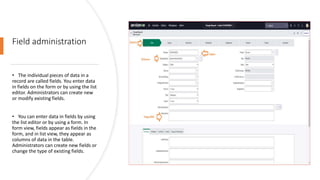
Field administration
• The individual pieces of data in a
record are called fields. You enter data
in fields on the form or by using the list
editor. Administrators can create new
or modify existing fields.
• You can enter data in fields by using
the list editor or by using a form. In
form view, fields appear as fields in the
form, and in list view, they appear as
columns of data in the table.
Administrators can create new fields or
change the type of existing fields.
List administration
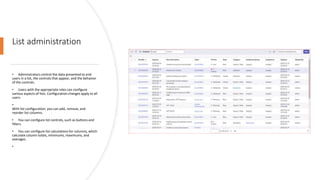
• Administrators control the data presented to end
users in a list, the controls that appear, and the behavior
of the controls.
• Users with the appropriate roles can configure
various aspects of lists. Configuration changes apply to all
users.
•
With list configuration, you can add, remove, and
reorder list columns.
• You can configure list controls, such as buttons and
filters.
• You can configure list calculations for columns, which
calculate column totals, minimums, maximums, and
averages.
•
ServiceNow – Development
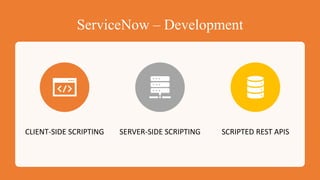
CLIENT-SIDE SCRIPTING SERVER-SIDE SCRIPTING SCRIPTED REST APIS
Client
Script
Types
A Client Script executes client-side script
logic when forms are:
 Loaded
 Changed
 Submitted
Onload Client Script
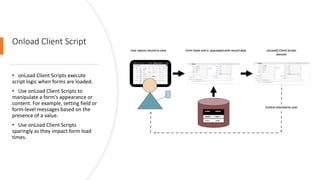
• onLoad Client Scripts execute
script logic when forms are loaded.
• Use onLoad Client Scripts to
manipulate a form's appearance or
content. For example, setting field or
form-level messages based on the
presence of a value.
• Use onLoad Client Scripts
sparingly as they impact form load
times.
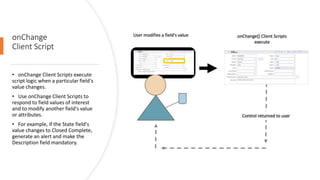
onChange
Client Script
• onChange Client Scripts execute
script logic when a particular field's
value changes.
• Use onChange Client Scripts to
respond to field values of interest
and to modify another field's value
or attributes.
• For example, if the State field's
value changes to Closed Complete,
generate an alert and make the
Description field mandatory.
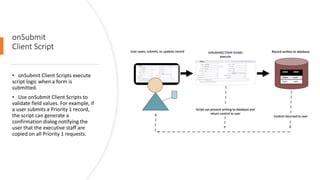
onSubmit
Client Script
• onSubmit Client Scripts execute
script logic when a form is
submitted.
• Use onSubmit Client Scripts to
validate field values. For example, if
a user submits a Priority 1 record,
the script can generate a
confirmation dialog notifying the
user that the executive staff are
copied on all Priority 1 requests.
Server-side Scripting
Business Rules Script Include Script Action
Business
Rules
• Business Rules are server-side logic that executes
when database records are queried, updated,
inserted, or deleted.
• Business Rules respond to database interactions
regardless of access method: for example, users
interacting with records through forms or lists, web
services, or data imports (configurable).
• Business Rules do not monitor forms or form fields
but do execute their logic when forms interact with
the database such as when a record is saved,
updated, or submitted.
Script Includes
• Script Includes are reusable server-side script logic
that defines a function or class. Script Includes
execute their script logic only when explicitly called
by other scripts. There are different types of Script
Includes:
• On-demand/classless
• Extend an existing class
• Define a new class
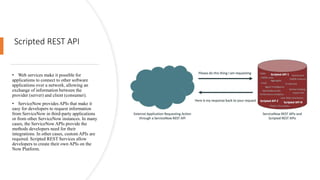
Scripted REST API
• Web services make it possible for
applications to connect to other software
applications over a network, allowing an
exchange of information between the
provider (server) and client (consumer).
• ServiceNow provides APIs that make it
easy for developers to request information
from ServiceNow in third-party applications
or from other ServiceNow instances. In many
cases, the ServiceNow APIs provide the
methods developers need for their
integrations. In other cases, custom APIs are
required. Scripted REST Services allow
developers to create their own APIs on the
Now Platform.
Any Questions?
Thank You

ServiceNow Table Management.pptx

  • 1.
    Agenda  Introduction toService Now. ServiceNow – ITIL. ServiceNow – Administration. ServiceNow – Development.
  • 2.
    What is ServiceNow? •ServiceNow is a cloud-based workflow automation platform that enables enterprise organizations to improve operational efficiencies by streamlining and automating routine work tasks. • Some of the important offerings and most widely used services of ServiceNow are explained below − • IT Service management • IT Asset management • IT Business management and so many…
  • 3.
    ServiceNow – ITIL ITIL(InformationTechnology Infrastructure Library) contains procedures, tasks, processes, and checklists that are not necessarily specific to an organization or technology but are still applicable to organizational strategies by delivering value and maintaining competency. ITIL, owned by AXELOS Limited, provides recommendations and a framework that, while not an industry standard, is widely adopted by thousands of organizations that are reaping the benefits of a standardized approach. The ITIL framework improves the quality-of-service management, outcomes, and operations for organizations that choose to commit to the ITIL framework.
  • 4.
    ServiceNow – Administration Useradministration Form administration Field administration List administration
  • 5.
    Personal Developer Instances ServiceNow offers freePersonal Developer Instances (PDI) to registered users who want to develop applications on the ServiceNow platform or improve their skills with ServiceNow. New Developer Program members automatically receive a PDI running the latest release. Members of the ServiceNow Developer Program can use their PDI if there is activity on the instance.
  • 6.
    • Obtaining aPersonal Developer Instance. Obtaining a PDI is fast and easy. • Sign in to the ServiceNow Developer Site(https://developer.servicenow.com/dev.do). • In the header, click the Request Instance button. • The Request Instance button on the Developer Site header. • Select a ServiceNow release for the instance. • Click the Request button. • When the instance is ready, the Your instance is ready! dialog provides the URL and admin login details for the instance. Copy the Current Password to a safe location to use when accessing the PDI from mobile apps or integrations. • Click the Open Instance button to open the instance in a new browser tab.
  • 7.
    User Administration • Creatingusers, groups, and roles provides a flexible and scalable way to manage access to features on the Now Platform. By creating user accounts, assigning users to groups, and defining roles and permissions, administrators can ensure that users have the appropriate level of access to applications and data. • This allows organizations to control access to sensitive data, maintain compliance with regulatory requirements, and improve overall security. Additionally, users, groups, and roles can be easily managed and modified over time as organizational needs change.
  • 8.
    Form Administration • Administratorscan configure several aspects of form personalization, which allows users to customize the layout for any form view. • Administrators can manage this function using the following options. • Activate or deactivate form personalization globally. • Control user access to form personalization based on roles. • Manage the personalized forms of users.
  • 9.
    Field administration • Theindividual pieces of data in a record are called fields. You enter data in fields on the form or by using the list editor. Administrators can create new or modify existing fields. • You can enter data in fields by using the list editor or by using a form. In form view, fields appear as fields in the form, and in list view, they appear as columns of data in the table. Administrators can create new fields or change the type of existing fields.
  • 10.
    List administration • Administratorscontrol the data presented to end users in a list, the controls that appear, and the behavior of the controls. • Users with the appropriate roles can configure various aspects of lists. Configuration changes apply to all users. • With list configuration, you can add, remove, and reorder list columns. • You can configure list controls, such as buttons and filters. • You can configure list calculations for columns, which calculate column totals, minimums, maximums, and averages. •
  • 11.
    ServiceNow – Development CLIENT-SIDESCRIPTING SERVER-SIDE SCRIPTING SCRIPTED REST APIS
  • 12.
    Client Script Types A Client Scriptexecutes client-side script logic when forms are:  Loaded  Changed  Submitted
  • 13.
    Onload Client Script •onLoad Client Scripts execute script logic when forms are loaded. • Use onLoad Client Scripts to manipulate a form's appearance or content. For example, setting field or form-level messages based on the presence of a value. • Use onLoad Client Scripts sparingly as they impact form load times.
  • 14.
    onChange Client Script • onChangeClient Scripts execute script logic when a particular field's value changes. • Use onChange Client Scripts to respond to field values of interest and to modify another field's value or attributes. • For example, if the State field's value changes to Closed Complete, generate an alert and make the Description field mandatory.
  • 15.
    onSubmit Client Script • onSubmitClient Scripts execute script logic when a form is submitted. • Use onSubmit Client Scripts to validate field values. For example, if a user submits a Priority 1 record, the script can generate a confirmation dialog notifying the user that the executive staff are copied on all Priority 1 requests.
  • 16.
    Server-side Scripting Business RulesScript Include Script Action
  • 17.
    Business Rules • Business Rulesare server-side logic that executes when database records are queried, updated, inserted, or deleted. • Business Rules respond to database interactions regardless of access method: for example, users interacting with records through forms or lists, web services, or data imports (configurable). • Business Rules do not monitor forms or form fields but do execute their logic when forms interact with the database such as when a record is saved, updated, or submitted.
  • 18.
    Script Includes • ScriptIncludes are reusable server-side script logic that defines a function or class. Script Includes execute their script logic only when explicitly called by other scripts. There are different types of Script Includes: • On-demand/classless • Extend an existing class • Define a new class
  • 19.
    Scripted REST API •Web services make it possible for applications to connect to other software applications over a network, allowing an exchange of information between the provider (server) and client (consumer). • ServiceNow provides APIs that make it easy for developers to request information from ServiceNow in third-party applications or from other ServiceNow instances. In many cases, the ServiceNow APIs provide the methods developers need for their integrations. In other cases, custom APIs are required. Scripted REST Services allow developers to create their own APIs on the Now Platform.
  • 20.
  • 21.