How to Get the Best MoBull
Experience
Tanvi Gadre
Jaclyn Moore
Amrutha Rajiv
Tanvi Gadre
Development Manager
Jaclyn Moore
Software Engineer
Amrutha Rajiv
Principal Software
Architect
Applying the Law of Two Feet
Every individual has two feet, and must be prepared
to use them.
Individuals can make a difference and must make a
difference. If that is not true in a given situation, they,
and they alone, must take responsibility to use their
two feet, and move to a new place where they can
make a difference.
-Harrison Owen
What Will We Cover Today?
• Mobile Overview
• Custom Actions
• Field Interactions
• Page Interactions
• Running of MoBull
Bullhorn Mobile Tech
Overview
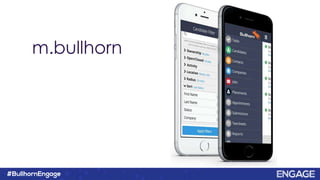
m.bullhorn
Live Demo
What is the Stack?
What is the Stack?
• Ionic
• Angular
• Ionic Angular
• Bullhorn
– Novo-Elements
– Ionic Mocks
– Taurus
– Chomsky
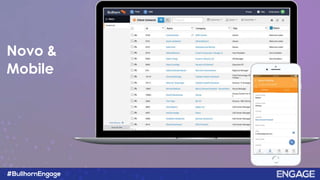
Novo Design System
Novo &
Mobile
What is
?
What is Ionic?
• Powerful HTML5 SDK using web
technologies
• Targeted at building Hybrid Mobile app
• Provides broad range of native mobile
components, animations and UI
• iOS and Android
How is it Native?
How is it Native?
• Ionic Native is a TypeScript wrapper for
Cordova/PhoneGap plugins that make
adding any native functionally
Live Demo
So what does this
mean for you?
Custom Actions
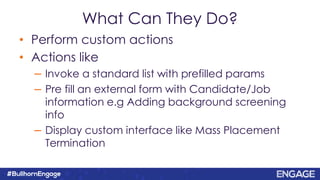
• Perform custom actions
• Actions like
– Invoke a standard list with prefilled params
– Pre fill an external form with Candidate/Job
information e.g Adding background screening
info
– Display custom interface like Mass Placement
Termination
What Can They Do?
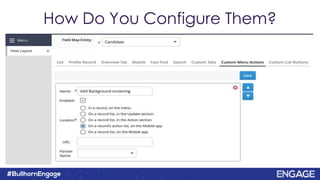
How Do You Configure Them?
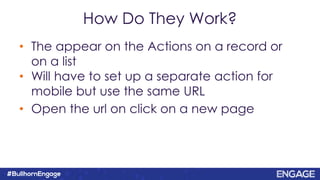
How Do They Work?
• The appear on the Actions on a record or
on a list
• Will have to set up a separate action for
mobile but use the same URL
• Open the url on click on a new page
Custom Actions Demo
Field Interactions
What Can They Do?
• Scripts that can customize form fields
• Examples:
– Update picker options for a customText field to bring back
data from an external system
– Filter down options on a contact dropdown based on a
selection made on a different field
– Mark a field as invalid and disallow users from being able to
save the formdata
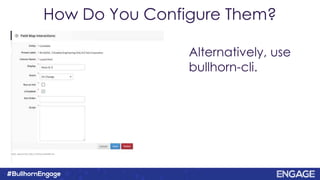
Alternatively, use
bullhorn-cli.
How Do You Configure Them?
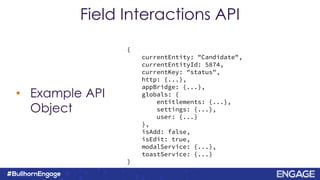
• Example API
Object
Field Interactions API
{
currentEntity: "Candidate",
currentEntityId: 5874,
currentKey: "status",
http: {...},
appBridge: {...},
globals: {
entitlements: {...},
settings: {...},
user: {...}
},
isAdd: false,
isEdit: true,
modalService: {...},
toastService: {...}
}
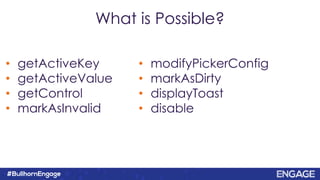
• modifyPickerConfig
• markAsDirty
• displayToast
• disable
What is Possible?
• getActiveKey
• getActiveValue
• getControl
• markAsInvalid
Page Interactions
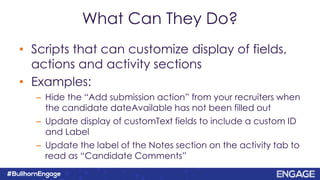
What Can They Do?
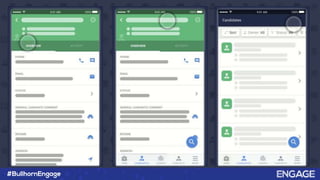
• Scripts that can customize display of fields,
actions and activity sections
• Examples:
– Hide the “Add submission action” from your recruiters when
the candidate dateAvailable has not been filled out
– Update display of customText fields to include a custom ID
and Label
– Update the label of the Notes section on the activity tab to
read as “Candidate Comments”
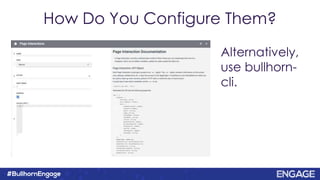
How Do You Configure Them?
Alternatively,
use bullhorn-
cli.
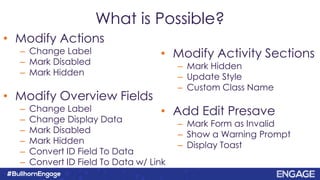
What is Possible?
• Modify Actions
– Change Label
– Mark Disabled
– Mark Hidden
• Modify Overview Fields
– Change Label
– Change Display Data
– Mark Disabled
– Mark Hidden
– Convert ID Field To Data
– Convert ID Field To Data w/ Link
• Modify Activity Sections
– Mark Hidden
– Update Style
– Custom Class Name
• Add Edit Presave
– Mark Form as Invalid
– Show a Warning Prompt
– Display Toast
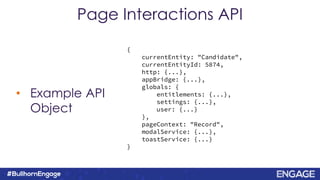
• Example API
Object
Page Interactions API
{
currentEntity: "Candidate",
currentEntityId: 5874,
http: {...},
appBridge: {...},
globals: {
entitlements: {...},
settings: {...},
user: {...}
},
pageContext: "Record",
modalService: {...},
toastService: {...}
}
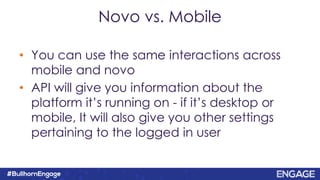
• You can use the same interactions across
mobile and novo
• API will give you information about the
platform it’s running on - if it’s desktop or
mobile, It will also give you other settings
pertaining to the logged in user
Novo vs. Mobile
• Using the cli to install page & field
interactions via command line
• Clone configuration starter to manage your
page and field interactions
Bullhorn CLI & Configuration Starter
bullhorn/bullhorn-cli
bullhorn/extension-configuration-starter
Page & Field Interactions
Demo
Running of the MoBull
How Do I Build It?
• Git clone repo
• Npm install
• Ionic serve
bullhorn/mobullDemo
What About on a Device?
• Android Studio
• Xcode - mac only
Ionic V3 Documentation
Repo
Questions?

How to Get the Best MoBull Experience

  • 1.
    How to Getthe Best MoBull Experience Tanvi Gadre Jaclyn Moore Amrutha Rajiv
  • 2.
    Tanvi Gadre Development Manager JaclynMoore Software Engineer Amrutha Rajiv Principal Software Architect
  • 3.
    Applying the Lawof Two Feet Every individual has two feet, and must be prepared to use them. Individuals can make a difference and must make a difference. If that is not true in a given situation, they, and they alone, must take responsibility to use their two feet, and move to a new place where they can make a difference. -Harrison Owen
  • 4.
    What Will WeCover Today? • Mobile Overview • Custom Actions • Field Interactions • Page Interactions • Running of MoBull
  • 5.
  • 6.
  • 8.
  • 9.
  • 10.
    What is theStack? • Ionic • Angular • Ionic Angular • Bullhorn – Novo-Elements – Ionic Mocks – Taurus – Chomsky
  • 11.
  • 12.
  • 13.
  • 14.
    What is Ionic? •Powerful HTML5 SDK using web technologies • Targeted at building Hybrid Mobile app • Provides broad range of native mobile components, animations and UI • iOS and Android
  • 15.
    How is itNative?
  • 16.
    How is itNative? • Ionic Native is a TypeScript wrapper for Cordova/PhoneGap plugins that make adding any native functionally
  • 17.
  • 18.
    So what doesthis mean for you?
  • 19.
  • 20.
    • Perform customactions • Actions like – Invoke a standard list with prefilled params – Pre fill an external form with Candidate/Job information e.g Adding background screening info – Display custom interface like Mass Placement Termination What Can They Do?
  • 21.
    How Do YouConfigure Them?
  • 22.
    How Do TheyWork? • The appear on the Actions on a record or on a list • Will have to set up a separate action for mobile but use the same URL • Open the url on click on a new page
  • 23.
  • 24.
  • 25.
    What Can TheyDo? • Scripts that can customize form fields • Examples: – Update picker options for a customText field to bring back data from an external system – Filter down options on a contact dropdown based on a selection made on a different field – Mark a field as invalid and disallow users from being able to save the formdata
  • 26.
  • 27.
    • Example API Object FieldInteractions API { currentEntity: "Candidate", currentEntityId: 5874, currentKey: "status", http: {...}, appBridge: {...}, globals: { entitlements: {...}, settings: {...}, user: {...} }, isAdd: false, isEdit: true, modalService: {...}, toastService: {...} }
  • 28.
    • modifyPickerConfig • markAsDirty •displayToast • disable What is Possible? • getActiveKey • getActiveValue • getControl • markAsInvalid
  • 29.
  • 30.
    What Can TheyDo? • Scripts that can customize display of fields, actions and activity sections • Examples: – Hide the “Add submission action” from your recruiters when the candidate dateAvailable has not been filled out – Update display of customText fields to include a custom ID and Label – Update the label of the Notes section on the activity tab to read as “Candidate Comments”
  • 31.
    How Do YouConfigure Them? Alternatively, use bullhorn- cli.
  • 32.
    What is Possible? •Modify Actions – Change Label – Mark Disabled – Mark Hidden • Modify Overview Fields – Change Label – Change Display Data – Mark Disabled – Mark Hidden – Convert ID Field To Data – Convert ID Field To Data w/ Link • Modify Activity Sections – Mark Hidden – Update Style – Custom Class Name • Add Edit Presave – Mark Form as Invalid – Show a Warning Prompt – Display Toast
  • 33.
    • Example API Object PageInteractions API { currentEntity: "Candidate", currentEntityId: 5874, http: {...}, appBridge: {...}, globals: { entitlements: {...}, settings: {...}, user: {...} }, pageContext: "Record", modalService: {...}, toastService: {...} }
  • 34.
    • You canuse the same interactions across mobile and novo • API will give you information about the platform it’s running on - if it’s desktop or mobile, It will also give you other settings pertaining to the logged in user Novo vs. Mobile
  • 35.
    • Using thecli to install page & field interactions via command line • Clone configuration starter to manage your page and field interactions Bullhorn CLI & Configuration Starter bullhorn/bullhorn-cli bullhorn/extension-configuration-starter
  • 36.
    Page & FieldInteractions Demo
  • 37.
  • 38.
    How Do IBuild It? • Git clone repo • Npm install • Ionic serve bullhorn/mobullDemo
  • 39.
    What About ona Device? • Android Studio • Xcode - mac only Ionic V3 Documentation
  • 40.
  • 41.