SEPHORA

a redesign case study
How to turn Sephora’s website
a shopping rather
than a shopping ?
experience
task
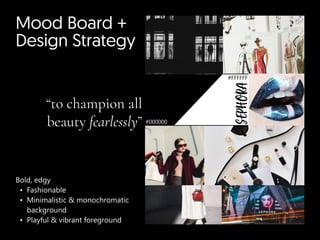
Mood Board +

Design Strategy
#FFFFFF
#000000
Sephora
“to champion all
beauty fearlessly”
Bold, edg
Fashionabl
Minimalistic & monochromatic
backgroun
Playful & vibrant foreground
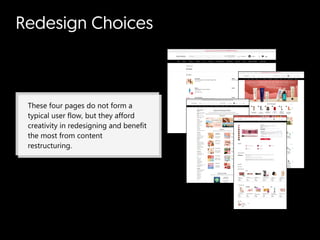
Redesign Choices
These four pages do not form a
typical user flow, but they afford
creativity in redesigning and benefit
the most from content
restructuring.
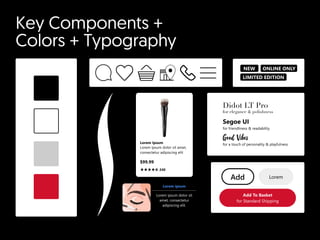
Key Components +

Colors + Typography
Lorem Ipsum
Lorem ipsum dolor sit amet,
consectetur adipiscing elit
$99.99
240
NEW
LIMITED EDITION
ONLINE ONLY
Lorem ipsum
Lorem ipsum dolor sit
amet, consectetur
adipiscing elit.
for a touch of personality & playfulness
Good Vibes
Didot LT Pro

for elegance & polishness
Segoe UI  

for friendliness & readability
Add To Basket

for Standard Shipping
Add Lorem
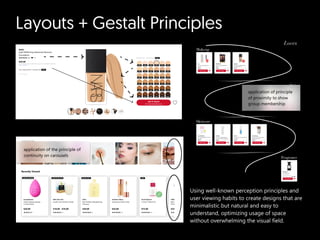
Layouts + Gestalt Principles
Using well-known perception principles and
user viewing habits to create designs that are
minimalistic but natural and easy to
understand, optimizing usage of space
without overwhelming the visual field.
application of the principle of
continuity on carousels
application of principle
of proximity to show
group membership
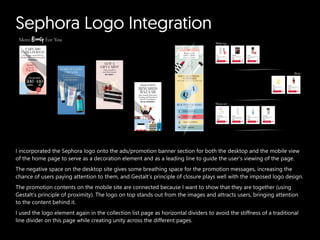
Sephora Logo Integration
I incorporated the Sephora logo onto the ads/promotion banner section for both the desktop and the mobile view
of the home page to serve as a decoration element and as a leading line to guide the user’s viewing of the page.

The negative space on the desktop site gives some breathing space for the promotion messages, increasing the
chance of users paying attention to them, and Gestalt’s principle of closure plays well with the imposed logo design.

The promotion contents on the mobile site are connected because I want to show that they are together (using
Gestalt’s principle of proximity). The logo on top stands out from the images and attracts users, bringing attention
to the content behind it.

I used the logo element again in the collection list page as horizontal dividers to avoid the stiffness of a traditional
line divider on this page while creating unity across the different pages.
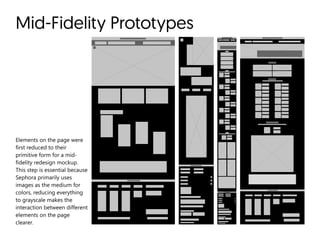
Mid-Fidelity Prototypes
Elements on the page were
first reduced to their
primitive form for a mid-
fidelity redesign mockup.
This step is essential because
Sephora primarily uses
images as the medium for
colors, reducing everything
to grayscale makes the
interaction between different
elements on the page
clearer.
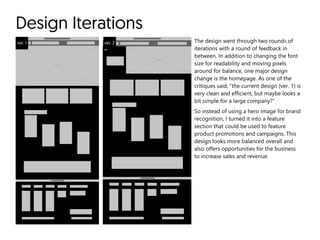
Design Iterations
ver. 1 ver. 2 The design went through two rounds of
iterations with a round of feedback in
between. In addition to changing the font
size for readability and moving pixels
around for balance, one major design
change is the homepage. As one of the
critiques said, “the current design (ver. 1) is
very clean and efficient, but maybe looks a
bit simple for a large company?”

So instead of using a hero image for brand
recognition, I turned it into a feature
section that could be used to feature
product promotions and campaigns. This
design looks more balanced overall and
also offers opportunities for the business
to increase sales and revenue.
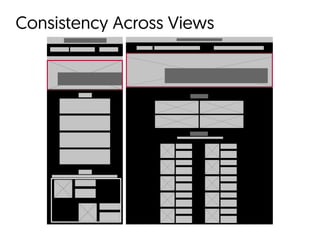
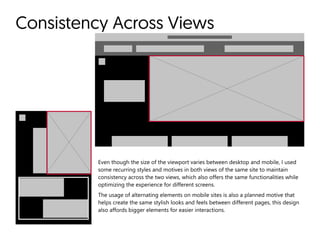
Consistency Across Views
Even though the size of the viewport varies between desktop and mobile, I used
some recurring styles and motives in both views of the same site to maintain
consistency across the two views, which also offers the same functionalities while
optimizing the experience for different screens.  

The usage of alternating elements on mobile sites is also a planned motive that
helps create the same stylish looks and feels between different pages, this design
also affords bigger elements for easier interactions.
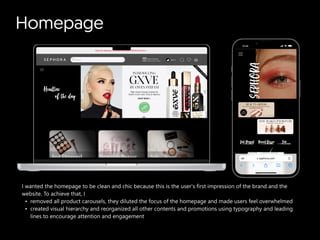
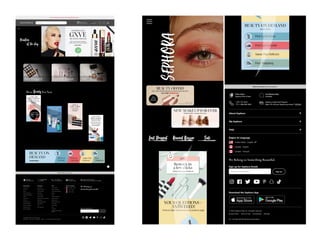
Homepage
I wanted the homepage to be clean and chic because this is the user’s first impression of the brand and the
website. To achieve that,
removed all product carousels, they diluted the focus of the homepage and made users feel overwhelme
created visual hierarchy and reorganized all other contents and promotions using typography and leading
lines to encourage attention and engagement
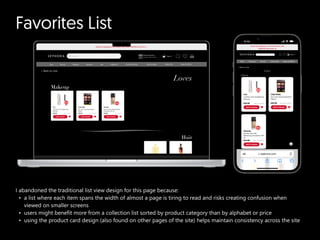
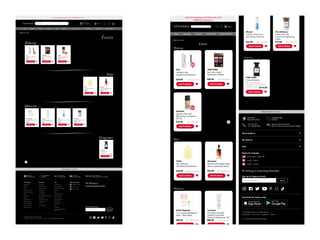
Favorites List
I abandoned the traditional list view design for this page because
a list where each item spans the width of almost a page is tiring to read and risks creating confusion when
viewed on smaller screen
users might benefit more from a collection list sorted by product category than by alphabet or price
using the product card design (also found on other pages of the site) helps maintain consistency across the site
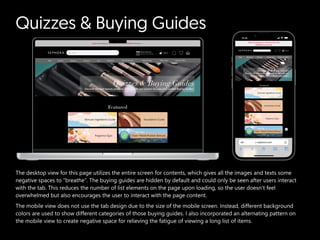
Quizzes & Buying Guides
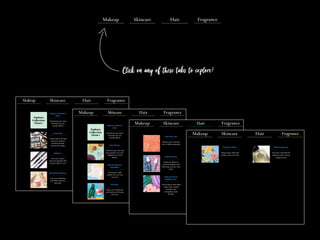
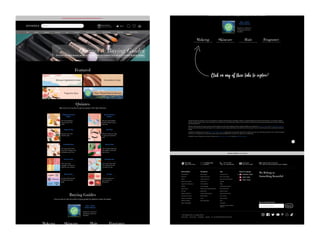
The desktop view for this page utilizes the entire screen for contents, which gives all the images and texts some
negative spaces to “breathe”. The buying guides are hidden by default and could only be seen after users interact
with the tab. This reduces the number of list elements on the page upon loading, so the user doesn’t feel
overwhelmed but also encourages the user to interact with the page content.

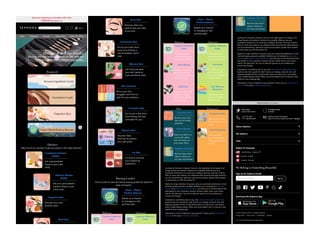
The mobile view does not use the tab design due to the size of the mobile screen. Instead, different background
colors are used to show different categories of those buying guides. I also incorporated an alternating pattern on
the mobile view to create negative space for relieving the fatigue of viewing a long list of items.
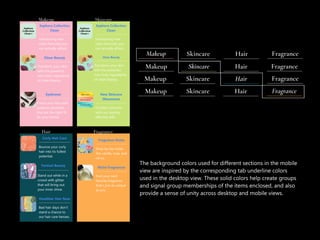
The background colors used for different sections in the mobile
view are inspired by the corresponding tab underline colors
used in the desktop view. These solid colors help create groups
and signal group memberships of the items enclosed, and also
provide a sense of unity across desktop and mobile views.
Product Details Page
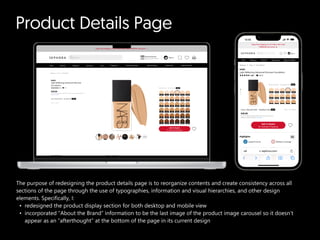
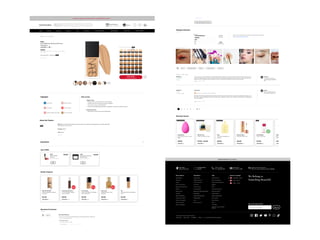
The purpose of redesigning the product details page is to reorganize contents and create consistency across all
sections of the page through the use of typographies, information and visual hierarchies, and other design
elements. Specifically, I
redesigned the product display section for both desktop and mobile vie
incorporated “About the Brand” information to be the last image of the product image carousel so it doesn’t
appear as an “afterthought” at the bottom of the page in its current design
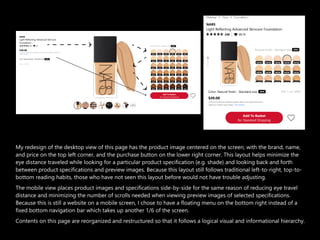
My redesign of the desktop view of this page has the product image centered on the screen, with the brand, name,
and price on the top left corner, and the purchase button on the lower right corner. This layout helps minimize the
eye distance traveled while looking for a particular product specification (e.g. shade) and looking back and forth
between product specifications and preview images. Because this layout still follows traditional left-to-right, top-to-
bottom reading habits, those who have not seen this layout before would not have trouble adjusting.  

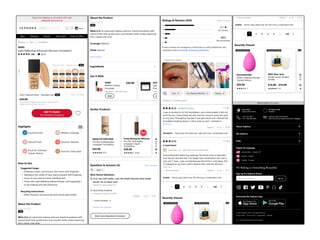
The mobile view places product images and specifications side-by-side for the same reason of reducing eye travel
distance and minimizing the number of scrolls needed when viewing preview images of selected specifications.
Because this is still a website on a mobile screen, I chose to have a floating menu on the bottom right instead of a
fixed bottom navigation bar which takes up another 1/6 of the screen.

Contents on this page are reorganized and restructured so that it follows a logical visual and informational hierarchy.
Sephora redesign case study.pdf

Sephora redesign case study.pdf

  • 1.
  • 2.
    How to turnSephora’s website a shopping rather than a shopping ? experience task
  • 3.
    Mood Board + DesignStrategy #FFFFFF #000000 Sephora “to champion all beauty fearlessly” Bold, edg Fashionabl Minimalistic & monochromatic backgroun Playful & vibrant foreground
  • 4.
    Redesign Choices These fourpages do not form a typical user flow, but they afford creativity in redesigning and benefit the most from content restructuring.
  • 5.
    Key Components + Colors+ Typography Lorem Ipsum Lorem ipsum dolor sit amet, consectetur adipiscing elit $99.99 240 NEW LIMITED EDITION ONLINE ONLY Lorem ipsum Lorem ipsum dolor sit amet, consectetur adipiscing elit. for a touch of personality & playfulness Good Vibes Didot LT Pro for elegance & polishness Segoe UI for friendliness & readability Add To Basket for Standard Shipping Add Lorem
  • 6.
    Layouts + GestaltPrinciples Using well-known perception principles and user viewing habits to create designs that are minimalistic but natural and easy to understand, optimizing usage of space without overwhelming the visual field. application of the principle of continuity on carousels application of principle of proximity to show group membership
  • 7.
    Sephora Logo Integration Iincorporated the Sephora logo onto the ads/promotion banner section for both the desktop and the mobile view of the home page to serve as a decoration element and as a leading line to guide the user’s viewing of the page. The negative space on the desktop site gives some breathing space for the promotion messages, increasing the chance of users paying attention to them, and Gestalt’s principle of closure plays well with the imposed logo design. The promotion contents on the mobile site are connected because I want to show that they are together (using Gestalt’s principle of proximity). The logo on top stands out from the images and attracts users, bringing attention to the content behind it. I used the logo element again in the collection list page as horizontal dividers to avoid the stiffness of a traditional line divider on this page while creating unity across the different pages.
  • 8.
    Mid-Fidelity Prototypes Elements onthe page were first reduced to their primitive form for a mid- fidelity redesign mockup. This step is essential because Sephora primarily uses images as the medium for colors, reducing everything to grayscale makes the interaction between different elements on the page clearer.
  • 9.
    Design Iterations ver. 1ver. 2 The design went through two rounds of iterations with a round of feedback in between. In addition to changing the font size for readability and moving pixels around for balance, one major design change is the homepage. As one of the critiques said, “the current design (ver. 1) is very clean and efficient, but maybe looks a bit simple for a large company?” So instead of using a hero image for brand recognition, I turned it into a feature section that could be used to feature product promotions and campaigns. This design looks more balanced overall and also offers opportunities for the business to increase sales and revenue.
  • 10.
  • 11.
    Consistency Across Views Eventhough the size of the viewport varies between desktop and mobile, I used some recurring styles and motives in both views of the same site to maintain consistency across the two views, which also offers the same functionalities while optimizing the experience for different screens. The usage of alternating elements on mobile sites is also a planned motive that helps create the same stylish looks and feels between different pages, this design also affords bigger elements for easier interactions.
  • 12.
    Homepage I wanted thehomepage to be clean and chic because this is the user’s first impression of the brand and the website. To achieve that, removed all product carousels, they diluted the focus of the homepage and made users feel overwhelme created visual hierarchy and reorganized all other contents and promotions using typography and leading lines to encourage attention and engagement
  • 14.
    Favorites List I abandonedthe traditional list view design for this page because a list where each item spans the width of almost a page is tiring to read and risks creating confusion when viewed on smaller screen users might benefit more from a collection list sorted by product category than by alphabet or price using the product card design (also found on other pages of the site) helps maintain consistency across the site
  • 16.
    Quizzes & BuyingGuides The desktop view for this page utilizes the entire screen for contents, which gives all the images and texts some negative spaces to “breathe”. The buying guides are hidden by default and could only be seen after users interact with the tab. This reduces the number of list elements on the page upon loading, so the user doesn’t feel overwhelmed but also encourages the user to interact with the page content. The mobile view does not use the tab design due to the size of the mobile screen. Instead, different background colors are used to show different categories of those buying guides. I also incorporated an alternating pattern on the mobile view to create negative space for relieving the fatigue of viewing a long list of items.
  • 18.
    The background colorsused for different sections in the mobile view are inspired by the corresponding tab underline colors used in the desktop view. These solid colors help create groups and signal group memberships of the items enclosed, and also provide a sense of unity across desktop and mobile views.
  • 21.
    Product Details Page Thepurpose of redesigning the product details page is to reorganize contents and create consistency across all sections of the page through the use of typographies, information and visual hierarchies, and other design elements. Specifically, I redesigned the product display section for both desktop and mobile vie incorporated “About the Brand” information to be the last image of the product image carousel so it doesn’t appear as an “afterthought” at the bottom of the page in its current design
  • 22.
    My redesign ofthe desktop view of this page has the product image centered on the screen, with the brand, name, and price on the top left corner, and the purchase button on the lower right corner. This layout helps minimize the eye distance traveled while looking for a particular product specification (e.g. shade) and looking back and forth between product specifications and preview images. Because this layout still follows traditional left-to-right, top-to- bottom reading habits, those who have not seen this layout before would not have trouble adjusting. The mobile view places product images and specifications side-by-side for the same reason of reducing eye travel distance and minimizing the number of scrolls needed when viewing preview images of selected specifications. Because this is still a website on a mobile screen, I chose to have a floating menu on the bottom right instead of a fixed bottom navigation bar which takes up another 1/6 of the screen. Contents on this page are reorganized and restructured so that it follows a logical visual and informational hierarchy.