SEO for Drupal Developers
Rick Donohoe, Microserve
@RickDonohoe
Search Engine Optimisation: think of SEO as “What can I do to help Google
promote my site?”
Introduction
SEO concepts are vast - won’t cover marketing, black hat, content writing etc.
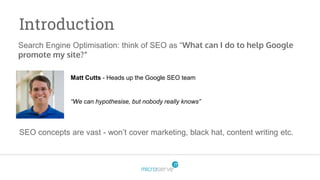
Matt Cutts - Heads up the Google SEO team
“We can hypothesise, but nobody really knows”
Why is SEO important to me?
Project success: Increasing engagement and traffic is good for the client, but
also good for us.
Success = great reference, more work, more money.
Why is SEO important to me?
Other reasons may also include:
1. Whilst pitching for the business you used the phrase “SEO? That’s my
middle name”
2. Your client works with an SEO consultant, and the sudden increase in your
acceptance criterias’ complexity makes you want to punch your screen.
Drupal SEO Modules
-The “Must have’s”
Gathers all website data
Can provide great insights into the quality of your build – are the end-users
engaging with your website as you expect?
Good opportunity for AM/PM to pinpoint new development
Link search to pinpoint content struggles
Google Analytics
Pathauto
URLs are used by Google as a factor in ranking for keywords.
URls also help the user know where they are on the site and what your
content is (e.g. /event/EVENT-NAME)
[node:menu-link:parent:url:path]/[node:title] trick. E.g./cycle ,
/cycle/where-to-ride
Global Redirect – use this to automate a canonical URL to reduce the
likelihood of Duplicate content.
URL Redirect
Simply put allows your client to fix 404s with redirects.
Useful tip 1: Your client can use this to create their own print short URLs.
Useful tip 2: Your client WILL change page titles, which will likely change the
URL. This module adds an automatic redirect.
Need to import redirects? Try Path redirect import module to use a
spreadsheet. Even better, let your client do this!
Metatag
Used for SERPs ->
Allows your client to set their own Meta title and Meta descriptions.
Title should be between 10 and 70 characters, and description should be
between 70 and 160 characters.
Set defaults per content type using [tokens]
Sub-modules allow you to put a whole range of metatags in. More on that
shortly…
SEO Principles applicable
to the build phase
Getting the HTML structure right
How Google “sees” your content (H1, H2, H3…)
For each page, ensure a single H1 exists, then use remaining heading tags
to structure content. Often the logo is used as the homepage H1.
Limit the WYSIWYG formats to H2 and H3, that way your client doesn’t add
H1’s like they’re going out of fashion.
For all content choose wisely between a content type and an entity
Getting the HTML structure right (2)
Remove unnecessary HTML where applicable, as it bloats the page and
affects HTML/text ratio.
If you want to go a step further, ensure headings are only used for unique
content (e.g. no sidebar, header or footer headings).
Getting links right
Save yourself a nightmare by making the client's job easier:
Pathologic - Prevents linking to wrong environments
CKEditor link - Provides WYSIWYG autocomplete link style
Ext Link - Automatically opens all ext links in a new tab
Promoting content
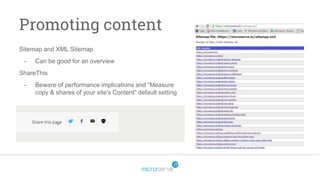
Sitemap and XML Sitemap
- Can be good for an overview
ShareThis
- Beware of performance implications and “Measure
copy & shares of your site's Content” default setting
Optimising content for
Social Media Channels
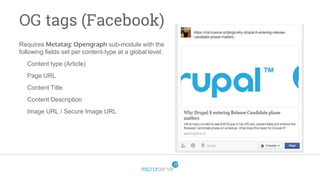
OG tags (Facebook)
Requires Metatag: Opengraph sub-module with the
following fields set per content-type at a global level:
Content type (Article)
Page URL
Content Title
Content Description
Image URL / Secure Image URL
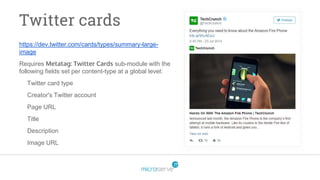
Twitter cards
https://dev.twitter.com/cards/types/summary-large-
image
Requires Metatag: Twitter Cards sub-module with the
following fields set per content-type at a global level:
Twitter card type
Creator's Twitter account
Page URL
Title
Description
Image URL
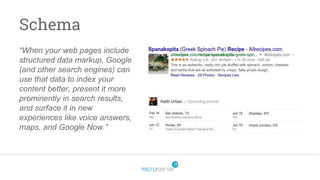
Schema
“When your web pages include
structured data markup, Google
(and other search engines) can
use that data to index your
content better, present it more
prominently in search results,
and surface it in new
experiences like voice answers,
maps, and Google Now.”
Other
Other
Other things that SEO tools will look for...
Impact of Responsiveness, Performance and Security
403 and 404 pages
Alt tags - http://www.mediacurrent.com/blog/describing-images-improved-web-accessibility
Touch Icons
Getting ready for launch day
Don’t get caught at the last hurdle:
Make sure robots.txt is fully accessible
Check your XML sitemap is correct and not cached to a dev URL
Ensure all applicable domains redirect to a single www domain (or non-www
if that floats your boat!)
Ensure your GA code is correctly set
Ensure all redirects are added - tip use site:example.com in Google.
Check your error logs and 404 report – You can spot any issues and/or URLs
missed.
Post-launch
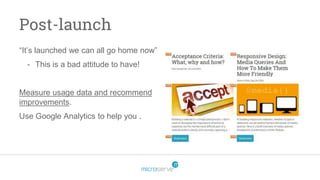
“It’s launched we can all go home now”
- This is a bad attitude to have!
Measure usage data and recommend
improvements.
Use Google Analytics to help you .
That’s all folks!
Any questions?

SEO for Drupal Developers

  • 1.
    SEO for DrupalDevelopers Rick Donohoe, Microserve @RickDonohoe
  • 2.
    Search Engine Optimisation:think of SEO as “What can I do to help Google promote my site?” Introduction SEO concepts are vast - won’t cover marketing, black hat, content writing etc. Matt Cutts - Heads up the Google SEO team “We can hypothesise, but nobody really knows”
  • 3.
    Why is SEOimportant to me? Project success: Increasing engagement and traffic is good for the client, but also good for us. Success = great reference, more work, more money.
  • 4.
    Why is SEOimportant to me? Other reasons may also include: 1. Whilst pitching for the business you used the phrase “SEO? That’s my middle name” 2. Your client works with an SEO consultant, and the sudden increase in your acceptance criterias’ complexity makes you want to punch your screen.
  • 5.
    Drupal SEO Modules -The“Must have’s”
  • 6.
    Gathers all websitedata Can provide great insights into the quality of your build – are the end-users engaging with your website as you expect? Good opportunity for AM/PM to pinpoint new development Link search to pinpoint content struggles Google Analytics
  • 7.
    Pathauto URLs are usedby Google as a factor in ranking for keywords. URls also help the user know where they are on the site and what your content is (e.g. /event/EVENT-NAME) [node:menu-link:parent:url:path]/[node:title] trick. E.g./cycle , /cycle/where-to-ride Global Redirect – use this to automate a canonical URL to reduce the likelihood of Duplicate content.
  • 8.
    URL Redirect Simply putallows your client to fix 404s with redirects. Useful tip 1: Your client can use this to create their own print short URLs. Useful tip 2: Your client WILL change page titles, which will likely change the URL. This module adds an automatic redirect. Need to import redirects? Try Path redirect import module to use a spreadsheet. Even better, let your client do this!
  • 9.
    Metatag Used for SERPs-> Allows your client to set their own Meta title and Meta descriptions. Title should be between 10 and 70 characters, and description should be between 70 and 160 characters. Set defaults per content type using [tokens] Sub-modules allow you to put a whole range of metatags in. More on that shortly…
  • 10.
  • 11.
    Getting the HTMLstructure right How Google “sees” your content (H1, H2, H3…) For each page, ensure a single H1 exists, then use remaining heading tags to structure content. Often the logo is used as the homepage H1. Limit the WYSIWYG formats to H2 and H3, that way your client doesn’t add H1’s like they’re going out of fashion. For all content choose wisely between a content type and an entity
  • 12.
    Getting the HTMLstructure right (2) Remove unnecessary HTML where applicable, as it bloats the page and affects HTML/text ratio. If you want to go a step further, ensure headings are only used for unique content (e.g. no sidebar, header or footer headings).
  • 13.
    Getting links right Saveyourself a nightmare by making the client's job easier: Pathologic - Prevents linking to wrong environments CKEditor link - Provides WYSIWYG autocomplete link style Ext Link - Automatically opens all ext links in a new tab
  • 14.
    Promoting content Sitemap andXML Sitemap - Can be good for an overview ShareThis - Beware of performance implications and “Measure copy & shares of your site's Content” default setting
  • 15.
  • 16.
    OG tags (Facebook) RequiresMetatag: Opengraph sub-module with the following fields set per content-type at a global level: Content type (Article) Page URL Content Title Content Description Image URL / Secure Image URL
  • 17.
    Twitter cards https://dev.twitter.com/cards/types/summary-large- image Requires Metatag:Twitter Cards sub-module with the following fields set per content-type at a global level: Twitter card type Creator's Twitter account Page URL Title Description Image URL
  • 18.
    Schema “When your webpages include structured data markup, Google (and other search engines) can use that data to index your content better, present it more prominently in search results, and surface it in new experiences like voice answers, maps, and Google Now.”
  • 19.
  • 20.
    Other Other things thatSEO tools will look for... Impact of Responsiveness, Performance and Security 403 and 404 pages Alt tags - http://www.mediacurrent.com/blog/describing-images-improved-web-accessibility Touch Icons
  • 21.
  • 22.
    Getting ready forlaunch day Don’t get caught at the last hurdle: Make sure robots.txt is fully accessible Check your XML sitemap is correct and not cached to a dev URL Ensure all applicable domains redirect to a single www domain (or non-www if that floats your boat!) Ensure your GA code is correctly set Ensure all redirects are added - tip use site:example.com in Google. Check your error logs and 404 report – You can spot any issues and/or URLs missed.
  • 23.
    Post-launch “It’s launched wecan all go home now” - This is a bad attitude to have! Measure usage data and recommend improvements. Use Google Analytics to help you .
  • 24.

Editor's Notes

  • #2 Potentially quite “Tutorial like”, but lots of SEO questions keep coming my way. At best you’ll learn something, at worst you’ll have motivation to put on a better talk.
  • #4 Show of hands developers vs client facing roles (non developers) - of those developers, who really cares about SEO?
  • #6 There may be some basics, so bare with.
  • #8 Credit: Perfecting Drupal IA: Harmonious Menus, Paths, and Breadcrumbs
  • #10 SEARCH ENGINE RESULTS PAGE. Meta keyword doesn’t mean anything to anybody these days.
  • #12 Content types for Slides = No no! Think about the URL and if you can land on it via Google. Explain how Google “READS” the page.
  • #13 Display Suite can be a good tool to use with “Expert” or “Minimal” field wrappers. Explain HTML/text ratio. Explain unique content.
  • #16 When you share a link on Facebook or Twitter, why does it look better on some posts than others?
  • #19 Schema.org and Rich Snippets modules. Is typically a nightmare! FYI, if your client requests “Rich Pins” (Pinterest) ignore them, delete them, move house.
  • #24 The common approach with websites is to finish off the build and call it a day. Instead, measure your work and suggest new recommendations.