Editing the image Nubra Glacier
using Adobe Photoshop Elements
        By Mariyah Hoosenally
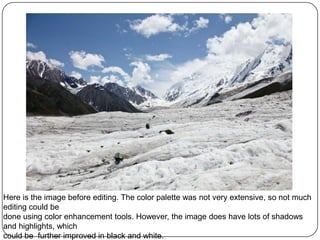
Here is the image before editing. The color palette was not very extensive, so not much
editing could be
done using color enhancement tools. However, the image does have lots of shadows
and highlights, which
could be further improved in black and white.
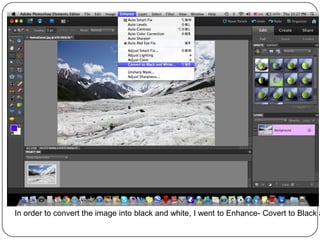
In order to convert the image into black and white, I went to Enhance- Covert to Black a
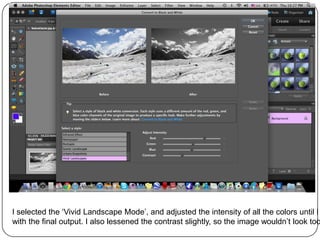
I selected the ‘Vivid Landscape Mode’, and adjusted the intensity of all the colors until I
with the final output. I also lessened the contrast slightly, so the image wouldn’t look too
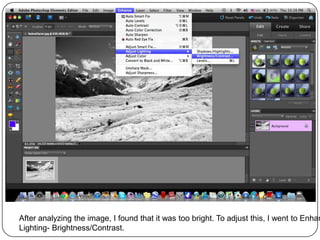
After analyzing the image, I found that it was too bright. To adjust this, I went to Enhan
Lighting- Brightness/Contrast.
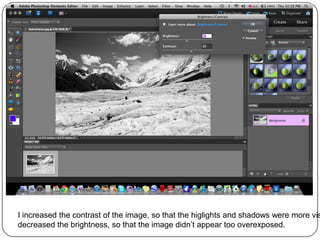
I increased the contrast of the image, so that the higlights and shadows were more vis
decreased the brightness, so that the image didn’t appear too overexposed.
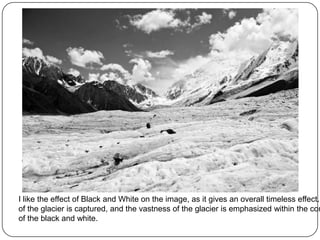
I like the effect of Black and White on the image, as it gives an overall timeless effect.
of the glacier is captured, and the vastness of the glacier is emphasized within the con
of the black and white.

How I edited the image Nubra glacier

  • 1.
    Editing the imageNubra Glacier using Adobe Photoshop Elements By Mariyah Hoosenally
  • 2.
    Here is theimage before editing. The color palette was not very extensive, so not much editing could be done using color enhancement tools. However, the image does have lots of shadows and highlights, which could be further improved in black and white.
  • 3.
    In order toconvert the image into black and white, I went to Enhance- Covert to Black a
  • 4.
    I selected the‘Vivid Landscape Mode’, and adjusted the intensity of all the colors until I with the final output. I also lessened the contrast slightly, so the image wouldn’t look too
  • 5.
    After analyzing theimage, I found that it was too bright. To adjust this, I went to Enhan Lighting- Brightness/Contrast.
  • 6.
    I increased thecontrast of the image, so that the higlights and shadows were more vis decreased the brightness, so that the image didn’t appear too overexposed.
  • 7.
    I like theeffect of Black and White on the image, as it gives an overall timeless effect. of the glacier is captured, and the vastness of the glacier is emphasized within the con of the black and white.