What is WannaCryRansomware?
• On 12 May 2017, a new strain of the
Ransom.Crypt.XXX (WannaCry)
ransomware began spreading widely
impacting a large number of
organizations across the world.
• WannaCry infects the system by
encrypting all its files.
3.
Vulnerable Microsoft OS
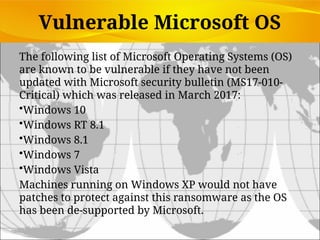
Thefollowing list of Microsoft Operating Systems (OS)
are known to be vulnerable if they have not been
updated with Microsoft security bulletin (MS17-010-
Critical) which was released in March 2017:
•Windows 10
•Windows RT 8.1
•Windows 8.1
•Windows 7
•Windows Vista
Machines running on Windows XP would not have
patches to protect against this ransomware as the OS
has been de-supported by Microsoft.
4.
What I needto do for my home computer to
prevent WannaCry Ransomware?
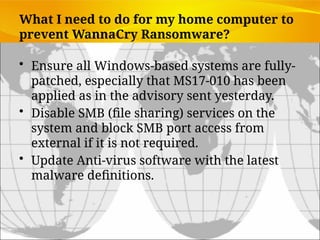
• Ensure all Windows-based systems are fully-
patched, especially that MS17-010 has been
applied as in the advisory sent yesterday.
• Disable SMB (file sharing) services on the
system and block SMB port access from
external if it is not required.
• Update Anti-virus software with the latest
malware definitions.
Boston Celtics ScoreBig Points Against Spyware
• Problem: Spyware infecting laptops during team travel
affecting accessibility and performance of proprietary
system
• Solutions: Deploy security software to reduce spyware.
• Mi5 Network’s Webgate security appliance tool sits
between corporate firewall and network to prevent
spyware entering network or infected computers
connecting to network
• Demonstrates IT’s role in combating malicious software
• Illustrates digital technology’s role in achieving security
on the Web
9.
System Vulnerability andAbuse
• Security:
• Policies, procedures and technical measures used to prevent
unauthorized access, alteration, theft, or physical damage to
information systems
• Controls:
• Methods, policies, and organizational procedures that ensure
safety of organization’s assets; accuracy and reliability of its
accounting records; and operational adherence to
management standards
10.
• Why systemsare vulnerable
• Hardware problems
• Breakdowns, configuration errors, damage from improper
use or crime
• Software problems
• Programming errors, installation errors, unauthorized
changes)
• Disasters
• Power failures, flood, fires, etc.
• Use of networks and computers outside of
firm’s control
• E.g., with domestic or offshore outsourcing vendors
System Vulnerability and Abuse
11.
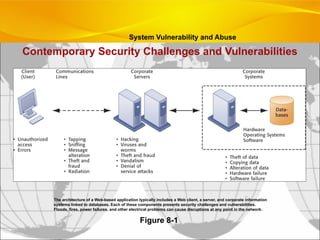
Contemporary Security Challengesand Vulnerabilities
Figure 8-1
The architecture of a Web-based application typically includes a Web client, a server, and corporate information
systems linked to databases. Each of these components presents security challenges and vulnerabilities.
Floods, fires, power failures, and other electrical problems can cause disruptions at any point in the network.
System Vulnerability and Abuse
12.
• Internet vulnerabilities
•Network open to anyone
• Size of Internet means abuses can have wide impact
• Use of fixed Internet addresses with permanent
connections to Internet eases identification by hackers
• E-mail attachments
• E-mail used for transmitting trade secrets
• IM messages lack security, can be easily intercepted
System Vulnerability and Abuse
13.
• Wireless securitychallenges
• Radio frequency bands easy to scan
• SSIDs (service set identifiers)
• Identify access points
• Broadcast multiple times
• War driving
• Eavesdroppers drive by buildings and try to intercept network traffic
• When hacker gains access to SSID, has access to network’s
resources
• WEP (Wired Equivalent Privacy)
• Security standard for 802.11
• Basic specification uses shared password for both users and access
point
• Users often fail to use security features
System Vulnerability and Abuse
14.
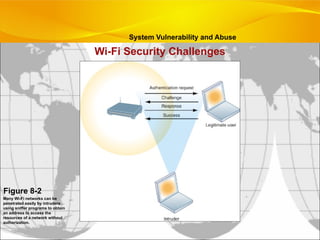
Wi-Fi Security Challenges
Figure8-2
Many Wi-Fi networks can be
penetrated easily by intruders
using sniffer programs to obtain
an address to access the
resources of a network without
authorization.
System Vulnerability and Abuse
15.
• Malicious software(malware)
• Viruses: Rogue software program that attaches itself to other
software programs or data files in order to be executed
• Worms: Independent computer programs that copy themselves from
one computer to other computers over a network
• Trojan horses: Software program that appears to be benign but
then does something other than expected
• Spyware: Small programs install themselves surreptitiously on
computers to monitor user Web surfing activity and serve up
advertising
• Key loggers: Record every keystroke on computer to steal
serial numbers, passwords, launch Internet attacks
System Vulnerability and Abuse
16.
• Spoofing
• Misrepresentingoneself by using fake e-mail addresses or
masquerading as someone else
• Redirecting Web link to address different from intended one,
with site masquerading as intended destination
• Sniffer: Eavesdropping program that monitors information
traveling over network
• Denial-of-service attacks (DoS): Flooding server with
thousands of false requests to crash the network
• Distributed denial-of-service attacks (DDoS): Use of
numerous computers to launch a DoS
• Botnets: Networks of “zombie” PCs infiltrated by bot malware
System Vulnerability and Abuse
17.
• Identity theft:Theft of personal Information (social security id,
driver’s license or credit card numbers) to impersonate someone
else
• Phishing: Setting up fake Web sites or sending e-mail
messages that look like legitimate businesses to ask users for
confidential personal data.
• Evil twins: Wireless networks that pretend to offer trustworthy
Wi-Fi connections to the Internet
• Pharming: Redirects users to a bogus Web page, even when
individual types correct Web page address into his or her browser
• Click fraud: Click fraud is clicking on online ads to artificially
inflate the number of clicks, often to drain an advertiser's budget
or damage their ad ranking.
System Vulnerability and Abuse
18.
• Global threats- Cyberterrorism and cyberwarfare
• Concern that Internet vulnerabilities and other
networks make digital networks easy targets for
digital attacks by terrorists, foreign intelligence
services, or other groups
System Vulnerability and Abuse
19.
• Internal threats– Employees
• Security threats often originate inside an
organization
• Inside knowledge
• Sloppy security procedures
• Social engineering
• Software vulnerability
Management Information Systems
Chapter 8 Securing Information Systems
System Vulnerability and Abuse
20.
• Legal andregulatory requirements for electronic
records management
• Firms face new legal obligations for the retention
and storage of electronic records as well as for
privacy protection
• HIPAA: Medical security and privacy rules and procedures
• Gramm-Leach-Bliley Act: Requires financial institutions to
ensure the security and confidentiality of customer data
• Sarbanes-Oxley Act: Imposes responsibility on companies
and their management to safeguard the accuracy and integrity
of financial information that is used internally and released
externally
Business Value of Security and Control
21.
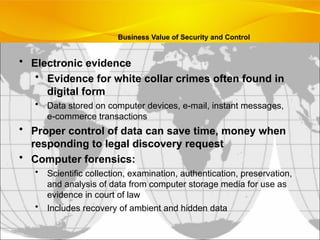
• Electronic evidence
•Evidence for white collar crimes often found in
digital form
• Data stored on computer devices, e-mail, instant messages,
e-commerce transactions
• Proper control of data can save time, money when
responding to legal discovery request
• Computer forensics:
• Scientific collection, examination, authentication, preservation,
and analysis of data from computer storage media for use as
evidence in court of law
• Includes recovery of ambient and hidden data
Business Value of Security and Control
22.
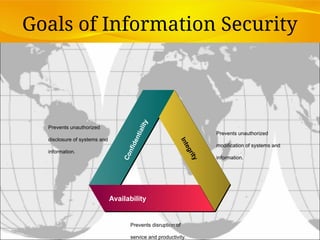
Goals of InformationSecurity
Availability
C
o
n
f
i
d
e
n
t
i
a
l
i
t
y
Prevents unauthorized
disclosure of systems and
information.
I
n
t
e
g
r
i
t
y
Prevents unauthorized
modification of systems and
information.
Prevents disruption of
service and productivity.
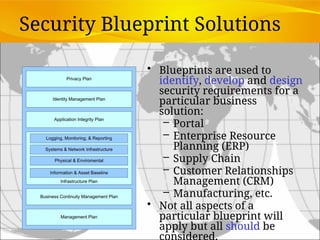
Security Blueprint Solutions
•Blueprints are used to
identify, develop and design
security requirements for a
particular business
solution:
– Portal
– Enterprise Resource
Planning (ERP)
– Supply Chain
– Customer Relationships
Management (CRM)
– Manufacturing, etc.
• Not all aspects of a
particular blueprint will
apply but all should be
considered.
Establishing a Frameworkfor Security and Control
• Information systems controls
• General controls
• Govern design, security, and use of computer programs
and data throughout organization’s IT infrastructure
• Combination of hardware, software, and manual
procedures to create overall control environment
• Types of general controls
• Software controls
• Hardware controls
• Computer operations controls
• Data security controls
• Implementation controls
• Administrative controls
Management Information Systems
Chapter 8 Securing Information Systems
30.
• Application controls
•Specific controls unique to each computerized application,
such as payroll or order processing
• Include both automated and manual procedures
• Ensure that only authorized data are completely and
accurately processed by that application
• Types of application controls:
• Input controls
• Processing controls
• Output controls
Management Information Systems
Chapter 8 Securing Information Systems
Establishing a Framework for Security and Control
31.
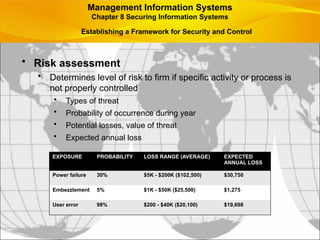
• Risk assessment
•Determines level of risk to firm if specific activity or process is
not properly controlled
• Types of threat
• Probability of occurrence during year
• Potential losses, value of threat
• Expected annual loss
EXPOSURE PROBABILITY LOSS RANGE (AVERAGE) EXPECTED
ANNUAL LOSS
Power failure 30% $5K - $200K ($102,500) $30,750
Embezzlement 5% $1K - $50K ($25,500) $1,275
User error 98% $200 - $40K ($20,100) $19,698
Management Information Systems
Chapter 8 Securing Information Systems
Establishing a Framework for Security and Control
32.
• Security policy
•Ranks information risks, identifies acceptable security goals,
and identifies mechanisms for achieving these goals
• Drives other policies
• Acceptable use policy (AUP): Defines acceptable uses
of firm’s information resources and computing equipment
• Authorization policies: Determine differing levels of user
access to information assets
• Authorization management systems
• Allow each user access only to those portions of system that
person is permitted to enter, based on information established
by set of access rules, profile
Management Information Systems
Chapter 8 Securing Information Systems
Establishing a Framework for Security and Control
33.
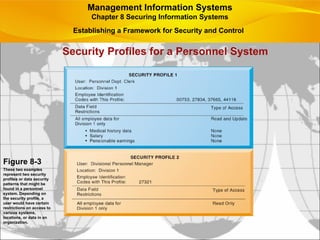
Security Profiles fora Personnel System
Figure 8-3
These two examples
represent two security
profiles or data security
patterns that might be
found in a personnel
system. Depending on
the security profile, a
user would have certain
restrictions on access to
various systems,
locations, or data in an
organization.
Management Information Systems
Chapter 8 Securing Information Systems
Establishing a Framework for Security and Control
34.
• Disaster recoveryplanning: Devises plans for
restoration of disrupted services
• Business continuity planning: Focuses on restoring
business operations after disaster
• Both types of plans needed to identify firm’s most
critical systems and business processes
• Business impact analysis to determine impact of an outage
• Management must determine
• Maximum time systems can be down
• Which systems must be restored first
Management Information Systems
Chapter 8 Securing Information Systems
Establishing a Framework for Security and Control
35.
• MIS audit
•Examines firm’s overall security environment as well as
controls governing individual information systems
• Reviews technologies, procedures, documentation, training,
and personnel
• May even simulate disaster to test response of technology, IS
staff, other employees
• Lists and ranks all control weaknesses and estimates
probability of their occurrence
• Assesses financial and organizational impact of each threat
Management Information Systems
Chapter 8 Securing Information Systems
Establishing a Framework for Security and Control
36.
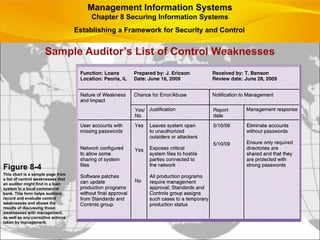
Sample Auditor’s Listof Control Weaknesses
Figure 8-4
This chart is a sample page from
a list of control weaknesses that
an auditor might find in a loan
system in a local commercial
bank. This form helps auditors
record and evaluate control
weaknesses and shows the
results of discussing those
weaknesses with management,
as well as any corrective actions
taken by management.
Management Information Systems
Chapter 8 Securing Information Systems
Establishing a Framework for Security and Control
37.
Technologies and Toolsfor Security
• Access control: Policies and procedures to prevent
improper access to systems by unauthorized
insiders and outsiders
• Authorization
• Authentication
• Password systems
• Tokens
• Smart cards
• Biometric authentication
Management Information Systems
Chapter 8 Securing Information Systems
38.
• Firewall: Hardwareand/or software to prevent
unauthorized access to private networks
• Screening technologies
• Packet filtering
• Stateful inspection
• Network address translation (NAT)
• Application proxy filtering
• Intrusion detection systems: Monitor vulnerable
points on networks to detect and deter intruders
• Examines events as they are happening to discover attacks
in progress
• Scans network to find patterns indicative of attacks
Management Information Systems
Chapter 8 Securing Information Systems
Technologies and Tools for Security
39.
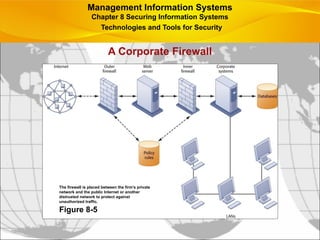
A Corporate Firewall
ManagementInformation Systems
Chapter 8 Securing Information Systems
Technologies and Tools for Security
The firewall is placed between the firm’s private
network and the public Internet or another
distrusted network to protect against
unauthorized traffic.
Figure 8-5
40.
• Antivirus andantispyware software:
• Checks computers for presence of malware and can often
eliminate it as well
• Require continual updating
• Unified threat management (UTM)
• Comprehensive security management products
• Tools include
• Firewalls
• Intrusion detection
• VPNs
• Web content filtering
• Antispam software
Management Information Systems
Chapter 8 Securing Information Systems
Technologies and Tools for Security
41.
• Securing wirelessnetworks
• WEP security can be improved:
• Activating it
• Assigning unique name to network’s SSID
• Using it with VPN technology
• Wi-Fi Alliance finalized WAP2 specification,
replacing WEP with stronger standards
• Continually changing keys
• Encrypted authentication system with central server
Management Information Systems
Chapter 8 Securing Information Systems
Technologies and Tools for Security
42.
• Encryption:
• Transformingtext or data into cipher text that cannot
be read by unintended recipients
• Two methods for encrypting network traffic
• Secure Sockets Layer (SSL) and successor Transport
Layer Security (TLS)
• Secure Hypertext Transfer Protocol (S-HTTP)
• Two methods of encryption
• Symmetric key encryption
• Public key encryption
Management Information Systems
Chapter 8 Securing Information Systems
Technologies and Tools for Security
43.
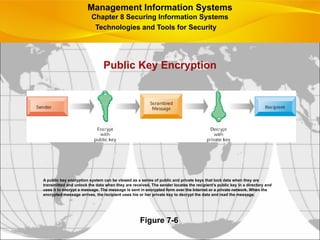
Public Key Encryption
Figure7-6
A public key encryption system can be viewed as a series of public and private keys that lock data when they are
transmitted and unlock the data when they are received. The sender locates the recipient’s public key in a directory and
uses it to encrypt a message. The message is sent in encrypted form over the Internet or a private network. When the
encrypted message arrives, the recipient uses his or her private key to decrypt the data and read the message.
Management Information Systems
Chapter 8 Securing Information Systems
Technologies and Tools for Security
44.
• Digital certificate:
•Data file used to establish the identity of users and electronic
assets for protection of online transactions
• Uses a trusted third party, certification authority (CA), to
validate a user’s identity
• CA verifies user’s identity, stores information in CA server,
which generates encrypted digital certificate containing
owner ID information and copy of owner’s public key
• Public key infrastructure (PKI)
• Use of public key cryptography working with certificate
authority
• Widely used in e-commerce
Management Information Systems
Chapter 8 Securing Information Systems
Technologies and Tools for Security
45.
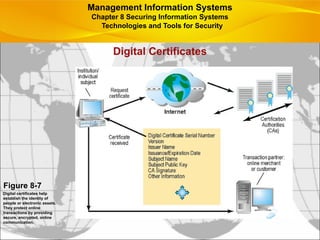
Digital Certificates
Figure 8-7
Digitalcertificates help
establish the identity of
people or electronic assets.
They protect online
transactions by providing
secure, encrypted, online
communication.
Management Information Systems
Chapter 8 Securing Information Systems
Technologies and Tools for Security
46.
• Ensuring systemavailability
• Online transaction processing requires 100%
availability, no downtime
• Fault-tolerant computer systems
• For continuous availability
• Contain redundant hardware, software, and power
supply components to provide continuous, uninterrupted
service
• High-availability computing
• Helps recover quickly from crash
• Minimizes, does not eliminate downtime
Management Information Systems
Chapter 8 Securing Information Systems
Technologies and Tools for Security
47.
• Recovery-oriented computing
•Designing systems that recover quickly with capabilities to
help operators pinpoint and correct of faults in multi-
component systems
• Controlling network traffic
• Deep packet inspection (DPI)
• Security outsourcing
• Managed security service providers (MSSPs)
Management Information Systems
Chapter 8 Securing Information Systems
Technologies and Tools for Security
48.
Can Salesforce.com On-DemandRemain in Demand?
• Read the Interactive Session: Technology and then
discuss the following questions:
• How did the problems experienced by Salesforce.com
impact its business?
• How did the problems impact its customers?
• What steps did Salesforce.com take to solve the
problems? Were these steps sufficient?
• List and describe other vulnerabilities discussed in this
chapter that might create outages at Salesforce.com and
measures to safeguard against them.
Management Information Systems
Chapter 8 Securing Information Systems
Technologies and Tools for Security
49.
• Ensuring softwarequality
• Software Metrics: Objective assessments of system in
form of quantified measurements
• Number of transactions
• Online response time
• Payroll checks printed per hour
• Known bugs per hundred lines of code
• Testing: Early and regular testing
• Walkthrough: Review of specification or design
document by small group of qualified people
• Debugging: Process by which errors are eliminated
Management Information Systems
Chapter 8 Securing Information Systems
Technologies and Tools for Security
#6 This chapter discusses the need for security to guard information systems and data as well as technologies used to secure information systems. Ask students what types of threats can harm an information system. Internet security, or the lack thereof, will continue to be a topic of major concern to corporations and countries. Ask students why there is so much attention paid to Internet security issues in the press.
#7 This slide discusses the chapter opening case, which describes the security problems Facebook has had. Note that the size of Facebook is one major factor that makes it an especially tempting target for hackers. Why is the size of the user base such a factor ? (It’s another example of a “network effect”!)
#8 The chapter opening case discusses the problems that spyware caused the Boston Celtics network; spyware that infected coaches, recruiters, and other staff member’s laptops at hotels. Ask students if they have had any personal problems with spyware and to describe this problem. How did they get rid of the spyware?
#9 This slide introduces the need for both security and controls in today’s businesses in order to safeguard information systems. Ask students to give an example of security technique and an example of a control that might be used in a business.
#10 This slide discusses the main categories of threats to information systems. Note that when large amounts of data are stored digitally, on computers and servers and in databases, they are vulnerable to many more kinds of threats than when they were stored in manual form, on paper in folders and file cabinets. When data are available over a network, there are even more vulnerabilities. Ask students if they have ever lost data on their computers. What was the reason (hardware, software, “disaster,” other people, etc.).
#11 This graphic illustrates the types of threats to system security and the points over the network at which these threats are prevalent. Some problems occur at the client computer, others through the network lines, corporate servers, or in corporate hardware and software.
#12 This slide discusses the types of threats that large public networks, like the Internet, face because they are open to virtually anyone. Note that Internet is so huge that when abuses do occur, they can have an enormously widespread impact. And when the Internet becomes part of the corporate network, the organization’s information systems are even more vulnerable to actions from outsiders.
#13 This slide discusses security threats related to wireless networks. Local-area networks (LANs) using the 802.11 standard can be easily penetrated by outsiders armed with laptops, wireless cards, external antennae, and hacking software. Hackers use these tools to detect unprotected networks, monitor network traffic, and, in some cases, gain access to the Internet or to corporate networks. Ask students if they have connected to the Internet through an unknown wireless network that a person or business had established and left unprotected.
#14 This graphic illustrates why wireless networks are vulnerable - The service set identifiers (SSIDs) identifying the access points in a Wi-Fi network are broadcast multiple times (as illustrated by the orange sphere) and can be picked up fairly easily by intruders’ sniffer programs.
#15 This slide identifies the various types of malware that threaten information systems and computers. Ask students if they have ever had a problem with a virus. Do they know how they got infected?
Note that there are now over 200 viruses and worms targeting mobile phones, and Web 2.0 applications like MySpace and blogs are new conduits for malware and spyware.
Malware is a serious problem - over the past decade, worms and viruses have cause billions of dollars of damage to corporate networks, e-mail systems, and data.
#16 This slide continues the discussion of different types of computer crimes. Ask students what the ultimate purpose of spoofing and sniffing are. Note that there are legitimate uses of sniffing – sniffers can help identify network trouble spots or spot criminal activity on a network.
What is the result of a DoS attack?
The text notes that in the first six months of 2007, security product provider Symantec observed over 5 million distinct bot-infected computers. Bots and botnets are an extremely serious threat because they can be used to launch very large attacks using many different techniques.
#17 This slide continues the discussion of types of computer crime.
Have any students encountered any of these types of crimes personally? Note that The U.S. Congress addressed the threat of computer crime in 1986 with the Computer Fraud and Abuse Act. This act makes it illegal to access a computer system without authorization. The text lists other legislation to counter computer crime, such as the National Information Infrastructure Protection Act in 1996 to make virus distribution and hacker attacks to disable Web sites federal crimes.
#18 This slide continues the discussion of types of computer crime. Note that cybercriminal activities are borderless: The global nature of the Internet makes it possible for cybercriminals to operate anywhere in the world.
Ask students if there should be legislation outlawing click fraud.
#19 This slide looks at another source of security problems – people inside the company with access to the system. Ask students if they have ever worked somewhere with a vulnerable password system. Have they ever revealed to anyone what their password is or was?
#20 This slide continues the look at the business value of security and control, examining the legal requirements for electronic records management.
Note that the Sarbanes-Oxley Act was designed to protect investors after the scandals at Enron, WorldCom, and other public companies. Sarbanes-Oxley is fundamentally about ensuring that internal controls are in place to govern the creation and documentation of information in
financial statements. Because managing this data involves information systems, information systems must implement controls to make sure this information is accurate and to enforce integrity, confidentiality, and accuracy.
#21 This slide continues the discussion of the business value of security and control. Security, control, and electronic records management are essential today for responding to legal actions. Ask students what the most common form of electronic evidence is (e-mail).
Note that in a legal action, a firm is obligated to respond to a discovery request for access to information that may be used as evidence, and the company is required by law to produce those data. The cost of responding to a discovery request can be enormous if the company has trouble assembling the required data or the data have been corrupted or destroyed. Courts impose severe financial and even criminal penalties for improper destruction of electronic documents.
Ask students what ambient data is and to give an example.
Given the legal requirements for electronic records, it is important that an awareness of computer forensics should be incorporated into a firm’s
contingency planning process.
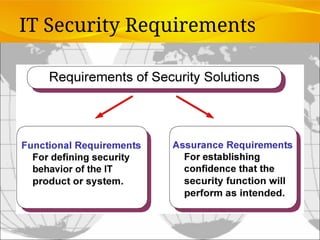
#23 All security solutions should be designed and implemented to focus on two areas, the functional requirements of the solution, and also the assurance requirements, which really address how the functional requirements are actually working properly. No solution is complete unless it addresses these two areas. Example: a firewall addresses the functional requirements, but it is the ‘logging and monitoring’ aspect of the firewall that addresses the assurance requirements and makes the entire ‘firewall solution’ a complete solution.
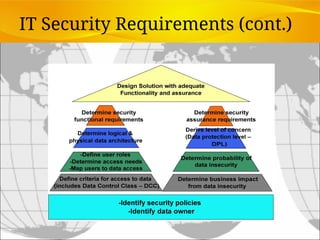
#24 For each security requirement and function, there must be a corresponding check or assurance that the function is working correctly. This graphic is a pictorial representation of the previous slide
#25 The Security Blueprints provide a method of organizing the requirements and the resulting components of a security architecture. They can be used to address the security requirements of a specific topic or across the enterprise.
#26 As we mentioned previously, the security blueprints provide a structure for organizing requirements and solutions. They are used to ensure that security is considered from a holistic view. The ISO 17799 Code of Practice for Security Information Management provides a broad base of security controls that provides a point of reference for completeness of the components within the blueprints. The ISO 17799 reference standard does not however, provide all of the guidance that is required for an effective, holistic security architecture.
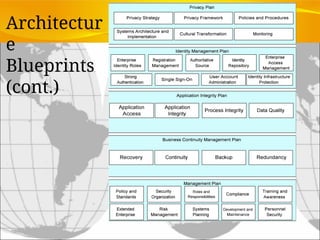
#27 This diagram provides more detail on the components that make up the blueprints. Consideration should given to each of these components in relation to the decisions and direction that they provide for the blueprint topic. You should be able to identify what each of the components contributes to the eventual solution.
For example, under privacy you should be able to point to the strategy the organization has chosen to manage privacy issues. You should have the privacy policy at hand and and enabling standards and procedures. You should be able to identify what components and processes are in place to monitor adherence to privacy policies.
#28 An effective security architecture will always be able to “connect the dots” between the business decisions of the organization, how these are reflected in the principles, policies and standards of the organization, how these have been turned into requirements and how the requirements map to the blueprints.
#29 To improve security for a firm’s information systems, it is important to create a framework that supports security. This includes establishing information systems controls, understanding the risks to the firm’s information systems, and establishing security policies that are appropriate for the firm. This slide looks at controls used in information systems. Remember that controls are methods, policies, and organizational procedures that ensure safety of organization’s assets; accuracy and reliability of its accounting records; and operational adherence to management standards. There are two main types of controls, general controls and application controls. General controls apply to all computerized applications.
Ask students what the functions are of the different types of general controls.
#30 This slide examines the second type of information systems controls, application controls.
Ask students what each type of application control does. (Input controls check data for accuracy and completeness when they enter the system. There are specific input controls for input authorization, data conversion, data editing, and error handling. Processing controls establish that data are complete and accurate during updating. Output controls ensure that the results of computer processing are accurate, complete, and properly distributed.)
#31 This slide looks at another important factor in establishing an appropriate framework for security and control, risk assessment. While not all risks can be anticipated and measured, most businesses should be able identify many of the risks they face.
The table illustrates sample results of a risk assessment for an online order processing system that processes 30,000 orders per day. The likelihood of each exposure occurring over a one-year period is expressed as a percentage. The expected annual loss is the result of multiplying the probability by the average loss.
Ask students to rank the three risks listed here in order of most important to minimize.
#32 This slide looks at the need for a firm to establish a security policy for protecting a company’s assets, as well as other company policies the security policy drives, and how information systems support this. The text provides the example of the security policy at Unilever, a multinational consumer goods company, which requires every employee with a laptop or mobile handheld to use an approved device and employ a password or other method of identification when logging onto the corporate network.
Ask students what types of issues would be covered under an AUP. (Privacy, user responsibility, and personal use of company equipment and networks, unacceptable and acceptable actions for every user and consequences for noncompliance.)
#33 This graphic illustrates the security allowed for two sets of users of a personnel database that contains sensitive information such as employees’ salaries and medical histories. Divisional managers cannot update the system but can read all employee data fields for his or her division, including medical history and salary. Clerical employees who input employee data into the system can update the system but can neither read nor
update sensitive fields. These security profiles are based on access rules supplied by business groups in the firm.
#34 This slide continues the discussion of essential activities a firm performs to maximize security and control, here looking at planning for activities should a disaster occur, such as a flood, earthquake, or power outage. Note that disaster recovery plans focus primarily on the technical issues involved in keeping systems up and running, such as which files to back up and the maintenance of backup computer systems or disaster recovery services. The text provides the example of MasterCard, which maintains a duplicate computer center in Kansas City, Missouri, to serve as an emergency backup to its primary computer center in St. Louis.
Ask students why it is important that both business managers and information systems specialists work together on these plans.
#35 This slide looks at the role of auditing. An MIS audit enables a firm to determine if existing security measures and controls are effective.
#36 This graphic illustrates a sample page from an auditor’s listing of control weaknesses for a loan system. It includes a section for notifying management of such weaknesses and for management’s response. Management is expected to devise a plan for countering significant weaknesses in controls
#37 This slide begins a look at the technologies and tools an organization can use to secure systems and data, ensure system availability, and ensure data quality. Here, techniques for preventing unauthorized access to a system are listed. Ask students what the difference between authentication and authorization is. Have any students used authentication methods other than passwords to access a system?
#38 This slide looks at two methods to prevent intruders from accessing private networks. To create a strong firewall, an administrator must maintain detailed internal rules identifying the people, applications, or addresses that are allowed or rejected. Firewalls can deter, but not completely prevent, network penetration by outsiders and should be viewed as one element in an overall security plan.
Ask students to differentiate between the screening technologies listed here. Note that these are often used in combination. Ask students if they use firewall software on their own computers.
#39 This graphic illustrates the use of firewalls on a corporate network. Notice that here, a second, “inner” firewall protects the Web server from access through the internal network.
#40 This slide looks at additional tools to prevent unwanted intruders and software from accessing the network. Ask students what antivirus and antispyware tools they use. Ask why these tools require continual updating. Ask why UTM packages would include antispam software.
#41 This slide looks at the tools and technologies used to secure wireless networks. Ask students with laptops what types of wireless security they have.
#42 This slide discusses the use of encryption to ensure that data traveling along networks cannot be read by unauthorized users. Ask students to explain the difference between symmetric key encryption and public key encryption. (In symmetric key encryption, the sender and receiver establish a secure Internet session by creating a single encryption key and sending it to the receiver so both the sender and receiver share the same key. Public key encryption uses two keys: one shared (or public) and one totally private. The keys are mathematically related so that data encrypted with one key can be decrypted using only the other key. To send and receive messages, communicators first create separate pairs of private and public keys. The public key is kept in a directory and the private key must be kept secret. The sender encrypts a message with the recipient’s public key. On receiving the message, the recipient uses his or her private key to decrypt it.
Ask students why public key encryption is stronger than symmetric key encryption.
Note that the strength of an encryption key is measured by its bit length. Today, a typical key will be 128 bits long (a string of 128 binary digits).
#43 This graphic illustrates the steps in public key encryption. The sender encrypts data using the public key of the recipient; data encrypted with this public key can only be decrypted with the recipient’s private key.
#44 This slide looks at the use of digital certificates as a tool to help protect online transactions. Digital certificates are used in conjunction with public key encryption to validate the identities of two parties in a transaction before data is exchanged.
#45 This graphic illustrates the process for using digital certificates. The institution or individual requests a certificate over the internet from a CA; the certificate received from the CA can then be used to validate a transaction with an online merchant or customer.
#46 This slide and the next look at technologies and tools for ensuring system availability. Ask students why online transaction processing requires 100% availability.
Note that firms with heavy e-commerce processing or for firms that depend on digital networks for their internal operations require at minimum high-availability computing, using tools such as backup servers, distribution of processing across multiple servers, high-capacity
storage, and good disaster recovery and business continuity plans.
#47 This slide continues the discussion of techniques to minimize downtime and improve network performance. Deep packet inspection enables a network to sort low-priority data packets from high-priority ones in order to improve performance for business critical communication. Ask students what types of network traffic would be suitable for assigning lower priority in a business setting?
#48 This Interactive Session discusses the consequences outages in Salesforce.com software that prevented clients from accessing the system, once for more than three hours. This case illustrates the serious consequences of problems in software and hardware quality, and the technologies that can be used to maximize system availability.
#49 This slide looks at ensuring software quality as a way to improve system quality and reliability by employing software metrics and rigorous software testing. Ongoing use of metrics allows the information systems department and end users to jointly measure the
performance of the system and identify problems as they occur.