PS C:Users>
whoami
Known on Twitter as
@banerjeeamit
An affair with SQL Server for nearly a decade
Sr. Program Manager on the Microsoft SQL Server (TIGER) product team
Speaker at SQL PASS 24HOP TechEd Virtual TechDays User Groups SQL
Saturdays SQLBITS
Co-authored “Pro SQL Server on Microsoft Azure”
Co-authored “Professional SQL Server 2012: Internals and Troubleshooting”
Own TroubleshootingSQL.com
Also found on http://aka.ms/sqlserverteam
2
@mssqltiger
No known vulnerabilities have been reported for the
Microsoft TDS implementation. This is the communication
protocol that's used between SQL Server clients and the
SQL Server database engine.
SQL Server Tiger Team
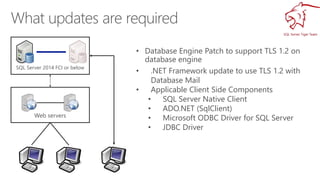
SQL Server 2014 FCI or below
Web servers
• .NET Framework update to use TLS 1.2 with
Database Mail
• Applicable Client Side Components
• SQL Server Native Client
• ADO.NET (SqlClient)
• Microsoft ODBC Driver for SQL Server
• JDBC Driver
SQL Server 2014 FCI or below
Web servers
• Apply the .NET updates
• Applicable Client Side Components
• SQL Server Native Client
• ADO.NET (SqlClient)
• Microsoft ODBC Driver for SQL Server
• JDBC Driver
SQL Server 2014 FCI or below
Web servers
• Applicable Client Side Components
• SQL Server Native Client
• ADO.NET (SqlClient)
• Microsoft ODBC Driver for SQL Server
• JDBC Driver
SQL Server Tiger Team
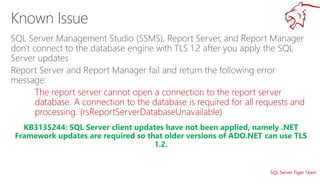
The report server cannot open a connection to the report server
database. A connection to the database is required for all requests and
processing. (rsReportServerDatabaseUnavailable)
KB3135244: SQL Server client updates have not been applied, namely .NET
Framework updates are required so that older versions of ADO.NET can use TLS
1.2.
SQL Server Tiger Team
Connection handshake failed. An OS call failed: (80090331) 0x80090331(The client and server cannot communicate, because
they do not possess a common algorithm.). State 56.
KB3135244: Database engine needs to be updated to support TLS 1.2
communications for Service Broker, Database Mirroring and Availability Groups
SQL Server Tiger Team
Wait on the Database Engine recovery handle failed. Check the SQL Server error log for potential causes.
A connection was successfully established with the server, but then an error occurred during the pre-login handshake. (provider: Named
Pipes Provider, error: 0 - No process is on the other end of the pipe.)
KB3135769: Apply the necessary .NET fixes and run SQL Server setup again.
SQL Server Tiger Team
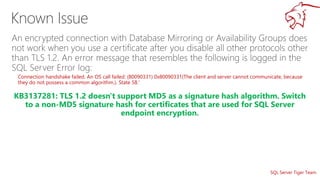
Connection handshake failed. An OS call failed: (80090331) 0x80090331(The client and server cannot communicate, because
they do not possess a common algorithm.). State 58.'
KB3137281: TLS 1.2 doesn't support MD5 as a signature hash algorithm. Switch
to a non-MD5 signature hash for certificates that are used for SQL Server
endpoint encryption.
SQL Server Tiger Team
Agent Log:
Microsoft.SqlServer.Management.SqlIMail.Server.Common.BaseException:
Mail configuration information could not be read from the database.
….
….
Unable to start mail session.
KB3135244: .NET framework updates required to support TLS 1.2 for database
mail need to be applied.
SQL Server Tiger Team
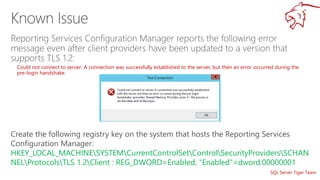
Could not connect to server: A connection was successfully established to the server, but then an error occurred during the
pre-login handshake
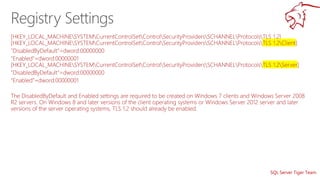
Create the following registry key on the system that hosts the Reporting Services
Configuration Manager:
HKEY_LOCAL_MACHINESYSTEMCurrentControlSetControlSecurityProvidersSCHAN
NELProtocolsTLS 1.2Client : REG_DWORD=Enabled, "Enabled"=dword:00000001
SQL Server Tiger Team
https://github.com/amitmsft/MSSQLTIGERDemos
http://spoke.at/TigerTLS
https://blogs.msdn.microsoft.com/sqlreleaseservices/tls-1-2-
support-for-sql-server-2008-2008-r2-2012-and-2014/
KB3135244
• Blog:
• Aka.ms/sqlserverteam
• www.troubleshootingsql.com
• Twitter:
• @banerjeeamit
• @mssqltiger
Securing SQL Server with TLS 1.2

Securing SQL Server with TLS 1.2

  • 2.
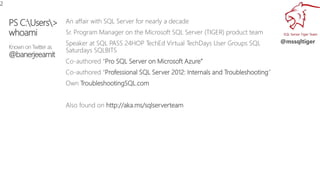
    PS C:Users> whoami Known onTwitter as @banerjeeamit An affair with SQL Server for nearly a decade Sr. Program Manager on the Microsoft SQL Server (TIGER) product team Speaker at SQL PASS 24HOP TechEd Virtual TechDays User Groups SQL Saturdays SQLBITS Co-authored “Pro SQL Server on Microsoft Azure” Co-authored “Professional SQL Server 2012: Internals and Troubleshooting” Own TroubleshootingSQL.com Also found on http://aka.ms/sqlserverteam 2 @mssqltiger
  • 3.
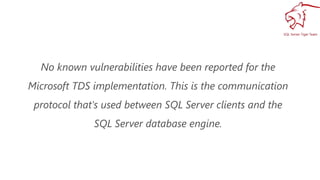
    No known vulnerabilitieshave been reported for the Microsoft TDS implementation. This is the communication protocol that's used between SQL Server clients and the SQL Server database engine.
  • 4.
  • 5.
  • 8.
  • 9.
  • 10.
    SQL Server 2014FCI or below Web servers • .NET Framework update to use TLS 1.2 with Database Mail • Applicable Client Side Components • SQL Server Native Client • ADO.NET (SqlClient) • Microsoft ODBC Driver for SQL Server • JDBC Driver
  • 11.
    SQL Server 2014FCI or below Web servers • Apply the .NET updates • Applicable Client Side Components • SQL Server Native Client • ADO.NET (SqlClient) • Microsoft ODBC Driver for SQL Server • JDBC Driver
  • 12.
    SQL Server 2014FCI or below Web servers • Applicable Client Side Components • SQL Server Native Client • ADO.NET (SqlClient) • Microsoft ODBC Driver for SQL Server • JDBC Driver
  • 13.
    SQL Server TigerTeam The report server cannot open a connection to the report server database. A connection to the database is required for all requests and processing. (rsReportServerDatabaseUnavailable) KB3135244: SQL Server client updates have not been applied, namely .NET Framework updates are required so that older versions of ADO.NET can use TLS 1.2.
  • 14.
    SQL Server TigerTeam Connection handshake failed. An OS call failed: (80090331) 0x80090331(The client and server cannot communicate, because they do not possess a common algorithm.). State 56. KB3135244: Database engine needs to be updated to support TLS 1.2 communications for Service Broker, Database Mirroring and Availability Groups
  • 15.
    SQL Server TigerTeam Wait on the Database Engine recovery handle failed. Check the SQL Server error log for potential causes. A connection was successfully established with the server, but then an error occurred during the pre-login handshake. (provider: Named Pipes Provider, error: 0 - No process is on the other end of the pipe.) KB3135769: Apply the necessary .NET fixes and run SQL Server setup again.
  • 16.
    SQL Server TigerTeam Connection handshake failed. An OS call failed: (80090331) 0x80090331(The client and server cannot communicate, because they do not possess a common algorithm.). State 58.' KB3137281: TLS 1.2 doesn't support MD5 as a signature hash algorithm. Switch to a non-MD5 signature hash for certificates that are used for SQL Server endpoint encryption.
  • 17.
    SQL Server TigerTeam Agent Log: Microsoft.SqlServer.Management.SqlIMail.Server.Common.BaseException: Mail configuration information could not be read from the database. …. …. Unable to start mail session. KB3135244: .NET framework updates required to support TLS 1.2 for database mail need to be applied.
  • 18.
    SQL Server TigerTeam Could not connect to server: A connection was successfully established to the server, but then an error occurred during the pre-login handshake Create the following registry key on the system that hosts the Reporting Services Configuration Manager: HKEY_LOCAL_MACHINESYSTEMCurrentControlSetControlSecurityProvidersSCHAN NELProtocolsTLS 1.2Client : REG_DWORD=Enabled, "Enabled"=dword:00000001
  • 19.
  • 20.
    SQL Server TigerTeam https://github.com/amitmsft/MSSQLTIGERDemos http://spoke.at/TigerTLS https://blogs.msdn.microsoft.com/sqlreleaseservices/tls-1-2- support-for-sql-server-2008-2008-r2-2012-and-2014/ KB3135244
  • 21.
    • Blog: • Aka.ms/sqlserverteam •www.troubleshootingsql.com • Twitter: • @banerjeeamit • @mssqltiger