Robust Industrial Data Communications – Made EasyRobust Industrial Data Communications – Made Easy
Secure your network -
Segmentation & Segregation
Niklas Mörth & Jon-Olov Vatn
If you need instruction on how to connect audio, please visit
https://collaborationhelp.cisco.com/article/en-us/cjr7xq
2
Westermo group 2018
▪ Founded in 1975
▪ Industry leading software and
hardware development force
▪ Own production in Sweden with
state of the art process control
▪ Own sales and support units in 12
key countries, distribution partners
in many others
3
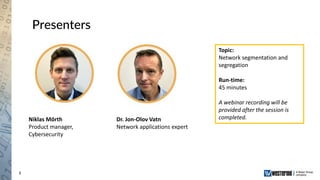
Presenters
Niklas Mörth
Product manager,
Cybersecurity
Dr. Jon-Olov Vatn
Network applications expert
Topic:
Network segmentation and
segregation
Run-time:
45 minutes
A webinar recording will be
provided after the session is
completed.
4
Questions
▪ Ask questions in the chat window
▪ Ask question to ”Host”
▪ Questions will be answered in the end of
the presentation
5
Agenda
▪ The Threat Landscape
▪ Your Security Posture
▪ The Why
▪ The What and How
▪ Summary
6
Agenda
▪ The Threat Landscape
▪ Your Security Posture
▪ The Why
▪ The What and How
▪ Summary
Protect
Detect
Respond
Security
Posture
7
Agenda
▪ The Threat Landscape
▪ Your Security Posture
▪ The Why
▪ The What and How
▪ Summary
? ?? ?
8
Agenda
▪ The Threat Landscape
▪ Your Security Posture
▪ The Why
▪ The What and How
▪ Summary
! !!
!
9
Agenda
▪ The Threat Landscape
▪ Your Security Posture
▪ The Why
▪ The What and How
▪ Summary
Robust Industrial Data Communications – Made EasyRobust Industrial Data Communications – Made Easy
The Threat Landscape
11
The Threat Landscape
Verizon Data Breach Investigation Report 2018
Robust Industrial Data Communications – Made EasyRobust Industrial Data Communications – Made Easy
Your Security Posture
13
Wikipedia definition
“Cybersecurity is the
protection of computer
systems from theft or
damage to their hardware,
software or electronic data,
as well as from disruption
or misdirection of the
services they provide.”
What is Cybersecurity?
14
Your Security Posture
Protect
Detect
Respond
Security
Posture
15
Your Security Posture
Protect
Detect
Respond
Firewall
Anti-virus
Authentication & Authorization
Cryptography
Network Segmentation
Etc.
Security
Posture
16
Your Security Posture
Protect
Detect
Respond
Firewall
Anti-virus
Authentication & Authorization
Cryptography
Network Segmentation
Etc.
Network Monitoring (NMS)
Intrusion Detection (IDS)
Security Incidents (SIEM)
Threat Hunting
Etc.
Security
Posture
17
Your Security Posture
Protect
Detect
Respond
Firewall
Anti-virus
Authentication & Authorization
Cryptography
Network Segmentation
Etc.
Network Monitoring (NMS)
Intrusion Detection (IDS)
Security Incidents (SIEM)
Threat Hunting
Etc.
Incident Response Plan
Breach containment
Security Incident Response Team
Etc. Security
Posture
Robust Industrial Data Communications – Made EasyRobust Industrial Data Communications – Made Easy
The Why!
19
The Why!
CONTROL NETWORK
OFFICE NETWORK
20
The Why!
CONTROL NETWORK
OFFICE NETWORK
21
The Why!
CONTROL NETWORK
OFFICE NETWORK
22
The Why!
▪ Avoid single point of failure
CONTROL NETWORK
OFFICE NETWORK
23
The Why!
▪ Avoid single point of failure
CONTROL NETWORK
OFFICE NETWORK
24
The Why!
▪ Avoid single point of failure
CONTROL NETWORK
OFFICE NETWORK
25
The Why!
▪ Avoid single point of failure
▪ Policy of least privilege
CONTROL NETWORK
OFFICE NETWORK
26
The Why!
▪ Avoid single point of failure
▪ Policy of least privilege
CONTROL NETWORK
OFFICE NETWORK
27
The Why!
▪ Avoid single point of failure
▪ Policy of least privilege
CONTROL NETWORK
OFFICE NETWORK
28
The Why!
▪ Avoid single point of failure
▪ Policy of least privilege
▪ Slowing down attackers
CONTROL NETWORK
OFFICE NETWORK
29
The Why!
▪ Avoid single point of failure
▪ Policy of least privilege
▪ Slowing down attackers
CONTROL NETWORK
OFFICE NETWORK
SENSITIVE
DATA
30
The Why!
▪ Avoid single point of failure
▪ Policy of least privilege
▪ Slowing down attackers
CONTROL NETWORK
OFFICE NETWORK
SENSITIVE
DATA
31
The Why!
▪ Avoid single point of failure
▪ Policy of least privilege
▪ Slowing down attackers
▪ Reduce damage of succeful
breaches
CONTROL NETWORK
OFFICE NETWORK
SENSITIVE
DATA
32
The Why!
▪ Avoid single point of failure
▪ Policy of least privilege
▪ Slowing down attackers
▪ Reduce damage of succeful
breaches
CONTROL NETWORK
OFFICE NETWORK
Robust Industrial Data Communications – Made EasyRobust Industrial Data Communications – Made Easy
The What and How!
34
Start: A plant network in need of organizing
▪ Mix of units with different
purposes and criticality
▪ Single, flat network (switched)
▪ Or multiple networks, each with
mix of units
▪ Little or no control of traffic
patterns within the Intranet
FW/
RouterIntranet
Internet (WAN)
Office PCs
Management
Clients
PLCs & Process
Equipment
Servers
Switched
Network
35
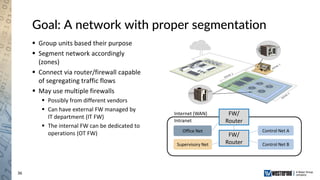
Goal: A network with proper segmentation
▪ Group units based their purpose
▪ Segment network accordingly
(zones)
▪ Connect via router/firewall capable
of segregating traffic flows
▪ May use multiple firewalls
▪ Possibly from different vendors
▪ Can have external FW managed by
IT department (IT FW)
▪ The internal FW can be dedicated to
operations (OT FW)
FW/
RouterIntranet
Internet (WAN)
Office Net
Supervisory Net
Control Net A
Control Net B
FW/
Router
36
Goal: A network with proper segmentation
▪ Group units based their purpose
▪ Segment network accordingly
(zones)
▪ Connect via router/firewall capable
of segregating traffic flows
▪ May use multiple firewalls
▪ Possibly from different vendors
▪ Can have external FW managed by
IT department (IT FW)
▪ The internal FW can be dedicated to
operations (OT FW)
FW/
RouterIntranet
Internet (WAN)
Office Net
Supervisory Net
Control Net A
Control Net B
FW/
Router
37
Segmentation: Local Area Networks
▪ What is a LAN?
▪ LAN – Local Area Network
▪ Sometimes it means ”your local
network”, i.e., your whole Intranet
▪ Here we use LAN when referring to a
broadcast network, typically using IEEE
802.3/Ethernet technology.
▪ Form star topology by using a
switch/hub/bridge to connect Ethernet
equipment.
▪ Switches can be connected together to
extend the LAN (tree topology).
▪ Connecting switches in a ring improves
robustness (requires RSTP, FRNT, ...)
Connecting units to LAN via a switch (Star Topology)
Using multiple switches to extend the LAN (Tree Topology)
38
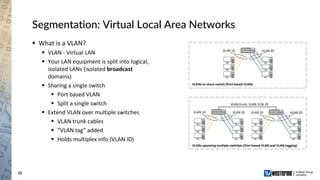
Segmentation: Virtual Local Area Networks
▪ What is a VLAN?
▪ VLAN - Virtual LAN
▪ Your LAN equipment is split into logical,
isolated LANs (isolated broadcast
domains)
▪ Sharing a single switch
▪ Port based VLAN
▪ Split a single switch
▪ Extend VLAN over multiple switches
▪ VLAN trunk cables
▪ ”VLAN tag” added
▪ Holds multiplex info (VLAN ID)
VLAN 10 VLAN 20
VLAN 10 VLAN 20 VLAN 10 VLAN 20
VLAN trunk: VLAN 10 & 20
VLANs to share switch (Port based VLAN)
VLANs spanning multiple switches (Port based VLAN and VLAN tagging)
39
Using VLANs to segment our network
▪ Configure VLANs on the (OT)
Firewall/Router
▪ Creates one zone for each network
▪ Within each zone there are
additional switches (not shown)
FW/Router
VLAN 50Intranet
Internet (WAN)
VLAN 10
Office Net
VLAN 20
Supervisory Net
VLAN 30
Control Net A
VLAN 40:
Control Net B
FW/Router
1
2
3
4
5
40
Assigning IP addresses/subnets
▪ IP addresses: Identifies a unit and its
location
▪ Logically assigned
▪ Network part and Host part
▪ Assign one subnet per VLAN, e.g.,
▪ 10.0.10.0/24: Office Net
▪ 10.0.20.0/24: Supervisory Net
▪ 10.0.30.0/24: Control Net A
▪ 10.0.40.0/24: Control Net B
▪ 10.0.50.0/24: Upstream Net
FW/Router
VLAN 50
10.0.50.0/24Intranet
Internet (WAN)
VLAN 10
Office Net
10.0.10.0/24
VLAN 20
Supervisory Net
10.0.20.0/24
VLAN 30
Control Net A
10.0.30.0/24
FW/Router
.2
VLAN 40
Control Net B
10.0.40.0/24
.1 .1
.1.1
.1
Example IP address with ”prefix length” 24
(netmask 255.255.255.0):
10.0.40.1
Network ID Host ID
41
Configuring IP address
▪ Example, configuring IP address for
interface ”vlan40” on (OT) Firewall
▪ Address: 10.0.40.1/24
FW/Router
VLAN 50
10.0.50.0/24Intranet
Internet (WAN)
VLAN 10
Office Net
10.0.10.0/24
VLAN 20
Supervisory Net
10.0.20.0/24
VLAN 30
Control Net A
10.0.30.0/24
FW/Router
.2
VLAN 40
Control Net B
10.0.40.0/24
.1 .1
.1.1
.1
42
Segmentation Done
▪ Segmentation using (V)LANs
▪ Units devided into groups based on role
▪ Each group in separate segment (zone)
▪ Within segment, communication
typically switched
▪ Across segments, routed via
Firewall/Router
▪ ”Default gateway” setting adds route
towards Internet
▪ Firewall not enabled
▪ All units can still communicate
▪ Security not (yet) enhanced
▪ Next step: Traffic segregation!
FW/Router
VLAN 50
10.0.50.0/24Intranet
Internet (WAN)
VLAN 10
Office Net
10.0.10.0/24
VLAN 20
Supervisory Net
10.0.20.0/24
VLAN 30
Control Net A
10.0.30.0/24
FW/Router
.2
VLAN 40
Control Net B
10.0.40.0/24
.1 .1
.1.1
.1
43
Traffic Segregation using Firewall
▪ Block all traffic by default
▪ ”Default forward policy”: Deny
▪ No traffic will be routed between LANs!
▪ Add ”packet filter allow” rules for legal traffic flows
▪ Whitelisting
▪ Need to learn your traffic patterns
▪ Example:
▪ Office network gets access towards Internet
(perhaps only HTTPS and DNS)
▪ No communication between Control Networks
▪ Supervisory Network can access Control
Networks
▪ Limit to specific sources/destinations and protocols
▪ Complements to Firewall packet filters
▪ Stateful Inspection
▪ Deep inspection firewall
FW/Router
VLAN 50
10.0.50.0/24Intranet
Internet (WAN)
VLAN 10
Office Net
10.0.10.0/24
VLAN 20
Supervisory Net
10.0.20.0/24
VLAN 30
Control Net A
10.0.30.0/24
FW/Router
.2
VLAN 40
Control Net B
10.0.40.0/24
.1 .1
.1.1
.1
44
Firewall filter rules in WeOS
▪ Default ”Forward Policy”: Drop
▪ Add ”Filter allow” rules for whitelisting allowed traffic
patterns
▪ Match traffic based on
▪ Network Interface (in/out)
▪ IP address (src/dst)
▪ IP payload protocol (TCP, UDP, ICMP, ...)
▪ TCP or UDP Port number
▪ Stop at first match (action: allow or deny/drop)
▪ Input or Forward chain?
▪ Input chain: Rules without ”Out Interface” and
”Destination address”
▪ Forward chain: Rules with ”Out Interface” and/or
”Destination address”
▪ Stateful firewall
▪ Logging possible
▪ Note: Does not apply to switched traffic
45
Firewall filter configuration example
▪ Add ability for management station in supervision
network to control a unit in control network A via
SNMP.
▪ Here we limit to specific IP addresses of
management station (10.0.20.5) and the controlled
unit (10.0.30.33).
FW/Router
VLAN 50
10.0.50.0/24Intranet
Internet (WAN)
VLAN 10
Office Net
10.0.10.0/24
VLAN 20
Supervisory Net
10.0.20.0/24
VLAN 30
Control Net A
10.0.30.0/24
FW/Router
.2
VLAN 40
Control Net B
10.0.40.0/24
.1 .1
.1.1
.1
46
Segmentation and Segregation Recap
▪ Segmentation using (V)LANs
▪ IP address and subnet assignment and
routing for connectivity
▪ Traffic segregation using firewall rules
Done!
FW/Router
VLAN 50
10.0.50.0/24Intranet
Internet (WAN)
VLAN 10
Office Net
10.0.10.0/24
VLAN 20
Supervisory Net
10.0.20.0/24
VLAN 30
Control Net A
10.0.30.0/24
FW/Router
.2
VLAN 40
Control Net B
10.0.40.0/24
.1 .1
.1.1
.1
47
More complex networks
▪ Intermediate Communication
Network between your zones
▪ Internal to plant
▪ Remote locations
▪ Use of VPNs (Conduits)
▪ Multiple (OT) Firewalls
▪ Redundancy within LANs
▪ Within Zones
▪ Intermediate Communication
Networks
▪ Ring Topologies
Intranet
Internet (WAN)
Office Net
Supervisory Net
Control Net A
Control Net B
FW/
Router
FW/
Router
FW/
Router
FW/
Router
FW/
Router
Robust Industrial Data Communications – Made EasyRobust Industrial Data Communications – Made Easy
Summary
49
Summary
▪ The threat is real, keep your Security Posture updated!
▪ Why you should segment and segregate your network:
▪ Avoid single point of failure
▪ Policy of least privilege
▪ Slow down the attacker
▪ Reduce the damage of a successful breach
▪ How to:
▪ Segmentation using (V)LANs
▪ Traffic segregation using firewall rules
50
Fundamentals of cybersecurity
▪ Network-to-Network protection
Recording available at Westermo.com
▪ Best practices for using VPNs for easy network-to-network
protection
▪ Network segregation
Recording available at Westermo.com in short
▪ Use WeOS switching routers to create security zones in your
network
▪ Perimeter protection and spoofing protection
April 17th 09.00 and 15.00 CET
▪ Protect your industrial network from unsolicited requests
51
Thank you for attending!
▪ An email will be sent to you including
▪ Playback link to Webinar recording
▪ Contact information to your local Westermo dealer
▪ Information on how to register for next webinar
Next webinar: April 17th, 2019
Perimeter protection and spoofing protection
52
Robust Industrial Data
Communications – Made Easy
Robust Industrial Data
Communications – Made Easy

Secure your network - Segmentation and segregation

  • 1.
    Robust Industrial DataCommunications – Made EasyRobust Industrial Data Communications – Made Easy Secure your network - Segmentation & Segregation Niklas Mörth & Jon-Olov Vatn If you need instruction on how to connect audio, please visit https://collaborationhelp.cisco.com/article/en-us/cjr7xq
  • 2.
    2 Westermo group 2018 ▪Founded in 1975 ▪ Industry leading software and hardware development force ▪ Own production in Sweden with state of the art process control ▪ Own sales and support units in 12 key countries, distribution partners in many others
  • 3.
    3 Presenters Niklas Mörth Product manager, Cybersecurity Dr.Jon-Olov Vatn Network applications expert Topic: Network segmentation and segregation Run-time: 45 minutes A webinar recording will be provided after the session is completed.
  • 4.
    4 Questions ▪ Ask questionsin the chat window ▪ Ask question to ”Host” ▪ Questions will be answered in the end of the presentation
  • 5.
    5 Agenda ▪ The ThreatLandscape ▪ Your Security Posture ▪ The Why ▪ The What and How ▪ Summary
  • 6.
    6 Agenda ▪ The ThreatLandscape ▪ Your Security Posture ▪ The Why ▪ The What and How ▪ Summary Protect Detect Respond Security Posture
  • 7.
    7 Agenda ▪ The ThreatLandscape ▪ Your Security Posture ▪ The Why ▪ The What and How ▪ Summary ? ?? ?
  • 8.
    8 Agenda ▪ The ThreatLandscape ▪ Your Security Posture ▪ The Why ▪ The What and How ▪ Summary ! !! !
  • 9.
    9 Agenda ▪ The ThreatLandscape ▪ Your Security Posture ▪ The Why ▪ The What and How ▪ Summary
  • 10.
    Robust Industrial DataCommunications – Made EasyRobust Industrial Data Communications – Made Easy The Threat Landscape
  • 11.
    11 The Threat Landscape VerizonData Breach Investigation Report 2018
  • 12.
    Robust Industrial DataCommunications – Made EasyRobust Industrial Data Communications – Made Easy Your Security Posture
  • 13.
    13 Wikipedia definition “Cybersecurity isthe protection of computer systems from theft or damage to their hardware, software or electronic data, as well as from disruption or misdirection of the services they provide.” What is Cybersecurity?
  • 14.
  • 15.
    15 Your Security Posture Protect Detect Respond Firewall Anti-virus Authentication& Authorization Cryptography Network Segmentation Etc. Security Posture
  • 16.
    16 Your Security Posture Protect Detect Respond Firewall Anti-virus Authentication& Authorization Cryptography Network Segmentation Etc. Network Monitoring (NMS) Intrusion Detection (IDS) Security Incidents (SIEM) Threat Hunting Etc. Security Posture
  • 17.
    17 Your Security Posture Protect Detect Respond Firewall Anti-virus Authentication& Authorization Cryptography Network Segmentation Etc. Network Monitoring (NMS) Intrusion Detection (IDS) Security Incidents (SIEM) Threat Hunting Etc. Incident Response Plan Breach containment Security Incident Response Team Etc. Security Posture
  • 18.
    Robust Industrial DataCommunications – Made EasyRobust Industrial Data Communications – Made Easy The Why!
  • 19.
  • 20.
  • 21.
  • 22.
    22 The Why! ▪ Avoidsingle point of failure CONTROL NETWORK OFFICE NETWORK
  • 23.
    23 The Why! ▪ Avoidsingle point of failure CONTROL NETWORK OFFICE NETWORK
  • 24.
    24 The Why! ▪ Avoidsingle point of failure CONTROL NETWORK OFFICE NETWORK
  • 25.
    25 The Why! ▪ Avoidsingle point of failure ▪ Policy of least privilege CONTROL NETWORK OFFICE NETWORK
  • 26.
    26 The Why! ▪ Avoidsingle point of failure ▪ Policy of least privilege CONTROL NETWORK OFFICE NETWORK
  • 27.
    27 The Why! ▪ Avoidsingle point of failure ▪ Policy of least privilege CONTROL NETWORK OFFICE NETWORK
  • 28.
    28 The Why! ▪ Avoidsingle point of failure ▪ Policy of least privilege ▪ Slowing down attackers CONTROL NETWORK OFFICE NETWORK
  • 29.
    29 The Why! ▪ Avoidsingle point of failure ▪ Policy of least privilege ▪ Slowing down attackers CONTROL NETWORK OFFICE NETWORK SENSITIVE DATA
  • 30.
    30 The Why! ▪ Avoidsingle point of failure ▪ Policy of least privilege ▪ Slowing down attackers CONTROL NETWORK OFFICE NETWORK SENSITIVE DATA
  • 31.
    31 The Why! ▪ Avoidsingle point of failure ▪ Policy of least privilege ▪ Slowing down attackers ▪ Reduce damage of succeful breaches CONTROL NETWORK OFFICE NETWORK SENSITIVE DATA
  • 32.
    32 The Why! ▪ Avoidsingle point of failure ▪ Policy of least privilege ▪ Slowing down attackers ▪ Reduce damage of succeful breaches CONTROL NETWORK OFFICE NETWORK
  • 33.
    Robust Industrial DataCommunications – Made EasyRobust Industrial Data Communications – Made Easy The What and How!
  • 34.
    34 Start: A plantnetwork in need of organizing ▪ Mix of units with different purposes and criticality ▪ Single, flat network (switched) ▪ Or multiple networks, each with mix of units ▪ Little or no control of traffic patterns within the Intranet FW/ RouterIntranet Internet (WAN) Office PCs Management Clients PLCs & Process Equipment Servers Switched Network
  • 35.
    35 Goal: A networkwith proper segmentation ▪ Group units based their purpose ▪ Segment network accordingly (zones) ▪ Connect via router/firewall capable of segregating traffic flows ▪ May use multiple firewalls ▪ Possibly from different vendors ▪ Can have external FW managed by IT department (IT FW) ▪ The internal FW can be dedicated to operations (OT FW) FW/ RouterIntranet Internet (WAN) Office Net Supervisory Net Control Net A Control Net B FW/ Router
  • 36.
    36 Goal: A networkwith proper segmentation ▪ Group units based their purpose ▪ Segment network accordingly (zones) ▪ Connect via router/firewall capable of segregating traffic flows ▪ May use multiple firewalls ▪ Possibly from different vendors ▪ Can have external FW managed by IT department (IT FW) ▪ The internal FW can be dedicated to operations (OT FW) FW/ RouterIntranet Internet (WAN) Office Net Supervisory Net Control Net A Control Net B FW/ Router
  • 37.
    37 Segmentation: Local AreaNetworks ▪ What is a LAN? ▪ LAN – Local Area Network ▪ Sometimes it means ”your local network”, i.e., your whole Intranet ▪ Here we use LAN when referring to a broadcast network, typically using IEEE 802.3/Ethernet technology. ▪ Form star topology by using a switch/hub/bridge to connect Ethernet equipment. ▪ Switches can be connected together to extend the LAN (tree topology). ▪ Connecting switches in a ring improves robustness (requires RSTP, FRNT, ...) Connecting units to LAN via a switch (Star Topology) Using multiple switches to extend the LAN (Tree Topology)
  • 38.
    38 Segmentation: Virtual LocalArea Networks ▪ What is a VLAN? ▪ VLAN - Virtual LAN ▪ Your LAN equipment is split into logical, isolated LANs (isolated broadcast domains) ▪ Sharing a single switch ▪ Port based VLAN ▪ Split a single switch ▪ Extend VLAN over multiple switches ▪ VLAN trunk cables ▪ ”VLAN tag” added ▪ Holds multiplex info (VLAN ID) VLAN 10 VLAN 20 VLAN 10 VLAN 20 VLAN 10 VLAN 20 VLAN trunk: VLAN 10 & 20 VLANs to share switch (Port based VLAN) VLANs spanning multiple switches (Port based VLAN and VLAN tagging)
  • 39.
    39 Using VLANs tosegment our network ▪ Configure VLANs on the (OT) Firewall/Router ▪ Creates one zone for each network ▪ Within each zone there are additional switches (not shown) FW/Router VLAN 50Intranet Internet (WAN) VLAN 10 Office Net VLAN 20 Supervisory Net VLAN 30 Control Net A VLAN 40: Control Net B FW/Router 1 2 3 4 5
  • 40.
    40 Assigning IP addresses/subnets ▪IP addresses: Identifies a unit and its location ▪ Logically assigned ▪ Network part and Host part ▪ Assign one subnet per VLAN, e.g., ▪ 10.0.10.0/24: Office Net ▪ 10.0.20.0/24: Supervisory Net ▪ 10.0.30.0/24: Control Net A ▪ 10.0.40.0/24: Control Net B ▪ 10.0.50.0/24: Upstream Net FW/Router VLAN 50 10.0.50.0/24Intranet Internet (WAN) VLAN 10 Office Net 10.0.10.0/24 VLAN 20 Supervisory Net 10.0.20.0/24 VLAN 30 Control Net A 10.0.30.0/24 FW/Router .2 VLAN 40 Control Net B 10.0.40.0/24 .1 .1 .1.1 .1 Example IP address with ”prefix length” 24 (netmask 255.255.255.0): 10.0.40.1 Network ID Host ID
  • 41.
    41 Configuring IP address ▪Example, configuring IP address for interface ”vlan40” on (OT) Firewall ▪ Address: 10.0.40.1/24 FW/Router VLAN 50 10.0.50.0/24Intranet Internet (WAN) VLAN 10 Office Net 10.0.10.0/24 VLAN 20 Supervisory Net 10.0.20.0/24 VLAN 30 Control Net A 10.0.30.0/24 FW/Router .2 VLAN 40 Control Net B 10.0.40.0/24 .1 .1 .1.1 .1
  • 42.
    42 Segmentation Done ▪ Segmentationusing (V)LANs ▪ Units devided into groups based on role ▪ Each group in separate segment (zone) ▪ Within segment, communication typically switched ▪ Across segments, routed via Firewall/Router ▪ ”Default gateway” setting adds route towards Internet ▪ Firewall not enabled ▪ All units can still communicate ▪ Security not (yet) enhanced ▪ Next step: Traffic segregation! FW/Router VLAN 50 10.0.50.0/24Intranet Internet (WAN) VLAN 10 Office Net 10.0.10.0/24 VLAN 20 Supervisory Net 10.0.20.0/24 VLAN 30 Control Net A 10.0.30.0/24 FW/Router .2 VLAN 40 Control Net B 10.0.40.0/24 .1 .1 .1.1 .1
  • 43.
    43 Traffic Segregation usingFirewall ▪ Block all traffic by default ▪ ”Default forward policy”: Deny ▪ No traffic will be routed between LANs! ▪ Add ”packet filter allow” rules for legal traffic flows ▪ Whitelisting ▪ Need to learn your traffic patterns ▪ Example: ▪ Office network gets access towards Internet (perhaps only HTTPS and DNS) ▪ No communication between Control Networks ▪ Supervisory Network can access Control Networks ▪ Limit to specific sources/destinations and protocols ▪ Complements to Firewall packet filters ▪ Stateful Inspection ▪ Deep inspection firewall FW/Router VLAN 50 10.0.50.0/24Intranet Internet (WAN) VLAN 10 Office Net 10.0.10.0/24 VLAN 20 Supervisory Net 10.0.20.0/24 VLAN 30 Control Net A 10.0.30.0/24 FW/Router .2 VLAN 40 Control Net B 10.0.40.0/24 .1 .1 .1.1 .1
  • 44.
    44 Firewall filter rulesin WeOS ▪ Default ”Forward Policy”: Drop ▪ Add ”Filter allow” rules for whitelisting allowed traffic patterns ▪ Match traffic based on ▪ Network Interface (in/out) ▪ IP address (src/dst) ▪ IP payload protocol (TCP, UDP, ICMP, ...) ▪ TCP or UDP Port number ▪ Stop at first match (action: allow or deny/drop) ▪ Input or Forward chain? ▪ Input chain: Rules without ”Out Interface” and ”Destination address” ▪ Forward chain: Rules with ”Out Interface” and/or ”Destination address” ▪ Stateful firewall ▪ Logging possible ▪ Note: Does not apply to switched traffic
  • 45.
    45 Firewall filter configurationexample ▪ Add ability for management station in supervision network to control a unit in control network A via SNMP. ▪ Here we limit to specific IP addresses of management station (10.0.20.5) and the controlled unit (10.0.30.33). FW/Router VLAN 50 10.0.50.0/24Intranet Internet (WAN) VLAN 10 Office Net 10.0.10.0/24 VLAN 20 Supervisory Net 10.0.20.0/24 VLAN 30 Control Net A 10.0.30.0/24 FW/Router .2 VLAN 40 Control Net B 10.0.40.0/24 .1 .1 .1.1 .1
  • 46.
    46 Segmentation and SegregationRecap ▪ Segmentation using (V)LANs ▪ IP address and subnet assignment and routing for connectivity ▪ Traffic segregation using firewall rules Done! FW/Router VLAN 50 10.0.50.0/24Intranet Internet (WAN) VLAN 10 Office Net 10.0.10.0/24 VLAN 20 Supervisory Net 10.0.20.0/24 VLAN 30 Control Net A 10.0.30.0/24 FW/Router .2 VLAN 40 Control Net B 10.0.40.0/24 .1 .1 .1.1 .1
  • 47.
    47 More complex networks ▪Intermediate Communication Network between your zones ▪ Internal to plant ▪ Remote locations ▪ Use of VPNs (Conduits) ▪ Multiple (OT) Firewalls ▪ Redundancy within LANs ▪ Within Zones ▪ Intermediate Communication Networks ▪ Ring Topologies Intranet Internet (WAN) Office Net Supervisory Net Control Net A Control Net B FW/ Router FW/ Router FW/ Router FW/ Router FW/ Router
  • 48.
    Robust Industrial DataCommunications – Made EasyRobust Industrial Data Communications – Made Easy Summary
  • 49.
    49 Summary ▪ The threatis real, keep your Security Posture updated! ▪ Why you should segment and segregate your network: ▪ Avoid single point of failure ▪ Policy of least privilege ▪ Slow down the attacker ▪ Reduce the damage of a successful breach ▪ How to: ▪ Segmentation using (V)LANs ▪ Traffic segregation using firewall rules
  • 50.
    50 Fundamentals of cybersecurity ▪Network-to-Network protection Recording available at Westermo.com ▪ Best practices for using VPNs for easy network-to-network protection ▪ Network segregation Recording available at Westermo.com in short ▪ Use WeOS switching routers to create security zones in your network ▪ Perimeter protection and spoofing protection April 17th 09.00 and 15.00 CET ▪ Protect your industrial network from unsolicited requests
  • 51.
    51 Thank you forattending! ▪ An email will be sent to you including ▪ Playback link to Webinar recording ▪ Contact information to your local Westermo dealer ▪ Information on how to register for next webinar Next webinar: April 17th, 2019 Perimeter protection and spoofing protection
  • 52.
    52 Robust Industrial Data Communications– Made Easy Robust Industrial Data Communications – Made Easy